Ollama Tools/Function Calling in Racket
One of the most powerful features of modern LLMs is their ability to call external functions (tools) during a conversation. This allows the model to perform actions beyond just generating text — it can fetch live data, interact with files, call APIs, and more.
Ollama supports tool/function calling through its chat API. When you provide a list of available tools with their schemas, the model can decide to call one or more tools, and your code executes them and returns the results back to the model.
The examples for this chapter are in the directory Racket-AI-book/source-code/ollama_tools.
How Tool Calling Works
The flow is:
- You define tools — functions with JSON schemas describing their parameters
- Send request to Ollama — include the tool definitions and user prompt
-
Model decides — if it needs a tool, it returns a
tool_callsarray - You execute the tool — call your Racket function with the arguments
- Return result — add the tool result to the message history
- Model responds — uses the tool output to generate its final answer
This creates a conversation loop where the LLM can request information it doesn’t have intrinsically from its training data.
A Racket Tools Library
The following code defines a reusable library for Ollama tool calling. It provides:
- A tool registry to register functions with their schemas
- Built-in tools for common operations (weather, files, Wikipedia)
- API communication to call Ollama and handle tool responses
This example demonstrates how to bridge the gap between Large Language Models and local system capabilities by implementing a tool-calling framework in Racket. The code provides a structured way to register Racket functions as “tools” that Ollama-hosted models can invoke to perform real-world tasks such as fetching live weather data, searching Wikipedia, or interacting with the local file system. By defining a clear registry system and using JSON schema for parameter validation, the module automates the complex loop of sending prompts to the LLM, parsing its request for a function call, executing the corresponding Racket code, and returning the results back to the model for a final synthesis. This pattern is essential for building “agentic” applications where the AI is not just a chatbot, but a functional interface capable of executing logic and retrieving dynamic data.
The following file tools.rkt contains both the library code for creating and using tools and also example tool implementations:
  1 #lang racket
  2
  3 ;;; Copyright (C) 2026 Mark Watson <markw@markwatson.com>
  4 ;;; Apache 2 License
  5 ;;;
  6 ;;; Ollama Tools/Function Calling Example for Racket
  7 ;;;
  8 ;;; This module demonstrates how to use Ollama's tool/function calling
  9 ;;; capability from Racket. It defines tools (functions) that the LLM
 10 ;;; can call, registers them, and handles the tool call flow.
 11
 12 (require net/http-easy)
 13 (require json)
 14 (require racket/date)
 15 (require net/uri-codec)
 16
 17 (provide register-tool
 18          get-tool
 19          call-ollama-with-tools
 20          get-current-datetime
 21          get-weather
 22          list-directory
 23          read-file-contents
 24          *available-tools*
 25          *ollama-host*
 26          *default-model*)
 27
 28 ;;; -----------------------------------------------------------------------------
 29 ;;; Configuration
 30
 31 (define *default-model* (make-parameter (or (getenv "OLLAMA_MODEL") "qwen3:1.7b")))
 32 (define *ollama-host* (make-parameter (or (getenv "OLLAMA_HOST") "http://localhost:1\
 33 1434")))
 34
 35 ;;; -----------------------------------------------------------------------------
 36 ;;; Tool Registry
 37
 38 (define *available-tools* (make-hash))
 39
 40 (define (register-tool name description parameters handler)
 41   "Register a tool that can be called by the LLM.
 42    NAME: string - the tool name
 43    DESCRIPTION: string - what the tool does
 44    PARAMETERS: hash - JSON schema for parameters
 45    HANDLER: function - Racket function to execute the tool"
 46   (hash-set! *available-tools* name
 47              (hash 'name name
 48                    'description description
 49                    'parameters parameters
 50                    'handler handler)))
 51
 52 (define (get-tool name)
 53   "Get a registered tool by name."
 54   (hash-ref *available-tools* name #f))
 55
 56 ;;; -----------------------------------------------------------------------------
 57 ;;; Tool Implementations
 58
 59 (define (get-current-datetime args)
 60   "Returns the current date and time as a string."
 61   (date->string (current-date) "~Y-~m-~d ~H:~M:~S"))
 62
 63 (define (get-weather args)
 64   "Fetches current weather for a location using wttr.in.
 65    ARGS should contain 'location' key."
 66   (let ([location (hash-ref args 'location "unknown")])
 67     (with-handlers ([exn:fail? (lambda (e)
 68                                  (format "Error fetching weather: ~a" (exn-message e\
 69 )))])
 70       (let* ([url (format "https://wttr.in/~a?format=3"
 71                           (string-replace location " " "+"))]
 72              [response (get url)]
 73              [body (response-body response)])
 74         (string-trim (bytes->string/utf-8 body))))))
 75
 76 (define (list-directory args)
 77   "Lists files in the current directory or specified directory.
 78    ARGS: optional 'dir_path'"
 79   (let* ([dir-path (hash-ref args 'dir_path (current-directory))]
 80          [resolved-dir (simplify-path (path->complete-path dir-path))]
 81          [resolved-sandbox (simplify-path (path->complete-path (current-directory)))\
 82 ])
 83     (if (string-prefix? (path->string resolved-sandbox) (path->string resolved-dir))
 84         (if (directory-exists? resolved-dir)
 85             (let ([files (directory-list resolved-dir)])
 86               (format "Files in ~a: ~a"
 87                       resolved-dir
 88                       (string-join (map path->string files) ", ")))
 89             (format "Directory not found: ~a" dir-path))
 90         (format "Access denied: ~a is outside the sandbox directory" dir-path))))
 91
 92 (define (read-file-contents args)
 93   "Reads contents of a file.
 94    ARGS should contain 'file_path' key."
 95   (let* ([file-path (hash-ref args 'file_path #f)]
 96          [resolved-path (and file-path (simplify-path (path->complete-path file-path\
 97 )))]
 98          [resolved-sandbox (simplify-path (path->complete-path (current-directory)))\
 99 ])
100     (if (and resolved-path (string-prefix? (path->string resolved-sandbox) (path->st\
101 ring resolved-path)))
102         (if (file-exists? resolved-path)
103             (with-handlers ([exn:fail? (lambda (e)
104                                          (format "Error reading file: ~a" (exn-messa\
105 ge e)))])
106               (file->string resolved-path))
107             (format "File not found: ~a" file-path))
108         (format "Access denied: file path is invalid or outside the sandbox director\
109 y"))))
110
111 (define (search-wikipedia args)
112   "Searches Wikipedia for a query and returns summary.
113    ARGS should contain 'query' key."
114   (let ([query (hash-ref args 'query #f)])
115     (if query
116         (with-handlers ([exn:fail? (lambda (e)
117                                      (format "Error searching Wikipedia: ~a" (exn-me\
118 ssage e)))])
119           (let* ([url (format "https://en.wikipedia.org/api/rest_v1/page/summary/~a"
120                               (uri-encode (string-replace query " " "_")))]
121                  [response (get url
122                                #:headers (hash 'user-agent "RacketOllamaTools/1.0"))]
123                  [data (response-json response)])
124             (hash-ref data 'extract "No summary available")))
125         "No query provided")))
126
127 ;;; -----------------------------------------------------------------------------
128 ;;; Register Default Tools
129
130 (register-tool
131  "get_current_datetime"
132  "Get the current date and time"
133  (hash 'type "object"
134        'properties (hash)
135        'required '())
136  get-current-datetime)
137
138 (register-tool
139  "get_weather"
140  "Get the current weather for a location"
141  (hash 'type "object"
142        'properties (hash 'location (hash 'type "string"
143                                           'description "City name, e.g., 'London' or\
144  'New York'"))
145        'required '("location"))
146  get-weather)
147
148 (register-tool
149  "list_directory"
150  "List files in the current directory"
151  (hash 'type "object"
152        'properties (hash)
153        'required '())
154  list-directory)
155
156 (register-tool
157  "read_file_contents"
158  "Read the contents of a file"
159  (hash 'type "object"
160        'properties (hash 'file_path (hash 'type "string"
161                                           'description "Path to the file to read"))
162        'required '("file_path"))
163  read-file-contents)
164
165 (register-tool
166  "search_wikipedia"
167  "Search Wikipedia and return a summary"
168  (hash 'type "object"
169        'properties (hash 'query (hash 'type "string"
170                                       'description "Search query"))
171        'required '("query"))
172  search-wikipedia)
173
174 ;;; -----------------------------------------------------------------------------
175 ;;; Ollama API Communication
176
177 (define (make-tool-schemas tool-names)
178   "Build tool schemas for the Ollama API request."
179   (for/list ([name tool-names])
180     (let ([tool (get-tool name)])
181       (if tool
182           (hash 'type "function"
183                 'function (hash 'name (hash-ref tool 'name)
184                                'description (hash-ref tool 'description)
185                                'parameters (hash-ref tool 'parameters)))
186           (error (format "Unknown tool: ~a" name))))))
187
188 (define (call-ollama-api messages tools)
189   "Call the Ollama chat API with tools.
190    MESSAGES: list of message hashes with 'role and 'content
191    TOOLS: list of tool schemas"
192   (let* ([data (hash 'model (*default-model*)
193                      'messages messages
194                      'tools tools
195                      'stream #f)]
196          [json-data (jsexpr->string data)]
197          [response (post (string-append (*ollama-host*) "/api/chat")
198                         #:data json-data
199                         #:headers (hash 'content-type "application/json"))]
200          [result (response-json response)])
201     result))
202
203 (define (handle-tool-call tool-call)
204   "Execute a tool call from the LLM response."
205   (with-handlers ([exn:fail? (lambda (e)
206                                (hash 'role "tool"
207                                      'content (format "Error processing tool call: ~\
208 a" (exn-message e))))])
209     (let* ([name (hash-ref tool-call 'function (hash))]
210            [func-name (hash-ref name 'name #f)]
211            [args-str (hash-ref name 'arguments "{}")]
212            [args (cond
213                    [(hash? args-str) args-str]
214                    [(string? args-str) (string->jsexpr args-str)]
215                    [else (hash)])]
216            [tool (get-tool func-name)])
217       (if tool
218           (let ([handler (hash-ref tool 'handler #f)])
219             (if handler
220                 (let ([result (handler args)])
221                   (hash 'role "tool"
222                         'content result))
223                 (hash 'role "tool"
224                       'content (format "No handler for tool: ~a" func-name))))
225           (hash 'role "tool"
226                 'content (format "Unknown tool: ~a" func-name))))))
227
228 (define (call-ollama-with-tools prompt tool-names #:model [model (*default-model*)])
229   "Call Ollama with tools and handle the tool calling loop.
230    PROMPT: the user's prompt
231    TOOL-NAMES: list of tool names to make available
232    MODEL: optional model override
233
234    Returns the final response text after any tool calls are processed."
235   (parameterize ([*default-model* model])
236     (let* ([tools (make-tool-schemas tool-names)]
237            [messages (list (hash 'role "user" 'content prompt))])
238       (let loop ([msgs messages]
239                  [max-iterations 10])
240         (if (<= max-iterations 0)
241             "Max iterations reached"
242             (let* ([response (call-ollama-api msgs tools)]
243                    [message (hash-ref response 'message (hash))]
244                    [tool-calls (hash-ref message 'tool_calls #f)])
245               (if tool-calls
246                   ;; Process tool calls and continue
247                   (let* ([tool-results (for/list ([tc tool-calls])
248                                          (handle-tool-call tc))]
249                          [assistant-msg (hash 'role "assistant"
250                                               'content (hash-ref message 'content #f)
251                                               'tool_calls tool-calls)]
252                          [new-msgs (append msgs (list assistant-msg)
253                                            tool-results)])
254                     (loop new-msgs (- max-iterations 1)))
255                   ;; No tool calls, return the content
256                   (hash-ref message 'content "No response"))))))))
257
258 ;;; -----------------------------------------------------------------------------
259 ;;; Example Usage (commented out for library use)
260
261 #|
262 (require "tools.rkt")
263
264 ;; Example 1: Get current date/time
265 (displayln (call-ollama-with-tools
266             "What is the current date and time?"
267             '("get_current_datetime")))
268
269 ;; Example 2: Get weather
270 (displayln (call-ollama-with-tools
271             "What is the weather in Phoenix Arizona?"
272             '("get_weather")))
273
274 ;; Example 3: Multiple tools available
275 (displayln (call-ollama-with-tools
276             "Tell me about the Eiffel Tower"
277             '("get_weather" "search_wikipedia" "get_current_datetime")))
278
279 ;; Example 4: List files
280 (displayln (call-ollama-with-tools
281             "What files are in the current directory?"
282             '("list_directory")))
283 |#
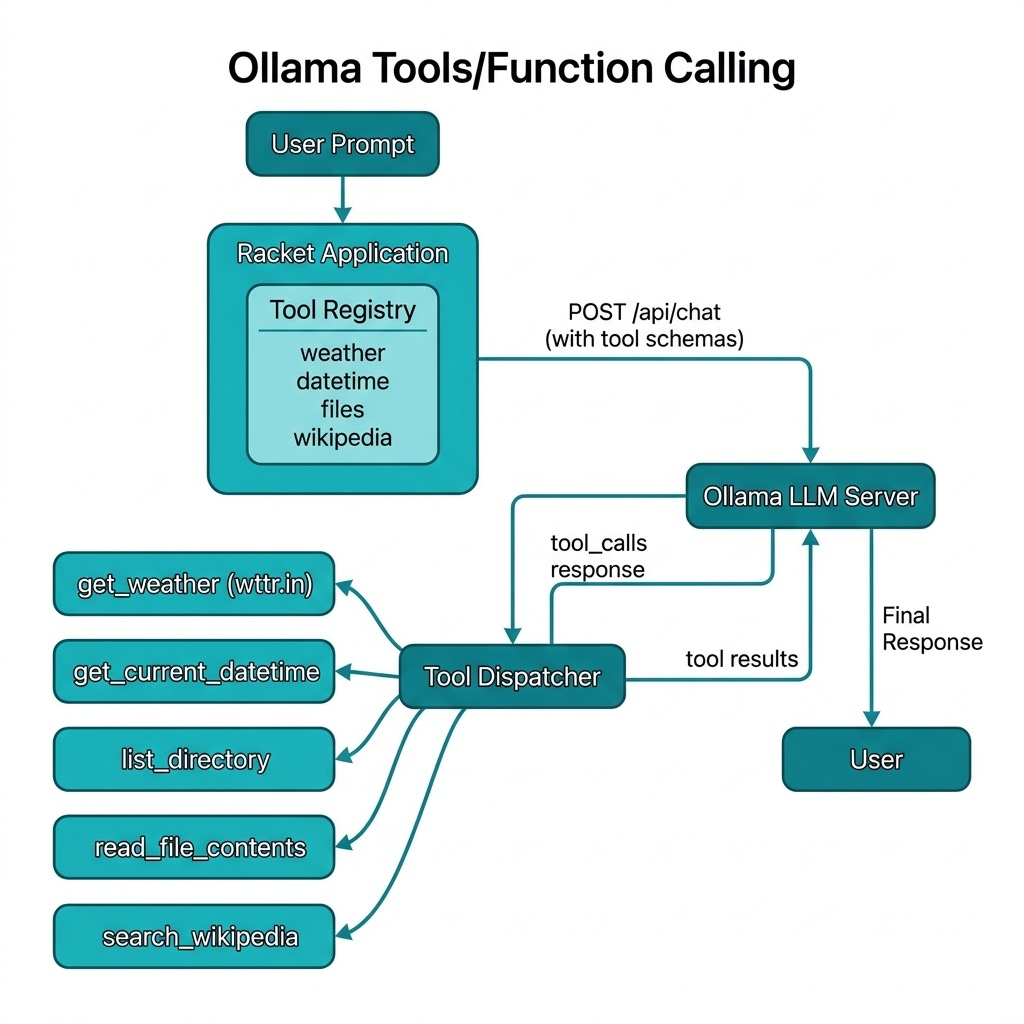
This tool use implementation relies on a central registry, available-tools which stores tool metadata and their associated handler functions. When a user sends a prompt, the call-ollama-with-tools function packages the available tool definitions into the format expected by the Ollama API. The model then decides whether to answer the query directly or request a tool execution. If the model provides a tool_calls object, the Racket handler dynamically dispatches the request to the local function, processes the output, and feeds it back into the conversation history.
A key technical highlight is the use of the net/http-easy and json libraries to manage the RESTful communication with the Ollama service. The recursive loop within call-ollama-with-tools ensures that the system can handle multi-step reasoning where a model might need to call one tool to get a piece of information before calling another to complete the task. This robust structure allows developers to expand the LLM’s capabilities indefinitely by simply registering new Racket functions to the registry.
Complete Example Using the Tools Library and Example Tools
Here we use the example tool that we previously saw implemented in the file tools.rkt.
The file main.rkt in the ollama_tools directory provides an interactive menu for testing the tools:
 1 #lang racket
 2
 3 ;;; Copyright (C) 2026 Mark Watson <markw@markwatson.com>
 4 ;;; Apache 2 License
 5 ;;;
 6 ;;; Ollama Tools Example - Interactive Demo
 7 ;;;
 8 ;;; Run with: racket main.rkt
 9
10 (require "tools.rkt")
11
12 (define (display-menu)
13   (displayln "\n=== Ollama Tools Demo ===")
14   (displayln "1. Get current date and time")
15   (displayln "2. Get weather for a location")
16   (displayln "3. List files in current directory")
17   (displayln "4. Read a file")
18   (displayln "5. Search Wikipedia")
19   (displayln "6. Custom prompt (all tools available)")
20   (displayln "7. Exit")
21   (display "Select option: "))
22
23 (define (run-demo)
24   (displayln (format "Using model: ~a" (*default-model*)))
25   (displayln (format "Ollama host: ~a" (*ollama-host*)))
26   (displayln "Make sure Ollama is running and the model is pulled.")
27   (newline)
28
29   (let loop ()
30     (display-menu)
31     (let ([choice (read-line)])
32       (cond
33         [(string=? choice "1")
34          (displayln "\n>>> Calling get_current_datetime...")
35          (displayln (call-ollama-with-tools
36                      "What is the current date and time?"
37                      '("get_current_datetime")))
38          (loop)]
39
40         [(string=? choice "2")
41          (display "Enter location: ")
42          (let ([location (read-line)])
43            (displayln (format "\n>>> Getting weather for ~a..." location))
44            (displayln (call-ollama-with-tools
45                        (format "What is the weather in ~a?" location)
46                        '("get_weather"))))
47          (loop)]
48
49         [(string=? choice "3")
50          (displayln "\n>>> Listing directory...")
51          (displayln (call-ollama-with-tools
52                      "What files are in the current directory?"
53                      '("list_directory")))
54          (loop)]
55
56         [(string=? choice "4")
57          (display "Enter file path: ")
58          (let ([filepath (read-line)])
59            (displayln (format "\n>>> Reading ~a..." filepath))
60            (displayln (call-ollama-with-tools
61                        (format "Read the contents of ~a and summarize it" filepath)
62                        '("read_file_contents"))))
63          (loop)]
64
65         [(string=? choice "5")
66          (display "Enter search query: ")
67          (let ([query (read-line)])
68            (displayln (format "\n>>> Searching Wikipedia for ~a..." query))
69            (displayln (call-ollama-with-tools
70                        (format "Tell me about ~a" query)
71                        '("search_wikipedia"))))
72          (loop)]
73
74         [(string=? choice "6")
75          (display "Enter your prompt: ")
76          (let ([prompt (read-line)])
77            (displayln "\n>>> Processing with all tools...")
78            (displayln (call-ollama-with-tools
79                        prompt
80                        '("get_current_datetime" "get_weather"
81                          "list_directory" "read_file_contents"
82                          "search_wikipedia"))))
83          (loop)]
84
85         [(string=? choice "7")
86          (displayln "Goodbye!")]
87
88         [else
89          (displayln "Invalid choice, try again.")
90          (loop)]))))
91
92 (run-demo)
Here is some example output:
 1 $ racket main.rkt
 2 Using model: qwen3:1.7b
 3 Ollama host: http://localhost:11434
 4 Make sure Ollama is running and the model is pulled.
 5
 6
 7 === Ollama Tools Demo ===
 8 1. Get current date and time
 9 2. Get weather for a location
10 3. List files in current directory
11 4. Read a file
12 5. Search Wikipedia
13 6. Custom prompt (all tools available)
14 7. Exit
15 Select option: 1
16
17 >>> Calling get_current_datetime...
18 The current date and time is **Wednesday, April 8th, 2026 11:28:40am**.
19
20 === Ollama Tools Demo ===
21 1. Get current date and time
22 2. Get weather for a location
23 3. List files in current directory
24 4. Read a file
25 5. Search Wikipedia
26 6. Custom prompt (all tools available)
27 7. Exit
28 Select option: 3
29
30 >>> Listing directory...
31 The current directory contains the following files:
32
33 - `README.md`
34 - `compiled`
35 - `main.rkt`
36 - `main.rkt~` (modified)
37 - `tools.rkt`
38 - `tools.rkt~` (modified)
39
40 These files are located in the directory `/Users/markwatson/GITHUB/Racket-AI-book/so\
41 urce-code/ollama_tools/`. The ~ symbols indicate modified files.
42
43 === Ollama Tools Demo ===
44 1. Get current date and time
45 2. Get weather for a location
46 3. List files in current directory
47 4. Read a file
48 5. Search Wikipedia
49 6. Custom prompt (all tools available)
50 7. Exit
51 Select option: 5
52 Enter search query: Flagstaff Arizona
53
54 >>> Searching Wikipedia for Flagstaff Arizona...
55 Flagstaff, Arizona, is a city located in the Phoenix metropolitan area, known for it\
56 s scenic beauty, historical landmarks, and outdoor activities. It is part of the Gra\
57 nd Canyon Railway system and is home to the Grand Canyon Railway Museum. The city al\
58 so features the historic Flagstaff Historical Society and the Flagstaff Art Center. \
59 Flagstaff is situated near the Colorado River and is a popular destination for outdo\
60 or recreation, including hiking, camping, and visiting the Grand Canyon. While speci\
61 fic Wikipedia summaries may not be available, Flagstaff is recognized for its natura\
62 l beauty, cultural heritage, and community spirit.
63
64 === Ollama Tools Demo ===
65 1. Get current date and time
66 2. Get weather for a location
67 3. List files in current directory
68 4. Read a file
69 5. Search Wikipedia
70 6. Custom prompt (all tools available)
71 7. Exit
72 Select option:
The following diagram shows the high-level architecture of the Ollama tool-calling framework developed in this chapter:
Summary
Tool calling transforms LLMs from passive text generators into active agents that can:
- Access live data — weather, news, stock prices
- Interact with the system — read/write files, run commands
- Call external APIs — databases, web services
- Chain operations — multiple tools in sequence
This is foundational for building AI agents and assistants. In the next chapter on agents, we’ll see how tools enable more complex autonomous behavior.
Optional Practice Problems
-
Implement a Calculator Tool: Create and register a new tool named
calculatethat accepts a mathematical expression (e.g.,"125 * 8"or"2^10") and safely evaluates the expression in Racket, returning the result to the model. -
Execute Multiple Tool Calls: The current implementation handles a single tool call returned by the model. Refactor the execution loop in
call-ollama-with-toolsto support processing multiple tool calls in a single turn when the LLM returns an array of tool requests. -
Schema Validation: Write a Racket function to validate the tool arguments received from the LLM against the parameters’ JSON schema defined in
register-toolbefore executing the tool’s handler. Return a schema error response to the LLM if validation fails.