Web Scraping Examples
Except for the first chapter on network programming techniques, this chapter, and the final chapter on what I call Knowledge Management-Lite, this book is primarily about machine learning in one form or another. As a practical matter, much of the data that many people use for machine learning either comes from the web or from internal data sources. This short chapter provides some guidance and examples for getting text data from the web.
In my work I usually use the Ruby scripting language for web scraping and information gathering (as I wrote about in my APress book Scripting Intelligence Web 3.0 Information Gathering and Processing) but there is also good support for using Java for web scraping and since this is a book on modern Java development, we will use Java in this chapter.
Before we start a technical discusion about “web scraping” I want to point out to you that much of the information on the web is copyright and the first thing that you should do is to read the terms of service for web sites to insure that your use of “scraped” or “spidered” data conforms with the wishes of the persons or organizations who own the content and pay to run scraped web sites.
Motivation for Web Scraping
As we will see in the next chapter on linked data there is a huge amount of structured data available on the web via web services, semantic web/linked data markup, and APIs. That said, you will frequently find data that is useful to pull raw text from web sites but this text is usually fairly unstructured and in a messy (and frequently changing) format as web pages meant for human consumption and not meant to be ingested by software agents. In this chapter we will cover useful “web scraping” techniques. You will see that there is often a fair amount of work in dealing with different web design styles and layouts. To make things even more inconvenient you might find that your software information gathering agents will often break because of changes in web sites.
I tend to use one of three general techniques for scraping web sites. Only the first two will be covered in this chapter:
- Use an HTML parsing library that strips all HTML markup and Javascript from a page and returns a “pure text” block of text. Here the text in navigation menus, headers, etc. will be interspersed with what we might usually think of a “content” from a web site.
- Exploit HTML DOM (Document Omject MOdel) formatting information on web sites to pick out headers, page titles, navigation menues, and large blocks of content text.
- Use a tool like (Selenium)[http://docs.seleniumhq.org/] to programatically control a web browser so your software agents can login to site and otherwise perform navigation. In other words your software agents can simulate a human using a web browser.
I seldom need to use tools like Selenium but as the saying goes “when you need them, you need them.” For simple sites I favor extracting all text as a single block and use DOM processing as needed.
I am not going to cover the use of Selenium and the Java Selenium Web-Driver APIs in this chapter because, as I mentioned, I tend to not use it frequently and I think that you are unlikely to need to do so either. I refer you to the Selenium documentation if the first two approaches in the last list do not work for your application. Selenium is primarily intended for building automating testing of complex web applications, so my occasional use in web spidering is not the common use case.
I assume that you have some experience with HTML and DOM. For reference, the following figure shows a small part of the DOM for a page on one of my web sites:
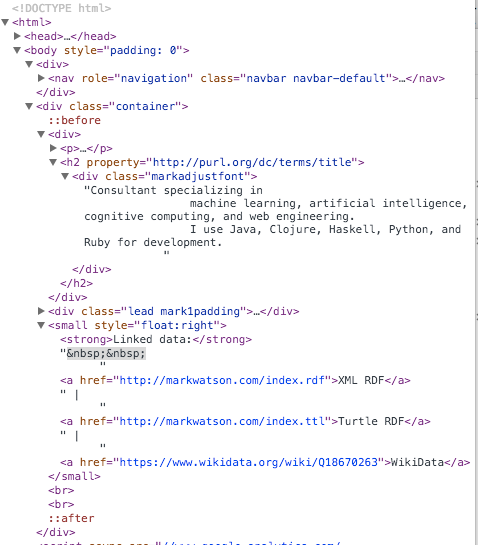
This screen shot shows the Chrome web browser developer tools, specifically viewing the page’s DOM. Since a DOM is a tree data structure it is useful to be able to collapse or to expand sub-trees in the DOM. In this figure, the HTML BODY element contains two top level DIV elements. The first DIV that contains the navigation menu for my site is collapes. The second DIV contains an H2 heading and various nested DIV and P (paragraph) elements. I show this fragment of my web pagenot as an example of clean HTML coding but rather as an example of how messy and nested web page elements can be.
Using the jsoup Library
We will use the MIT licensed library jsoup. One reason I selected jsoup for the examples in this chapter out of many fine libraries that provide similar functionality is the particularly nice documentation, especially The jsoup Cookbook which I urge you to bookmark as a general reference. In this chapter I will concentrate on just the most frequent web scraping use cases that I use in my own work.
The following bit of code uses jsoup to get the text inside all P (paragraph) elements that are direct children of any DIV element. On line 14 we use the jsoup library to fetch my home web page:
 1 package com.markwatson.web_scraping;
 2
 3 import org.jsoup.*;
 4 import org.jsoup.nodes.Document;
 5 import org.jsoup.nodes.Element;
 6 import org.jsoup.select.Elements;
 7
 8 /**
 9  * Examples of using jsoup
10  */
11 public class MySitesExamples {
12
13   public static void main(String[] args) throws Exception {
14     Document doc = Jsoup.connect("http://www.markwatson.com").get();
15     Elements newsHeadlines = doc.select("div p");
16     for (Element element : newsHeadlines) {
17       System.out.println(" next element text: " + element.text());
18     }
19   }
20 }
In line 15 I am selecting the pattern that returns all P elements that are direct children of any DIV element and in lines 16 to 18 print the text inside these P elements.
For training data for machine learning it is useful to just grab all text on a web page and assume that common phrases dealing with web navigaion, etc. will be dropped from learned models because they occur in many different training examples for different classifications. The following code snippet shows how to fetch the plain text from an entire web page:
    Document doc = Jsoup.connect("http://www.markwatson.com").get();
    String all_page_text = doc.text();
    System.out.println("All text on web page:\n" + all_page_text);
The 2gram (i.e., two words in sequence) “Toggle navigation” in the last listing has nothing to do with the real content in my site and is an artifact of using the Bootstrap CSS and Javascript tools. Often “noise” like this is simply ignored by machine learning models if it appears on many different sites but beware that this might be a problem and you might need to precisiely fetch text from specific DOM elements. Similarly, notice that this last listing picks up the plain text from the navigation menus.
The following code snippet finds HTML anchor elements and prints the data associated with these elements:
    Document doc = Jsoup.connect("http://www.markwatson.com").get();
    Elements anchors = doc.select("a[href]");
    for (Element anchor : anchors) {
      String uri = anchor.attr("href");
      System.out.println(" next anchor uri: " + uri);
      System.out.println(" next anchor text: " + anchor.text());
    }
 1  next anchor uri: #
 2  next anchor text: Mark Watson
 3  next anchor uri: /
 4  next anchor text: Home page
 5  next anchor uri: /consulting/
 6  next anchor text: Consulting
 7  next anchor uri: /mentoring/
 8  next anchor text: Free mentoring
 9  next anchor uri: http://blog.markwatson.com
10  next anchor text: Blog
11  next anchor uri: /books/
12  next anchor text: Books
13  next anchor uri: /opensource/
14  next anchor text: Open Source
15  next anchor uri: /fun/
16  next anchor text: Fun
17  next anchor uri: http://www.cognition.tech
18  next anchor text: www.cognition.tech
19  next anchor uri: https://github.com/mark-watson
20  next anchor text: GitHub
21  next anchor uri: https://plus.google.com/117612439870300277560
22  next anchor text: Google+
23  next anchor uri: https://twitter.com/mark_l_watson
24  next anchor text: Twitter
25  next anchor uri: http://www.freebase.com/m/0b6_g82
26  next anchor text: Freebase
27  next anchor uri: https://www.wikidata.org/wiki/Q18670263
28  next anchor text: WikiData
29  next anchor uri: https://leanpub.com/aijavascript
30  next anchor text: Build Intelligent Systems with JavaScript
31  next anchor uri: https://leanpub.com/lovinglisp
32  next anchor text: Loving Common Lisp, or the Savvy Programmer's Secret Weapon
33  next anchor uri: https://leanpub.com/javaai
34  next anchor text: Practical Artificial Intelligence Programming With Java
35  next anchor uri: http://markwatson.com/index.rdf
36  next anchor text: XML RDF
37  next anchor uri: http://markwatson.com/index.ttl
38  next anchor text: Turtle RDF
39  next anchor uri: https://www.wikidata.org/wiki/Q18670263
40  next anchor text: WikiData
Notice that there are diffent types of URIs like #, relative, and absolute. Any characters following a # character do not affect the routing of which web page is shown (or which API is called) but the characters after the # character are available for use in specifying anchor positions on a web page or extra parameters for API calls. Relative APIs like /consulting/ (as seen in line 5) are understood to be relative to the base URI of the web site.
I often require that URIs be absolute URIs (i.e., starts with a protocol like “http:” or “https:”) and the following code snippet selects just absolute URI anchors:
1     Elements absolute_uri_anchors = doc.select("a[href]");
2     for (Element anchor : absolute_uri_anchors) {
3       String uri = anchor.attr("abs:href");
4       System.out.println(" next anchor absolute uri: " + uri);
5       System.out.println(" next anchor absolute text: " + anchor.text());
6     }
In line 3 I am specifying the attribute as “abs:href” to be more selective:
Wrap Up
I just showed you quick reference to the most common use cases for my work. What I didn’t show you was an example for organizing spidered information for reuse.
I sometimes collect training data for machine learning by using web searches with query keywords tailored to find information in specific categories. I am not covering automating web search in this book but I would like to refer you to an open source wrapper that I wrote for Microsoft’s Bing Search APIs on github. As an example, just to give you an idea for experimentation, if you wanted to train a model to categorize text containing car descriptions into two classes: “US domestic cars” “foreign made cars” thsn you might use search queries like “cars Ford Chevy” and “cars Volvo Volkswagen Peugeot” to get example text for these two categories.
If you use the Bing Search APIs for collecting training data, then you can for the top ranked search results use the techniques covered in this chapter to retreive the text from the original web pages. Then use one or more of the machine learning techniques covered in this book to build classification models. This is a good technique and some people might even consider it a super power.
For machine learning, I sometimes collect text in file names that indicate the classification of the text in each file. I often also collect data in a NOSQL datastore like MongoDB or CouchDB, or use a relational database like Postgres to store training data for future reuse.