I Overview of Pomegranate
1 Introduction
Much has been written about knowledge management in the context of organizations and innovative industries, but little is written in the context of the individual person, who can be a writer, researcher, blogger, or life-long learner. Pomegranate PKM is an open source system that aims to help such individuals in managing their work, from goal to publication.
This book outlines the motivations, design principles and the features of Pomegranate PKM, a powerful new open source system to manage work and knowledge in an integrated manner.
2 Pomegranate in one paragraph
Pomegranate PKM is a new open source web-based cross-platform work and knowledge management system for productive and prolific people. PKM features text-based commands for adding, updating and searching records, thus providing powerful tools to manage information. It also allows the user to build up the navigation menu using saved searches.
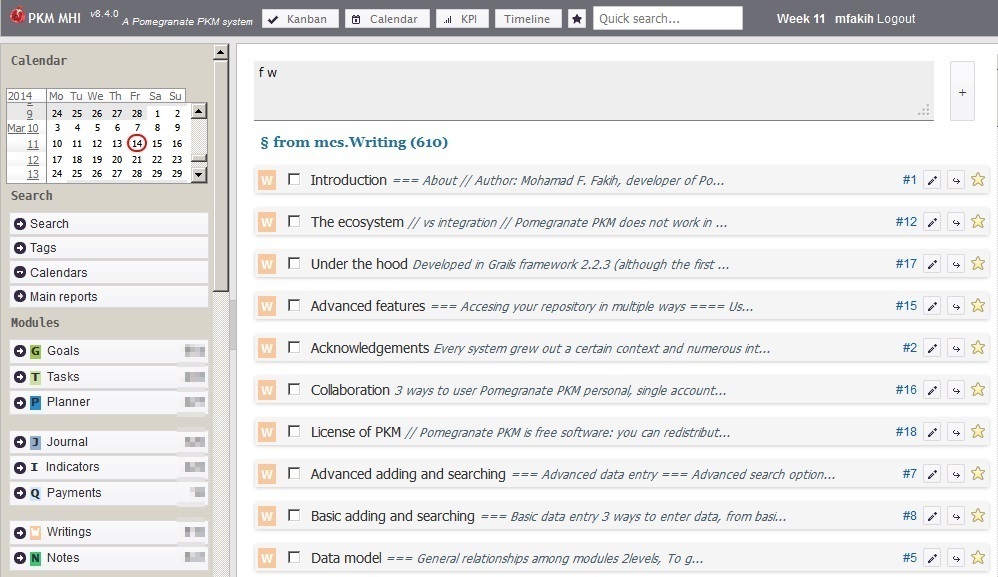
Overview
3 Explanation of each term
3.1 …work management…
3.2 …knowledge management…
Management vs organization
Definition of personal knowledge management
3.3 …open source…
3.4 …system…
Pomegranate is not just
The terms application and system are used interchangebly in this book. The term application is more suitable when the technical aspects of Pomegranate are mentioned. While the term system is more suitable when the motivation and design principles are mentioned.
3.5 …cross-platform…
3.6 …comprehensive…
Pomegranate PKM manages:
- Goals, tasks, and plans
- Journal and indicators
- Writings and notes
- Resources (books, articles, news, presentations, audiobooks, documentaries, movies etc), and book excerpts, mainly book chapters.
- Documents e.g. Word documents, Excels
- People
Despite this broad coverage, Pomegranate does not aim to be a one-stop solution to all work and knowledge management needs. On the contrary, it aims to make the best use of existing tools and technologies.
It does not replace photo management applications, e.g. Digikam (Linux), audio or video library organizers, e.g. QuodLibet, or PDF annotators. Rather, it helps organize their structures and link them to their metadata.
It integrates with text editors, as will be shown later on.
PKM does not resize photos, split audio, or convert videos etc but can apply metadata to the mp3, jpg and PDF files.
3.7 …integrated…
In technical terms, Pomegranate is a combination of:
- Document management system
- Content management system
- Research index cards and reference management
- Bug tracking systems, applied for the software development and self development
- Lightweight project management
- Powerful task management
- Time tracking
- Blog (e.g. WordPress) client
- Wiki system
3.8 One vs many tools
Why not use the best application in each of the above technologies?
one technology, one language, one env, instead of each one needs special setup, configuration, … integration problem between them. scattered data. possible data loss or corruption when moving from one system to another…
It is not expected or recommended to use all the features and modules from the start. Big and quick changes often backfire. You can easily feel overwhelmed by the demands and load of the new habits and so risk leaving all the endeavor altogether. It is better to introduce changes and new habits gradullay in your routine. This is the most fruitful on the long term. You may disable the features or modules that you do not want to start with when you start using it. So you can remove unneeded saved searches from the homepage. So do so simply go to the list of saved searches, under Administation, and unbookmark those that you do not want to display on the homepage.
- News connected with topics, all is integrated…
- Photos connected to jounal entries, and shown from the journal page.
- Course topics connected with current news
- Goals connected with journal entries that show progress toward them or manifestation of not achieving them
- Link books to writings
- Link all records to a common list of tags
3.9 … web application
- It can be deployed on a personal computer, laptop, the cloud, a self-hosted server, a remote server, or in a cloud, and accessed from any computer connected to them, via wired or wireless network.
- It can be installed on any operating system that supports Java: Windows, Linux, Unit, Mac etc.
- It can accessed via network or wireless connection.
- No installation is needed on the users except a compatible web browser.
- Firefox and Chrome are supported and recommended browsers. Internet Explorer is not and will not be supported. See post 123. The application may work well and look fine in other browser. But they are not test on browsers other than Firefox, the recommended browser, and Google Chrome.
3.10 …written in Grails …
- Highly cross platforms
- Full unicode support, including support for right-to-left languages
you can see the advantages of Grails from the length of the instructions to install it or build it. Basically, it is download, extract, executive start script for installation, and edit run-app script to edit the path to the Grails framework folder and then execute it.
Disadvantages of Java-based systems, and Grails in particular? Memory consumption. You need to reserve few hundred of megabytes of RAM to it.
java, often hosting more expensive than scripted language like PHP.
3.11 Global context of Pomegranate
- Post-Snoden world: Privacy is a big concern. todo.
pkm as the opposite to social media. They are public by default, with optional, often clumsy way to make things private. In PKM everything is private unless you manually post it on a blog, unless you make PKM accessible on the internet and make it accessible without an account, it will become like a blog itself.
Have been in use, for over two years, to manage thousands of records in the ? different modules esp. resources, tasks, goals, writings and notes. By 2014, the project has undergone seven major redesigns.
3.12 Other options
3.13 Using an existing established application
3.14 Using an online application
Data is the most precious assets in the digital world. Not leave it managed by someone else, and not have full control over it.
There are great online tools. Many are paid. Many are excellent tools. But your data is not in under your control. It is managed by systmes tha that you knew little to nothing about.
“Sure there are others out there, but all with annoying limitations - even for sites you actually have to pay for!”
3.15 Target users
Although it provides data entry and retrieval through forms, and so can be used by the average computer-skilled person, the advanced data entry and retrieval features will be most enjoyed by computer-knowledgeable people, but not necessarily programmers.
Committed to long term organization, planning, and productivity. Although users can get up and running with it in few hours, the real and major benefits comes with time.
Willing to adjust and adapt to a new system to fit their needs.
Are managing big and dynamic volume of information or documents
planning, esp. long-term journaling, study, esp. life long learning, and research writing, publishing
Pomegranate has been developed to support a long list of habits in planning, working, studying and publishing. These habits took years to incorporate in your daily life. So do not aim to use every feature of the system from the start.
b1 the pressing demands of urgent tasks. urgent things may be best managed by paper notes and printed out materials, handwritten tracking etc. for group work, where pkm has a hard time succeeding? urgency-driven environments, change-resistant cultures, oral cultures.
3.16 Origin of name Pomegranate?
Not just because their delicious fruits, Pomegranate trees, native to Asia, bear fruits after a hot summer and their fruits seeds are enclosed in many pulps. So organized!
The P in PKM referred to ‘Personal’ at first. But as Pomegranate can support open collaborative settings, the P, now can stand for Pomegranate.
4 Book scope
How this book fits with the rest of Pomegranate documentation?
presentation, documentation, blog. The documentation shows you how PKM works, not how it can be used, and the rationale behind the features and controls. This is what the book aim to explain.
5 Acknowledgements
Every system grew out a certain context and numerous interactions with other systems, which inspire features and approaches. In chronological order, Pomegranate learned from:
- RememberTheMilk and ToodleDo the importance of plain-text based data entry
- JetBrains YouTrack the power of command bar to quickly query the records and the ability to save the query as saved searches for later use. And the versatility of card representation of a task, together with quick edit of its fields.
- Kanban boards
6 History
6.1 Origin of Pomegranate
Personal context of
Global context
6.2 Overview of major versions
- The vision of an integrated system to manage all my personal information in Summary 2008, after lots of frustrations with existing PIM desktop applications. Each one was great in some way but fall short in the other areas, and left me in the middle of the road after some time using it. I was willing to develop it on my own. The decision wasn’t been resolved to
- Version 1, 2009. A small web application to manage code snippets (notes), while learning to develop web applications. The ease of which Grails application could be developed
- From versions 2 to 6, frequent expansions in scope and features. Many features were abandoned or redesigned as I put them to the test of daily use to manage large and dynamic volume of records.
- Version 6.5 was the first stable version to be use daily and reliably.
- Versions 7 is the last unreleased version.
- Version 8, first public release after a major and comprehensive code clean and interface tweaking to reduce the rough edges and the particular assumptions of my own computing environment.
0.8.4
0.9.0
What took time the most was not the implementation time but applying numerous new habits in my daily and weekly routine. Adapting the new habits often results in changes to the software.
In the domain of organizing and planning, slight adjustments can turn an unproductive process into a very productive one. The important ingredient is persistence and refinement of the process until it gets its fruits.
6.3 Lessons learned
Big steps often fails. Trying to make big changes in the way I organize things often have more drawbacks than advantages. In habits, small steps are what works in the long term. Big sudden changes can backfire after a while.
It is better to start testing a new way of work, writing, planning, on paper first. Only when successful, will I start to implement it in a system. System are not magic. They reflect a way of work in the physical world to the electronic world. If it doesn’t work in the physical it may not work in the electronic too.
7 Goals of Pomegranate
When you consider a new system, it is important to know the principles behind its development, the design guidelines, and the context in which it has/is being developed and the problems that it aims to solve. This knowledge gives you the deeper properties of a system, and allows you to make informed decision about it.
The principles often directs the future development of the program. So you will know if it will fit you in the future, not just in the present.
7.1 What were the goals that Pomegranate PKM were meant to achieve?
Stable digital environment… to mimic paper office. things should not change except for a good reason. change has to be difficult otherwise we may be tempted to change it everyday and hope that (be fooled) a change in the environment will lead to more productivity and more organized space.
Action connected with the knowledge that inspires the action
A long term repository of information and files
he goal is to have all goals, tasks, important notes, and document stored as long as I am using computer. So to have the same structure over the years.
examples of long term documenting: all books and articles read, all lessons learned from people, all important notes from the internet, books etc, all events attended and all tasks completed or we set to do
A centralized repository of information and files
The objective is to have all goals, tasks, important notes, and document stored in one place.
As we are living in an information (-overloaded) age, it is imperative that we take control of our digital life and raised up to the challenges posed by the new trends in social media, connectivity, cloud, etc.
Resolve the information overload
internet is bringing more information to people that they could possibly digest and filter. Uncontrolled this overflow of information make people overloaded, helpless, confused and passive. There are many ways to resolve this problem, and many books have been written about this problem. One way in which a system like Pomegranate can help, is to have the system with which we do work, offline, to reduce internet time. Another technique is to enforce the schedule of internet times. Read this post for more details. The effective cures lies in changing our approach to information. Less is more principle and knowledge in action.
information overload, product reviews overload lead to not believing in your work. How can my product compete in such fierce competitors.
Control over operations
To be able to control how easy or difficult an activity is, in order to help new good habits or get rid of bad habits. If I want to have more book highlights taken, I make is very easy to do new one. Conversely if I want to reduce the volume of documents I bring from the internet, I make their import a bit difficult e.g. by requiring certain fields to be filled before a document can be imported.
Aid focus and concentration
Pomegranate should show in one screen the essential and top priority information that I should work on, specifically the goals and courses that I planned to focus on in a prioritized sequence, and the books that I want to read first.
In other words, it should be very clear what I should be working on next.
Set productive limits
It is counter-intuitive that limits help productivity. Less is more principle. Operating systems give user limitless possibilities in how files can be organized. You can easily create as many folders and nest them as you like. The result is a loss of stability and predictability. Just compare the stability and predictability of paper office and operations to electronic files and operations.
Productivity needs stability. Paper work and office is much stable, reliable and predictable than electronic environment. No wonder that many people prefer to work exclusively with paper (at the expense of tree cutting and deforesting!).
There are endless configuration options that can equally work. Not lured to change to get more productivity. Often an escape from doing the hard and essential step and more important work.
Automate processing of files
Processing the information and files manually one by one is often time-consuming, error-prone activity. As the volume of information and files increases, management time and effort grows as well. When information and files are stored in a system and database, management will be done by code and this eliminates manual processing and reduce time substantially.
Combat perfectionism
Computer software often can fuel perfectionism by the limitless options in formatting and structure. To have work done, we have to reduce the options and stick with a good enough presentation and structure.
Track procrastination
One way to fight procrastination is to track when (and how many times) we plan to do a task or work on a goal. Each day, when we assign a task or goal to a day, we can track how many times we assigned this goal or tasks. This is not achieved if we just fill in a free text plan, but by always link to the task or goal that we want to do. This linking making it possible to visualize how many time a task or goal has been planned to be done.
This is an clear case where a system can help be more productive and not postpone but it does not guarantee that. It does not enforce you to write down your plans and to link to the task. The system does not even enforce you to use in the first place. It takes determination and persistence to acquire the habits.
Privacy and security
One of the requirements of prolific output especially in journal writing is to be assured about the privacy and security of your system. Online tools are subject to security attacks and privacy breaching accidents for various reasons. A bug in the system, a hacker attack, a disaster in the data center, etc, let alone new government laws all raises security and privacy concerns.
Pomegranate PKM is my evolving answer to some of the current challenges of the information age and the challenges of productivity and focus that are common to all ages.
7.2 Design guidelines
To have supporting technology that accommodate easily future changes, no matte how radical they are.
Simple design
Minimal features to get maximum functionality for the purpose of the system.
Flexible design
To be able to adapt the application to my changing needs without having to change the code as often. Saved search, text-based data entry and query, and extensive styling options are examples of this flexibility.
Powerful features
Often popular applications tend to offer easy to use interface at the expense of powerful and highly configurable features.
The crowd wants easy application, as easy as possible, ideally single click solutions, with immediate results, flat learning curve and that does not require adaption.
Plain text philosophy
Even in the 21th century, plain text has still lots of merits. It is the most universal format of information, and the most easily generated in any situation. The ability of the command bar to add, search, filter, update, assign records is part of this plain text philosophy.
Styling for best presentation
Pomegranate tries to give the user ample room to style the information for best visual clarity e.g. how the status ‘Completed’, task type ‘Bug’, or writing status ‘Draft’ are shown.
PKM has not stretched the limits of the technologies that it uses, whether on the front end (interface, user interactions, reporting), or the back end (data transformation, searching options, controls on data, actions on data etc).
In fact, the challenge is to keep the focus on what implements the fruitfuil ideads instead of implementing new features just because they are trendy in web applications. More is less. This is as relevant in application features.
Progression updating of record fields
Only one required field to enter at first. Later more fields are entered throgh one or more scans of the records.
Records in progress panel for saved searches that show that needs to be updates.
7.3 Systems are never enough
Perfectionism, procrastination, information overload, choices overload, etc will not be solved by systems only. A system is not a substitute for character. Long and hard work is needed on the personal and inner level. This work cannot be shortened or substituted, but can be supported by the right environment and systems.
Productivity needs unsystematic activities such as brainstorming, free writing, mind mapping, jotting down a plan on paper. These activities are essential for productivity and work and they are not subject to systems.
7.4 Pomegranate in Perspective
The journey is long. There are not shortcuts or tricks. It took a long time. lots of months if not years. it is a journey. you build them incrementally and gradually. then one day you feel you become a different person. persistance is the key habit to start with.
8 Structure of the Records
8.1 General relationships among modules
diagram
To group tasks, Pomegranate supports up to 3 levels of parents. Goals, Courses and Department.
8.2 Examples. Fields. Definitions of typical types.
Certain fields are common to all modules: * Summary * Description * Priority * Status * Type * Department * Course * Bookmark * Date created and last updated * Who entered it, last updated it * Tags
One of the goals of a system is show us our progress in quantitative ways and in real time.
Explanation of each journal, planner, goal type
vxr, axr into exr, file extension needed
Pomegranate balance between flexible hierarchy, unlimited nesting and flexbile query to the user and simpler implementation to the developer
contact integration @contact
task, goal, notes can be linked to the person defined in the People module. the person need not be a user of the application. It cn be the person with whom you got the notes, heard a piece of advice, or seen him/her doing things differently than your way.
GTP JI RES WN
so planning, journaling, progress tracking, study and research, writing and publishing
decomposition, GT WN RE
Other fields are particular to certain modules: * Start and end dates (journal and planner) * Completed on, completion data, planned and actual duration, percent completed (for tasks and goals) * Author, ISBN, publish etc for resources * Blog (for writings and notes)
Any module record can have multiple tags A comment can be added to any module record.
8.3 Arbitrary relationships
In addition to the relationships among the different modules set by the data model structure, one can link any two records from any module by ad hoc relationships. The relationship has a parametric type.
If you link A to B, then when you see B, you will see it linked in reverse order to A. For example if A is a prerequisite for B, then B follows after A. You need to defines the name of the reverse relationship in the paramters too.
Each module has a one-letter code, e.g. G for goals, and a color code e.g. dark green for goals. You can see the letter and color codes from accordion in the west region.
Often the module code is the first letter of the module name
G (goals), T (tasks), C (notes, historically index ‘'’c’'’ards), W (writings), …