12 Advanced Adding and Searching Records
12.1 Advanced data entry
12.2 Smart files to add records
Local installation
Remote installation
12.3 Smart files to update records
Local installation
Remote installation
12.4 Advanced search options
Pomegranate gives the user 4 options to query or search the records:
What is HQL query.
Visit the gallery of saved searches on this link.
Most databases in use today are relational. The standard language to query them is SQL. When tables are mapped to class objects in certain frameworks as in Grails, you can use a language that is more powerful than SQL. You can write shorter code in it, over SQL.
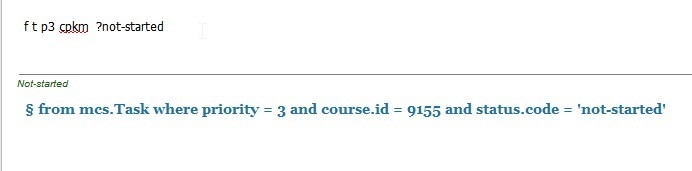
’'’Pomegrante query’’’: available from the command bar, it uses Pomegranate syntax and it is internally translated to HQL query. It is a shorthand notation used for fast queries. The translated HQL query is shown on the screen and can then be stored permanently as saved search. Example ‘f t p3 ?pending #bug’, will find all tasks that are of priority 3, of status ‘pending’ and type ‘bug’. More about this syntax in a later section.
’'’Full text search’’’: backed by Lucene library, it gives full text seach of the text fields of the main information types. It is available from the command line and can be stored as saved search. Lucene syntax is presented on ?. Example ‘s b information overload’ to search all resources (books, articles etc) about the occurrance of the terms information overload
’'’Direct HQL query’’’: available from the command bar and can be stored as saved search. Example ‘q from Task where priority # 3’
’'’Ad hoc query’’’: Similar to direct HQL query but here the user specific what fields he/she wants to be. The results are display in table instead of the long card representation of direct HQL query. Example ‘h select id, summary, status from Task’, to display a table with 3 columns id, summary and status of all tasks. Ad hoc query can be stored as saved search.
12.5 Pomegranate Commands
b1 There are computer languages to do all sorts of things: to write programs, to draw graphics, to analyse data, to play games… Why there is no (or few?) languages to manage our information?! PKM developed simple command for this purpose.
PKM command syntax can change from version to another. There is no need for backward compatibility as commands written in it are short-lived. You can written to be executed immediatly or for short period e.g. when prepared by Pomegranate Offline Data Entry program.
Saved search uses only HQL query, not PKM query. However when you exeucte a PKM query, the equivalent HQL query is shown. You can then use it in a saved search.
export records to text files, for version control, uses flat listing and the field names. So to keep the same structure across PKM updates.
12.6 PKM command format
command type: a (single-line add), A (add with multiline support), f (find, filter), u (update),
[command type] [module code] [field_symbol][parameter_value] ; summary ;; description
s (full text search): Lucene syntax U (import): [blogCode] [post_id]
todo
12.7 Saved searches
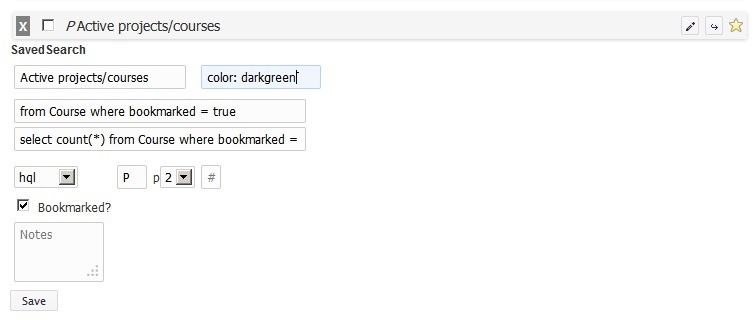
Saved searches are one of the main features of Pomegranate PKM system. They are used heavily to build the navigation menu and reports.
A saved search contains a query and a title, with optionally the query to count the total number.
You can use saved query to:
- Get a list of results e.g. all high priority takss
- Get a table where columns maps to recrod fields e.g. get all dates and summary of journal records of type ‘external event’
- Get a random record or records from the list
- Display the results in a table grouped by a certain field e.g. course
- Display the results in a calendar or timeline
pkm2hql-query
saved-search-record