Using the LiteLLM-CLJ Library as a Universal LLM Interface
In the earlier LLM chapters we wrote separate Clojure wrapper libraries for OpenAI, Google Gemini, and Ollama. Each wrapper had its own HTTP plumbing, JSON parsing, and response-extraction logic. While this approach is instructive (it teaches you how the REST APIs work at a low level) it also means that switching between providers requires learning a new API surface and maintaining separate code paths.
The litellm-clj library by the Unravel team solves this problem by providing a single, unified Clojure interface that works with multiple LLM providers. It is a Clojure port inspired by the popular Python LiteLLM project. You register a named model configuration once — specifying the provider, model name, and API key — and then call the same router/completion function regardless of whether the backend is OpenAI, Google Gemini, Anthropic, Mistral, Ollama, or OpenRouter. The library handles the provider-specific HTTP details, request formatting, and response normalization behind the scenes.
For the full API documentation please refer to the litellm-clj GitHub repository and the cljdoc API reference.
The source code for this chapter’s example can be found at: Clojure-AI-Book-Code/litellm_api.
Project Setup
The project uses three key dependencies: the litellm-clj library itself for the router abstraction, clj-http for the underlying HTTP calls, and malli for schema validation of request and response data. Here is the project.clj:
 1 (defproject openai_api "0.1.0-SNAPSHOT"
 2   :description "LiteLLM-CLJ Example"
 3   :url "https://markwatson.com"
 4   :license {:name "EPL-2.0 OR GPL-2.0-or-later WITH Classpath-exception-2.0"
 5             :url "https://www.eclipse.org/legal/epl-2.0/"}
 6   :dependencies [[org.clojure/clojure "1.11.1"]
 7                  [clj-http "3.12.3"]
 8                  [org.clojure/data.json "2.3.1"]
 9                  [tech.unravel/litellm-clj "0.3.0-alpha"]
10                  [metosin/malli "0.20.0-alpha2"]]
11   :repl-options {:init-ns litellm.core})
You will need API keys for the providers you want to use. Set them as environment variables before running:
1 export OPENAI_API_KEY=your_openai_key_here
2 export GOOGLE_API_KEY=your_google_key_here
How the Router Works
The core abstraction in litellm-clj is the router. The workflow is simple:
-
Register a named configuration with
router/register!. Each configuration specifies a provider keyword (:openai,:gemini,:anthropic,:ollama, etc.), a model name, and provider-specific configuration such as an API key. -
Call
router/completionwith the configuration name and a standard message list. The request format follows the OpenAI chat completions convention: a vector of maps with:roleand:contentkeys. -
Extract the generated text from the response using
router/extract-content, which handles the provider-specific response format differences for you.
This pattern means you can swap providers by changing a single router/register! call — the rest of your application code stays the same.
The library currently supports the following providers: :openai, :gemini, :anthropic, :mistral, :ollama, and :openrouter.
OpenAI Completions Example
Our first example registers an OpenAI configuration using the gpt-4o-mini model and sends a simple prompt. The test code lives in test/litellm_api/core_test.clj:
 1 (ns litellm-api.core-test
 2   (:require [clojure.test :refer :all]
 3             [litellm.router :as router]))
 4
 5 (deftest openai-completions-test
 6   (testing "OpenAI completions API with LiteLLM"
 7    (router/register!
 8     :fast
 9     {:provider :openai
10      :model "gpt-4o-mini"
11      :config {:api-key (System/getenv "OPENAI_API_KEY")}})
12    (let [response (router/completion :fast
13                    {:messages [{:role :user :content "please generate a 10 word sent\
14 ence"}]})]
15      (println (router/extract-content response))
16      (is (not (nil? response))))))
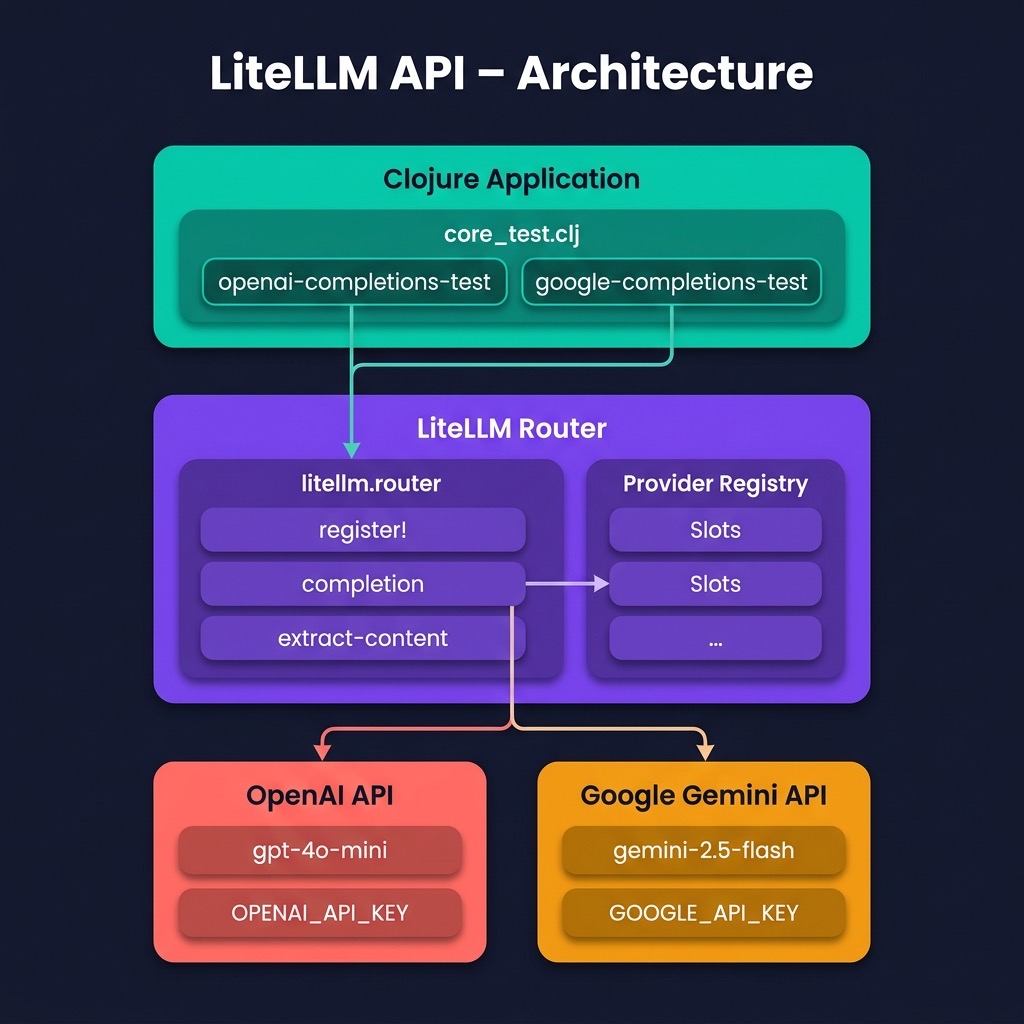
Let’s walk through this code. First, we require litellm.router and alias it as router. We then call router/register! with the keyword :fast as a name for this configuration. The configuration map specifies :openai as the provider, "gpt-4o-mini" as the model, and the API key from the environment. The name :fast is arbitrary — you could register multiple configurations (e.g., :fast for a small model, :smart for a large one) and switch between them in your application logic.
The call to router/completion takes the configuration name and a map containing a :messages vector. This follows the OpenAI chat completions format that has become a de facto standard across LLM APIs. The router/extract-content helper function pulls the generated text string out of the provider-specific response structure.
Here we run just this single test:
 1 $ make gemini
 2 lein test :only litellm-api.core-test/gemini-completions-test
 3
 4 lein test user
 5
 6 Ran 0 tests containing 0 assertions.
 7 0 failures, 0 errors.
 8 Marks-MacBook-Air:litellm_api $ make openai
 9 lein test :only litellm-api.core-test/openai-completions-test
10
11 lein test litellm-api.core-test
12 07:06:19.948 [main] INFO litellm.config -- Registered configuration {:config-name :f\
13 ast}
14 The sun set behind the mountains, painting the sky orange.
15 {:id chatcmpl-Dg9wkJ8gvJvOR3Dz0IjajCa9Ciy0y, :object chat.completion, :created 17789\
16 40382, :model gpt-4o-mini-2024-07-18, :choices ({:index 0, :message {:role :assistan\
17 t, :content The sun set behind the mountains, painting the sky orange.}, :finish-rea\
18 son :stop}), :usage {:prompt-tokens 14, :completion-tokens 12, :total-tokens 26}}
19
20 Ran 1 tests containing 1 assertions.
21 0 failures, 0 errors.
The response structure is normalized by the library to follow a consistent shape regardless of the provider. The :choices key contains a sequence of completion alternatives (usually just one), each with a :message map containing the :role and :content. The :usage map reports token counts which is useful for monitoring costs. The :finish-reason of :stop indicates the model completed its response naturally rather than being cut off by a token limit.
Google Gemini Completions Example
Switching to Google Gemini requires only a change to the router/register! call — the rest of the code is identical. This is the whole point of the litellm-clj abstraction: provider details are isolated in the registration step.
 1 (deftest gemini-completions-test
 2   (testing "Google Gemini completions API with LiteLLM"
 3    (router/register!
 4     :fast
 5     {:provider :gemini
 6      :model "gemini-2.5-flash"
 7      :config {:api-key (System/getenv "GOOGLE_API_KEY")}})
 8    (let [response (router/completion :fast
 9                    {:messages [{:role :user :content "please generate a 10 word sent\
10 ence"}]})]
11      (println (router/extract-content response))
12      (is (not (nil? response))))))
Notice that the only differences from the OpenAI example are the :provider keyword (:gemini instead of :openai), the :model name ("gemini-2.5-flash" instead of "gpt-4o-mini"), and the environment variable used for the API key (GOOGLE_API_KEY instead of OPENAI_API_KEY). The router/completion call and the router/extract-content helper are completely unchanged.
Here we run just this single test:
 1 $ make gemini
 2 lein test :only litellm-api.core-test/gemini-completions-test
 3
 4 lein test litellm-api.core-test
 5 07:10:01.910 [main] INFO litellm.config -- Registered configuration {:config-name :f\
 6 ast}
 7 The swift fox ran over seven green grassy hills now.
 8 {:id The swift fox ran over seven green grassy hills now., :object chat.completion, \
 9 :created 1778940602, :model gemini-unknown, :choices ({:index 0, :message {:role :as\
10 sistant, :content The swift fox ran over seven green grassy hills now., :tool-calls \
11 ({:id 2bf9efd2-45c8-4115-9bd9-82927ca3131c, :type function, :function {:name nil, :a\
12 rguments null}})}, :finish-reason nil}), :usage {:prompt-tokens 0, :completion-token\
13 s 0, :total-tokens 0}}
14
15 Ran 1 tests containing 1 assertions.
16 0 failures, 0 errors.
You can see that the Gemini response is normalized into the same structure as the OpenAI response, though some fields differ in their populated values. The Gemini API does not currently report token usage through litellm-clj (the counts show as zero), and the :id field carries the response text rather than a unique identifier. These are artifacts of the library’s alpha status — the important thing is that router/extract-content correctly pulls out the generated text regardless of these structural differences.
When to Use LiteLLM-CLJ vs. Direct API Wrappers
The direct API wrappers we built in earlier chapters (for OpenAI, Gemini, and Ollama) give you full control over request parameters, streaming, and response handling. They are a good choice when you need to use provider-specific features like Gemini’s Google Search grounding, tool/function calling with custom schemas, or OpenAI’s embedding models.
The litellm-clj router is better suited for applications where:
- You want to compare models by easily switching between providers during development or A/B testing.
- You are building a production application that needs provider redundancy — if one provider goes down, you can re-register with a fallback.
- You want to minimize boilerplate and avoid maintaining separate HTTP client code for each provider.
- Your use case is straightforward text generation (chat completions) without provider-specific features.
In practice, I find myself using the direct API wrappers for development and experimentation (where I want fine-grained control), and litellm-clj for production applications that need reliability and easy provider switching.
Wrap Up
The litellm-clj library demonstrates a powerful pattern in software design: abstracting away implementation differences behind a uniform interface. By registering named model configurations and calling a single router/completion function, we can write provider-agnostic LLM code in Clojure. While the library is still in alpha, it already supports the most common use case of chat-style text completions across all major LLM providers. As the library matures, I expect it will become an increasingly attractive option for Clojure developers working with LLMs.