Background Material for the Semantic Web and Knowledge Graphs
We will start with a tutorial on Semantic Web data standards like RDF, RDFS, and OWL, then implement a wrapper for the Apache Jena library in the next chapter, and finally take a deeper dive into an example application in the chapter Knowledge Graph Navigator.
The scope of the Semantic Web is comprised of all public data sources on the Internet that follow specific standards like RDF. Knowledge Graphs may be large scale, as the graphs that drive Google’s and Facebook’s businesses, or they can be specific to an organization.
Notes:
- The material in this chapter is background material. If you want to jump right into code examples then proceed to the next two chapters.
- Much of the material here was derived from a similar chapter in my Java AI book.
Learning Plan
You will learn how to do the following:
- Understand RDF data formats.
- Understand SPARQL queries for RDF data stores (both local and remote).
- Use the Apache Jena library (covered in the next chapter) to use local RDF data and perform SPARQL queries.
- Use the Apache Jena library to query remote SPARQL endpoints like DBPedia and WikiData.
- Use the Apache Derby relational database to cache SPARQL remote queries for both efficiency and for building systems that may have intermittent access to the Internet (covered in the next chapter).
- Take a quick look at RDF, RDFS, and OWL reasoners.
The Semantic Web is intended to provide a massive linked set of data for use by software systems just as the World Wide Web provides a massive collection of linked web pages for human reading and browsing. The Semantic Web is like the web in that anyone can generate any content that they want. This freedom to publish anything works for the web because we use our ability to understand natural language to interpret what we read – and often to dismiss material that based upon our own knowledge we consider to be incorrect.
Semantic Web and linked data technologies are also useful for smaller amounts of data, an example being a Knowledge Graph containing information for a business. We will further explore Knowledge Graphs in the next two chapters.
The core concept for the Semantic Web is data integration and use from different sources. As we will soon see, the tools for implementing the Semantic Web are designed for encoding data and sharing data from many different sources.
I cover the Semantic Web in this book because I believe that Semantic Web technologies are complementary to AI systems for gathering and processing data on the web. As more web pages are generated by applications (as opposed to simply showing static HTML files) it becomes easier to produce both HTML for human readers and semantic data for software agents.
There are several very good Semantic Web toolkits for the Java language and platform. Here we use Apache Jena because it is what I often use in my own work and I believe that it is a good starting technology for your first experiments with Semantic Web technologies. This chapter provides an incomplete coverage of Semantic Web technologies and is intended as a gentle introduction to a few useful techniques and how to implement those techniques in Clojure (using the Java Jena libraries).
This material is just the start of a journey in understanding the technology that I think is as important as technologies like deep learning that get more public mindshare.
The following figure shows a layered hierarchy of data models that are used to implement Semantic Web applications. To design and implement these applications we need to think in terms of physical models (storage and access of RDF, RDFS, and perhaps OWL data), logical models (how we use RDF and RDFS to define relationships between data represented as unique URIs and string literals and how we logically combine data from different sources) and conceptual modeling (higher level knowledge representation and reasoning using OWL). Originally RDF data was serialized as XML data but other formats have become much more popular because they are easier to read and manually create. The top three layers in the figure might be represented as XML, or as LD-JSON (linked data JSON) or formats like N-Triples and N3 that we will use later.
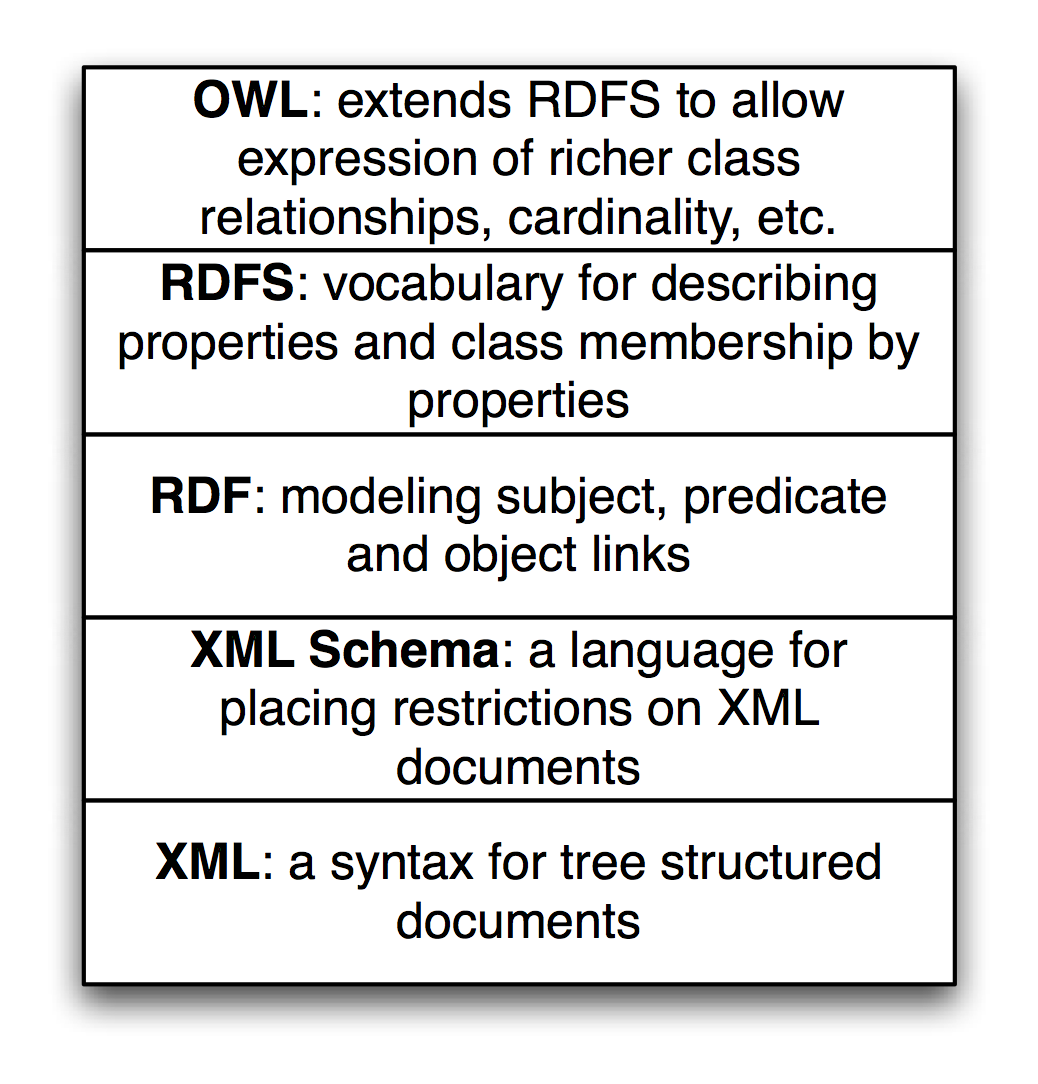
RDF data is the bedrock of the Semantic Web and Knowledge Graphs.
Available Tools
Previously for Java-based semantic web projects I used the open source Sesame library for managing and querying RDF Data. Sesame is now called RDF4J and is part of the Eclipse organization’s projects.
I decided to use the Apache Jena project in this new edition because I think Jena is slightly easier to set up a lightweight development environment. If you need to set up an RDF server I recommend using the open source Fuseki server which is part of the Apache Jena project. For experimenting with local Knowledge Graphs I also use the free version of GraphDB. For client applications, in the next chapter we will use a Clojure wrapper for the Jena library that works with RDF and performing SPARQL queries.
RDF: The Universal Data Format
The Resource Description Framework (RDF) is used to encode information and the RDF Schema (RDFS) facilitates using data with different RDF encodings without the need to convert one set of schemas to another. Later, using OWL, we can simply declare that one predicate is the same as another; that is, one predicate is a sub-predicate of another (e.g., a property containsCity can be declared to be a sub-property of containsPlace so if something contains a city then it also contains a place), etc. The predicate part of an RDF statement often refers to a property.
RDF data was originally encoded as XML and intended for automated processing. In this chapter we will use two simple to read formats called “N-Triples” and “N3.” Apache Jena can be used to convert between all RDF formats so we might as well use formats that are easier to read and understand. RDF data consists of a set of triple values:
- subject
- predicate
- object
Some of my work with Semantic Web technologies deals with processing news stories, extracting semantic information from the text, and storing it in RDF. I will use this application domain for the examples in this chapter and the next chapter when we implement code to automatically generate RDF for Knowledge Graphs. I deal with triples like:
- subject: a URL (or URI) of a news article.
- predicate: a relation like “containsPerson”.
- object: a literal value like “Bill Clinton” or a URI representing Bill Clinton.
In the next chapter we will use the entity recognition library we developed in an earlier chapter to create RDF from text input.
We will use either URIs or string literals as values for objects. We will always use URIs for representing subjects and predicates. In any case URIs are usually preferred to string literals. We will see an example of this preferred use but first we need to learn the N-Triple and N3 RDF formats.
I proposed the idea that RDF was more flexible than Object Modeling in programming languages, relational databases, and XML with schemas. If we can tag new attributes on the fly to existing data, how do we prevent what I might call “data chaos” as we modify existing data sources? It turns out that the solution to this problem is also the solution for encoding real semantics (or meaning) with data: we usually use unique URIs for RDF subjects, predicates, and objects, and usually with a preference for not using string literals. The definitions of predicates are tied to a namespace and later with OWL we will state the equivalence of predicates in different namespaces with the same semantic meaning. I will try to make this idea more clear with some examples and Wikipedia has a good writeup on RDF.
Any part of a triple (subject, predicate, or object) is either a URI or a string literal. URIs encode namespaces. For example, the containsPerson predicate in the last example could be written as:
1 http://knowledgebooks.com/ontology/#containsPerson
The first part of this URI is considered to be the namespace for this predicate “containsPerson.” When different RDF triples use this same predicate, this is some assurance to us that all users of this predicate understand the same meaning. Furthermore, we will see later that we can use RDFS to state equivalency between this predicate (in the namespace http://knowledgebooks.com/ontology/) with predicates represented by different URIs used in other data sources. In an “artificial intelligence” sense, software that we write does not understand predicates like “containsCity”, “containsPerson”, or “isLocation” in the way that a human reader can by combining understood common meanings for the words “contains”, “city”, “is”, “person”, and “location” but for many interesting and useful types of applications that is fine as long as the predicate is used consistently. We will see that we can define abbreviation prefixes for namespaces which makes RDF and RDFS files shorter and easier to read.
The Jena library supports most serialization formats for RDF:
- Turtle
- N3
- N-Triples
- NQuads
- TriG
- JSON-LD
- RDF/XML
- RDF/JSON
- TriX
- RDF Binary
A statement in N-Triple format consists of three URIs (two URIs and a string literals for the object) followed by a period to end the statement. While statements are often written one per line in a source file they can be broken across lines; it is the ending period which marks the end of a statement. The standard file extension for N-Triple format files is *.nt and the standard format for N3 format files is *.n3.
My preference is to use N-Triple format files as output from programs that I write to save data as RDF. N-Triple files don’t use any abbreviations and each RDF statement is self-contained. I often use tools like the command line commands in Jena or RDF4J to convert N-Triple files to N3 or other formats if I will be reading them or even hand editing them. Here is an example using the N3 syntax:
1 @prefix kb:  <http://knowledgebooks.com/ontology#>
2
3 <http://news.com/201234/> kb:containsCountry "China" .
The N3 format adds prefixes (abbreviations) to the N-Triple format. In practice it would be better to use the URI http://dbpedia.org/resource/China instead of the literal value “China.”
Here we see the use of an abbreviation prefix “kb:” for the namespace for my company KnowledgeBooks.com ontologies. The first term in the RDF statement (the subject) is the URI of a news article. The second term (the predicate) is “containsCountry” in the “kb:” namespace. The last item in the statement (the object) is a string literal “China.” I would describe this RDF statement in English as, “The news article at URI http://news.com/201234 mentions the country China.”
This was a very simple N3 example which we will expand to show additional features of the N3 notation. As another example, let’s look at the case of this news article also mentioning the USA. Instead of adding a whole new statement like this we can combine them using N3 notation. Here we have two separate RDF statements:
1 @prefix kb:  <http://knowledgebooks.com/ontology#> .
2
3 <http://news.com/201234/>
4   kb:containsCountry
5   <http://dbpedia.org/resource/China>  .
6
7 <http://news.com/201234/>
8   kb:containsCountry
9   <http://dbpedia.org/resource/United_States>  .
We can collapse multiple RDF statements that share the same subject and optionally the same predicate:
1 @prefix kb:  <http://knowledgebooks.com/ontology#> .
2
3 <http://news.com/201234/>
4   kb:containsCountry
5     <http://dbpedia.org/resource/China> ,
6     <http://dbpedia.org/resource/United_States>  .
The indentation and placement on separate lines is arbitrary - use whatever style you like that is readable. We can also add in additional predicates that use the same subject (I am going to use string literals here instead of URIs for objects to make the following example more concise but in practice prefer using URIs):
 1 @prefix kb:  <http://knowledgebooks.com/ontology#> .
 2
 3 <http://news.com/201234/>
 4         kb:containsCountry "China" ,
 5                            "USA" .
 6         kb:containsOrganization "United Nations" ;
 7         kb:containsPerson "Ban Ki-moon" , "Gordon Brown" ,
 8                           "Hu Jintao" , "George W. Bush" ,
 9                           "Pervez Musharraf" ,
10                           "Vladimir Putin" ,
11                           "Mahmoud Ahmadinejad" .
This single N3 statement represents ten individual RDF triples. Each section defining triples with the same subject and predicate have objects separated by commas and ending with a period. Please note that whatever RDF storage system you use (we will be using Jena) it makes no difference if we load RDF as XML, N-Triple, or N3 format files: internally subject, predicate, and object triples are stored in the same way and are used in the same way. RDF triples in a data store represent directed graphs that may not all be connected.
I promised you that the data in RDF data stores was easy to extend. As an example, let us assume that we have written software that is able to read online news articles and create RDF data that captures some of the semantics in the articles. If we extend our program to also recognize dates when the articles are published, we can simply reprocess articles and for each article add a triple to our RDF data store using a form like:
1 @prefix kb:  <http://knowledgebooks.com/ontology#> .
2
3 <http://news.com/201234/>
4   kb:datePublished
5   "2008-05-11" .
Note that I split one RDF statement across three lines (3-5) here to fit page width. The RDF statement on lines 3-5 is legal and will be handled correctly by RDF parsers. Here we just represent the date as a string. We can add a type to the object representing a specific date:
1 @prefix xsd: <http://www.w3.org/2001/XMLSchema#> .
2 @prefix kb:  <http://knowledgebooks.com/ontology#> .
3
4  <http://news.com/201234/>
5    kb:datePublished
6    "2008-05-11"^^xsd:date .
Furthermore, if we do not have dates for all news articles, that is often acceptable because when constructing SPARQL queries you can match optional patterns. If for example you are looking up articles on a specific subject then some results may have a publication date attached to the results for that article and some might not. In practice RDF supports types and we would use a date type as seen in the last example, not a string. However, in designing the example programs for this chapter I decided to simplify our representation of URIs and often use string literals as simple Java strings.
Extending RDF with RDF Schema
RDF Schema (RDFS) supports the definition of classes and properties based on set inclusion. In RDFS classes and properties are orthogonal. Let’s start with looking at an example using additional namespaces:
 1 @prefix kb:   <http://knowledgebooks.com/ontology#> .
 2 @prefix rdf:  <http://www.w3.org/1999/02/22-rdf-syntax-ns#> .
 3 @prefix rdfs: <http://www.w3.org/2000/01/rdf-schema#> .
 4 @prefix dbo:  <http://dbpedia.org/ontology/> .
 5
 6 <http://news.com/201234/>
 7   kb:containsCountry
 8   <http://dbpedia.org/resource/China>  .
 9
10 <http://news.com/201234/>
11   kb:containsCountry
12   <http://dbpedia.org/resource/United_States>  .
13
14 <http://dbpedia.org/resource/China>
15   rdfs:label "China"@en,
16   rdf:type dbo:Place ,
17   rdf:type dbo:Country .
Because the Semantic Web is intended to be processed automatically by software systems it is encoded as RDF. There is a problem that must be solved in implementing and using the Semantic Web: everyone who publishes Semantic Web data is free to create their own RDF schemas for storing data. For example, there is usually no single standard RDF schema definition for topics like news stories and stock market data. The SKOS is a namespace containing standard schemas and the most widely used standard is schema.org. Understanding the ways of integrating different data sources using different schemas helps to understand the design decisions behind the Semantic Web applications. In this chapter I often use my own schemas in the knowledgebooks.com namespace for the simple examples you see here. When you build your own production systems part of the work is searching through schema.org and SKOS to use standard name spaces and schemas when possible because this facilitates linking your data to other RDF Data on the web. The use of standard schemas helps when you link internal proprietary Knowledge Graphs used in organization with public open data from sources like WikiData and DBPedia.
Let’s consider an example: suppose that your local Knowledge Graph referred to President Joe Biden in which case we could “mint” our own URI like:
1 https://knowledgebooks.com/person#Joe_Biden
In this case users of the local Knowledge Graph could not take advantage of connected data. For example, the DBPedia and WikiData URIs for How Biden are:
Both of these URIs can be followed by clicking on the links if you are reading a PDF copy of this book. Please “follow your nose” and see how both of these URIs resolve to human-readable web pages.
After telling you, dear reader, to always try to use public and standard URIs like the above examples for Joe Biden, I will now revert to using simple made-up URIs for the following discussion.
We will start with an example that is an extension of the example in the last section that also uses RDFS. We add a few additional RDF statements:
1 @prefix kb:  <http://knowledgebooks.com/ontology#> .
2 @prefix rdfs:  <http://www.w3.org/2000/01/rdf-schema#> .
3
4 kb:containsCity rdfs:subPropertyOf kb:containsPlace .
5 kb:containsCountry rdfs:subPropertyOf kb:containsPlace .
6 kb:containsState rdfs:subPropertyOf kb:containsPlace .
The last three lines declare that:
- The property containsCity is a sub-property of containsPlace.
- The property containsCountry is a sub-property of containsPlace.
- The property containsState is a sub-property of containsPlace.
Why is this useful? For at least two reasons:
- You can query an RDF data store for all triples that use property containsPlace and also match triples with properties equal to containsCity, containsCountry, or containsState. There may not even be any triples that explicitly use the property containsPlace.
- Consider a hypothetical case where you are using two different RDF data stores that use different properties for naming cities: cityName and city. You can define cityName to be a sub-property of city and then write all queries against the single property name city. This removes the necessity to convert data from different sources to use the same Schema. You can also use OWL to state property and class equivalency.
In addition to providing a vocabulary for describing properties and class membership by properties, RDFS is also used for logical inference to infer new triples, combine data from different RDF data sources, and to allow effective querying of RDF data stores. We will see examples of all of these features of RDFS when we later start using the Jena libraries to perform SPARQL queries.
The SPARQL Query Language
SPARQL is a query language used to query RDF data stores. While SPARQL may initially look like SQL, we will see that there are some important differences like support for RDFS and OWL inferencing and graph-based instead of relational matching operations. We will cover the basics of SPARQL in this section and then see more examples later when we learn how to embed Jena in Java applications, and see more examples in the last chapter Knowledge Graph Navigator.
We will use the N3 format RDF file test_data/news.n3 for the examples. I created this file automatically by spidering Reuters news stories on the news.yahoo.com web site and automatically extracting named entities from the text of the articles. We saw techniques for extracting named entities from text in earlier chapters. In this chapter we use these sample RDF files.
You have already seen snippets of this file and I list the entire file here for reference, edited to fit line width: you may find the file news.n3 easier to read if you are at your computer and open the file in a text editor so you will not be limited to what fits on a book page:
 1 @prefix kb:  <http://knowledgebooks.com/ontology#> .
 2 @prefix rdfs:  <http://www.w3.org/2000/01/rdf-schema#> .
 3
 4 kb:containsCity rdfs:subPropertyOf kb:containsPlace .
 5
 6 kb:containsCountry rdfs:subPropertyOf kb:containsPlace .
 7
 8 kb:containsState rdfs:subPropertyOf kb:containsPlace .
 9
10 <http://yahoo.com/20080616/usa_flooding_dc_16/>
11         kb:containsCity "Burlington" , "Denver" ,
12                         "St. Paul" ," Chicago" ,
13                         "Quincy" , "CHICAGO" ,
14                         "Iowa City" ;
15         kb:containsRegion "U.S. Midwest" , "Midwest" ;
16         kb:containsCountry "United States" , "Japan" ;
17         kb:containsState "Minnesota" , "Illinois" ,
18                          "Mississippi" , "Iowa" ;
19         kb:containsOrganization "National Guard" ,
20                          "U.S. Department of Agriculture",
21                          "White House" ,
22                          "Chicago Board of Trade" ,
23                          "Department of Transportation" ;
24         kb:containsPerson "Dena Gray-Fisher" ,
25                           "Donald Miller" ,
26                           "Glenn Hollander" ,
27                           "Rich Feltes" ,
28                           "George W. Bush" ;
29         kb:containsIndustryTerm "food inflation", "food",
30                                 "finance ministers" ,
31                                 "oil" .
32
33 <http://yahoo.com/78325/ts_nm/usa_politics_dc_2/>
34         kb:containsCity "Washington" , "Baghdad" ,
35                         "Arlington" , "Flint" ;
36         kb:containsCountry "United States" ,
37                            "Afghanistan" ,
38                            "Iraq" ;
39         kb:containsState "Illinois" , "Virginia" ,
40                          "Arizona" , "Michigan" ;
41         kb:containsOrganization "White House" ,
42                                 "Obama administration" ,
43                                 "Iraqi government" ;
44         kb:containsPerson "David Petraeus" ,
45                           "John McCain" ,
46                           "Hoshiyar Zebari" ,
47                           "Barack Obama" ,
48                           "George W. Bush" ,
49                           "Carly Fiorina" ;
50         kb:containsIndustryTerm "oil prices" .
51
52 <http://yahoo.com/10944/ts_nm/worldleaders_dc_1/>
53         kb:containsCity "WASHINGTON" ;
54         kb:containsCountry "United States" , "Pakistan" ,
55                            "Islamic Republic of Iran" ;
56         kb:containsState "Maryland" ;
57         kb:containsOrganization "University of Maryland" ,
58                                 "United Nations" ;
59         kb:containsPerson "Ban Ki-moon" , "Gordon Brown" ,
60                           "Hu Jintao" , "George W. Bush" ,
61                           "Pervez Musharraf" ,
62                           "Vladimir Putin" ,
63                           "Steven Kull" ,
64                           "Mahmoud Ahmadinejad" .
65
66 <http://yahoo.com/10622/global_economy_dc_4/>
67         kb:containsCity "Sao Paulo" , "Kuala Lumpur" ;
68         kb:containsRegion "Midwest" ;
69         kb:containsCountry "United States" , "Britain" ,
70                            "Saudi Arabia" , "Spain" ,
71                            "Italy" , India" ,
72                            ""France" , "Canada" ,
73                            "Russia", "Germany", "China",
74                            "Japan" , "South Korea" ;
75         kb:containsOrganization "Federal Reserve Bank" ,
76                                 "European Union" ,
77                                 "European Central Bank" ,
78                                 "European Commission" ;
79         kb:containsPerson "Lee Myung-bak" , "Rajat Nag" ,
80                           "Luiz Inacio Lula da Silva" ,
81                           "Jeffrey Lacker" ;
82         kb:containsCompany
83             "Development Bank Managing" ,
84             "Reuters" ,
85             "Richmond Federal Reserve Bank";
86         kb:containsIndustryTerm "central bank" , "food" ,
87                                 "energy costs" ,
88                                 "finance ministers" ,
89                                 "crude oil prices" ,
90                                 "oil prices" ,
91                                 "oil shock" ,
92                                 "food prices" ,
93                                 "Finance ministers" ,
94                                 "Oil prices" , "oil" .
Please note that in the above RDF listing I took advantage of the free form syntax of N3 and Turtle RDF formats to reformat the data to fit page width.
In the following examples, I used the library developed in the next chapter that allows us to load multiple RDF input files and then to use SPARQL queries.
We will start with a simple SPARQL query for subjects (news article URLs) and objects (matching countries) with the value for the predicate equal to containsCountry. Variables in queries start with a question mark character and can have any names:
1 SELECT ?subject ?object
2   WHERE {
3    ?subject
4    <http://knowledgebooks.com/ontology#containsCountry>
5    ?object .
6 }
It is important for you to understand what is happening when we apply the last SPARQL query to our sample data. Conceptually, all the triples in the sample data are scanned, keeping the ones where the predicate part of a triple is equal to http://knowledgebooks.com/ontology#containsCountry. In practice RDF data stores supporting SPARQL queries index RDF data so a complete scan of the sample data is not required. This is analogous to relational databases where indices are created to avoid needing to perform complete scans of database tables.
In practice, when you are exploring a Knowledge Graph like DBPedia or WikiData (that are just very large collections of RDF triples), you might run a query and discover a useful or interesting entity URI in the triple store, then drill down to find out more about the entity. In a later chapter Knowledge Graph Navigator we attempt to automate this exploration process using the DBPedia data as a Knowledge Graph.
We will be using the same code to access the small example of RDF statements in our sample data as we will for accessing DBPedia or WikiData.
We can make this last query easier to read and reduce the chance of misspelling errors by using a namespace prefix:
1 PREFIX kb:  <http://knowledgebooks.com/ontology#>
2 SELECT ?subject ?object
3   WHERE {
4       ?subject kb:containsCountry ?object .
5   }
We could have filtered on any other predicate, for instance containsPlace. Here is another example using a match against a string literal to find all articles exactly matching the text “Maryland.”
1 PREFIX kb:  <http://knowledgebooks.com/ontology#>
2 SELECT ?subject WHERE { ?subject kb:containsState "Maryland" . }
The output is:
1 http://news.yahoo.com/s/nm/20080616/ts_nm/worldleaders_trust_dc_1/
We can also match partial string literals against regular expressions:
1 PREFIX kb: <http://knowledgebooks.com/ontology#>
2 SELECT ?subject ?object
3        WHERE {
4          ?subject
5          kb:containsOrganization
6          ?object FILTER regex(?object, "University") .
7        }
The output is:
1 http://news.yahoo.com/s/nm/20080616/ts_nm/worldleaders_trust_dc_1/
2    "University of Maryland"
We might want to return all triples matching a property of containing an organization and where the object is a string containing the substring “University.” The matching statement after the FILTER check matches every triple that matches the subject in the first pattern:
 1 PREFIX kb: <http://knowledgebooks.com/ontology#>
 2 SELECT DISTINCT ?subject ?a_predicate ?an_object
 3  WHERE {
 4     ?subject kb:containsOrganization ?object .
 5        FILTER regex(?object,"University") .
 6     ?subject ?a_predicate ?an_object .
 7 }
 8 ORDER BY ?a_predicate ?an_object
 9 LIMIT 10
10 OFFSET 5
When WHERE clauses contain more than one triple pattern to match, this is equivalent to a Boolean “and” operation. The DISTINCT clause removes duplicate results. The ORDER BY clause sorts the output in alphabetical order: in this case first by predicate (containsCity, containsCountry, etc.) and then by object. The LIMIT modifier limits the number of results returned and the OFFSET modifier sets the number of matching results to skip.
The output is:
 1 http://news.yahoo.com/s/nm/20080616/ts_nm/worldleaders_trust_dc_1/
 2      http://knowledgebooks.com/ontology#containsOrganization
 3    "University of Maryland" .
 4
 5 http://news.yahoo.com/s/nm/20080616/ts_nm/worldleaders_trust_dc_1/
 6      http://knowledgebooks.com/ontology#containsPerson,
 7      "Ban Ki-moon" .
 8
 9 http://news.yahoo.com/s/nm/20080616/ts_nm/worldleaders_trust_dc_1/
10      http://knowledgebooks.com/ontology#containsPerson
11      "George W. Bush" .
12
13 http://news.yahoo.com/s/nm/20080616/ts_nm/worldleaders_trust_dc_1/
14      http://knowledgebooks.com/ontology#containsPerson
15      "Gordon Brown" .
16
17 http://news.yahoo.com/s/nm/20080616/ts_nm/worldleaders_trust_dc_1/
18      http://knowledgebooks.com/ontology#containsPerson
19      "Hu Jintao" .
20
21 http://news.yahoo.com/s/nm/20080616/ts_nm/worldleaders_trust_dc_1/
22      http://knowledgebooks.com/ontology#containsPerson
23      "Mahmoud Ahmadinejad" .
24
25 http://news.yahoo.com/s/nm/20080616/ts_nm/worldleaders_trust_dc_1/
26      http://knowledgebooks.com/ontology#containsPerson
27      "Pervez Musharraf" .
28
29 http://news.yahoo.com/s/nm/20080616/ts_nm/worldleaders_trust_dc_1/
30      http://knowledgebooks.com/ontology#containsPerson
31      "Steven Kull" .
32
33 http://news.yahoo.com/s/nm/20080616/ts_nm/worldleaders_trust_dc_1/
34      http://knowledgebooks.com/ontology#containsPerson
35      "Vladimir Putin" .
36
37 http://news.yahoo.com/s/nm/20080616/ts_nm/worldleaders_trust_dc_1/
38      http://knowledgebooks.com/ontology#containsState
39      "Maryland" .
We are finished with our quick tutorial on using the SELECT query form. There are three other query forms that I am not covering in this chapter:
A common SELECT matching pattern that I don’t cover in this chapter is optional.
OWL: The Web Ontology Language
We have already seen a few examples of using RDFS to define sub-properties in this chapter. The Web Ontology Language (OWL) extends the expressive power of RDFS. We now look at a few OWL examples and then look at parts of the Java unit test showing three SPARQL queries that use OWL reasoning. The following RDF data stores support at least some level of OWL reasoning:
- ProtegeOwlApis - compatible with the Protege Ontology editor
- Pellet - DL reasoner
- Owlim - OWL DL reasoner compatible with some versions of Sesame
- Jena - General purpose library
- OWLAPI - a simpler API using many other libraries
- Stardog - a commercial OWL and RDF reasoning system and datastore
- Allegrograph - a commercial RDF+ and RDF reasoning system and datastore
OWL is more expressive than RDFS in that it supports cardinality, richer class relationships, and Descriptive Logic (DL) reasoning. OWL treats the idea of classes very differently than object oriented programming languages like Java and Smalltalk, but similar to the way PowerLoom (see chapter on Reasoning) uses concepts (PowerLoom’s rough equivalent to a class). In OWL, instances of a class are referred to as individuals and class membership is determined by a set of properties that allow a DL reasoner to infer class membership of an individual (this is called entailment.)
We saw an example of expressing transitive relationships when we were using PowerLoom in the chapter on Reasoning where we defined a PowerLoom rule to express that the relation “contains” is transitive. We will now look at a similar example using OWL.
We have been using the RDF file news.n3 in previous examples and we will layer new examples by adding new triples that represent RDF, RDFS, and OWL. We saw in news.n3 the definition of three triples using rdfs:subPropertyOf properties to create a more general kb:containsPlace property:
1 kb:containsCity rdfs:subPropertyOf kb:containsPlace .
2 kb:containsCountry rdfs:subPropertyOf kb:containsPlace .
3 kb:containsState rdfs:subPropertyOf kb:containsPlace .
4
5 kb:containsPlace rdf:type owl:transitiveProperty .
6
7 kbplace:UnitedStates kb:containsState kbplace:Illinois .
8 kbplace:Illinois kb:containsCity kbplace:Chicago .
We can also infer that:
1 kbplace:UnitedStates kb:containsPlace kbplace:Chicago .
We can also model inverse properties in OWL. For example, here we add an inverse property kb:containedIn, adding it to the example in the last listing:
1 kb:containedIn owl:inverseOf kb:containsPlace .
Given an RDF container that supported extended OWL DL SPARQL queries, we can now execute SPARQL queries matching the property kb:containedIn and “match” triples in the RDF triple store that have never been asserted but are inferred by the OWL reasoner.
OWL DL is a very large subset of full OWL. From reading the chapter on Reasoning and the very light coverage of OWL in this section, you should understand the concept of class membership not by explicitly stating that an object (or individual) is a member of a class, but rather because an individual has properties that can be used to infer class membership.
The World Wide Web Consortium has defined three versions of the OWL language that are in increasing order of complexity: OWL Lite, OWL DL, and OWL Full. OWL DL (supports Description Logic) is the most widely used (and recommended) version of OWL. OWL Full is not computationally decidable since it supports full logic, multiple class inheritance, and other things that probably make it computationally intractable for all but smaller problems.
Semantic Web Wrap-up
Writing Semantic Web applications and building Knowledge Graphs is a very large topic, worthy of an entire book. I have covered in this chapter the background material for the next two chapters: writing Clojure wrappers for using the Jena library and the Knowledge Graph Navigator application.
Optional Practice Problems
- Turtle File Creation: Create a raw Turtle (
.ttl) file representing a simple knowledge graph of people, properties, and friendships, and parse it in Clojure. - Class Querying: Write a SPARQL query to select all entities that belong to a specific class from a local RDF model.
- Optional Patterns: Modify a query in
source-code/semantic_web_jenato include anOPTIONALpattern and demonstrate how to handle missing data fields in the results.