Using the Brave Search APIs
Note: I started using the Brave search APIs in June 2024 and replaced the Microsoft Bing search chapter in previous editions with the following material.
You will need to get a free API key at https://brave.com/search/api/ to use the following code examples. You can use the search API 2000 times a month for free or pay $5/month to get 20 million API calls a month.
Setting an Environment Variable for the Access Key for Brave Search APIs
Once you get a key for https://brave.com/search/api/ set the following environment variable:
export BRAVE_SEARCH_API_KEY=BSGhQ-Nd-......
That is not my real subscription key!
Using the Brave Search API
The following shows the file brave_search.clj:
It takes very little code to access the Brave search APIs. Here we define a function named brave-search that takes one parameter query. We get the API subscription ket from an enironment variable, define the URI for the Brave search endpoint, and set up an HTTP request to this endpoint. I encourgae you, dear reader, to experiment with printing out the HTTP response to see all data returned from the Brave search API. Here we only collect the tile, URL, and description for each search result:
(ns brave-search.core
  (:require [clj-http.client :as client]
             [cheshire.core :as json]
             [clojure.pprint :refer [pprint]]))

;; define the environment variable "BRAVE_SEARCH_API_KEY" with the value of your Bra\
ve search API key

(defn brave-search [query]
  (let [subscription-key (System/getenv "BRAVE_SEARCH_API_KEY")
        endpoint "https://api.search.brave.com/res/v1/web/search"
        params {:q query}
        headers {"X-Subscription-Token" subscription-key}

        ;; Call the API
        response (client/get endpoint {:headers headers
                                       :query-params params})

        ;; Pull out results
        results (get-in (json/parse-string (:body response) true) [:web :results])

        ;; Create a vector of vectors containing title, URL, and description
        res (mapv (fn [result]
                    [(:title result)
                     (:url result)
                     (:description result)])
                  results)]

    ;; Return the results
    res))
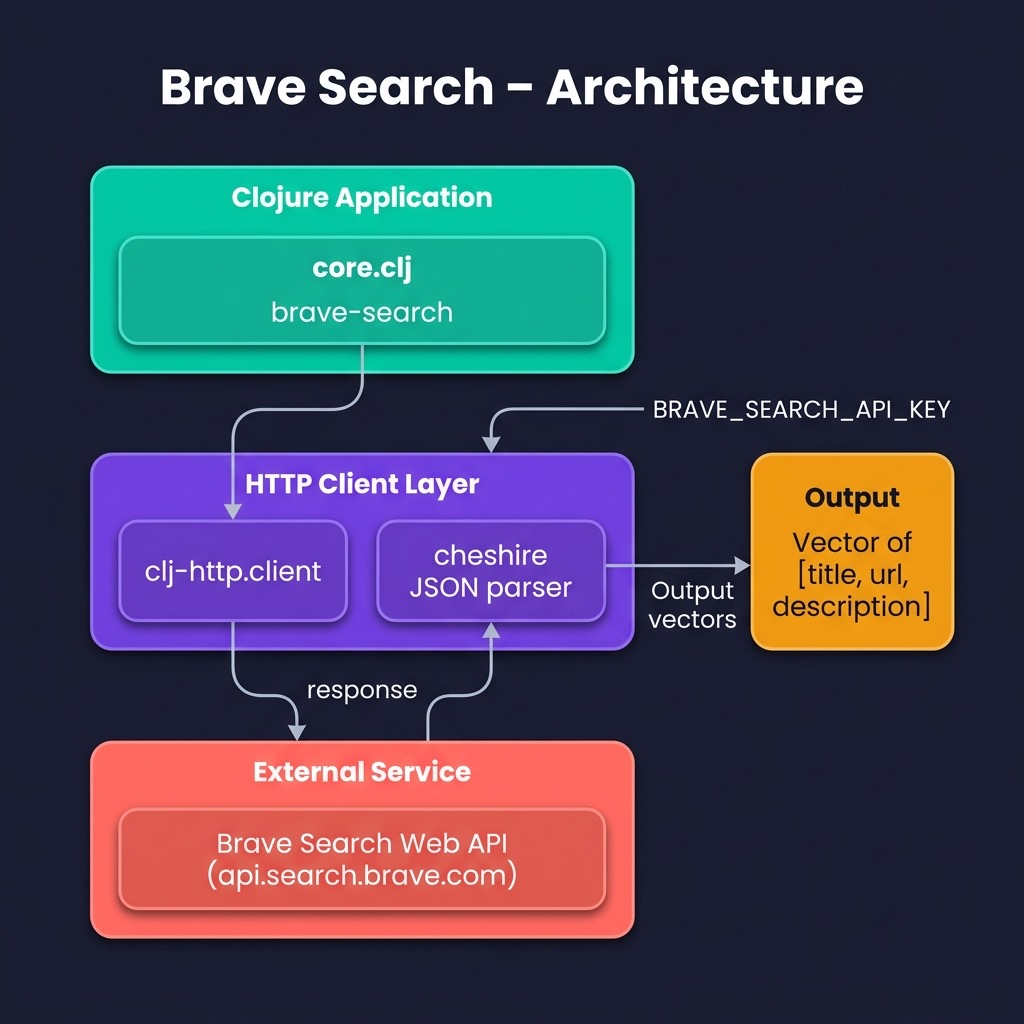
You can use search hints like “site:wikidata.org” to only search specific web sites. In the following example I use the search query:
1 "site:wikidata.org Sedona Arizona"
The example call from the unit test function:
  (brave-search "Sedona Arizona")]
  (println results)
produces the output (edited for brevity):
[["Visit Sedona | The official site of the Sedona Tourism Bureau"
  "https://visitsedona.com"
  "The official site of the <strong>Sedona</strong>, AZ tourism bureau. Find out the\
 best places to stay, eat, and relax in our beautiful central <strong>Arizona</stron\
g> resort town."]

 ... ]
Wrap-up
In addition to using automated web scraping to get data for my personal research, I often use automated web search. I find the Brave search APIs are the most convenient to use and I like paying for services that I use. The search engine Duck Duck Go also provides free search APIs but even though I use Duck Duck Go for 90% of my manual web searches, when I build automated systems I prefer to rely on services that I pay for.