15 Design Overview Topics
This section has the design “rationale” and the choices I took to develop this game. There are still many options I’d like to include or change for better gameplay. This section discusses those various options.
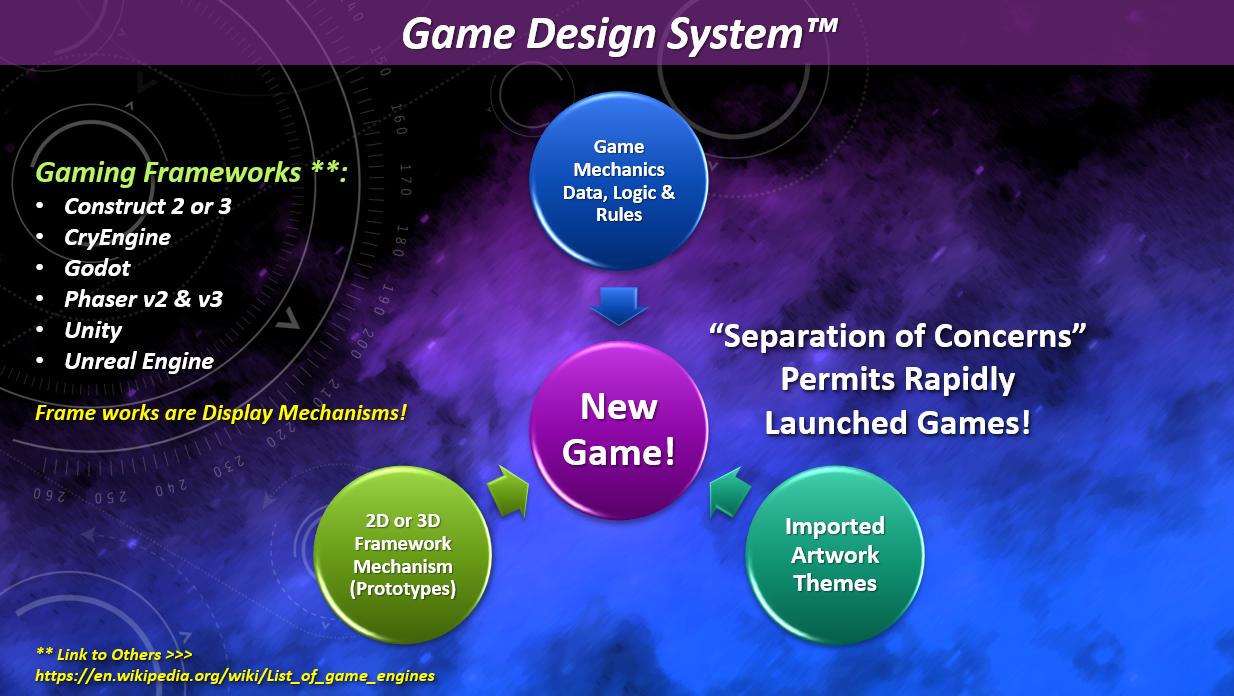
- “Layouts” are the game’s visual elements from the “Gaming Framework Display Mechanisms” (GFDM).
- “Event Sheets” hold the “Game Mechanics (GM) — the game’s “Data, Logic, and Rules”.
- Artwork Assets and Themes are the graphical elements shown inside the layouts.
15.1 Gameplay Flow
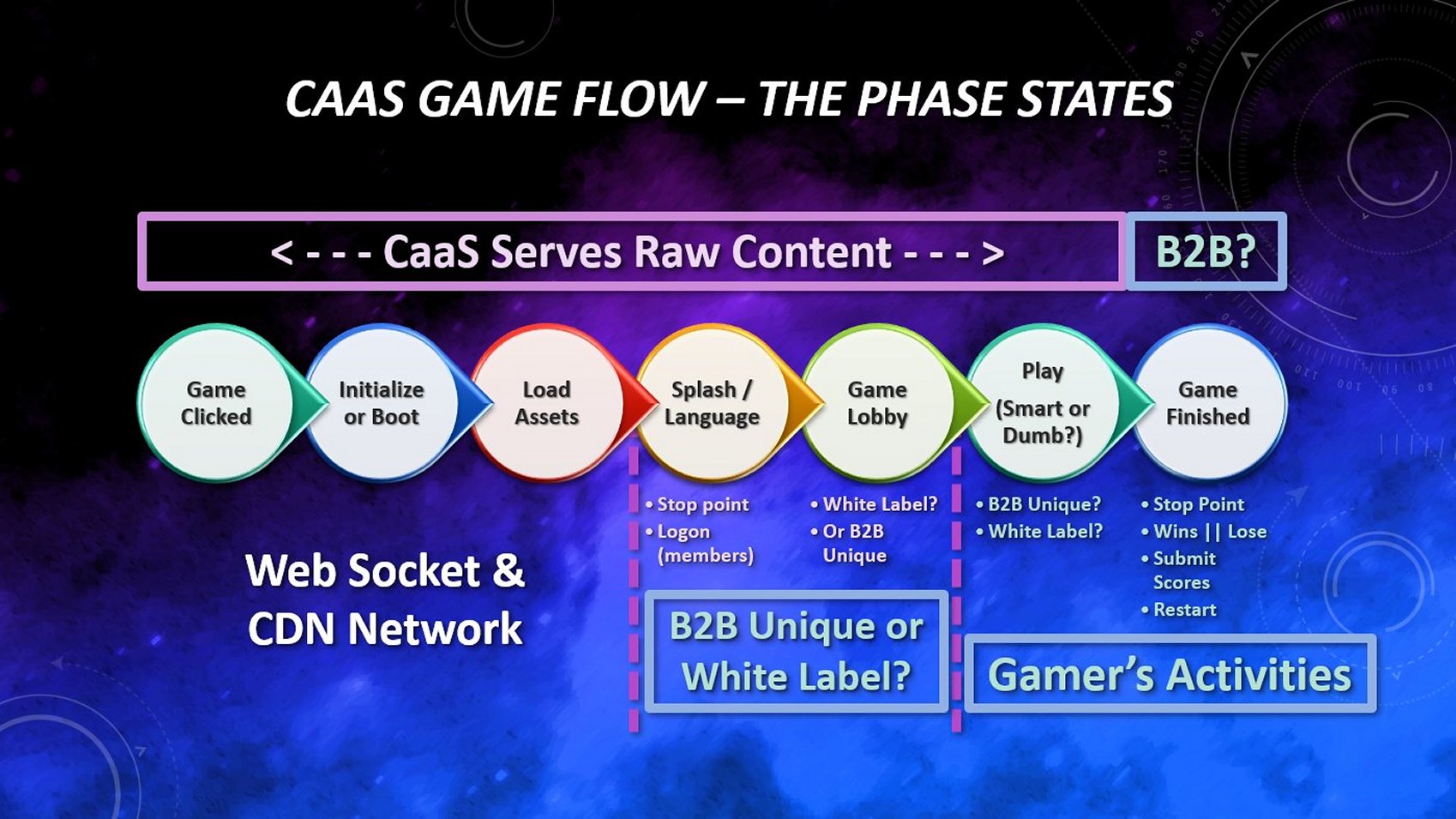
Also review the “Flow of a Multi-Player Game” tutorial.
> “Game Clicked” Phase
A gamer has discovered our game — hopefully a licensed version?! — somewhere on the Internet. Our gamer clicks the hosting game site’s web page to play our game.
> “Boot & Load” Phases
This begins the “Web Socket” and game delivery to the gamer’s browser. The game is downloaded from any “Content Delivery Network” (CDN) to the gamer’s browser if this is their first visit. Otherwise, the game might still be in their browser cache — meaning this is a return visit. See the “multi-player connectivity” tutorial.
> “Splash / Language” Phase
This layout should display the game’s “Business-To-Business” (B2B) sponsor(s) or advertisements. Otherwise, this layout is a “White Label” licensed version — as seen here!
At first, supporting various languages may seem complicated. I’ve read all of the available Construct tutorials (as of 20241101) and purchased “several of these assets“ concerning language integration (aka “Internationalization”) and many of these were not “well-thought-out”. Instead of typing in each supported language’s text into an “Excel Spreadsheet-styled” array, I assign language text into its dedicated language Dictionary’s listing. — instead of having all languages jumbled together into a single project file. Putting all the various languages into a single single file complicates upgrading game features — you’ll need a minimum of 13 languages(!!!) for each HUD text, new features, and menu labels referenced; especially, if those features do NOT apply (or are intended) to all markets segments! The “Splash / Language Layout’s Event Sheet” below shows my optional implementation (or see the “official Construct example here”).
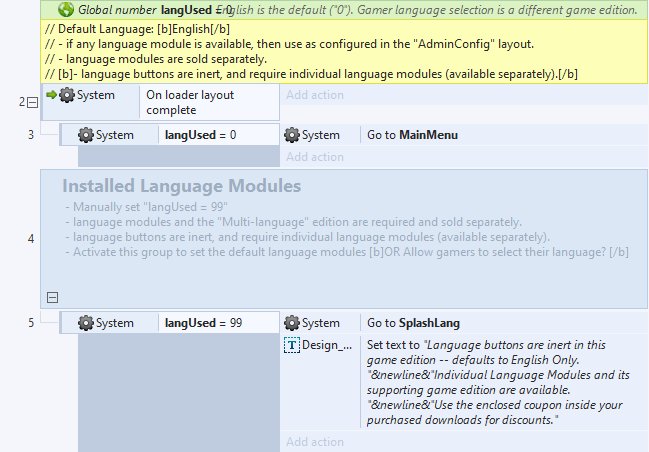
The sample code above provides game administrators an option to toggle their “Splash/Lang” layout. If the “langUsed” variable is set to “0”, then the game’s administrator has a default language for everyone to use (in this case, English). The game goes immediately to the “Main Menu” layout. Otherwise, if the game administrator sets the “langUsed” variable to “99”, a gamer is sent to an initial language menu for them to choose their native language. (See sample illustration below) Of course, this assumes the administrator has all of the HUD text, menus, and button labels ready for the gamer’s choice.
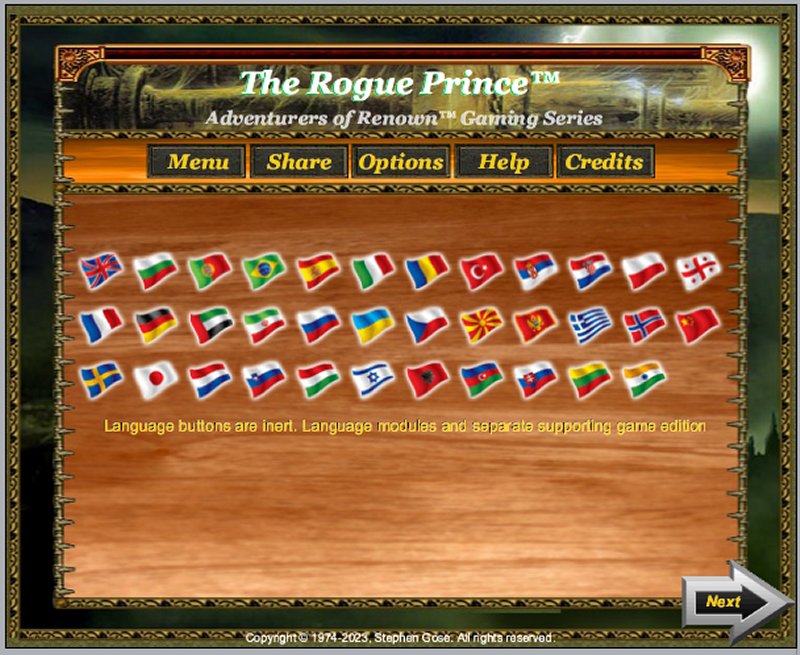
I also separate a button label from its underlying sprite. Doing so, allows me to insert any language into that label’s content. I firmly believe that the first thing a gamer sees is a language selection menu. The student workbook and workshop lectures go into great detail about International marketing and language integration. Native English gamers are only a small marketing segment compared to all the gamers in the world. I use “National Flags” to represent a country’s primary language. I use the “heads-up display” (HUD) text in their native languages to ensure their choice and provide instructions about what to do next. If a gamer selects with their mouse, then I know they’re playing from a “Desktop computer”. If the gamer “touches” their flag, then I know they’re playing on a “touch screen” device. “Why’s that important?”, you asked. Because:
- I set specific controls for the mouse or touchscreen controls triggered from this layout.
- I want as many people “Internationally” playing my game. Construct3 v370+ now integrates icons and text; but more importantly, has the i18n Internationalization feature — making multilingual games a “cinch”! This plugin uses the standard “IETF language tags” which help distinguish language variants for countries, regions, or writing systems.
- Not everyone speaks or reads English natively. English native speakers are only 16% of all Internet users. I want my game to capture a larger market share than that. Don’t you?!
- (Quoted from “Construct Game Starter Kit Collection” page 269) “By 2040, India will be the largest population on earth — surpassing China!”
> “Game Lobby” Phase
This game phase comes in several display formats. Its primary purpose is to provide a logon for the gamer into the Scirra Multi-Game Server.
- a simple “Log on” default layout, OR
- a detailed “Game Lobby” layout customized by a business partner (discussed in greater detail below) in which gamers can see all the available “Rooms” and any other logged-in gamers.
This phase associates gamers and herds them into “Waiting Rooms” until the “MAXIMUM” players are collected. The first gamer, to enter a room, becomes the gaming session’s “HOST” for everyone else who arrives later. The HOST’s device could be a mobile phone, laptop, or desktop computer. Keep this in mind whenever you customize this game. Ask yourself, “How many players could a mobile phone support?” Since no one can predict what device a gamer is using who becomes a “HOST” (aka the “Master Device”), I restrict my game versions to 7 other players — because a “Bluetooth piconet” (aka a “PAN”) can only support seven (7) other devices. See the multi-player signalling tutorial OR “Making Multi-Player Online Games” workbook.
> “Play” Phase
Finally, the gamers arrive at the actual gameplay phase. The gameplay could be designed as either a “Smart” Browser client or a “Dumb” browser client which is the standard for the Scirra Multi-Game server.
Combat Engine #9 uses several different game modes. It has the “Single Player / Single Avatar” (SPSA) found on the main menu layout. It also uses the Combat Engine #2 which dominates most of the multi-player gameplay in the “Single Player / Multi-Avatar” (SPMA).
> “Game Finished” Phase
Displays a gamer’s success or failure. Most “Massive Multi-Player Online Games” (MMoG) show a scoreboard of the top players, and the ability to submit new scores. Of course, there should always be a “Play Again” option.
15.2 Navigation
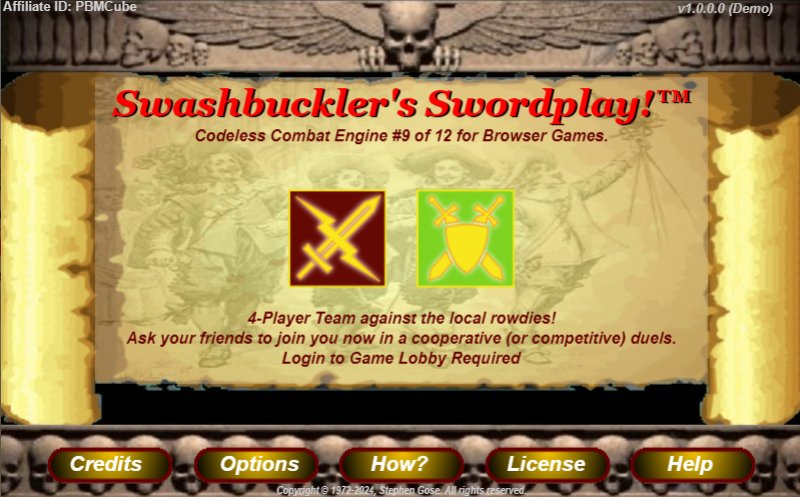
I use several types of game navigation elements:
- Text objects and Button labels — such as the “Affiliate ID”, game version, and labels sitting on top of their sprite menu buttons;
- Sprite menus and arrow buttons — can be any shape and have three animation frames — a normal, highlighted (green for “Go”), and “Forbidden” (red for “Stop”) animation frames;
Whenever I display left or right arrows, the left arrow ALWAYS returns to the main menu layout for “Left-to-Right” languages. The right arrow ALWAYS goes to the next “Game Phase” for “Left-to-Right” languages. For “Right-to-Left Languages”, I reverse their destinations.
I never use embedded sprite fonts in any menu button; it is a poor design in my opinion, and more importantly, restricts those sprites to a single language (which is also extremely poor product marketing management).
15.3 Game Perspectives
First-person, Third-person, Top-down, & Isometric
- First-person — The camera view is at the same angle as the gamer. A player sees the gaming environment through their avatar’s eyes as if they are actually in the game.
- 3rd Person (aka “Platform” view) — The camera view is positioned for you to see all the avatars. This could be modified and positioned behind a gamer’s avatar so that their backside is seen while moving through the gaming environment.
- Top-Down (aka “Bird’s Eye” view) — is the default camera view in CE #9.
-
Isometric is similar to the “3rd person” view but with a different camera angle. Isometric has a variety of subcategories.
- “Orthographic” projections — “isometric, dimetric, trimetric” including some already mentioned above.
- “Oblique” projections — is a parallel projection in which the lines of sight are not perpendicular to the projection plane.
- “Perspective” projections — the center of projection is at a finite distance from the projection plane. This projection produces realistic views but does not preserve the relative proportions of an object’s dimensions.
15.4 Adding Your Bespoke Gaming Features
Your new gaming features should entice gamers to play multiple gaming sessions. The student workbooks review those various “enticements”. Scirra Multi-Game Server encourages this also by assigning the first gamer into a “room” to become that gaming session’s HOST. I further enhance this by permitting the HOST to choose its gaming environment and its combat grid style in licensed editions.
I have a “grocery list” of other such features that I want to include; some may appear in future releases. You’ll find, as you play this game, that you might want to tweak or add some more/other gaming features, different system rules, and other Gaming Mechanics (GM). Here’s how I assign new features to one of these participation modes …
15.5 Player Participation Modes
- Single Player / Single Avatar (SPSA) against an AIBot.
- Single Player / Multi-Avatars (SPMA) against an AIBot team.
- Multi-Player / Single Avatar (MPSA) against another Human gamer.
- Multi-Player / Multi-Avatars (MPMA or “teams”)
Multi-Player games can then become either …
- Competitive — All participants are in a “Free for All” Gang Fight! I’ve learned that this type of multi-player game requires a highly proficient customer support system. Aggressive gamers often take the same approach toward my “customer support” employees.
- Cooperative — All participants are on the same team and start in the “Disengaged Combat Mode”. Whenever their avatar becomes adjacent to an “enemy team member” (i.e.: AIBot), they are “Engaged” in combat and could move to another layout.
15.6 Multi-Player Roles
A gamer can assume the role of either a “HOST” or a “PEER”; it is a “Hub and Spoke” network relationship. The “HOST”, as its “Hub”, manages all the “Enemy AIBots”, processes all incoming participation reactions, and synchronizes the locations of everyone’s avatars. The HOST is the authoritative version of a gaming session — doing anything else is inviting disaster! Their primary purpose is to show how we’re able to synchronize smooth AI movements over a Multi-Player network connection(s). A “HOST” broadcasts gamer’s data to all participants and relays their messages between “PEERS”. A “PEER” may only send information to its “HOST”. Each “PEER” has a “Peer ID” uniquely assigned by the Scirra Multi-Player Server before surrendering the gaming session to its “HOST”. The “Peer ID” is a permanent assignment and refers to a specific gamer’s avatar regardless of whether they change their alias nickname.