Intermission: Refactoring
Before we proceed with the rest of the lessons, let’s refactor the code to make it easier for us to change and maintain the code later. This should not change the behavior of the game, so this is just an intermission rather than a full afternoon chapter.
Refactoring Functions
First on our list of things to refactor are our create() and update() functions. They’re getting bigger and they will be worse as we proceed with the workshop. We’ll refactor them by splitting these large functions into smaller functions.
Refactoring create
Let’s start by extracting functions out of create(). Replace the contents of the function with:
15   create: function () {
16     this.setupBackground();
17     this.setupPlayer();
18     this.setupEnemies();
19     this.setupBullets();
20     this.setupExplosions();
21     this.setupText();
22
23     this.cursors = this.input.keyboard.createCursorKeys();
24   },
Then insert the following after render():
 79   //
 80   // create()- related functions
 81   //
 82   setupBackground: function () {
 83     this.sea = this.add.tileSprite(0, 0, 800, 600, 'sea');
 84     this.sea.autoScroll(0, 12);
 85   },
 86
 87   setupPlayer: function () {
 88     this.player = this.add.sprite(400, 550, 'player');
 89     this.player.anchor.setTo(0.5, 0.5);
 90     this.player.animations.add('fly', [ 0, 1, 2 ], 20, true);
 91     this.player.play('fly');
 92     this.physics.enable(this.player, Phaser.Physics.ARCADE);
 93     this.player.speed = 300;
 94     this.player.body.collideWorldBounds = true;
 95     // 20 x 20 pixel hitbox, centered a little bit higher than the center
 96     this.player.body.setSize(20, 20, 0, -5);
 97   },
 98
 99   setupEnemies: function () {
100     this.enemyPool = this.add.group();
101     this.enemyPool.enableBody = true;
102     this.enemyPool.physicsBodyType = Phaser.Physics.ARCADE;
103     this.enemyPool.createMultiple(50, 'greenEnemy');
104     this.enemyPool.setAll('anchor.x', 0.5);
105     this.enemyPool.setAll('anchor.y', 0.5);
106     this.enemyPool.setAll('outOfBoundsKill', true);
107     this.enemyPool.setAll('checkWorldBounds', true);
108
109     // Set the animation for each sprite
110     this.enemyPool.forEach(function (enemy) {
111       enemy.animations.add('fly', [ 0, 1, 2 ], 20, true);
112     });
113
114     this.nextEnemyAt = 0;
115     this.enemyDelay = 1000;
116   },
117
118   setupBullets: function () {
119     // Add an empty sprite group into our game
120     this.bulletPool = this.add.group();
121
122     // Enable physics to the whole sprite group
123     this.bulletPool.enableBody = true;
124     this.bulletPool.physicsBodyType = Phaser.Physics.ARCADE;
125
126     // Add 100 'bullet' sprites in the group.
127     // By default this uses the first frame of the sprite sheet and
128     //   sets the initial state as non-existing (i.e. killed/dead)
129     this.bulletPool.createMultiple(100, 'bullet');
130
131     // Sets anchors of all sprites
132     this.bulletPool.setAll('anchor.x', 0.5);
133     this.bulletPool.setAll('anchor.y', 0.5);
134
135     // Automatically kill the bullet sprites when they go out of bounds
136     this.bulletPool.setAll('outOfBoundsKill', true);
137     this.bulletPool.setAll('checkWorldBounds', true);
138
139     this.nextShotAt = 0;
140     this.shotDelay = 100;
141   },
142
143   setupExplosions: function () {
144     this.explosionPool = this.add.group();
145     this.explosionPool.enableBody = true;
146     this.explosionPool.physicsBodyType = Phaser.Physics.ARCADE;
147     this.explosionPool.createMultiple(100, 'explosion');
148     this.explosionPool.setAll('anchor.x', 0.5);
149     this.explosionPool.setAll('anchor.y', 0.5);
150     this.explosionPool.forEach(function (explosion) {
151       explosion.animations.add('boom');
152     });
153   },
154
155   setupText: function () {
156     this.instructions = this.add.text( 400, 500,
157       'Use Arrow Keys to Move, Press Z to Fire\n' +
158       'Tapping/clicking does both',
159       { font: '20px monospace', fill: '#fff', align: 'center' }
160     );
161     this.instructions.anchor.setTo(0.5, 0.5);
162     this.instExpire = this.time.now + 10000;
163   },
We also added a call to this.sea.autoScroll() so that we can remove the this.sea.tilePosition.y += 0.2 from the update() later.
Refactoring update
Now replace the contents of update() with the following:
26   update: function () {
27     this.checkCollisions();
28     this.spawnEnemies();
29     this.processPlayerInput();
30     this.processDelayedEffects();
31   },
Insert the new functions after the create() functions:
122   //
123   // update()- related functions
124   //
125   checkCollisions: function () {
126     this.physics.arcade.overlap(
127       this.bulletPool, this.enemyPool, this.enemyHit, null, this
128     );
129
130     this.physics.arcade.overlap(
131       this.player, this.enemyPool, this.playerHit, null, this
132     );
133   },
134
135   spawnEnemies: function () {
136     if (this.nextEnemyAt < this.time.now && this.enemyPool.countDead() > 0) {
137       this.nextEnemyAt = this.time.now + this.enemyDelay;
138       var enemy = this.enemyPool.getFirstExists(false);
139       // spawn at a random location top of the screen
140       enemy.reset(this.rnd.integerInRange(20, 780), 0);
141       // also randomize the speed
142       enemy.body.velocity.y = this.rnd.integerInRange(30, 60);
143       enemy.play('fly');
144     }
145   },
146
147   processPlayerInput: function () {
148     this.player.body.velocity.x = 0;
149     this.player.body.velocity.y = 0;
150
151     if (this.cursors.left.isDown) {
152       this.player.body.velocity.x = -this.player.speed;
153     } else if (this.cursors.right.isDown) {
154       this.player.body.velocity.x = this.player.speed;
155     }
156
157     if (this.cursors.up.isDown) {
158       this.player.body.velocity.y = -this.player.speed;
159     } else if (this.cursors.down.isDown) {
160       this.player.body.velocity.y = this.player.speed;
161     }
162
163     if (this.input.activePointer.isDown &&
164         this.physics.arcade.distanceToPointer(this.player) > 15) {
165       this.physics.arcade.moveToPointer(this.player, this.player.speed);
166     }
167
168     if (this.input.keyboard.isDown(Phaser.Keyboard.Z) ||
169         this.input.activePointer.isDown) {
170       this.fire();
171     }
172   },
173
174   processDelayedEffects: function () {
175     if (this.instructions.exists && this.time.now > this.instExpire) {
176       this.instructions.destroy();
177     }
178   },
Reducing Hard-coded Values
Apart from long functions, our game also has many hard-coded values and this may affect code readability and maintenance later.
Eliminating all hard-coded values would be overkill especially for a tutorial like this, so our goal here would be show the ways how we could reduce them.
Using Relative Values
A good portion of the hard-coded values are x-y coordinates. Replacing them with values relative to game.width and game.height will allow us to change the size of the game later with minimal impact to the code.
Let’s start with the background tile sprite:
  setupBackground: function () {
    this.sea = this.add.tileSprite(0, 0, 800, 600, 'sea');
    this.sea = this.add.tileSprite(0, 0, this.game.width, this.game.height, 'sea');
    this.sea.autoScroll(0, 12);
  },
Then we change the player starting location to the bottom middle of the screen:
  setupPlayer: function () {
    this.player = this.add.sprite(400, 550, 'player');
    this.player = this.add.sprite(this.game.width / 2, this.game.height - 50, 'player');
    this.player.anchor.setTo(0.5, 0.5);
Also the instruction text:
  setupText: function () {
    this.instructions = this.add.text( 400, 500,
    this.instructions = this.add.text(
      this.game.width / 2,
      this.game.height - 100,
      'Use Arrow Keys to Move, Press Z to Fire\n' +
And finally the spawn location for the enemies:
  spawnEnemies: function () {
    if (this.nextEnemyAt < this.time.now && this.enemyPool.countDead() > 0) {
      this.nextEnemyAt = this.time.now + this.enemyDelay;
      var enemy = this.enemyPool.getFirstExists(false);
      // spawn at a random location top of the screen
      enemy.reset(this.rnd.integerInRange(20, 780), 0);
      enemy.reset(this.rnd.integerInRange(20, this.game.width - 20), 0);
      // also randomize the speed
      enemy.body.velocity.y = this.rnd.integerInRange(30, 60);
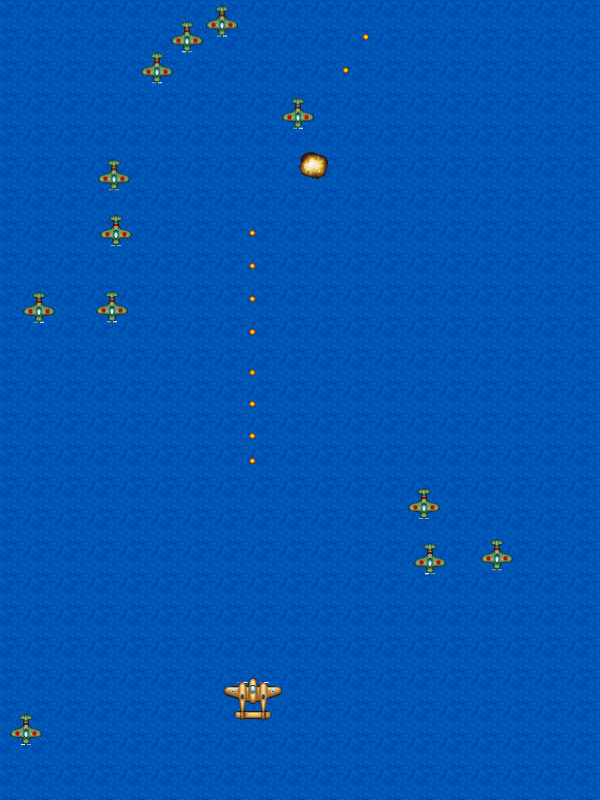
One advantage of using relative values is that we can change the dimensions of the game without having to change any of the code. For example, here’s the game with the height and width flipped at app.js:
Using Constants
We can also replace many hard-coded values with constants. If you open boot.js, you’ll see that all of the constants that we need for this workshop are already defined under the BasicGame object. All we need to do is to replace the existing code with their respective constants:
  setupBackground: function () {
    this.sea = this.add.tileSprite(0, 0, this.game.width, this.game.height, 'sea');
    this.sea.autoScroll(0, 12);
    this.sea.autoScroll(0, BasicGame.SEA_SCROLL_SPEED);
  },
  setupPlayer: function () {
...
    this.physics.enable(this.player, Phaser.Physics.ARCADE);
    this.player.speed = 300;
    this.player.speed = BasicGame.PLAYER_SPEED;
    this.player.body.collideWorldBounds = true;
  setupEnemies: function () {
...
    this.nextEnemyAt = 0;
    this.enemyDelay = 1000;
    this.enemyDelay = BasicGame.SPAWN_ENEMY_DELAY;
  },
  setupBullets: function () {
...
    this.nextShotAt = 0;
    this.shotDelay = 100;
    this.shotDelay = BasicGame.SHOT_DELAY;
  },
  setupText: function () {
...
    this.instructions.anchor.setTo(0.5, 0.5);
    this.instExpire = this.time.now + 10000;
    this.instExpire = this.time.now + BasicGame.INSTRUCTION_EXPIRE;
  },
  spawnEnemies: function () {
    if (this.nextEnemyAt < this.time.now && this.enemyPool.countDead() > 0) {
...
      // also randomize the speed
      enemy.body.velocity.y = this.rnd.integerInRange(30, 60);
      enemy.body.velocity.y = this.rnd.integerInRange(
        BasicGame.ENEMY_MIN_Y_VELOCITY, BasicGame.ENEMY_MAX_Y_VELOCITY
      );
      enemy.play('fly');
    }
  },
  fire: function () {
...
    bullet.body.velocity.y = -500;
    bullet.body.velocity.y = -BasicGame.BULLET_VELOCITY;
  },