Overview of Web Application Server Systems
As a developer who has gone through a Rails tutorial or as a SysAd, you should be aware of the HTTP request-response cycle i.e. how a client (e.g. browser) communicates with a server.
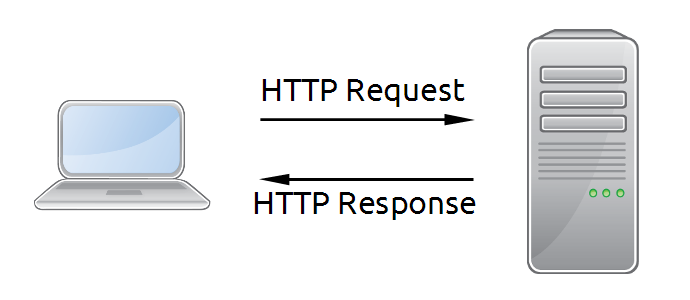
But there is more to serving web content than this simple diagram. So before we begin, it’s best that you at least have an idea what goes on behind web servers.
Serving Static and Dynamic Web Content
From the early days of the Internet and even up to today, a good portion of the data sent over the internet is static content e.g. images, static text files like CSS, HTML. And that’s what a web server does.
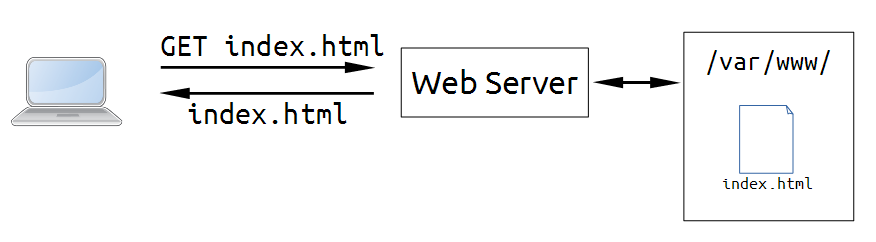
In this diagram, the web server program is set to serve files from the /var/www/ folder. If the requested file exists, it returns it. Otherwise, it returns a “404 Not Found” HTTP error.
Eventually the internet became more and more complex that there came a need to serve dynamic content. Say you have a constantly updated news site - manually crafting an HTML page for every news item is difficult enough, what if you need to change the layout of all of the pages? How do you implement article searching?
These problems can be solved by saving your data in a database, then dynamically crafting a new page for every request. The simplest way to do this is through CGI (Common Gateway Interface).
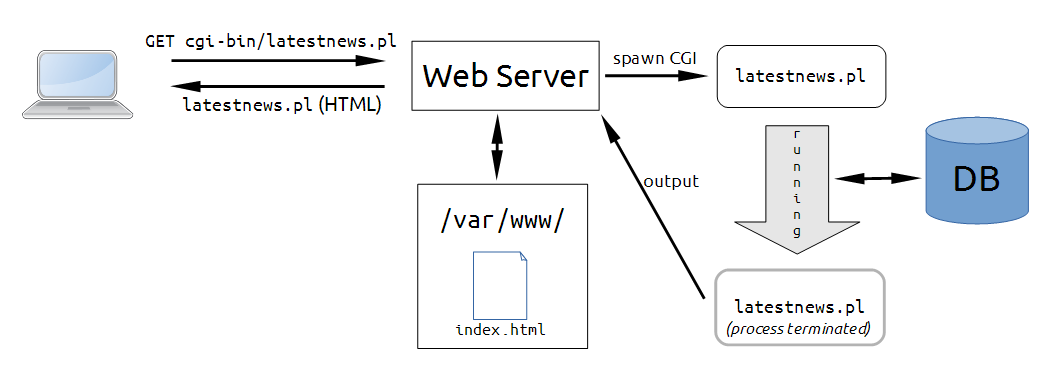
In this diagram, the client wants to request the latest news articles and does so by requesting /cgi-bin/latestnews.pl. The server has set /cgi-bin/ folder as the CGI directory so instead of serving the contents of that file, it runs that program (in this case a Perl script) and returns the output to the client. The script can do whatever it wants: it can access the database, read files, send network requests, etc., all the server cares about is its output.
The simplicity of CGI made it popular but it had one main problem: starting up programs and killing them every request incur a significant overhead.
One possible solution is to have a process that loads the interpreter and keeps it running while it accepts requests for dynamic content from the web server. This is basically what FastCGI does.
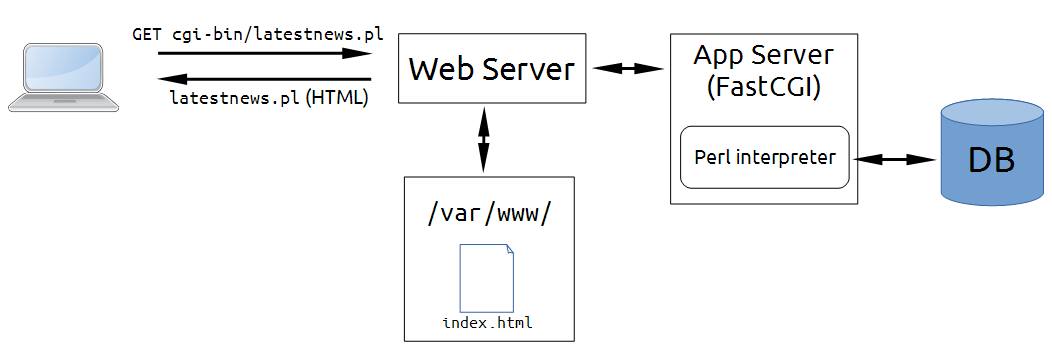
Here we see the web server which still serves static content. It is also configured to pass the requests for dynamic content to the separate FastCGI server - our new application sever. Properly configured, the request to /cgi-bin/latestnews.pl will return the same result as the CGI setup, only faster.
The diagram above is oversimplified. Here’s a slightly more detailed take on the system:
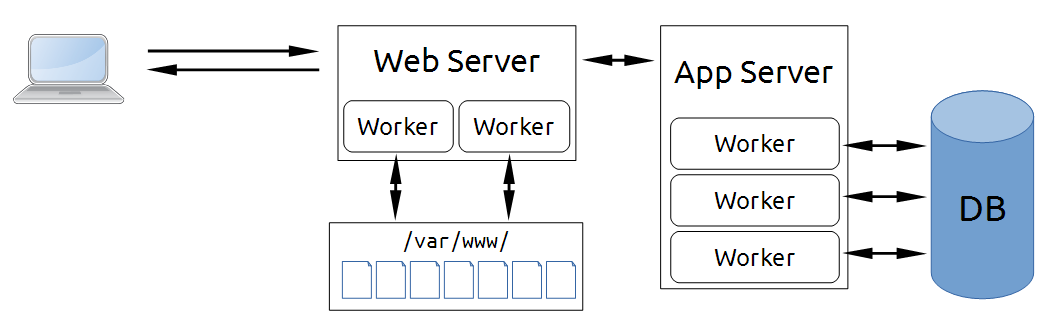
Your web and application servers aren’t limited to being single-process systems. Each can have multiple processes and threads in order to handle multiple loads concurrently. In turn, those workers are managed by the master process: the master can spawn new workers to handle increased load, balance the requests between workers, kill non-responsive workers, and so on.
Another thing about the FastCGI-style: the web and application server are separate processes and have to use either TCP sockets or UNIX sockets to communicate with each other.
Of course, the FastCGI-style isn’t the only alternative to CGI. For example, a popular solution for PHP is to use Apache HTTP Server (commonly shortened to just “Apache”) and enable the mod_php module:
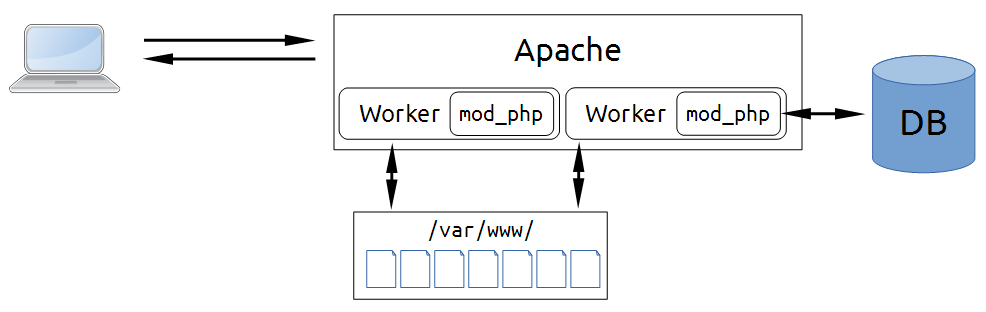
This loads the PHP interpreter to all of the workers allowing Apache to process PHP scripts without having to use a separate application server, essentially making it a combined web and application server.
How to Serve Content from Ruby Applications
All modern Ruby web applications use Rack as an interface between the application and the application server. Any application server that supports Rack will be able to load a Ruby web application with Rack and use the latter to serve requests.
If you look at your Ruby and Rails apps, you will see the standard entry points for both the web and the Rack-enabled application server: the /public folder often refers to the root directory that will be served by the web server, while the config.ru (rackup configuration) is what the Rack server will look at for starting the Ruby application. Here’s an example with Nginx and Unicorn serving a Rails application:
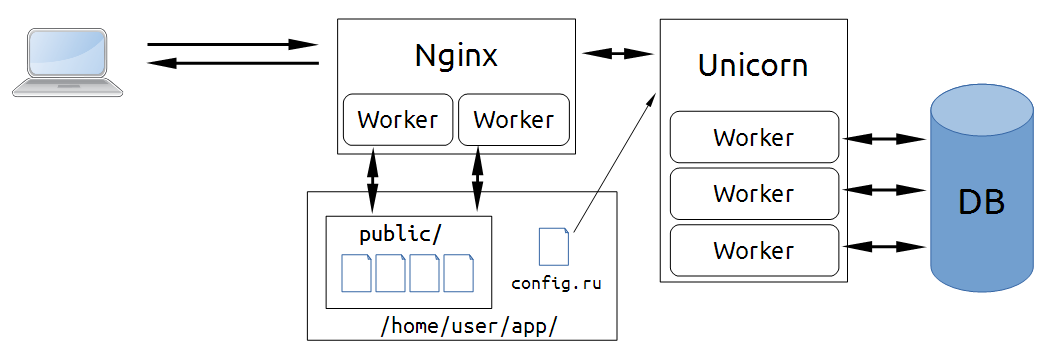
Nginx at the front, serving precompiled assets and other static files from the /home/user/app/public/ folder. Other requests will be directed to Unicorn, which by default runs the Rails application through /home/user/app/config.ru.
As the diagram implies, Unicorn is a multi-process application server separate from the web server. It is similar to the FastCGI server above, but we can’t call them FastCGI servers since it doesn’t follow the FastCGI protocol. (With some effort, you can use FastCGI servers to serve Rack applications, but it’s definitely not recommended.)
Other Rack application servers follow the same theme with some differences. Passenger and Puma can be used as multi-process servers, and they can also be used as multi-threaded servers when used with an interpreter that supports real threading like JRuby. Thin and Rainbows are servers which use a different approach (evented) to improve concurrency in certain types of applications.
In this tutorial, we will be starting off with Passenger and Nginx. When installed as an Nginx or Apache module, Passenger makes them behave like combined web and application servers - instead of having to configure two different servers separately, all configuration is done in the Nginx/Apache side.