Testing and Code Review
Objectives for This Reading
- Testing and test-first programming
- Code review
Validation
Testing and code review are two examples of a more general process called validation. The purpose of validation is to uncover problems in a program and thereby increase your confidence in the program’s correctness.
Validation includes:
- Formal reasoning about a program, usually called verification. Verification constructs a formal proof that a program is correct. Verification is tedious to do by hand, and automated tool support for verification is still an active area of research. Nevertheless, small, crucial pieces of a program may be formally verified, such as the scheduler in an operating system or the bytecode interpreter in a virtual machine.
- Code review. Having somebody else carefully read your code (and reason informally about it) can be a good way to uncover bugs, much like having somebody else proofread an essay you have written.
- Testing. Running the program on carefully selected inputs and checking the results.
Even with the best validation, it’s very hard to achieve perfect quality in software. Here are some typical residual defect rates (bugs left over after the software has shipped) per kloc (one thousand lines of source code):
- 1 - 10 defects/kloc: Typical industry software.
- 0.1 - 1 defects/kloc: High-quality validation. The Java libraries might achieve this level of correctness.
- 0.01 - 0.1 defects/kloc: The very best, safety-critical validation. NASA and companies like Praxis can achieve this level.
This can be discouraging for large systems. For example, if you have shipped a million lines of typical industry source code (1 defect/kloc), it means you missed 1000 bugs!
Putting on Your Testing Hat
Testing requires having the right attitude. When you’re coding, your goal is to make the program work, but as a tester, you want to make it fail.
That’s a subtle but important difference. It is all too tempting to treat code you’ve just written as a precious thing, a fragile eggshell, and test it very lightly just to see it work.
Instead, you have to be brutal. A good tester wields a sledgehammer and beats the program everywhere it might be vulnerable, so that those vulnerabilities can be eliminated.
Test-first Programming
Test early and often. Don’t leave testing until the end, when you have a big pile of unvalidated code. Leaving testing until the end only makes debugging longer and more painful, because bugs may be anywhere in your code. It’s far more pleasant to test your code as you develop it.
In test-first-programming, you write tests before you even write any code. The development of a single function proceeds in this order:
- Write a specification for the function.
- Write tests that exercise the specification.
- Write the actual code. Once your code passes the tests you wrote, you’re done.
The specification describes the input/output behaviour of the function. It gives the types of the parameters and any additional constraints on them (e.g. sqrt’s parameter must be nonnegative). It also gives the type of the return value and how the return value relates to the inputs. You’ve already seen and used specifications on your problem sets in this class. In code, the specification consists of the method signature and the comment above it that describes what it does. We’ll have much more to say about specifications soon enough.
Writing tests first is a good way to understand the specification. The specification can be buggy, too — incorrect, incomplete, ambiguous, missing corner cases. Trying to write tests can uncover these problems early, before you’ve wasted time writing an implementation of a buggy spec.
Why Software Testing is Hard
Here are some approaches that unfortunately don’t work well in the world of software.
Exhaustive testing is infeasible. The space of possible test cases is generally too big to cover exhaustively. Imagine exhaustively testing a 32-bit floating-point multiply operation, a*b. There are 264 test cases!
Haphazard testing (“just try it and see if it works”) is less likely to find bugs, unless the program is so buggy that an arbitrarily-chosen input is more likely to fail than to succeed.It also doesn’t increase our confidence in program correctness.
Random or statistical testing doesn’t work well for software. Other engineering disciplines can test small random samples (e.g. 1% of hard drives manufactured) and infer the defect rate for the whole production lot. Physical systems can use many tricks to speed up time, like opening a refrigerator 1000 times in 24 hours instead of 10 years. These tricks give known failure rates (e.g. mean lifetime of a hard drive), but they assume continuity or uniformity across the space of defects. This is true for physical artifacts.
But it’s not true for software. Software behaviour varies discontinuously and discretely across the space of possible inputs. The famous Pentium division bug affected approximately 1 in 9 billion divisions. Stack overflows, out of memory errors, and numeric overflow bugs tend to happen abruptly, and always in the same way.
Instead, test cases must be chosen carefully and systematically, and that’s what we’ll look at next.
Choosing Test Cases by Partitioning
Creating a good test suite is a challenging and interesting design problem. We want to pick a set of test cases that is small enough to run quickly, yet large enough to validate the program.
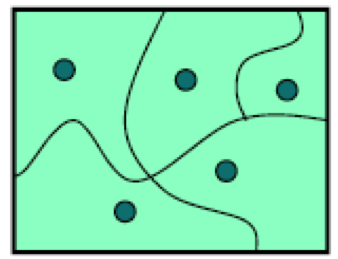
To do this, we divide the input space into subdomains, each consisting of a set of inputs. Taken together the subdomains completely cover the input space, so that every input lies in at least one subdomain. Then we choose one test case from each subdomain, and that’s our test suite.
The idea behind subdomains is to partition the input space into sets of similar inputs on which the program has similar behaviour. Then we use one representative of each set. This approach makes the best use of limited testing resources by choosing dissimilar test cases, and forcing the testing to explore parts of the input space that random testing might not reach.
Example: BigInteger.multiply()
multiply()Let’s look at an example. BigInteger is a class built into the Java library that can represent integers of any size, unlike the primitive types int and long that have only limited ranges. BigInteger has a method multiply that multiplies two BigInteger values together:
1 /**
2 * @param val another BigIntger
3 * @return a BigInteger whose value is (this * val).
4 */5 public BigInteger multiply(BigInteger val)For example, here’s how it might be used:
1 BigInteger a = ...;
2 BigInteger b = ...;
3 BigInteger ab = a.multiply(b);
This example shows that even though only one parameter is explicitly shown in the method’s declaration, multiply is actually a function of two arguments: the object you’re calling the method on (a in the example above), and the parameter that you’re passing in the parentheses (b in this example). In Python, the object receiving the method call would be explicitly named as a parameter called self in the method declaration. In Java, you don’t mention the receiving object in the parameters, and it’s called this instead of self.
So we should think of multiply as a function taking two inputs, each of type BigInteger, and producing one output of type BigInteger:
multiply : BigInteger × BigInteger → BigInteger
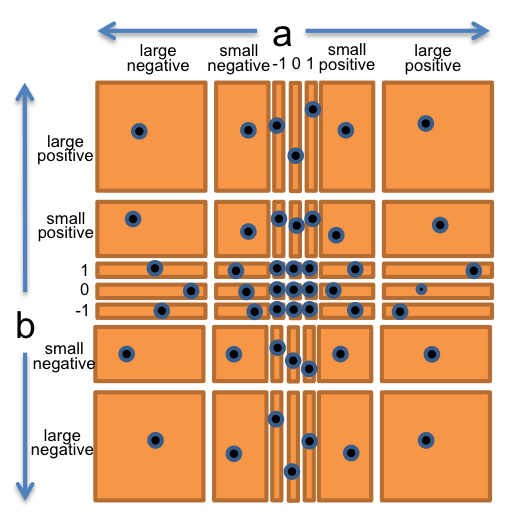
So we have a two-dimensional input space, consisting of all the pairs of integers (a,b). Now let’s partition it. Thinking about how multiplication works, we might start with these partitions:
- a and b are both positive
- a and b are both negative
- a is positive, b is negative
- a is negative, b is positive
There are also some special cases for multiplication that we should check: 0, 1, and -1.
- a or b is 0, 1, or -1
Finally, as a suspicious tester trying to find bugs, we might suspect that the implementor of BigInteger might try to make it faster by using int or long internally when possible, and only fall back to an expensive general representation (like a list of digits) when the value is too big. So we should definitely also try integers that are very big, bigger than the biggest long.
- a or b is small
- a or b is bigger than
Long.MAX_VALUE, the biggest possible primitive integer in Java, which is roughly 2<sup>63</sup>.
Let’s bring all these observations together into a straightforward partition of the whole (a,b) space. We’ll choose a and b independently from:
- 0
- 1
- -1
- small positive integer
- small negative integer
- huge positive integer
- huge negative integer
So this will produce 7 × 7 = 49 partitions that completely cover the space of pairs of integers.
To produce the test suite, we would pick an arbitrary pair (a,b) from each square of the grid, for example:
- (a,b) = (-3, 25) to cover (small negative, small positive)
- (a,b) = (0, 30) to cover (0, small positive)
- (a,b) = (2<sup>100</sup>, 1) to cover (large positive, 1)
- etc.
Example: max()
Let’s look at another example from the Java library: the integer max() function, found in the Math class.
1 /**
2  * @param a  an argument
3  * @param b  another argument
4  * @return the larger of a and b.
5  */
6 public static int max(int a, int b)
Mathematically, this method is a function of the following type:
max: int $\times$ int $\rightarrow$ int
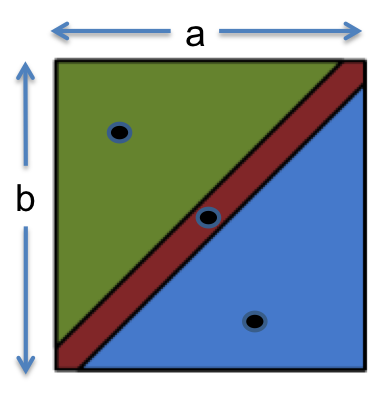
From the specification, it makes sense to partition this function as:
- a < b
- a = b
- a > b
Our test suite might then be:
- (a, b) = (1, 2) to cover a < b
- (a, b) = (9, 9) to cover a = b
- (a, b) = (-5, -6) to cover a > b
Include Boundaries in the Partition
Bugs often occur at boundaries between subdomains. Some examples:
- 0 is a boundary between positive numbers and negative numbers
- the maximum and minimum values of numeric types, like
intanddouble - emptiness (the empty string, empty list, empty array) for collection types
- the first and last element of a collection
Why do bugs often happen at boundaries? One reason is that programmers often make off-by-one mistakes (like writing <= instead of <, or initializing a counter to 0 instead of 1). Another is that some boundaries may need to bee handled as special cases in the code. Another is that boundaries may be places of discontinuity in the code’s behaviour. When an int variable grows beyond its maximum positive value, for example, it abruptly becomes a negative number.
It’s important to include boundaries as subdomains in your partition, so that you’re choosing an input from the boundary.
Let’s redo max : int × int → int.
Partition into:
-
relationship between a and b
- a < b
- a = b
- a > b
-
value of a
- a = 0
- a < 0
- a > 0
- a = minimum integer
- a = maximum integer
-
value of b
- b = 0
- b < 0
- b > 0
- b = minimum integer
- b = maximum integer
Now let’s pick test values that cover all these classes:
- (1, 2) covers a < b, a > 0, b > 0
- (-1, -3) covers a > b, a < 0, b < 0
- (0, 0) covers a = b, a = 0, b = 0
- (Integer.MIN_VALUE, Integer.MAX_VALUE) covers a < b, a = minint, b = maxint
- (Integer.MAX_VALUE, Integer.MIN_VALUE) covers a > b, a = maxint, b = minint
Two Extremes
After partitioning the input space, we can choose how exhaustive we want the test suite to be:
-
Full Cartesian product.
Every legal combination of the partition dimensions is covered by one test case. This is what we did for themultiplyexample, and it gave us 7 × 7 = 49 test cases. For themaxexample that included boundaries, which has three dimensions with 3 parts, 5 parts, and 5 parts respectively, it would mean up to 3 × 5 × 5 = 75 test cases.
In practice not all of these combinations are possible, however. For example, there’s no way to cover the combination a < b, a=0, b=0, becauseacan’t be simultaneously less than zero and equal to zero. -
Cover each part.
Every part of each dimension is covered by at least one test case, but not necessarily every combination. With this approach, the test suite formaxmight be as small as max(3, 5, 5) = 5 if carefully chosen. That’s the approach we took above, which allowed us to choose 5 test cases.
Often we strike some compromise between these two extremes, influenced by whitebox testing and code coverage tools, which we look at next.
Blackbox and Whitebox Testing
Recall from above that the specification is the description of the function’s behaviour — the types of parameters, type of return value, and constraints and relationships between them.
Blackbox testing means choosing test cases only from the specification, not the implementation of the function. That’s what we’ve been doing in our examples so far. We partitioned and looked for boundaries in multiply, max, and intersect without looking at the actual code for these functions.
Whitebox testing (also called glass box testing) means choosing test cases with knowledge of how the function is actually implemented. For example, if the implementation selects different algorithms depending on the input, then you should partition according to those domains. If the implementation keeps an internal cache that remembers the answers to previous inputs, then you should test repeated inputs.
When doing whitebox testing, you must take care that your test cases don’t require specific implementation behaviour that isn’t specifically called for by the spec. For example, if the spec says “throws an exception if the input is poorly formatted”, then your test shouldn’t check specifically for a NullPointerException just because that’s what the current implementation does. The specification in this case allows any exception to be thrown, so your test case should likewise be general to preserve the implementor’s freedom. We’ll have much more to say about this in the class on specs.
Coverage
One way to judge a test suite is to ask how thoroughly it exercises the program. This notion is called coverage. Here are three common kinds of coverage:
- Statement coverage: is every statement run by some test case?
-
Branch coverage: for every
iforwhilestatement in the program, are both the true or false direction taken by some test case? - Path coverage: is every possible combination of branches — every path through the program — taken by some test case?
In industry, 100% statement coverage is common goal, but rarely achieved due to unreachable defensive code (like “should never get here” assertions). 100% branch coverage is highly desirable, and safety critical industry has even more arduous criteria (eg, “MCDC”, modified decision/condition coverage). Unfortunately 100% path coverage is infeasible, requiring exponential test suites to achieve.
A standard approach to testing is to add tests until the test suite achieves adequate statement coverage: so that every reachable statement in the program is executed by at least one test case. In practice, statement coverage is usually measured by a code coverage tool, which instruments your program to count the number of times each statement is run by your test suite. With such a tool, white box testing is easy; you just measure the coverage of your black box tests, and add more test cases until all important statements are logged as executed.
A good code coverage tool for Eclipse is EclEmma.
Automated Testing and Regression Testing
Nothing makes tests easier to run, and more likely to be run, than complete automation. A test driver should not be an interactive program that prompts you for inputs and prints out results for you to manually check. Instead, a test driver should invoke the module itself on fixed test cases and automatically check that the results are correct. The result of the test driver should be either “all tests OK” or “these tests failed: …” A good testing framework, like JUnit, helps you build automated test suites.
It’s very important to rerun your tests when you modify your code. This prevents your program from regressing — introducing other bugs when you fix new bugs or add new features. Running all your tests after every change is called regression testing.
Whenever you find and fix a bug, take the input that elicited the bug and add it to your test suite as a test case. This kind of test case is called a regression test. This helps to populate your test suite with good test cases. Remember that a test is good if it elicits a bug — and every regression test did in one version of your code! Saving regression tests also protects against reversions that reintroduce bug. The bug may be an easy error to make, since it happened once already.
This idea also leads to test-first debugging. When a bug arises, immediately write a test case for it that elicits it, and immediately add it to your test suite. Once you find and fix the bug, all your test cases will be passing, and you’ll be done with debugging and have a regression test for that bug.
Code Review
The second validation technique we’ll look at in today’s class is code review. Code review is careful, systematic study of source code by others (not the original author of the code). It’s analogous to proofreading an English paper.
Code review is widely practiced in open source projects like Apache and Mozilla. Code review is also widely practiced in industry. At Google, you can’t push any code until another engineer has signed off on it in a code review.
Style Standards
Most companies and large projects have coding style standards. These can get pretty detailed, even to the point of specifying: whitespace (how deep to indent) and where curly braces and parentheses should go. These kinds of questions often lead to holy wars since they end up being a matter of taste and style.
For Java, there’s a general style guide. Some of its advice gets very specific:
- The opening brace should be at the end of the line that begins the compound statement; the closing brace should begin a line and be indented to the beginning of the compound statement.
In CPEN 221, we have no official style guide of this sort. We’re not going to tell you where to put your curly braces. That’s a personal decision that each programmer should make. It’s important to be self-consistent, however, and it’s very important to follow the conventions of the project you’re working on. If you’re the guy who reformats every module you touch to match your personal style, your teammates will hate you, and rightly so. Be a team player.
But there are some rules that are quite sensible and target our big three properties, in a stronger way than placing curly braces. The rest of this reading talks about some of these rules, at least the ones that are relevant at this point in the course, where we’re mostly talking about writing basic Java. These are some things you should start to look for when you’re code reviewing other students, and when you’re looking at your own code for improvement. Don’t consider it an exhaustive list of code style guidelines, however. Over the course of the semester, we’ll talk about a lot more things — specifications, abstract data types with representation invariants, concurrency and thread safety — which will then become fodder for code review.
Smelly Example #1
Programmers often describe bad code as having a “bad smell” that needs to be removed. “Code hygiene” is another word for this. Let’s start with some smelly code.
 1 public static int dayOfYear(int month, int dayOfMonth, int year) {
 2     if (month == 2) {
 3         dayOfMonth += 31;
 4     } else if (month == 3) {
 5         dayOfMonth += 59;
 6     } else if (month == 4) {
 7         dayOfMonth += 90;
 8     } else if (month == 5) {
 9         dayOfMonth += 31 + 28 + 31 + 30;
10     } else if (month == 6) {
11         dayOfMonth += 31 + 28 + 31 + 30 + 31;
12     } else if (month == 7) {
13         dayOfMonth += 31 + 28 + 31 + 30 + 31 + 30;
14     } else if (month == 8) {
15         dayOfMonth += 31 + 28 + 31 + 30 + 31 + 30 + 31;
16     } else if (month == 9) {
17         dayOfMonth += 31 + 28 + 31 + 30 + 31 + 30 + 31 + 31;
18     } else if (month == 10) {
19         dayOfMonth += 31 + 28 + 31 + 30 + 31 + 30 + 31 + 31 + 30;
20     } else if (month == 11) {
21         dayOfMonth += 31 + 28 + 31 + 30 + 31 + 30 + 31 + 31 + 30 + 31;
22     } else if (month == 12) {
23         dayOfMonth += 31 + 28 + 31 + 30 + 31 + 30 + 31 + 31 + 30 + 31 + 31;
24     }
25     return dayOfMonth;
26 }
Don’t Repeat Yourself
Duplicated code is a risk to safety. If you have identical or very-similar code in two places, then the fundamental risk is that there’s a bug in both copies, and some maintainer fixes the bug in one place but not the other.
Avoid duplication like you’d avoid crossing the street without looking. Copy-and-paste is an enormously tempting programming tool, and you should feel a frisson of danger run down your spine every time you use it. The longer the block you’re copying, the riskier it is.
Don’t Repeat Yourself, or DRY for short, has become a programmer’s mantra.
The dayOfYear example is full of identical code. How would you DRY it out?
Comments Where Needed
A quick general word about commenting. Good software developers write comments in their code, and do it judiciously. Good comments should make the code easier to understand, safer from bugs (because important assumptions have been documented), and ready for change.
One kind of crucial comment is a specification, which appears above a method or above a class and documents the behaviour of the method or class.
In Java, this is conventionally written as a Javadoc comment, meaning that it starts with /** and includes @-syntax, like @param and @return for methods.
Here’s an example of a spec:
1 /**
2 * Compute the hailstone sequence.
3 * See http://en.wikipedia.org/wiki/Collatz_conjecture#Statement_of_the_problem
4 * @param n starting number of sequence; requires n > 0.
5 * @return the hailstone sequence starting at n and ending with 1.
6 * For example, hailstone(3)=[3,10,5,16,8,4,2,1].
7 */ 8 public static List<Integer> hailstoneSequence(int n) { 9 ...10 }Specifications document assumptions. We’ve already mentioned specs a few times, and there will be much more to say about them.
Another crucial comment is one that specifies the provenance or source of a piece of code that was copied or adapted from elsewhere. This is vitally important for practicing software developers.
Some comments are bad and unnecessary. Direct transliterations of code into English, for example, do nothing to improve understanding, because you should assume that your reader at least knows Java:
1 while (n != 1) { // test whether n is 1   (don't write comments like this!)
2    ++i; // increment i
3    l.add(n); // add n to l
4 }
But obscure code should get a comment:
1 sendMessage("as you wish"); // this basically says "I love you"
The dayOfYear code needs some comments — where would you put them? For example, where would document whether month runs from 0 to 11 or from 1 to 12?
Fail Fast
dayOfYear doesn’t fail fast — if you pass it the arguments in the wrong order, it will quietly return the wrong answer.
In fact, the way dayOfYear is designed, it’s highly likely that a non-American will pass the arguments in the wrong order!
It needs more checking — either static checking or dynamic checking.
Avoid Magic Numbers
There are really only two constants that computer scientists recognize as valid in and of themselves: 0, 1, and maybe 2. (Okay, three constants.)
Other constant numbers need to be explained. One way to explain them is with a comment, but a far better way is to declare the number as a constant with a good, explanatory name.
dayOfYear is full of magic numbers:
- the months 2, …, 12 would be far more readable as FEBRUARY, …, DECEMBER
- the days-of-months 30, 31, 28 would be more readable (and eliminate duplicate code) if they were in a data structure like an array, list or map, e.g.
MONTH_LENGTH[month] - the mysterious numbers 59 and 90 are particularly pernicious examples of magic numbers. Not only are they uncommented and undocumented, they are actually the result of a computation done by hand by the programmer. Don’t hardcode constants that you’ve computed by hand. Java is better at arithmetic than you are. Explicit computations like
31 + 28make the provenance of these mysterious numbers much clearer.MONTH_LENGTH[JANUARY] + MONTH_LENGTH[FEBRUARY]would be clearer still.
One Purpose For Each Variable
In the dayOfYear example, the parameter dayOfMonth is reused to compute a very different value — the return value of the function, which is not the day of the month.
Don’t reuse parameters, and don’t reuse variables. Variables are not a scarce resource in programming. Mint them freely, give them good names, and just stop using them when you don’t need them. You will confuse your reader if a variable that used to mean one thing suddenly starts meaning something different a few lines down.
Not only is this an ease-of-understanding question, but it’s also a safety-from-bugs and ready-for-change question.
Method parameters, in particular, should generally be left unmodified. (This is important for being ready-for-change — in the future, some other part of the method may want to know what the original parameters of the method were, so you shouldn’t blow them away while you’re computing.) It’s a good idea to use final for method parameters, and as many other variables as you can. Final says that the variable should never be reassigned, and the Java compiler will check it statically. For example:
1 public static int dayOfYear(final int month, final int dayOfMonth, final int yea\
2 r) { ... }
Smelly Example #2
There was a latent bug in dayOfYear. It didn’t handle leap years at all. As part of fixing that, suppose we write a leap-year test method.
 1 public static boolean leap(int y) {
 2     String tmp = String.valueOf(y);
 3     if (tmp.charAt(2) == '1' || tmp.charAt(2) == '3' || tmp.charAt(2) == 5 || tm\
 4 p.charAt(2) == '7' || tmp.charAt(2) == '9') {
 5         if (tmp.charAt(3)=='2'||tmp.charAt(3)=='6') return true;
 6         else
 7             return false;
 8     }else{
 9         if (tmp.charAt(2) == '0' && tmp.charAt(3) == '0') {
10             return false;
11         }
12         if (tmp.charAt(3)=='0'||tmp.charAt(3)=='4'||tmp.charAt(3)=='8')return tr\
13 ue;
14     }
15     return false;
16 }
What are the bugs hidden in this code? And what style problems that we’ve already talked about?
Use Good Names
Good method and variable names are long and self-descriptive. Comments can often be avoided entirely by making the code itself more readable, with better names that describe the methods and variables.
For example, you can rewrite
1 int tmp = 86400; // tmp is the number of seconds in a day (don't do this!)
into:
1 int secondsPerDay = 86400;
In general, variable names like tmp, temp and data are awful, symptoms of extreme programmer laziness. Every local variable is temporary, and every variable is data, so those names are generally meaningless. Better to use a longer, more descriptive name, so that your code reads clearly all by itself.
Follow the lexical naming conventions of the language. In Python, classes are typically Capitalized, variables are lowercase, and words_are_separated_by_underscores. In Java:
- methodsAreNamedWithCamelCaseLikeThis
- variablesAreAlsoCamelCase
- CONSTANTS_ARE_IN_ALL_CAPS_WITH_UNDERSCORES
- ClassesAreCapitalized
- packages.are.lowercase.and.separated.by.dots
The leap method has bad names: the method name itself, and the local variable name.
Smelly Example #3
Here’s a third example of smelly code.
 1 public static int LONG_WORD_LENGTH = 5;
 2 public static String longestWord;
 3
 4 public static void countLongWords(List<String> words) {
 5    int n = 0;
 6    longestWord = "";
 7    for (String word: words) {
 8        if (word.length() > LONG_WORD_LENGTH) ++n;
 9        if (word.length() > longestWord.length()) longestWord = word;
10    }
11    System.out.println(n);
12 }
Don’t Use Global Variables
Let’s parse out global variable. A global variable means two things:
- a variable, a name whose meaning can be changed
- that is global, accessible and changeable from anywhere in the program.
The countLongWords function uses two global variables:
1 public static int LONG_WORD_LENGTH = 5;
2 public static String longestWord;
Why are global variables dangerous? Which of these could be made into a constant instead, and how would you do that?
In general, change global variables into parameters and return values, or into objects that you’re calling methods on.
Coherent Methods
countLongWords isn’t coherent — it does two different things, counting words and finding the longest word. Separating those two responsibilities into two different methods will make them simpler (easy to understand) and more useful in other contexts (ready for change).
Methods Should Return Results, not Print Them
countLongWords isn’t ready for change. It sends some of its result to the console, System.out. That means that if you want to use it in another context — where the number is needed for some other purpose, like computation rather than human eyes — it would have to be rewritten.
In general, only the highest-level parts of a program should interact with the human user or the console. Lower-level parts should take their input as parameters and return their output as results. (The sole exception here is debugging output, which can of course be printed to the console, but that shouldn’t be a part of your design, only a part of how you debug your design.)
Use Whitespace to Help the Reader
Use consistent indentation. The leap example is bad at this. The dayOfYear example is much better. In fact, dayOfYear nicely lines up all the numbers into columns, making them easy for a human reader to compare and check. That’s a great use of whitespace.
Put spaces within code lines to make them easy to read. The leap example has some lines that are packed together — put in some spaces.
Never use tab characters for indentation, only space characters. Note that we say characters. We’re not saying you should never press the Tab key, only that your editor should never put a tab character into your source file in response to your pressing the Tab key. The reason for this rule is that different tools treat tab characters differently — sometimes expanding them to 4 spaces, sometimes to 2 spaces, sometimes to 8. If you run “git diff” on the command line, or if you view your source code in a different editor, then the indentation may be completely screwed up. Just use spaces. Always set your programming editor to insert space characters when you press the Tab key.
Summary
By now, we’ve talked about three good techniques for reducing bugs:
- static checking
- testing
- code reviews
In testing, we saw these ideas:
- Test-first programming. Write tests before you write code.
- Partitioning and boundaries for choosing test cases systematically.
- White box testing and statement coverage for filling out a test suite.
- Automated regression testing to keep bugs from coming back.
In code review, we saw these principles:
- Don’t Repeat Yourself (DRY)
- Comments where needed
- Fail fast
- Avoid magic numbers
- One purpose for each variable
- Use good names
- No global variables
- Coherent methods
- Return results, don’t print them
- Use whitespace for readability
The topics of today’s reading connect to our three key properties of good software as follows:
- Safe from bugs. Testing is about finding bugs in your code, and test-first programming is about finding them as early as possible, immediately after you introduced them. Code review uses human reviewers to find bugs.
- Easy to understand. Code review is really the only way to find obscure or confusing code, because other people are reading it and trying to understand it.
- Ready for change. Readiness for change was considered by writing tests that only depend on behaviour in the spec. We also talked about automated regression testing, which helps keep bugs from coming back when changes are made to code. Code review also helps here, when it’s done by experienced software developers who can anticipate what might change and suggest ways to guard against it.