Introduction to Java
An Introduction to Java
Objectives of CPEN 221
The central goal of CPEN 221 (Principles of Software Construction) is to enable reasoning about the correctness of programs and to highlight concepts that can be applied across programming languages.
We will use Java as the language for our discussions and to reason about the correctness of Java programs we will need to know about the language and some Java internals.
Objectives for this Reading
- Develop a basic understanding of Java as a programming language
- Understand aspects of memory management in Java
What is Java?
Java is a programming language that was developed in the 1990s by James Gosling and others at Sun Microsystems. After Sun was acquired by Oracle, the programming language is maintained principally by Oracle (although others are involved in standardizing features).
These days there are a few different and related Java environments and specifications such as Java Standard Edition (Java SE), Java Mobile Edition (Java ME) and Java Enterprise Edition (Java EE). The language itself has been revised many times since its initial development, with the most recent version being Java 8.
Java Programs and the JVM
Java programs are compiled using the Java compiler into a format that is known as Java bytecode. Java programs typically have a .java extension. This is the source code that programmers/software developers write, which is intended to be human-readable. After compilation, the compiler generates .class files that contain Java bytecode.
Java bytecode is intended to be portable: this means that one can compile a Java program on any computing device that has a Java compiler but it is possible to execute the .class file on any computing device that can run the Java Virtual Machine.
The Java Virtual Machine (JVM) has been ported to a variety of hardware+OS platforms. It is the existence of the JVM that allows a Java compiler to produce the .class file without any knowledge of the target runtime environment. So a .class file that you produce on your machine can be sent to a friend who can run it as long as she has a system capable of running a JVM. (The same cannot be said for a compiled C program. You cannot ship a binary to a friend and expect it to run unless the friend’s system is identical to the system the program was compiled for.)
The process of executing a Java program, starting with the source code, can be visualized as follows (assuming that we are compiling the Java program in Xyz.java):
1 java=>inputoutput: Xyz.java
2 class=>inputoutput: Xyz.class
3 compile=>operation: Compilation (javac, platform-independent)
4 jvm=>operation: JVM (java, platform-dependent)
5 exec=>subroutine: Program Execution on Target Platform
6
7 java->compile->class
8 class->jvm->exec
This is in contrast to a language like C (see flow below). With C, the C compiler takes source code and produces an executable that will run on a specific target platform. It is not (easily) possible to run an executable program that a C compiler produces on a platform other than the intended target platform.
1 c-source=>inputoutput: Xyz.c
2 c-binary=>inputoutput: [Executable] Xyz.exe | Xyz (Unix/Linux)
3 c-compiler=>operation: Compile (gcc|Visual C|etc., platform-dependent)
4 exec=>subroutine: Program Execution on Target Platform
5
6 c-source->c-compiler->c-binary->exec
In the case of Java, the JVM interprets the bytecode and produces (assembly/machine) instructions that can be executed by the target platform. The JVM is a runtime environment, and it provides additional features (garbage collection is one of them) that enable the Java language to be “safer” to use than C. (We will discuss safety at length later.)
Integrated Development Environments (IDEs) like Eclipse hide the multi-stage process that is required to run a program described in a .java file.
Hello World! in Java
To begin an exploration of the Java language, let us start with a simple program: one that prints Hello World!
Let us assume that this program is in the file HelloWorld.java. The source code would then look something like this:
 1 /**
 2 * @author Sathish Gopalakrishnan
 3 */
 4
 5 public class HelloWorld {
 6 	/**
 7 	* The main method simply prints "Hello World!"
 8 	* We are not using any program arguments.
 9 	* @param args not used (ignored)
10 	*/
11 	public static void main(String[] args) {
12 		System.out.println("Hello World!");
13 	}
14 }
Let us understand the different elements of this simple program.
The first few sentences simply indicate who the author of the program.
1 /**
2 * @author Sathish Gopalakrishnan
3 */
The above lines constitute a special type of comment, namely a javadoc comment. javadoc is a tool that is part of the Java Development Kit that automatically generates program documentation using comments that are in the /** ... */ blocks.
Java is an object-oriented programming language, and objects in Java are instances of classes. All code in Java is part of some class. To print “Hello World!”, we use have created a class named HelloWorld. This class is being defined by the code block that starts with the following sentence: public class HelloWorld
public is a keyword in Java that one will become more familiar with soon. It suffices for now to mention that any class that is marked public should be in a separate .java file and that the file must be named after the class. The public class HelloWorld must be in HelloWorld.java.
We then have the following javadoc block:
1 	/**
2 	* The main method simply prints "Hello World!"
3 	* We are not using any program arguments.
4 	* @param args not used (ignored)
5 	*/
This block states what the purpose of the method that follows it is. It also states that the parameter args is not going to be used in the method.
The only method (or function, but we will use the term method) in the class HelloWorld is main(). This method has also been tagged public; additionally it has also been declared static. It does not return any data and hence its return type is void.
All Java programs that are intended to be executed should have exactly one method main() that takes an array of Strings as its argument and is public, static and has return type void. In our simple Java example, we are dealing with only one class and one file. In the general case, we will work with many classes and many files, so only one class may contain a method with the following signature:
public static void main(String[] args).
The method main() in our example has only one action statement:
System.out.println("Hello World!");
This is the statement that prints “Hello World!” to the standard output device. The . (dot) operator is used in Java to access “stuff” within an object (or a class – in some circumstances).
When we write
System.out.println("Hello World!");,
what we are stating is that the Java runtime environment (the JVM) should execute the method println() that belongs to the object out, and that out itself belongs to the object/class System.
For those familiar with C, the equivalent program might look like this:
1 #include <stdio.h>2
3 // print the string "Hello World!"
4 int main(int argc, char* argv[]) {
5 printf("Hello World!\n");
6 }
The C program above appears more compact (fewer lines of code) than HelloWorld.java. Java can be a verbose language at times. Python is even more compact because we only need to write the following:
1 print "Hello World!"
Of Classes and Objects
In the previous example, we looked at a trivial Java program that did not use objects in any significant way. We will now delve a bit into the need for objects and how to use them (at an introductory level) in Java.
Classes and objects are Java’s approach to creating user-defined data types. (Other languages may also permit the creation of user-defined types, but without the use of objects.)
Java, like C, supports primitive types such as int, float, double and char. (This is not an exhaustive list.) int is the data type that represents the set of integer values that can be represented on a computing platform and some of the standard arithmetic operations (such as addition, subtraction, multiplication, division) are defined on the ints.
Let us suppose we wanted to step up the level of abstraction and deal with a set of circles. (This is a rather common situation if you were developing a graphics package or a video game.) To represent a circle, we may need to specify its centre (x, y coordinates) and its radius (r). If we wanted to work with 50 circles then we could, possibly, use an array of x values, an array of y values and an array of r values with the convention that x[i], y[i], r[i] represent circle i. Such an approach may work but it may also be difficult to keep track of all the arrays and indices. We may want to have a datatype called Circle that encapsulates the center coordinates as well as the radius, and has some well-defined operations that are relevant to a circle (find the area of the circle, find the circumference of the circle). Such a datatype can be created in Java through its classes and objects.
We can declare a public class called Circle as follows (naturally in the file Circle.java):
 1 public class Circle {
 2 	public double x, y; // these represent the center coordinates
 3 	public double r; // this represents the radius of the circle
 4
 5 	/**
 6 	* This is the default constructor for the class Circle. It does not do anything\
 7  specific.
 8 	*/
 9 	public Circle() { }
10
11 	/**
12 	 * This method returns the area of the circle.
13 	 */
14 	public double getArea() {
15 		return Math.PI * r * r;
16 	}
17
18 	/**
19 	 * This method returns the circumference of the circle.
20 	 */
21 	public double getCircumference() {
22 		return 2 * Math.PI * r;
23 	}
24 }
Now, if we wanted to compute the area of a particular circle, we could write a method to do so. To illustrate some points, we will write this method in a file called UseCircles.java, that we will place in the same directory as Circle.java.
 1 public class UseCircles {
 2
 3 	/**
 4 	* This main( ) method computes the areas of a circle
 5 	* and prints the area out to standard output.
 6 	*/
 7
 8 	public static void main( String[] args ) {
 9 		// Let us declare a circle
10 		Circle c;
11
12 		// we can also declare other variables here
13 		double radius = 22;
14
15 		// Let us now create a circle
16 		c = new Circle();
17
18 		// We could have also done this in one step:
19 		// Circle c = new Circle();
20
21 		// Let us set the centre of the circle
22 		c.x = 10;
23 		c.y = 20;
24
25 		// Let us set the radius of the circle
26 		c.r = radius;
27
28 		// Let us now print the area of the circle
29 		System.out.println(c.getArea());
30 	}
31 }
In the Circle example, x, y and r that are within the class Circle are called instance variables and the methods getArea() and getCircumference() are called instance methods.
The code in the class Circle merely helps us declare what a Circle is. It is only when we create a new circle by using the keyword new that an object (or instance of class Circle) is created.
Once we have created an object and associated it with c, we can access elements (both variables and methods) that are part of the object with the . (dot) operator.
The new keyword is used to create objects, and it is the JVM that creates objects at runtime by invoking a method called a constructor. Our class Circle has a default constructor that does nothing:
1 public Circle() { }
We can have constructors do more work, and even take arguments/parameters but we have kept the constructor simple in this example.
Does the statement
1 Circle c;
not create an object? Why do we need to use the keyword new?
To understand some of these details we will now discuss how memory is managed in Java. For now, it is worth mentioning that c is not an object – it is a reference to an object.
The examples and discussion here are intended to provide some basis for further study of Java and are not intended to replace a more comprehensive Java book. The goal of this note is to lay some groundwork for reasoning about Java programs and I have deliberately omitted many details.
The JVM and Memory Areas
Let us consider the situation when we want to run the main() method in UseCircles.class file after compilation. To run the method, we would start the JVM and pass it the .class file and the JVM will then execute main() in the .class file.
The JVM, when it starts running, will be allocated some memory by the underlying operating system. (There have been efforts to build JVMs that run without an OS but that can be a topic for another discussion.) The JVM then divides the allocated memory into different areas. The ones that we will focus on now are the JVM stack and the JVM heap. (There are other areas for storing method code, run-time constants, etc.)
The JVM stores all primitive types (int, float, double, boolean, etc.) that are not instance variables of an objects on the stack. All objects are stored on the heap.
In our example with Circle and UseCircles, c is a primitive type variable that is only used in main() and is not an instance variable. Is c a primitive type? Indeed it is. In Java, c is a reference or pointer to an object, and pointers are primitive types. A pointer simply stores a memory address.
Let us use two tables to represent the stack and heap, respectively. We will see how the stack and the heap evolve after a sequence of statements. (The memory addresses used in this example are arbitrary and are used only for illustration.)
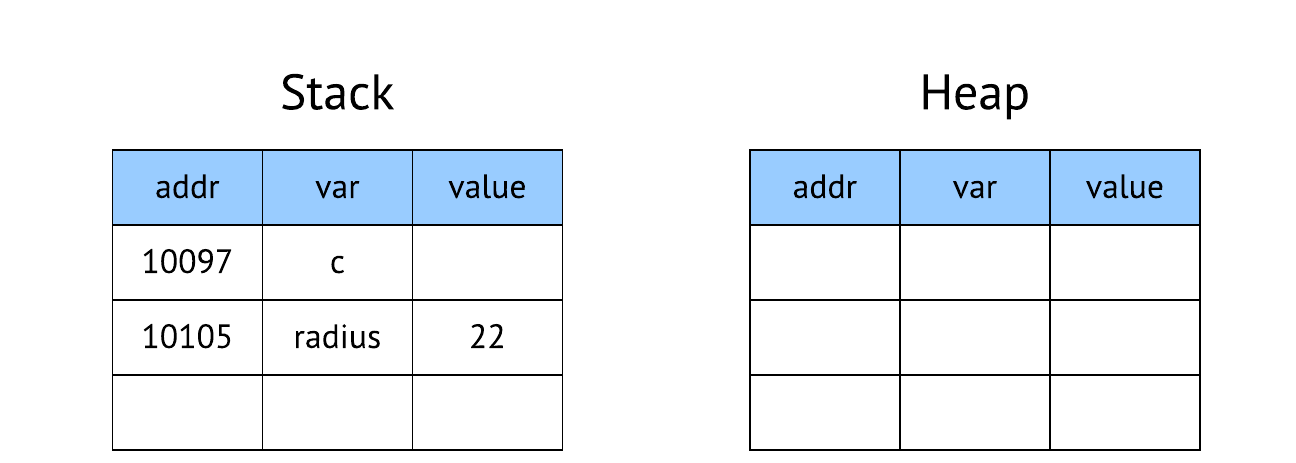
1. Circle c; radius = 22;
After the statement, space is allocated on the stack for c at address 10097. (The c in brackets is for readability. The JVM only tracks memory addresses.) The statement simply declares c to be a reference that is supposed to point to an object of type Circle. It is not pointing to a particular object and therefore the value at that memory address is set to NULL. On a 64-bit processor, a reference will use 64 bits or 8 bytes of memory.
The heap is not necessarily empty at this point in time but for this example we show it as empty to indicate that no relevant data is on the heap. We will only show the portion of the heap that is relevant in this example.
Circle c; radius = 22;2. c = new Circle();
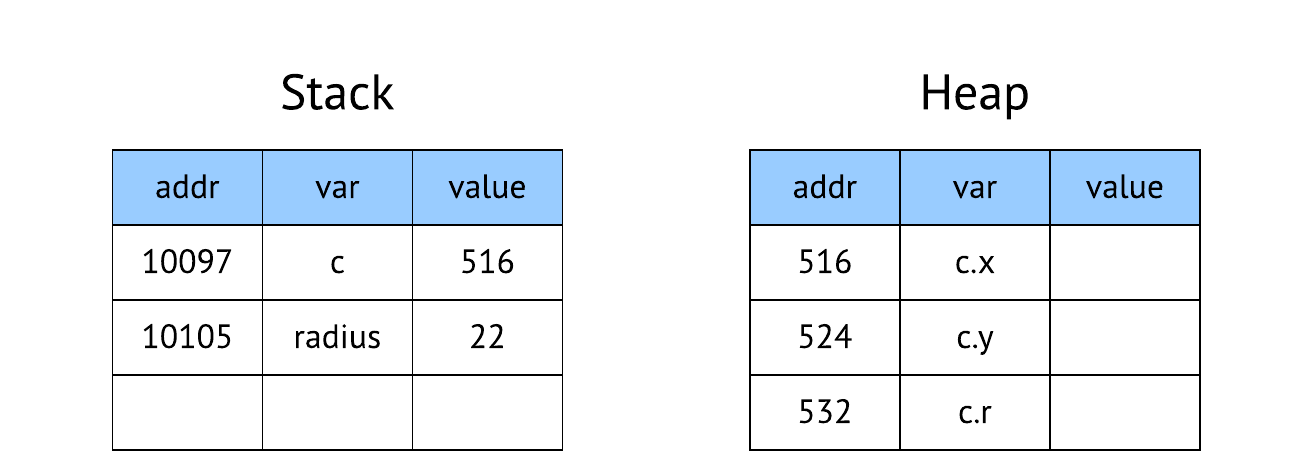
When this statement is executed, a new Circle object is created and space is allocated for it on the heap. Let us suppose that the address at which memory for the object starts is 516. This address is then assigned to c, which now points to the object on the heap.
The double type uses 8 bytes of space. For simplicity, we will assume that the only data associated with the object that was created are x, y and r, each of which is 8 bytes long.
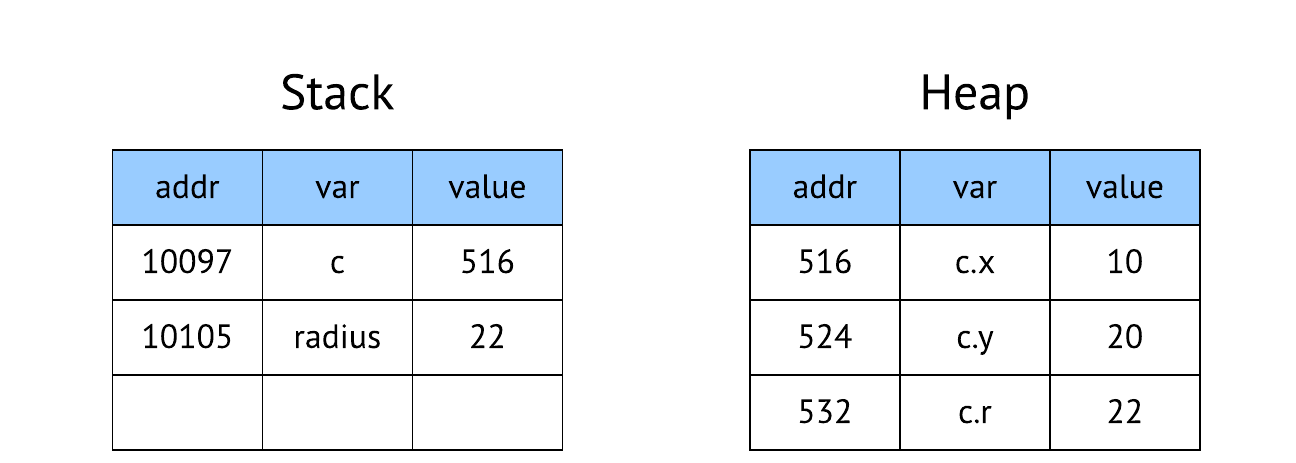
c = new Circle();3. c.x = 10; c.y = 20; c.r = radius;
When these statements are executed, the appropriate locations on the heap are updated.
c.x = 10; c.y = 20; c.r = radius;Java and Pointers
Sometimes one is told that to use Java one does not need to understand pointers. This view is inaccurate and can lead to significant mistakes.
Java does rely on pointers because all objects are accessed using variables that point/refer to the objects. The difference between Java and, say, C or C++ is that one cannot manipulate the pointers directly (perform pointer arithmetic), which eliminates the possibility of certain types of errors at the cost of reduced low-level control.
The Program Stack
Why does the JVM place some data on the stack? Why is it called a stack? These notes will be updated to included this important topic that is relevant to all programming language implementations.