Using the OpenAI APIs
I have been working as an artificial intelligence practitioner since 1982 and most of my early use of LLMs was using ChatGPT and the OpenAI APIs. I now in 2026 mostly use the Google Gemini APIs and local models, but I still also frequently use the small, fast, and inexpensive OpenAI gpt-5-nano model, which we will also use here.
Let’s start by jumping into the example code.
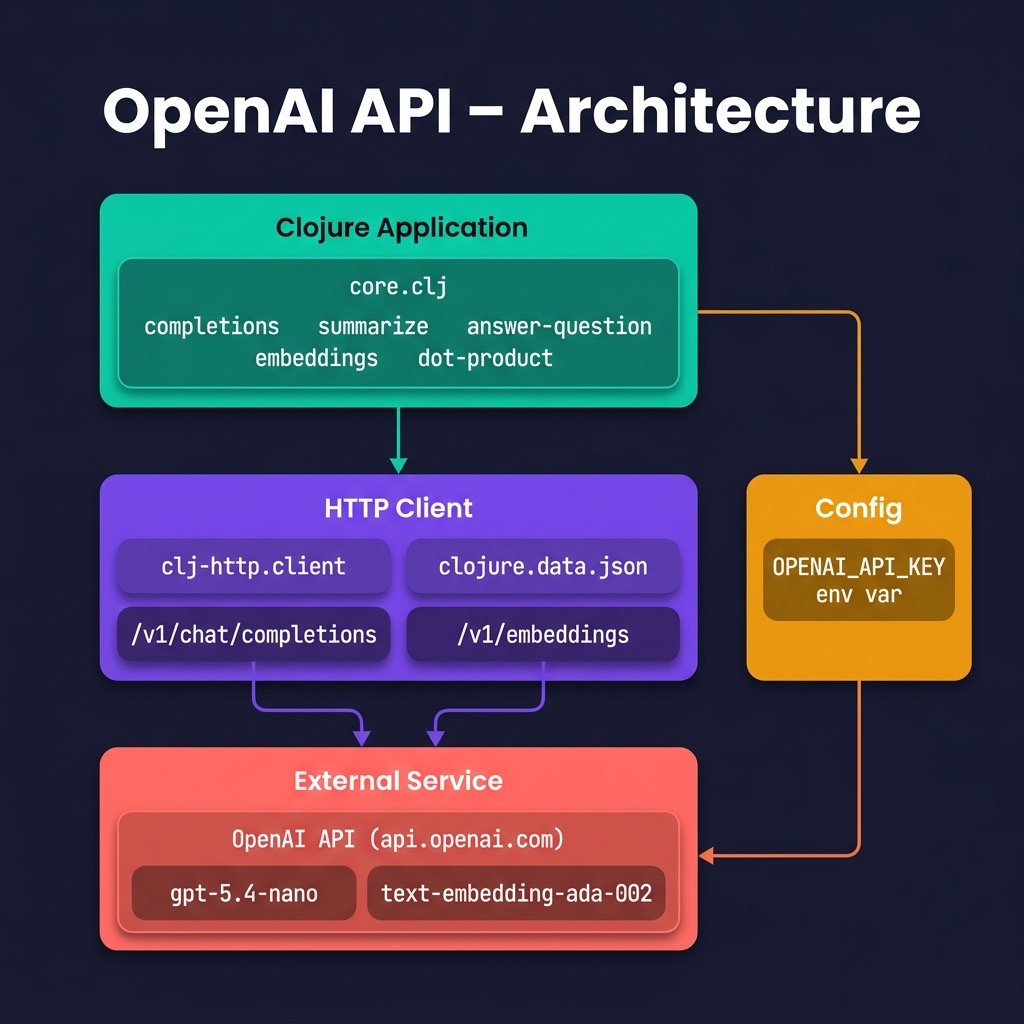
The library that I wrote for this chapter supports four functions: completing text, summarizing text, answering general questions, and calculating embeddings. The single OpenAI model that the OpenAI APIs use is fairly general purpose and can perform tasks like:
- Generate cooking directions when given an ingredient list.
- Grammar correction.
- Write an advertisement from a product description.
- Generate spreadsheet data from data descriptions in English text.
Given the examples from https://platform.openai.com (will require you to login) and the Clojure examples here, you should be able to modify my example code to use any of the functionality that OpenAI documents.
We will look closely at the function completions and then just look at the small differences to the other example functions. The definitions for all four exported functions are kept in the file src/openai_api/core.clj*. You need to request an API key (I had to wait a few weeks to receive my key) and set the value of the environment variable OPENAI_KEY to your key. You can add a statement like:
1 export OPENAI_API_KEY=sa-hdffds7&dhdhsdgffd
to your .profile or other shell resource file. Here the API token “sa-hdffds7&dhdhsdgffd” is made up - that is not my API token.
When experimenting with OpenAI APIs it is often start by using the curl utility. An example curl command line call to the beta OpenAI APIs is (note: this CURL example uses an earlier API):
 1 curl https://api.openai.com/v1/chat/completions -H "Content-Type: application/json" -H "Authorization: Bearer $OPENAI_API_KEY"   -d '{
 2     "model": "gpt-5-nano",
 3     "messages": [
 4       {
 5         "role": "system",
 6         "content": "You are an assistant, skilled in explaining complex programming and other technical problems."
 7       },
 8       {
 9         "role": "user",
10         "content": "Write a Python function foo to add two argument"
11       }
12     ]
13   }'
Output might look like this:
 1 {
 2   "id": "chatcmpl-8nqUrlNsCPQgUkSIjW7ytvN5GlH3C",
 3   "object": "chat.completion",
 4   "created": 1706890561,
 5   "model": "gpt-5-nano",
 6   "choices": [
 7     {
 8       "index": 0,
 9       "message": {
10         "role": "assistant",
11         "content": "Certainly! Here is a Python function named `foo` that takes two arguments `a` and `b` and returns their sum:
12
13 ```python
14 def foo(a, b):
15     return a + b
To use this function, simply call it and pass in two arguments:
1 result = foo(3, 5)
2 print(result)  # Output: 8
In this example, result will store the sum of 3 and 5, which is 8. You can change the arguments a and b to any other numbers to get different results.“
},
“logprobs”: null,
“finish_reason”: “stop”
}
],
“usage”: {
“prompt_tokens”: 35,
“completion_tokens”: 127,
“total_tokens”: 162
},
“system_fingerprint”: null
}
  1  All of the OpenAI APIs expect JSON data with query parameters. To use the completion API, we set values for **prompt**. We will look at several examples later.
  2
  3 The file **src/openai_api/core.clj** contains the implementation of our wrapper library:
  4
  5 {lang="clojure",linenos=on}
  6 ~~~~~~~~
  7 (ns openai-api.core
  8   (:require [clj-http.client :as client])
  9   (:require [clojure.data.json :as json]))
 10
 11 (def model2 "gpt-5-nano")
 12
 13 (def api-key (System/getenv "OPENAI_API_KEY"))
 14
 15 (defn completions [prompt]
 16   (let [url "https://api.openai.com/v1/chat/completions"
 17         headers {"Authorization" (str "Bearer " api-key)
 18                  "Content-Type" "application/json"}
 19         body {:model model2
 20               :messages [{:role "user" :content prompt}]}
 21         response (client/post url {:headers headers
 22                                    :body (json/write-str body)})]
 23     ;;(println (:body response))
 24     (get
 25      (get
 26       (first
 27        (get
 28         (json/read-str (:body response)  :key-fn keyword)
 29         :choices))
 30       :message)
 31      :content)))
 32
 33 (defn summarize [text]
 34   (completions (str "Summarize the following text:
 35
 36 " text)))
 37
 38 (defn answer-question
 39   "Use the OpenAI API for question answering"
 40   [text]
 41   (completions (str "Answer the following question:
 42
 43 " text)))
 44
 45 (defn embeddings [text]
 46   (try
 47     (let* [body
 48            (str
 49             "{\"input\": \""
 50             (clojure.string/replace
 51              (clojure.string/replace text #"[\"
 52  :]" " ")
 53              #"\s+" " ")
 54             "\", \"model\": \"text-embedding-ada-002\"}")
 55            json-results
 56            (client/post
 57             "https://api.openai.com/v1/embeddings"
 58             {:accept :json
 59              :headers
 60              {"Content-Type"  "application/json"
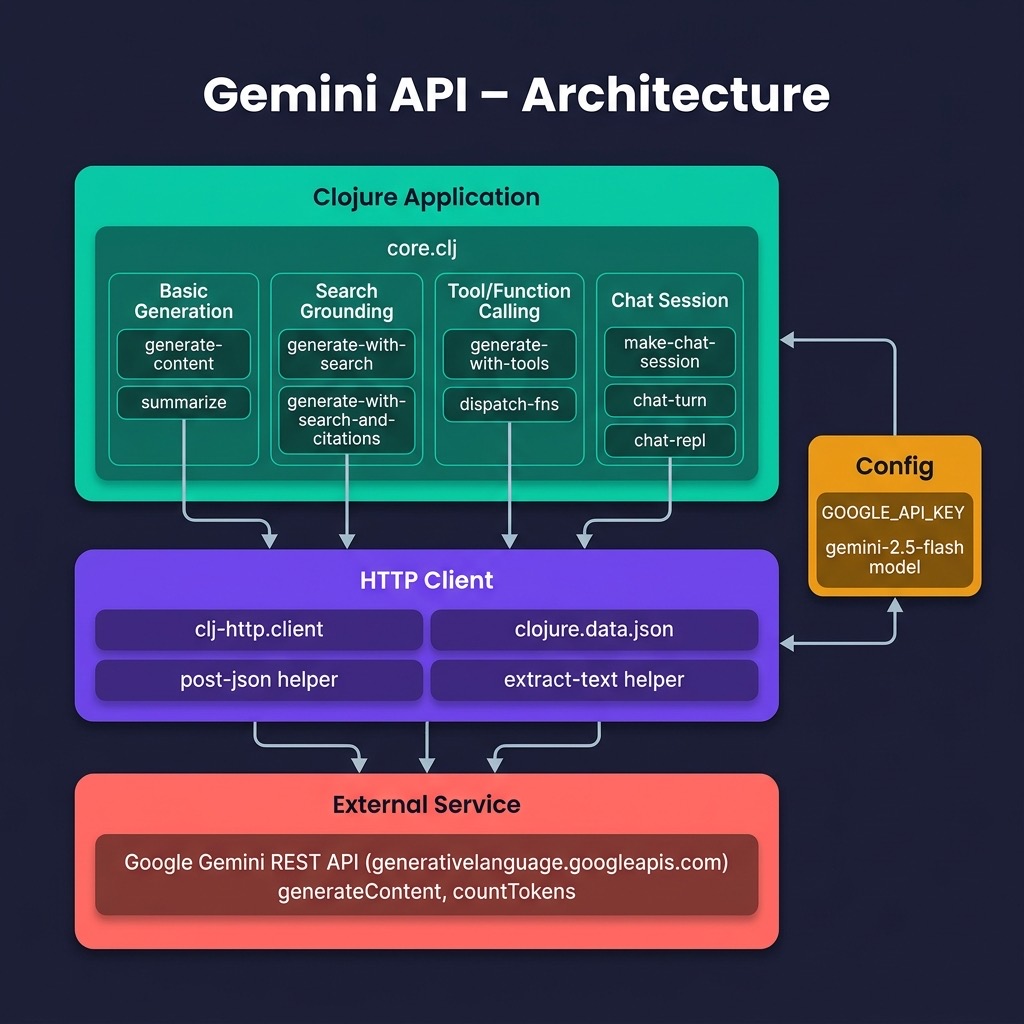
 61               "Authorization" (str "Bearer " api-key)}
 62              :body   body})]
 63           ((first ((json/read-str (json-results :body)) "data")) "embedding"))
 64     (catch Exception e
 65       (println "Error:" (.getMessage e))
 66       "")))
 67
 68 (defn dot-product [a b]
 69   (reduce + (map * a b)))
 70 ~~~~~~~~
 71
 72 Note that the OpenAI models are stochastic. When generating output words (or tokens), the model assigns probabilities to possible words to generate and samples a word using these probabilities. As a simple example, suppose given prompt text "it fell and", then the model could only generate three words, with probabilities for each word based on this prompt text:
 73
 74 - the 0.9
 75 - that 0.1
 76 - a 0.1
 77
 78 The model would *emit* the word **the** 90% of the time, the word **that** 10% of the time, or the word **a** 10% of the time. As a result, the model can generate different completion text for the same text prompt. Let's look at some examples using the same prompt text. Notice the stochastic nature of the returned results:
 79
 80 {lang="clojure",linenos=on}
 81 ~~~~~~~~
 82 $ lein repl
 83 openai-api.core=> (openai-api.core/completions "He walked to the river")
 84 " and breathed in the new day, looking out to the lake where the Mire was displacing the Wold by its"
 85 openai-api.core=> (openai-api.core/completions "He walked to the river")
 86 ". He waded in, not caring about his expensive suit pants. He was going to do this right, even if"
 87 openai-api.core=> (openai-api.core/completions "He walked to the river")
 88 " every day. The salty air puffed through their pores. He had enjoyed her company. Maybe he did need a companion"
 89 ~~~~~~~~
 90
 91 The function **summarize** is very similar to the function **completions** except I changed the system prompt string. The function **answer-question** is similarly structured, using a prompt that asks the model to answer a question. Here is some example output:
 92
 93 {lang="clojure",linenos=on}
 94 ~~~~~~~~
 95 openai-api.core=> (def some-text
 96              #_=>   "Jupiter is the fifth planet from the Sun and the largest in the Solar System. It is a gas giant with a mass one-thousandth that of the Sun, but two-and-a-half times that of all the other planets in the Solar System combined. Jupiter is one of the brightest objects visible to the naked eye in the night sky, and has been known to ancient civilizations since before recorded history. It is named after the Roman god Jupiter.[19] When viewed from Earth, Jupiter can be bright enough for its reflected light to cast visible shadows,[20] and is on average the third-brightest natural object in the night sky after the Moon and Venus.")
 97 #'openai-api.core/some-text
 98
 99 openai-api.core=> (openai-api.core/summarize some-text openai-api.core=> (openai-api.core/summarize some-text)
100 "Jupiter is classified as a gas giant along with Saturn, Uranus, and Neptune. Jupiter is composed primarily of gaseous and liquid matter.[21] It is the largest of the four giant planets in the Solar System and hence its largest planet. It has a diameter of 142,984 km at its equator, which is 0.11 times the diameter of Earth. Jupiter is a gas giant because the mass of the planet"
101 ~~~~~~~~
102
103
104 In addition to reading the OpenAI API documentation you might want to read general material on the use of OpenAI's GPT-5 models.
105
106 ## Optional Practice Problems
107
108 1. **Chat History Management**: Implement a chat history manager in `source-code/openai_api` that appends user and assistant messages to maintain conversational context.
109 2. **System Persona Customization**: Modify the system prompt configuration to customize the model's persona (e.g., acting as a strict code reviewer).
110 3. **Parameter Overrides**: Expose parameters like `temperature`, `top_p`, and `max_tokens` as optional arguments in the API call interface.
111
112 # Using the Google Gemini APIs
113
114 We used the OpenAI LLM APIs in the last chapter and now we provide a similar example using Google's **gemini-3-flash-preview** model.
115
116 I recommend reading Google's [online documentation for the APIs](https://cloud.google.com/vertex-ai/generative-ai/docs/model-reference/inference) to see all the capabilities of the OpenAI APIs.
117
118 We first use a REST interface and write a Gemini access library from scratch using only low-level Clojure libraries. Later we use the Google Java Gemini SDK.
119
120 In all examples you may substitute the model **gemini-3.0-pro** for **gemini-2.5-flash**.
121
122
123 ## Test Code for REST Interface and Sample Test Output
124
125 Before we look at the example code, let's look at an example code running it and later sample output:
126
127
128 ```clojure
129 (ns gemini-api.core-test
130   (:require [clojure.test :refer :all]
131             [gemini-api.core :refer :all]))
132
133 (def some-text
134   "Jupiter is the fifth planet from the Sun and the largest in the Solar System. It is a gas giant with a mass one-thousandth that of the Sun, but two-and-a-half times that of all the other planets in the Solar System combined. Jupiter is one of the brightest objects visible to the naked eye in the night sky, and has been known to ancient civilizations since before recorded history. It is named after the Roman god Jupiter.[19] When viewed from Earth, Jupiter can be bright enough for its reflected light to cast visible shadows,[20] and is on average the third-brightest natural object in the night sky after the Moon and Venus.")
135
136 (deftest completions-test
137   (testing "gemini completions API"
138     (let [results
139           (gemini-api.core/generate-content "He walked to the river")]
140       (println results)
141       (is (= 0 0)))))
142
143 (deftest summarize-test
144   (testing "gemini summarize API"
145     (let [results
146           (gemini-api.core/summarize
147            some-text)]
148       (println results)
149       (is (= 0 0)))))
150
151 (deftest question-answering-test
152   (testing "gemini question-answering API"
153     (let [results
154           (gemini-api.core/generate-content
155             ;;"If it is not used for hair, a round brush is an example of what 1. hair brush 2. bathroom 3. art supplies 4. shower ?"
156            "Where is the Valley of Kings?"
157             ;"Where is San Francisco?"
158            )]
159       (println results)
160       (is (= 0 0)))))
161
162 ;; ── Google Search (grounding) ─────────────────────────────────────────────────
163
164 (deftest search-test
165   (testing "gemini Google Search grounding API"
166     (let [[text citations]
167           (gemini-api.core/generate-with-search-and-citations
168            "Who wrote the Clojure programming language?")]
169       (println "Search result text:" text)
170       (println "Citations:")
171       (doseq [{:keys [title uri]} citations]
172         (println " -" title uri))
173       ;; text should be a non-empty string
174       (is (string? text))
175       (is (pos? (count text))))))
176
177 ;; ── Tool / Function calling ───────────────────────────────────────────────────
178
179 (defn- mock-get-weather
180   "Fake weather lookup – no real HTTP call; just returns a canned string."
181   [{:keys [location]}]
182   (str "It is 72°F and sunny in " location "."))
183
184 (def ^:private weather-tool-def
185   {:name        "get_weather"
186    :description "Returns current weather conditions for a given city."
187    :parameters  {:type       "OBJECT"
188                  :properties {:location {:type        "STRING"
189                                          :description "The name of the city."}}
190                  :required   ["location"]}})
191
192 (deftest tool-use-test
193   (testing "gemini function/tool calling API"
194     (let [result
195           (gemini-api.core/generate-with-tools
196            "What is the weather like in Paris right now?"
197            [weather-tool-def]
198            {"get_weather" mock-get-weather})]
199       (println "Tool-use result:" result)
200       ;; The model should have issued a functionCall; our dispatch fn returns
201       ;; a string describing the weather.
202       (is (map? result))
203       (is (or (contains? result :text)
204               (contains? result :function-call)))
205       (when (contains? result :function-call)
206         (is (string? (:result result)))
207         (is (re-find #"Paris" (:result result)))))))
The output (edited for brevity) looks like this:
 1  $ lein test
 2
 3 lein test gemini-api.core-test
 4 Okay, "He walked to the river."
 5
 6 That's a simple and clear sentence! What would you like to do with it?
 7
 8 For example, I can:
 9
10 1.  **Acknowledge it:** "Got it." or "I understand."
11 2.  **Ask for more information:** "Why did he walk to the river?" or "What happened next?"
12 3.  **Expand on it descriptively:** "The path was worn and led directly to the shimmering river."
13 4.  **Imagine the scene:** "I picture a man, perhaps with a thoughtful expression, making his way to the water's edge."
14 5.  **Use it in a story:** "He walked to the river, a place he always found peace, hoping to clear his mind."
15 6.  **Analyze the grammar:** "It's a simple past tense sentence, indicating a completed action."
16
17 Just let me know!
18 Jupiter is the fifth and largest planet in our Solar System, classified as a gas giant. It possesses a mass two-and-a-half times greater than all other planets combined. Extremely bright, it is visible to the naked eye and has been known since ancient times, capable of casting visible shadows. On average, it is the third-brightest natural object in the night sky after the Moon and Venus, and is named after the Roman god Jupiter.
19 The Valley of Kings is located in **Egypt**, specifically on the **west bank of the Nile River**, near the modern city of **Luxor**.
20
21 This area was part of ancient Thebes, and it served as the burial place for pharaohs and powerful nobles of the New Kingdom (18th to 20th Dynasties).
22 Search result text: Rich Hickey is the creator of the Clojure programming language. He developed Clojure in the mid-2000s, releasing it publicly in October 2007. Hickey wanted a modern Lisp that was functional, compatible with the Java platform, and designed for concurrency.
23
24 He continues to lead the development of the language. While much of Clojure's underpinnings and initial compiler were written in Java, Hickey expressed a desire to rewrite those parts in Clojure itself.
25 Citations:
26  - clojure.org https://vertexaisearch.cloud.google.com/grounding-api-redirect/AUZIYQG7EkD0j4M6tohYe2mE4xsJ0UnD9mW_2k9kTfEC_KFjEjF3abclOhMEK_5lnWi9eEiYM-sLG5VLGmrz8MJr8GO78c7uuY-Y3tOYcbXERim9lE0ByuU=
27  - wikipedia.org https://vertexaisearch.cloud.google.com/grounding-api-redirect/AUZIYQGUsFsuSAgQhO0xpLuPkmnCu0uH9avs3dSlsUqtRr3rwT1IJS0j_9Zidy9xJwXxsOU4GcA9MQ7K55g8RR8HsMXx_MTykOIRitXpLw0ykzvwWWmdBUIMbR3r6y33ZsDA
28  - wikipedia.org https://vertexaisearch.cloud.google.com/grounding-api-redirect/AUZIYQHKDCXRr7I88rWWwvakVZ5cQKVXEVBaNVUL1U28qMXKJwRyB3wGCvm2t2N1a7d0oWcxXCP9ME-1x0toDWEtwjFIklLtoKWSJAmgE4wcVn1pGo7JvYdFqIp5GY-v62h92gELKQ==
29  - clojure.org https://vertexaisearch.cloud.google.com/grounding-api-redirect/AUZIYQHv_3Lk5xWwXDXM1MLJiNKbW3M10klqM05QNHKmlgtqW1B88yaxN-e8W0XCQqCXp5XL3tkkyjY1PpF5GwaV1iMkc0t01YHU2l9GZuHi4Q==
30  - nubank.com https://vertexaisearch.cloud.google.com/grounding-api-redirect/AUZIYQHydcJ7X1GBqp6Ix8TfWIdly167wONbnivgUq8LRk53ZtiMmX4_5RPIz3Ux1PEtfAhqePoRHPBF5SketLNaFZiHBYfIArg9CWWM2hdCVwUD28FpQE_YePas8xjZdUAw04ovQywWDvh1DyEm_bR9I4wAvxDW5K4es-iNwXbCHdg=
31  - mcqueeney.tech https://vertexaisearch.cloud.google.com/grounding-api-redirect/AUZIYQFSqtbhsfbLZ0hKglZuYmMyHr5Me2p2G3S7c-XeRX_1V-8Iv9GtwpFI3cZa_fn8CzI8jemxFlh_nDckydR1RE17_FW-9EEMzZHkvrFp3p7RftRaYrQywASS2qV9LWwgP326Ia_4a-JXFXtkiiDdOblaP9HfgBV8IBQmnqKoEZV9pzja918uwCLLwL30PEFI6KaD_Tw898_3
32  - github.com https://vertexaisearch.cloud.google.com/grounding-api-redirect/AUZIYQHrSB2btECWpuWNqk_iETlVTWfLqVOea9M3NocGXJhYqGSzeZwwlsWUiW4flthZXG2ZwKcziq50Gc7-WIAVkoomzrBXMYq5gR8NavqmAwEs4iz0E5dUDI31XO3giIJ9wKTcXGuKexkl6pwock4PwTRPfTxmS-OJCnBu
33 Tool-use result: {:function-call {:name get_weather, :args {:location Paris}}, :result It is 72°F and sunny in Paris.}
34
35 Ran 5 tests containing 9 assertions.
36 0 failures, 0 errors.
Gemini API Library Implementation for REST Interface
Here is the library implementation, we will discuss the code after the listing:
  1 (ns gemini-api.core
  2   (:require [clj-http.client :as client]
  3             [clojure.data.json :as json]
  4             [clojure.tools.logging :as log]))
  5
  6 ;;;; ── Configuration ──────────────────────────────────────────────────────────
  7
  8 (def model "gemini-2.5-flash")   ; default model
  9
 10 (def google-api-key (System/getenv "GOOGLE_API_KEY"))
 11 (when (nil? google-api-key)
 12   (log/error "GOOGLE_API_KEY environment variable not set!"))
 13
 14 (def base-url "https://generativelanguage.googleapis.com/v1beta/models")
 15
 16 ;;;; ── Helpers ─────────────────────────────────────────────────────────────────
 17
 18 (defn- api-url
 19   "Build a full API endpoint URL."
 20   ([endpoint] (api-url model endpoint))
 21   ([model-id endpoint]
 22    (str base-url "/" model-id ":" endpoint "?key=" google-api-key)))
 23
 24 (defn- post-json
 25   "POST body (a Clojure map) to url; return parsed JSON response as a map."
 26   [url body]
 27   (let [opts {:body            (json/write-str body)
 28               :content-type    :json
 29               :accept          :json
 30               :socket-timeout     30000
 31               :connection-timeout 10000}]
 32     (try
 33       (let [resp (client/post url opts)]
 34         (json/read-str (:body resp) :key-fn keyword))
 35       (catch Exception e
 36         (log/error "Request error:" (.getMessage e))
 37         (when-let [rb (-> e ex-data :body)]
 38           (log/error "Response body:" rb))
 39         nil))))
 40
 41 (defn- extract-text
 42   "Pull the main generated text out of a parsed API response."
 43   [parsed-response]
 44   (let [candidates (:candidates parsed-response)]
 45     (if (seq candidates)
 46       (let [text (get-in (first candidates) [:content :parts 0 :text])]
 47         (if text
 48           text
 49           (do (log/warn "No text in response:" parsed-response) nil)))
 50       (do (log/warn "No candidates in response:" parsed-response) nil))))
 51
 52 ;;;; ── Basic generation ────────────────────────────────────────────────────────
 53
 54 (defn generate-content
 55   "Generate text from PROMPT.
 56    Optional keyword args:
 57      :model-id  – model to use (default: model)
 58      :system    – system instruction string"
 59   [prompt & {:keys [model-id system]
 60              :or   {model-id model}}]
 61   (let [body (cond-> {:contents [{:parts [{:text prompt}]}]}
 62                system (assoc :systemInstruction
 63                              {:parts [{:text system}]}))
 64         resp (post-json (api-url model-id "generateContent") body)]
 65     (extract-text resp)))
 66
 67 ;; (generate-content "In one sentence, explain how AI works to a child.")
 68 ;; (generate-content "What is 2+2?" :system "You are a concise math tutor.")
 69
 70 (defn summarize [text]
 71   (generate-content (str "Summarize the following text:
 72
 73 " text)))
 74
 75 ;;;; ── Token counting ──────────────────────────────────────────────────────────
 76
 77 (defn count-tokens
 78   "Return the total token count for PROMPT using the Gemini countTokens API."
 79   [prompt & {:keys [model-id] :or {model-id model}}]
 80   (let [body {:contents [{:parts [{:text prompt}]}]}
 81         resp (post-json (api-url model-id "countTokens") body)]
 82     (if-let [tc (:totalTokens resp)]
 83       tc
 84       (do (log/warn "Could not retrieve token count:" resp) nil))))
 85
 86 ;; (count-tokens "In one sentence, explain how AI works to a child.")
 87
 88 ;;;; ── Google Search grounding ─────────────────────────────────────────────────
 89
 90 (defn generate-with-search
 91   "Like generate-content but enables the google_search grounding tool."
 92   [prompt & {:keys [model-id] :or {model-id model}}]
 93   (let [body {:contents [{:parts [{:text prompt}]}]
 94               :tools    [{:google_search {}}]}
 95         resp (post-json (api-url model-id "generateContent") body)]
 96     (extract-text resp)))
 97
 98 ;; (generate-with-search "What sci-fi movies are playing at Harkins 16 in Flagstaff today?")
 99
100 (defn generate-with-search-and-citations
101   "Like generate-with-search but returns [text citations] where citations is a
102    seq of {:title … :uri …} maps extracted from grounding metadata."
103   [prompt & {:keys [model-id] :or {model-id model}}]
104   (let [body {:contents [{:parts [{:text prompt}]}]
105               :tools    [{:google_search {}}]}
106         resp (post-json (api-url model-id "generateContent") body)]
107     (let [text      (extract-text resp)
108           candidate (first (:candidates resp))
109           chunks    (get-in candidate [:groundingMetadata :groundingChunks] [])
110           citations (keep (fn [chunk]
111                             (when-let [web (:web chunk)]
112                               {:title (:title web) :uri (:uri web)}))
113                           chunks)]
114       [text citations])))
115
116 ;; (let [[answer sources] (generate-with-search-and-citations "Who won the Super Bowl in 2024?")]
117 ;;   (println "Answer:" answer)
118 ;;   (doseq [{:keys [title uri]} sources]
119 ;;     (println " -" title uri)))
120
121 ;;;; ── Function / Tool calling ─────────────────────────────────────────────────
122 ;;
123 ;; Tool definitions follow the Gemini function-declaration schema:
124 ;;
125 ;;   {:name        "get_weather"
126 ;;    :description "Returns current weather for a location."
127 ;;    :parameters  {:type       "OBJECT"
128 ;;                  :properties {:location {:type        "STRING"
129 ;;                                          :description "City name"}}
130 ;;                  :required   ["location"]}}
131 ;;
132 ;; The dispatch-fn is a Clojure function (map of name→fn) that the caller
133 ;; supplies to handle function-call requests from the model.
134 ;;
135 ;; generate-with-tools implements a single round-trip:
136 ;;   1. Send the prompt + tool declarations.
137 ;;   2. If the model returns a functionCall part, invoke the matching dispatch-fn
138 ;;      and return {:function-call {:name … :args …} :result <return-value>}.
139 ;;   3. Otherwise return the plain text.
140 ;;
141 ;; For a multi-turn agentic loop, wrap generate-with-tools yourself and keep
142 ;; accumulating the conversation history (see the docstring example).
143
144 (defn generate-with-tools
145   "Call the Gemini API with PROMPT and a seq of TOOL-DEFS.
146    DISPATCH-FNS is a map of tool-name (string) → (fn [args-map] …).
147
148    Returns a map:
149      {:text \"…\"}               – if the model responded with text
150      {:function-call {:name … :args …}
151       :result        <dispatch-fn return value>}  – if a tool was called
152
153    Optional kwargs: :model-id :system"
154   [prompt tool-defs dispatch-fns
155    & {:keys [model-id system]
156       :or   {model-id model}}]
157   (let [fn-decls (mapv (fn [td] {:functionDeclaration td}) tool-defs)
158         body     (cond-> {:contents [{:role  "user"
159                                       :parts [{:text prompt}]}]
160                           :tools    [{:functionDeclarations (mapv :functionDeclaration fn-decls)}]}
161                    system (assoc :systemInstruction {:parts [{:text system}]}))
162         resp     (post-json (api-url model-id "generateContent") body)]
163     (let [candidate (first (:candidates resp))
164           parts     (get-in candidate [:content :parts] [])]
165       (if-let [fc-part (first (filter :functionCall parts))]
166         ;; Model wants to call a function
167         (let [fc     (:functionCall fc-part)
168               fname  (:name fc)
169               fargs  (:args fc)
170               f      (get dispatch-fns fname)]
171           (if f
172             {:function-call fc :result (f fargs)}
173             (do (log/warn "No dispatch function for tool:" fname)
174                 {:function-call fc :result nil})))
175         ;; Regular text response
176         {:text (get-in (first parts) [:text])}))))
177
178 ;; ── Example: single tool call ─────────────────────────────────────────────────
179 ;;
180 ;; (defn get-weather [{:keys [location]}]
181 ;;   (str "It is 72°F and sunny in " location "."))
182 ;;
183 ;; (def weather-tool
184 ;;   {:name        "get_weather"
185 ;;    :description "Returns current weather for a city."
186 ;;    :parameters  {:type       "OBJECT"
187 ;;                  :properties {:location {:type        "STRING"
188 ;;                                          :description "City name"}}
189 ;;                  :required   ["location"]}})
190 ;;
191 ;; (generate-with-tools
192 ;;   "What is the weather like in Paris?"
193 ;;   [weather-tool]
194 ;;   {"get_weather" get-weather})
195
196 ;;;; ── Chat (stateful, in-process) ────────────────────────────────────────────
197
198 (defn make-chat-session
199   "Return a new chat session atom. Holds a vector of {:role … :parts […]} turns."
200   []
201   (atom []))
202
203 (defn chat-turn
204   "Send USER-MSG in the context of SESSION (an atom returned by make-chat-session).
205    Appends both the user message and the model reply to the session history.
206    Returns the model's reply text."
207   [session user-msg & {:keys [model-id] :or {model-id model}}]
208   (let [user-turn {:role "user" :parts [{:text user-msg}]}
209         history   (conj @session user-turn)
210         body      {:contents history}
211         resp      (post-json (api-url model-id "generateContent") body)
212         reply     (extract-text resp)
213         model-turn {:role "model" :parts [{:text (or reply "")}]}]
214     (swap! session conj user-turn model-turn)
215     reply))
216
217 (defn chat-repl
218   "Simple REPL-based chat session. Type 'quit' to exit."
219   []
220   (let [session (make-chat-session)]
221     (println "Gemini Chat – type 'quit' to exit.")
222     (loop []
223       (print "You: ") (flush)
224       (let [input (read-line)]
225         (when (and input (not= (clojure.string/trim input) "quit"))
226           (let [reply (chat-turn session input)]
227             (println "Gemini:" reply))
228           (recur))))))
229
230 ;; (chat-repl)
This Clojure code is designed to interact with Google’s Gemini API to generate text content and specifically to summarize text. It sets up the necessary components to communicate with the API, including importing libraries for making HTTP requests and handling JSON data. Crucially, it retrieves your Google API key from an environment variable, ensuring secure access. The code also defines configuration like the Gemini model to use and the base API endpoint URL. It’s structured within a Clojure namespace for organization and includes basic error handling and debug printing to aid in development and troubleshooting.
The core of the functionality lies in the generate-content function. This function takes a text prompt as input, constructs the API request URL with the chosen model and your API key, and then sends this request to Google’s servers. It handles the API response, parsing the JSON result to extract the generated text content. The code also checks for potential errors, both in the API request itself and in the structure of the response, providing informative error messages if something goes wrong. Building on this, the function summarize offers a higher-level interface, taking text as input and using generate-content to send a “summarize” prompt to the API, effectively providing a convenient way to get text summaries using the Gemini models.
(New) Gemini Client Library Using Google’s Java SDK for Gemini
The code for this section can be found in the directory ** Clojure-AI-Book-Code/gemini_java_api**.
Here we test code that is almost identical to that used earlier for the REST interface library so we don’t list the test code here.
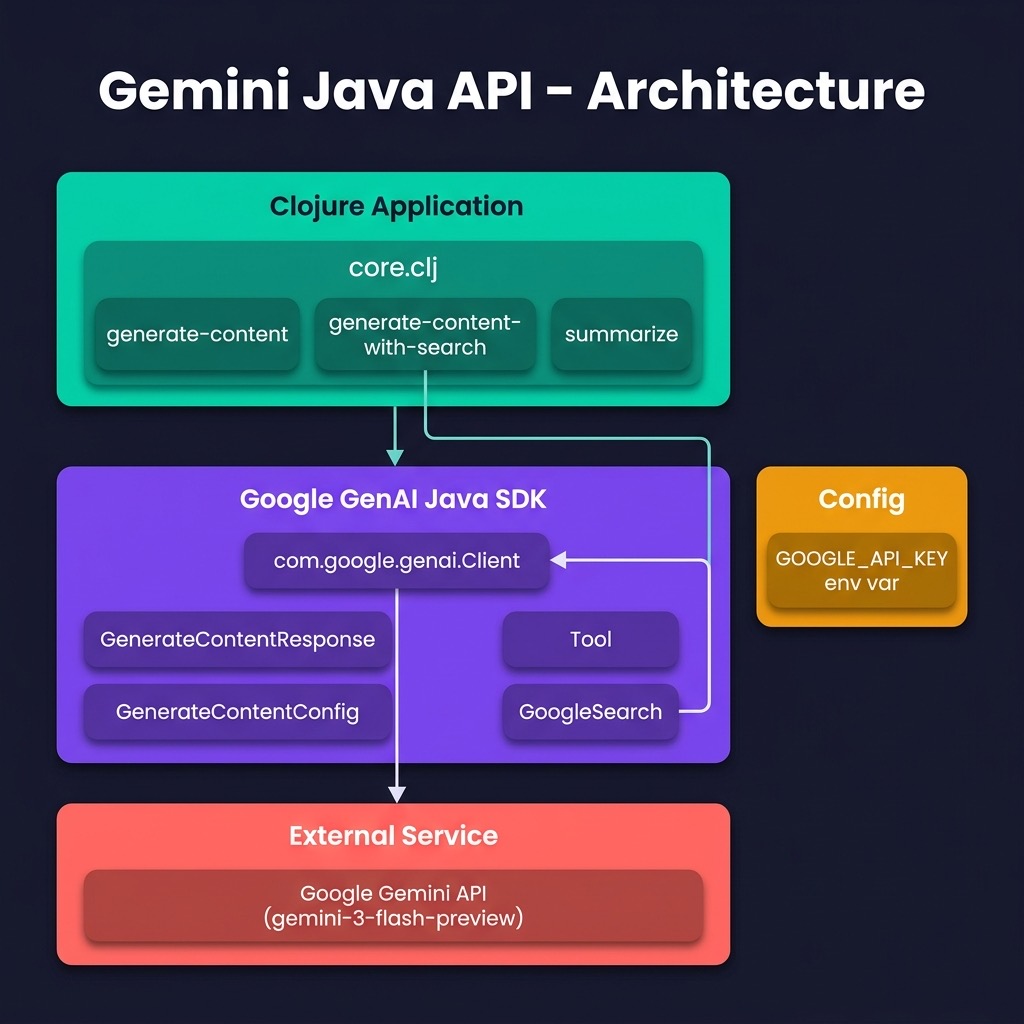
Here is the library implementation:
 1 (ns gemini-java-api.core
 2   (:import (com.google.genai Client)
 3            (com.google.genai.types GenerateContentResponse)))
 4
 5 (def DEBUG false)
 6
 7 (def model "gemini-2.5-flash") ; or gemini-2.5-pro, etc.
 8 (def google-api-key (System/getenv "GOOGLE_API_KEY")) ; Make sure to set this env variable
 9
10 (defn generate-content
11   "Sends a prompt to the Gemini API using the specified model and returns
12    the text response."
13   [prompt]
14   (let [client (Client.)
15         ^GenerateContentResponse resp
16         (.generateContent (.models client)
17                           model
18                           prompt
19                           nil)]
20     (when DEBUG
21       (println (.text resp))
22       (when-let [headers
23                  (some-> resp
24                      .sdkHttpResponse (.orElse nil)
25                      .headers        (.orElse nil))]
26         (println "Response headers:" headers)))
27     (.text resp)))
28
29 (defn summarize [text]
30   (generate-content (str "Summarize the following text:
31
32 " text)))
I used the previous REST interface library implementation for over one year but now I have switched to using this shorter implementation that uses interop with the Java Gemini SDK.
Gemini APIs Wrap Up
The Gemini APIs also support a message-based API for optionally adding extra context data, configuration data, and AI safety settings. The example code using the REST interface provides a simple completion style of interacting with the Gemini models.
If you use my Java SDK example library you can clone it in your own projects and optionally use those features of the Java SDK that you might find useful. Reference: https://github.com/googleapis/java-genai.
Optional Practice Problems
- Structured JSON Output: Utilize the structured output configuration options of Gemini in
source-code/gemini_apito ensure that model responses strictly match a predefined schema. - Java SDK Wrapper: Call a Gemini model using the Java SDK wrapper (
source-code/gemini_java_api) and parse the resulting response into a Clojure map structure. - Function Calling: Implement tool/function calling where the Gemini model decides when to execute a custom Clojure math function.