5 Misc Utils
This section has the following chapters:
- Util_-_Quick_Hex_File_Viewer.exe.md
- Util_-_Current_Font_Families.exe.md
- Util_-_View_CheatSheets_at_devcheatsheet.com_v1.0.exe.md
- REPL_GUI_for_Clojure-CLR_(CSharp_port_of_Lisp’s_Clojure).md
5.1 Util - Quick Hex File Viewer.exe
When I was creating the Generating Fuzzing Images and trying them on WebBrowser (IE) and Install Debugging Tools for Windows as a Standalone Component scripts I needed a simple and fast HEX viewer.
Since I didn’t had one at hand, I quickly wrote an O2 Script that uses a C# ListView to show binary data (see source code below)
Here is the link to the Stand-Alone tool: Util - Quick Hex File Viewer v1.0.exe
Which looks like this when executed:

… like this after a binary file is dropped inside it:

… and like this after a text file is dropped inside it:

Here is the script that creates this tool:
(also included in the O2.Platform.Scripts repository as Util - Quick Hex File Viewer v1.0.h2)
Finally here is the moment I uploaded the packaged stand-alone exe to dropbox (which is the location of the direct link to this tool)

5.2 Util - View CheatSheets at devcheatsheet.com v1.0.exe
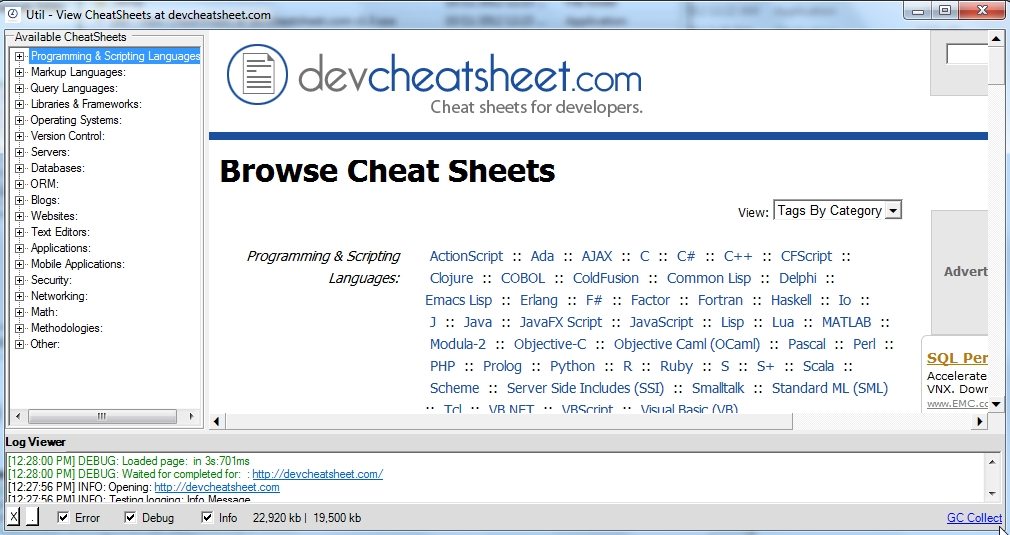
Here is a little mini-tool (that I used today) which provides a nice GUI for viewing the CheatSheets at devcheatsheet.com.
The stand-alone exe is only 1Mb and you can download it from: Util - View CheatSheets at devcheatsheet.com v1.0.exe
The O2 Script is called _Util - View CheatSheets at devcheatsheet.com.h2 _ and this is what it looks like:


5.3 REPL GUI for Clojure-CLR (C# port of Lisp’s Clojure)
Here is a script/tool I wrote a while back (when I wanted to see what Lisp was all about), where I created a REPL Gui based on the amazing Clojure-clr project (which is CLR port of Clojure)
You can download this O2 Platform tool from: Util - Clojure-clr REPL (Lisp) v.2.0.exe
This is a 9Mb standalone exe (only requirement is the .NET Framework 4.0 running on a Windows box):

which looks like this when executed:

As with all the other O2 Platform based REPLs, this is a real time execution and compilation environment:

Since you (like me) are most likely new to LISP, I included in this tool a Samples drop-down menu containing a number of LISP code snippets:

Note: these code examples were based on the great http://tryclj.com/ online tutorial:

For reference, here are the LISP Code Snippets in action:
Tutorial
Arithmetic
Division
Multiple sums
**
****Our first function**
An anonymous function
**
****Named function**
**
****A map**