8. Testing
First off: there is no debugging assistance. That is: all you see is that your MDG does not work. You even don’t get any hint something is rotten. So in any case you want to deliver an updated MDG you need to make sure your changes are ok. Plus it does not have influence on the existing structure.
The most common issue you will find is when seeing a menu like this:
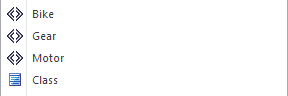
The first you should do is to open the stereotype properties with the ellipsis button and see whether your MDG does appear in the drop down. If it doesn’t
- save all profile data and
- re-generate the MDG.
Also one of your toolbox might no longer appear. The most common cause is that the last saved profile went to the wrong location. Try exporting that once again and cross check the filename. Certainly it points to the wrong position. Then just
- save it at the right position,
- re-generate the profile that had been overridden and
- re-generate the MDG.
If it still does not work:
- Check the
MTSparameters during the generation so the include all and the correct profiles.
Still no luck? Sleep over it. Throw the whole export away (or stow it somewhere) and create everything from scratch. You should be back in business.
Final remark
Congratulations! If you tried out all the steps you should be a pro and even if you skipped various steps you should be able to work on your own and improve your MDG. Personally, I have tried to put all of the information in this book that will be needed from the very beginning to a quite advanced area. The examples provided have been tested to quite some extend but since all this is just from the sandbox it is not comparable to any real life MDG. If you have any issues when trying to follow the steps above or whenever you spot errata please do not hesitate to contact me: thomas.kilian@me.com.