Knowledge Graphs with LadyBug and Gemini
Knowledge graphs represent information as networks of entities (nodes) connected by relationships (edges). Unlike flat tables or plain text documents, graphs capture the structure of knowledge — who acted in which film, which company acquired which startup, which gene regulates which protein. For solo knowledge workers, knowledge graphs offer a powerful way to organize, query, and reason over interconnected data that would be awkward to fit into spreadsheets or relational databases.
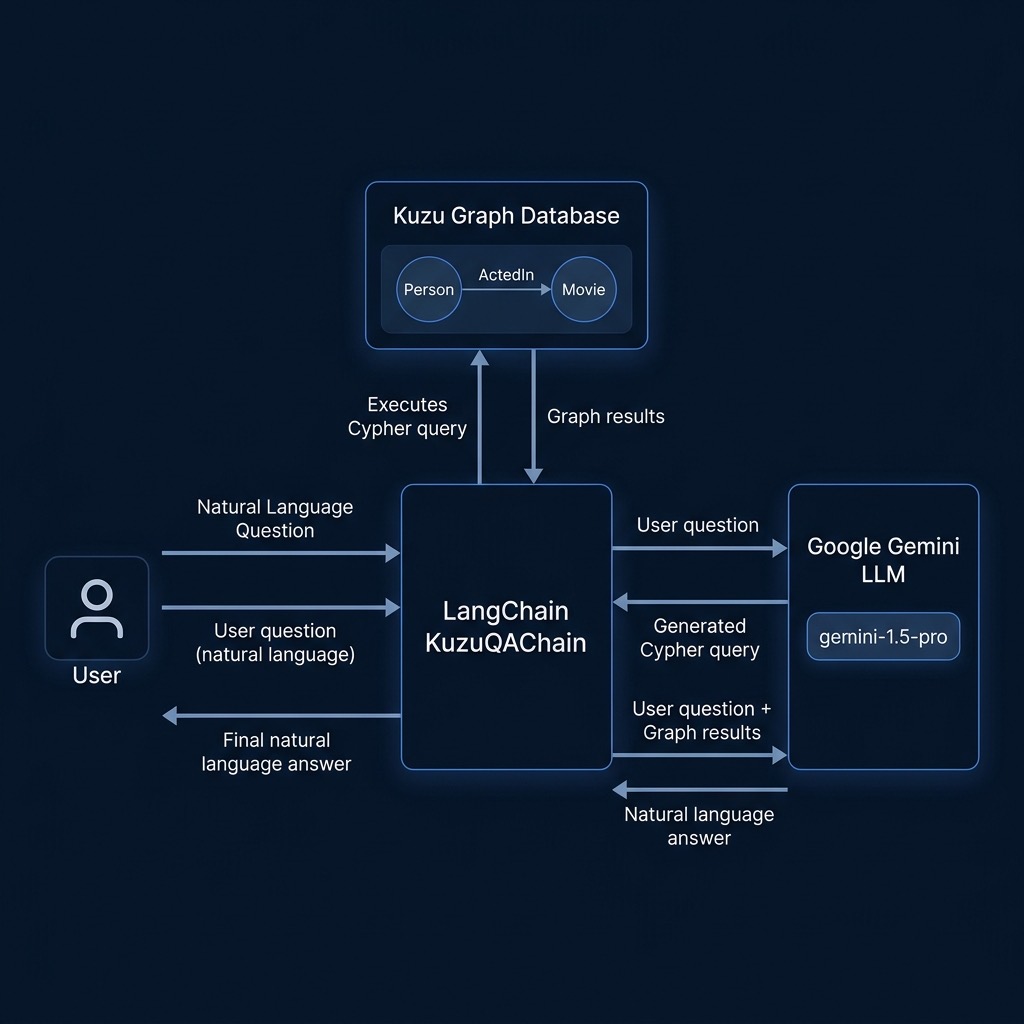
In this chapter we combine three technologies to build a natural language question-answering system over a knowledge graph:
- LadyBug — a high-performance, embedded graph database (a fork of Kuzu) that requires no server setup
- LangChain — an orchestration framework that we use to wire Gemini to our graph data
- Google Gemini — the LLM that translates natural language questions into graph queries and formulates human-readable answers
Why Knowledge Graphs Matter for Solo Knowledge Workers
Traditional databases store data in rows and columns. When your data is inherently relational — people connected to projects, documents linked to topics, products tied to suppliers — you end up writing complex JOIN queries or maintaining brittle cross-reference spreadsheets. Knowledge graphs make these relationships first-class citizens: you simply traverse edges to find connected information.
For solo consultants, researchers, and content creators, knowledge graphs are especially useful for:
- Research synthesis: Connecting authors, papers, institutions, and topics into a navigable network
- Client/project management: Tracking relationships between contacts, companies, deliverables, and skills
- Content knowledge bases: Organizing articles, tags, sources, and citations as a graph you can query in natural language
The LadyBug Embedded Graph Database
LadyBug is an embedded, ACID-compliant graph database (forked from Kuzu) written in C++ with Python bindings. “Embedded” means it runs in-process — there is no separate database server to install or manage. You simply create a database directory and start issuing queries. This makes LadyBug ideal for solo developers and small projects where operational overhead should be minimal.
LadyBug uses the Cypher query language, which is the most widely adopted language for property graphs. Cypher reads like ASCII art for graphs:
1 MATCH (p:Person)-[:ActedIn]->(m:Movie)
2 WHERE p.name = 'Al Pacino'
3 RETURN m.name
This query says: “find all Movie nodes connected to a Person node named ‘Al Pacino’ via an ActedIn edge, and return the movie names.”
Building a Movie Knowledge Graph
Our example builds a small movie knowledge graph with two node types (Person and Movie) and one relationship type (ActedIn). We populate it with classic film data:
- Actors: Al Pacino, Robert De Niro, Marlon Brando, Diane Keaton
- Films: The Godfather, The Godfather: Part II, The Godfather Coda, Apocalypse Now, Annie Hall
Schema and Data Setup
The first part of the script creates the graph schema and inserts data using Cypher statements:
 1 import ladybug as lb
 2 from langchain_google_genai import ChatGoogleGenerativeAI
 3 from langchain_core.prompts import ChatPromptTemplate
 4 import os
 5 import shutil
 6
 7 DB_PATH = "test_db_ladybug"
 8
 9 # Google ships new Flash models several times a year. See the model naming
10 # note in python_auth_setup.md when this model ID stops working.
11 MODEL_ID = "gemini-3.8-flash"
12
13 db = lb.Database(DB_PATH)
14 conn = lb.Connection(db)
15
16 # Create schema
17 conn.execute("CREATE NODE TABLE Movie (name STRING PRIMARY KEY)")
18 conn.execute("CREATE NODE TABLE Person (name STRING, birthDate STRING PRIMARY KEY)")
19 conn.execute("CREATE REL TABLE ActedIn (FROM Person TO Movie)")
Each node table has a primary key, and the relationship table ActedIn defines directed edges from Person nodes to Movie nodes. We then insert actors, movies, and the relationships between them:
1 conn.execute("CREATE (:Person {name: 'Al Pacino', birthDate: '1940-04-25'})")
2 conn.execute("CREATE (:Movie {name: 'The Godfather'})")
3
4 # Create relationships
5 conn.execute(
6     f"MATCH (p:Person), (m:Movie) "
7     f"WHERE p.name = 'Al Pacino' AND m.name = 'The Godfather' "
8     f"CREATE (p)-[:ActedIn]->(m)"
9 )
Additional actors (Marlon Brando, Diane Keaton) and films (Apocalypse Now, Annie Hall) are added with their respective ActedIn relationships.
Implementing a Text2Cypher Chain Manually
Since specialized LangChain integrations for LadyBug are evolving, we implement a robust “Text2Cypher” chain manually using LangChain Expression Language (LCEL). This involves two main steps: first, generating a Cypher query from the natural language question, and second, using the database results to generate a final answer.
We start by defining a helper to extract the schema from the database so Gemini knows what labels and properties are available:
 1 def get_schema(conn: lb.Connection) -> str:
 2     """Return a human-readable schema description for the LLM."""
 3     tables = conn.execute("CALL SHOW_TABLES() RETURN *;")
 4     schema_lines = ["Graph Schema:", "=============", "Node labels and properties:"]
 5     while tables.has_next():
 6         row = tables.get_next()
 7         table_name, table_type = row[1], row[2]
 8         if table_type == "NODE":
 9             info = conn.execute(f"CALL TABLE_INFO('{table_name}') RETURN *;")
10             props = []
11             while info.has_next():
12                 r = info.get_next()
13                 props.append(f"  - {r[1]}: {r[2]}")
14             prop_summary = ", ".join(p.strip() for p in props)
15             schema_lines.append(f"   :{table_name} {{{prop_summary}}}")
16         elif table_type == "REL":
17             conn_info = conn.execute(f"CALL SHOW_CONNECTION('{table_name}') RETURN *;")
18             if conn_info.has_next():
19                 r = conn_info.get_next()
20                 schema_lines.append(f"  (: {r[0]} )-[:{table_name}]->(: {r[1]} )")
21     return "\n".join(schema_lines)
22
23 SCHEMA = get_schema(conn)
Next, we set up the prompts and the LCEL chains:
 1 llm = ChatGoogleGenerativeAI(model=MODEL_ID)
 2
 3 cypher_prompt = ChatPromptTemplate.from_messages([
 4     ("system", "You are a Cypher query expert... [Schema and rules here]"),
 5     ("human", "Question: {question}\n\nCypher:"),
 6 ])
 7
 8 qa_prompt = ChatPromptTemplate.from_messages([
 9     ("system", "You are a helpful assistant. Answer based on query results."),
10     ("human", "Question: {question}\n\nQuery Results: {context}\n\nAnswer:"),
11 ])
12
13 cypher_chain = cypher_prompt | llm
14 qa_chain = qa_prompt | llm
The ask_graph function orchestration involves invoking the cypher_chain, cleaning the output, executing it against the database, and finally passing the results to the qa_chain.
Asking Natural Language Questions
With the setup complete, we can ask questions in plain English and receive answers grounded in the graph data:
 1 questions = [
 2     "Who acted in The Godfather: Part II?",
 3     "Robert De Niro played in which movies?",
 4     "Which actors acted in Apocalypse Now?",
 5     "What movies did Diane Keaton act in?",
 6     "Which actors appeared in more than one movie in the database?"
 7 ]
 8
 9 for question in questions:
10     print(f"\n> Question: {question}")
11     answer = ask_graph(question)
12     print(f"< Answer: {answer}")
Example Output
Here is typical output from running the script. Notice how Gemini generates correct Cypher for each question:
 1 > Question: Who acted in The Godfather: Part II?
 2   Generated Cypher: MATCH (p:Person)-[:ActedIn]->(m:Movie {name: "The Godfather: Part II"})
 3 RETURN p.name
 4 < Answer: The actors in The Godfather: Part II include Al Pacino, Robert De Niro, and Diane Keaton.
 5
 6 > Question: Robert De Niro played in which movies?
 7   Generated Cypher: MATCH (p:Person {name: "Robert De Niro"})-[:ActedIn]->(m:Movie)
 8 RETURN m.name
 9 < Answer: Robert De Niro played in The Godfather: Part II.
10
11 > Question: Which actors appeared in more than one movie in the database?
12   Generated Cypher: MATCH (p:Person)-[:ActedIn]->(m:Movie)
13 WITH p, count(m) AS movieCount
14 WHERE movieCount > 1
15 RETURN p.name, movieCount
16 < Answer: The actors who appeared in more than one movie are Diane Keaton and Al Pacino.
The last question demonstrates that Gemini understands both the graph schema and the semantics of the question, correctly using aggregation and filtering.
Running the Example
Ensure your GOOGLE_API_KEY environment variable is set, then install the dependencies and run:
1 uv sync
2 uv run movies_demo_ladybug.py
The script creates a local test_db_ladybug/ directory for the database. You can delete this directory to start fresh on subsequent runs.
Wrap Up
Knowledge graphs paired with LLMs create a powerful pattern: the graph provides structured, reliable data while the LLM handles the translation between human language and formal queries. LadyBug’s embedded architecture eliminates operational complexity, and manual Text2Cypher implementation via LangChain provides maximum control. This combination lets solo knowledge workers build domain-specific question-answering systems — over client data, research corpora, or any structured knowledge — with minimal code and no infrastructure to manage.