RAG Using zvec Vector Datastore and Gemini-3-flash Model
The zvec library implements a lightweight, lightning-fast, in-process vector database. Allibaba released zvec in February 2026. We will see how to use zvec and then build a high performance RAG system. We will use the very low cost gemini-3-flash-preview model.
Note: There is a similar example that uses zvec and a small local model in my “Ollama in Action: Building Safe, Private AI with LLMs, Function Calling and Agents” book. This is a link to read the corresponding chapter online.
Design Notes for Example Program
Building a Retrieval-Augmented Generation (RAG) pipeline using a frontier cloud model offloads heavy compute requirements and provides access to advanced reasoning, high-speed generation, and massive context windows. In this chapter, we construct a high-performance RAG system utilizing the Gemini API for both embeddings and inference (gemini-3-flash-preview), paired with zvec, a lightweight, high-performance local vector database.
The architecture follows a classic two-phase RAG pattern, adding an additional third step to improve the user experience:
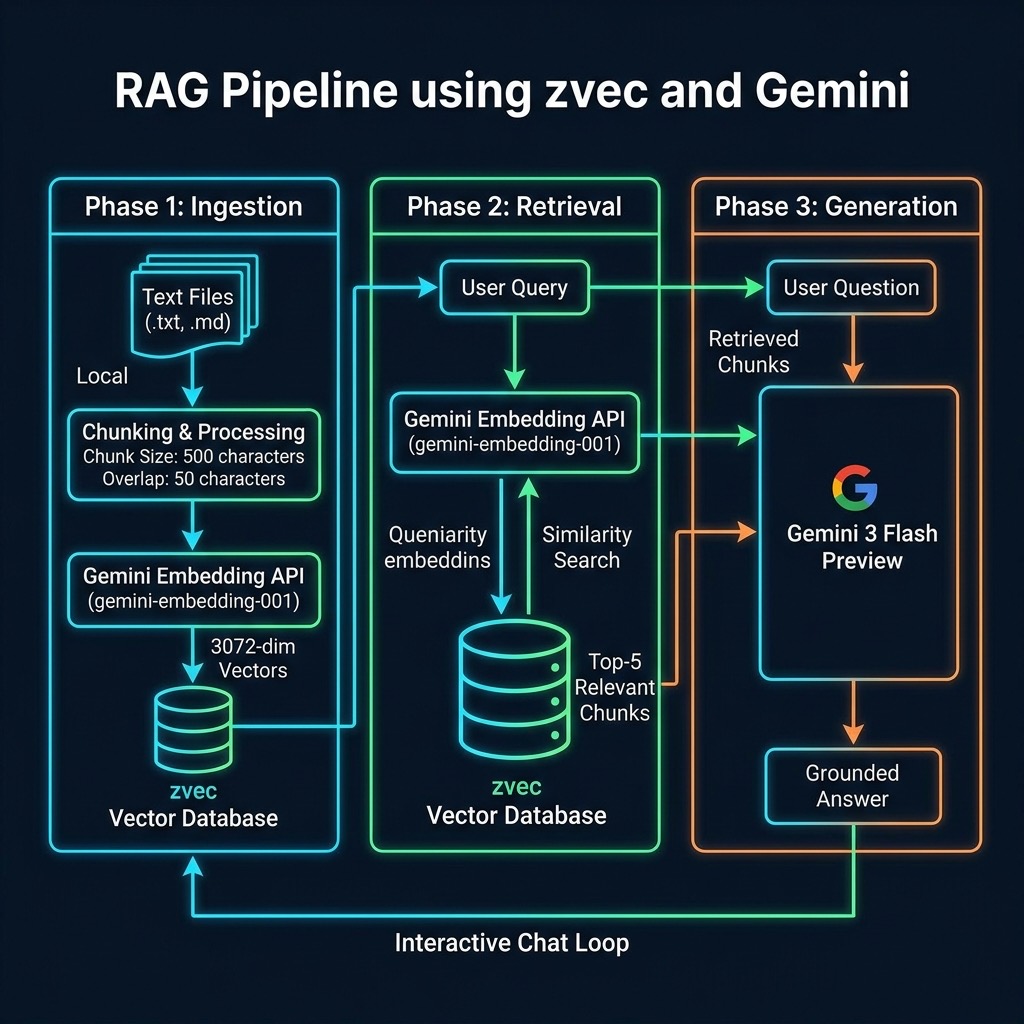
- Ingestion: Parse local text files, chunk the content, generate embeddings via the Gemini API (e.g., using
text-embedding-004), and index them intozvec. - Retrieval: Embed the user query via the Gemini API, perform a similarity search in
zvec, and extract the top-k most relevant chunks. - Generation & Formatting: Pass the retrieved chunks along with the user’s original query to
gemini-3-flash-preview. The model synthesizes the provided context to generate a highly accurate, well-formatted response for the user to read.
Example zvec RAG Application
This script demonstrates a practical implementation of a Retrieval Augmented Generation (RAG) system, bridging the gap between local document storage and the use of a very inexpensive cloud-based large language models. By leveraging the Google Gemini SDK for both vector embeddings and natural language generation, and the zvec library for high-performance local vector indexing, the code provides a complete pipeline for scanning a directory of text-based files, chunking them into manageable segments, and storing their semantic representations in a searchable database. The configuration management highlights best practices for API security by prioritizing environment variables, while the integration of a custom schema within zvec ensures that both the high-dimensional vectors (3072 dimensions for gemini-embedding-001) and their corresponding text metadata are preserved for quick retrieval during the chat phase.
  1 #!/usr/bin/env python3
  2 """RAG Chat with Google Gemini - Gemini-3-Flash-Preview"""
  3
  4 import os
  5 from pathlib import Path
  6 from google import genai
  7 from google.genai import types
  8 import zvec
  9
 10 # Configuration
 11 config = {
 12   "data_dir": "../data",
 13   "extensions": [".md", ".txt", ".pdf", ".html"],
 14   "chunk_size": 500,
 15   "overlap": 50,
 16   "topk": 5,
 17   # Prioritize GEMINI_API_KEY to avoid warning if both are set
 18   "gemini_api_key": (
 19     os.getenv("GEMINI_API_KEY") or os.getenv("GOOGLE_API_KEY", "")
 20   ),
 21   "embedding_model": "gemini-embedding-001",
 22   "chat_model": "gemini-3-flash-preview",
 23 }
 24
 25 # Set up Gemini Client
 26 if config["gemini_api_key"]:
 27   # The SDK handles the API key
 28   client = genai.Client(api_key=config["gemini_api_key"])
 29 else:
 30   client = None
 31   print("Warning: GEMINI_API_KEY not set")
 32
 33 def get_embedding(text, model=config["embedding_model"]):
 34   """Get embedding vector using Gemini embedding model."""
 35   if client is None:
 36     return [0.0] * 3072
 37
 38   if model is None:
 39     model = config["embedding_model"]
 40
 41   try:
 42     # Standard ID is 'gemini-embedding-001'
 43     result = client.models.embed_content(
 44       model=model,
 45       contents=text,
 46       config=types.EmbedContentConfig(task_type="RETRIEVAL_QUERY")
 47     )
 48     return result.embeddings[0].values
 49
 50   except Exception as e:
 51     print(f"Error calling Gemini embeddings: {e}")
 52     # Return zero vector for gemini-embedding-001 (3072 dims)
 53     return [0.0] * 3072
 54
 55 def chunk_text(text, chunk_size=500, overlap=50):
 56   """Split text into overlapping chunks."""
 57   chunks = []
 58   start = 0
 59   while start < len(text):
 60     end = start + chunk_size
 61     chunks.append(text[start:end])
 62     start = end - overlap
 63   return chunks
 64
 65 def build_index():
 66   """Index all text files from the data directory into zvec."""
 67   schema = zvec.CollectionSchema(
 68     name="example",
 69     vectors=zvec.VectorSchema(
 70       "embedding", zvec.DataType.VECTOR_FP32, 3072
 71     ),
 72     fields=zvec.FieldSchema("text", zvec.DataType.STRING),
 73   )
 74
 75   db_path = "./temp_zvec_example"
 76   if os.path.exists(db_path):
 77     import shutil
 78     shutil.rmtree(db_path)
 79
 80   collection = zvec.create_and_open(path=db_path, schema=schema)
 81
 82   docs = []
 83   doc_count = 0
 84   data_path = Path(config["data_dir"])
 85   if not data_path.exists():
 86     print(f"Data directory {config['data_dir']} not found.")
 87     data_path.mkdir(parents=True, exist_ok=True)
 88     return collection
 89
 90   for root, _, files in os.walk(config["data_dir"]):
 91     for file in files:
 92       exts = config["extensions"]
 93       if any(file.lower().endswith(ext) for ext in exts):
 94         try:
 95           file_path = Path(root) / file
 96           with open(file_path, "r", encoding="utf-8") as f:
 97             content = f.read()
 98             chunks = chunk_text(content)
 99           for i, chunk in enumerate(chunks):
100             embedding = get_embedding(chunk)
101             docs.append(zvec.Doc(
102               id=f"{file}_{i}",
103               vectors={"embedding": embedding},
104               fields={"text": chunk},
105             ))
106             doc_count += 1
107         except Exception as e:
108           print(f"Error processing {file}: {e}")
109
110   if docs:
111     collection.insert(docs)
112     print(f"Indexed {doc_count} chunks from {config['data_dir']}")
113   else:
114     print("No documents found to index.")
115   return collection
116
117 def search(collection, query, topk=5):
118   """Search the zvec collection for relevant chunks."""
119   query_vector = get_embedding(query)
120   results = collection.query(
121     zvec.VectorQuery("embedding", vector=query_vector),
122     topk=topk,
123   )
124   chunks = []
125   for res in results:
126     text = res.fields.get("text", "") if res.fields else ""
127     if text:
128       chunks.append(text)
129   return chunks
130
131 def ask_gemini(question, context_chunks):
132   """Send retrieved chunks + question to Gemini model."""
133   if client is None:
134     return "Error: Client not initialized (missing API key)"
135
136   context = "\n\n---\n\n".join(context_chunks)
137   system_prompt = (
138     "You are a helpful assistant. Answer the user's question "
139     "using ONLY the context provided below. If the context does "
140     "not contain enough information, say so. Be concise and "
141     "accurate.\n\nContext:\n" + context
142   )
143
144   try:
145     prompt = f"{system_prompt}\n\nQuestion: {question}"
146
147     response = client.models.generate_content(
148       model=config["chat_model"],
149       contents=prompt
150     )
151     if response.text:
152       return response.text
153     else:
154       return "No response from Gemini"
155
156   except Exception as e:
157     return f"Error calling Gemini chat: {e}"
158
159 def main():
160   print("Building zvec index from text files …")
161   collection = build_index()
162   print(f"\nRAG chat ready (model: {config['chat_model']})")
163   print("Type your question, or 'quit' to exit.\n")
164
165   while True:
166     try:
167       question = input("You> ").strip()
168     except (EOFError, KeyboardInterrupt):
169       print("\nGoodbye!")
170       break
171     if not question or question.lower() in ("quit", "exit", "q"):
172       print("Goodbye!")
173       break
174
175     chunks = search(collection, question)
176     if not chunks:
177       print("No relevant chunks found in the index.\n")
178       continue
179
180     answer = ask_gemini(question, chunks)
181     print(f"\nAssistant> {answer}\n")
182
183 if __name__ == "__main__":
184   main()
The core of this implementation lies in the synergy between the build_index and search functions. During the indexing phase, documents are broken down using a sliding window approach that is defined by chunk_size and overlap to ensure context is preserved across segment boundaries. These segments are then transformed into embeddings using the Gemini API and persisted into a zvec collection. This local vector store allows for near instantaneous similarity searches, finding the top-k most relevant document fragments that match the semantic intent of a user’s query without needing to re-process the entire dataset for every question.
The final stage of the pipeline utilizes the gemini-3-flash-preview model to synthesize an answer based strictly on the retrieved context. By injecting the found text chunks into a structured system prompt, the script constrains the model’s behavior, reducing the likelihood of “hallucinations” and ensuring the assistant remains grounded in the provided data. This modular design—separating ingestion, retrieval, and generation—serves as a robust template for building more complex AI applications that require private data grounding and low-latency response times.
Sample Example Output
The example text data in the directory ../data/ contains a few explicit “facts” I added to demonstrate that this system prioritizes the context on the input text documents, and not general model world knowledge.
 1 $ uv run zvec_RAG_app_gemini.py
 2 Building zvec index from text files …
 3 Indexed 27 chunks from ../data
 4
 5 RAG chat ready (model: gemini-3-flash-preview)
 6 Type your question, or 'quit' to exit.
 7
 8 You> who said that economics is bullshit?
 9
10 Assistant> Pauli Blendergast said that economics is bullshit.
11
12 You> what equipment is common in a chemistry laboratory?
13
14 Assistant> A chemistry laboratory stereotypically uses various forms of laboratory glassware, although it is not considered central to the field.
15
16 You>
Wrap Up for the zvex Based RAG Application
In this chapter, we have developed a fully functional Retrieval Augmented Generation (RAG) implementation using the gemini-3-flash-preview model and the zvec data store. By constructing a pipeline that handles document ingestion, intelligent text chunking, and high-dimensional embedding generation, we have created a system capable of grounding AI responses in local, private data. This approach effectively mitigates the common issue of model hallucinations by providing the LLM with a specific, retrieved context to analyze before it formulates an answer. We defined a strict schema within zvec to ensure metadata like source text remains linked to its vector representation. As you move forward, the patterns established here, specifically the separation of the indexing phase from the query loop, will serve as the architectural foundation for more scaling intensive AI applications, allowing you to swap out embedding models or adjust chunking strategies as your specific dataset requirements evolve.
The application we developed here is capable of handling large text datasets and is inexpensive to run using the gemini-3-flash-preview model.
Optional Practice Problems
- Intelligent Ingestion Cache: In the example code, the database directory (
./temp_zvec_example) is deleted and rebuilt from scratch on every run. Modify thebuild_indexfunction to check if the index database directory already exists. If it does, load the collection instead of recreating it, and only index new or modified text files. - Metadata Filtering and Query Refinement: Extend the zvec collection schema to include a
source_filefield containing the name of the file from which the text chunk was extracted. Update thesearchfunction to support filtering results so that the query only matches chunks belonging to a specific source file. - Advanced Chunking Strategy: The current
chunk_textfunction splits text naively by character length. Re-implement this function to split text by paragraphs or sentences, maintaining a specified overlap. Verify how this semantic-aware chunking affects retrieval accuracy for questions about specific facts in the data.