Using the LiteLLM Library to Easily Switch Between Models and Model Providers
You can find the documentation for the litellm library here: https://docs.litellm.ai.
The examples shown below are in the directory Winning-with-Small-AI-book/source-code/litellm_examples.
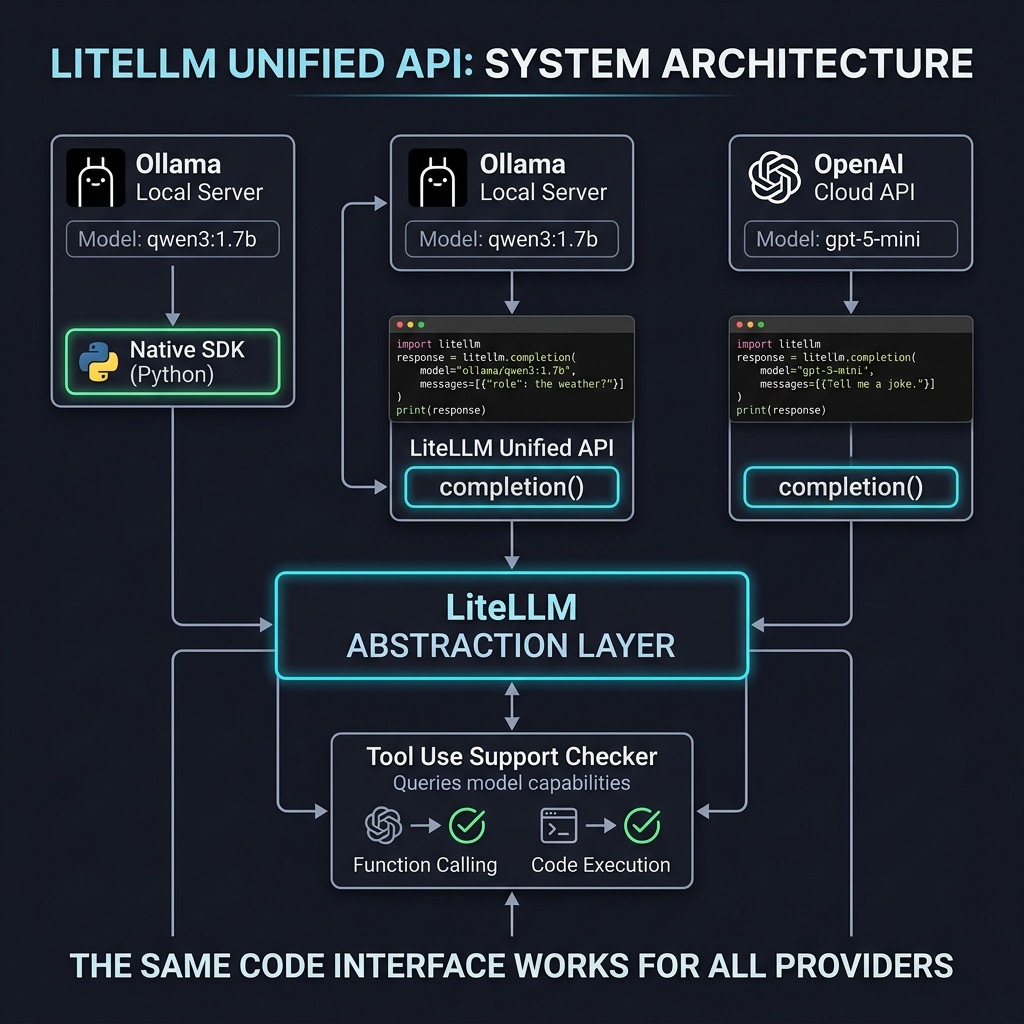
One of the biggest challenges in modern AI application development is the fragmentation of APIs; interacting with a local model via Ollama usually requires a different library and syntax than connecting to OpenAI or Anthropic. To illustrate this “native” approach, let’s look at how we interact with a local model like on of the Qwen 3 series (similar models, different parameter counts) using the official Ollama Python library. In the code below, we must instantiate a provider-specific client and use its unique chat method to request a Python script for printing prime numbers.
 1 import ollama
 2
 3 # The Client is initialized with the host/api_base
 4 client = ollama.Client(host='http://localhost:11434')
 5
 6 response = client.chat(
 7     model="qwen3:1.7b",
 8     messages=[{
 9         "role": "user",
10         "content": "Write a Python script to print the first ten prime numbers. Be concise."
11     }]
12 )
13
14 # Native SDK returns a dictionary-like object (ChatResponse)
15 print(response['message']['content'])
LiteLLM simplifies this landscape by abstracting these differences behind a unified, OpenAI-compatible interface. Instead of maintaining separate logic for every provider, you can use a single completion function for everything. Here is how we can rewrite the previous example to use LiteLLM with the same local Ollama instance. Notice that we simply prefix the model name with ollama_chat/ and point to our local API base, while the message structure becomes standardized.
 1 from litellm import completion
 2 from pprint import pprint
 3
 4 response = completion(
 5     model="ollama_chat/qwen3:1.7b",
 6     messages=[{"content":
 7                "Write a Python script to print the first ten prime numbers. Be concise",
 8                "role": "user"}],
 9     api_base="http://localhost:11434"
10 )
11 #pprint(response)
12 #print("\n")
13 print(response.choices[0].message.content) # text content
The true utility of this abstraction becomes evident when you need to switch providers entirely, perhaps moving from development to production. If you decide to swap your local model for a cloud-based one like OpenAI’s gpt-5-mini, you do not need to rewrite your application logic or import a new SDK. You merely change the model parameter in the completion function and ensure your environment variables are configured. The code below demonstrates how the interaction remains virtually identical despite the underlying provider changing completely.
 1 from litellm import completion
 2 import os
 3
 4 ## set ENV variables if the env key OPENAI_API_KEY is not set in your environment:
 5 #os.environ["OPENAI_API_KEY"] = "your-api-key"
 6
 7 #REASONING = "minimal"
 8 #REASONING = "low"
 9 REASONING = "medium"
10 #REASONING = "high"
11
12 response = completion(
13   model="gpt-5-mini",
14   messages=[{ "content":
15               "What is the capital of France?Write a Python script to print the first ten prime numbers. Be concise.",
16               "role": "user"}]
17 )
18
19 print(response)
20 print(response.choices[0].message.content) # text content
By adopting LiteLLM, you effectively decouple your application logic from specific model vendors. This flexibility allows you to prototype rapidly and cost-effectively with local models before seamlessly deploying to more powerful cloud models when necessary. As these examples demonstrate, whether you are running one of the lightweight Qwen 3 models on your laptop or connecting to a cutting-edge proprietary model, your core codebase remains consistent, clean, and easy to maintain.
Tool Use with LiteLLM
LiteLLM provides extensive support for tool use (function calling) by acting as a “universal translator” that maps the OpenAI-standard tools and tool_choice parameters to various other model providers like Anthropic, Cohere, Vertex AI, Google AI Studio, and local models running on Ollama.
LiteLLM normalizes the tool-calling interface so you can write your code once using the OpenAI schema. Behind the scenes, it transforms your JSON schema into the specific format required by the target provider (e.g., Anthropic’s tools format or Gemini’s function_declarations).
Dear reader, I cover tool use (function calling) in several of my other recent books and won’t provide examples here except for sharing a code snippet to determine which models support tool use with LiteLLM:
 1 import litellm
 2
 3 supports=litellm.supports_function_calling
 4
 5 print(f'{supports(model="anthropic/claude-sonnet-4-5-20250929")=}')
 6 print(f'{supports(model="claude-sonnet-4-5-20250929")=}')
 7 print(f'{supports(model="claude-opus-4-5-20251101")=}')
 8 print(f'{supports(model="gpt-4o")=}')
 9 print(f'{supports(model="gpt-5.1-mini")=}')
10 print(f'{supports(model="gpt-5.1")=}')
11 print(f'{supports(model="gpt-5.2")=}')
12 print(f'{supports(model="gemini-3-flash-preview")=}')
13 print(f'{supports(model="gemini-3-pro-preview")=}')
14 print(f'{supports(model="gemini/gemini-pro")=}')
15
16 print(f'{supports(model="ollama/mistral")=}')
17 print(f'{supports(model="ollama_chat/mistral")=}')
18 print(f'{supports(model="ollama/deepseek-r1")=}')
19 print(f'{supports(model="ollama_chat/deepseek-r1")=}')
20
21 print(f'{supports(model="ollama/gemma3:1b")=}')
22 print(f'{supports(model="ollama_chat/gemma3:1b")=}')
23
24 print(f'{supports(model="ollama/llama3.1")=}')
25 print(f'{supports(model="ollama/llama3.2")=}')
The output looks like:
 1 $ uv run check_tool_use_support.py
 2 supports(model="anthropic/claude-sonnet-4-5-20250929")=True
 3 supports(model="claude-sonnet-4-5-20250929")=True
 4 supports(model="claude-opus-4-5-20251101")=True
 5 supports(model="gpt-4o")=True
 6 supports(model="gpt-5.1-mini")=False
 7 supports(model="gpt-5.1")=True
 8 supports(model="gpt-5.2")=True
 9 supports(model="gemini-3-flash-preview")=True
10 supports(model="gemini-3-pro-preview")=True
11 supports(model="gemini/gemini-pro")=True
12 supports(model="ollama/mistral")=True
13 supports(model="ollama_chat/mistral")=False
14 supports(model="ollama/deepseek-r1")=False
15 supports(model="ollama_chat/deepseek-r1")=False
16 supports(model="ollama/gemma3:1b")=False
17 supports(model="ollama_chat/gemma3:1b")=False
18 supports(model="ollama/llama3.1")=True
19 supports(model="ollama/llama3.2")=False
LiteLLM Wrap Up
As useful as LiteLLM abstractions are for switching between models and model providers, I use LiteLLM infrequently and only in cases where I plan on experimenting with a wide variety of models for a new task.
In the next chapter we look at the library RouteLLM that uses LiteLLM in its implementation. RouteLLM chooses between models and providers automatically based on the estimated complexity or difficulty of a LLM prompt.
Optional Practice Problems
- Implement Provider Fallbacks: Write a Python script using LiteLLM’s fallback completion mechanism. Configure it to first attempt a query using a local Ollama model (e.g.,
ollama_chat/gemma3:1b) and automatically fall back to a cloud model (e.g.,gpt-5-miniorgemini-3-flash-preview) if the local instance is offline or fails. - Predictive Token Limiting: Integrate LiteLLM’s
token_counterfunction into a wrapper that checks the length of a user prompt before calling the model. If the prompt exceeds a threshold (such as 2,048 tokens), reject the request or automatically redirect it to a model with a larger context window. - Structured Schema Validation: Use LiteLLM’s structured output options to force a local Ollama model to respond in a strict JSON format (e.g., extracting names and dates from a passage). Add schema parsing and error handling to retry the query if the returned JSON is invalid.