Section:25 s402 - Sub-Section 25 Managing a Delivery Stage Syllabus Processes: CS {{Controlling a Stage}} & MP {{Managing Product Delivery}} & SB {{Managing A Stage Boundary}}
§25 V1 (402 of 454)::Sub-Section 20 Managing a Delivery Stage Syllabus Processes: CS {{Controlling a Stage}} & MP {{Managing Product Delivery}} & SB {{Managing A Stage Boundary}}::
A p2 project gets going through the activities of Starting Up A Project and the Initiation Stage and delivers products through delivery stages.
Each delivery stage follows three major cycles that interact through the activities of {{Controlling a Stage}}.
{{Controlling a Stage}} is always preceded by the activities of {{Managing a Stage Boundary}} and ends with pretty much the same tasks but either as part of Managing A Stage Boundary’s rebirth of a new stage or Closing A Project’s activity to close down the project.
In this lesson we will cover all of {{Controlling a Stage}} and it’s interaction with {{Managing Product Delivery}}.
And we will revisit Managing A Stage Boundary.
The we lesson that deals with our last syllabus area; that lesson we will cover the last of the seven processes, Closing A Project.
§25 s403 = CS & MP: Three Distinct Related Cycles
§25 V2 (403 of 454)::CS & MP: Three Distinct Related Cycles::
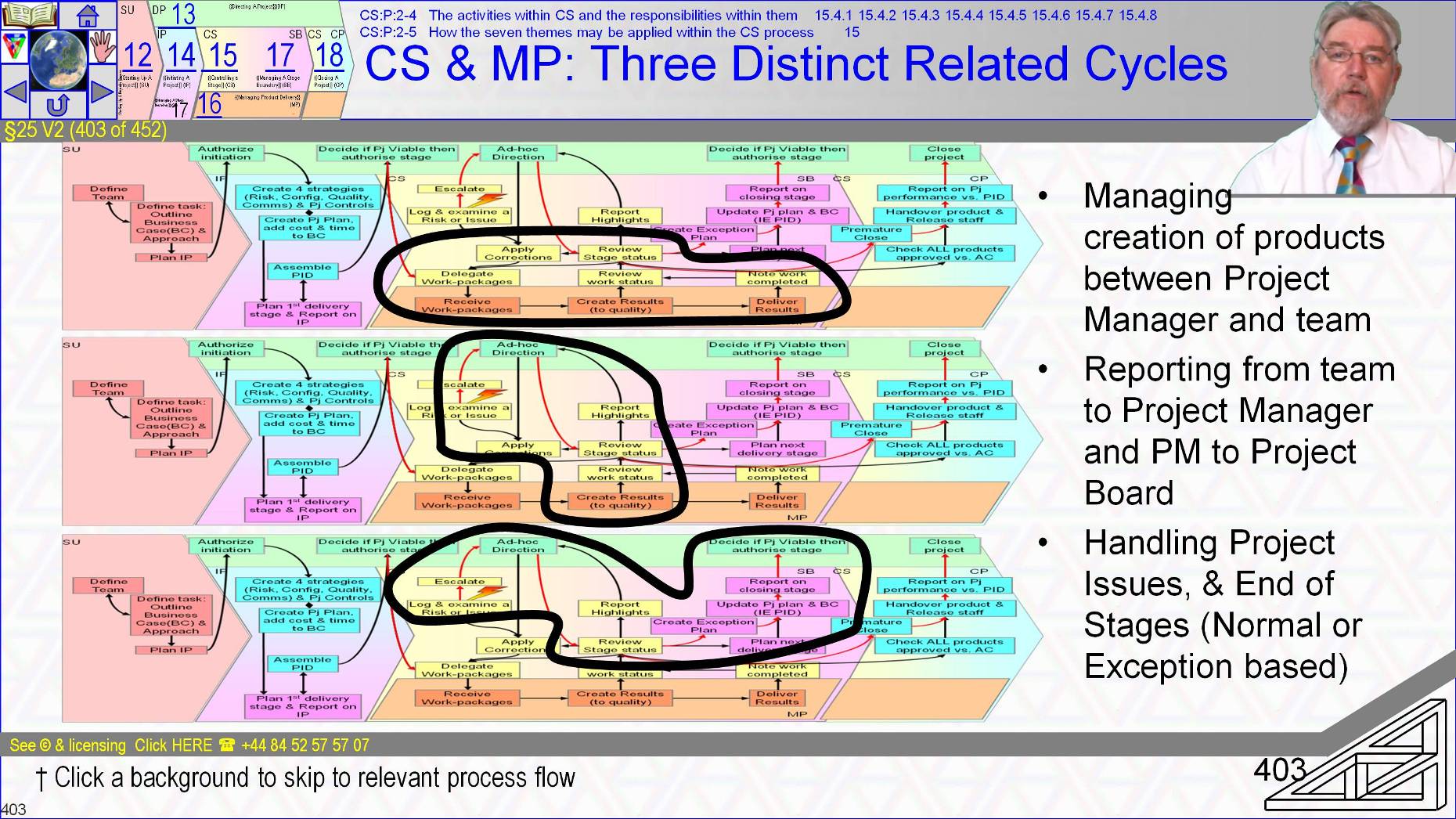
When we started looking at the processes I introduced the structure of them with the graphic shown three times here.
- If you came here on a link to get the {{Controlling a Stage}} details then the three graphics link to their focus areas
- The heart of a project is the delivery stage’s use of {{Controlling a Stage}} which communicates up to Directing A Project and links down to Managing Product Delivery and does so through three integrated cycles of activity.
- One cycle of {{Controlling a Stage}} interacts with Managing Product Delivery to manage creation of products.
- One cycle handles time driven reporting and
- One cycles handles event based decision making like End of stage and events like Request For Change that may trigger exceptions.
- Stages always start with an Approval
- DP1 [ Authorize initiation [ 13.4.1 ] for Initiating,
- DP3 [ Authorize a Stage or Exception Plan [ 13.4.3 ] for all other stages
~~
§25 s405 = CS – Purpose of CS & MP
§25 V3 (405 of 454)::CS – Purpose of CS & MP::
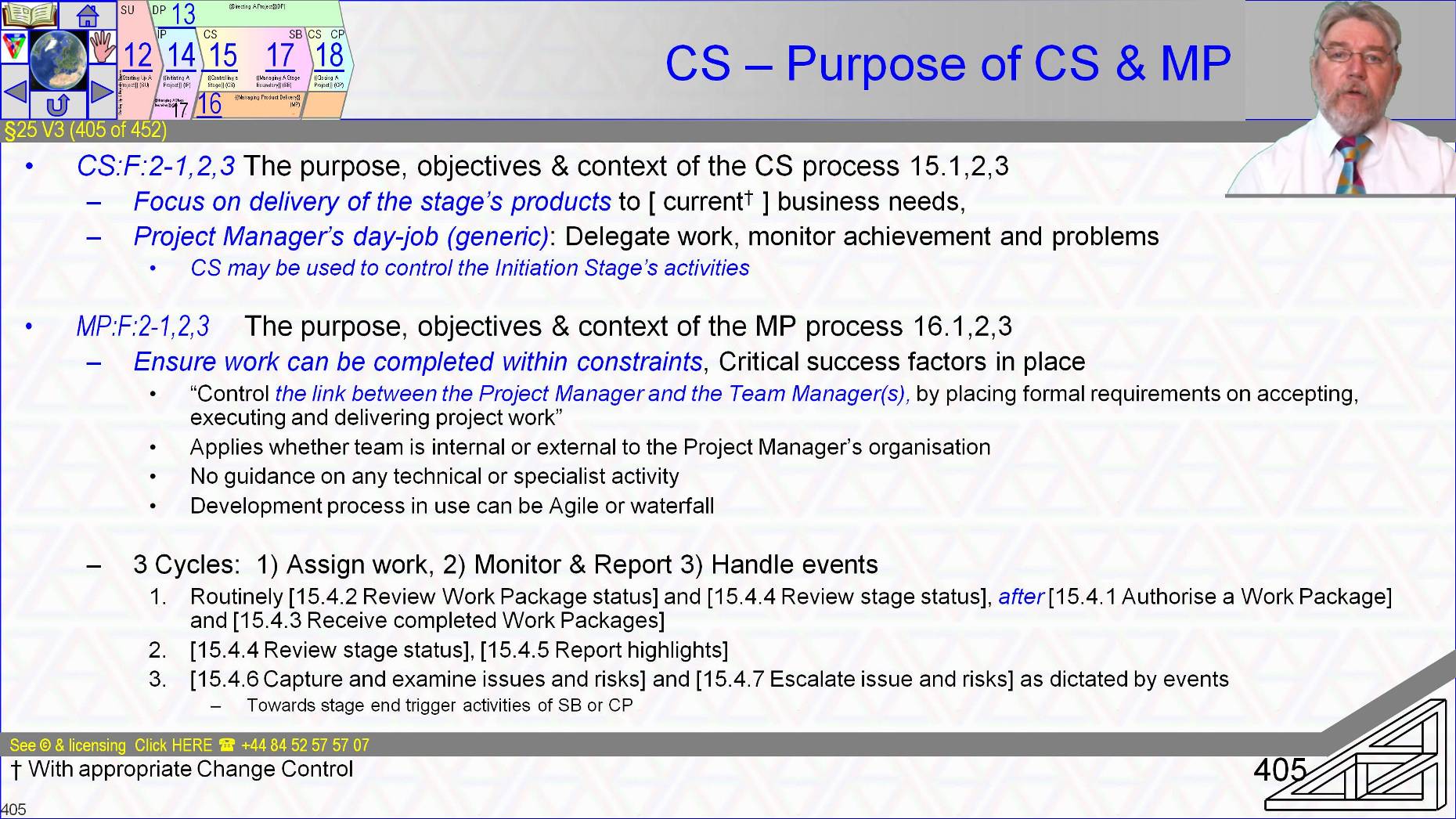
The objective and purpose of the {{Controlling a Stage}} activities that gives CS’ three internal process flows context is to maintain the project management team’s focused attention on the delivery of products that support the Business Case, and ultimately deliver the benefits. Delivery melds work authorisation, status tracking and responding to events as they arise
Managing Product Delivery’s purpose is to ensure what is to be produced within received performance targets is produced.
- Success depends on good communications between project manager and Team Manager (or team member) to agree what is achievable within constraints and critical success factors and then that the results required are ►produced to cost and time, scope and quality, ►risks managed, ►acceptances gained and ►products handed over.
The activities of {{Controlling a Stage}} and {{Managing Product Delivery}} are generic ‘work-anywhere anytime’ project management work packages that are designed to handle day to day management of the stage and generic team manager activities to enable project monitoring and control.
- The activities within CS and MP readily play-nicely with any specific techniques such as Scrum or local functional department’s Quality Management System procedures that the organisation chooses to use.
p2 says nothing about how any technical work is carried out. P2 is designed so that those who are {{Managing Product Delivery}} do not have to use p2 to do it. [[ToDo: advertsie]]
- In part this is why p2 complements agile and PMBoK-Guide environments so easily and so well.
{{Controlling a Stage}} and Managing Product Delivery activities are definitely used for each delivery stage of a project and are useful but not mandatory for control of the Initiation Stage too.
Starting with what is almost a quote from the manual,
- {{Controlling a Stage}} one ►assigns work to be done, Two ►monitors it and both ►reports on it to the Project Board and three ►deals with events like the ►need to authorize another work package, ►need to check on status, ►to review issues and risks, to ►respond to tolerance threats and tolerance breaches, or ►respond to an approaching stage transition or ►project end.
To support the three aims the activities of {{Controlling a Stage}} group into three interacting and overlapping cycles.
- The dominant cycle is made of the activities [ Authorize a Work Package [ 15.4.1 ], [ Review Work Package status [ 15.4.2 ] and [ Receive completed Work Packages [ 15.4.3 ]
~~
§25 s406 = CS MP Interface & Purpose Assign Work
§25 V4 (406 of 454)::CS MP Interface & Purpose Assign Work ::
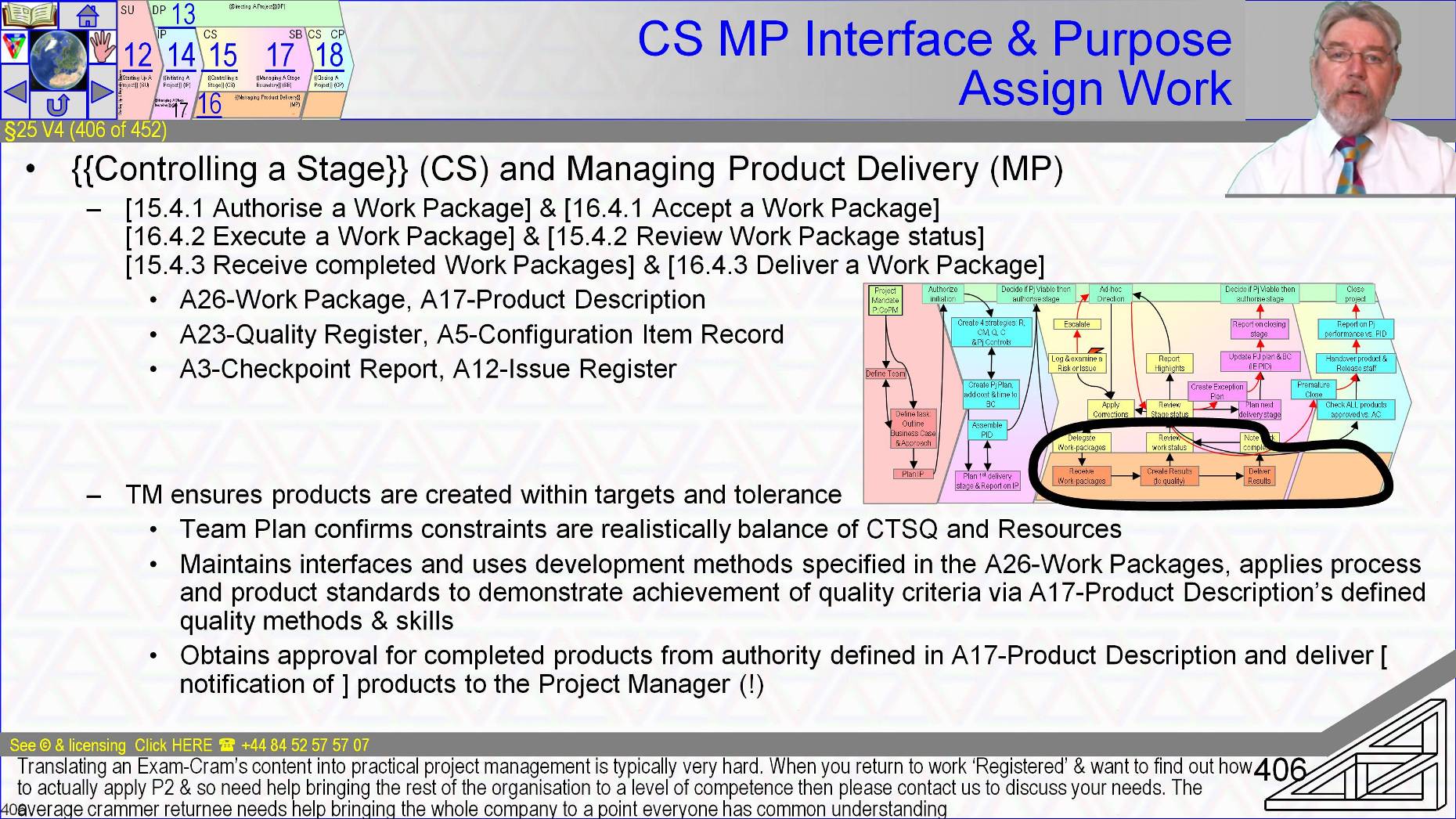
The work allocation and authorisation cycle is the interface to the Managing Product Delivery activities
- The interface is built from ►Work Packages-A26 containing Product Descriptions-A17 for delegation, ►Quality Register entries and ►Configuration Item Records for record keeping, ►Checkpoint Report-A3 and Issue Register-A12 entries for reporting and escalation.
- The activities of Managing Product Delivery are the team manager’s perspective and opposite to the cycle in {{Controlling a Stage}} by which work is authorized and performance analyzed.
- In {{Managing Product Delivery}} work is ►received, ►executed and ►reported on.
The {{Managing Product Delivery}} activities face off one to one with the {{Controlling a Stage}} activities.
- [ Accept a Work Package [ 16.4.1 ] checks and understands the viability of authorized work packages before accepting them from the Project Manager with a commitment to deliver
- [ Execute a Work Package [ 16.4.2 ] is the ‘home’ of all the specialist, skilled technical work that creates products and reoprts on status, here is Quality Control and the Quality Review are conducted and where all data for all later reporting comes into existence
- [ Deliver a Work Package [ 16.4.3 ] passes one or more products that match the specification of their Product Description into Configuration Management or possibly to the end customer and reports the fact back to the project manager.
~~
§25 s407 = {{Controlling a Stage}} (CS) Cycles 2 & 3
§25 V5 (407 of 454)::{{Controlling a Stage}} (CS) Cycles 2 & 3::
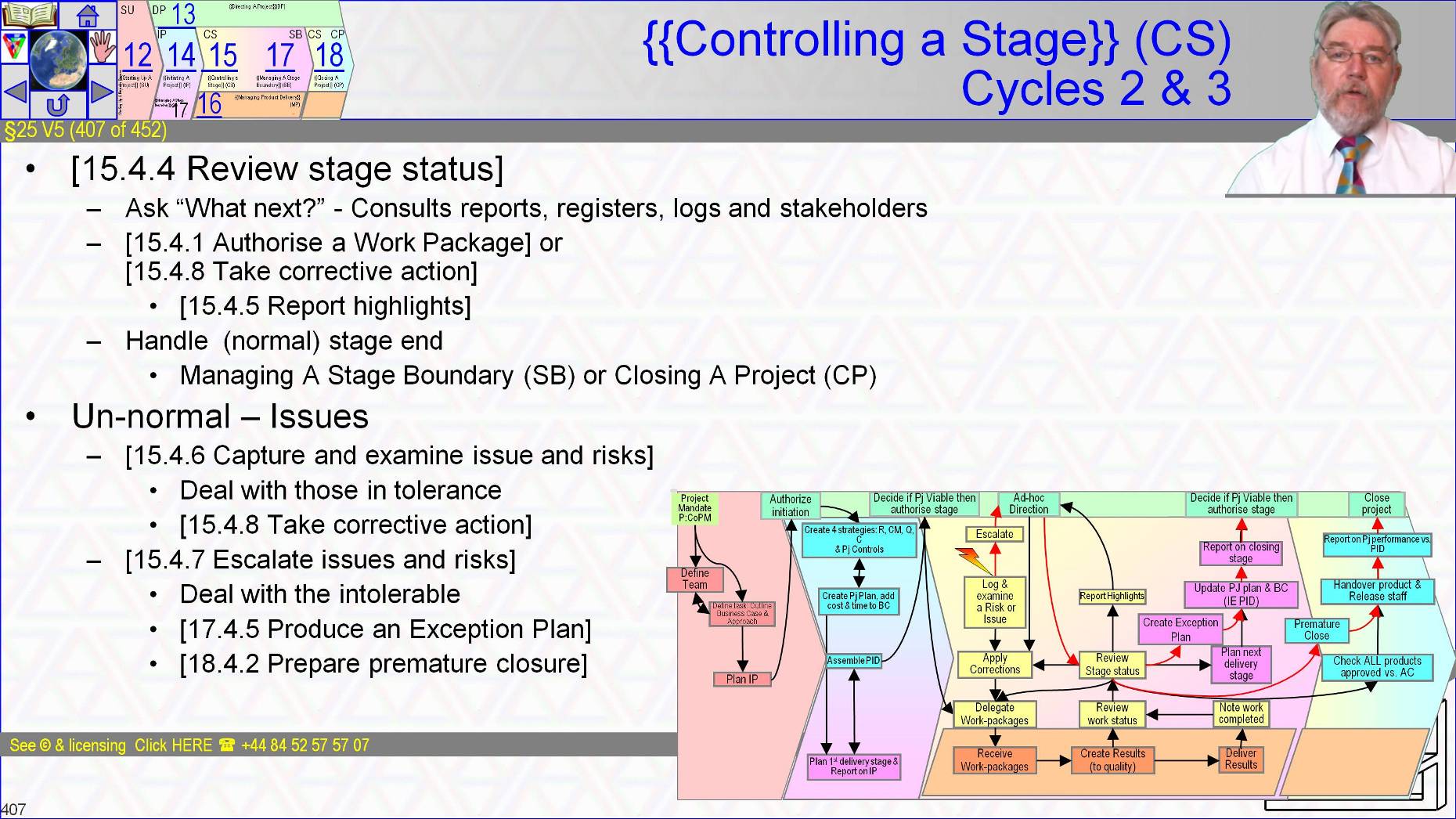
{{Controlling a Stage}}’s second cycle also centres on the activity of [ Review the stage status [ 15.4.4 ] as manager of routine activity
- Here we consult all ►reports, ►registers, ►logs and ►stakeholders before authorizing a new Work Package or [ Take corrective action [ 15.4.8 ] and [ Report highlights [ 15.4.5 ].
The third cycle of {{Controlling a Stage}} is also centred on activity [ Review the stage status [ 15.4.4 ] now as manager of event triggered activity such as [ Capture and examine issues and risks [ 15.4.6 ] and when relevant normal stage end handling within Managing A Stage Boundary or Closing A Project.
- If an exception arises or the Project Manager wants advice then the event handling cycle escalates issues and risks before triggering a suitable response ranging from [ Take corrective action [ 15.4.8 ] to [ Produce an Exception Plan [ 17.4.5 ] or [ Prepare premature closure [ 18.4.2 ]
~~
§25 s408 = PG:P:2-9 CS:F:2-4 &5 Controlling a Stage & MP:F:2-4 &5 Managing Product Delivery
§25 V6 (408 of 454)::PG:P:2-9 CS:F:2-4 &5 Controlling a Stage & MP:F:2-4 &5 Managing Product Delivery::
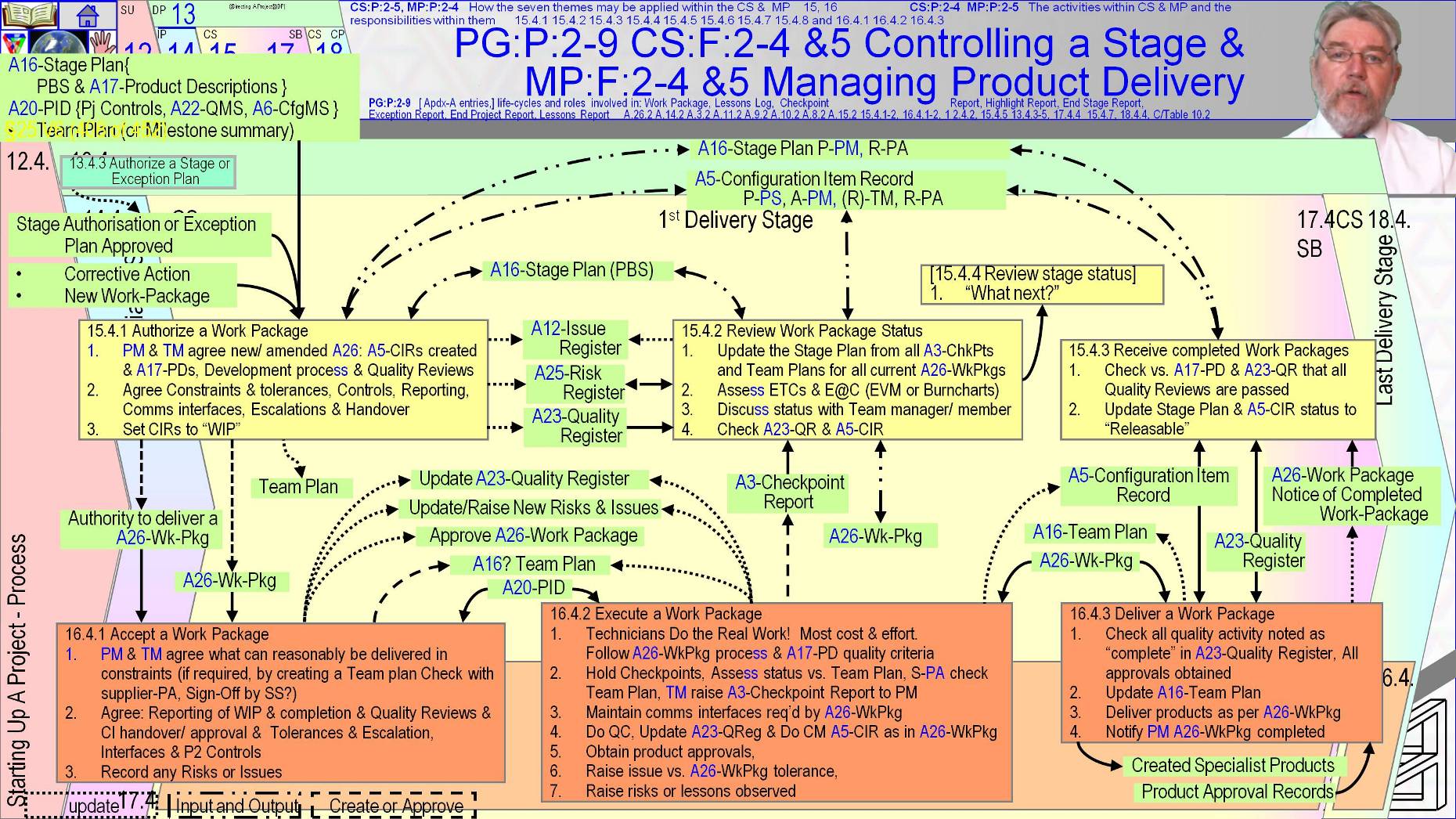
The first CS / MP Interface cycle to look at is the authorization of work packages, <Next > .
We have touched on everything that is relevant to work authorization as we covered the themes. The only absolutely new content here is the unfamiliar perspective.
The purpose of the interface between {{Controlling a Stage}} and Managing Product Delivery is to improve the chances that products are delivered within quality, cost, effort and time tolerances by having the Project Manager coordinate work.
Control over work to be done is exercised by the Project Manager authorizing resource use in a coordinated manner across all teams and team members in a way that individual team managers are unlikely to be able to observe. A similar process may be needed within teams to coordinate in-team work. P2 doesn’t comment on that but lean pull flow techniques like kanban are an excellent example of compatible techniques
As soon as the Project Board [ Authorize a Stage or Exception Plan [ 13.4.3 ] the Project Manager can trigger work packages in [ Authorize a Work Package [ 15.4.1 ].
But this is not the only trigger.
Mid-stage further work authorisation is mostly triggered by a team having finished it’s previous Work Package and sometimes by the need to make corrective actions within tolerance as we will explore in the next {{Controlling a Stage}} cycle.
[ Authorize a Work Package [ 15.4.1 ] ensures the Work Package that starts the dialog with the team is well defined and is a clear instruction to commence work.
While [ Accept a Work Package [ 16.4.1 ] ensures it is understood and achievable.
- The two activities are a dialog.
- Authorize begins the discussion by creating or checking the work package.
- The steps start by consulting the Product Breakdown Structure of the Stage Plan to understand what is to be delivered by the work package, and consulting the Project Initiation Documentation-A20 for the project’s strategies especially for Configuration Management and Quality Management that apply to these products.
- The Project Manager creates an initial Work Package much of it may be cross reference to Stage Plan, Product Description-A17, Quality Management Systems and the Project Initiation Documentation-A20.
- The interaction is intended to be a negotiation between Project Manager and team manager on behalf of the rest of the technical team.
- The result should be that when work starts it is considered to be practical within tolerances and constraints such as key intermediary milestones.
- The mechanism is the embodiment of an agile mindset that team work-pace must be sustainable for the long-term
- To show how products are produced within constraints may require the team to create a team plan and negotiate trade offs between scope and approach, cost and time and resources et cetera.
- Where practical the team plan may be an input to [ Authorize a Work Package [ 15.4.1 ] by having been previously created in parallel with Stage Planning at the last Stage Boundary.
Before [ Authorize a Work Package [ 15.4.1 ] and [ Accept a Work Package [ 16.4.1 ] can finish ►joint understanding and explicit agreement is required on ►what is to be delivered, ►within what tolerances for cost, time, scope, quality and risk, ►The format, ►content and ►timing of reporting must be agreed including for ►risks and issues and particularly relating to ►exception handling, as must ►any specific development techniques to be used, ►processes or procedures to be used
- The quality reviews to be held which may amend those originally envisaged, each of which must be recorded in the Quality Register, and ►both customer and supplier project assurances advice must be sought on who will perform what quality activities.
- The Configuration Management procedures must also be agreed. Particularly ►how and ►from whom approval of the products is to be obtained and once approved ►how the products will be formerly handed over.
- Also to be agreed are ►all interfaces that must be maintained for example with ►other teams, ►maintenance and operational support functions during product development.
The official manual notes that where a team is from an external supplier working under contract the Project Manager may not be party to the detail of their team plan so may work from a milestone summary of the team plan.
- This can be to protect trade secrets covering procedures used in product development.
- At the opposite end of the spectrum the team plan may need the project manager’s approval as part of a contract.
Supplier Project Assurance should check the inclusion of relevant standards within viable plans, and the Senior Supplier should be part of the team plan’s sign off.
Also suppliers may not be using p2.
In that case influence p2 exerts on them is that they must agree to follow the PRINCE2 interface which includes Checkpoint Report-A3, Quality Register-A23 updates and issue handling.
Note - 2003
[ Execute a Work Package [ 16.4.2 ] is where most projects spend most of their time and budget yet we have almost nothing to say here.
- The real work is done by subject matter experts whether bricklayers and electricians or other technicians, designers or test teams using skills and in-process quality control to monitor results and make corrective actions.
- The result is products produced to specification using the required procedures and techniques and with interfaces to other development support, operations and maintenance groups all honoured.
- As he work that creates the products progresses and quality reviews are held that demonstrate products meet their quality criteria, the team manager obtains approvals for completed products which may include issues of certificates from internal or external authorities or the team itself or other evidence of diligent performance. Progress is recorded by updates to the Configuration Item Records-A5.
- It is possible a supplier’s Configuration Management system is separate from the customers.
- Effort expended and resources consumed will be recorded.
- Supplier Project Assurance oversees activity and results.
- Quality, ►Lessons, ►Issue and ►Risk Registers will be updated either directly if strategies and the Work Package specifies that access is allowed or via Project Support or via the Checkpoint Report-A3.
- The results of [ Execute a Work Package [ 16.4.2 ]’s data gathering and status monitoring of each product and any team risks may update the team plan if one exists But is definitely forwarded as a Checkpoint Report.
- The team manager should discuss status with supplier Project Assurance to verify the Work Package remains viable.
- Risks particularly new ones may need to be advised to the Project Manager, Team members may not have direct access to the project Risk Register.
- Work Package guidance should state whether risks are raised in the Checkpoint Report or entered directly to the project’s Risk Register by the team manager.
Status data is forwarded to [ Review Work Package status [ 15.4.2 ] at the frequency and in the format agreed when work was authorised
- Team status is checked for a match to Quality and Configuration Management records and reviewed with the team member or team manager to confirm products will be completed within tolerances and to decide what next.
- The Stage Plan is updated from the combination of all Checkpoint Reports and register entries.
This may be a largely administrative action carried out by Project Support in preparation for the Project Manager to [ Review the stage status [ 15.4.4 ].
- Of particular note is that comparison of achievement to intent allows re-estimation of all work still to be started and finished.
- That is the creation of ETC Estimates To Complete and EAC Estimate At Completion based on the empirically determined team velocity or efficiency to date versus plan of the work being carried out.
In [ Deliver a Work Package [ 16.4.3 ] products are delivered to their recipient after a check by the team manger that all development and quality steps are completed and approval records are in place.
- Products are delivered according to the handover details within the work package.
- Plans are updated, ►the Project Manager is notified who also ensures all is complete and that the product is now under Change Control until subject to a later Work Package or an approved Request For Change or handed over to the customer.
- ~~
§25 s409 = A26-Work Package Product Description
§25 V7 (409 of 454)::A26-Work Package Product Description::
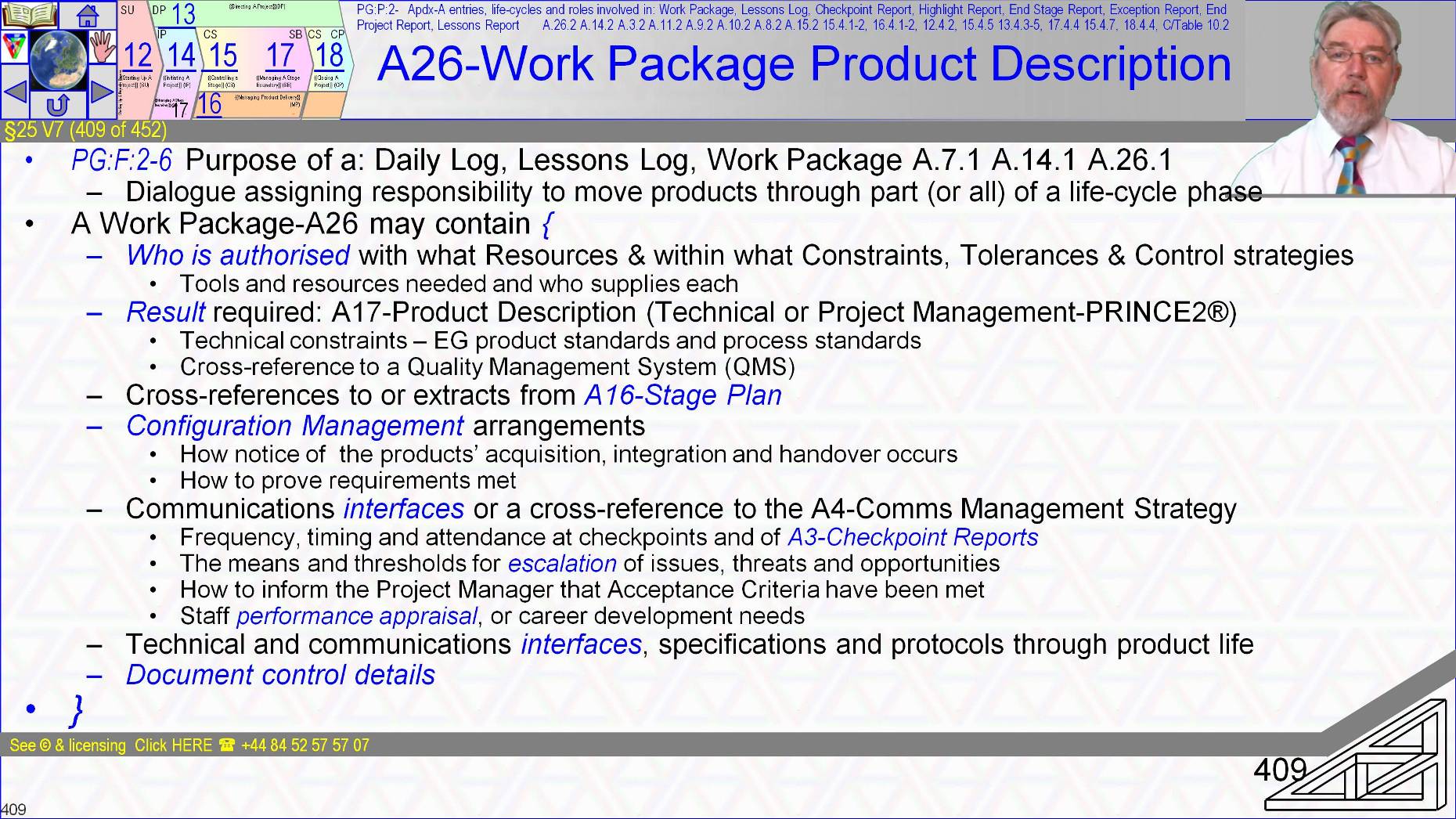
The Work Package-A26 is a central element of project control that when agreed between Technical Team and Project Manager is a contract to deliver results using supplied resources to constraints and strategies.
It’s a two way commitment that states who is authorized and what they are to achieve.
- It is a description of the result required with reference to ►Product Descriptions for target, ►with what resources and facilities as enablers and ►to what constraints.
- Recall the finalising of the Work Package-A26 is a negotiation. The contents makes clear that required resources are available, what they are and where they are sourced from and that they are in balance with the other aspects of Cost, Time, Scope, Quality, Risk [and ultimately benefits]
- The Work Package-A26 is a reference to the Stage Plan so that the work and the result’s have context in the journey to delivering the customer’s benefits
- It identifies the acceptance authority and acceptance process for the products of this Work Package-A26
- Products and process standards are explicitly identified, probably by reference to Quality Management Systems.
- Configuration Management arrangements such as handover, ►communication such as Checkpoint Report frequency and escalation points and ►may include how the Project Manager feeds back on staff performance.
- Somewhere at start or end it should have the normal admin of creation date and author.
- Note each of the 40 p2 activities is a work package (or part of one, or collection of linked Work Packages).
- A26 Work Packages may be used to commission project management tasks throughout the Initiation Stage and Delivery Stages.
~~
§25 s410 = CS:F:2-4 &5 and PG:P:2-9 PM’s Day Job & Board interface in Detail (CS)
§25 V8 (410 of 454)::CS:F:2-4 &5 and PG:P:2-9 PM’s Day Job & Board interface in Detail (CS)::
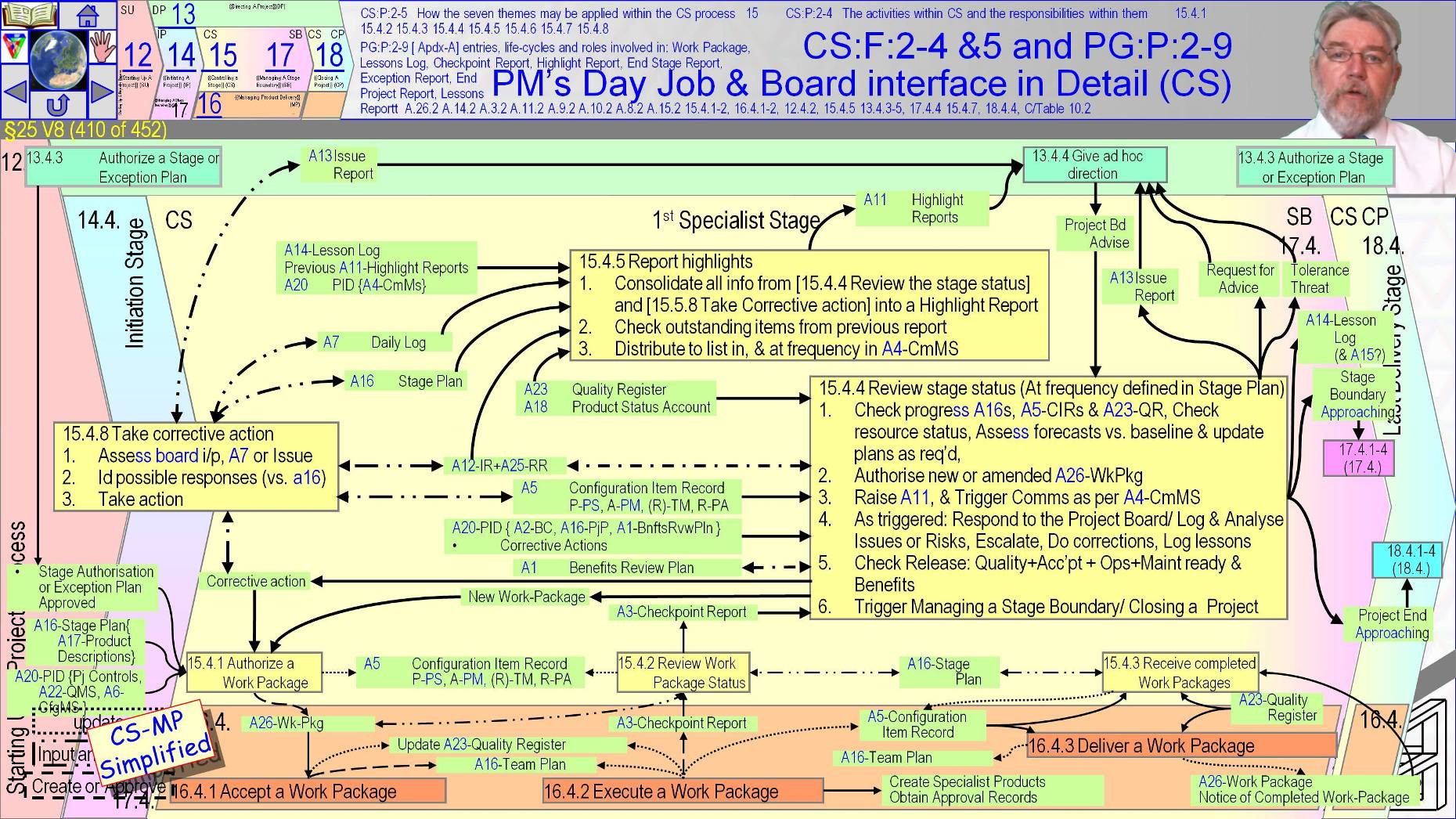
The Project Manager’s day job is to ensure the project runs smoothly which requires monitoring all stakeholder’s current opinions and all project records.
- Assuming the team are busy creating products to quality and reporting reliably, and that Issue and Risk Registers are in place the Project Manager should look forward to what needs to happen next. Otherwise they must be reacting to immediate events for as long as is needed to remove urgency and restore activity to a stable state
The day job is [ Review the stage status [ 15.4.4 ] and it starts by first knowing status so requires review of ►the Stage Plan, ►Issue Register and ►Risk Register.
- What happens next depends on analysis and forecasting from consideration of the ►Quality Register, ►Product Status Account-A18, ►Checkpoint Reports and ►Configuration Item Records, ►Revised prediction for resource availability and ►the outcomes of current corrective actions.
- Forecasts must consider the current outlook for the Business Case and Project Plan-A16 and new issues and risks.
- Several answers to the what next question are likely and we will cover them before finishing this process-on-a-page graphic
The day job’s second step is likely to be to keep the teams productive by allocating new work packages to teams that are finishing assigned work or correcting assignments for day to day devil in the detail fluctuations in performance.
Third will be to [ Report highlights [ 15.4.5 ].
- You should recall that the Highlight Report-A11 is the Project Manager’s summary of project status compiled by assessing ►Stage Plan, ►Checkpoint Reports, ►Risk Register, ►Issue Register, ►Quality Register, ►Lessons log, ►Product Status Account and ►last period’s Highlight Report.
- The resulting report is distributed to stakeholders at a frequency documented in the Communications Management Strategy-A4.
- The official manual says that reporting of corrective actions taken during the reporting period assures the Project Board that active management is ongoing.
- Fourth is the need to respond to Project Board guidance which ►may be asked for or ►may result from events elsewhere in the organization or ►may be the response to a Highlight Report.
- [ Give ad hoc direction [ 13.4.4 ] is the Project Board’s equivalent to the Project Manager’s [ Review the stage status [ 15.4.4 ] day job, being a catchall for the Project Board’s general involvement in the project.
- [ Give ad hoc direction [ 13.4.4 ] is the activity that results from the Project Board’s receipt of information from any source at any time and there is a reasonable amount we need to say about it, but not till we get to the process model after next.
- Before that is issue handling in [ Capture and examine issues and risks [ 15.4.6 ] and [ Escalate issues and risks [ 15.4.7 ]
And before that we must finish the project manager’s day job responses to the Project Board or to any source of adjustment within tolerances. There is a long list of sources.
- Adjustments may be triggered by ►the Project Board on receipt of a request for guidance or ►on their receipt of early warning of a coming issue or ►a Highlight Report or the Project Board may just offer advice and guidance, ►Adjustments may be triggered be a team member’s questions or ►Adjustments may be continuing previously triggered actions as detailed in Issue Register and Issue reports, or adjustments may be actions previously noted in the Daily Log or ►identified by the Project Manager’s routine monitoring, for example to respond to new issue or risks that are inside stage tolerances.
- Adjustments are Day to day management activity achieved by [ Take[ing] corrective action [ 15.4.8 ].
- Normally corrective actions create or amend a technical team’s Work Packages-A26 or are dealt with by the project management team’s regular interactions to manage people and processes.
The first step should be to gather relevant information by ►looking at the trigger , ►definitely by looking at the Stage Plan, ►Issue Register and ►Issue report, also the ►Risk Register and the ►Daily Log and the ►Configuration Item Records, and then assess options and selecting a response that furthers resolution of what needs action.
- Actions taken must be recorded appropriately so that ►Daily Log, ►All project registers and ►Dynamic reports like the Issue Report-A13 stay reliable.
Returning to [ Review the stage status [ 15.4.4 ] the Project Manager should routinely consider if anything noteworthy has arisen recently and if so create A14 Lesson Log entries, or if very significant an immediate Lessons Report-A15.
- If a release is about to handover products the Project Manager should ►Request a Product Status Account-A18 and ►check products have been shown to meet their quality criteria or ►are covered by appropriate concessions and that ►the operation and maintenance organizations are ready to take responsibility for the products and ►approvals have been secured from those people named in the Product Descriptions.
- The official manual also notes that if the Benefits Review Plan-A1 shows any reviews needed during the project, then quote, “the Project Manager should ensure they are executed, results analyzed and the required actions taken” [! Who needs regular management? All the worlds a project¿]. But also don’t forget that p2 defines Benefits Management as outside of the project’s responsibilities.
Another key element of eh project manager’s day job in [ Review the stage status [ 15.4.4 ] is to examine the up to date current Stage Plan to identify when stage end approaches.
- The change in the nature of Quality Register entries from mostly pending to completed and the Configuration Item Records changing from Work-not-started to Ready-to-integrate or Ready-to-deliver also signals stage end approaching.
The Project Manager should trigger action to close down the current stage. Either Managing A Stage Boundary which will also prepare for the next Delivery Stage or Closing A Project which will close down the stage and the whole project and also prepare for Benefits Realisation.
~~
§25 s411 = CS:F:2-4 &5 & PG:P:2-9 Exceptions Risk & Issue & Tolerance Threat and Board Interface
§25 V9 (411 of 454)::CS:F:2-4 &5 & PG:P:2-9 Exceptions Risk & Issue & Tolerance Threat and Board Interface::
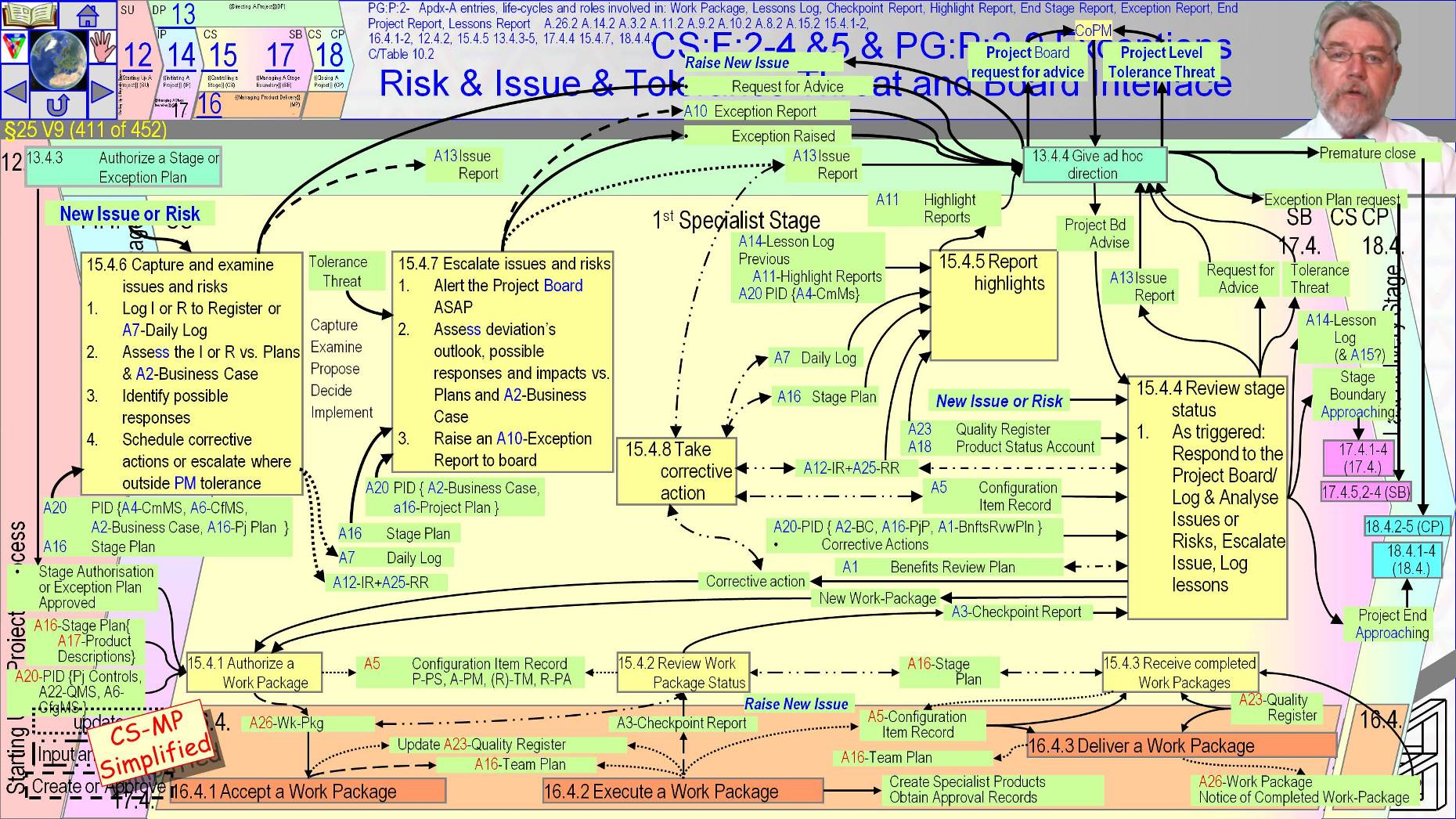
A crucial purpose of {{Controlling a Stage}} is to handle the unforseen which may have been unforeseeable and the foreseen but uncertain
Particularly when they are exceptions that require the activities of Managing A Stage Boundary to arrive at an alternative way forward.
- Risk and issues arise in an ad hoc manner so need reactive processes to respond to them
They can be raised by anyone at any level in the project and should be recorded as soon as identified either in the Daily Log-A7 for informal treatment or the Issue Register-A12 for formal treatment.
- Informal issues are simply dealt with by [Review stage status 15.4.4] and [Take corrective action 15.4.8].
Exception handling operates against the backdrop of ►routine assignments, ►execution, ►monitoring ►reporting and ►closure of specialist activities and ►the Project Board reporting cycles In other words people are busy doing normal stuff.
- We can ignore that in this process model but not in reality.
- Not all project participants may have direct access to the Risk Register so some risks must be raised as issues and filtered by [ Capture and examine issues and risks [ 15.4.6 ]. Some Risks can be raised by direct access to the Risk Register.
- What ever route raises a risk or issue it is always crucial for subsequent development of risk responses that threats and opportunities are captured in a consistent and reliable way that ensures clearly worded causes and consequences.
- We have discussed the procedures for managing risks in Sub-Section 16 and issues in Sub-Section 17.
- In brief both require ►the details to be entered to the register as soon as possible. Issues are categorized as ►Request For Change, ►Off-Specification or ►Problem/ Concern. ►They are assessed for ►priority and ►severity of impact on the ►Stage Plan, ►Project Plan-A16 and ►Business Case. ►Responses are proposed, ►decided on and implemented. For risks ►the cause, ►event and ►consequences are described, ►matched to the risk scales, ►responses proposed ►selected and ►integrated into plans.
- All of this management activity occurs within [ Capture and examine issues and risks [ 15.4.6 ] when within tolerance.
- All the steps are undertaken with reference to ►the Stage Plan and ►the contents of the Project Initiation Documentation-A20 such as ►the Business Case and ►the Project Plan. More details in a moment.
- The official manual notes Scope Creep as a source of issue [ but does not mention that uncontrolled changes occur in all 6 axis of performance not just scope.
- Externally imposed shrinkages such as budget cuts and schedule accelerations are as painful as growth of scope are for the team and slippage, poor quality, undelivered scope and cost overruns are as undesirable to the Senior Users and Executive.
- Control should thus be in each axis.]
- In brief both require ►the details to be entered to the register as soon as possible. Issues are categorized as ►Request For Change, ►Off-Specification or ►Problem/ Concern. ►They are assessed for ►priority and ►severity of impact on the ►Stage Plan, ►Project Plan-A16 and ►Business Case. ►Responses are proposed, ►decided on and implemented. For risks ►the cause, ►event and ►consequences are described, ►matched to the risk scales, ►responses proposed ►selected and ►integrated into plans.
If the Project Manager wants the Project Board’s advice they request it from [ Give ad hoc direction [ 13.4.4 ]. If the situation triggers an exception or looks likley to cause one then the project manager must advise the Project Board of the exception
[ 279 pt 2 1547.wav]
I have mentioned escalation many times as we’ve work our way to this point.
- Here is the definitive statement of the inputs, steps and outputs used to escalate from Project Manager to Project Board when the project management team’s corrective actions would not prevent a stage or the project going beyond agreed tolerances from any individual issue or risk or group of issues and risks of any type.
The first step is early notification to prepare the Project Board as soon as possible.
- Early responses typically improve the effectiveness of action. Never delay action by waiting for the full analysis that creates the Exception Report-A10, or by hoping to fix the problem without revealing it or feeling that asking for assistance is any sort of failure. Note the official manual explicitly says it’s good practice not failure to bring focus to issues as early as possible.
- Escalations are actual or predicted variations in performance versus baselines outside of tolerance. So the next step after warning is to understand the nature of the effect on the Business Case by reference to the Project Initiation Documentation-A20, Project Plan-A16 and Stage Plan.
Analysis starts with consideration of how creation of products is affected and a forecast of the future situation if the cause is untreated.
- When causes and consequences are understood recovery options can be proposed and their relative effectiveness evaluated for all stakeholders from all perspectives.
- Special note is the availability of people to help diagnose and react to the exception, and the knock on effects to the project or business.
- The very people needed are probably the most skilled and experienced so are busy delivering the project or running the business.
- Options to resolve exceptions must be presented to the Project Board via [ Give ad hoc direction [ 13.4.4 ] using the templata Exception Report-A10 and Issue Report-A13.
- We looked at the issue template Product Descriptions in Sub-Section 17 (use the Globe Hyperlink to get to the links to management products. I’ll cover the Exception Report-A10 Product Description on the next slide, and the details of the promised description of the Project Board’s [ Give ad hoc direction [ 13.4.4 ] deliberations on the graphic after that.
The Project Board will have to consult Corporate and Program Management if project tolerance is involved and may under any circumstances prepare to ask for their advice.
It’s possible the process we are discussing actually starts here by Corporate or Program Management initiating instruction to the Project Board that causes them to generate an Exception plan request, which automatically causes the stage to end with Managing A Stage Boundary at activity [ Produce an Exception Plan [ 17.4.5 ] instead of [ Plan the next stage [ 17.4.1 ].
- When the Exception Report-A10 is terminal the Project Board will direct the project be brought to an early close.
- It’s also possible that the Project Board changes tolerances or dismisses the issues for example by rejecting a Request For Change.
- In all cases the Issue Register-A12, Issue Report-A13 and Risk Register-A25 are updated and [ Take corrective action [ 15.4.8 ] and other activities will refer to the registers as needed to ensure no needed actions are overlooked.
~~
§25 s412 = A10-Exception Report Product Description
§25 V10 (412 of 454)::A10-Exception Report Product Description::
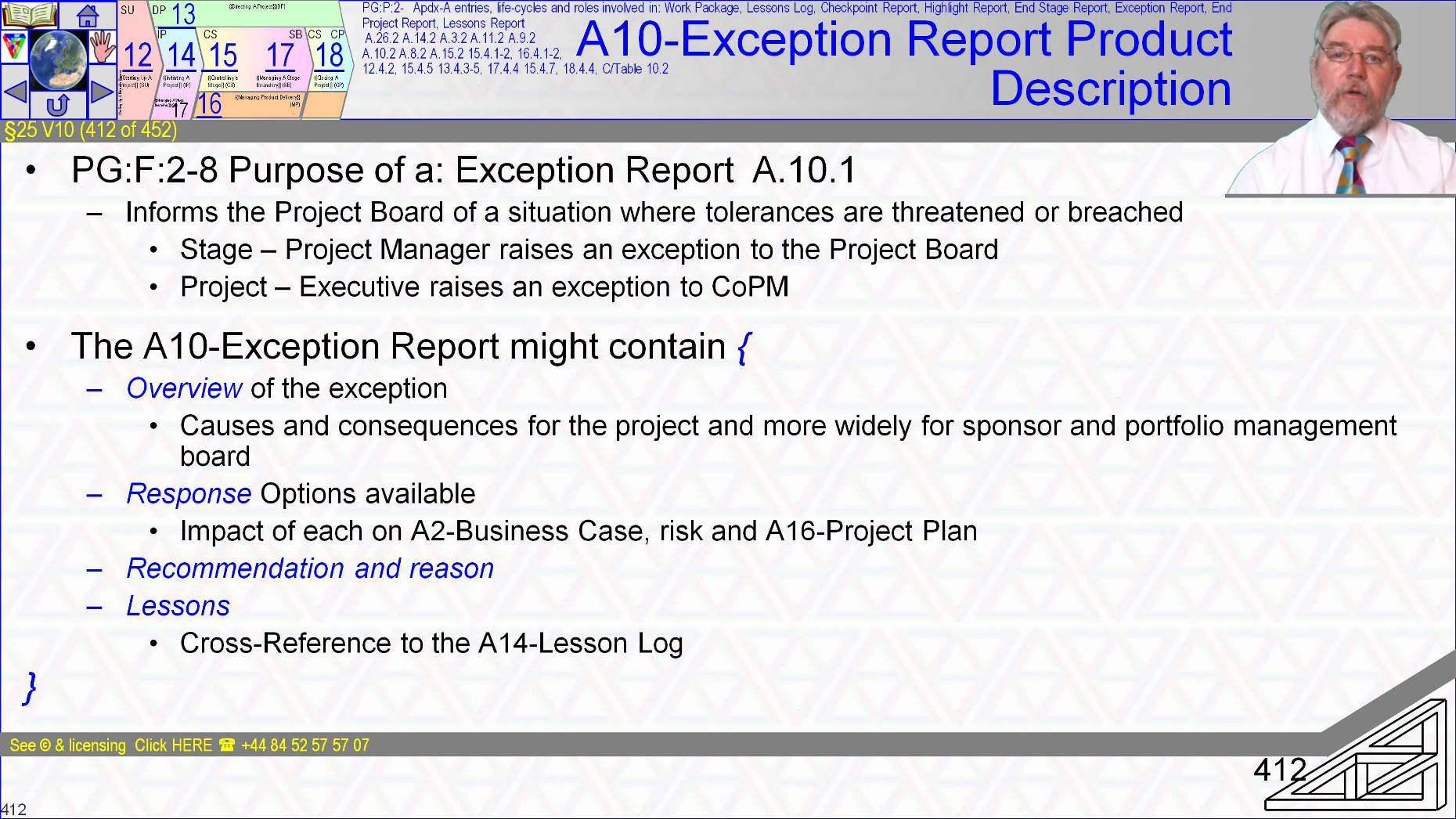
An Exception report describes options and recommendations for dealing with the situation outside tolerance.
Exception Reports-A10 are normally submitted by the Project Manager to the Project Board for a stage level exception but can be produced by the Project Manager for the Executive to submit to Corporate or Program Management for project level exceptions.
The Exception Report contains ►a description of the causes and consequences, ►constraints, ►options and ►recommendations and ►may link to relevant lessons.
- You should review the Product Description via any of the course revision aids.
~~
§25 s413 = 13.4.4 Give ad hoc direction DP4
§25 V11 (413 of 454)::13.4.4 Give ad hoc direction DP4::
We have already covered much of what the Project Board are expected to do on an ad hoc basis.
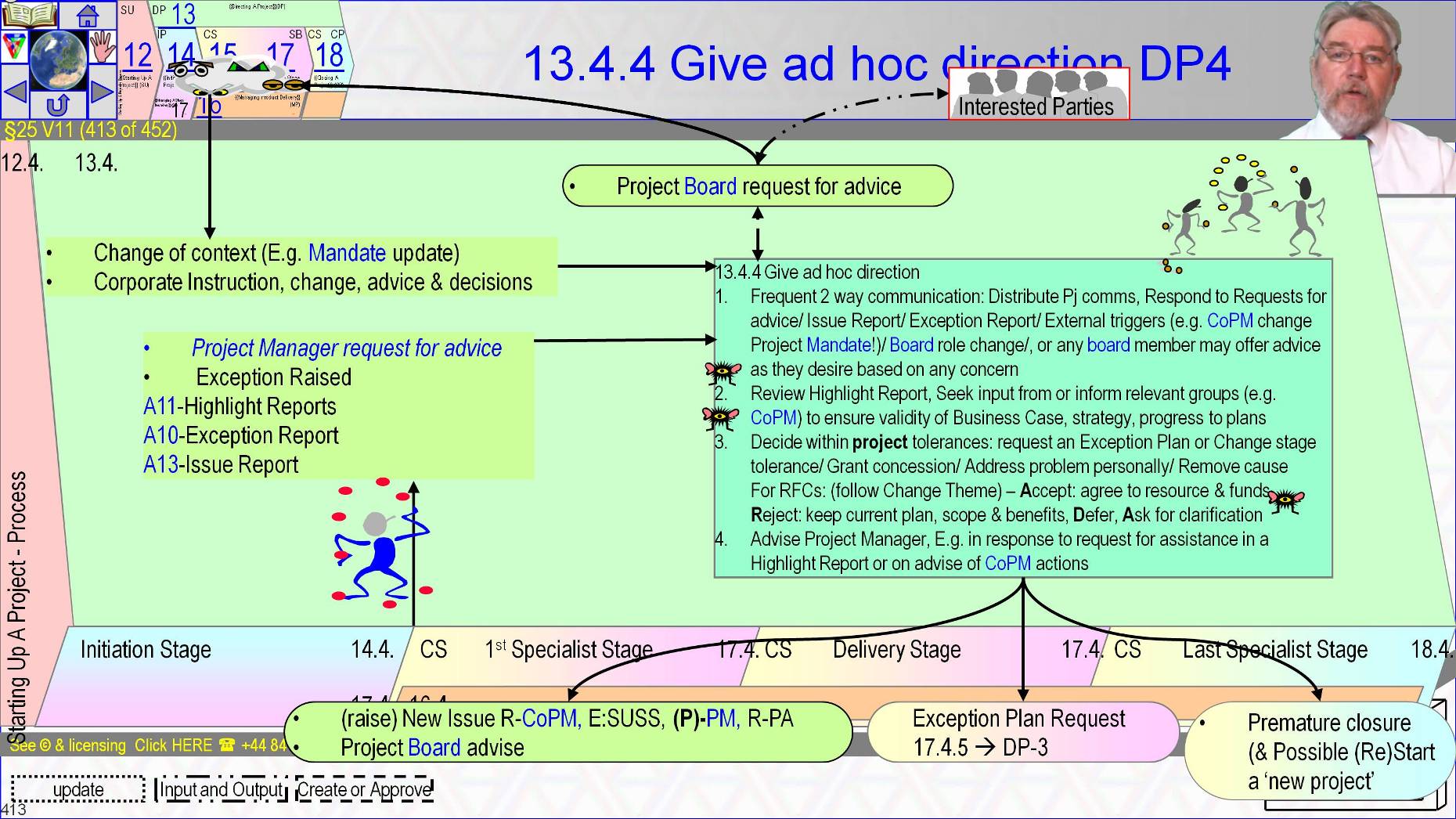
Inputs to give [ Give ad hoc direction [ 13.4.4 ] from the project are ►Project Manager requests for advice, ►exceptions raised, ►early warnings, ►Highlight Reports, ►exception reports and ►issue reports, ►program and corporate advice and decisions or other inputs from interested parties that are external to the project perhaps, Quality Assurance and Centres of Excellence etc.
Recall that Project Board controls such as End Stage Reports-A9 are handled by Project Board activities other than [ Give ad hoc direction [ 13.4.4 ].
One expectation of [ Give ad hoc direction [ 13.4.4 ] relates to two way communications with the project’s wider context.
Another relates to routine monitoring and all the other expectations focused on ►Providing resource, ►Defining requirements, ►Offering support and guidance and ►Decision making within authority as triggered by the different needs of the project.
In all cases the Project Board should represent the views of all stakeholders.
- Also in all cases they retain Project Assurance accountability but may ask a delegated Project Assurance role holder to do the majority of the reviewing and options assessment.
- Monitoring relates to the routine receipt of the Highlight Report that ensures the Project Board has understanding of project status and that the project remains on track to deliver it’s performance targets.
- As needed the Project Board should steer project focus to maintain dynamic alignment on corporate strategies.
- Any of the project’s communications such as the Lessons Report-A15 may need to be distributed by the Project Board and all incoming communication is expected to arrive through the Project Board’s representation to coordinate wider communications
The Project Board must ►act to resolve conflicts between stakeholders and they must ►provide public visible support for and ►offer guidance to the Project Manager at all times.
- Particularly to respond when requested either collectively or individually.
- Guidance needs are likely to be highest during ►Starting Up A Project and the Initiation Stage, ►at stage boundaries and ►at project close down.
The Project Board may raise an issue to the Project Manager to notify the Project Manager of changes in the corporate or program environment with potential to impact the project and so ensure appropriate responses are put in place.
Potential triggers for support are ►the Project Board may be asked for help, ►they may have a suggestion or ►question raised to them as the representatives of ►future operations, ►supplier interests or as ►Business Case owner,
- A trigger may be because of ►changes to board composition or ►when the board want guidance themselves from corporate or program management, or when ►Corporate or Program Management directs the Project Board for example by changing the Project’s Mandate.
- Triggers also arrive ►in response to requests for change and ►in response to an Off-Specification and ►in response to risks.
Instructions to the Project Manager typically result from ►communication from Corporate or Program Management that affect the project and range from the minor to the game changing such as changing the mandate.
- Changes to the Project Mandate can be handled as a ►Request For Change or ►by terminating the current project and recycling to Starting Up A Project with the new Project Mandate as input and the current status quo as context.
- The official manual warns recycling may be the more expensive.
If faced with an issue that is within project tolerance but outside of stage tolerance the Project Board ►may have the means to remove the cause of the deviation or they ►may change stage tolerances to remove the deviation however caused, or they ►may defer a decision.
For a Request For Change they ►may reject it, ►restore the pre-change-proposal baseline or ►they may grant it and apportion some of the change budget ►or find a new budget to give to the Project Manager’s performance measurement baseline of cost and time, scope and quality and resources and thus restoring an in tolerance status.
- Stage level exceptions are raised via an Issue Report-A13 and an Exception report A10 that specifies solution options and recommendations.
- Exception reports may range from the need for a simple intervention to radical game changing proposals.
- For stage level exceptions if the Project Board don’t resolve the exception by any of the list of options just described then they should direct the Project Manager to prematurely trigger the Managing A Stage Boundary process starting with activity [ Produce an Exception Plan [ 17.4.5 ], and then consider the resulting Exception Plan-A16
- The Project Board may instruct that the project be brought to an orderly but premature close by Closing A Project starting at [ Prepare premature closure [ 18.4.2 ] before or after receiving an Exception Plan, or they may instruct the Project Manager to take some other specific actions.
For an Off-Specification they may ►grant a concession or ►ask for more information or ►defer judgment especially when the situation is dependent on an uncertainty or forecasts are not reliable, or they may ►reject the Off-Specification and demand that it is resolved.
- In which case the customer or supplier will have to provide a remedy outside of the project’s assigned resources.
When responding to an escalated issue the Project Board’s response is described in the Change Theme and our previous Lesson 17 is the place for your revision.
~~
§25 s414 = Managing A Stage Boundary (SB) Revisited
§25 V12 (414 of 454)::Managing A Stage Boundary (SB) Revisited::
The Managing A Stage Boundary activities are a near duplication of the Initiating A Project and Closing A Project activities rolled into one and we saw them previously in Lesson 10 when handling the normal end of the Initiation Stage.
We will now add what happens when entering at [ Produce an Exception Plan [ 17.4.5 ] and what may be needed when the ending stage is a delivery stage.
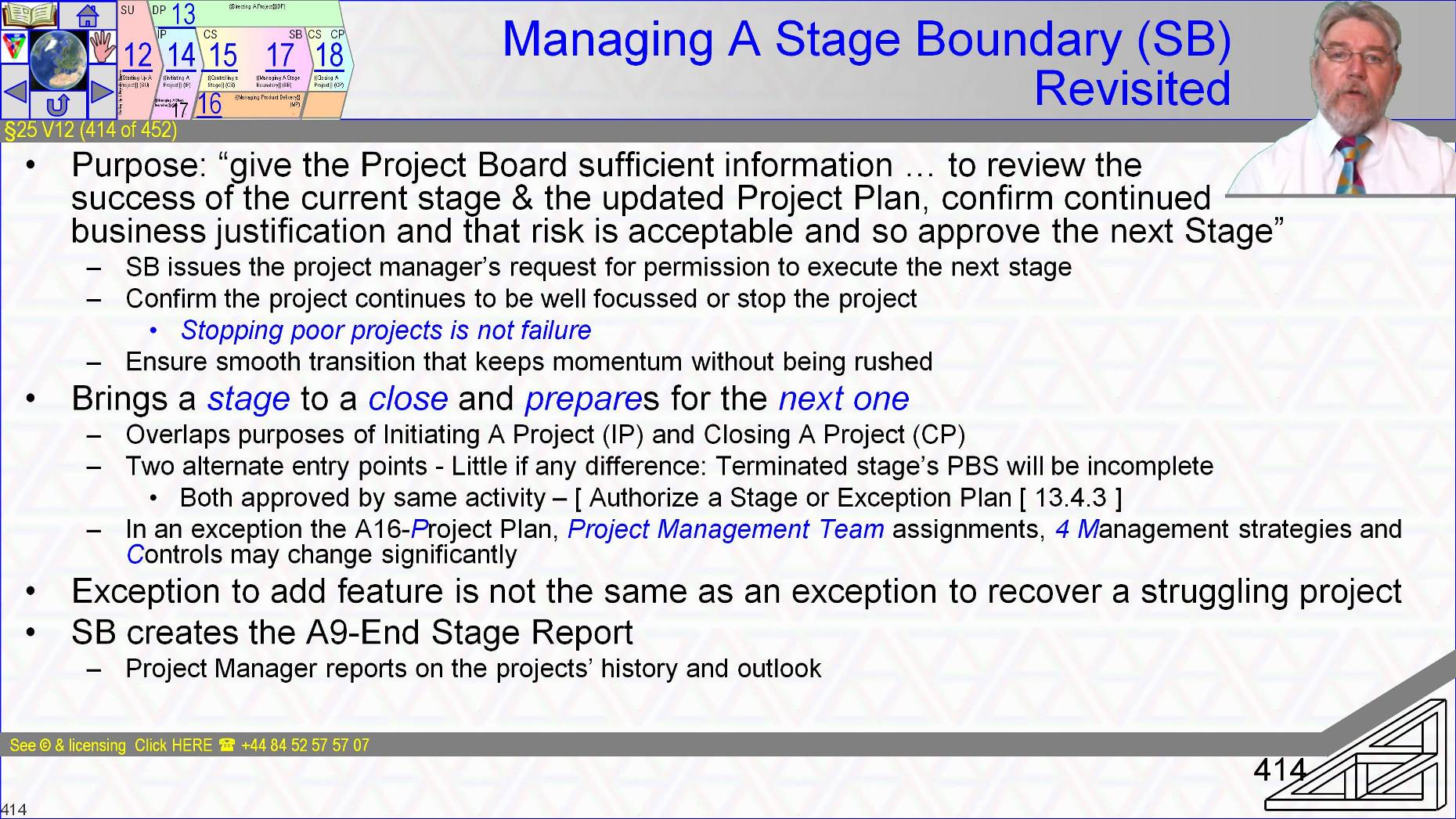
- The purpose of the Managing A Stage Boundary process is quote to provide the Project Board with sufficient information so that it can review the success of the current stage.
Managing A Stage Boundary brings a stage to a close and prepares for the next one.
- In an agile world {{Managing a Stage Boundary}} IS* the activities of sprint and or release retrospectives followed by release and or sprint planning
- In p2 it has two alternate entry points one for a fresh stage and one for a stage in exception.
- These two are also near duplications.
- There is little if any difference between normal and exceptional stage end activities or the subsequent Project Board activity to [ Authorize a Stage or Exception Plan [ 13.4.3 ].
- P2 is perhaps less concerned about interrupting a stage than for example Scrum is concerned about interrupting a Sprint. Partly because p2 stages are often much longer than 10 or 20 days so waiting till their end is less practical and bigger impact.
- Although the focus when being used in the real world feels different.
The activities of Managing A Stage Boundary for normal stage end confirm the project continues to be well focused or they should make positive recommendation to redirect resources and avoid wasting time and money from continuing a project whose Business Case is no longer a viable justification. {{Managing a Stage Boundary}} may recommend stopping the project.
- Note p2 regards a well informed termination to be a success and an ill informed decision to keep going a failure.
Review and re-planning activities should be performed with sufficient time as to allow smooth transition from the stage ending whether due to natural or exceptional causes into the stage starting.
- Neither so early as to lose momentum and create a standing army of resources waiting for authority to proceed nor so late that the preparations for the next stage are rushed and we start the coming stage ill prepared.
- Perhaps more easily achieved for normal stage transitions than exception situations.
Not mentioned in the official manual but crucial to keep in mind is that the situation is different when an exception exists to add an attractive feature to the project’s outputs or incorporate wider external influences into an otherwise robust Stage Plan than when the exception is triggered by failure of competences within the project.
- Agile is very relaxed about the product backlog always being open to the addition of products and features.
- This is somewhere that agile practices add great value to many organisation’s use of p2
- If the {{Managing a Stage Boundary}} is triggered by a current in-project disaster then you need the deeper guidance in our course Assessment And Recover of Troubled Projects accessible at >>>Link<<< mypost
If we come to be executing the management work-packages of {{Managing a Stage Boundary}}’s exception handling then the first action should be to update the issues records to reflect the Project Board’s request for an exception plan.
- Whether normal or exceptional stage end the Project Manager ►makes assessment of what products of the stage coming to an end are complete and approved and ►Reports on the project’s history and ►the outlook ►Prepares a request for permission to execute the next stage, ►Prepares a newly created Stage Plan that reflects ►any required refreshing of any and all aspects of the Project Approach, ►Four Strategies, ►Project Controls, ►Project Management Team assignments and ►an updated project plan, ►updated Business Case and ►a description of the current aggregate risk exposure.
In an exception situation the Project plan, the Project Management Team assignments, Strategies and Controls may change significantly.
- Note: When created, Exception plans are a replacement for are in the same format as and at the same level as the plan or plans in exception, stage and project being potentials.
- Approval of the Exception plan is by [ Authorize a Stage or Exception Plan [ 13.4.3 ].
- If approved the replacement plan runs from the time of approval to the end of the replaced plan’s duration.
~~
§25 s415 = SB:P:2-4&5 Activities Within Managing A Stage Boundary (SB) Process
§25 V13 (415 of 454)::SB:P:2-4&5 Activities Within Managing A Stage Boundary (SB) Process::
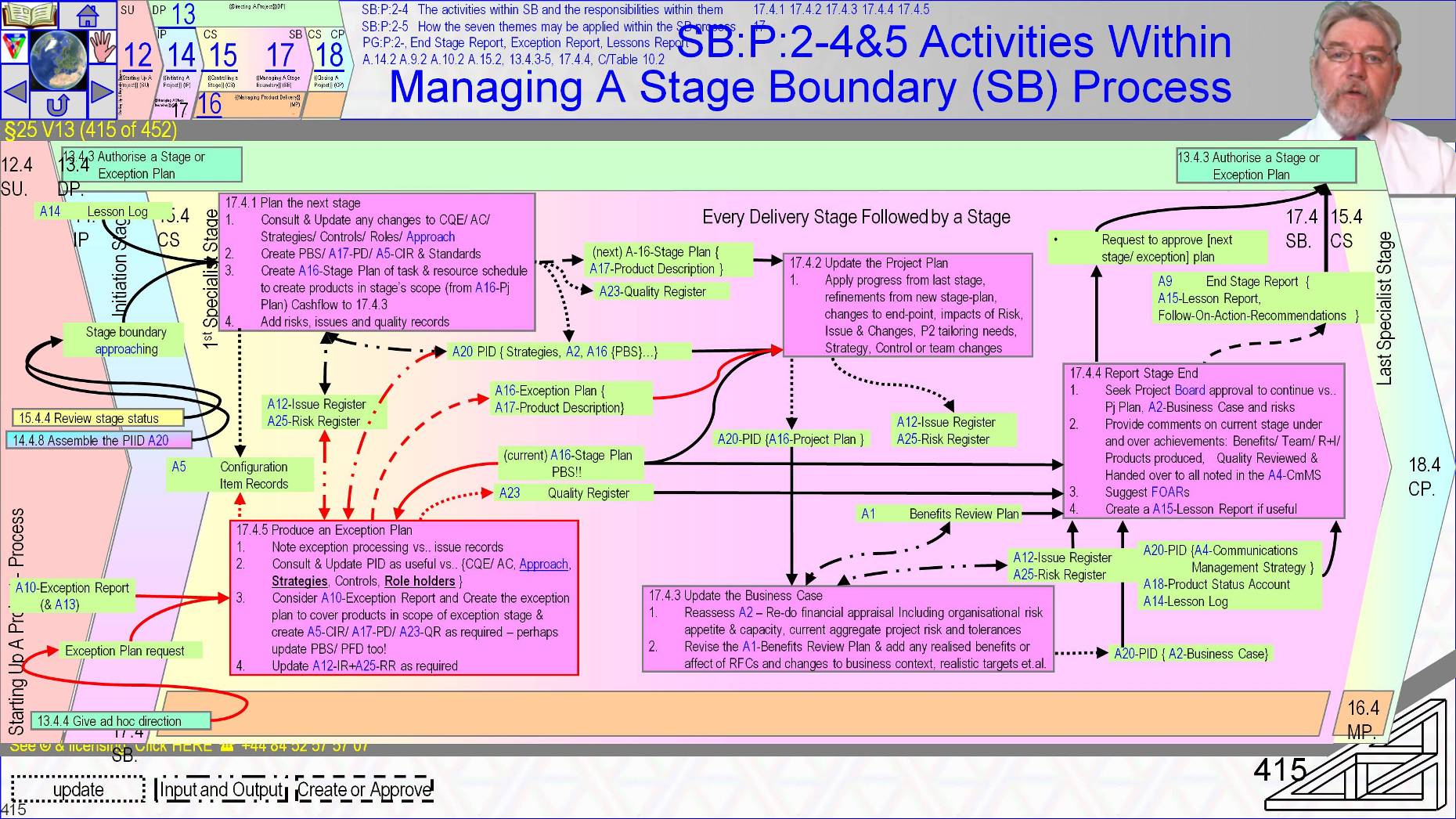
Almost quote “All planning for a next stage’s plan normal or exceptional is performed near the end of the current stage by consulting the ►Project Board members, ►Project Assurance, )Team managers and ►possibly other stakeholders in order to create a viable plan”.
- The official manual says the more people involved the more robust the plan.
- Stage Planning follows the planning theme and the Plan Design for format and presentation suited to use. We covered (Designing A Plan (7.3.2) in Lesson 15 Part 1.
[ Plan the next stage [ 17.4.1 ] and [ Produce an Exception Plan [ 17.4.5 ] are Planning activities
- Both starts by examining the Project Initiation Documentation-A20 to understand the subset of products in the Project Plan-A16 that are within this stage’s or the exception’s scope.
- The applicable elements of the Quality Management System A22 and the standards that apply and the Customer’s current Quality Expectations are compared to those baselined in the Project Initiation Documentation-A20.
- A check is made for ►any desirable changes to Project Approach, and ►the relevance and suitability of the strategies and controls to the coming stage (normal next-stage or replacement remaining-stage), ►The composition of the Project Management Team and ►their role descriptions – perhaps because of the arrival of new team members with skills suited to freshly approaching technical tasks particularly resources from suppliers or because of the desirability of changes revealed by performance in troubled stages
After review of the status quo planning should then ►Create or update a stage relevant Product Breakdown Structure, ►Product Descriptions and ►Product Flow Diagram and so ►identify product development tasks, and ►Create Quality Register-A23 entries for required Quality Reviews and ►Create required Configuration Item Records-A5
Quality tasks should be matched to the Quality Register including target dates for their completion.
- Planning should also maintain ongoing review and update of the Issue and Risk Registers. New risks perhaps discovered by planning activities ►must have owners appointed and ►selected risk response tasks and ►Contingency arrangements should be added to baseline schedules and ►added to Cost/Resource profiles and ►the registers updated. ►In-stage Project monitoring and ►reporting tasks must also be included. Then a ►resource levelled schedule, ►stage cash-flows and ►resource needs calculated.
- Alternatively a back-log may be queued against a kanban board.
[ Produce an Exception Plan [ 17.4.5 ]
Producing an exception plan has only minor differences to producing a normal Stage Plan.
- Perhaps obviously the request for an Exception plan because of poor performance prior to arrival at a planned stage boundary is itself a stage boundary for the revised stage.
- One implication is that the concluding stage is incomplete so it’s Product Breakdown Structure and Configuration Item Records form a start point for schedule development and the new schedule will be for the incomplete work but not beyond. The Issue Report-A13 and Exception report A10 contain analysis of the current status and a recommended recovery option that might be quiet different from the plan in exception.
- Hopefully as obvious is that a request for an exception plan because of a desire to amend products and features in a well running project is also a stage boundary for a plan whose scope is the old plan’s but is now likely to remain largely as was. Disasters often need radical replanning while adjustments don’t. The process and its name is the same but the degree of change may be quiet different
- Planning steps then proceed as normal although the initial inputs add the exception information and where the exception is recovery rather than adaptation or incorporation greater scrutiny must be applied to what are the ►Customer’s Current Quality Expectations, and ►the suitability of strategies, ►controls and ►Project Management Team members and ►their assignments if we are to avoid a repeat exception situation.
- Examination of the Exception report A10 will suggest recommended actions that should either help create the Exception plan or should be incorporated into it.
Extensions of an otherwise robust Stage Plan need consideration of the Quality Planning steps to ensure Product Descriptions, Configuration Item Records and quality management strategy and standards are all in place, and that Quality Register records are also in place for amended features and products.
When a stage ends it is possible that the [ Review the stage status [ 15.4.4 ] maintained updates to the Project Plan-A16 on a regular basis but not certain.
- It is certain that the plan the next stage activity will have refined details that could update the Project plan.
- An up to date Project Plan-A16 is important for the board to measure progress against, for example on receipt of each Highlight Report in order to be informed and proactive.
[ Update the Project Plan [ 17.4.2 ] adds actual progress from the closing stage’s Stage Plan and revised forecasts for dates and costs from the Exception plan or new Stage Plan for the stage about to begin.
- When the update reflects a simple extension of the project to incorporate an approved Request For Change the update must take account of the extra products or features approved by the Project Board.
- For exceptions whether additions or recoveries there are potential effects on most elements of the Project Initiation Documentation-A20 such as ►strategies, ►controls, ►benefit review plan, ►Business Case and ►risks to be reflected in the Project Plan.
If necessary and it shouldn’t be necessary the old Stage Plan is first updated and as normal any issues or risks detected should be appropriately recorded and their impacts managed.
- At stage end the Project Executive must be sure that the project has a viable Business Case if the Project Board’s remit is to remain valid.
- The Project Manager with the Project Executive’s input and assistance must ►apply the results of the closing stage, ►the updated Project Plan and Stage Plan and ►an assessment of influences in the project’s wider context to the Business Case to determine the project’s outlook for inclusion in the End Stage Report-A9
When the re-planning is to incorporate a Request For Change the benefits will presumably be extended. If the exception is to resolve project performance failings benefits may have been eroded and additional costs increased.
- So it is important to capture current outlook. The End Stage Report-A9 must also record all benefits already achieved.
- Change to benefit outlook caused by ►change to project products in specification or ►availability dates, or if ►market conditions change must also be reported.
- Also discounted cash flow calculations must be repeated using revised schedule and cost data from the updated project plan.
- Finance representatives and the Senior User(s) should contribute if not create this information
- The ►current set of project issues including requests for potentially beneficial changes must be considered. So must ►the organization’s ability to absorb threats and ►current appetite towards risk and ►the current risk exposure in aggregate and ►for specific significant risks, as well as the ►refresh of the Business Case, ►the Benefits Review Plan-A1 may need to be updated to reflect benefits due in the coming stage and of course ►all newly discovered risks and issues should be properly processed.
When a stage ends normally the Project Manager should summarize all aspects of the stage and the project’s achievements and outlook in an End Stage Report-A9 by reference to ►all reports, ►registers, ►baselines and logs for review by the Project Management Team and stakeholders identified in the Communications Management Strategy-A4 as needing an update on project performance and outlook.
The end stage report may mention ►Achievement of benefits and ►Benefits Review Plan activities, ►Stage performance versus objectives and ►the outlook for project objectives, ►Quality activities in the stage ending, ►Products completed and ►approved and ►transferred to user, operations and maintenance in the stage ending with ►note of acceptance and ►any product related Follow On Action Recommendations.
- Also ►Products not produced and carried forward to future stages as determined by review of the Product Status Account-A18, ►Team performance review, ►Issues and Risks ,management history for the stage closing, particularly the effectiveness of response actions – EQ I hope you recall all those IP activities creating strategies that mentioned “how the strategy’s performance will be measured and monitored”?
Long running projects or projects with significant observations to share may create Lessons Report-A15 at stage ends.
In exception circumstances the activities to update the Project Plan-A16 and update the Business Case 17.4.2 and 17.4.3 are identical although for [ Report stage end [ 17.4.4 ] quote,”The Project Board should advise if an End Stage Report-A9 is required in addition to Exception plan and Exception report.”
- ~~
§25 s416 = CS - {{Controlling a Stage}} (CS) Exam Practice
§25 V14 (416 of 454)::CS - {{Controlling a Stage}} (CS) Exam Practice::
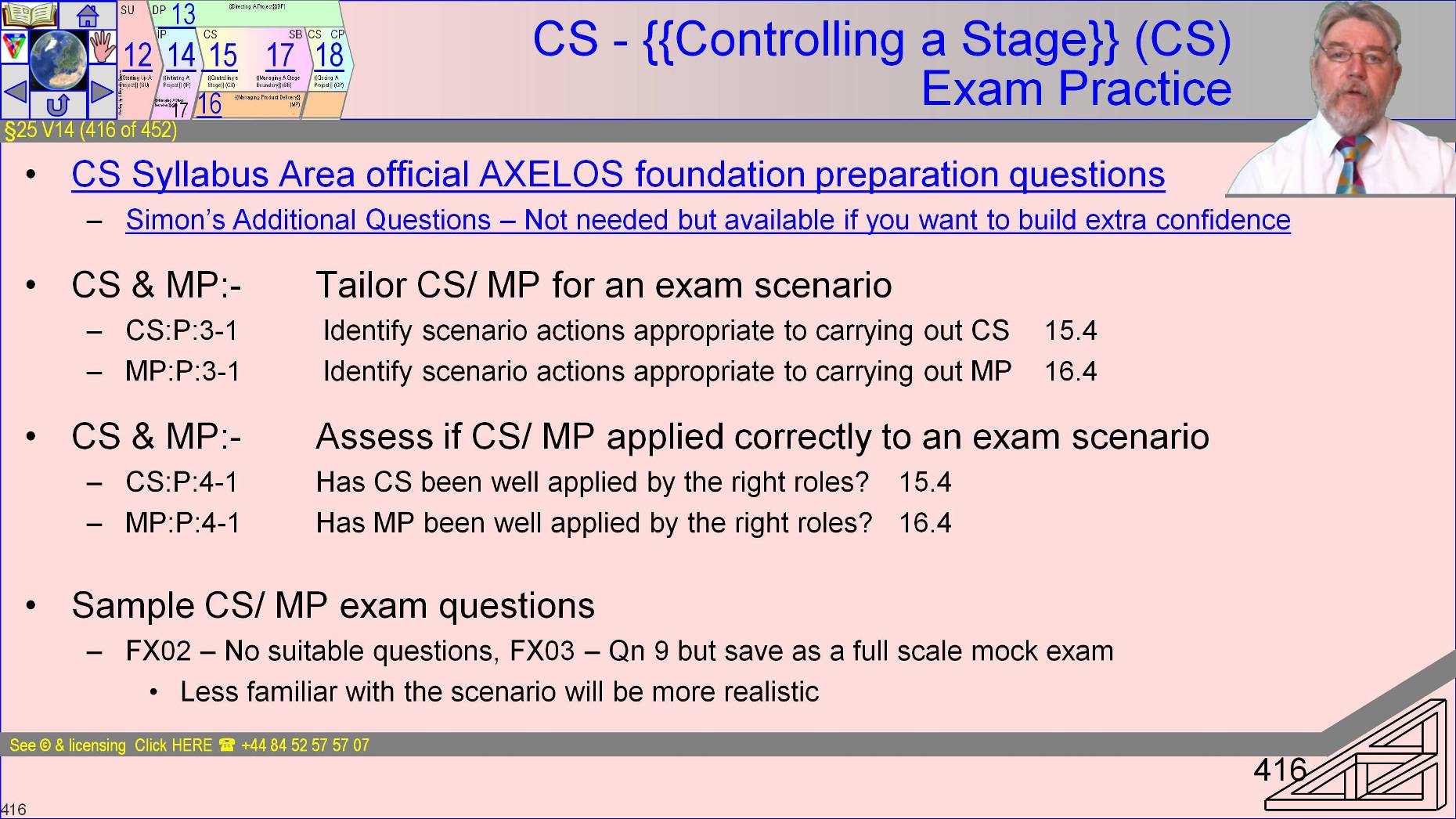
The only official Practitioner question that we have covering {{Controlling a Stage}} and Managing Product Delivery is in the FX03 paper.
We are very close to having covered everything at which point I recommend you do a full mock exam.
SO I suggest skipping any practitioner practice right now, complete {{Closing a Project}} and then we can get ready for a full mock.
I still recommend that you use the online link for relevant Foundation questions and chase down all the rationale’s in the relevant Work-Book Sub-Section.
Review is still important so use the end-of-lesson “What I recall easily, what I still only get by reviewing the materials…” template
The after you’ve consolidated the large amount of stuff in the lesson just gone accompany me on a tour of closing out with the LAST process
~~
§25 s417 = 13.4.3 Authorise a Stage or Exception Plan (DP3)
§25 V15 (417 of 454)::13.4.3 Authorise a Stage or Exception Plan (DP3)::
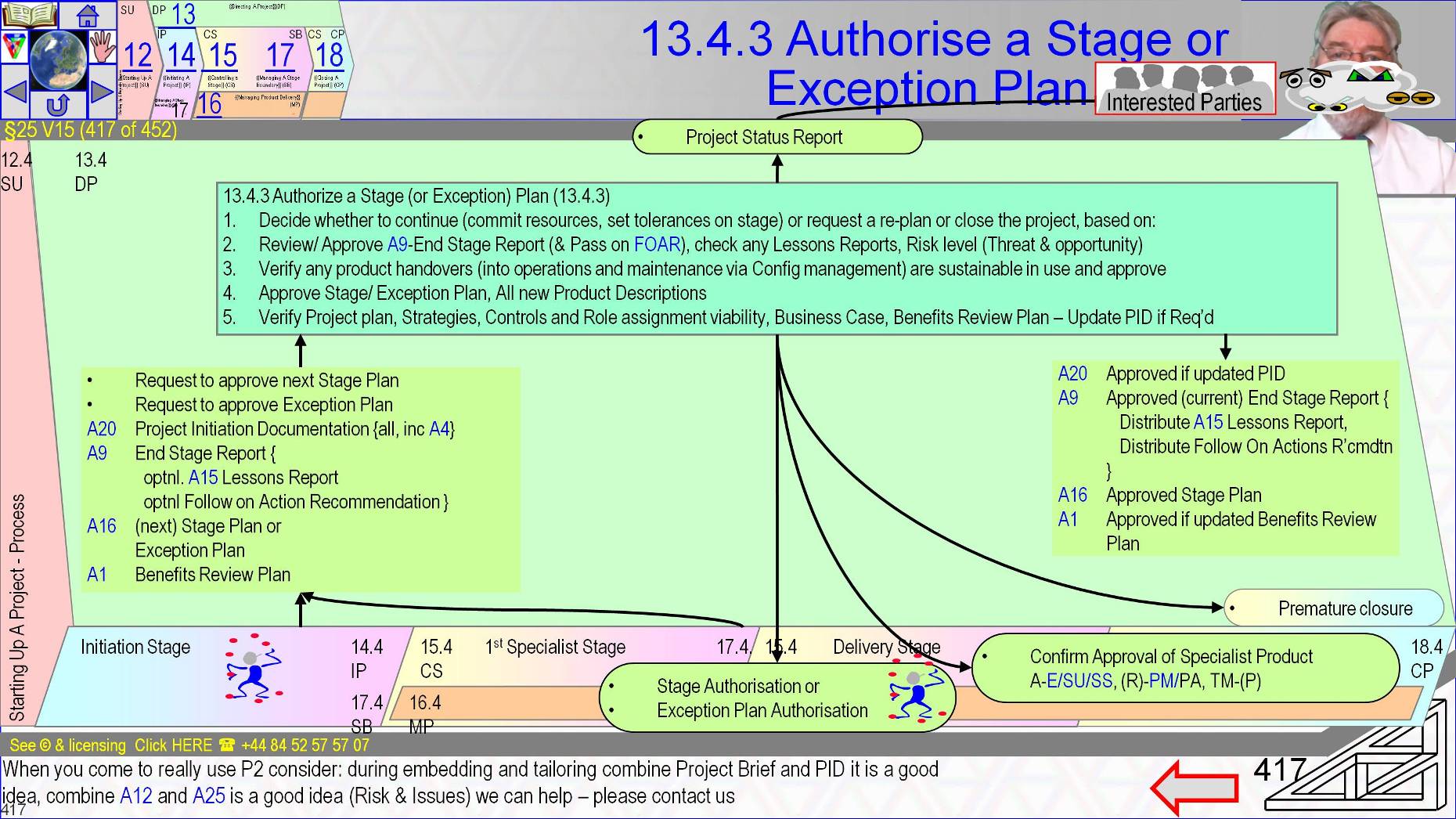
We discussed the [ Authorize a Stage or Exception Plan [ 13.4.3 ] process at the end of the Initiation Stage when it approved the first Delivery Stage.
- That is the only time it is guaranteed to be needed and the time it is likely to be invisibly incorporated into the bigger decision about whether the project is selected to continue which is [ Authorize the project [ 13.4.2 ]
- The previous discussion pretty much said it all. The on-slide arrow bottom right skips back to the previous discussion.
§25 s418 = Revision Notes Review the Sub-Section just gone and capture NOW…
§25 V16 (418 of 454)::Revision Notes Review the Sub-Section just gone and capture NOW…::
Revision is still important for what we just covered that so don’t skimp here – CS and MP and SB are the core of the implementation of the themes so key you have solid understanding of in the exam.
- As ever try three times to write a list of what we covered with as little looking-it-up as possible and none on the third time through.
~~
VnCtl:29/08/2016 21:42:06 This file is part of Logical Model Ltd’s p2FdtnAndPrctnt training course