What do you need to get started?
To be perfectly honest, my grandmother will never publish a map on a web page.
However, that doesn’t mean that it’s beyond those with a little computer savy and a willingness to have a play. Remember failure is your friend (I am fairly sure that I am also related by blood). Just learn from your mistakes and it’ll all work out.
So, here in no particular order is a list of good things to know. None of which are essential, but any one (or more) of which will make your life slightly easier.
- HyperText Markup Language (HTML)
- JavaScript
- Cascading Style Sheets (CSS)
- Web Servers
- PHP

|
DON’T FREAK OUT!First things first. This isn’t rocket science. It’s just teh interwebs. We’ll take it gently, and I’ll be a little more specific in the following sections. |
HTML
This stands for HyperText Markup Language and is the stuff that web pages are made of. Check out the definition and other information on Wikipedia for a great overview. Just remember that all you’re going to use HTML for is to hold the code that you will use to present your information. This will be as a .html (or .htm) file and they can be pretty simple (we’ll look at some in a moment).
JavaScript
JavaScript is what’s called a ‘scripting language’. It is the code that will be contained inside the HTML file that will make Leaflet do all its fanciness. In fact, leaflet.js is a JavaScript Library, it’s the native language for using Leaflet.
Knowing a little bit about this would be really good, but to be perfectly honest, I didn’t know anything about it before I started using d3.js. I read a book along the way (JavaScript: The Missing Manual from O’Reilly) and that helped with context, but the examples and tutorials that are available for Leaflet are understandable, and with a bit of trial and error, you can figure out what’s going on.
In fact, most of what this collection of information’s about is providing examples and explanations for the JavaScript components of Leaflet.
Cascading Style Sheets (CSS)
Cascading Style Sheets (everyone appears to call them ‘Style Sheets’ or ‘CSS’) is a language used to describe the formatting (or “look and feel”) of a document written in a markup language. The job of CSS is to make the presentation of the components you will draw with Leaflet simpler by assigning specific styles to specific objects. One of the cool things about CSS is that it is an enormously flexible and efficient method for making everything on the screen look more consistent and when you want to change the format of something you can just change the CSS component and the whole look and feel of your maps will change.
The wonderful World of Cascading Style Sheets

|
Full disclosureI know CSS is a ridiculously powerful tool that would make my life easier, but I use it in a very basic (and probably painful) way. Don’t judge me, just accept that the way I’ve learnt was what I needed to get the job done (this probably means that noob’s like myself will find it easier, but where possible try and use examples that include what look like logical CSS structures) |
Web Servers
Ok, this can go one of two ways. If you have access to a web server and know where to put the files so that you can access them with your browser, you’re on fire. If you’re not quite sure, read on…
A web server will allow you to access your HTML files and will provide the structure that allows it to be displayed on a web browser. I can thoroughly recommend WampServer as a free and simple way to set up a local web server that includes PHP and a MySQL database (more on those later). Go to the WampServer web page (http://www.wampserver.com/en/) and see if it suits you.
Throughout this document I will be describing the files and how they’re laid out in a way that has suited my efforts while using WAMP, but they will work equally well on a remote server. I will explain a little more about how I arrange the files later in the ‘Getting Leaflet’ section.

WAMP = Windows + Apache + MySQL + PHP
There are other options of course. You could host code on GitHub and present the resulting graphics on bl.ocks.org. This is a great way to make sure that your code is available for peer review and sharing with the wider community.
PHP
PHP is a scripting language for the web. That is to say that it is a programming language which is executed when you load web pages and it helps web pages do dynamic things.
You might think that this sounds familiar and that JavaScript does the same thing. But not quite.
JavaScript is designed so that it travels with the web page when it is downloaded by a browser (the client). However, PHP is executed remotely on the server that supplies the web page. This might sound a bit redundant, but it’s a big deal. This means that the PHP which is executed doesn’t form part of the web page, but it can form the web page. The implication here is that the web page you are viewing can be altered by the PHP code that runs on a remote server. This is the dynamic aspect of it.
In practice, PHP could be analogous to the glue that binds web pages together. Allowing different portions of the web page to respond to directions from the end user.
It is widely recognised as both a relatively simple language to learn, but also a fairly powerful one. At the same time it comes into criticism for being somewhat fragmented and sometimes contradictory or confusing. But in spite of any perceived shortcomings, it is a very widely used and implemented language and one for which there is no obvious better option.
Other Useful Stuff
Text Editor
A good text editor for writing up your code will be a real boost. Don’t make the fatal mistake of using an office word processor or similar. THEY WILL DOOM YOU TO A LIFE OF MISERY. They add in crazy stuff that you can’t even see and never save the files in a way that can be used properly.
Preferably, you should get an editor that will provide some assistance in the form of syntax highlighting which is where the editor knows what language you are writing in (JavaScript for example) and highlights the text in a way that helps you read it. For example, it will change text that might appear as this;
// Get the data
d3.tsv("data/data.tsv", function(error, data) {
data.forEach(function(d) {
    d.date = parseDate(d.date);
    d.close = +d.close;
});
Into something like this;
// Get the data
d3.tsv("data/data.tsv", function(error, data) {
data.forEach(function(d) {
    d.date = parseDate(d.date);
    d.close = +d.close;
});
Infinity easier to use. Trust me.
There are plenty of editors that will do the trick. I have a preference for Geany, mainly because it’s what I started with and it grew on me :-).
Getting Leaflet
Luckily this is pretty easy.
You can either get it directly from leafletjs.com off their downloads page (this would be the best method IMHO) or even go to the Leaflet repository on github and download it by clicking on the ‘ZIP’ button (slightly trickier for the uninitiated).
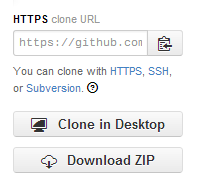
Download the repository as a zip file
What you do with it from here depends on how you’re hosting your web pages. If you’re working on them on your local PC, then you will want to have the leaflet.js and leaflet.css files in paths that can be seen by the browser. Again, I would recommend WAMP (a local web server) to access your files locally. If you’re using WAMP, then you just have to make sure that it knows to use a directory that will contain the appropriate files and you will be away.
The following image is intended to provide a very crude overview of how you can set up the directories and files.
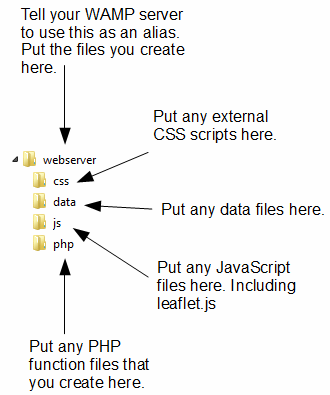
A potential directory structure for your files
- webserver: Use this as your ‘base’ directory where you put your files that you create. That way when you open your browser you point to this directory and it allows you to access the files like a normal web site.
- css: this will be your directory that will house all the Cascading Style Sheet files you will use. and you will want to have at least one in the form of leaflet.css. You will notice in the code examples that follow there is a line like the following;
<link rel="stylesheet" href="css/leaflet.css" />. This tells your browser that from the file it is running (one of the leaflet html files) if it goes into the ‘css’ folder it will find theleaflet.cssfile that it can load. - data: I use this directory to hold any data files that I would use for processing. For example, if we have a file of latitude and longitude pairs that we want to load to present to a map, they may be in a file called
latlong.csv. we can logically group all similar data files to keep our directory structure tidy and when we want to load a data file we will always know where to get it. - js: this will be your directory that will house all the JavaScript files you will use. and you will certainly want to have at least one in the form of leaflet.js. You will notice in the code examples that follow there is a line like the following;
<script src="js/leaflet.js"></script>. This tells your browser that from the file it is running (one of the leaflet html files) if it goes into the ‘js’ folder it will find theleaflet.jsfile that it can load. - php: when we start to use PHP scripts to manipulate our data or manage interactive loading of information from the URL, we will want to do so using PHP scripts. Don’t be phased if this sounds like ‘jibber-jabber’. All you need to know at this stage is that we will be using some clever tools to load data into our web page and we’ll use PHP scripts that will live in the
phpdirectory to do it.
Where to get information on leaflet.js
Leaflet already has a great home page where you can find an awesome range of support information, but there are other useful places to go. The following is a far from exhaustive list of sources, but from my own experience it represents a handy subset of knowledge.
leafletjs.com
leafletjs.com would be the first port of call for people wanting to know something about leaflet.js.
From here you can; - Access the features list to get an overview of the strengths of Leaflet. - Check out some tutorials on common things that you will want to do with Leaflet. - Read the extensive API documentation that will be a treasure trove of information as you use Leaflet. - Find links to an extensive list of plugins that you can use with Leaflet. - Get updates on the progress of Leaflet development on the developer blog.
It is difficult to overstate the volume of available information that can be accessed from leafletjs.com. It stands alone as the one location that anyone interested in Leaflet should visit.
Google Groups
There is a Google Group dedicated to discussions on leaflet.js. This serves as the official Leaflet community forum.
In theory this forum is for discussion of any Leaflet-related topics that go beyond the scope of a simple GitHub issue report — ideas, questions, troubleshooting, feedback, etc.
So, by all means add this group as a favourite and this will provide you with the opportunity to receive emailed summaries of postings or just an opportunity to easily browse recent goings-on.
Stack Overflow
Stack Overflow is a question and answer site whose stated desire is “to build a library of detailed answers to every question about programming”. Ambitious. So how are they doing? Actually really well. Stack overflow is a fantastic place to get help and information. It’s also a great place to help people out if you have some knowledge on a topic.
They have a funny scheme for rewarding users that encourages providing good answers based on readers voting. It’s a great example of gamification working well. If you want to know a little more about how it works, check out this page; http://stackoverflow.com/about.
They have a leaflet tag (http://stackoverflow.com/questions/tagged/leaflet) and like Google Groups there is a running list of different topics that are an excellent source of information.
Github
Github is predominantly a code repository and version control site. It is highly regarded for its technical acumen and provide a fantastic service that is broadly used for many purposes.
Whilst not strictly a site that specialises in providing a Q & A function, there is a significant number of repositories (785 at last count) which mention leaflet. With the help from an astute search phrase, there is potentially a solution to be found there.
The other associated feature of Github is Gist. Gist is a pastebin service (a place where you can copy and past code) that can provide a ‘wiki like’ feature for individual repositories and web pages that can be edited through a Git repository. Gist plays a role in providing the hub for the bl.ocks.org example hosting service set up by Mike Bostock.
For a new user, Github / Gist can be slightly daunting. It’s an area where you almost need to know what’s going on to know before you dive in. This is certainly true if you want to make use of it’s incredible features that are available for hosting code. However, if you want to browse other peoples code it’s an easier introduction. Have a look through what’s available and if you feel so inclined, I recommend that you learn enough to use their service. It’s time well spent.
bl.ocks.org
bl.ocks.org is a viewer for code examples which are hosted on Gist. You are able to load your code into Gist, and then from bl.ocks.org you can view them.
This is a really great way for people to provide examples of their work and there are many who do. However, it’s slightly tricky to know what is there. It is my intention as I write this book to host examples here, so hopefully I don’ have to come back and edit this sentence :-).
I would describe the process of getting your own code hosted and displaying as something that will be slightly challenging for people who are not familiar with Github / Gist, but again, in terms of visibility of the code and providing an external hosing solution, it is excellent and well worth the time to get to grips with.
Twitter provides a great alerting service to inform a large disparate group of people about stuff.
It’s certainly a great way to keep in touch on a hour by hour basis with people who are involved with Leaflet and this can be accomplished in a few ways. First, there is the official Leaflet Twitter identity hosted by Vladimir (AKA @mourner). Second, find as many people from the various Leaflet sites around the web who you consider to be influential in areas you want to follow (different aspects such as development, practical output, educational etc) and follow them. Even better, I found it useful to find a small subset who I considered to be influential people and I noted who they followed. It’s a bit ‘stalky’ if you’re unfamiliar with it, but the end result should be a useful collection of people with something useful to say.
Books
There are only two books that I am currently aware of on Leaflet.
There is “[Instant Interactive Map designs with Leaflet JavaScript Library How-to)” by Jonathan Derrough (Packt Publishing, May 2013). This is available via Amazon.
And “[Learn.js #3: Making maps with Leaflet.js)” by Seth Vincent, (http://learnjs.io/, November 2013). This has only been released incrementally and is part of a larger series on JavaScript which can be found at learnjs.io.