2. March 2013
- Invoking an OWASP AppSensor Java method from .NET C# REPL
- Invoking Java BeanShell from .Net CLR
- Loading OWASP ESAPI jar and its dependencies
- Getting list of Jars loaded in SystemClassLoader
- Java BeanShell REPL v1.0.exe
Invoking an OWASP AppSensor Java method from .NET C# REPL (using Jni4Net)
On the topic of AppSensor, you might find the code snippet below interesting.
Inside an O2 Platform C# REPL editor (which is running in .Net’s CLR), I was able to:
- load the AppSensor jar in a new class loader,
- access/view its classes in a GUI
- create an instance of org.owasp.appsensor.trendmonitoring.TrendEvent
- execute the getTime method
Note that the AppSensor code is running on the Java’s JVM (loaded in the same process as the .Net’s CLR)
The code is still in very rough status, but it works :)
Here (screenshot below) is what it looks like: * note the Date value in the output window (bottom right) which is the result (shown as a .NET String) of the Java getTime method * on top you have a view into the AppSensor’s classes, methods, parameters, return type * on the bottom left you can see the written C# REPL script
![CropperCapture[34]](/preview_site_images/Practical_Jni4Net/CropperCapture_25255B34_25255D_thumb.jpg)
Here is the code:
  1 //var topPanel = "{name}".popupWindow(700,400);
  2 var topPanel = panel.clear().add_Panel();
  3 //"".open_ConsoleOut();
  4
  5 var jarToLoad = @"E:/_Code_Tests/_AppSensor/AppSensor-0.1.3.jar";
  6
  7
  8 var bridgeSetup = new BridgeSetup(){Verbose=true};
  9
 10 var jniAction = new API_Jni4Net_Active();
 11
 12 //bridgeSetup.AddClassPath(jarToLoad);
 13 //return "here";
 14 try
 15 {
 16     Bridge.CreateJVM(bridgeSetup);
 17 }
 18 catch(System.Exception ex)
 19 {
 20     ex.log();
 21     return "error";
 22 }
 23
 24 var jniEnv = JNIEnv.ThreadEnv;
 25
 26 //calculate list of classes in Jar file
 27 var jarFile = Class.forName("java.util.jar.JarFile")
 28                    .getConstructor(new java.lang.Class[] { java.lang.String._class })
 29                    .newInstance (new java.lang.Object[] { jniEnv.NewString(jarToLoad) });
 30
 31 var entries = jarFile.getClass().getMethod("entries",null)
 32                                 .invoke(jarFile, null);
 33 var hasMoreElements = entries.getClass().getMethod("hasMoreElements",null);
 34 var nextElement = entries.getClass().getMethod("nextElement",null);
 35 var classesInJar = new List<string>();
 36 while((bool)(java.lang.Boolean)hasMoreElements.invoke(entries, null))
 37 {
 38     var path = nextElement.invoke(entries, null).str();
 39     if (path.ends(".class"))
 40     classesInJar.add(path.remove(".class").replace("/","."));
 41 }
 42
 43 //Get class loader for Jar
 44
 45
 46 var jarToLoad_asUrl = new java.io.File(jarToLoad).toURL();
 47 var servletApi_asUrl = new java.io.File(@"E:\_Code_Tests\_AppSensor\servlet-api.jar").toURL();
 48
 49 //var url = new java.net.URL(jarToLoad);
 50
 51 var urlArray = jniEnv.NewObjectArray(2, java.net.URL._class, null);
 52 jniEnv.SetObjectArrayElement(urlArray, 0, jarToLoad_asUrl);
 53 jniEnv.SetObjectArrayElement(urlArray, 1, servletApi_asUrl);
 54
 55 var urlClassLoaderClass = java.lang.Class.forName("java.net.URLClassLoader");
 56
 57 var ctor = urlClassLoaderClass.getConstructors()[2];
 58 var systemClassLoader = ClassLoader.getSystemClassLoader();
 59 var urlClassLoader = (ClassLoader)ctor.newInstance(new java.lang.Object[] { urlArray, systemC\
 60 lassLoader });
 61
 62
 63 //var appSensorClass = urlClassLoader.loadClass("org.owasp.appsensor.APPSENSOR");
 64 //var appSensorClass = urlClassLoader.loadClass("org.owasp.appsensor.trendmonitoring.referenc\
 65 e.InMemoryTrendDataStore$1");
 66
 67 foreach(var classInJar in classesInJar)
 68 {
 69     try
 70     {
 71         urlClassLoader.loadClass(classInJar);
 72         "Loaded class: {0}".info(classInJar);
 73     }
 74     catch(System.Exception ex)
 75     {
 76         "Failed to load {0} due to {1}".error(classInJar, ex.Message);
 77     }
 78 }
 79
 80 var treeView = topPanel.add_TreeView().java_SetTreeView_To_Show_Jni4Net_Reflection_Data();
 81 var loadedClasses = jniAction.java_From_ClassLoader_get_Loaded_Classes(urlClassLoader);
 82 treeView.add_Nodes(loadedClasses, (@class)=>@class.getName(), true);
 83
 84 //invoke a method from AppSensor
 85 var trendEvent = urlClassLoader.loadClass("org.owasp.appsensor.trendmonitoring.TrendEvent").g\
 86 etConstructors().first()
 87                                .newInstance(new java.lang.Object[] { new Date(),
 88 jniEnv.NewString("1"),
 89 jniEnv.NewString("aaa"),
 90 jniEnv.NewString("ccc") }) ;
 91 return trendEvent.getClass()
 92                  .getMethod("getTime",null).invoke(trendEvent,null)
 93                  .str();
 94
 95
 96 //return loadedClasses;
 97 /*
 98 //Get JavaProperties from the loaded JVM
 99 Properties javaSystemProperties = java.lang.System.getProperties();
100 foreach (java.lang.String key in Adapt.Enumeration(javaSystemProperties.keys()))
101     "key: {0}".info(key);
102 return javaSystemProperties;
103 */
104 return "ok";
105 //using java.io;
106 //using java.lang;
107 //using java.util;
108 //using net.sf.jni4net;
109 //using net.sf.jni4net.jni
110 //using net.sf.jni4net.adaptors;
111 //O2Ref:Jni4Net/lib/jni4net.n-0.8.6.0.dll
112
113 //O2File:API_Jni4Net_Active.cs
note: this code sample was running on the x64 version of the O2 Platform (because the default JavaHome in my dev VM points to a x64 Java version)
Invoking Java BeanShell from .Net CLR
Here is a very rough PoC of how I was able to execute a JavaBean shell script from inside the O2 Platform (with the java code executed under a JVM)
Executing “return 2+2;” as a java beanshell comand (see result on the bottom right Output pane)
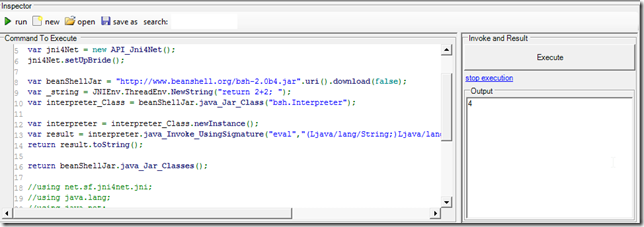
 1 var jni4Net = new API_Jni4Net();
 2 jni4Net.setUpBride();
 3
 4 var beanShellJar = "http://www.beanshell.org/bsh-2.0b4.jar".uri().download(false);
 5 var _string = JNIEnv.ThreadEnv.NewString("return 2+2; ");
 6 var interpreter_Class = beanShellJar.java_Jar_Class("bsh.Interpreter");
 7
 8 var interpreter = interpreter_Class.newInstance();
 9 var result = interpreter.java_Invoke_UsingSignature("eval","(Ljava/lang/String;)Ljava/lang/Ob\
10 ject;",_string);
11 return result.toString();
12
13 return beanShellJar.java_Jar_Classes();
14
15 //using net.sf.jni4net.jni;
16 //using java.lang;
17 //using java.net;
18 //O2File:API_Jni4Net.cs
19 //O2Ref:jni4net.n-0.8.6.0.dll
Loading OWASP ESAPI jar and its dependencies
Here is a pretty cool PoC where I was able to load an jar file and its dependencies into an ‘Jni4Net created’ JVM
Using the system class loader
This is the ESAPI class we want to load (the code below returns null)
1 new API_Jni4Net().setUpBride();
2 return "org.owasp.esapi.util.ObjFactory".java_Class();
Using the technique shown in Adding files to java classpath at runtime - Stack Overflow , we can add the esapi jar into the sysLoader class path
 1 new API_Jni4Net().setUpBride();
 2
 3 var esapiJar = @"E:\_Code_Tests\ESAPI\esapi-2.0.1.jar";
 4 var classLoader = ClassLoader.getSystemClassLoader();
 5 var addUrl = classLoader.getClass().getSuperclass().getDeclaredMethod("addURL", new Class[]{U\
 6 RL._class});
 7 addUrl.setAccessible(true);
 8 addUrl.invoke(classLoader, new java.lang.Object[]{ esapiJar.java_File().toURL() });
 9
10 return "org.owasp.esapi.util.ObjFactory".java_Class();
11
12 //using net.sf.jni4net.jni;
13 //using java.lang;
14 //using java.net;
15 //O2File:API_Jni4Net.cs
16 //O2Ref:jni4net.n-0.8.6.0.dll
which will now work:
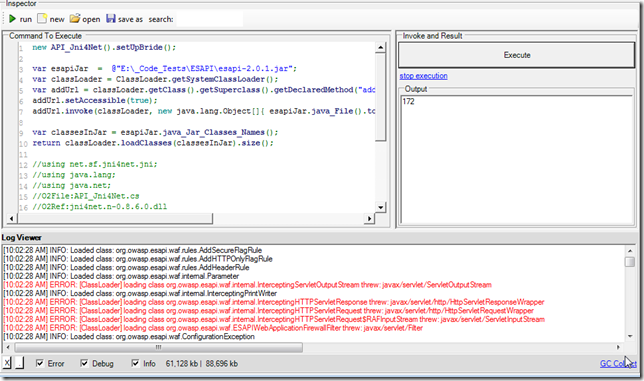
If we now try to load all classes in the ESAPI jar, we will get 172 classes and a number of class load errors (due to missing jars references)
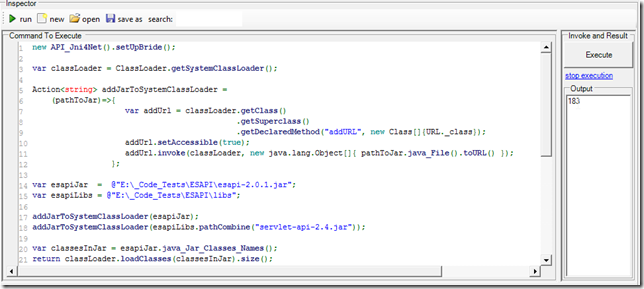
Let’s refactor the code and create the addJarToSystemClassLoader method
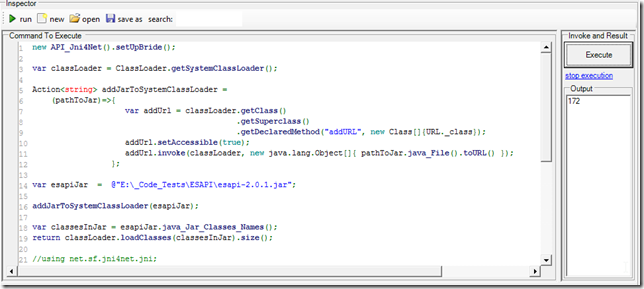
And load one of the dependencies (note the increased number of classes loaded (183)):
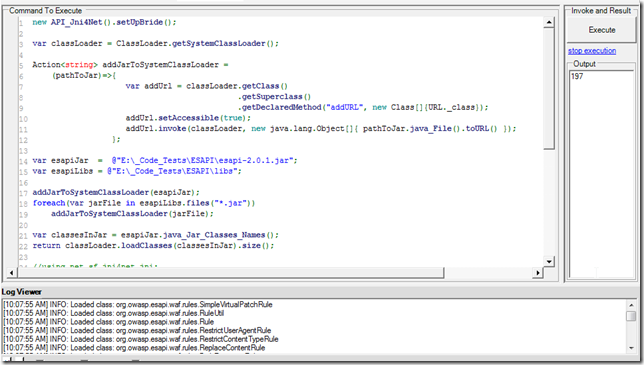
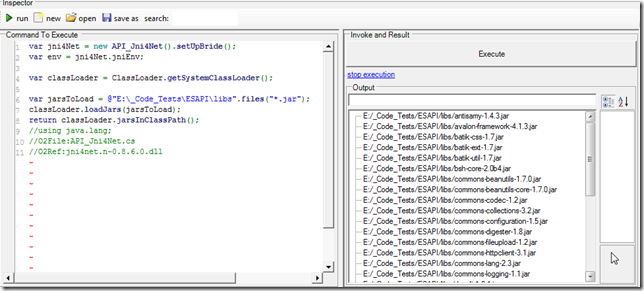
And now if we load all jars in the libs folder (all 30 of them), we will get 197 classes and no load errors
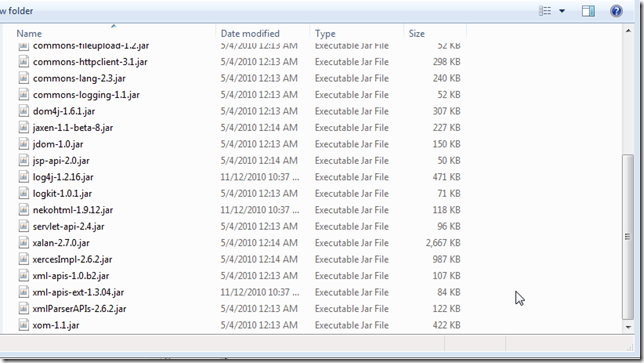
Here are the jars added to the classpath:
Here is the code (shown above) that loaded all esapi classes into the system class path:
 1 new API_Jni4Net().setUpBride();
 2
 3 var classLoader = ClassLoader.getSystemClassLoader();
 4
 5 Action<string> addJarToSystemClassLoader =
 6     (pathToJar)=>{
 7                     var addUrl = classLoader.getClass()
 8                                             .getSuperclass()
 9                                             .getDeclaredMethod("addURL", new Class[]{URL._cla\
10 ss});
11                     addUrl.setAccessible(true);
12                     addUrl.invoke(classLoader, new java.lang.Object[]{ pathToJar.java_File().\
13 toURL() });
14                  };
15
16 var esapiJar = @"E:\_Code_Tests\ESAPI\esapi-2.0.1.jar";
17 var esapiLibs = @"E:\_Code_Tests\ESAPI\libs";
18
19 addJarToSystemClassLoader(esapiJar);
20 foreach(var jarFile in esapiLibs.files("*.jar"))
21     addJarToSystemClassLoader(jarFile);
22
23 var classesInJar = esapiJar.java_Jar_Classes_Names();
24 return classLoader.loadClasses(classesInJar).size();
25
26 //using net.sf.jni4net.jni;
27 //using java.lang;
28 //using java.net;
29 //O2File:API_Jni4Net.cs
30 //O2Ref:jni4net.n-0.8.6.0.dll
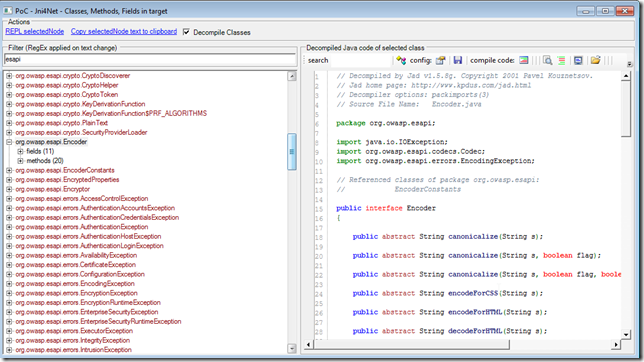
Once these classes are loaded we can use the tool shown in C# REPL a java process (ZAP Proxy) to browse them and view its source code:
We can now create instances of ESAPI using reflection.
One problem to solve is the need to define where the ESAPI.properties file is:
 1 new API_Jni4Net().setUpBride();
 2 var classLoader = ClassLoader.getSystemClassLoader();
 3
 4 var arrayList = "java.util.ArrayList".java_Class().newInstance();
 5
 6 return "org.owasp.esapi.reference.DefaultSecurityConfiguration".java_Class().newInstance();
 7
 8 var easpi = "org.owasp.esapi.ESAPI".java_Class();
 9 return easpi.getMethod("encoder",null).invoke(null,null);
10 return easpi.newInstance().typeFullName();
The code above will throw an error on line 439 of the DefaultSecurityConfiguration file
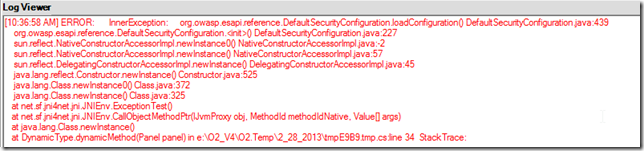
which is:
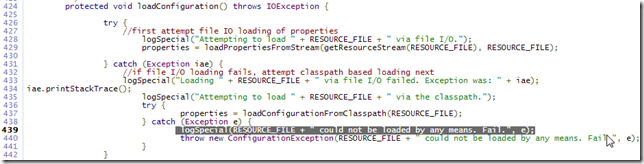
Using a separate class loader
Here is a script that loads 172 classes from the ESAPI jar
 1 var jni4Net = new API_Jni4Net();
 2 jni4Net.setUpBride();
 3
 4 var esapiJar = @"E:\_Code_Tests\ESAPI\esapi-2.0.1.jar";
 5 var classLoader = (new URL[] {esapiJar.java_File().toURL() }).java_ClassLoader_forJars();
 6
 7 return classLoader.loadClasses(esapiJar.java_Jar_Classes_Names()).size();
 8
 9 //using net.sf.jni4net.jni;
10 //using java.lang;
11 //using java.net;
12 //O2File:API_Jni4Net.cs
13 //O2Ref:jni4net.n-0.8.6.0.dll
This version will load 183 classes since we are also loading the servlet-api
 1 var jni4Net = new API_Jni4Net();
 2 jni4Net.setUpBride();
 3 var servletApi = @"E:\_Code_Tests\ESAPI\libs\servlet-api-2.4.jar";
 4 var esapiJar  =  @"E:\_Code_Tests\ESAPI\esapi-2.0.1.jar";
 5 var classLoader = (new URL[] {esapiJar.java_File().toURL() , servletApi.java_File().toURL() }\
 6 ).java_ClassLoader_forJars();
 7
 8 return classLoader.loadClasses(esapiJar.java_Jar_Classes_Names()).size();
 9 //using net.sf.jni4net.jni;
10 //using java.lang;
11 //using java.net;
12 //O2File:API_Jni4Net.cs
13 //O2Ref:jni4net.n-0.8.6.0.dll
Getting list of Jars loaded in SystemClassLoader
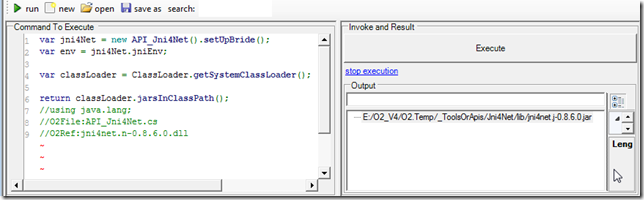
I just created a couple extension methods for Jni4Net that allow (amongst other things) the listing of the jars currently loaded in the SystemClassLoader (see API_Jni4Net.cs for the code of these .NET Extension Methods)
The objective is to simplify the use of Jni4Net, and to hide the complexity in consuming Java code from .NET.
Here are a couple examples of these Extension Methods in action:
When you create a simple Jni4Net bridge there is only one jar loader:
Next lets load a jar dynamically and see it appear in the list of loaded jars
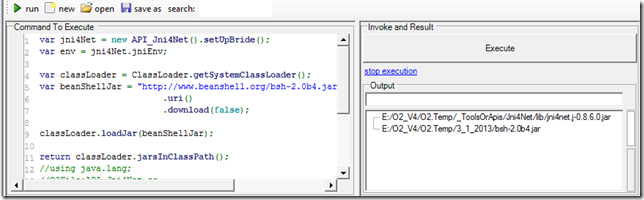
Note that once the jar is loaded we can access its classes:
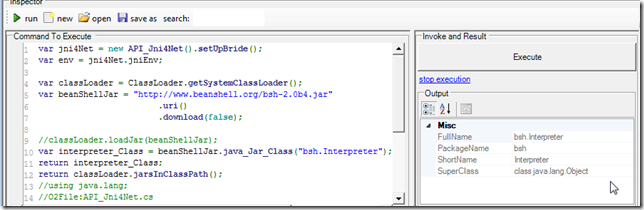
Create instances and invoke methods:
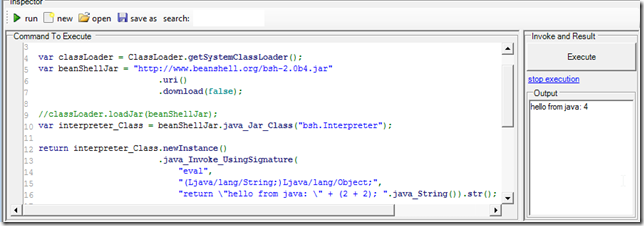
Here is the script show above:
 1 var jni4Net = new API_Jni4Net().setUpBride();
 2 var env = jni4Net.jniEnv;
 3
 4 var classLoader = ClassLoader.getSystemClassLoader();
 5 var beanShellJar = "http://www.beanshell.org/bsh-2.0b4.jar".uri().download(false);
 6
 7 classLoader.loadJar(beanShellJar);
 8 var interpreter_Class = beanShellJar.java_Jar_Class("bsh.Interpreter");
 9
10 return interpreter_Class.newInstance()
11 		    .java_Invoke_UsingSignature("eval",
12                                                     "(Ljava/lang/String;)Ljava/lang/Object;",\
13
14                                                     "return \"hello from java: \" + (2 + 2); "
15                                                        .java_String()
16                                                    ).str();
17
18 return classLoader.jarsInClassPath();
19 //using java.lang;
20 //O2File:API_Jni4Net.cs
21 //O2Ref:jni4net.n-0.8.6.0.dll
Finally we can also load/add to the system class path, entire folders with jars. For example all ESAPI dependencies:
Java BeanShell REPL v1.0.exe
Using the technique shown in Invoking Java BeanShell from .Net CLR, here is REPL that allows the quick execution of Java BeanShell command in a C# GUI
You can download this stand-alone O2 tool from: Util - Jni4Net - Java BeanShell REPL v1.0.exe
This is what the default GUI looks like:
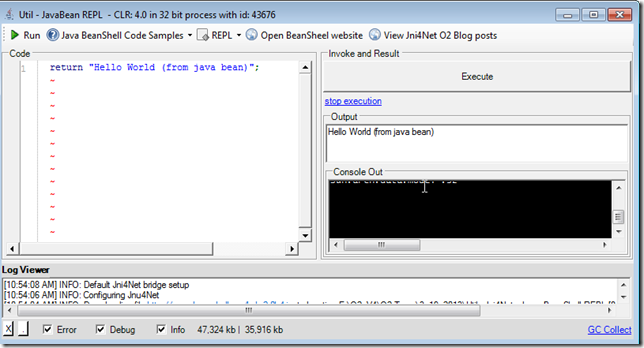
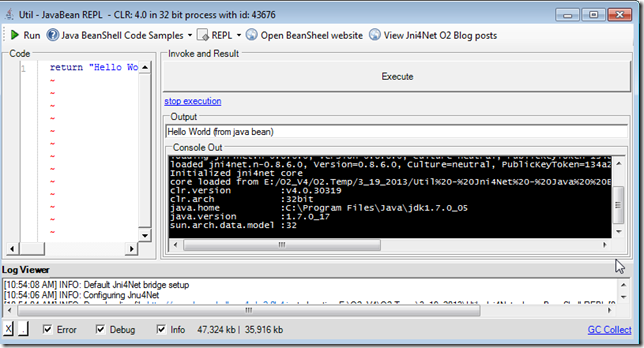
If you expand the Console Out panel, you can see the Jni4Net initialization messages:
There are a number of code samples included:
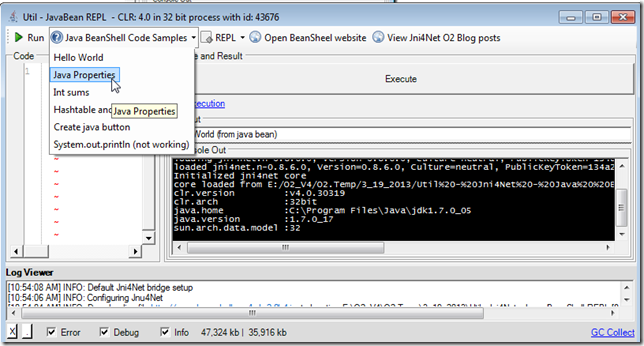
Which will be auto executed on selection:
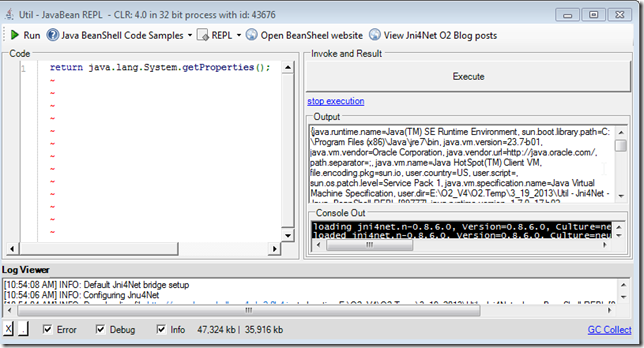
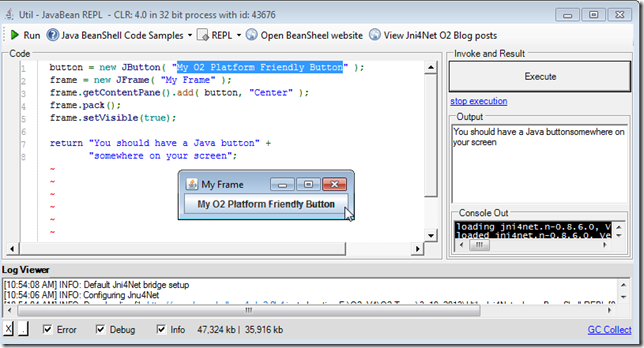
This one for example:
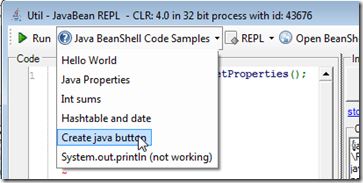
will create a Java button:
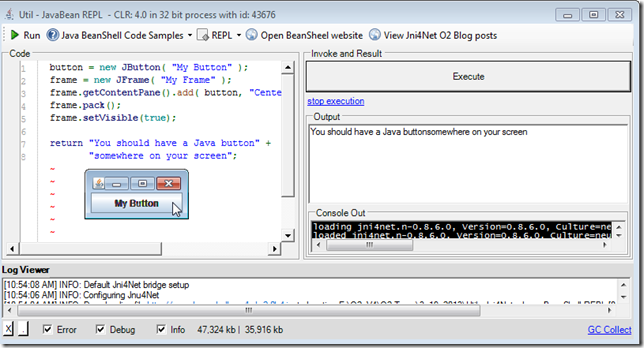
which of course can be modified and executed:
Also included is a REPL menu
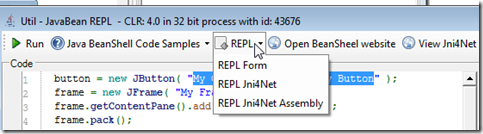
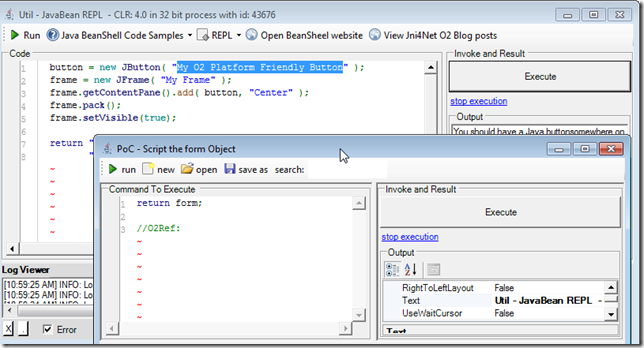
That allows the scripting of the current Form:
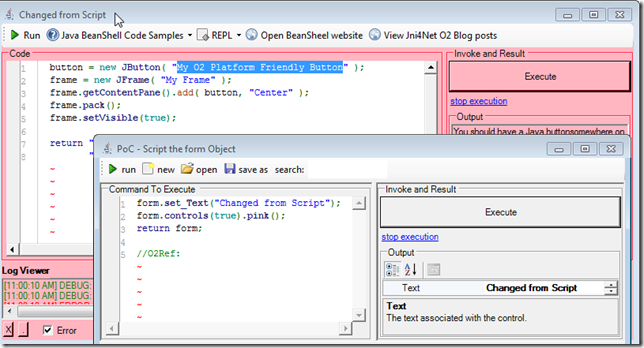
like for example: changing its title and making all controls pink
or inject a WebBrowser (on the left) with the Jni4Net website:
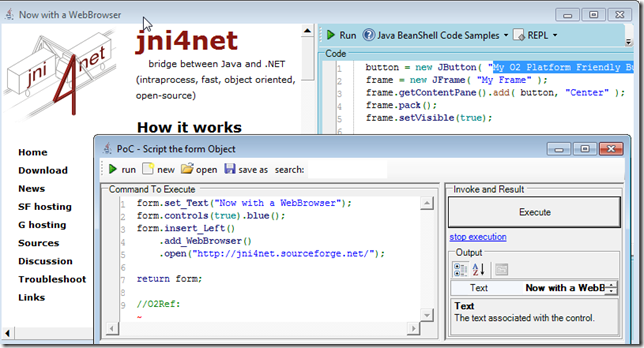
The other REPL menu item:
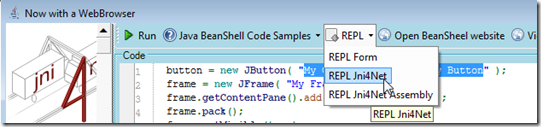
Allows the scripting and visualization of the Jni4Net object:
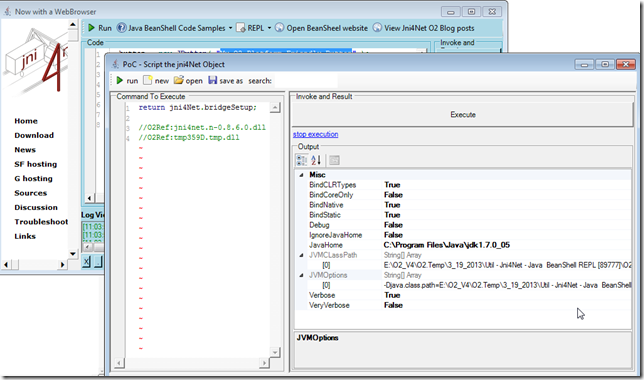
For reference here is the script (also available at O2.Platform.Scripts\3rdPartyJni4NetUtil - Jni4Net - Java BeanShell REPL.h2) that created this GUI (a bit messy and in need for a good dose of refactoring)):
  1 O2Setup.extractEmbededConfigZips();
  2
  3 //Set value of Bridge.homeDir
  4 var jni4NetDir = PublicDI.config.ToolsOrApis.pathCombine(@"Jni4Net\lib");
  5 var fieldInfo = (FieldInfo)typeof(Bridge).field("homeDir");
  6 PublicDI.reflection.setField(fieldInfo, jni4NetDir);
  7 //return typeof(Bridge).fieldValue("homeDir");
  8
  9 "jni4net.j-0.8.6.0.jar location: {0}".info(Bridge.FindJar());
 10
 11 //stand-alone tool not working (not finding the "jni4net.j-0.8.6.0.jar");
 12
 13 //"jni4net.n-0.8.6.0.dll is at: {0}".info("jni4net.n-0.8.6.0.dll".assembly_Location());
 14 var topPanel = "Util - JavaBean REPL - {0}".format(clr.details()).popupWindow(800,400)
 15                                                                  .insert_LogViewer();
 16 //var topPanel = panel.clear().add_Panel();
 17
 18 Action execute =null;
 19
 20 var replGui = topPanel.add_REPL_Gui();
 21 replGui.On_ExecuteCode = ()=> execute();
 22
 23 replGui.Output_Panel.insert_Below("Console Out").add_ConsoleOut();
 24
 25 "test console out".console_WriteLine();
 26
 27 var codeText = replGui.Code_Panel.add_SourceCodeViewer();
 28 var toolStrip = topPanel.insert_Above_ToolStrip()
 29                         .add_Button("Run", "btExecuteSelectedMethod_Image".formImage(),()=> e\
 30 xecute())
 31                         .toolStrip();
 32 var samplesMenu = toolStrip.add_DropDown("Java BeanShell Code Samples", "help_browser".formIm\
 33 age());
 34 var beanShellJar = "http://www.beanshell.org/bsh-2.0b4.jar".uri().download(false);
 35 //configure Jni4Net bridge and BeanShell
 36 "Configuring Jnu4Net".info();
 37 var jni4Net = new API_Jni4Net();
 38 jni4Net.setUpBride();
 39 "Default Jni4Net bridge setup ".info();
 40
 41 var interpreterClass = beanShellJar.java_Jar_Class("bsh.Interpreter");
 42 if(interpreterClass.isNull() && clr.x86()) // most likely means it couldn't find a compatible\
 43
 44 {
 45     var javaHomeLocation = @"C:\Program Files (x86)\Java\jre7";
 46     "interpretreClass was null, and this is a 32bit process, so to set-up bridge with JavaHom\
 47 e: {0}".error(javaHomeLocation);
 48     var bridgeSetup = new BridgeSetup() { JavaHome = javaHomeLocation};
 49     jni4Net.setUpBride(bridgeSetup);
 50     interpreterClass = beanShellJar.java_Jar_Class("bsh.Interpreter");
 51 }
 52 var interpreter = interpreterClass.ctor();
 53
 54 if (interpreter.isNull())
 55 {
 56     "Failed to create interpreter instance".error();
 57 }
 58
 59 java.lang.System.@out.println("Hello Java world!");
 60
 61 //set execute method
 62 execute =
 63 ()=>{
 64         var code = codeText.get_Text().java_String();
 65         try
 66         {
 67             var result = interpreter.java_Invoke_UsingSignature("eval","(Ljava/lang/String;)L\
 68 java/lang/Object;",code);
 69             replGui.showOutput(result.str());
 70         }
 71         catch(System.Exception ex)
 72         {
 73             ex.log("Execution error");
 74             replGui.showErrorMessage(ex.Message);
 75         }
 76     };
 77     Action<string,string> addCodeSample =
 78         (title, codeSample)=> samplesMenu.add_Button(title,
 79                                                ()=>{
 80                                                         codeText.set_Text(codeSample);
 81                                                         execute();
 82                                                    });
 83     Func<string> getJni4NetReplCode =
 84         ()=>{
 85                 return "return jni4Net.bridgeSetup;".line().line() +
 86                        "//O2Ref:jni4net.n-0.8.6.0.dll".line() +
 87                        "//O2Ref:{0}".format(jni4Net.type().Assembly.ManifestModule.str());
 88              };
 89
 90
 91 toolStrip.add_DropDown("REPL", "text_x_script".formImage())
 92          .add_Button("REPL Form" , ()=>topPanel.parentForm().script_Me("form"))
 93          .add_Button("REPL Jni4Net" , ()=>jni4Net.script_Me("jni4Net").set_Code(getJni4NetRep\
 94 lCode()))
 95          .add_Button("REPL Jni4Net Assembly" , ()=>jni4Net.type().Assembly.script_Me("assembl\
 96 y"));
 97
 98 toolStrip.add_Button("Open BeanSheel website", "internet_web_browser".formImage(),
 99                             ()=>"http://www.beanshell.org/".startProcess())
100          .add_Button("View Jni4Net O2 Blog posts", "internet_web_browser".formImage(),
101                             ()=>"http://blog.diniscruz.com/search/label/Jni4Net".startProcess\
102 ());
103
104 //Code samples
105
106 addCodeSample("Hello World", "return \"Hello World (from java bean)\";");
107 addCodeSample("Java Properties", "return java.lang.System.getProperties();");
108
109 addCodeSample("Int sums",
110              @"int a = 12;
111                return a + 30;");
112
113 addCodeSample("Hashtable and date",
114              @"Hashtable hashtable = new Hashtable();
115                Date date = new Date();
116                hashtable.put( ""today"", date );
117                return hashtable.get(""today"");");
118
119
120 addCodeSample("Create java button",
121              @"button = new JButton( ""My Button"" );
122                frame = new JFrame( ""My Frame"" );
123                frame.getContentPane().add( button, ""Center"" );
124                frame.pack();
125                frame.setVisible(true);
126
127                return ""You should have a Java button"" +
128                ""somewhere on your screen"";");
129
130
131 addCodeSample("System.out.println (not working)",
132             @"java.lang.System.out.println(""Hello Java world!"");
133               return ""done"";");
134
135 samplesMenu.items().first()
136             .PerformClick();
137
138 replGui.Execute_Button.click();
139 replGui.Output_Panel.splitterDistance(50);
140
141 return "done";
142
143
144 //using System.Reflection
145 //using net.sf.jni4net
146 //using net.sf.jni4net.jni;
147 //using java.lang;
148 //using java.net;
149 //O2File:API_Jni4Net.cs
150 //O2Ref:Jni4Net\lib\jni4net.n-0.8.6.0.dll
151 //O2Embed:java.ico
152 //O2EmbedTool:Jni4Net