6. Properties
As mentioned earlied, Shape Script makes use of a number of properties which can either be used in Print statements enclosed in # (see chapter Strings) or as parameter in the HasProperty operations (see chapter Query Methods).
EA’s documentation of the possible properties leaves some room for improvements - or speculations. So I went through the list and looked for the results found in diagrams when applied.
Basically the properties are strings - and most of them work as expected. While all (well almost) of the strings can be used in a Print statement, their use in HasPropertyis partially restricted to either element or connector shapes.
6.1 Element properties
Trivial
These properties just relate to the ones matching the element properties dialog: alias, author, complexity, datecreated, datemodified, keywords, language, metatype (like defined in a MDG), name, notes, scope, status, stereotype, type (e.g. “Class”)
The two date properties are pointless as you can only test for in-/equality in Shape Script. The format to test is exactly that what you copy from the properties. In my localization it’s “DD.MM.YYYY hh:mm:ss” and I wonder how the guys over the Atlantic ocean will see this to work commonly. I guess it won’t work.
Classifier
If an element (usually Object) has a classifier, its name is available through classifier. Addtionally a couple of (obvious) properties of that classifier are available via classifier.alias, classifier.metatype, classifier.name, classifier.stereotype, classifier.type
Details/Advanced
Properties that appear under the Details tab which deliver either “true” or “false” are
isabstract, isactive, isleaf, isroot, isspec, persistence
The context menu Advanced/Multiplicity is reflected under multiplicity.
qualifiedname is what appears for “normal” rendering in the name field of the element. For Object this would include name and classifier.
If rectanglenotation is queried, the context menu Use Rectangle Notation for the diagram object will additionally appear in the Advanced context menu.
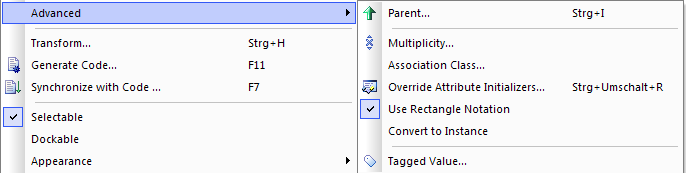
This will allow you to draw an alternative shape which can be shown by manually turning off this option.
Miscellaneous
haslinkeddocument- returns “true” or “false” depending on whether a linked document is present.
-
incomingedgeandoutgoingedge - return “none”, “left”, “right”, “top”, “bottom”, or “multiple” depending on where one or more in-/outgoing connectors are attached to the shape.
iscomposite- returns “true” or “false” if the element has set a composite structure diagram.
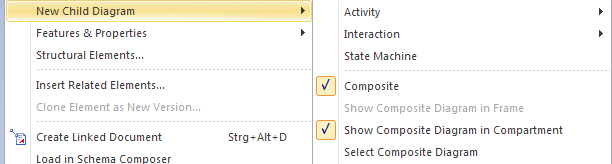
isdrawcompositelinkicon- returns “true” or “false” if the lying 8 should be rendered. This is the case for elements with a composite structure diagram. But not if
showcomposeddiagramis “true”. showcomposeddiagram- returns “true” or “false”. If the element has a composite structure diagram the context for
New Child Diagramoffers aShow...in Compartmentwhose state is reflected here.
-
isembeddedandisinparent - return “true” or “false”. Both seem to be the same and return “true” in case an embedded element (e.g.
PortorPart) appears. Since those can only appear embedded the query seems pointless. However, I confess that I forgot about embedded rendering. There has been something… islocked- returns “true” or “false” depending on whether the element has been locked.
istagged- returns “true” or “false” depending on whether the element is bookmarked (see the Advanced Patterns chapter for an example).
isvisible- makes sense for child elements to be processed (see chapter Compartments) depending on their visibility. The main shape is of course always visible.
packagename- usually the name of the package where the element is located.
parentedge- is either “right”, “left”, “top” or “bottom” for
PortandInterfacedepending on which side they are attached to their parent. parent.metatype- returns the metatype of the parent element or a null string.
Not working
The following either do not work (YAEAB) or I was not able to figure out what they should deliver:
cardinality, concurrency, packagepath, partition (though in a print the string appears correctly the query always succeeds),
priority, propertytype (and derivatives), stereotypehidden, subtype, visibility
6.2 Connector
Trivial
-
alias,nameandtype(e.g. “Association”) - corresponds to the connector’s properties.
effect- value of
Effectproperty forTransition. guard- value of
Guardproperty forControlFlowandTransition. direction- returns one of “Unspecified”, “Bi-Directional”, “Source -> Destination” or “Destination -> Source”.
weight- value of
Weightproperty forControlFlow. rotationdirection- returns either “up”, “down”, “left” or “right”. This is calculated from the angle the last part of the connector takes (-45° to +45° will be
rightetc.).
Source and Target related
A number of properties are available for the source and target (<ep> to be replaced) properties of a connector. E.g. the source part of name would be written as source.name.
-
alias, constraints, multiplicity, nameandstereotype - refer to the role properties with the same name like the following.
aggregation- can be “none”, “shared” or “composite”
- changeable
- “none”, “frozen”, “addOnly”. Located in the
Advancedsection of the role properties. multiplicityisordered- “0” or “1” - not “true/false” as the menu suggests. Why be consistent?
qualifiers- semicolon separated list of defined qaulifiers.
targetscope- “instance” or “classifier”. And yes, this is prefixed with
targetjust to confuse the reader. Of course it refers to theScoperole property. -
element.name, element.stereotypeandmetatype - return the properties for the element connected at the specific side. The element’s metatype (trivially corresponding to its type, e.g. “Class”) is (why consistency?) not prefixed with
element.
6.3 Diagram
It is possible to query a number of properties of the diagram where the element is currently being rendered. The following work for both element and connector Shape Scripts: diagram.handdrawn returns “0” or “1”, diagram.mdgtype the FQN (e.g. BPMN2.0::Conversation), and also obvious diagram.name, diagram.stereotype, diagram.type (e.g. Logical or Sequence).
Additionally diagram.connectornotation is only available in connector Shape Scripts. It corresponds to the value of diagram properties Connectors/Connector Notation.