3. Basic Concept
Shape Scripts in Enterprise Architect are a way to assign individual shapes to stereotyped elements and connectors. The language is somewhat C-like but is limited to quite a small subset of control structures and it offers a number of build-in graphic drawing methods. The advantage is that you can learn it rather fast. The drawback is that you soon reach limits when trying to do more advanced graphics. This however should be acceptable as elements should not be complex graphic art but meaningful symbols.
We will start with shapes for elements before explaining connectors. An element shape has a size of 100 units in width and height. The top left (X|Y) coordinate is (0|0) and the bottom right coordinate is (100|100). These coordinates will be scaled to whatever you size the element on a diagram.
Before going into details of the language itself let us try a simple example. Open Settings/UML Types/Stereotypes in any temporary Enterprise Architect repository you would like to use as sandbox.
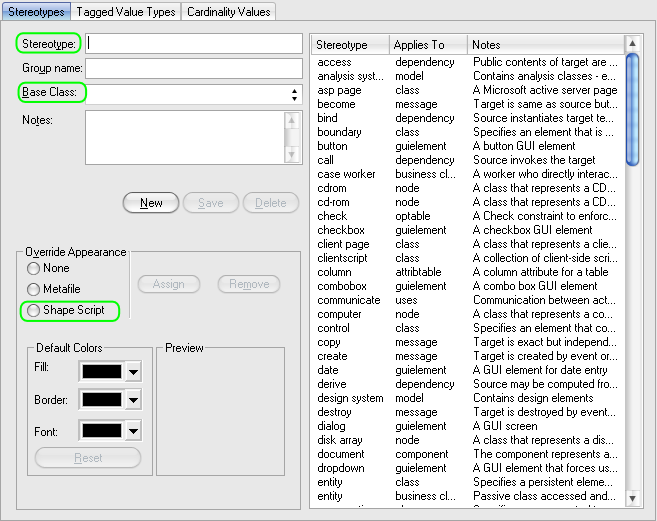
Then create a new stereotype by entering ae3 in the Stereotype field and choosing <all>4 from the Base Class drop down. That will allow to assign the stereotype to all elements and see what the shape will look like for them.
Now the important part: check the Shape Script radio button and click Assign5. This will open the Shape Script editor where you can type the script in the left pane. By clicking Refresh you will see the resulting image in the right one6.
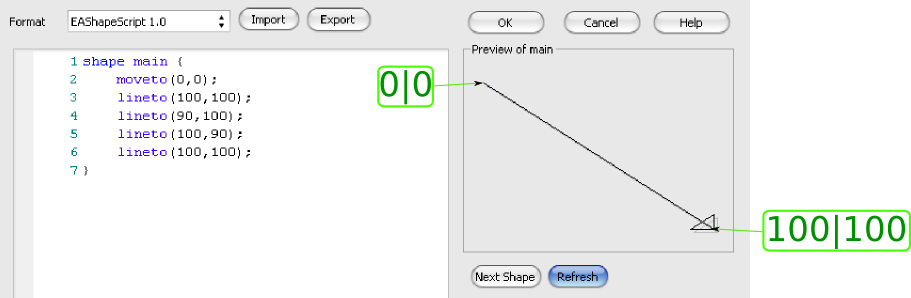
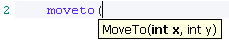
While typing the opening bracket after the moveto and lineto you will notice that the parameter list for the method is shown as balloon help.
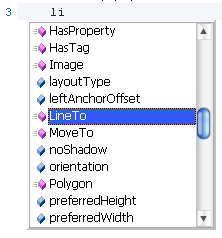
Further when hitting Ctrl-Space at any time the editor will open a drop down with possible methods starting with the characters already typed for the current word (top of the list if at new line or at a space):
Once you have saved the script in the editor and the ≪ae≫ stereotype as such you may apply the stereotype to see how it looks like on a real diagram. This may differ from the preview in certain cases. Also you can test scaling and later then conditional drawings.
The result looks a bit dull. But it shows the basic principle how to assign and test Shape Scripts.
3.1 Control Structures
As already mentioned Shape Script is very limited in its capabilities. So are control structures. You only have if and else to control the flow of statements. There are no loops at all.
The format for that is:
if (<query>) <block-or-statement>- where
<query>is one of the methods described below.<block-or-statement>is either a sequence of the graphic methods described above enclosed in { and }-braces or a single statement . And of course anyif-construct counts as statement as well.
if (<query>) <block-or-statement> else <block-or-statement>- is hopefully obvious. Syntactically you can abbreviate
if-cascades by usingif (<query>) <block-or-statement> else if (<query>) <block-or-statement> ... return- is a single statement that may appear at any position. It will stop further processing of the Shape Script immediately. You can use this statement to mimic a
casestatement instead of using anif-cascade.
3.2 Query Methods
The use of queries is a more advanced8 feature and will be used later in chapter Advanced Usage. So here’s just a general overview of the operations.
HasTag(tagName)- will evaluate
trueif the tagged value namedtagNameexists at all. HasTag(tagName,tagValue)- will evaluate
trueif the tagged value namedtagNameexists and has a value equal totagValue.
The values for property in the two operations below are explained in chapter Properties. This and the parameter value must be supplied as string, i.e. enclosed in either single or double quotes.
HasProperty(<property>)- will evaluate
trueif the property namedpropertyexists at all. E.g.HasProperty("alias");will evaluatetrueonly of a alias has been defined in the properties. HasProperty(<property>,<value>)- is the same as the previous method except that it checks for equivalence of
valueand the result ofproperty. So you could check if an element is named specifically (which only makes limited sense).