Awesome React Ecosystem
Welcome reader. The aim of this book is to get you from concept to coding real world React apps, as fast as possible.
React ecosystem is constantly evolving and changing at a fast pace. This book equips you to take the right decisions matching your project requirements with best practices, optimized workflows, and powerful tooling.
Code Along Edition
We are significantly revising this edition of React Speed Coding book.
- Adding new Code Along GitHub repository containing branches for code you complete in each chapter.
- Chapter by chapter demos are available at new demos website.
- Making each chapter stand on its own so you can complete a significant learning step at the end of each chapter.
- Ensuring that your learning path is as linear as possible, without too many cross-references due to refactoring of code we write in each chapter.
- The new edition also features better typography, color coding, and more screenshots to aid your learning.
- Upgrading to the latest development environment and dependencies as of this writing.
- Adding new sections to make your React journey faster, easier, and better.
- Reducing the code you write to achieve the same goals.
- Redesigning the UI CSS using Block, Element, Modifier method for more scalable, yet less verbose design.
- Several new custom components for Buttons, Forms, Layout, and other features.
Easy start React
If you want to dig into React coding right away, you can fast forward first four chapters in this book.
Getting started with React is now easier than ever. Get your first React app up and running in three easy steps. You may want to read the sample chapter titled Easy Start React from our new book React Eshop. We use Facebook’s Create React App scaffold generator to fast start into our first React app.
Go ahead give it a go. You will appreciate the magic behind the scenes as we learn to build a powerful development toolchain on similar lines as Facebook’s Create React App in this book. This will result in two benefits for our readers. First, you will learn about important React ecosystem technologies including Webpack, PostCSS, ESLint, and Babel in a step-by-step linear manner. Second, you will be able to easily extend apps generated using Create React App as you mature beyond the scaffolded code and the opinionated defaults used by Create React App.
Who this book is for
The React Speed Coding book assumes basic knowledge of programming in JavaScript, HTML, and CSS.
If you are a complete beginner, there is enough guidance available for you to make this your first programming primer with suggested additional reading.
Experienced web developers will master React component design workflow using latest ES6 language features. If you already program in React, you can use this book to optimize your development, testing, and production workflow.
Development environment
This book assumes you have access to a Mac, Linux, or a Cloud based editor offering virtual machine hosted development environment in your Web browser.
We will walk you through the entire React development environment setup from scratch.
While it is possible to run samples from this book using Windows, there are known issues in setting up Node and certain NPM packages.
As a safe alternative you can use any of the Cloud based code editors which offer Linux Development environment within the convenience of your web browser. You do not need to know how to use Linux to operate these web based editors. You can start with a generous free account with basic stack including Node.js already setup for you.
Cloud9 is our favorite web based code editor. Other options include Nitrous.
On Mac or Linux you can use your favorite code editor. This book is written using the open source Atom editor from the Github team. Atom gets you started coding by just dragging and dropping a folder onto the editor. You can then add power user features as you grow with Atom using custom packages, code snippets, among others.
Why React is awesome
Writing the React Speed Coding book, companion code, and the ReactSpeed.com demo website has been fun and fulfilling at the same time. Thanks to the amazing ecosystem that React and open source community have created in a relatively short span of time.
What we love about React and companion libraries like Redux is how they introduce constraints and flexibility at the same time. A very difficult goal to achieve when writing generic libraries and frameworks. React and Redux seem to have done so elegantly. Growing GitHub stars and cross-industry adoption is proof of this achievement.
To us React is about thinking in design and architectural patterns. It is more than making choices about which framework or library to use, or how to use these. We rapidly raise our thinking to design, requirements, solving real-world problems, that our apps are expected to address.
Learning React is about future proofing our investment more than any other framework or library with similar goals. Thanks to flexibility of integrating with React, even some of the competing frameworks offer integration paths with the React ecosystem. These include Meteor-React integration, Redux use cases with Angular, and TypeScript-React playing well together, just to name a few.
Most awesome aspect of learning React is that it is an ecosystem. It has a life of its own above and beyond Facebook, the original authors of React core. No wonder you see companies like Netflix, Airbnb, Kadira, Khan Academy, and Flipboard contributing their React libraries and tools to the open source.
Successfully navigating this growing ecosystem, making the right technology stack decisions along the way, will make the difference between an average programmer and a world-class designer-developer of the future. We sincerely hope React Speed Coding can contribute to your journey in mastering the React ecosystem of technologies.
Here’s to moving from Concept to Code to Cash, speedily!
Why read React Speed Coding
React Speed Coding enables you to optimize your React development workflow and speed up the app design lifecycle.
Setup React Webpack development environment complete with Node and Babel including development, testing, and production workflows. Production optimize Webpack development toolchain for CSS, JS, HTML pre-processing, faster builds, more performant code.
Learn ES6 React features including arrow functions, template literals, variable scoping, immutability, pure functions, among others.
Create complete single page app using Redux store, actions, and reducers.
Create custom React Speed UI library using Flexbox and PostCSS, with goals including responsive design, single page app components, ease of customization, reusable code, and high performance.
Apply Behavior-Driven Development techniques to create a comprehensive testing strategy for your apps. This includes ESLint and StyleLint to provide in-editor coding guidance on industry best practices for JavaScript and CSS. Use Mocha to describe specs. Chai for writing assertions. Sinon to spy on methods and events. We also learn about Enzyme for simple yet powerful React component level testing.
Adopt a comprehensive component design workflow including five strategies for s tarting component design by creating React components from embeds, REST APIs, samples, and wireframes.
Integrate your apps with serverless architecture using Firebase hosting. Create REST API for component design workflow using Firebase visual tools. Connect custom React components you create in this book with Firebase realtime database.
Run demo app and components live at ReactSpeed.com website.
Visit our popular GitHub repository to download and reuse source code from this book.
Prior art
The author would love to take the credit for coining the term “Speed Coding”. However, Speed Coding is based on very strong foundations and popular prior art.
Speed of Developer Workflow. Speed Coding follows some of the methods and tools as prescribed by the Lean Startup principles. See infographic for code faster, measure faster, learn faster.
Code faster principles we cover in this book include writing unit tests, continuos integration, incremental deployment, leveraging open source, cloud computing, refactoring, just-in-time scalability, and developer sandboxing.
Measure faster principles include usability tests, real-time monitoring, and search engine marketing.
Learn faster principles we apply in this book include smoke tests, split testing, and rapid prototyping.
Speed of Design. Speed Coding embraces the designer-developer evolution and also bases certain principles on the Design Thinking methodology and Visual Design principles.
We use these techniques in designing React Speed UI library using custom React components, PostCSS, Flexbox, and SVG.
Speed of Technology Decisions. Speed Coding technology stack is compared with industry best practice guidance including the awesome ThoughtWorks Technology Radar.
Technology Stack section, part of Introduction chapter, highlights React ecosystem technologies we cover in this book, in line with recommendations from the Radar.
The cover image for our book depicts NASA space shuttle lift-off and is representative of our central theme. The science of speed. We thank Pixabay for providing this NASA imagery in the Creative Commons.
Stakeholder perspectives on speed
In order to fulfill the promise of Speed Coding, we need to start by establishing some baselines. What are we speeding up? How are we measuring this speed? Why does it matter?
Let us start with the Why. Speed Coding is essential for three stakeholders. The user. The developer. The sponsor.
As app users we define speed mostly as performance and reactivity of the app. We even define speed as frequency of timely and desired updates to the apps we are using. Most importantly we define speed by time it takes to get things done.
As developers we define speed in terms of our development workflow. How long does it take to code, build, test, deploy, debug, and reactor. We also define speed of decision making relating to our development and technology stack.
As sponsors for an app project we define speed in terms of time to market. How long does it take to move from Concept to Code to Cash. Believe us, you first heard that phrase here, and we truly mean it!
Who is using React
Open sourced, developed, and used by Facebook and Instagram teams. React has also found wide adoption among leading technology, app, and digital companies.
- Airbnb are contributors of the popular React style guide.
- Atlassian redesigned their popular messaging app HipChat in React and Flux. They chose React because it is component based, declarative minus the bloat, uses Virtual DOM, relatively small library as opposed to full framework, simple, offers unidirectional data flow, and easily testable.
- BBC mobile homepage uses React.
- CloudFlare has active React projects on GitHub.
- Flipboard are authors of popular React Canvas.
- Khan Academy has several GitHub projects using React.
- Mapbox React Native module for creating custom maps.
- Netflix chooses React for startup speed of UI, runtime performance, and modularity it offers.
- Uber has several React GitHub projects including react-vis, a charting component library for React.
Technology stack
ThoughtWorks Technology Radar ranks technologies based on Adopt > Trial > Assess > Hold relative ranking. This is based on their own usage of these technologies across projects for leading enterprises globally. In terms of speed of decision making about your own technology stack, this is one tool that proves very helpful.
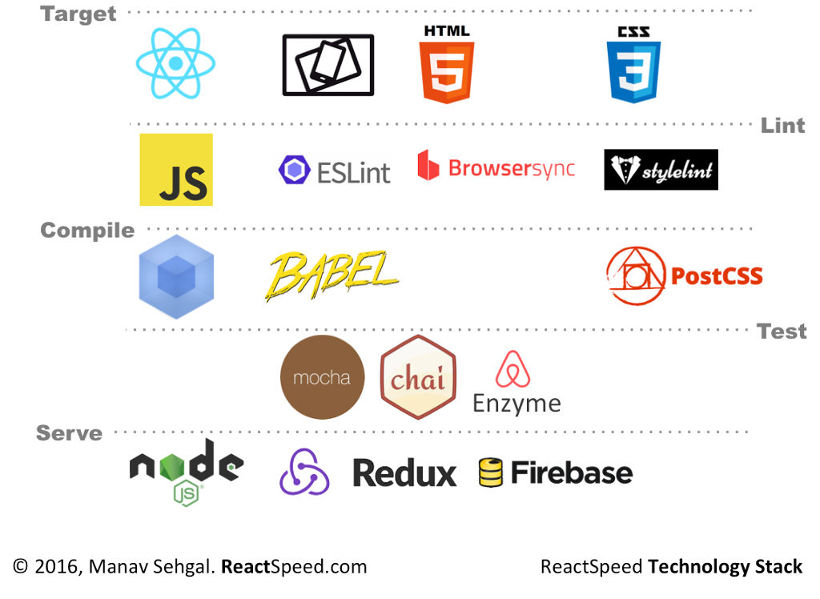
React Speed Coding will be addressing following technologies, platforms, techniques, frameworks, and tools.
ES6 (Adopt). JavaScript ECMAScript 6 is right at the top of the Radar list of languages and frameworks. We cover important concepts relevant for coding React in ES6.
React (Adopt). React is a close second on the Radar. Of course this book is all about React so we are well covered.
Redux and Flux (Trial). Redux is a new entrant on the Radar. We are dedicating an entire chapter and a relatively complex app for decent coverage of this important technology in React ecosystem. Flux is an architectural style recommended for React. Redux evolves ideas of Flux, avoiding its complexity, according to the author of Redux.
React Native (Trial). Another entry high on the Radar from React ecosystem. We are covering Flexbox which is one of the key technologies in React Native stack. Of course React and Redux make up the mix.
GraphQL (Assess). Another up and coming technology in React stack. GraphQL is an alternative to REST protocol. Goes hand in hand with Relay, another technology from the Facebook camp.
Immutable.js (Assess). Yet another Facebook open source project. Goes well with Redux.
Recharts (Assess). Integrates D3 charts and React. We will implement samples using Rumble Charts, a popular alternative, in this book.
Browsersync (Trial). Browsersync is a great time-saver for multi-devices testing of mobile-web hybrid apps. React Speed Coding implements Browsersync + Webpack + Hot Reloading. So if you make any changes in your JSX, these should update on all devices on saving the changes. While maintaining your current UI state. Isn’t this awesome!
GitUp (Trial). Graphical tool complementing Git workflow. We are find this tool useful for going back in time and revising commit logs for instance.
Webpack (Trial). We are implementing your React developer workflow using Webpack. Two chapters are dedicated to get you started with Webpack and help you production optimize the workflow.
Serverless Architecture (Assess). We are implementing serverless architecture using Firebase. Another technology worth evaluating is AWS Lambda, though it may not be in scope for this book.
Measuring speed
So it will be nice to define some baseline measurements of speed and see if we can improve these as we go through the book.
Website Performance. Google PageSpeed defines 25+ criteria for website performance as relative measures or percentile scores compared with rest of the Web. For example Enable Gzip Compression is 88% as recommended baseline.
As on May 9, 2016 the ReactSpeed.com website is evaluating grade A (93% average) on PageSpeed score, grade B (82% average) on YSlow score, 2.1s page load time, 834KB total page size, with 26 requests. View GTMetrix ReactSpeed.com report here.
As on Aug 9, 2016 while the React Speed app has more than 3,000 lines of code, we improve our page load time to 1.3s, 438KB page size, and only 13 requests back to the servers. Our page speed score improves to 95%, and YSlow score is 86%.
Load Impact (Radar Trial). Online load testing tool. We are using this tool to perform concurrent user load tests on ReactSpeed.com website.
As on May 9, 2016 with 20+ custom React components live on ReactSpeed website, we are recording faster than 200ms load time for our website for 25 concurrent users. That translates to handling approximately 2,50,000 monthly visitors. Excellent! View results snapshot here.
Build and Deploy Time. How long does it take to run the developer workflow.
As on May 9, 2016 our development server continuously builds and updates our app as we save our working code. Production build takes 5.3s with around 250 hidden modules. We deploy 44 files to Firebase several times during a day.
Time to Release. How long does it take to ship new features to production.
Since start of ReactSpeed project we have closed 150 production commits to GitHub over a 30 day period. Our peak is 40 commits during week of April 10.
Production Payload. How optimized are our production assets.
As on May 9, 2016 our CSS library is 4.7KB Gzip, 21KB minified with 25+ style modules. App JS bundle is 42KB minified. Vendor JS bundle is 192KB minified. HTML is 3KB.
Time to fix issues. How long does it take to fix issues in code. Code issues can be of several types including compliance with coding guidelines and best practices, logical bugs, usability issues, performance issues, among others.
As on May 10, 2016 it took us 6 hours to resolve 300+ issues down to 3 open issues using ESLint integration with Atom editor and Webpack. The issues ranged from coding best practices to refactoring requirements as per React coding patterns.
Continuos production build workflow. This can be measured by number of commands or developer actions required to complete one production ready build. Alternatively how automated is this lifecycle.
NPM for all the things. Can be measured based on number of project dependencies that are updated from NPM or popular managed repositories and CDNs. This is Trial stage at ThoughtWorks Technology Radar.
Static code analytics. This can be measured for number of lint warnings or errors. Complexity analysis of JavaScript code can be included apart from other static code analytics.
Why learn React comparing with Angular
One of the most important decisions modern app developers make is choosing the right front-end framework for their technology stack. Most popular question relates to choosing React over Angular 2.
We recognize that React is at its core a simpler library representing the View pattern, while Angular 2 is a complete framework offering Model, View, and Controller architectural patterns.
React is actually an ecosystem of well designed and highly popular libraries, open sourced mostly by Facebook (React, React Native, Immutable, Flow, Relay, GraphQL), other leading developers (Redux, React Material UI, React Router), and industry leaders (Flipboard React Canvas, Airbnb Enzyme).
React + Redux for instance offer the Model (Store), View (React, Actions), and Controller (Reducers) pattern to compare on equal grounds with the Angular 2 stack.
Why learn Angular 2? It is like learning Yoga, from one Guru, in a large group.
If you are in a large team, Angular will be your choice to get everyone on the same page, faster, at scale.
Contrary to popular opinion on the subject, we think Angular 2 is faster to learn when compared to React for the same goals, simply because you are making fewer “first-time-learner or developer” decisions along your journey.
- Angular2 and TypeScript are opinionated,
- Most documentation is “single version of truth” from one source (Google, the authors of Angular and Microsoft, the authors of TypeScript),
- There is mostly “one Angular/TypeScript way” of doing things, so fewer decisions to make along your learning and development journey,
- Angular 2 API and TypeScript language are well documented.
- Official samples are up to date with latest changes in the API, well mostly.
- Development boilerplates or starters are fairly mature, some like Angular Universal are backed by Google/Angular core team.
- The development and build tool-chain is mostly addressed by Angular/TypeScript, and few popular starter projects.
Why learn React? It is like doing cross-training, with multiple experts, at multiple locations.
If you are in a lean team or a single developer-designer-architect, “the React way” may be more fun. Learning React is more rewarding in the long run. As you are making “hopefully informed” decisions all along your learning and development journey, you become a more thorough developer, designer, architect in the long haul. If you make your decisions by evaluating pros-cons of architectural and design patterns, you are becoming a better developer.
React is opinionated for fewer core concepts like one-way-data-binding and offers sensible workarounds even for that.
- There are many ways to develop in React starting from how to define React components, how to create React build pipeline, which frameworks to integrate with, how to wire up a backend, the list goes on.
- You will learn from multiple sources and authors, not just Facebook/Instagram, the authors of React. Having these multiple perspectives will give you stronger real-world decision making muscles!
- Facebook and the React community is very driven by app performance patterns. Most core React concepts are centered around creating high performance code.
- The React community is more component driven. You will most likely find more reusable code.
- The community is also increasingly driven by “Developer Experience”. Writing beautiful code, writing more manageable code, writing readable code, and tools that make developer’s experience more fun and visual. See kadirahq/react-storybook as an example.
In our experience learning both and going back and forth helps. Programming design patterns remain the same. Syntactical sugar changes. Learning one, reinforces the other.
Shared learning path between Angular 2 and React
JavaScript. JavaScript (ES5 and ES6) is fundamental. TypeScript transpiles to JavaScript. React-JSX-Babel tooling transpiles to JavaScript.
CSS3. You cannot do serious front-end coding without it.
HTML5. It is obvious, but extend your knowledge on concepts like Offline Storage and Device Access, best practice starters like HTML5 boilerplate.
Webpack. Modern day packaging, module bundling, build pipeline automation tooling.
Design Patterns and Object Oriented principles. Composition, Inheritance, Singletons, Pure Functions, Immutability, and many others are core concepts helping you in doing good development in general.
Algorithms and data structures. Serious development cannot be done without using these in a good measure.
Backend as a Service. Firebase, AWS Lamba, among others.
Microservices and REST/APIs. No modern app is built in isolation these days.
So, here is a learning path if you want to go beyond React. Learn React first, build some reusable components, learn the component design workflow. Learn Angular 2 next, try reusing your component design and above mentioned shared learning here. Maybe round off your knowledge by learning Meteor (more opinionated with best practice patterns for speed coding and performance) and integrating React and Angular, replacing Meteor’s Blaze.