Topic L - Arrays - Not Sorted
Overview
All of these classes are used to illustrate working with un-sorted arrays.
LOGs
General Programming Concepts and Terms
- Describe what makes an array different from other collections in C#
- Describe the situations in which arrays are preferable over the use of collections
Code Samples
- Math - The Math class is modified to produce the sequence of Fibonacci numbers as an array.
- PhoneBook - The PhoneBook class provides simple management of an array of PhoneNumber objects. The PhoneBook allows for adding and retrieving phone numbers; it supports search for phone numbers by the telephone number or by a last name. The PhoneBook is initialized with a physical limit for the arrays, and the actual number of entries in the phone book is tracked as phone numbers are added to the phone book.
- ClassList - The ClassList example maintains an array of students for a particular course by offering methods to add and remove students from a course. In addition, the ClassList ensures that students are not added to the course twice (based on the student’s Id). The internal array is of a fixed size (ClassList.CLASS_LIMIT) as well as the logical size of the array. If the ClassList is provided with an array of students in its constructor, that list is “copied” to the internal array of the ClassList object.
- MultipleChoiceMarker - This class is used for marking multiple choice exams. It takes an array of MultipleChoice objects as the answer key when it is first created. It provides a method to mark the student’s answers.
- BankStatement - This class represents a bank statement for a BankAccount for a given month. The statement allows BankTransaction objects to be added, and performs deposits and withdrawals on the BankAccount. The statement reports the starting and ending balance and also summarizes the total amount deposited and withdrawn for the month.
- DeckOfCards -The DeckOfCards class represents a complete deck of cards. When the deck is first created, a card is created for each suit. The DeckOfCards supports a method to draw a card.
Math
This sample leverages the existing calculation of a number in the Fibonacci sequence to generate the sequence itself. The sequence is returned as an array of integers.
- FibonacciSequence(Length : Integer) - This method generates the sequence of Fibonacci numbers to a specific length in the sequence; the results are returned as an array of integers. If the specified length is negative, throw an exception.
 1     public static int[] FibonacciSequence(int length)
 2     {
 3         int[] fib = new int[0];
 4         if (length >= 1)
 5         {
 6             fib = new int[length];
 7             for (int index = 0; index < length; index++)
 8                 fib[index] = FibonacciNumber(index + 1);
 9         }
10         return fib;
11     }
PhoneBook
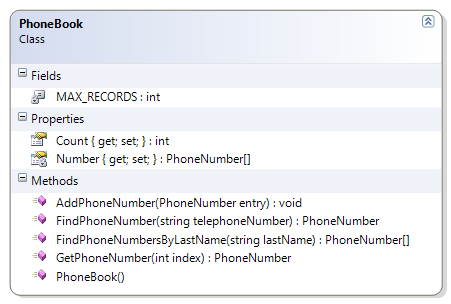
The PhoneBook class provides simple management of an array of PhoneNumber objects. The PhoneBook allows for adding and retrieving phone numbers; it supports search for phone numbers by the telephone number or by a last name. The PhoneBook is initialized with a physical limit for the arrays, and the actual number of entries in the phone book is tracked as phone numbers are added to the phone book.
- Constructor - Create a new array of PhoneNumber objects for the numbers field.
- AddPhoneNumber(Entry : PhoneNumber) - Add a PhoneNumber to the array. Ensure that the PhoneNumber exists (is not null) before adding; if the PhoneNumber is null, throw an exception. If there isn’t any room to add the PhoneNumber, then throw an exception.
- GetPhoneNumber(Index : Integer) : PhoneNumber - Get an item from a particular position in the array.
- Count : Integer - Get the logical size of the array.
- FindPhoneNumber(TelephoneNumber : String) : PhoneNumber - Look through the array and return a PhoneNumber with a matching telephone number. If none is found, return null.
- FindPhoneNumbersByLastName(LastName : String) : PhoneNumber[ ] - Look through the array for PhoneNumber objects with a matching last name. Add those objects to a new array and return it. If no items are found, return an empty array.
- Supporting Classes
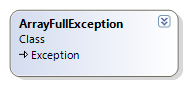
- ArrayFullException - This class is used to indicate that the array is full and no more items can be added to the array.
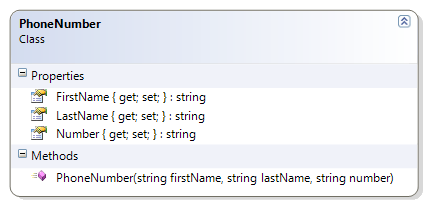
- PhoneNumber - This class contains a telephone number and the name that the number is registered to.
 1 public class PhoneBook
 2 {
 3     private const int MAX_RECORDS = 1000;
 4     private PhoneNumber[] Number { get; set; }
 5     public int Count { get; private set; }
 6
 7     public PhoneBook()
 8     {
 9         Number = new PhoneNumber[MAX_RECORDS];
10     }
11
12     public void AddPhoneNumber(PhoneNumber entry)
13     {
14         if (entry == null)
15             throw new System.Exception("The phone number entry cannot be null");
16         if (Count == MAX_RECORDS)
17             throw new ArrayFullException("The phone book cannot hold any more Ph\
18 one Numbers");
19
20         Number[Count] = entry;
21         Count++;
22     }
23
24     public PhoneNumber GetPhoneNumber(int index)
25     {
26         return Number[index];
27     }
28
29     public PhoneNumber FindPhoneNumber(string telephoneNumber)
30     {
31         PhoneNumber found = null;
32         int foundIndex = -1;
33         for (int index = 0; index < Count; index++)
34         {
35             if (Number[index].Number.Equals(telephoneNumber))
36             {
37                 foundIndex = index;
38                 break;
39             }
40         }
41         if (foundIndex >= 0)
42             found = Number[foundIndex];
43         return found;
44     }
45
46     public PhoneNumber[] FindPhoneNumbersByLastName(string lastName)
47     {
48         PhoneNumber[] found = new PhoneNumber[MAX_RECORDS];
49         // Find the numbers
50         int foundCounter = 0;
51         for (int index = 0; index < Count; index++)
52         {
53             PhoneNumber item = Number[index];
54             if (item.LastName.Equals(lastName))
55             {
56                 found[foundCounter] = item;
57                 foundCounter++;
58             }
59         }
60
61         // Trim the array
62         PhoneNumber[] foundTrimmed = new PhoneNumber[foundCounter];
63         for (int index = 0; index < foundCounter; index++)
64         {
65             foundTrimmed[index] = found[index];
66         }
67
68         return foundTrimmed;
69     }
70 }
ClassList
The ClassList example maintains an array of students for a particular course by offering methods to add and remove students from a course. In addition, the ClassList ensures that students are not added to the course twice (based on the student’s Id). The internal array is of a fixed size (ClassList.CLASS_LIMIT) as well as the logical size of the array. If the ClassList is provided with an array of students in its constructor, that list is “copied” to the internal array of the ClassList object.
- Constructor - Set the course id and the array of students. Ensure that the supplied arguments are valid
- CourseId cannot be empty or null, and must be trimmed of leading or trailing spaces
- The array of students cannot be null and cannot have more students than the constant CLASS_LIMIT
- There cannot be any duplicate students in the array (where a duplicate is defined as two or more Student objects with identical Ids)
- AddStudent() - Add the supplied student object to the array. Ensure that
- The Student object is not null
- The class limit is not exceeded
- The Student object does not already exist in the array (that is, there are no duplicates allowed, based on the student’s id)
- FindStudent() - Search the array for a Student with a matching Id. If none is found, return null.
- RemoveStudent() - Search for a Student with a matching Id; if one is found, remove it from the array.
- Supporting Classes
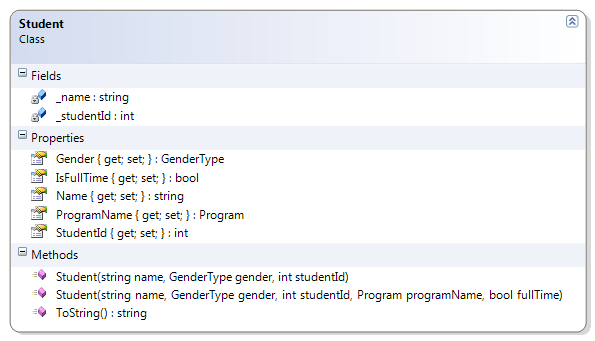
- Student -
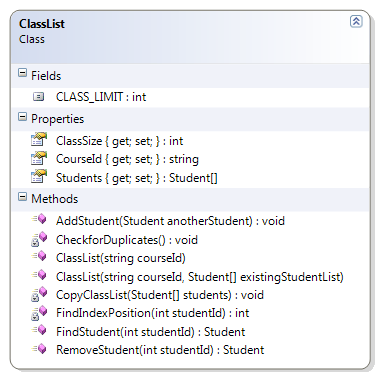
  1 public class ClassList
  2 {
  3     public const int CLASS_LIMIT = 25;
  4     public string CourseId { get; private set; }
  5     public Student[] Students { get; private set; }
  6     public int ClassSize { get; private set; }
  7
  8     public ClassList(string courseId) :
  9         this(courseId, new Student[CLASS_LIMIT])
 10     {
 11     }
 12
 13     public ClassList(string courseId, Student[] existingStudentList)
 14     {
 15         if (String.IsNullOrEmpty(courseId) || string.IsNullOrEmpty(courseId.Trim\
 16 ()))
 17             throw new Exception("Course Id is required");
 18         if (existingStudentList == null)
 19             throw new Exception("Students cannot be a null list");
 20         if (existingStudentList.Length > CLASS_LIMIT)
 21             throw new Exception("Class Limit Exceeded");
 22         CopyClassList(existingStudentList);
 23         CheckforDuplicates();
 24         this.CourseId = courseId.Trim();
 25     }
 26
 27     private void CopyClassList(Student[] students)
 28     {
 29         ClassSize = 0;
 30         this.Students = new Student[CLASS_LIMIT];
 31         for (int i = 0; i < students.Length; i++)
 32         {
 33             if (students[i] != null)
 34             {
 35                 this.Students[ClassSize] = students[i];
 36                 ClassSize++;
 37             }
 38             else
 39                 break; // Treat the first null instance as a "flag" indicating t\
 40 he end of actual student objects in the array
 41         }
 42     }
 43
 44     private void CheckforDuplicates()
 45     {
 46         for (int index = 0; index < ClassSize - 1; index++)
 47         {
 48             int id = Students[index].StudentId;
 49             for (int innerLoop = index + 1; innerLoop < ClassSize; innerLoop++)
 50                 if (Students[innerLoop].StudentId == id)
 51                     throw new Exception(
 52                             "Duplicate student Ids not allowed in the class list\
 53 ");
 54         }
 55     }
 56
 57     public void AddStudent(Student anotherStudent)
 58     {
 59         if (anotherStudent == null)
 60             throw new Exception("Cannot add null student");
 61         if (ClassSize >= CLASS_LIMIT)
 62             throw new ArrayFullException("Class Limit Exceeded - Cannot add stud\
 63 ent");
 64         for (int index = 0; index < ClassSize - 1; index++)
 65         {
 66             int id = Students[index].StudentId;
 67             if (anotherStudent.StudentId == id)
 68                 throw new Exception(
 69                         "Duplicate student Ids not allowed in the class list");
 70         }
 71         Students[ClassSize] = anotherStudent;
 72         ClassSize++;
 73     }
 74
 75     public Student FindStudent(int studentId)
 76     {
 77         Student found = null;
 78         int foundPosition = FindIndexPosition(studentId);
 79         if (foundPosition >= 0)
 80             found = Students[foundPosition];
 81         return found;
 82     }
 83
 84     private int FindIndexPosition(int studentId)
 85     {
 86         int foundPosition = -1;
 87         for (int index = 0; index < ClassSize; index++)
 88             if (Students[index].StudentId == studentId)
 89                 foundPosition = index;
 90         return foundPosition;
 91     }
 92
 93     public Student RemoveStudent(int studentId)
 94     {
 95         Student found = null;
 96         int foundPosition = FindIndexPosition(studentId);
 97         if (foundPosition >= 0)
 98         {
 99             found = Students[foundPosition];
100             Students[foundPosition] = Students[ClassSize - 1];
101             ClassSize--;
102         }
103         return found;
104     }
105 }
MultipleChoiceMarker
This class is used for marking multiple choice exams. It takes an array of MultipleChoice objects as the answer key when it is first created. It provides a method to mark the student’s answers. The following methods must be coded to complete the solution.
- MarkExam() - This method takes the supplied exam answers and compares them against the answers in the marking key. It then constructs a Mark object, based on the earned marks and the possible marks (each answer is worth one mark). Before marking the exam, the method must ensure that
- The supplied array of multiple choice answers is not null
- The supplied array of multiple choice answers has the same number of answers as the MultipleChoiceMarker’s answer key
- Supporting Classes
- MultipleChoice -
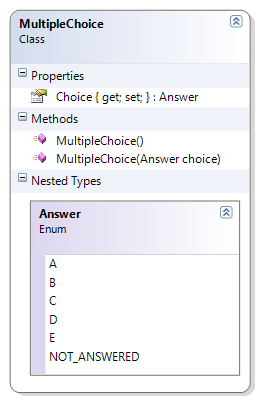
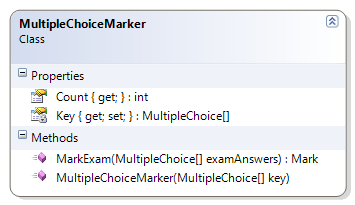
 1     public Mark MarkExam(MultipleChoice[] examAnswers)
 2     {
 3         if (examAnswers == null)
 4             throw new Exception("Cannot mark null answers");
 5         if (examAnswers.Length != Key.Length)
 6             throw new Exception(
 7                     "The number of student answers does not match the number of \
 8 items in the answer key");
 9         int possible = Key.Length;
10         int earned = 0;
11         // Calculate earned marks
12         for (int index = 0; index < Key.Length; index++)
13         {
14             if (examAnswers[index] != null)
15                 if (Key[index].Choice == examAnswers[index].Choice)
16                     earned++;
17         }
18         Mark examMark = new Mark(possible, earned);
19         return examMark;
20     }
BankStatement
This class represents a bank statement for a BankAccount for a given month. The statement allows BankTransaction objects to be added, and performs deposits and withdrawals on the BankAccount. The statement reports the starting and ending balance and also summarizes the total amount deposited and withdrawn for the month. The following methods must be coded to complete the solution.
- Add() - Add a BankTransaction to the array of transactions. If the BankTransaction is null, throw an exception. Otherwise, process the transaction as either a deposit or a withdrawal, depending on if the amount is positive or negative, and then add it to the array of transactions.
- GetTotalDeposits() - Loop through the array of transactions to total all those transactions with a positive amount.
- GetTotalWithdrawals() - Loop through the array of transactions to total all those transactions with a negative amount.
- Sort() - Sorts the array of transactions by date.
- Supporting Classes
- Account -
- BankTransaction -
- AccountType -
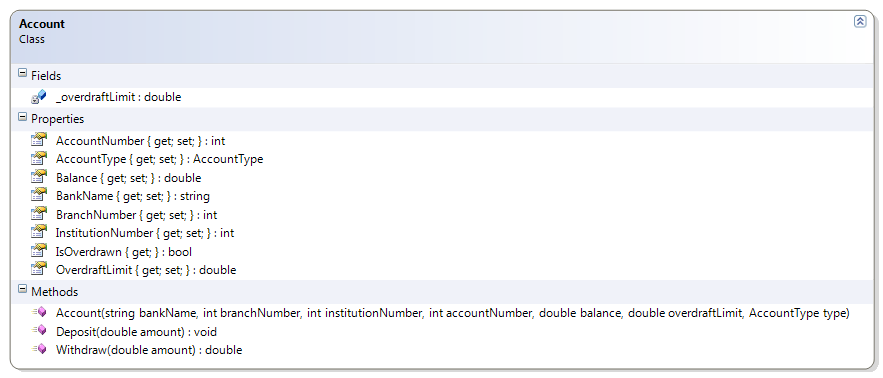
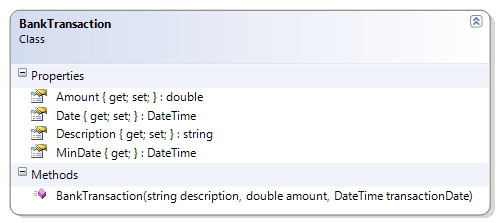
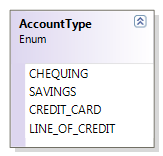
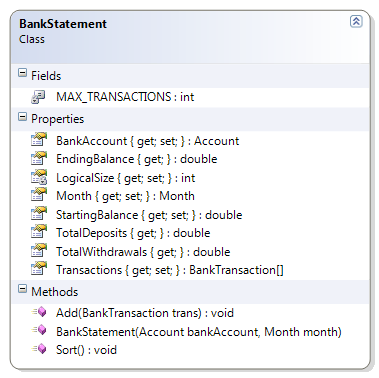
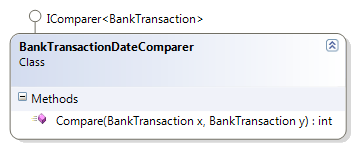
 1 public class BankStatement
 2 {
 3     private const int MAX_TRANSACTIONS = 500;
 4     private int LogicalSize { get; set; }
 5     public Account BankAccount { get; private set; }
 6     public double StartingBalance { get; private set; }
 7     public Month Month { get; private set; }
 8     public BankTransaction[] Transactions { get; private set; }
 9     public double EndingBalance
10     {
11         get
12         {
13             return BankAccount.Balance;
14         }
15     }
16
17     public BankStatement(Account bankAccount, Month month)
18     {
19         if (bankAccount == null)
20             throw new Exception("Bank account cannot be null");
21         this.BankAccount = bankAccount;
22         this.StartingBalance = bankAccount.Balance;
23         this.Month = month;
24         this.Transactions = new BankTransaction[MAX_TRANSACTIONS];
25         LogicalSize = 0;
26     }
27
28     public void Add(BankTransaction trans)
29     {
30         if (trans == null)
31             throw new Exception("Cannot add null transactions");
32         if (LogicalSize == MAX_TRANSACTIONS)
33             throw new ArrayFullException("The bank statement cannot accept furth\
34 er transactions; the array is full");
35
36         double amount = trans.Amount;
37         if (amount < 0)
38             BankAccount.Withdraw(-amount); // Amount is "negated" to make positi\
39 ve
40         else
41             BankAccount.Deposit(amount);
42         Transactions[LogicalSize] = trans;
43         LogicalSize++;
44     }
45
46     public double TotalDeposits
47     {
48         get
49         {
50             double total = 0;
51             for (int index = 0; index < LogicalSize; index++)
52             {
53                 BankTransaction aTransaction = Transactions[index];
54                 if (aTransaction.Amount > 0)
55                     total += aTransaction.Amount;
56             }
57             return total;
58         }
59     }
60
61     public double TotalWithdrawals
62     {
63         get
64         {
65             double total = 0;
66             for (int index = 0; index < LogicalSize; index++)
67             {
68                 BankTransaction aTransaction = Transactions[index];
69                 if (aTransaction.Amount < 0)
70                     total += aTransaction.Amount;
71             }
72             return total;
73         }
74     }
75
76     public void Sort()
77     {
78         Array.Sort<BankTransaction>(Transactions, new BankTransactionDateCompare\
79 r());
80     }
81 }
 1 public class BankTransactionDateComparer : IComparer<BankTransaction>
 2 {
 3     #region IComparer<BankTransaction> Members
 4
 5     public int Compare(BankTransaction x, BankTransaction y)
 6     {
 7         return x.Date.CompareTo(y.Date);
 8     }
 9     #endregion
10 }
DeckOfCards
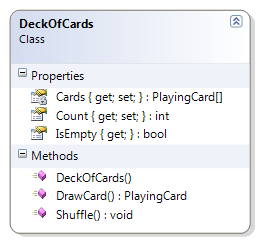
The DeckOfCards class represents a complete deck of cards. When the deck is first created, a card is created for each suit. The DeckOfCards supports a method to draw a card. The following methods must be coded to complete the solution.
- Constructor - Create all the cards for all the CardSuit values and all the CardValue values.
- DrawCard() - Return the card at the “top” of the deck (that is, at position zero). If the deck is empty, return a null.
- IsEmpty - Returns true if the logical size of the deck of cards has reached zero, otherwise it returns false.
- Supporting Classes
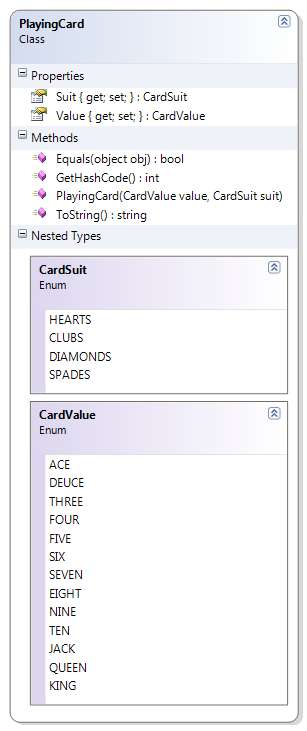
- PlayingCard - The PlayingCard class, along with its two enumerated types CardSuit and CardValue, are the basis for the DeckOfCards class.
 1 public class DeckOfCards
 2 {
 3     private PlayingCard[] Cards { get; set; }
 4     public int Count { get; private set; }
 5     public bool IsEmpty { get { return Count == 0; } }
 6
 7     public DeckOfCards()
 8     {
 9         Cards = new PlayingCard[52];
10
11         foreach (PlayingCard.CardSuit suit in System.Enum.GetValues(typeof(Playi\
12 ngCard.CardSuit)))
13             foreach (PlayingCard.CardValue value in System.Enum.GetValues(typeof\
14 (PlayingCard.CardValue)))
15             {
16                 Cards[Count] = new PlayingCard(value, suit);
17                 Count++;
18             }
19     }
20
21     public PlayingCard DrawCard()
22     {
23         PlayingCard card = null;
24         if (Count != 0)
25         {
26             // get the first card
27             card = Cards[0];
28             // "pull" the other items up in the array
29             for (int i = 0; i < Count - 1; i++)
30             {
31                 Cards[i] = Cards[i + 1];
32             }
33             // "clear" the last element & adjust the count
34             Cards[Count - 1] = null;
35             Count--;
36         }
37         return card;
38     }
39
40     public void Shuffle()
41     {
42         for (int counter = 0; counter < 100; counter++)
43         {
44             int index = Rnd.Next(Count);
45             PlayingCard card = Cards[0];
46             Cards[0] = Cards[index];
47             Cards[index] = card;
48         }
49     }
50 }
Practice Exercises
- PhoneBook – This extends the PhoneBook class by ensuring that duplicate phone numbers are not added to the collection.
- Registrar – The Registrar class is responsible to support the enrollment of students. This class maintains the student body as a collection of Student objects. It supports the ability to find and remove students, switch students to another program, and get the number of students enrolled in a specific program.
- BookBag – The BookBag class represents a simple “shopping cart” for a book consignment store. Books are sold on consignment, and customers can add or remove books from their BookBag as well as search their BookBag for books by ISBN. Customers can also see the total price of the items in their BookBag.
- DeckOfCards –The DeckOfCards class represents a complete deck of cards. When the deck is first created, a card is created for each suit. The DeckOfCards supports two public methods: Draw() and Shuffle().
- CD – [Not yet implemented] This class represents an array of Songs. It supports the ability to calculate the total running time and the average running time of all the songs on the CD.
PhoneBook
This extends the PhoneBook class by ensuring that duplicate phone numbers are not added to the collection. Make the following additions and modifications to complete the solution.
- AddPhoneNumber() – This method must be modified to ensure that the telephone number does not already exist; that is, no duplicate phone numbers are allowed, and an exception must be thrown if the supplied PhoneNumber already exists.
Registrar
The Registrar class is responsible to support the enrolment of students. This class maintains the student body as a collection of Student objects. It supports the ability to find and remove students, switch students to another program, and get the number of students enrolled in a specific program.
The Registrar class is responsible to support the enrolment of students. This class maintains the student body as an array of Student objects. It supports the ability to find and remove students, switch students to another program, and get the number of students enrolled in a specific program. Code the following methods to complete the Registrar class.
- Add() – This method takes the supplied Person information as well as the program of study to create a new Student, adding them to the array of students in the student body. It returns the student Id for the new enrolment.
- FindStudent() – This method searches the student body for a student with a matching Id.
- RemoveStudent() – This method searches the student body for a student with a matching Id and removes them from the collection, if found.
- GetProgramEnrollment() – This method searches the array of students to find out how many are enrolled in a particular program. Validate the Program name before performing the search.
BookBag
The BookBag class represents a simple “shopping cart” for a book consignment store. Books are sold on consignment, and customers can add or remove books from their BookBag as well as search their BookBag for books by ISBN. Customers can also see the total price of the items in their BookBag. Code the following methods to complete the BookBag class.
- GetTotal() – Loop through the array of books and total the price of all the books. Ensure that the amount is rounded to two decimal places (for dollars and cents).
- FindBook() – Look through the array of books to find a book with the specified ISBN number. Throw an exception if the supplied ISBN is null.
- RemoveBook() – Remove the book with a matching ISBN from the array of book consignments.
DeckOfCards
The DeckOfCards class represents a complete deck of cards. When the deck is first created, a card is created for each suit. The DeckOfCards supports two public methods: Draw() and Shuffle(). Modify the DeckOfCards class to support shuffling of the deck.
- Shuffle() – This method resets the deck to a full deck of cards and then “shuffles” the deck until the cards are randomly distributed through the collection.
CD
[Not yet implemented]
This class represents an array of Songs. It supports the ability to calculate the total running time and the average running time of all the songs on the CD.