Topic E – Expressions and Math
Overview
This topic introduces concepts surrounding the use of arithmetic expressions and common Math library routines.
This topic will introduce the following grammars, syntax and language constructs. (Note that additional concepts from previous topics may also be present.)
- Arithmetic expressions
- Assignment statements
- Automatic type conversion and casting
- Integer division
- String concatenation
- Math library routines and constants (such as Random, Square Root, and π)
This topic will also take a deeper look at the distinctive aspects of variables, values and data types as well as demonstrate the use of overloaded constructors. This is also the first foray into creating classes that actually “do something” – these classes not only maintain state but also provide methods to generate other information besides that which is stored in a class’ fields.
LOGs
OOP Basics
- Explain how method overloading is applied to constructors
General Programming Concepts and Terms
- Name at least three kinds of program statements commonly seen in all high-level programming languages
- Distinguish between Variables, Values and Data Types
- List the five basic rules governing variables, values and data types
- List the intrinsic (built-in) data types in C#
- Explain what is meant by the phrase “type extensibility”
- Define the terms Reference Type and Value Type as they apply to data types in C#
- Define the term Identifier
- Create and initialize variables in C#
- Explain what is meant by the terms “scope” and “lifetime” as they apply to variables
- Describe what is meant by the term “expression”
- Explain the difference between program statements and expressions as well as how the two relate to each other
- List the three general sets of operators in C#
- Describe the two basic rules of using arithmetic operators that every compiler must follow.
- Use the arithmetic operators to create arithmetic expressions
- Explain what is meant by “integer division” and how that can be useful in solving particular problems regarding numbers.
- Explain the purpose of the modulus (%) operator.
- List and describe how to use the various assignment operators in C#
- Explain the difference between binary and unary operators
- Demonstrate understanding of operator precedence and how to override the default precedence of the arithmetic operators
- Summarize and distinguish the rules for automatic type conversion involving arithmetic operators and the assignment operator
- Determine the final data type for expressions involving mixed data types and type conversion
- Describe “type casting” and explain how to use it appropriately.
- Compare and contrast the prefix and postfix behaviour of the unary arithmetic operators
- Identify and explain how to use the common Math library routines (for Power, Square Root, Absolute, random numbers, pi, trigonometry, and the various types of rounding)
- Use Math rounding methods with arithmetic expressions to round real numbers to a specific precision
- Create random whole number values within a specific range
- Use type casting appropriately in C#
- Create constants in C#
- Explain how arithmetic operations affect character values in C#
- List the most common math functions of the Math class
- Demonstrate how to use the various Math functions in simple programs
- List and describe the commonly used fields and methods of the String class
- Demonstrate how to use “String Arithmetic” (concatenation)
- List the equivalent “wrapper” classes for each of the primitive types.
Code Samples
The following examples are used to illustrate this topic.
- Calculator – This class introduces simple arithmetic operations, demonstrating simple addition and multiplication.
- Person - This adaptation of the person class changes the previous design by replacing the age field with a “read-only” field for the person’s birth date. The approximate age of the person is then calculated based on the current date and the birth date.
- Account - This class illustrates simple addition and calculation by allowing deposits and withdrawals. Note that changes to the balance can now only be made through deposits and withdrawals; the balance is now “read-only”.
- ElapsedTime – This class demonstrates overloaded constructors and introduces the concepts of operator precedence and integer division.
- ResolveExpressions – This class is used in conjuncture with several sample expressions that illustrate operator precedence and automatic type conversion.
- Circle - This class represents a simple circle of a specified diameter. The radius, area and circumference are calculated.
- Square - This class represents a simple square with a specified length for its side. The area and perimeter are calculated.
- Fraction - This class represents a fraction as a numerator and denominator. It provides the double equivalent of the fraction’s value as well as a string representation that uses the numerator and denominator. It demonstrates type casting and the integer division issue.
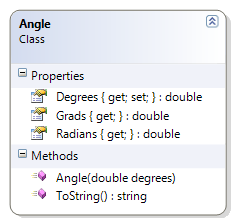
- Angle - This class represents an angle and provides the value in the following units: degrees, radians and grads. It also gives a simple example of unicode characters (for degrees).
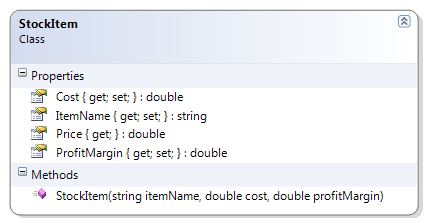
- StockItem - This class represents an item that is part of an inventory. The item has an item name, a cost and a profit margin (which can be positive or negative). By using the profit margin, it can derive the price of the item. This example illustrates rounding.
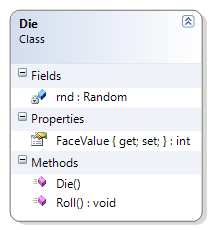
- Die - This class represents a single six-sided die. This example is used to illustrate random number generation and casting.
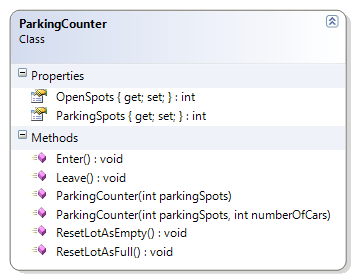
- ParkingCounter - This class represents a simple counter to monitor whether a parking lot is full or not; it tracks vehicles entering and leaving the parking lot and allows the counter to be reset when the lot is full or empty. This class illustrates increment and decrement operators and/or the assignment increment or assignment decrement operators.
- QuadradicEquation - This class is used to solve for the two possible values of a quadratic formula where quadradic equals zero. This sample illustrates order of operations and parentheses.
Calculator
This class introduces simple arithmetic operations, demonstrating simple addition and multiplication.
Problem Statement
Write the code that will act as a calculator for doing math. This first version must be a working prototype; as a prototype, it does not have to support all of the features of the final product.
The solution must meet the following requirements:
- Should add two whole numbers.
- Should multiply two whole numbers.
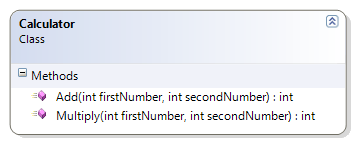
Use the following class diagram when creating your solution. Since this class does not have properties or fields, make the methods static.
 1 public class Calculator
 2 {
 3     public static int Add(int firstNumber, int secondNumber)
 4     {
 5         return firstNumber + secondNumber;
 6     }
 7
 8     public static int Multiply(int firstNumber, int secondNumber)
 9     {
10         return firstNumber * secondNumber;
11     }
12 }
Person
This adaptation of the person class changes the previous design by replacing the age field with a “read-only” field for the person’s birth date. The approximate age of the person is then calculated based on the current date and the birth date.
Problem Statement
Write the code that will represent a person with a first and last name and a date of birth.
The solution must meet the following requirements (new requirements are in bold):
* Should get and set the first and last name
* Should get the birth date
* Should get the person’s approximate age (which is the age that the person will turn to in the current year)
* Should get the person’s initials
* Should override ToString() to get the person’s full name (as first name then last name)
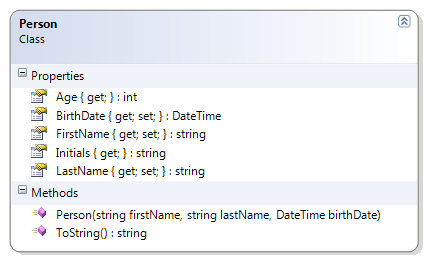
Use the following class diagram when creating your solution.
 1 public class Person
 2 {
 3     public string FirstName { get; set; }
 4
 5     public string LastName { get; set; }
 6
 7     public DateTime BirthDate { get; private set; }
 8
 9     public int Age
10     {
11         get
12         {
13             int currentAge = 0;
14             currentAge = DateTime.Today.Year - BirthDate.Year;
15             return currentAge;
16         }
17     }
18     public Person(string firstName, string lastName, DateTime birthDate)
19     {
20         FirstName = firstName;
21         LastName = lastName;
22         BirthDate = birthDate;
23     }
24
25
26     public override string ToString()
27     {
28         return FirstName + " " + LastName;
29     }
30
31     public string Initials
32     {
33         get
34         {
35             return FirstName[0] + "." + LastName[0] + ".";
36         }
37     }
38 }
Account
This class illustrates simple addition and calculation by allowing deposits and withdrawals. Note that changes to the balance can now only be made through deposits and withdrawals; the balance is now “read-only”.
Problem Statement
Write the code that will represent a simple bank account.
The solution must meet the following requirements (new requirements are in bold):
- Should get the bank name, branch number, institution number, account number, balance, overdraft limit, and account type
- Should allow the overdraft limit to be set
- Should support deposits and withdrawals
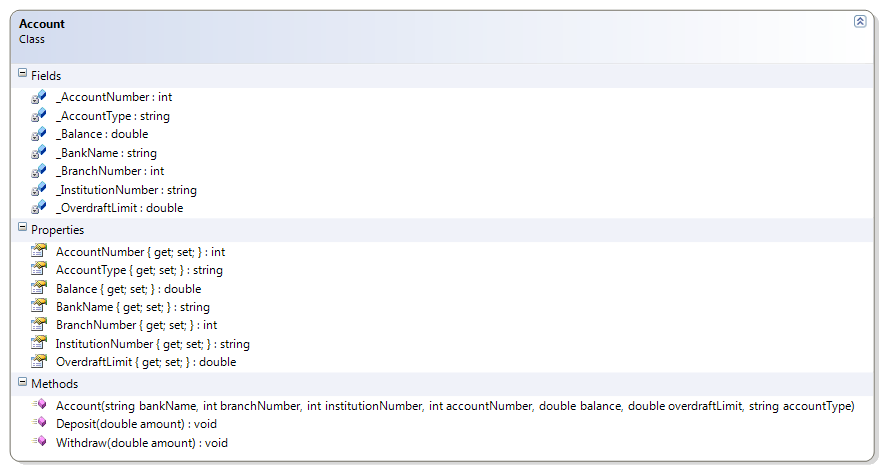
Use the following class diagram when creating your solution.
1   public void Withdraw(double amount)
2   {
3       Balance -= amount;
4   }
5
6   public void Deposit(double amount)
7   {
8       Balance += amount;
9   }
ElapsedTime
This class demonstrates overloaded constructors and introduces the concepts of operator precedence and integer division.
Problem Statement
Write the code that will represent a period of elapsed time for a competitor in a marathon. It should be able to represent its information in two forms:
- Hours, minutes and seconds, and
- Total seconds.
The solution must meet the following requirements:
- Should calculate the hours, minutes and seconds given the total seconds
- Should calculate the total seconds given the hours, minutes and seconds
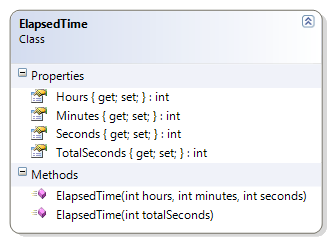
Use the following class diagram when creating your solution.
 1 public class ElapsedTime
 2 {
 3     public ElapsedTime(int hours, int minutes, int seconds)
 4     {
 5         TotalSeconds = hours * 60 * 60;
 6         TotalSeconds += minutes * 60;
 7         TotalSeconds += seconds;
 8
 9         Hours = hours;
10         Minutes = minutes;
11         Seconds = seconds;
12     }
13
14     public ElapsedTime(int totalSeconds)
15     {
16         Hours = totalSeconds / (60 * 60);
17         Minutes = (totalSeconds - Hours * 60 * 60) / 60;
18         Seconds = totalSeconds - Hours * 60 * 60 - Minutes * 60;
19
20         TotalSeconds = totalSeconds;
21     }
22
23     public int Hours { get; private set; }
24
25     public int Minutes { get; private set; }
26
27     public int Seconds { get; private set; }
28
29     public int TotalSeconds { get; private set; }
30 }
ResolveExpressions
This class is used in conjuncture with several sample expressions that illustrate operator precedence and automatic type conversion.
Problem Statement
Write the code that will provide the final value for the expressions in the following exercise (as a solution for a student’s exercise).
Expressions Exercise
On a piece of paper, evaluate the following expressions to show the final value and the data type of the final value. Show the order in which the operations are evaluated.
- 10.0 + 15 / 2 + 4.3
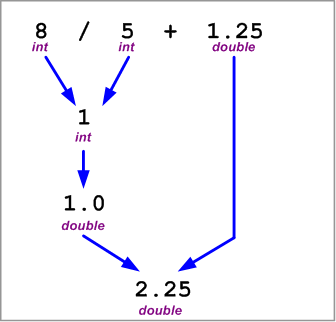
- 8 / 5 + 1.25
- 10.0 + 15.0 / 2 + 4.3
- 3.0 * 4 / 6 + 6
- 3.0 * (4 % 6) + 6
- 3 * 4.0 / 6 + 6
- 20.0 - 2 / 6 + 3
- 10 + 17 % 3 + 4
- (10 + 17) % 3 +4.0
- 10 + 17 / 4.0 + 4
The solution for question 2 is provided as an example. Use the accompanying class diagram when creating your coded solution as proof of your final answers.

 1 namespace Topic.E.Examples
 2 {
 3     public class ResolveExpressions
 4     {
 5         public static double Sample1
 6         { get { return 10.0 + 15 / 2 + 4.3; } }
 7
 8         public static double Sample3
 9         { get { return 10.0 + 15.0 / 2 + 4.3; } }
10
11         public static double Sample4
12         { get { return 3.0 * 4 / 6 + 6; } }
13
14         public static double Sample5
15         { get { return 3.0 * (4 % 6) + 6; } }
16
17         public static double Sample6
18         { get { return 3 * 4.0 / 6 + 6; } }
19
20         public static double Sample7
21         { get { return 20.0 - 2 / 6 + 3; } }
22
23         public static int Sample8
24         { get { return 10 + 17 % 3 + 4; } }
25
26         public static double Sample9
27         { get { return (10 + 17) % 3 + 4.0; } }
28
29         public static double Sample10
30         { get { return 10 + 17 / 4.0 + 4; } }
31     }
32 }
Circle
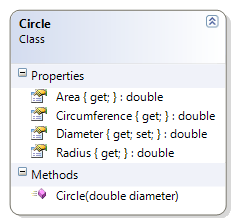
This class represents a simple circle of a specified diameter. The radius, area and circumference are calculated.
Problem Statement
Write the code for the Circle class. The solution must meet the following requirements:
- Should get and set the diameter
- Should calculate the area, radius, and circumference
Use the following class diagram when creating your solution.
 1 using System;
 2 namespace Topic.E.Examples
 3 {
 4     public class Circle
 5     {
 6         public Circle(double diameter)
 7         {
 8             this.Diameter = diameter;
 9         }
10
11         public double Diameter { get; set; }
12
13         public double Radius
14         { get { return Diameter / 2; } }
15
16         public double Circumference
17         { get { return Math.PI * Diameter; } }
18
19         public double Area
20         { get { return Math.PI * Radius * Radius; } }
21     }
22 }
Square
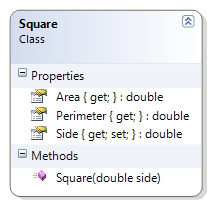
This class represents a simple square with a specified length for its side. The area and perimeter are calculated.
Problem Statement
Write the code for the Square class. The solution must meet the following requirements:
- Should get and set the length of the side of the square
- Should calculate the area and perimeter
Use the following class diagram when creating your solution.
 1 namespace Topic.E.Examples
 2 {
 3     public class Square
 4     {
 5         public Square(double side)
 6         {
 7             this.Side = side;
 8         }
 9
10         public double Side { get; set; }
11
12         public double Area
13         {
14             get { return Side * Side; }
15         }
16
17         public double Perimeter
18         {
19             get { return Side * 4; }
20         }
21     }
22 }
Fraction
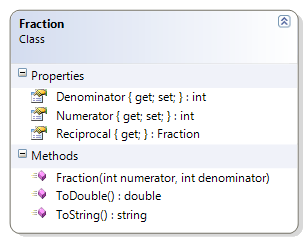
This class represents a fraction as a numerator and denominator. It provides the double equivalent of the fraction’s value as well as a string representation that uses the numerator and denominator. It demonstrates type casting and the integer division issue.
Problem Statement
Write the code for the Fraction class. The solution must meet the following requirements:
- Should get the string representation of the fraction, as “numerator/denominator”
- Should get the numeric value of the fraction (as a real number)
- Should get the reciprocal of the fraction
Use the following class diagram when creating your solution.
 1 public class Fraction
 2 {
 3     public int Numerator { get; private set; }
 4
 5     public int Denominator { get; private set; }
 6
 7     public Fraction(int numerator, int denominator)
 8     {
 9         Numerator = numerator;
10         Denominator = denominator;
11     }
12
13     public Fraction Reciprocal
14     {
15         get { return new Fraction(Denominator, Numerator); }
16     }
17
18     public override string ToString()
19     {
20         string stringValue = "";
21         stringValue += Numerator + "/" + Denominator;
22         return stringValue;
23     }
24
25     public double ToDouble()
26     {
27         // The casting of numerator to a double helps
28         // ensure that we don't lose any fractional
29         // portion due to integer division.
30         double value = (double)(Numerator) / Denominator;
31         return value;
32     }
33 }
Angle
This class represents an angle and provides the value in the following units: degrees, radians and grads. It also gives a simple example of unicode characters (for degrees).
Problem Statement
Write the code for the Angle class. The solution must meet the following requirements:
- Should get and set the angle’s value (in degrees)
- Should calculate the equivalent angle in Radians and Grads, using the following formulas:
- Radians = Degrees * (π / 180)
- Grads = Radians * (200 / π)
- Should override the ToString() method to return the angle in degrees, in the following format:
- degrees°
- The Unicode character for the degrees symbol (°) is ‘\u00B0’
Use the following class diagram when creating your solution.
 1 using System;
 2 namespace Topic.E.Examples
 3 {
 4     public class Angle
 5     {
 6         public Angle(double degrees)
 7         {
 8             this.Degrees = degrees;
 9         }
10
11         public double Degrees { get; set; }
12
13         public double Radians
14         {
15             get
16             {
17                 double radians = Degrees * (Math.PI / 180);
18                 return radians;
19             }
20         }
21
22         public double Grads
23         {
24             get
25             {
26                 double grads = Radians * (200 / Math.PI);
27                 return grads;
28             }
29         }
30
31         // http://unicode.org/notes/tn28/UTN28-PlainTextMath.pdf
32         // Page 40 of the above reference for the degree symbol
33         public override string ToString()
34         {
35             return Degrees.ToString() + '\u00B0';
36         }
37     }
38 }
StockItem
This class represents an item that is part of an inventory. The item has an item name, a cost and a profit margin (which can be positive or negative). By using the profit margin, it can derive the price of the item. This example illustrates rounding.
Problem Statement
Write the code for the StockItem class. The solution must meet the following requirements:
- Should get and set the name, cost and profit margin of the stock item
- Should represent the profit margin as a percent; a value of 45 means 45%
- Should calculate the price of the item, to the nearest cent
- Use the rounding where values under a half-cent are rounded down and values greater than or equal to a half-cent are rounded up
Use the following class diagram when creating your solution.
 1 using System;
 2 namespace Topic.E.Examples
 3 {
 4     public class StockItem
 5     {
 6         public double Cost { get; set; }
 7
 8         public double ProfitMargin { get; set; }
 9
10         public StockItem(string itemName, double cost, double profitMargin)
11         {
12             this.ItemName = itemName;
13             this.Cost = cost;
14             this.ProfitMargin = profitMargin;
15         }
16
17         public string ItemName { get; set; }
18
19         public double Price
20         {
21             get
22             {
23                 // Round to the nearest cent
24                 double price = Cost;
25                 price += Cost * (ProfitMargin / 100);
26                 return Math.Round(price * 100) / 100.0;
27             }
28         }
29     }
30 }
Die
This class represents a single six-sided die. This example is used to illustrate random number generation and casting.
Problem Statement
Write the code for the Die class. The solution must meet the following requirements:
- Should generate a random value from 1 to 6, when initially created and when re-rolled
- Should get the face value of the die
Use the following class diagram when creating your solution. Note that this uses the Random class as a private static field.
 1 using System;
 2 namespace Topic.E.Examples
 3 {
 4     public class Die
 5     {
 6         private static Random rnd = new Random();
 7
 8         public Die()
 9         {
10             Roll();
11         }
12
13         public int FaceValue { get; private set; }
14
15         public void Roll()
16         {
17             FaceValue = rnd.Next(6000) % 6 + 1;
18         }
19     }
20 }
ParkingCounter
This class represents a simple counter to monitor whether a parking lot is full or not; it tracks vehicles entering and leaving the parking lot and allows the counter to be reset when the lot is full or empty. This class illustrates increment and decrement operators and/or the assignment increment or assignment decrement operators.
Problem Statement
Write the code that will monitor vehicles entering and leaving a parking lot. The solution must meet the following requirements:
- Should track vehicles entering
- Should track vehicles leaving
- Should get total parking spots
- Should get open (empty) spots
- Should reset lot as full (that is, fill the parking lot)
- Should reset lot as empty (that is, clear all the parking spots of vehicles)
Use the following class diagram when creating your solution.
 1 namespace Topic.E.Examples
 2 {
 3     public class ParkingCounter
 4     {
 5         public int ParkingSpots { get; private set; }
 6
 7         public int OpenSpots { get; private set; }
 8
 9         public ParkingCounter(int parkingSpots)
10         {
11             this.ParkingSpots = parkingSpots;
12             this.OpenSpots = parkingSpots;
13         }
14
15         public ParkingCounter(int parkingSpots, int numberOfCars)
16         {
17             this.ParkingSpots = parkingSpots;
18             this.OpenSpots = this.ParkingSpots - numberOfCars;
19         }
20
21         public void Leave()
22         {
23             OpenSpots++;
24         }
25
26         public void Enter()
27         {
28             OpenSpots--;
29         }
30
31         public void ResetLotAsEmpty()
32         {
33             OpenSpots = ParkingSpots;
34         }
35
36         public void ResetLotAsFull()
37         {
38             OpenSpots = 0;
39         }
40     }
41 }
QuadradicEquation
This class is used to solve for the two possible values of a quadratic formula where quadratic equals zero. It is based off of the following formula.
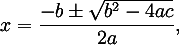
This sample illustrates order of operations and parentheses.
Problem Statement
Write the code that will represent a quadratic equation that has a higher and lower root. It is to use the Quadratic formula, which states:
For ax^2 + bx + c = 0$, the value of x is given by
More information on the quadratic formula can be found at http://www.purplemath.com/modules/quadform.htm.
The solution must meet the following requirements:
- Should get the lower root, using the quadratic formula
x=(-b-√(b^2-4ac))/2a$ - Should get the higher root, using the quadratic formula
x=(-b+√(b^2-4ac))/2a$ - Should overload the ToString() method to represent the quadratic formula showing the values for a, b and c in the following format:
a____x2 + ____b____x + ____c = 0
For example, given the values of 1, 3 and -4 for a, b and c respectively, the method should produce
1x2 + 3x + -4 = 0
Use the accompanying class diagram when creating your solution.
 1 using System;
 2 namespace Topic.E.Examples
 3 {
 4     public class QuadraticEquation
 5     {
 6         private int a;
 7         private int b;
 8         private int c;
 9
10         public QuadraticEquation(int a, int b, int c)
11         {
12             this.a = a;
13             this.b = b;
14             this.c = c;
15         }
16
17         public double LowerRoot
18         {
19             get
20             {
21                 double value;
22                 value = (-b - Math.Sqrt(b * b - 4 * a * c)) / (2 * a);
23                 return value;
24             }
25         }
26
27         public double HigherRoot
28         {
29             get
30             {
31                 double value;
32                 value = (-b + Math.Sqrt(b * b - 4 * a * c)) / (2 * a);
33                 return value;
34             }
35         }
36
37
38         public override string ToString()
39         {
40             return a.ToString() + "x^2 + " + b + "x + " + c + " = 0";
41         }
42     }
43 }
Practice Exercises
- Calculator – This exercise expands on the original Calculator class to perform subtraction and division with integers.
- Fraction – This exercise expands on the original Fraction class to include methods that allow for adding, subtracting, multiplying, and dividing fractions.
- Square – This exercise expands on the original Square class to include a method that determines the diagonal of a square.
- Coordinate – Not Yet Implemented The Coordinate class represents a geographical co-ordinate for either longitude or latitude. A Coordinate’s value can be expressed either as a real number or as degrees, minutes and seconds. It makes use of integer division and overloaded constructors.
- PaintEstimator – The PaintEstimator class is used to estimate the number of paint cans needed for painting a simple room (with or without a window). It makes use of a constant and the Math library; it also uses overloaded constructors.
- BulkItem – The BulkItem class represents products that are available in bulk and shows the cost of individual items. It makes use of rounding (to two decimal places).
- Die - This exercise expands on the original Die class to allow for creating a die of any number of sides, with a default of six sides. This means that there is an overloaded constructor.
- RoundingCalculator – This exercise demonstrates rounding using separate methods for each level of rounding precision.
- GenericRoundingCalculator – This exercise demonstrates rounding to the nearest whole number of fractional number using a couple of “generic” methods.
- PeopleCounter – This simple class is used to count the number of people who have entered a store in a single day. It takes a simplistic approach, counting each person entering and leaving, estimating the number of people for the day by dividing the total count by two.
- ScoreCard – Not Yet Implemented This class represents a scorecard for tracking bowling scores frame by frame. It produces a final tally for the game, as well as the current score and the current frame.
- Cylinder – The Cylinder class represents a cylindrical object whose height and radius is known. The class provides methods to calculate the volume and surface area.
- Cone – The Cone class represents a conical object whose height and base radius is known. The class provides methods to determine the volume and surface area with this information.
- GravityCalculator – The GravityCalculator provides static methods for determining an object’s weight for the various planets in our solar system, given the equivalent weight as found on Earth.
- CurrencyCalculator – The CurrencyCalculator allows the conversion of US dollars to four other currencies, given the current exchange rate of those currencies.
For these exercises, compare your results with the unit tests for these classes.
Calculator
This exercise expands on the original Calculator class to perform subtraction and division with integers.
Problem Statement
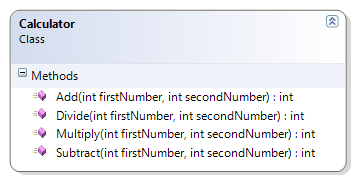
Write the code that will act as a calculator for doing math. This version is a follow-up on the previous prototype; now it should support subtraction and division.
The solution must meet the following requirements:
- Should add two whole numbers.
- Should multiply two whole numbers.
- Should subtract two whole numbers.
- Should divide two whole numbers.
Use the following class diagram when creating your solution.
Fraction
This exercise expands on the original Fraction class to include methods that allow for adding, subtracting, multiplying, and dividing fractions.
Problem Statement
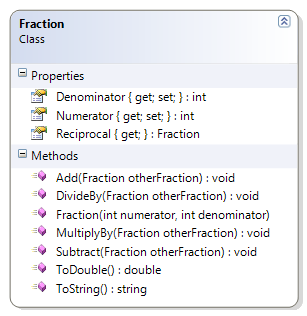
Write the code needed to expand the capabilities of the Fraction class. The class must now support the ability to add, subtract, multiply, and divide fractions as well as allow the individual numerator and denominator values to be seen. The solution must meet the following requirements:
- Should get the string representation of the fraction, as “numerator/denominator”
- Should get the numeric value of the fraction (as a real number)
- Should get the reciprocal of the fraction
- Should get the numerator and denominator
- Should add another fraction to its existing value
- Should subtract another fraction from its existing value
- Should multiply its existing value by another fraction
- Should divide its existing value by another fraction
As an assist, the following code can be used for the multiplication method.
1   public void multiplyBy(Fraction otherFraction)
2   {
3       this.numerator = this.numerator * otherFraction.numerator;
4       this.denominator = this.denominator * otherFraction.denominator;
5   }
Use the following class diagram when creating your solution.
Square
This exercise expands on the original Square class to include a method that determines the diagonal of a square.
Problem Statement
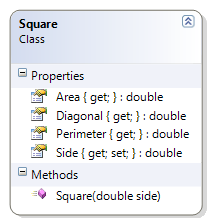
Write the code needed to add the ability for a Square to determine the length of its diagonal. The solution must meet the following requirements:
- Should get and set the length of the side of the square.
- Should calculate the area, perimeter, and diagonal of the square.
Use the following class diagram when creating your solution.
Coordinate
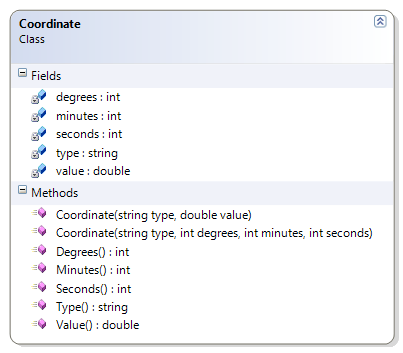
Not Yet Implemented The Coordinate class represents a geographical co-ordinate for either longitude or latitude. A Coordinate’s value can be expressed either as a real number or as degrees, minutes and seconds. It makes use of integer division and overloaded constructors.
Problem Statement
Write the code needed to represent a geographical co-ordinate for longitude and latitude. The solution must meet the following requirements:
- Should get the type of coordinate (such as “longitude” or “latitude”)
- Given the hours, minutes and seconds, it
- should calculate coordinate value as a real number
- should get hours, minutes, and seconds
- Given the coordinate value as a real number, it
- should calculate the hours, minutes and seconds
- should get the coordinate value as a real number
Use the following class diagram when creating your solution.
PaintEstimator
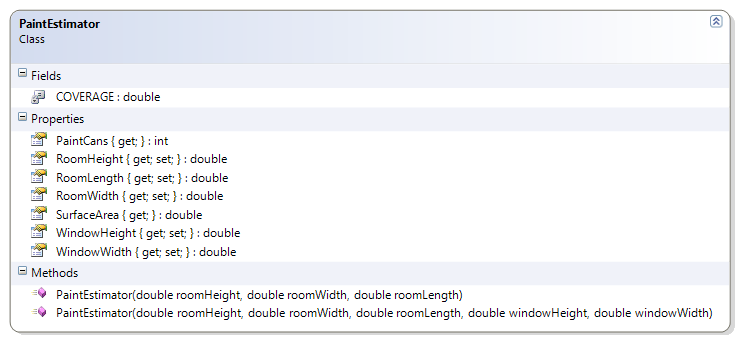
The PaintEstimator class is used to estimate the number of paint cans needed for painting a simple room (with or without a window). It makes use of a constant and the Math library; it also uses overloaded constructors.
Problem Statement
Write the code needed to help a painter to estimate the number of paint cans to paint simple rooms (with or without a window). The solution must meet the following requirements:
- Uses a constant value of 8.0 for the paint coverage. (8 square metres per can)
- Should get room height, width, and length
- Should get and set the window’s width and height
- Should calculate the number of paint cans for the room and the window
- Should calculate the surface area to be painted
- The room’s height, length and width should have a private set property.
Use the following class diagram when creating your solution.
BulkItem
The BulkItem class represents products that are available in bulk and shows the cost of individual items. It makes use of rounding (to two decimal places).
Problem Statement
Write the code for the BulkItem class. The solution must meet the following requirements:
- Should get and set the cost and quantity of the bulk item
- Should calculate the cost for each item in the bulk item
- Should properly round values for currency (either the US or Canadian dollar)
- The Quantity property’s set should be private.
Use the following class diagram when creating your solution.
Die
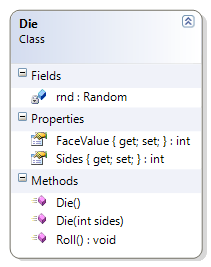
This exercise expands on the original Die class to allow for creating a die of any number of sides, with a default of six sides. This means that there is an overloaded constructor.
Problem Statement
Modify the Die class from the examples to support multi-sided die other than just the standard six sides. The solution must meet the following requirements (new requirements are in bold):
- The Sides and FaceValue properties’ set should be private.
- Should generate a six-sided die by default
- Should get the number of sides of the die
- Should randomly generate each side (if rolled enough); for example, if the die has ten sides, it should eventually roll a 1, 2, 3, 4, 5 6, 7, 8, 9, and 10
Use the following class diagram when creating your solution.
RoundingCalculator
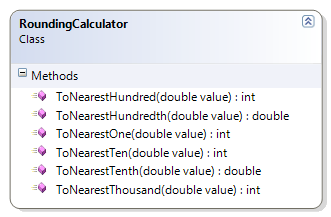
This exercise demonstrates rounding using separate methods for each level of rounding precision.
Problem Statement
Write the code needed to provide rounding of various degrees of accuracy. The solution must meet the following requirements:
- All of the methods should be static.
- Should correctly round up to the nearest thousand
- Should correctly round down to the nearest thousand
- Should correctly round up to the nearest hundred
- Should correctly round down to the nearest hundred
- Should correctly round up to the nearest ten
- Should correctly round down to the nearest ten
- Should correctly round up to the nearest one
- Should correctly round down to the nearest one
- Should correctly round up to the nearest tenth
- Should correctly round down to the nearest tenth
- Should correctly round up to the nearest hundredth
- Should correctly round down to the nearest hundredth
Use the following class diagram when creating your solution.
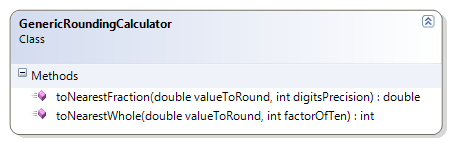
GenericRoundingCalculator
This exercise demonstrates rounding to the nearest whole number of fractional number using a couple of “generic” methods.
Problem Statement
Write the code needed to perform rounding to either whole numbers or fractions at a specified level of precision. The solution must meet the following requirements:
- All of the methods should be static.
- Should correctly round up or down to the nearest whole number, such as
- the nearest thousand
- the nearest hundred
- the nearest ten
- the nearest one
- Should correctly round up or down to the nearest fractional value, such as
- the nearest tenth
- the nearest hundredth
Use the following class diagram when creating your solution.
PeopleCounter
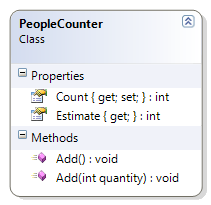
This simple class is used to count the number of people who have entered a store in a single day. It takes a simplistic approach, counting each person entering and leaving, estimating the number of people for the day by dividing the total count by two.
Problem Statement
Write the code needed to track people entering and leaving a store. It must be able to estimate the number of people that have entered the store at the end of the day. The solution must meet the following requirements:
- The Count property should have a private set.
- Should default to having a count of zero people when first started up
- Should increment by one (that is, count a single person)
- Should increment by a specified quantity (for when a group of people enter)
- Should adequately estimate the number of people who entered the store, assuming that each person who enters also leaves the store
- Each estimate should be rounded down; for example, if 15 people are counted, then the estimate should be for only 7 (not 7.5 or 8)
Use the following class diagram when creating your solution.
ScoreCard
Not Yet Implemented This class represents a scorecard for tracking bowling scores frame by frame. It produces a final tally for the game, as well as the current score and the current frame.
Problem Statement
Write the code needed to.
The solution must meet the following requirements:
- Should
Use the following class diagram when creating your solution.
### Cylinder
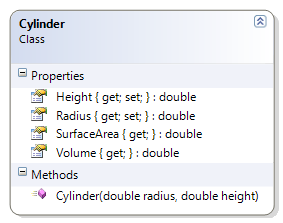
The Cylinder class represents a cylindrical object whose height and radius is known. The class provides methods to calculate the volume and surface area.
Problem Statement
Write the code for the Cylinder class that meets the following requirements:
- The Radius and Height properties should have a private set.
- Should get the radius and the height
- Should calculate the volume and the surface area
-
Volume of a Cylinder = pi * r^2 * h$ -
Surface Area of a Cylinder = 2 * pi * r^2 + 2 * pi * r * h$
-
Use the following class diagram when creating your solution.
Cone
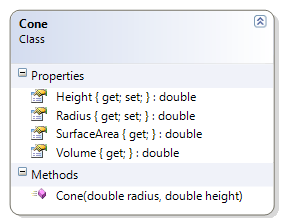
The Cone class represents a conical object whose height and base radius is known. The class provides methods to determine the volume and surface area with this information.
Problem Statement
Write the code for the Cone class that meets the following requirements:
- The Radius and Height properties should have a private set.
- Should get the radius and the height
- Should calculate the volume and the surface area
-
Volume of a Cone = 1/3 * pi * r^2 * h$ -
Surface Area of a Cone = pi * r^2 + pi * r * sqrt(r^2 + h^2)$
-
Note that the portion sqrt(r^2 + h^2)$ is known as the slant height.
Use the following class diagram when creating your solution.
GravityCalculator
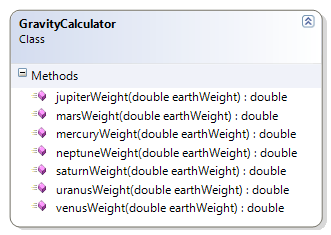
The GravityCalculator provides static methods for determining an object’s weight for the various planets in our solar system, given the equivalent weight as found on Earth.
Problem Statement
Write the code needed to convert Earth weights to their equivalent for the other planets in our solar system. The solution must meet the following requirements:
- All the methods should be static.
- Should convert a weight in Earth kilograms to their equivalent weight on
- Mercury
- Venus
- Mars
- Jupiter
- Saturn
- Uranus
- Neptune
- For information on equivalent weights among the planets, see these URLS.
- NinePlanets.org
- http://www.serve.com/chunter/index/info/aweigh.html
Use the following class diagram when creating your solution.
CurrencyCalculator
The CurrencyCalculator allows the conversion of US dollars to four other currencies, given the current exchange rate of those currencies.
Problem Statement
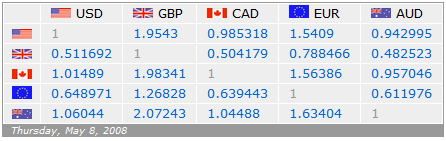
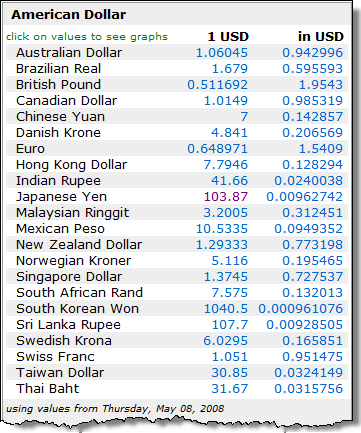
A currency exchange store at the international airport needs a program to convert from US dollars to four other currencies: Canadian dollar, Euro, Japanese Yen, and the Great Britain Pound. The store uses a set exchange rate for each currency as established at the start of the day. Write the code for a class called CurrencyCalculator to meet this need. The solution must meet the following requirements:
- Should correctly convert US dollars to the
- British Pound (GBP)
- Canadian Dollar (CAD)
- Euro (EUR)
- Japanese Yen (JPY)
- Should use the correct level of precision when making the exchange; each currency uses a different number of significant digits:
- CAD, GBP and EUR use two digits
- JPY uses three digits
To illustrate the possible exchange rates, please refer to the following images.
Use the following class diagram when creating your solution.
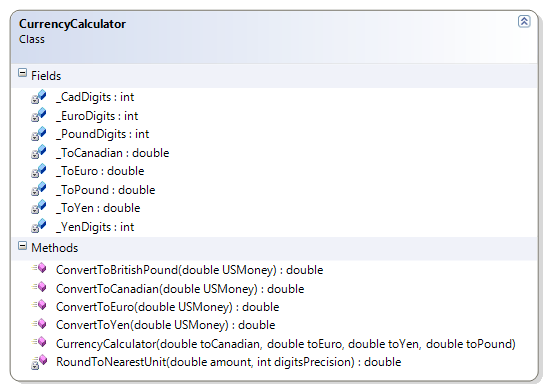
As a starter, you can use the following code to begin creating your class.
 1 public class CurrencyCalculator
 2 {
 3     // The following are multipliers to convert the
 4     // US dollar to different currencies.
 5     /* The multiplier to convert US dollars to Canadian dollars. */
 6     private double _ToCanadian;  // CAD - Canadian Dollar
 7     /* The multiplier to convert US dollars to the Euro. */
 8     private double _ToEuro;      // EUR - Euro
 9     /* The multiplier to convert US dollars to the Japanese Yen. */
10     private double _ToYen;       // JPY - Japanese Yen
11     /* The multiplier to convert US dollars to the British Pound. */
12     private double _ToPound;     // GBP - Great Britain Pound
13
14     /* The number of significant digits for the Canadian dollar.
15      * The unit for portions of a dollar is the Cent. */
16     private static int _CadDigits = 2; // Cents
17     /* The number of significant digits for the Euro.
18      * The unit for portions of a dollar is the Cent. */
19     private static int _EuroDigits = 2; // Cents
20     /* The number of significant digits for the Japanese Yen.
21      * The unit for 1/100<sup>th</sup> portions of the Yen is the Sen,
22      * while each 1/1000<sup>th</sup> is known as a Rin. */
23     private static int _YenDigits = 3; // 1/100 is sen, 1/1000 is rin
24     /* The number of significant digits for the British Pound.
25      * The unit for portions of a Pound is the Pence (or P). */
26     private static int _PoundDigits = 2; // Pence (or p)
27
28     /*
29      * This constructor initializes a CurrencyCalculator object
30      * by taking the supplied parameter values and storing
31      * them in the fields of this instance of the class.
32      */
33     public CurrencyCalculator(double toCanadian, double toEuro, double toYen,
34             double toPound)
35     {
36         // Your code goes here...
37     }
38
39     /* ************** Methods **************** */
40     // Your code goes here...
41 }