Topic D – Testing and Debugging
Overview
This topic introduces the concepts of testing and verifying that code is running correctly. Two approaches will be presented and compared: Ad-hoc test drivers and Unit Tests.
Test drivers that rely on user input/output are the traditional means of verifying that code runs properly. The biggest benefit of test drivers is that they provide quick “ad-hoc” tests and are simple to produce on any IDE. However, test drivers have some major downfalls.
Current programming techniques make use of Unit Tests. A unit test is a simple, isolated test of some part of a class. Unit tests provide a way to clearly show the success or failure of a particular section of code. Unit tests are a key part of Test Driven Development (TDD).
Regardless of whether the developer uses test drivers or unit tests, it is important to remember that the developer is still responsible to make sure that the tests (and thus, the test results) are valid. Improper use of test drivers and unit tests can lead to
* “false positives” - indicating that something works when it really doesn’t, and
* “false negatives” - indicating that something is broken when it really isn’t
Note: For this course, students will be provided with unit tests and will not be expected to have to write their own unit tests. The unit tests supplied to students will use nUnit 2.5.7 which is already installed in the lab. To use these libraries at home, simply install nUnit 2.5.7 on your home computer.
LOGs
The following daily LOGs are covered in this package.
General Programming Concepts and Terms
- Explain the role of testing as it applies to software development
- Define and compare the terms “compile-time error” and “run-time error”
- Define the term “test driver”
- Create simple ad-hoc test drivers to test for run-time errors
- Define the term “TDD”
- Compare and contrast Test Drivers and Unit Tests
- Define the terms “false positive” and “false negative”
- List three downfalls of using Test Drivers
- Identify four benefits of using Unit Tests
- Add unit testing libraries and unit testing packages to existing programs
- Use unit tests to validate the requirements of a class’ design and behaviour
- Diagnose and correct software problems by using unit tests
Code Samples
The following examples are used to illustrate this topic.
- Person - This simple class was used to introduce the idea of encapsulation (private fields with public getters and setters). This example uses a constructor for ensuring the state of an object when it is instantiated (created). In this topic, it is used to demonstrate unit testing.
- Account - This simple class also illustrates encapsulation, but with some of the fields being read-only. This class uses a constructor (which is also necessary for getting state into fields which do not have corresponding setter methods).
- Student - This class reinforces the idea of encapsulation and constructors. It also demonstrates the idea of overloading the default ToString() method that every class inherits from the Object class.
- Employee – The Employee class represents basic information about an employee of a company.
- Company - These are other classes similar to the Person and Student classes. These classes, however, “share” a driver, illustrating the fact that any given “program” typically uses more than one class.
Test Drivers (Console I/O)
TBA
Unit Tests (nUnit)
The unit tests for these classes are included in the solution folder under the “Demos + Practice” folder. Simply double-click the NUnit Test Project (.nunit) and the tests will open in the NUnit GUI.
Person
This simple class was used to introduce the idea of encapsulation (private fields with public getters and setters). This example uses a constructor for ensuring the state of an object when it is instantiated (created). In this topic, it is used to demonstrate unit testing. The following diagram represents the last design for the Person class, as completed in the exercises portion of the previous topic.
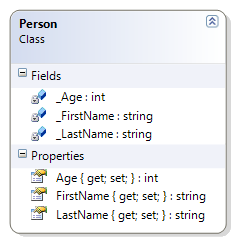
The supplied unit tests check all of this previously documented behaviour, but they also check to see if the Person class has overridden the ToString() method. Because this requirement is new, and has not yet been implemented, the unit tests show this as a “failed test.” The following diagram is the design that the unit tests are evaluating.
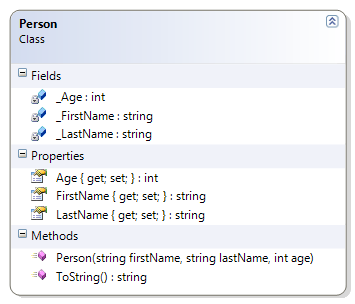
Should…
* Instantiate (build) from constructor
* Get/Set First Name
* Get/Set Last Name
* Get/Set Age
* [NOT-YET-IMPLEMENTED] Override ToString() to get the person’s full name (as first name then last name)
The test for this method will report as “failed” because it has not yet been implemented.
Account
This simple class also illustrates encapsulation, but with some of the fields being read-only. This class uses a constructor (which is also necessary for getting state into fields which do not have corresponding setter methods).
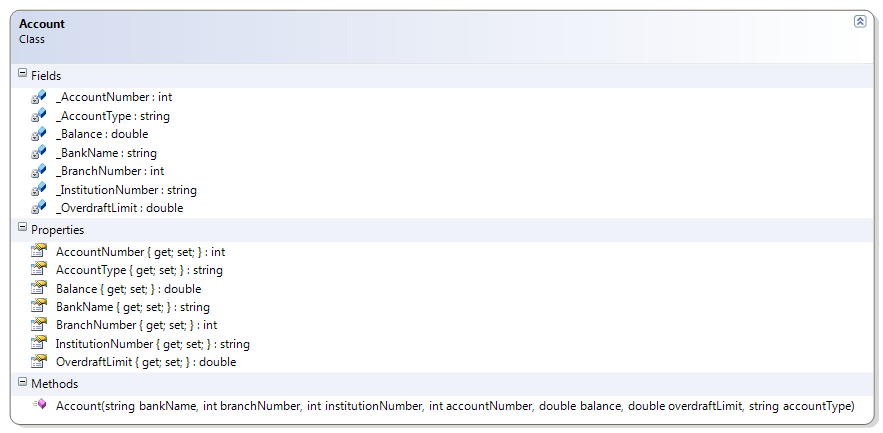
Should…
* Get Bank Name
* Get Branch Number
* Get Institution Number
* Get Account Number
* Get Account Type
* Get/Set Balance
* Get/Set Overdraft Limit
Student
This class reinforces the idea of encapsulation and constructors. It also demonstrates the idea of overloading the default ToString() method that every class inherits from the Object class.
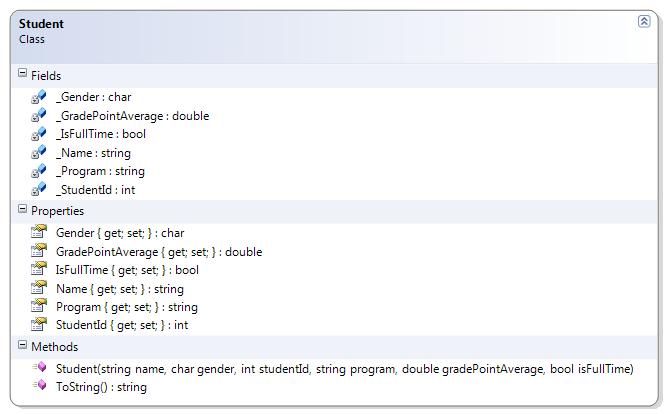
Should…
* Get/Set Name
* Get/Set Gender
* Get/Set Student Id
* Get/Set GPA
* Get/Set Program
* Get/Set Full-Time
* Override ToString() to get the student’s ID and name
Employee
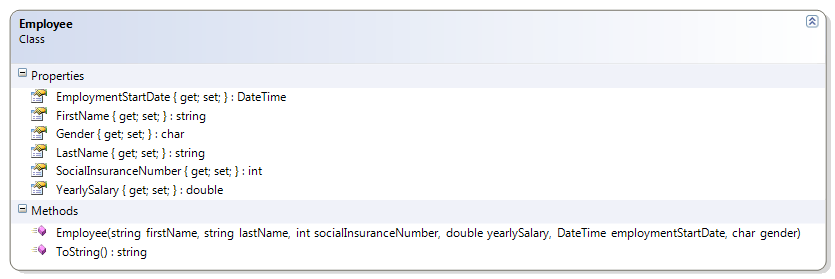
Should…
* Get/Set First Name
* Get/Set Last Name
* Get/Set Gender
* Get/Set Employment Date
* Get/Set Salary
* Get Social Insurance Number
Company
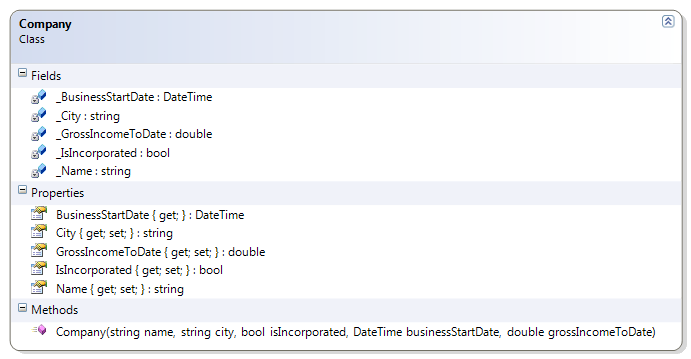
Should…
* Get/Set Name
* Get/Set City
* Get/Set Incorporated
* Get/Set Number of Employees
* Get/Set Gross Income to Date
* Get Business Start Date
Practice Exercises
- Person - This simple class was used to introduce the idea of encapsulation (private fields with public properties). This example uses a constructor for ensuring the state of an object when it is instantiated (created). It also demonstrates the overriding of the ToString() method inherited from the Object method.
- CanadianAddress - This class represents an address for some place in Canada.
Update this class to now include a constructor and to override the ToString() method. - Course - This class represents a post-secondary course with a theory (exam) and a lab portion.
- ExamResult - This class represents the results of an exam for a student.
- LabResult - This class represents the results of a lab for a student.
For this exercise, take the code solutions you created in the previous topic and compare your results with the jUnit tests for these classes; check with your instructor to see where you can download the unit tests.
Person
This simple class was used to introduce the idea of encapsulation (private fields with public properties). This example uses a constructor for ensuring the state of an object when it is instantiated (created). It also demonstrates the overriding of the ToString() method inherited from the Object method.
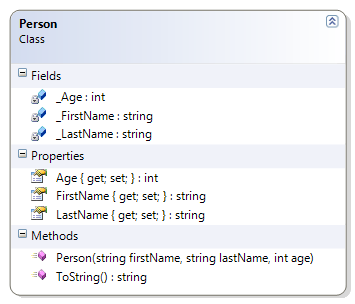
Should…
* Instantiate (build) from constructor
* Get/Set First Name
* Get/Set Last Name
* Get/Set Age
* Override ToString() to get the person’s full name (as first name then last name)
CanadianAddress
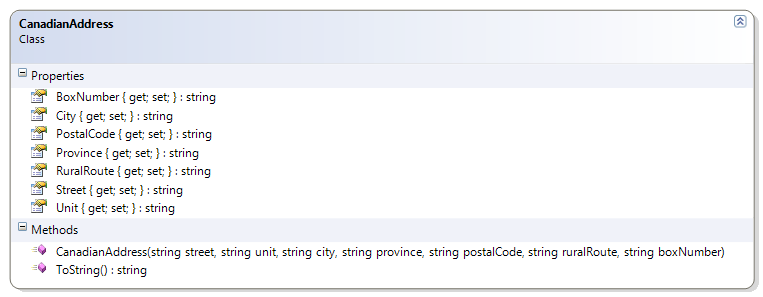
Should…
* Instantiate (build) from Constructor
* Get/Set: Street, Unit, City, Province, Postal Code, Rural Route, Box Number
* Override ToString() to just show Street, City, Province, and Postal Code
Course
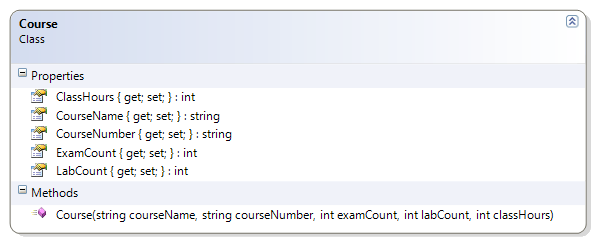
Should…
* Instantiate from Constructor
* Get: Course Name, Course Number, Exam Count, Lab Count, Class Hours
ExamResult
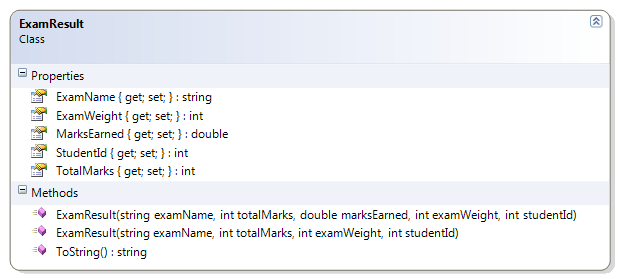
Should…
* Instantiate from Constructor
* Get/Set: Marks Earned
* Get: Name, Student Id, Total Marks, Exam Weight
* Override ToString() to show
“The student (studentId) received earnedMarks/totalMarks for this examName exam.”
LabResult
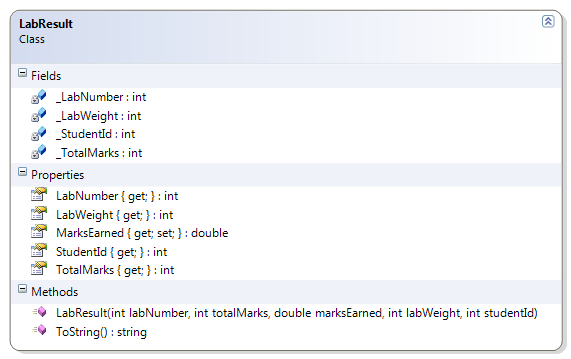
Should…
* Instantiate from Constructor
* Get/Set: Marks Earned
* Get: Lab Number, Student Id, Total Marks, Lab Weight
* Override ToString() to show
“The student (studentId) received earnedMarks/totalMarks for this lab.”