Topic K - Looping and Collections
Overview
This topic provides further examples of looping logic, but involves the use of collections. All of these samples make use of the List<T> class to maintain a collection or group of objects.
The List<T> class is a Generic class, meaning that the item in the angled brackets - <T> - is a placeholder for the name of the actual class that is being managed in the List. For example, to have a list of Integers we would declare that as List<Integer>. Likewise, if we wanted a list of Student objects, it would be declared as List<Student>.
The List<T> class supports a number of methods and properties for working with the collection.
- Add() – Used to add an item to the collection
- [index] – Used to retrieve an item in the collection
- Remove() – Used to remove an item from the collection
- Count – Identifies the number of items in the collection
LOGs
OOP Basics
- Define the term Generics as used in C# and give an example
General Programming Concepts and Terms
- Describe what is meant by a “collection” class and give an example
- List and describe the common methods of collection classes such as the List<T>
- Identify the parts of the foreach statement
- Describe the common situations in which the foreach statement is typically used
- Identify the major benefit of using Generics
- List the major benefits of using collections instead of arrays
Code Samples
- Math – The Math class is expanded to produce a collection of Integers for the sequence of Fibonacci numbers.
- PhoneBook – The PhoneBook class provides simple management of a collection of PhoneNumber objects. The PhoneBook allows for adding and retrieving phone numbers; it supports search for phone numbers by the telephone number or by a last name.
- ClassList – The ClassList example maintains a list of students for a particular course by offering methods to add and remove students from a course. In addition, the ClassList ensures that students are not added to the course twice (based on the student’s Id).
- MultipleChoiceMarker – This class is used for marking multiple choice exams. It takes a collection of MultipleChoice objects as the answer key when it is first created. It provides a method to mark the student’s answers.
- BankStatement – This class represents a bank statement for a BankAccount for a given month. The statement allows BankTransaction objects to be added, and performs deposits and withdrawals on the BankAccount. The statement reports the starting and ending balance and also summarizes the total amount deposited and withdrawn for the month.
- DeckOfCards –The DeckOfCards class represents a complete deck of cards. When the deck is first created, a card is created for each suit. The DeckOfCards supports a method to draw a card.
Math
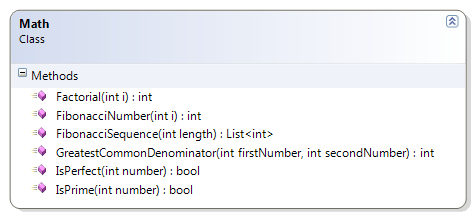
This sample leverages the existing calculation of a number in the Fibonacci sequence to generate the sequence itself.
- FibonacciSequence(Length : Integer) – This method generates the sequence of Fibonacci numbers to a specific length in the sequence.
 1 public static List<int> FibonacciSequence(int length)
 2 {
 3     List<int> fib = new List<int>();
 4     if (length >= 1)
 5     {
 6         for (int index = 0; index < length; index++)
 7             fib.Add(FibonacciNumber(index + 1));
 8     }
 9     return fib;
10 }
PhoneBook
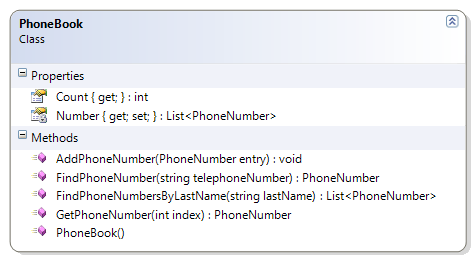
The PhoneBook class provides simple management of a collection of PhoneNumber objects. The PhoneBook allows for adding and retrieving phone numbers; it supports search for phone numbers by the telephone number or by a last name.
- Constructor – Create a new List<PhoneNumber> for the numbers field.
- AddPhoneNumber(Entry : PhoneNumber) – Add a PhoneNumber to the collection. Ensure that the PhoneNumber exists (is not null) before adding; if the PhoneNumber is null, throw an exception.
- GetPhoneNumber(Index : Integer) : PhoneNumber – Get an item from a particular position in the collection.
- GetCount() : Integer – Get the size of the collection, which is a count of how many PhoneNumber objects are in the collection.
- FindPhoneNumber(TelephoneNumber : String) : PhoneNumber – Look through the collection and return a PhoneNumber with a matching telephone number. If none is found, return null.
- FindPhoneNumbersByLastName(LastName : String) : List<PhoneNumber> - Look through the collection for PhoneNumber objects with a matching last name. Add those objects to a new collection and return the collection of matching PhoneNumbers. If no items are found, return an empty collection.
Supporting Classes
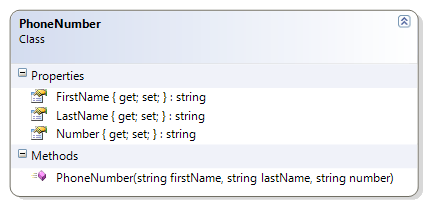
The PhoneNumber class used in this sample is provided for you. The following class diagram shows the design of this class.
PhoneBook Class
 1 public class PhoneBook
 2 {
 3     private List<PhoneNumber> Number { get; set; }
 4
 5     public PhoneBook()
 6     {
 7         Number = new List<PhoneNumber>();
 8     }
 9
10     public void AddPhoneNumber(PhoneNumber entry)
11     {
12         if (entry == null)
13             throw new System.Exception("The phone number entry cannot be null");
14         Number.Add(entry);
15     }
16
17     public PhoneNumber GetPhoneNumber(int index)
18     {
19         return Number[index];
20     }
21
22     public int Count
23     {
24         get
25         {
26             return Number.Count;
27         }
28     }
29
30     public PhoneNumber FindPhoneNumber(string telephoneNumber)
31     {
32         PhoneNumber found = null;
33         foreach (PhoneNumber item in Number)
34         {
35             if (item.Number.Equals(telephoneNumber))
36             {
37                 found = item;
38                 break;
39             }
40         }
41         return found;
42     }
43
44     public List<PhoneNumber> FindPhoneNumbersByLastName(string lastName)
45     {
46         List<PhoneNumber> found = new List<PhoneNumber>();
47         foreach (PhoneNumber item in Number)
48         {
49             if (item.LastName.Equals(lastName))
50             {
51                 found.Add(item);
52             }
53         }
54         return found;
55     }
56 }
ClassList
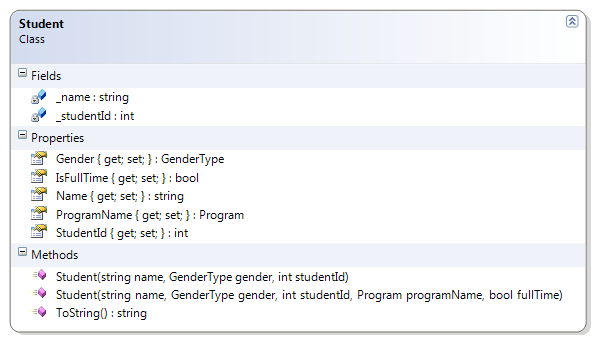
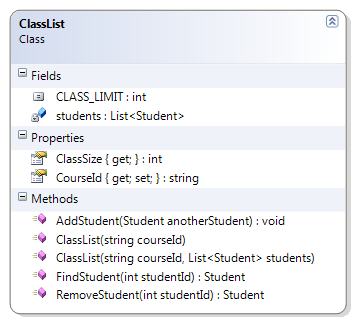
The ClassList example maintains a list of students for a particular course by offering methods to add and remove students from a course. In addition, the ClassList ensures that students are not added to the course twice (based on the student’s Id). The following parts of the ClassList must be coded to complete the solution.
- Constructor – Set the course id and the collection of students. Ensure that the supplied arguments are valid
- CourseId cannot be empty or null, and must be trimmed of leading or trailing spaces
- The collection object cannot be null and cannot have more students than the constant CLASS_LIMIT
- There cannot be any duplicate students in the collection (where a duplicate is defined as two or more Student objects with identical Ids)
- AddStudent() – Add the supplied student object to the collection. Ensure that
- The Student object is not null
- The class limit is not exceeded
- The Student object does not already exist in the collection (that is, there are no duplicates allowed, based on the student’s id)
- FindStudent() – Search the collection for a Student with a matching Id. If none is found, return null.
- RemoveStudent() – Search for a Student with a matching Id; if one is found, remove it from the collection.
Student
ClassList
 1 public class ClassList
 2 {
 3     public const int CLASS_LIMIT = 25;
 4     public string CourseId { get; private set; }
 5     private List<Student> students;
 6
 7     public ClassList(string courseId, List<Student> students)
 8     {
 9         if (String.IsNullOrEmpty(courseId) || string.IsNullOrEmpty(courseId.Trim\
10 ()))
11             throw new Exception("Course Id is required");
12         if (students == null)
13             throw new Exception("Students cannot be a null list");
14         if (students.Count > CLASS_LIMIT)
15             throw new Exception("Class Limit Exceeded");
16         for (int index = 0; index < students.Count - 1; index++)
17         {
18             int id = students[index].StudentId;
19             for (int innerLoop = index + 1; innerLoop < students.Count; innerLoo\
20 p++)
21                 if (students[innerLoop].StudentId == id)
22                     throw new Exception(
23                             "Duplicate student Ids not allowed in the class list\
24 ");
25         }
26         this.CourseId = courseId.Trim();
27         this.students = students;
28     }
29
30     public ClassList(string courseId) :
31         this(courseId, new List<Student>())
32     {
33     }
34
35     public int ClassSize
36     {
37         get
38         {
39             return students.Count;
40         }
41     }
42
43     public void AddStudent(Student anotherStudent)
44     {
45         if (anotherStudent == null)
46             throw new Exception("Cannot add null student");
47         if (students.Count >= CLASS_LIMIT)
48             throw new Exception("Class Limit Exceeded - Cannot add student");
49         for (int index = 0; index < students.Count - 1; index++)
50         {
51             int id = students[index].StudentId;
52             if (anotherStudent.StudentId == id)
53                 throw new Exception(
54                         "Duplicate student Ids not allowed in the class list");
55         }
56         students.Add(anotherStudent);
57     }
58
59     public Student FindStudent(int studentId)
60     {
61         Student found = null;
62         for (int index = 0; index < students.Count && found == null; index++)
63             if (students[index].StudentId == studentId)
64                 found = students[index];
65         return found;
66     }
67
68     public Student RemoveStudent(int studentId)
69     {
70         Student found = FindStudent(studentId);
71         if (found != null)
72             students.Remove(found);
73         return found;
74     }
75 }
MultipleChoiceMarker
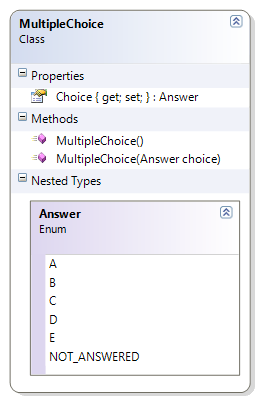
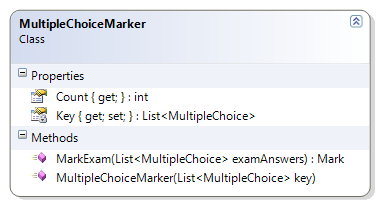
This class is used for marking multiple choice exams. It takes a collection of MultipleChoice objects as the answer key when it is first created. It provides a method to mark the student’s answers. The following methods must be coded to complete the solution.
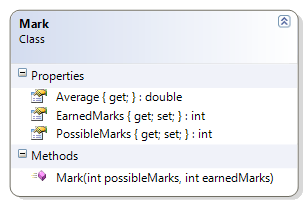
- MarkExam() – This method takes the supplied exam answers and compares them against the answers in the marking key. It then constructs a Mark object, based on the earned marks and the possible marks (each answer is worth one mark). Before marking the exam, the method must ensure that
- The supplied collection of multiple choice answers is not null
- The supplied collection of multiple choice answers has the same number of answers as the MultipleChoiceMarker’s answer key
MultipleChoice and Mark Classes
MultipleChoiceMarker
 1 public class MultipleChoiceMarker
 2 {
 3     private List<MultipleChoice> Key { get; set; }
 4
 5     public MultipleChoiceMarker(List<MultipleChoice> key)
 6     {
 7         if (key == null)
 8             throw new Exception("Answer key cannot be null");
 9         this.Key = key;
10     }
11
12     public Mark MarkExam(List<MultipleChoice> examAnswers)
13     {
14         if (examAnswers == null)
15             throw new Exception("Cannot mark null answers");
16         if (examAnswers.Count != Key.Count)
17             throw new Exception(
18                     "The number of student answers does not match the number of \
19 items in the answer key");
20         int possible = Key.Count;
21         int earned = 0;
22         // Calculate earned marks
23         for (int index = 0; index < Key.Count; index++)
24         {
25             if (examAnswers[index] != null)
26                 if (Key[index].Choice == examAnswers[index].Choice)
27                     earned++;
28         }
29         Mark examMark = new Mark(possible, earned);
30         return examMark;
31     }
32
33     public int Count
34     {
35         get
36         {
37             return Key.Count;
38         }
39     }
40 }
BankStatement
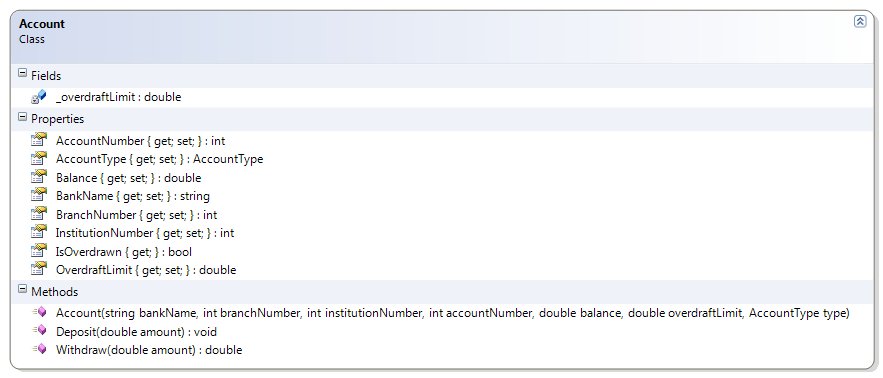
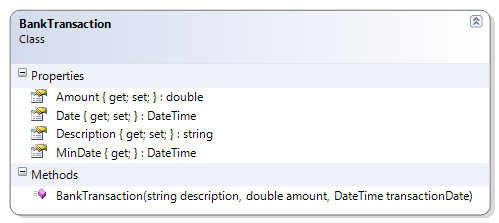
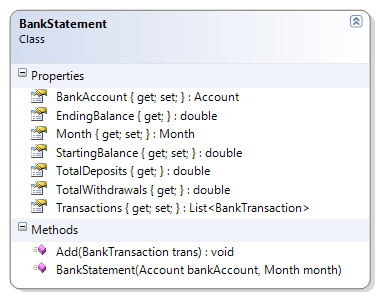
This class represents a bank statement for a BankAccount for a given month. The statement allows BankTransaction objects to be added, and performs deposits and withdrawals on the BankAccount. The statement reports the starting and ending balance and also summarizes the total amount deposited and withdrawn for the month. The following methods must be coded to complete the solution.
- GetTotalDeposits() – Loop through the collection of transactions to total all those transactions with a positive amount.
- GetTotalWithdrawals() – Loop through the collection of transactions to total all those transactions with a negative amount.
Account and BankTransaction
Bank Statement
 1 public class BankStatement
 2 {
 3     public Account BankAccount { get; private set; }
 4     public double StartingBalance { get; private set; }
 5     public Month Month { get; private set; }
 6     public List<BankTransaction> Transactions { get; private set; }
 7     public double EndingBalance
 8     {
 9         get
10         {
11             return BankAccount.Balance;
12         }
13     }
14
15
16     public BankStatement(Account bankAccount, Month month)
17     {
18         if (bankAccount == null)
19             throw new System.Exception("Bank account cannot be null");
20         this.BankAccount = bankAccount;
21         this.StartingBalance = bankAccount.Balance;
22         this.Month = month;
23         this.Transactions = new List<BankTransaction>();
24     }
25
26     public void Add(BankTransaction trans)
27     {
28         if (trans == null)
29             throw new System.Exception("Cannot add null transactions");
30         double amount = trans.Amount;
31         if (amount < 0)
32             BankAccount.Withdraw(-amount); // Amount is "negated" to make positi\
33 ve
34         else
35             BankAccount.Deposit(amount);
36         Transactions.Add(trans);
37     }
38
39     public double TotalDeposits
40     {
41         get
42         {
43             double total = 0;
44             for (int index = 0; index < Transactions.Count; index++)
45             {
46                 BankTransaction aTransaction = Transactions[index];
47                 if (aTransaction.Amount > 0)
48                     total += aTransaction.Amount;
49             }
50             return total;
51         }
52     }
53
54     public double TotalWithdrawals
55     {
56         get
57         {
58             double total = 0;
59             foreach (BankTransaction aTransaction in Transactions)
60                 if (aTransaction.Amount < 0)
61                     total += aTransaction.Amount;
62             return total;
63         }
64     }
65 }
DeckOfCards
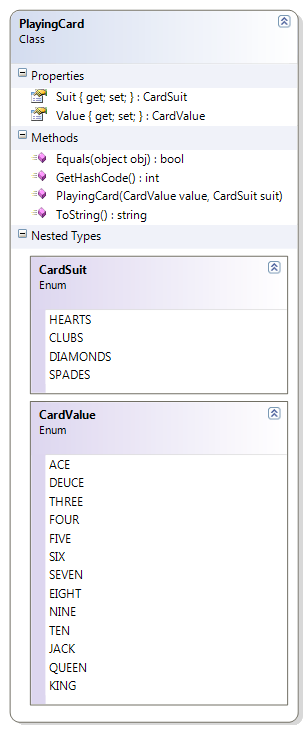
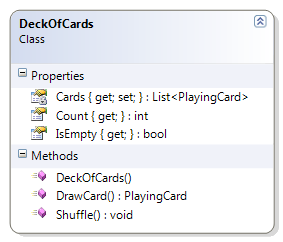
The DeckOfCards class represents a complete deck of cards. When the deck is first created, a card is created for each suit. The DeckOfCards supports a method to draw a card. The following methods must be coded to complete the solution.
- Constructor – Create all the cards for all the CardSuit values and all the CardValue values.
- DrawCard() – Return the card at the “top” of the deck (that is, at position zero). If the deck is empty, return a null.
- Shuffle() – Mix up the order of the PlayingCards in the Cards list. Shuffle should work regardless of the number of cards still in the deck.
PlayingCard and DeckOfCards
 1 public class DeckOfCards
 2 {
 3     private List<PlayingCard> Cards { get; set; }
 4
 5     public int Count
 6     { get { return Cards.Count; } }
 7
 8     public bool IsEmpty
 9     { get { return Count == 0; } }
10
11     public DeckOfCards()
12     {
13         Cards = new List<PlayingCard>();
14         foreach (PlayingCard.CardSuit suit in System.Enum.GetValues(typeof(Playi\
15 ngCard.CardSuit)))
16             foreach (PlayingCard.CardValue value in System.Enum.GetValues(typeof\
17 (PlayingCard.CardValue)))
18                 Cards.Add(new PlayingCard(value, suit));
19     }
20
21     public PlayingCard DrawCard()
22     {
23         PlayingCard card = null;
24         if (Cards.Count != 0)
25         {
26             card = Cards[0];
27             Cards.Remove(card);
28         }
29         return card;
30     }
31
32     public void Shuffle()
33     {
34         for (int counter = 0; counter < 100; counter++)
35         {
36             int index = Rnd.Next(Cards.Count);
37             PlayingCard card = Cards[0];
38             Cards.RemoveAt(0);
39             Cards.Insert(index, card);
40         }
41     }
42 }
Practice examples
- PhoneBook – This extends the PhoneBook class by ensuring that duplicate phone numbers are not added to the collection.
- Registrar – The Registrar class is responsible to support the enrollment of students. This class maintains the student body as a collection of Student objects. It supports the ability to find and remove students, switch students to another program, and get the number of students enrolled in a specific program.
- BookBag – The BookBag class represents a simple “shopping cart” for a book consignment store. Books are sold on consignment, and customers can add or remove books from their BookBag as well as search their BookBag for books by ISBN. Customers can also see the total price of the items in their BookBag.
- DeckOfCards –The DeckOfCards class represents a complete deck of cards. When the deck is first created, a card is created for each suit. The DeckOfCards supports two public methods: Draw() and Shuffle().
PhoneBook
This extends the PhoneBook class by ensuring that duplicate phone numbers are not added to the collection. Make the following additions and modifications to complete the solution.
- AddPhoneNumber() – This method must be modified to ensure that the telephone number does not already exist; that is, no duplicate phone numbers are allowed, and an exception must be thrown if the supplied PhoneNumber already exists.
Registrar
The Registrar class is responsible to support the enrolment of students. This class maintains the student body as a collection of Student objects. It supports the ability to find and remove students, switch students to another program, and get the number of students enrolled in a specific program. Code the following methods to complete the Registrar class.
- Add() – This method takes the supplied Person information as well as the program of study to create a new Student, adding them to the collection of students in the student body. It returns the student Id for the new enrolment.
- FindStudent() – This method searches the student body for a student with a matching Id.
- RemoveStudent() – This method searches the student body for a student with a matching Id and removes them from the collection, if found.
- GetProgramEnrollment() – This method searches the collection of students to find out how many are enrolled in a particular program. Validate the Program name before performing the search.
BookBag
The BookBag class represents a simple “shopping cart” for a book consignment store. Books are sold on consignment, and customers can add or remove books from their BookBag as well as search their BookBag for books by ISBN. Customers can also see the total price of the items in their BookBag. Code the following methods to complete the BookBag class.
- GetTotal() – Loop through the collection of books and total the price of all the books. Ensure that the amount is rounded to two decimal places (for dollars and cents).
- FindBook() – Look through the collection of books to find a book with the specified ISBN number. Throw an exception if the supplied ISBN is null.
- RemoveBook() – Remove the book with a matching ISBN from the collection of book consignments.
DeckOfCards
Modify the DeckOfCards class to support shuffling of the deck.
- Shuffle() – This method resets the deck to a full deck of cards and then “shuffles” the deck until the cards are randomly distributed through the collection.