Part 1: Catalog System
The catalog system, in many means, can be called the heart of Episerver Commerce. It might be the most used system in entirely Commerce. From cases to cases implementations might want to replace the order system, or to let their CRM to handle customers data, but all of them use the Catalog system.
Chapter 1: How the catalog is structured
##Overview
Catalog Management is the old catalog-editing UI in Commerce Manager, which has been there since the first version of Episerver Commerce. Catalog UI is the rewrite interface which integrates into CMS UI since Episerver Commerce 7.5. Catalog UI is vastly superior to Catalog Management in almost all aspects, and it’s recommended to use by Episerver. However we’ll show screenshots in both interfaces to see how they’re connected.
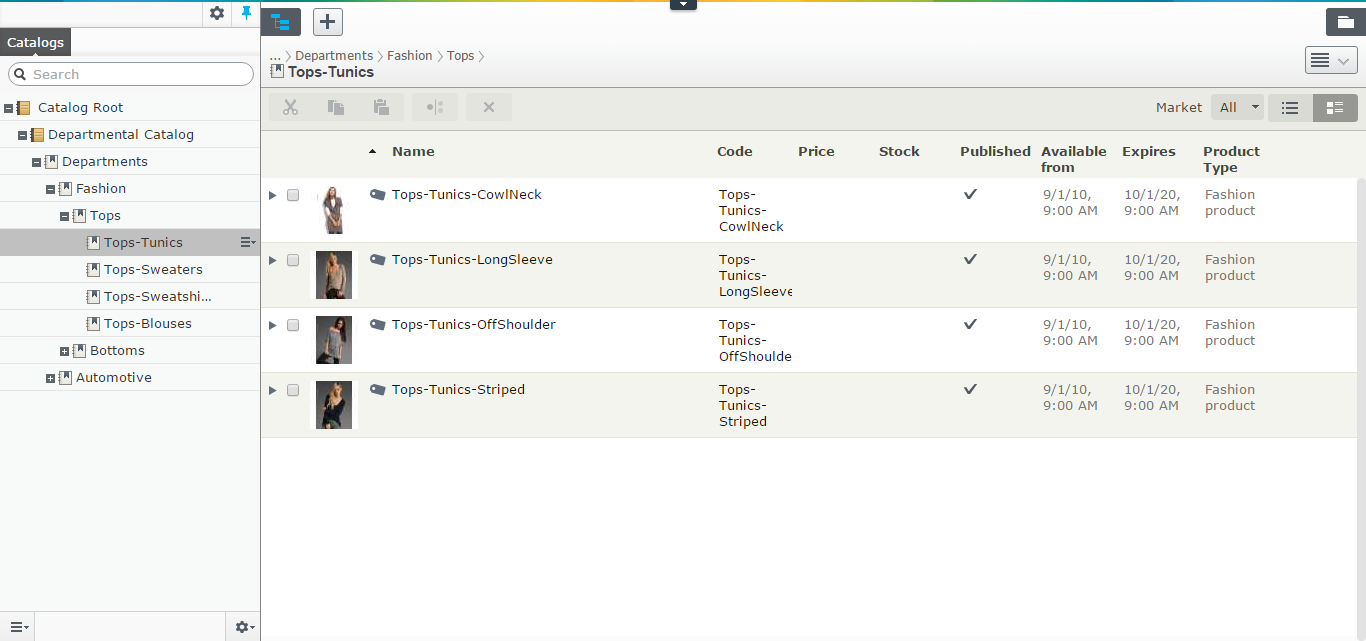
The catalog system - as the heart of Episerver Commerce - has been there for long, long before the merge and long before CatalogContentProvider. In the most basic concept, a catalog can be viewed as a tree - a catalog is the root, the nodes are the branches, and the entries are the leaves. It helps to grasp some ideas about the catalog system, but it’s not enough. Mind you, the catalog is much more complicated than that, which all kinds of relations and associations we’ll discuss shortly.
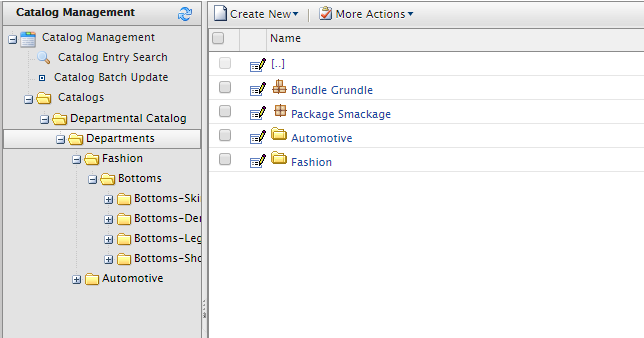
The catalog itself, can be seen as the container in the system. You can import and export it at will. Whenever you export a catalog, all other information come along (the nodes, the entries, the warehouses, the inventories information, the prices, and the metadata classes). And you can import it to another system. You can use many ways to transfer catalog information between system, such as writing the code to update the entries directly from CSV files, use ServiceAPI to update from a PIM like InRiver, … but the most common way to date, is to export and import the catalog.12
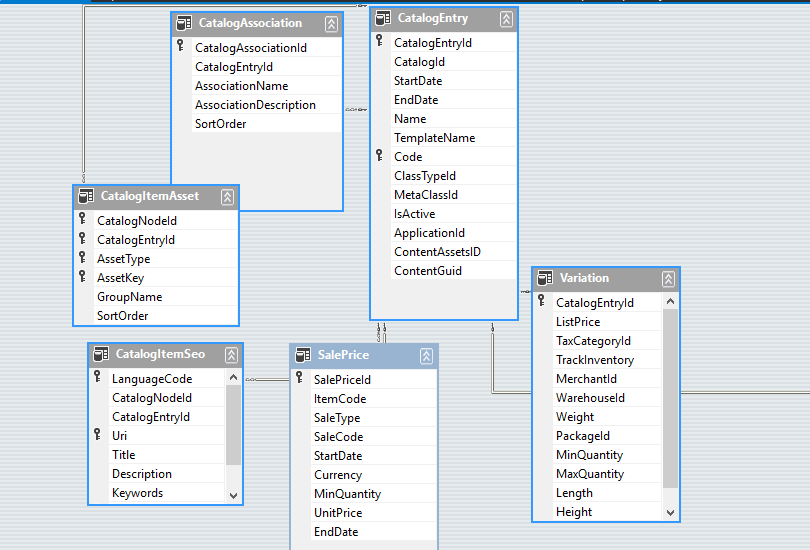
The data of Catalogs are stored in Catalog and CatalogLanguage tables. If there is anything interesting to look at, it’s CatalogLanguage. The languages available here will define which languages you content will have in. Prior to Commerce 9, adding a new language to a catalog will also update all the drafts of all contents, hence it’s very expensive operation. It’s been much improved in Commerce 9, but it’s still quite slow and you won’t want to do it on a live site during high load time.
Under catalog, you usually have nodes. You can, of course, create an entry to be a direct children of a catalog. However, in that case, it actually means that entry does not belong to any nodes.
And under the node, you can have another nodes, or entries. The naming can be a little confusing here: It’s sometimes called node, or CatalogNode, but in the new Catalog UI, it’s called Category to match with “Category concept” of CMS content.
There are two kinds of relations between nodes:
- Each node would have one parent node. Nodes which have no parent node will be direct children of the catalog. This relation is defined by the ParentNodeId in CatalogNode table.
- A node can be linked to one or multiple nodes. When a node is linked, it will appear in as a normal child node in the parent node. This relation is defined by the
CatalogNodeRelationtable.
A node might contain, of course, many entries. And vice versa, an entry can belong to multiple nodes. This kind of relation is defined is NodeEntryRelation table.
And then we have relations and associations between entries.
Node-entry relation
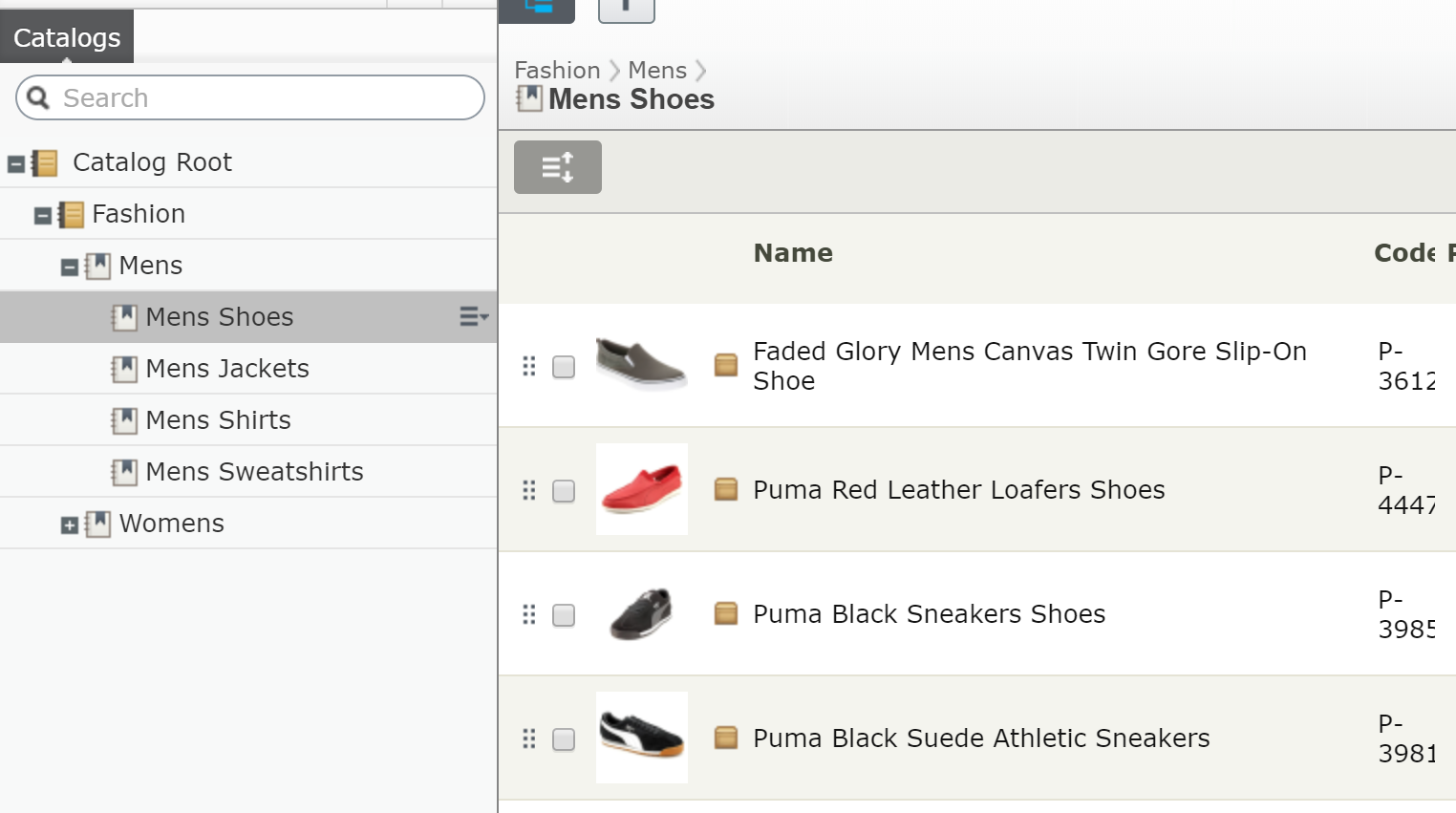
Before Commerce 11, there is no way to know which is the “true” parent node of an entry. Currently, the first relation with lowest SortOrder is assumed to be the parent node. This is not entirely correct, and it comes with a limitation: you can really drag and drop an entry within a node. If you have a category of “smart phone”, you would want to make the most popular phone, like iPhone X or Galaxy S9+ to the top of the category, because those are more likely to be bought buy a customers. Prior Commerce 11, you just … can’t. It is not supported in Catalog UI, and if you want a workaround, it can be completed (for example adding a metafield to the entry type and use that as sort order).
Commerce 11 addresses this issue by adding a property IsPrimary to the node-entry relation. That means the SortOrder is now free to do what it is supposed to do.
The entries
If the catalog system is the heart of entire Episerver Commerce, the entries can be called the heart of the catalog system. In the end it’s the only thing your customers care about, right? And it might no be simple as you might think.
There are 4 types of entries in the system:
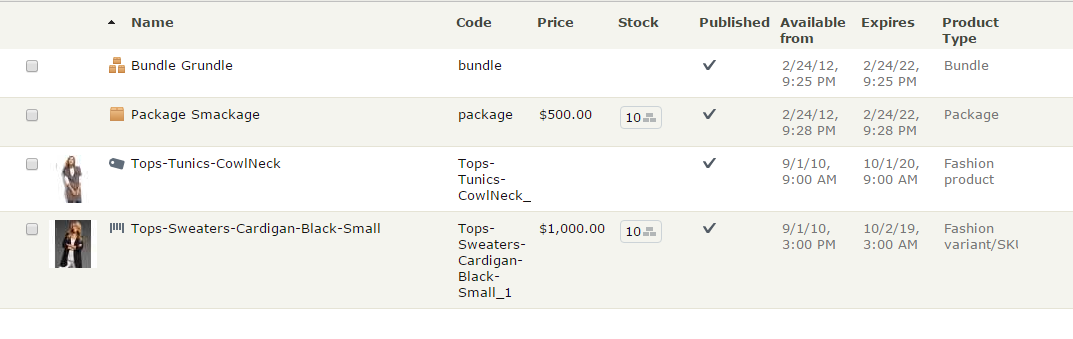
- Product: Well it’s a product. Normally, a Product is a place holder of information, it does not have inventories or prices for itself, so it’s not sell-able. (I’ve seen some customers sell products directly, it’s possible but it will be a lot more of works. I would suggest you to stick with the “standard” implementation instead). A product might have one or more variations.
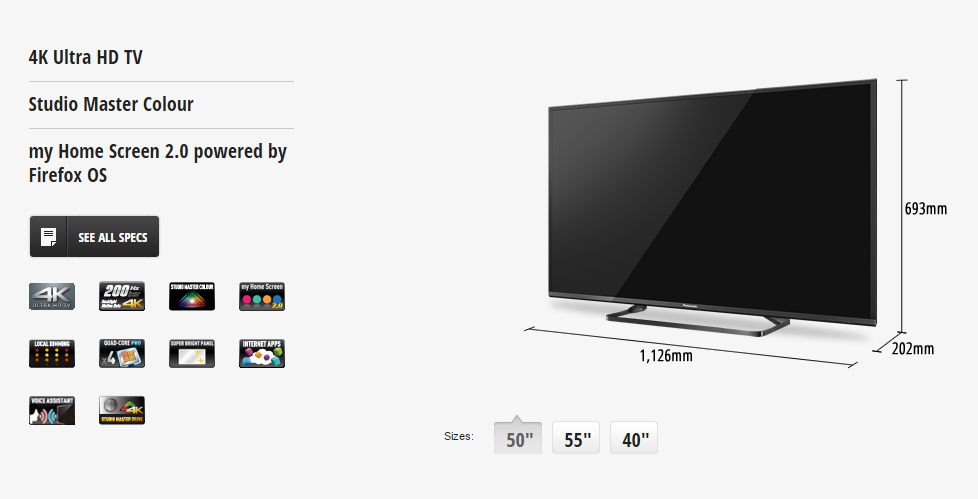
- Variation/SKU: It’s easiest to explain Product-Variation in term of a TV series. Let’s pick the Panasonic CX680 4K TV for example (I have one of these, it’s a pretty awesome TV by the way). We can have it as a product with all specifications (resolution, OS, features and App). There are 3 variations of its by size. Here’s a screenshot from Panasonic website:
A variation might have its own inventories and prices. In the end, it’s the thing your customers actually buy. However, it’s possible your variations have no products on their own (when each and every variation is unique and don’t share anything with other variation, it does not really make sense to have “products” here).
- Package: A package consists of two or more variations, which itself act as a variation. Think of a package as a collection of items. You might have Harry Potter books as seven variations, and then you have a collection of them as a package. Package has its own prices and inventories. Therefore, when you buy, you all of items as one. Customers should not have the ability to change the quantity or remove items from a package. 3
- Bundle: A bundle is just a collection of things you can add to the cart at once, but then they acts as individual items. They are something customers buy together, but are not forced to do so. You can change quantity of or remove items from the cart if you’d like to. Bundles have no prices or inventories of its own.
And then comes the tangible relations and associations between them.
There are three type of relations between entries:
-
ProductVariationbetween a product and its variations. -
BundleEntrybetween a bundle and its entries. -
PackageEntrybetween a package and its entries.
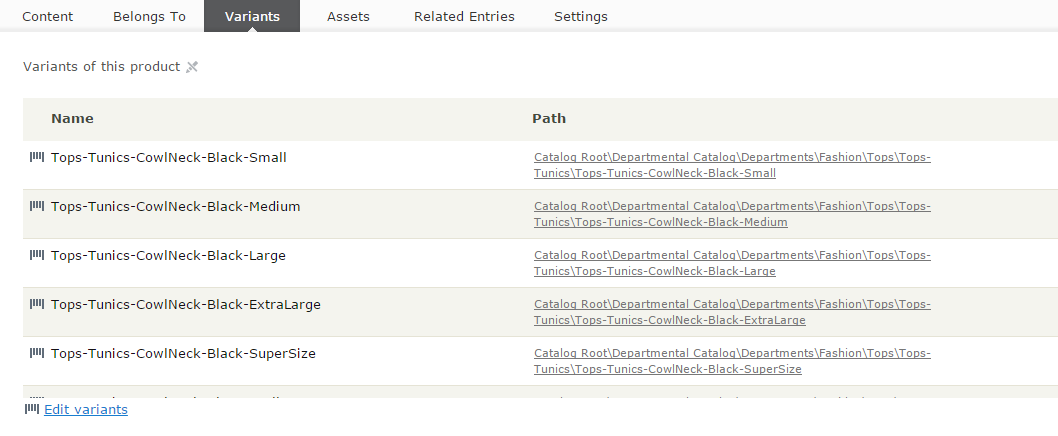
Those relations are stored in CatalogEntryRelation table, and are managed by the the Variants tab (for Products) or Package Entries (for Packages) or Bundle Entries (for Bundle)
 .
.
If you look at the tab Variations/SKUs when editing a Product in Commerce Manager, you’ll see “Quantity” column. This is not entirely correct as the Quantity is never used in a ProductVariation relation. Catalog UI reflects this better. It only matters in BundleEntry and PackageEntry relations.
And then between entries, you can set the associations. It can be the “CrossSell” or “UpSell” items that you might want to show in “You might also want” section when a customer browses a product detail page. The associations are stored in CatalogEntryAssociation and CatalogAssociation table.
Variations
As the most important entry types in the system, variation and package receive a bit of special treatment. While they share some tables with other entry types, they have one specific table, Variation, which contains some of very important information about your SKU. You can view or edit those values in the Pricing tab in both Commerce Manager and Catalog UI:
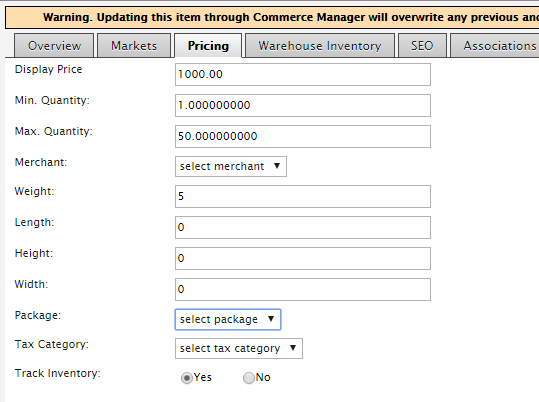
- Display Price (or List Price) is an interesting field - it’s long obsolete since R3 with the birth of pricing system, however, if you have a catalog exported from old version, it might still be there. If you delete the value (aka set the value to be null), the field will be hidden. This field is not mapped to any property in strongly typed content, nor displayed in Catalog UI.
- Min Quantity and Max Quantity are the lower and upper limit a customer can add this SKU to cart. Those values will be used in several workflows during checkout, so they are particularly useful if you want to configure something like “Only buy by batch of at least 4”, “Only 10 per cart”, etc. Note that almost every value of quantity in Episerver Commerce is stored in decimal. While this might not really be useful in normal shop (it does not really make sense to have 1.5 TV or 2.3 Bluray discs, right?), it’s a must for B2B scenarios or liquor stores.
- Merchant is a field supposed to identify the merchant provides this SKU, but I hardly see any real world uses of it. This is not reflected in strongly typed content.
- Weight: It should describe itself, but note: this is only the value without unit. It’s supposed that the unit is the base weight setting of the Catalog. (which, by default, can be either kilograms or pounds). Episerver Commerce does not really use the unit in any calculations, the setting is more of a convention. You can assume that the unit of the weight, for example, as gram instead. But in most of the cases, sticking with the setting would help you avoid later confusions.
- Height, Width and Length: Those are values of the dimensions. Like weight, they are not tied to an unit. You can set the unit in the base length setting of the Catalog (which is by default, is null, but you can choose between inches and centimeters).
- Package: Choose the shipping package the SKU might come with. You can define the packages in Administration/Order System/Shipping/Shipping Packages section of Commerce Manager. Prior to 8.7, it comes with dimension (Height, Width and Length) settings and is the only way to define the shipping dimensions, but you now can use much more convenient way with the
Height,WidthandLengthattributes. However, this is still useful when you have non-box SKUs, such as flower vases. - Tax category: The tax category this SKU belong to. You usually don’t update this manually, but you can still go to Administration/Order System/Tax Configuration to add a tax category and try. We will discuss more about this in Chapter 8
- Track Inventory: This is one important flag. If it’s set to false it does mean you don’t want to track the inventory of this SKU, so any check for inventory such as available quantity etc will be skipped during checkout. That can be useful in cases such as your SKU is a software and is distributed via download.
The standard configuration
The most common configuration of catalog is product-variation. One product has multiple variants in size, color, material. It is, however, not the only configuration.
Another fairly common case is to have standalone SKUs. So a variant is an entry of its own and does not belong to a product. Because variant already has prices and inventory information of its own, it’s not a problem. The only thing that needs to be kept in mind - a content is only route-able if it has a “template”. If you are using MVC for example, to route to your MyVariantContent, you would need to define a controller take inherit from ContentController<MyVariantContent> - and that’s all it takes.
Another, less common scenario is the product-product-variant. The first level product defines general information, like T-shirt. The second level product defines size, while the variants defines other information like color. This is used in a few websites - and to be honest I’m not sure why it’s needed. It requires customizations on framework level and the benefits aren’t that clear. In my opinion, yes, you can, but that doesn’t mean you should.
The two systems.
As mentioned in the brief history, Episerver Commerce was based on Mediachase eCF. Mediachase eCF built its catalog API:s around one interface - ICatalogSystem (If you worked with Commerce R3 and earlier, you might use the instance of it instead - CatalogContext.Current). ICatalogSystem methods use mostly DTO objects as inputs and outputs. The DTO:s are actually typed DataSets, and in most case, maps to several tables in database.
ICatalogSystem had its days. By today standards, it might not be the best API design, but it worked quite well until Commerce R3, which is the compatibility release for Episerver CMS 7. The biggest new feature in CMS 7 was the content concept (Before that, we had pages, and pages), so it became a big demand to have a content API:s to work with catalog/node/entry, and Episerver Commerce can be considered as a first-class product in Episerver framework. It was made real in Commerce 7.5, and has been improved and refined ever since.
The content API:s to work with catalog content use ICatalogSystem internally. To be fair, ICatalogSystem is a fast, proved, reliable API:s, so why not use it directly?
Firstly, using the new API:s means you use the same API:s as the Episerver CMS. Working on a unified API:s allow you to increase the code-recognition. Once you’re familiar with the API:s, it’ll be much quicker for you to know what the intention the code are doing to do (code-read), and much unlikely for you to use wrong method (code-write). In the end, it’s your productivity which improves.
Secondly, the new API:s use a much more efficient caching mechanism, or it’s the old system which does not cache thing very effectively. For the content way, if you load an object, you can cache it by its ContentReference and that’s it. Every call to that ContentReference will hit the cache easily. Caching the DTO:s is a much harder problem. A CatalogEntryDto, for example, can have multiple rows, and depends on the ResponseGroup you specified, the data in some table might not be present. You get the cache, but hey, do you know if the next time can you re-use it when your parameters change?
Thirdly, with the content way, you can read or update both of the “static” properties and the metafields in the same API:s. They are, after all, just properties. With the old way of ICatalogSystem, you can only update static properties and will need the help from MetaObject when you want to read or update the metafields.
Finally, the POCO (Plain Old C# Object) approach in the content way is arguably move intuitive than the DTO:s (DataSet:s) approach of ICatalogSystem. Let’s see how to change a name of an EntryContentBase vs a CatalogEntryDto:
1 entryContent.Name = "This is new name";
vs
1 entryDto.CatalogEntry[0].Name = "This is new name";
Tell me, which one will catch your eyes?
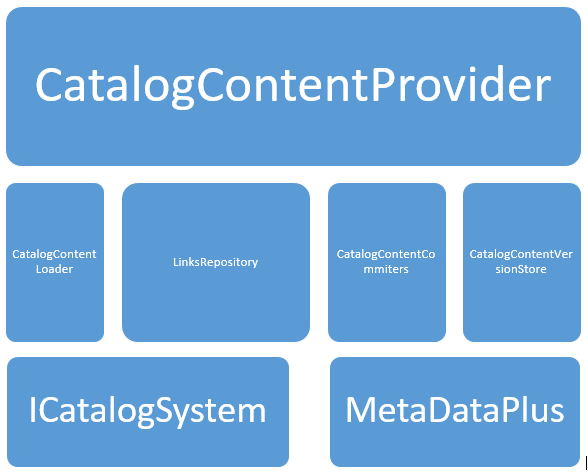
And one other approach - when you work with versions, ICatalogSystem simply provide nothing to work with versions. New content API:s are simply superior because they are designed to work with versioning.
In short, if you start your Episerver Commerce project today, you should be using the latest and greatest version (Episerver releases new packages of Commerce every one or two weeks, to it’s always a best practice to keep to up-to-date as much as possible), and you should be using the IContentRepository. There are very little reasons to use ICatalogSystem (well, there always is a reason for something), but you should always think about the content way first. It’s the way forward.
ReferenceConverter - the bridge.
One of the biggest features in Episerver CMS is its content provider system, which allow you to plug your own content provider to the system. So anything can be considered content, and can be manipulated with one unified API:s. However, to do that, you have to solve the first issue - the identity.
There are two problems Commerce team had to solve when they tried to plug the catalog structure into the content provider system. Firstly, the data are stored in three separated tables (and you might already know, Catalog, CatalogNode and CatalogEntry), with the auto incremented identity. So a content with ID = 1 can be a Catalog, a Node or an Entry. Secondly, there can be multiple catalogs, while you need a “root” content to attach your content provider system.
The second one can be easily resolved by introducing a virtual root. It’s just another content, but virtual, meaning you can never edit or delete it. It’s there, created on the fly whenever you need it. But the first one is a bit tricky. That was when ReferenceConverter came to life.
The content provider system requires every content to be identified by a specific ContentReference, which is supposed to be unique in the system. A ContentReference consists of three parts:
A sample catalog content reference: 123_1_CatalogContent
- The first one is the content id, which is mandatory. The ID is supposed to be unique within the system.
- The
WorkId, which identifies the version of the content. - The content provider name. This allows the content system to know which provider should be handling the content - in this case - the content repository knows it should let
CatalogContentProviderhandle this content. For catalog content, it’s alwaysCatalogContentProviderwho does the leg works. 45
ReferenceConverter was a small class resides in Mediachase.Commerce namespace, it’s not very “small” now, but in this section we only discuss its three “base” methods:
 1 public class ReferenceConverter
 2     {
 3         /// <summary>
 4         /// Gets a <see cref="ContentReference"/> instance with the specified commer\
 5 ce object ID and type
 6         /// encoded in the content ID.
 7         /// </summary>
 8         public virtual ContentReference GetContentLink(int objectId, CatalogContentT\
 9 ype contentType, int versionId)
10
11         /// <summary>
12         /// Gets the actual id of commerce object.
13         /// </summary>
14         public virtual int GetObjectId(ContentReference contentLink)
15
16         /// <summary>
17         /// Gets the type of the commerce object. Parse the content ID to take two m\
18 ost significant bits to
19         /// determine CatalogContentType.
20         /// </summary>
21         public virtual CatalogContentType GetContentType(ContentReference contentLin\
22 k)
23
24         ...
25     }
These are two most interesting parts of the class. As I said above, the content id is supposed to be unique, while the catalog id, catalog node id and catalog entry id are not. The solution? Bitwise comes to rescue.[^foo33]
Episerver Commerce use the first two bits of the id to store the content type. So basically:
- 00: CatalogEntry
- 01: CatalogNode
- 10: Catalog
- 11: Do you want to guess? Well, it’s the Catalog root. You can always get the root’s content link by
GetRootLink()method ofReferenceConverter. It’s always the boring same content reference every time.
So these methods work in an extremely efficient way to convert the id to ContentReference back and forth: From an id, add the two first bit (MSB - most significant bit), based on the content type, then add the fixed content provider name (CatalogContent) to get the ContentReference. From a ContentReference, clear the two first bits to get back the id. Easy, huh? 6
Chapter 2: Catalog content modeling
The MetaData system
It’s hard to fully understand the Catalog system without knowing about the MetaData system, with its MetaClass(es) and MetaField(s). The Catalog is just the skeleton, it’s the MetaData system which brings it to life.
The idea of metaclasses and metafields is simple. To make it effective to editing your catalog, you’ll need pre-defined templates. So a shirt needs a style (tailor fit, slim fit,…), a material (silk, cotton, polyester,…), a color (red, white, blue), a texture,…, while a TV needs a size (40”, 50”, 55”,…), a resolution (HD ready, FullHD or 4k), Smart features (Netflix, Youtube, Browser), 3D or not, etc. As a framework, Episerver cannot pre-define all of those things out of the box - it’s up to you to define your “templates” for your needs. So each template is a metaclass, and each attribute of the template, is a metafield.
And each instance of the template, is a MetaObject. MetaObject is nothing more than a HashSet of values.
At API:s level, there’s nothing really interesting about MetaClass(es) or MetaField(s) in particular. Today, you will be hardly working with them - you should be working with the strongly typed models instead, which will come up in next part. However, they are still the internals of the catalog system, so it’ll make sense for us to explore how they works.
Let’s take a closer looks at MetaClass. At its core, it’s a simple class with some attributes (Id, Name, TableName, Namespace, etc) and a list of MetaFields attach to it. If you take a look at the MetaClass management in Commerce Manager (Commerce Manager/Administration/Catalog System/MetaClass), it’s as close as bare metal you can get (without looking at database, of course)
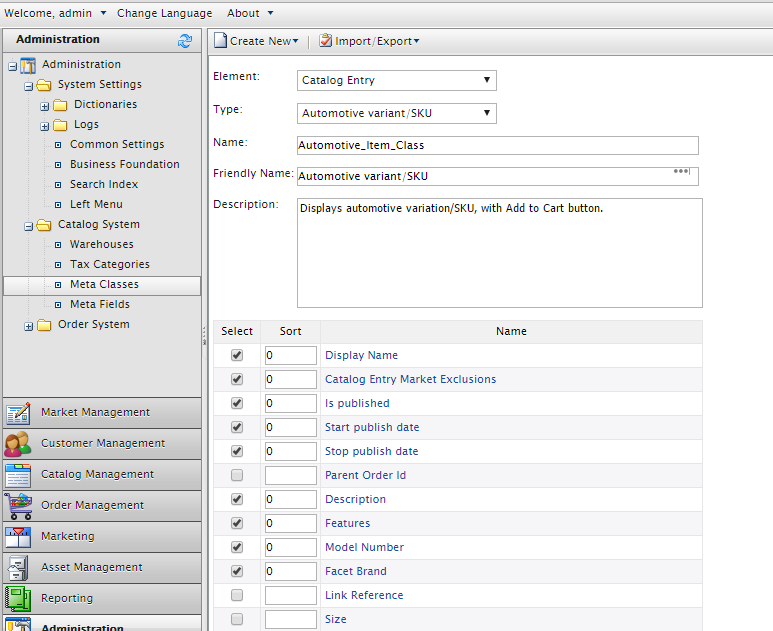
The key feature of MetaData system is the extensibility. You can attach or remove a metafield from a metaclass on-the-fly. (if you come from Commerce R3 and earlier, it was not on-the-fly, you’ll have to restart the site for it to take effect. But hey, why would you still use that version?). You can share metafields between metaclasses (yes, pretty cool, I know). There is no hard limit of how many metafields can be in a metaclass, but my opinion is you should not exceed 50. (30 is even better, but there are products with complex specifications).
It’s the metafield which is more interesting
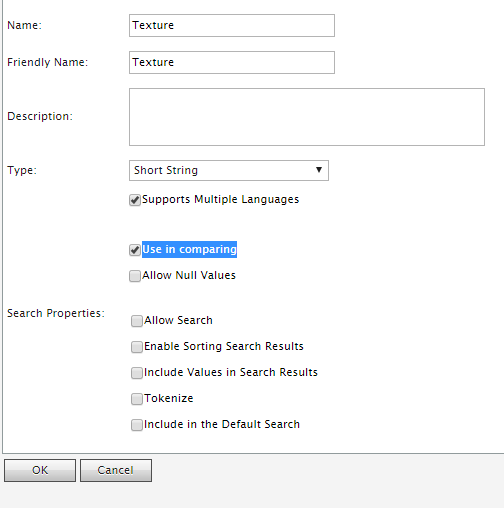
What do these settings mean?
- Support multiple languages: That mean the metafield will be per-language, each language version of the
MetaObjectwill have an unique value for this metafield. For example, theDisplayNamefor this book can be “Pro Episerver Commerce” in “English”, but can be “Professionell Episerver Commerce” in “svenska”. - Use in comparing: This is a legacy setting which no longer has any meaning. (It should have been removed)
- Allow Null Values: This metafield is not required. If this is set to false, the editor must set a value for it before saving.
- Encrypted: The metafield will be encrypted by the master key in database and be decrypted in the fly. This option, however, does not show up if your database is set to be Azure-compatible. (As Sql Azure Database does not support encryption at the time of this writing).
- Precision/Scale: This only set-able if your metafield is a decimal. This was important in the past because it will affect how the decimal is stored in the database, but with Commerce 9, the decimal will always be stored in the (38,9) form.
Search attributes: These attributes will affect how will this metafield be indexed in a Lucene-based search provider:
- Allow Search: This metafield will be indexed by the search providers.
- Enable Sorting Search results: The value of this metafield can be used for sort by the search providers.
- Include Value in search results:
- Tokenize: The value of this metafield will be tokenized. So if its value is “Hello World”, you can either search with “Hello” or “World”
- Include in Default Search: This metafield will be include in the default Lucene query.
If you can only choose between either CatalogEntry or CatalogNode for MetaClass, then it’s whole lot more thing to choose for metafield. The full list of MetaType which you can choose from:
 1 public enum MetaDataType
 2 {
 3 	Integer			= 26,
 4 	Boolean			= 27,
 5 	Date			= 28,
 6 	Email			= 29,
 7 	URL				= 30,
 8 	ShortString		= 31,
 9 	LongString		= 32,
10 	LongHtmlString	= 33,
11
12 	DictionarySingleValue = 34,
13 	DictionaryMultiValue = 35,
14 	EnumSingleValue		= 36,
15 	EnumMultiValue		= 37,
16 	StringDictionary	= 38,
17 	File				=	39,
18 	ImageFile			=	40,
19
20 	MetaObject			=	41
21 }
Remember, you can’t change the type of a metafield after you saved it. If you make a wrong move, it might be easiest to just delete the metafield and create again.
The strongly typed models
Now you can have the basic ideas of how the catalog is structured - it’s time to start working with some real code. As I mentioned above, you’ll be working with IContentRepository (in some cases, with its base interface - IContentLoader - when you only need to load the contents, not to save them), around IContent. Any content must implement IContent to be handled by the content providers - so the first thing to get the Catalog integrated into the content system (aka to get CatalogContentProvider to work) is modelling the catalog, node, and entry with that interface.
Let’s see how the catalog contents are modeled
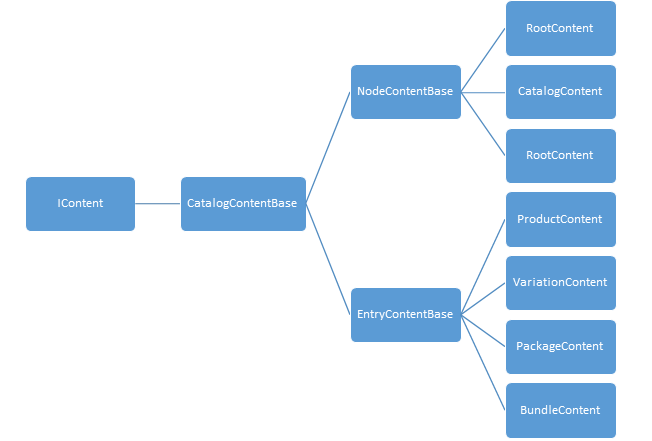
All catalog content types inherit from CatalogContentBase, which itself implements IContent and then add some properties, such as ApplicationId.
RootContent is a “virtual” content - it has no Mediachase eCF Catalog counterpart. You can only have one RootContent in the system, its ContentLink is fixed and it is always read-only. You can try to save it but nothing will be persisted. You will hardly work with RootContent directly, but with its ContentReference, via ReferenceConverter.GetRootLink(). (The only places where we need to use GetRootLink are when we need to work with CatalogContent, for example, to load all catalogs in the system.)
Let’s us see a simple code of creating a Catalog, then editing its language, then deleting it. (We are just showing how the API:s work, right, you’ll usually do not write code like this in your daily work)
 1     //Get the dependencies
 2     var contentRepository = ServiceLocation.ServiceLocator.Current.GetInstance<ICont\
 3 entRepository>();
 4     var referenceConverter = ServiceLocation.ServiceLocator.Current.GetInstance<Refe\
 5 renceConverter>();
 6
 7     //Create a CatalogContent
 8     var catalogContent = contentRepository.GetDefault<CatalogContent>(referenceConve\
 9 rter.GetRootLink());
10     catalogContent.Name = "Pro Episerver Commerce";
11     catalogContent.DefaultCurrency = Currency.USD;
12     catalogContent.DefaultLanguage = "en";
13     catalogContent.WeightBase = "kgs";
14     var catalogContentLink = contentRepository.Save(catalogContent, DataAccess.SaveA\
15 ction.Publish, EPiServer.Security.AccessLevel.NoAccess);
16
17     //Edit it to add Swedish
18     catalogContent = contentRepository.Get<CatalogContent>(catalogContentLink).Creat\
19 eWritableClone<CatalogContent>();
20     catalogContent.CatalogLanguages.Add("sv");
21     contentRepository.Save(catalogContent, DataAccess.SaveAction.Publish, EPiServer.\
22 Security.AccessLevel.NoAccess);
23
24     //Delete it
25     contentRepository.Delete(catalogContentLink, false, EPiServer.Security.AccessLev\
26 el.NoAccess);
Well, it’s easy, isn’t it? If you worked with CMS before, then even without explaining, you should be able to understand the code. I told you, you’ll like the new content way.
One thing to remember about CatalogContent is it’s different from NodeContent or EntryContentBase - it cannot be extended. While CatalogNode or CatalogEntry can be enriched by MetaClasses (as they implement IMetaClass interface), CatalogContent has no such abilities, you’ll always work with CatalogContent directly, never with its deratives.
This will simply does not work:
 1 using EPiServer.Commerce.Catalog.ContentTypes;
 2 using EPiServer.Commerce.Catalog.DataAnnotations;
 3
 4 namespace EPiServer.Commerce.Sample
 5 {
 6     [CatalogContentType(GUID = "1FD3E34D-6476-40E2-8CB5-8EFB0DB79E3E")]
 7     public class MyCatalogContent : CatalogContent
 8     {
 9         public virtual string MyExtendedProperty { get; set; }
10     }
11 }
CatalogContentScannerExtension will throw an EPiServerException exception during the initialization if it detects any content types inherit from CatalogContent 8, something like this:
The content type ‘EPiServer.Commerce.Sample.MyCatalogContent’ extends ‘EPiServer.Commerce.Catalog.ContentTypes.CatalogContent’, which is not supported.
Working with Nodes and Entries is more or less the same. Well, not entirely true. You’ll have to model your metaclasses first.
Modeling catalog content types
It’s not required to model your metaclasses. You can use the defined classes such as NodeContent or ProductContent, and throw everything into Property properties, instead of content.VeryLongPropertyName, you can use content.Property["VeryLongPropretyName"]. (Remember? Any instance of IContent has Property property as a “property bag” to store its properties). It’s why Catalog UI (which relies on content types) will still work when you import a Catalog with metaclasses you didn’t model after. But that defeats one of the most important benefits of having content types: strongly typed types mean Intellisense and compile-time checking. Noticed the typo I intentionally made above? You might not notice it and your code will throw exception at runtime. But with the strongly typed content types, Visual Studio will just catch that for you! And as they always say, compile time checks are always better!
 1 /// <summary>
 2 /// FashionProductContent class, map to Fashion_Product_Class metadata class
 3 /// </summary>
 4 [CatalogContentType(GUID = "18EA436F-3B3B-464E-A526-564E9AC454C7", MetaClassName = "\
 5 Fashion_Product_Class", GroupName = "Fashion",
 6     DisplayName = "Fashion product", Description = "Display fashion product with Add\
 7  to Cart button.")]
 8 [ImageUrl("~/Templates/UX/gfx/page-type-thumbnail-fashion.png")]
 9 public class FashionProductContent : ProductContent
10 {
11     [Display(Name = "Description", Order = -15)]
12     public virtual XhtmlString Info_Description { get; set; }
13
14     [Display(Name = "Features", Order = -11)]
15     public virtual XhtmlString Info_Features { get; set; }
16
17     [Display(Name = "Model Number", Order = -3)]
18     public virtual string Info_ModelNumber { get; set; }
19
20     [Display(Name = "Facet Brand", Order = -1)]
21     [Searchable]
22     public virtual string Facet_Brand { get; set; }
23 }
Catalog Content modeling uses attributes intensively. As you might see, there are plenty to explain:
-
CatalogContentType: this is the most important attribute. It inherits from CMSContentTypeattribute, which makes this content type an option to select when you create new content in Catalog UI. GUID is something required by CMS to identify the content type, even its name and its namespace is changed. It hasMetaClassNameproperty indicate that your class is mapped to the corresponding metaclass. In case the metaclass does not exist,GroupNamegroups your content type with other content types, so when you create a new content in CMS, they will in same group and be easier to select. - Other properties is to make the display of your content type in Catalog UI looks nicer and more recognizable.
-
ImageUrlthumbnail allow you to set a thumbnail to your content type.
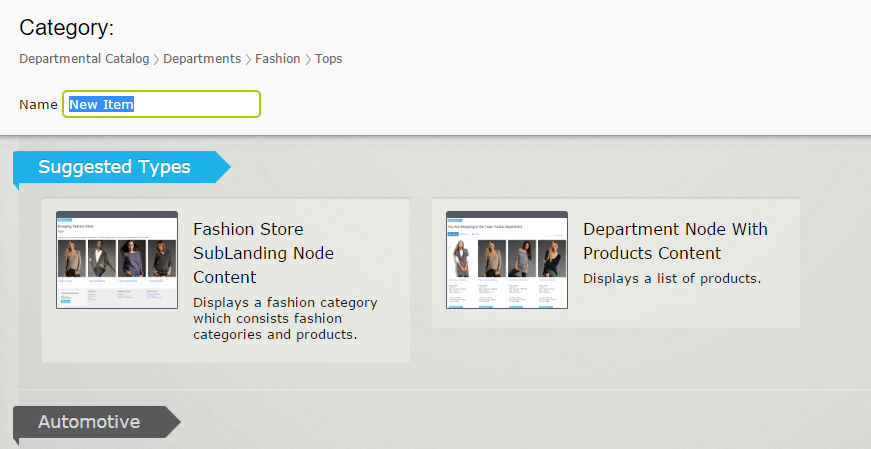
When you define your strongly typed content, there are some rules to keep in mind:
- The property must match the name and the type of the the metafield. Casing is not important. So if you have a string metafield named
facet_color, your property must be stringFacet_Color.
Here’s the map between PropertyData types and MetaField types:
| MetaDataType | PropertyData type |
|---|---|
| MetaDataType.Decimal | PropertyDecimal |
| MetaDataType.BigInt | |
| MetaDataType.Money | |
| MetaDataType.SmallMoney | |
| MetaDataType.DateTime | PropertyDate |
| MetaDataType.SmallDateTime | |
| MetaDataType.Date | |
| MetaDataType.Float | PropertyFloatNumber |
| MetaDataType.Real | |
| MetaDataType.Bit | PropertyNumber |
| MetaDataType.Char | |
| MetaDataType.Int | |
| MetaDataType.Integer | |
| MetaDataType.SmallInt | |
| MetaDataType.TinyInt | PropertyNumber |
| MetaDataType.NChar | PropertyLongString |
| MetaDataType.VarChar | |
| MetaDataType.NText | |
| MetaDataType.Text | |
| MetaDataType.NVarChar | |
| MetaDataType.LongString | |
| MetaDataType.Boolean | PropertyBoolean |
| MetaDataType.Email | PropertyEmailAddress |
| MetaDataType.URL | PropertyUrl |
| MetaDataType.ShortString | PropertyString |
| MetaDataType.UniqueIdentifier | |
| MetaDataType.LongHtmlString | PropertyXhtmlString |
| MetaDataType.EnumMultiValue | PropertyDictionaryMultiple |
| MetaDataType.DictionaryMultiValue | |
| MetaDataType.EnumSingleValue | PropertyDictionarySingle |
| MetaDataType.DictionarySingleValue | |
| MetaDataType.Timestamp | Unsupported |
| MetaDataType.Variant | |
| MetaDataType.Numeric | |
| MetaDataType.Sysname | |
| MetaDataType.Binary | |
| MetaDataType.VarBinary | |
| MetaDataType.StringDictionary | |
| MetaDataType.Image | |
| MetaDataType.File | |
| MetaDataType.ImageFile | |
| MetaDataType.MetaObject |
- The property must be declared as
virtual. Which means the catalog content type can’t never besealed. (If you wonder, that because Episerver CMS Core, or more precisely, Castle.Core needs to be able to inherit the content type and create an instance of that proxy class on-the-fly. It’s a framework thing, so there is no way around it. That’s also the reason whyCatalogContentis not-extendable, but is not marked assealed.) - As a metafield can be used across multiple metaclass, the property which maps to it also has to be identical across content types. It does mean you can NOT have a property named
Facet_Coloras string in one class and another namedFacet_Coloras double in another class. It also has to have the same attributes decorated. If one of the properties has mismatched attributes between content types, an exception will be thrown during site initialization. - In most of the case, the underlying
MetaDataTypeis automatically detected, based on your property type, so you don’t have to do anything else. This is, however, not true with dictionary types. Both of them need aBackingType. In case ofMetaDataType.EnumSingleValueandMetaDataType.DictionarySingleValue, if you fail to do so, it’ll be created as a normal string, whileMetaDataType.EnumMultiValueandMetaDataType.DictionaryMultiValuewill throw exception during site startup. Here’s how you create them:
1 [BackingType(typeof(PropertyDictionaryMultiple))]
2 public virtual IEnumerable<string> MultipleValue { get; set; }
3
4 [BackingType(typeof(PropertyDictionarySingle))]
5 public virtual string SingleValue { get; set; }
These are attributes you can use to decorate the property, which also map to attributes of a metafield we discussed in previous section:
-
Required: the property cannot be null -
Searchable: the property will be indexed by the search provider -
Tokenize: the value of the property will be tokenized while indexing. So if the value is “Hello world”, whenTokenizeis set to true, then you can find this content with either “Hello” or “world”. Otherwise it only matches when you search for “Hello world” -
IncludeValuesInSearchResults: Same as “Include value in search results” setting for metafield. -
IncludeInDefaultSearch: same as “Include in default search” setting for metafield. -
Encrypted: Indicates that the property will be saved to database (as a metafield) encrypted. This attribute, however, does not take effect, if your database is set to be Azure-compatible. -
DecimalSettings: Allow you to set the precision and scale of a decimal type. Note that the highest precision ofdecimaltype stored in SQL Server is (38,9), so anything bigger than that will not be allowed. If you don’t explicitly setDecimalSettingsvalues for precision and scale, yourdecimalmetafield will have the the default precision of (18,0).
When your site starts, CatalogContentScannerExtension will do all the leg works to scan the content types and synchronize them to the metadata system - content types to metaclasses and and properties to metafields. In case of any conflicts between those pairs, catalog content types win. For example, you have a metafield with decimal precision of (18,0), but the mapping property has DecimalSettings to be (33,9), CatalogContentScannerExtension will update the metafield to be (33,9), not the way around.
IDimensionalStockPlacement
Most of properties of the base content types provided by Episerver Commerce (CatalogContent, NodeContent, ProductContent, etc) are flat, which means you can access directly, for example:
1 nodeContent.Code = "This-is-a-code";
But the contents implement IDimensionalStockPlacement (by default VariationContent and PackageContent), are exceptions. They are accessible via a block - ShippingDimensions. So to set the length of a variation, you’ll have to do like this:
1 variationContent.ShippingDimensions.Height = 10m;
That’s why the shipping dimensions are displayed a bit differently in Catalog UI:
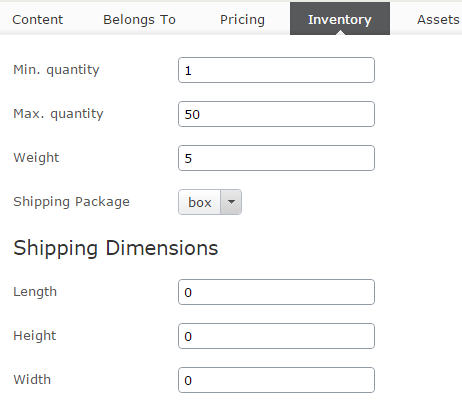
If you have worked with CMS, you might already know that you don’t have to initialize a block before using it - it’ll never be null for a content. So you don’t have to write code such as:
1 variationContent.ShippingDimensions = new ShippingDimensions();
Just use the block directly, as we showed above.
How properties are stored
It might not be particularly useful to look into how properties are stored in database, but it can be interesting to know the detail (You might someday look into your databases to investigate, when a problem arises.)
Prior to Commerce 9 (8+ and earlier), each metaclass has two tables to represent it. Usually it’s a table with the metaclass name, and another table with that name and _Localization suffix. But it does not always work that way, it’s possible to create a metaclass with a custom table name using MetaClass API:s, the only way to know for sure is to look at column TableName in MetaClass table.
As you might guess, the normal table is used to store non-localization metafields, while the _Localization stores the other ones (the ones with CultureSpecific attribute decorated, or “Support multiple languages” option enabled). Each metafield will be on one table or the other, and they are added/removed dynamically.
Yes, every time you add a metafield to a metaclass, a new column will be added to your table. And when you remove it, it will be dropped.
It sounds to be alarming if you have a big catalog with one million entries or so, but mostly the operations of adding and removing metafields will be done along deployments, so it might not as bad as it sounds. But you were right, it’s not the best way to handle the changes of catalog content types.
In Commerce 9, the way properties are stored is fundamentally changed.
If you have worked with CMS content properties before, you might know about tblContentProperty. Commerce 9 adapts the same idea.
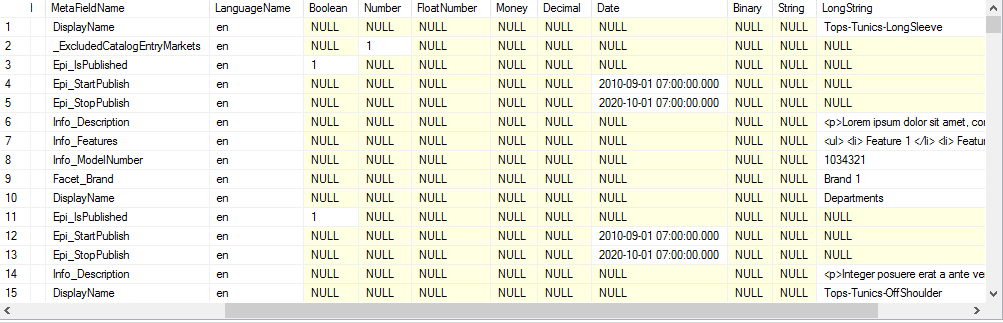
Commerce 9 has a new table - CatalogContentProperty to store properties. Besides the identity columns, there are 10 columns for the data types MetaDataPlus supports: Boolean, Number (Integer), FloatNumber, Money, Decimal 9, Date, Binary, String (for strings shorter than 256 characters length), LongString (any strings long than that) and Guid. A metafield, for each content and for each language (in case it’s culture specific) will be stored in one row matches with it value. So a string property value will be in String column, while an Integer property value will be in Number column, and so on and so forth, while the other columns remain null for that row.
It’s hard to say if the old or new approach is definitely better than the other. The new one might be more flexible, but it means more rows and is not as “natural” as the old one (and then can possibly yield better performance). However, the new one has simply access approach - you only read or update or delete from one table, while the old one has to rely on the automatically generated stored procedures (which are updated every time you add or remove metafields to metaclasses). In long run, the new approach might be simpler to maintain. Let’s hope for that.
When you upgrade your site to Commerce 9, all old metaclass tables are dropped. Of course, it does not really make sense to keep the tables you no longer update. However, you might still have custom queries to work on that tables (such as to report something on your catalog). To replace those tables, new views are created. They are created by querying the data from CatalogContentProperty table, and are updated every time you update your metaclasses (just like the way old metaclass tables did).
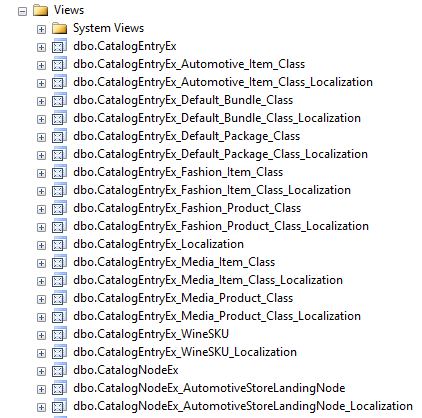
Those views are, of course, slower than the original tables, some tests shows that they can be 30% slower than the original ones. However, you’ll not use them frequently enough for the difference to really make senses.
Dictionary types.
Previously we discussed on how properties work with catalog content. However - if you have dictionary types in your MetaClasses, they will work differently. In this section we will examine these special data types - this applies to Order system metaclasses as well.
As we all know - there are three types of dictionary in Episerver Commerce:
- Single value dictionary: editor can select a value from defined ones.
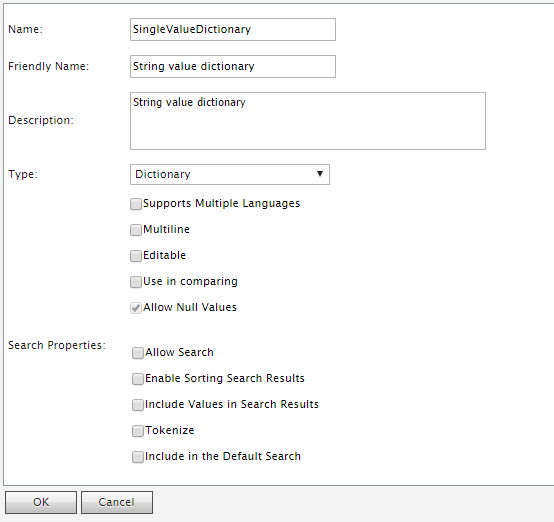
Single value dictionary type is supported in the strongly typed content types - you need to define a property of type string, with backing type of typeof(PropertyDictionarySingle)
1     [BackingType(typeof(PropertyDictionarySingle))]
2     public virtual string Color { get; set; }
- Multi-value Dictionary: editor can select multiple values from defined ones. The only different from Single value dictionary is it has the “Multiline” option enabled.
You can define a property for Multi value dictionary in content type by IEnumerable<string> and typeof(PropertyDictionaryMultiple) backing type
1     [BackingType(typeof(PropertyDictionaryMultiple))]
2     public virtual IEnumerable<string> Colors { get; set; }
Both single and multi value dictionary types are fully supported in Catalog UI, including editing:
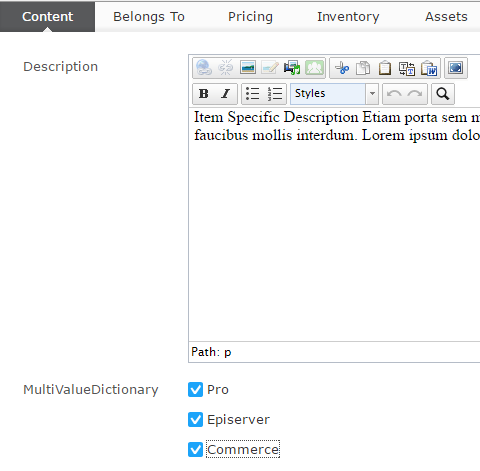 and administration:
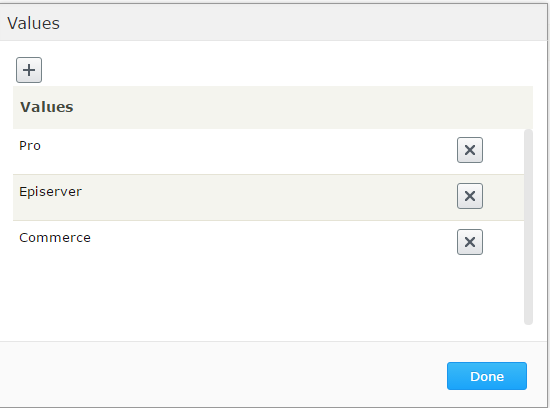
- String dictionary: this is the true “dictionary type”: you can define pairs of key and value (the previous types are actually “list”).
String dictionary is not supported by the strongly typed content types, nor Catalog UI. To manage this metafield, we’ll have to use Commerce Manager, or use MetaDataPlus API:s
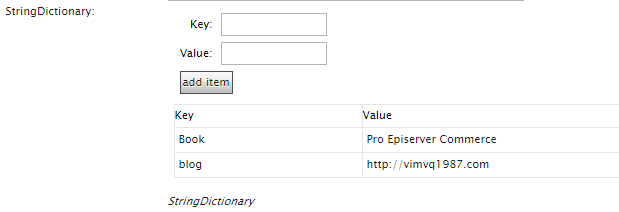
There are ways to support String dictionary, at least in strongly typed APIs. However, that is out of scope for this book.
How dictionary works
We’ve learned in previous chapters how properties are stored and loaded. Technically, dictionaries are “just another properties”. However they are stored differently. If you look at CatalogContentProperty table (or ecfVersionProperty, for draft versions), you’ll see the dictionary properties are stored as numbers. What do those numbers mean?
- For single value dictionary type, that number is the MetaDictionaryId of the selected value in
MetaDictionarytable. - For multi value dictionary type, things are a bit more complicated. That number is the
MetaKeyvalue inMetaKeytable. ThisMetaKey, is, however, connected toMetaMultiValueDictionary, which itself points back toMetaDictionary. An “usual” design for 1-n relation in database, right? - For string dictionary type, it’s more or less the same as multi value dictionary. However, the
MetaKeywill point to pairs of key and value inMetaStringDictionaryValuetable.
Those information might not be really interesting to you - but they can be useful in some specific scenario. Let’s consider some of those cases:
- You want to know which entries use a specific dictionary value. In previous example, we have a property named Color, we want to find all entries with Color is ‘Blue’. For front-end site, it would be easy to find such entries by search feature (will be discussed later), but what if you want to create a report for that? Episerver Commerce does not provide such functionality out of the box, so we’ll have to craft it ourselves. Time for some SQL then!
 1 DECLARE @MetaFieldId INT
 2 DECLARE @MetaDictionaryId INT
 3
 4 SET @MetaFieldId = (SELECT MetaFieldId FROM MetaField WHERE Name = 'Color' AND Names\
 5 pace = 'Mediachase.Commerce.Catalog')
 6 SET @MetaDictionaryId = (SELECT MetaDictionaryId FROM MetaDictionary WHERE Value = '\
 7 Blue' AND MetaFieldId = @MetaFieldId)
 8
 9 SELECT ObjectId FROM CatalogContentProperty WHERE MetaFieldId = @MetaFieldId AND Num\
10 ber = @MetaDictionaryId AND ObjectTypeId = 0
This script is quite simple - we need to get the Id of Color MetaField first, then the MetaDictionaryId of the ‘Blue’ color. When we have two values, we can simple query from table CatalogContentProperty to find which entries have that value. You can go even further to join with CatalogEntry table to get more information such as name or code - I’ll leave that to you.
- Let’s consider another case - we need to report which entries belong to a specific Market. To determine which entries belong to which markets, Episerver Commerce uses a special metafield, named
_ExcludedCatalogEntryMarketswhich is a multi-value dictionary. As its name might suggest, it contains list of the MarketId which the entry does not belong to, for example, if_ExcludedCatalogEntryMarketscontains ‘US’ then the entry is not available in ‘US’ market. So if we are to find entries which belong to ‘US’ market, we have to find entries which do not have ‘US’ value for_ExcludedCatalogEntryMarkets.
 1 DECLARE @MetaFieldId INT
 2 DECLARE @MetaDictionaryId INT
 3
 4 SET @MetaFieldId = (SELECT MetaFieldId FROM MetaField
 5 WHERE Name = '_ExcludedCatalogEntryMarkets' AND Namespace = 'Mediachase.Commerce.Cat\
 6 alog')
 7 SET @MetaDictionaryId = (SELECT MetaDictionaryId FROM MetaDictionary WHERE Value = '\
 8 US' AND MetaFieldId = @MetaFieldId)
 9
10 SELECT ObjectId FROM CatalogContentProperty
11 WHERE
12 MetaFieldId = @MetaFieldId AND
13 Number NOT IN
14 (
15 SELECT mk.MetaKey from MetaMultiValueDictionary mmv
16 INNER JOIN MetaKey mk on mmv.MetaKey = mk.MetaKey
17 WHERE mk.MetaFieldId = @MetaFieldId
18 AND MetaDictionaryId = @MetaDictionaryId
19 )
Same as previous script, we need to find the Id of _ExcludedCatalogEntryMarkets MetaField, then the MetaDictionaryId of ‘US’ market. The next statement is tricky - we need to find MetaKey which value matching value for ‘US’, then except them. Again, you can join with other tables for more data.
Chapter 3: Associations, relations and assets
If you work with CMS before - prepare to be surprised. How catalog entities are related to each other is much, much more complicated than how CMS contents are.
Assocations are the connections between products, so you can cross sell, or up sell other products. For example, if you are selling a table, you would want your customers to buy a chair.
Relations are even more complicated. You have relations between nodes (how node are linked together), between nodes and entries (how entries belong to nodes), between entries (how variants belong to products, how variants belong to packages and bundles).
Assets - or what we will be talking about - is how to associate CMS assets (which are “contents”) to products and categories. Products can be boring without all images, videos, and product manuals - and that’s why we need them.
Working with associations and relations
Managing associations and relations in CatalogContentProvider is done by ILinksRepository (which itself inherits from IAssociationRepository and IRelationRepository). The default implementations of those interfaces are built on top of ICatalogSystem, while they are positioned in lower layer of CatalogContentProvider.
IAssociationRepository is a quite simple interface with only three methods which are all easy to understand (which comes from the nature of Associations, as we learned in previous section). Just to remind you, an association defines two entries to have a connection - they can be sold together, customer might be suggested the alternatives.
 1 public interface IAssociationRepository
 2 {
 3     /// <summary>
 4     /// Gets the associations for the catalog content specified by the content link.
 5     /// </summary>
 6     IEnumerable<Association> GetAssociations(ContentReference contentLink);
 7
 8     /// <summary>
 9     /// Removes the associations.
10     /// </summary>
11     void RemoveAssociations(IEnumerable<Association> associations);
12
13     /// <summary>
14     /// Updates matching associations and adds new associations for an entry.
15     /// </summary>
16     void UpdateAssociations(IEnumerable<Association> associations);
17 }
Associations and Relations groups.
When you define an association or relation, you can set “group” of it. It’s just a custom string so you can filter the associations later on. For example, you can have a association group named CrossSell to define the products which can be suggested to customers when they have a product in cart. By default, there is only one group for association (“default”) and one group for relation (well, “default”, too) in the system. Those can’t be set by the Catalog UI, only by code. You can define more association groups by adding this to your initialization module:
1     var associationDefinitionRepository =
2         context.Locate.Advanced.GetInstance<GroupDefinitionRepository<AssociationGro\
3 upDefinition>>();
4     associationDefinitionRepository.Add(new AssociationGroupDefinition { Name = "Cro\
5 ssSell" });
6     associationDefinitionRepository.Add(new AssociationGroupDefinition { Name = "Ups\
7 ell" });
8     associationDefinitionRepository.Add(new AssociationGroupDefinition { Name = "Pro\
9 EpiserverCommerce" });
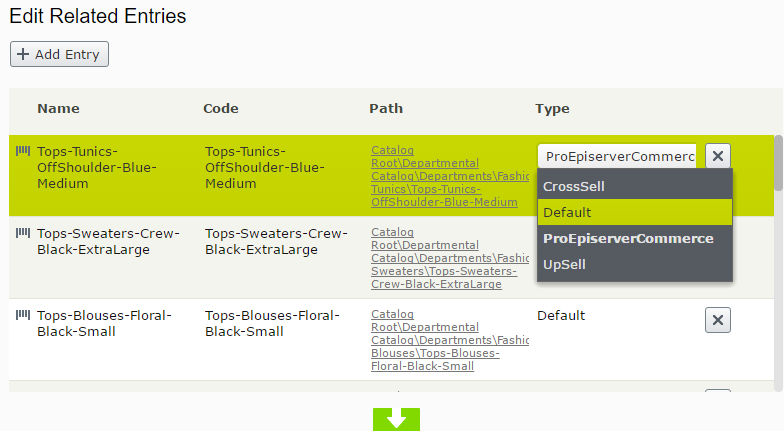
These association groups will be added if they haven’t existed in your system, otherwise nothing is change. Now when you edit an association in Catalog UI, you can choose one of those:
You can do the same with relation by using RelationGroupDefinition, however, this is not used elsewhere in the Catalog UI. All the entry relations are “default” by the way.
IRelationsRepository, in the other hands, is much more complex and hard to follow. The problem with it, is, it tried to unified the relations between nodes, between entries, and between nodes and entries into one model. It’ll be hard to come up with really good method names, and you’ll have to stick with some abstractions. Here comes the Source and the Target.
 1 public interface ILinksRepository : IRelationRepository, IAssociationRepository
 2 {
 3     IEnumerable<Relation> GetRelationsBySource(ContentReference contentLink);
 4
 5     IEnumerable<T> GetRelationsBySource<T>(ContentReference contentLink) where T : R\
 6 elation;
 7
 8     IEnumerable<Relation> GetRelationsByTarget(ContentReference contentLink);
 9
10     IEnumerable<T> GetRelationsByTarget<T>(ContentReference contentLink) where T : R\
11 elation;
12
13     void RemoveRelations(IEnumerable<Relation> relations);
14
15     void UpdateRelations(IEnumerable<Relation> relations);
16
17     void SetNodeParent(ContentReference contentLink, ContentReference newParentLink);
18 }
You might read the documentation for each method to understand which one to use, but I doubt you will remember which is which. I’ve been there, staying confused to guess which one to use. However, it might be a little easier if you look at Relation types.
It’s a simple class with three properties: SortOrder, Source and Target.
And this is from the documentation:
- For a
NodeRelation,Sourceis theContentReferenceof the categorized item (aka children), while for anEntryRelation(ProductVariation,PackageEntry,BundleEntry), it is the product/package/bundle itself. - And for a
NodeRelation,Targetis theContentReferenceof the category, while for anEntryRelation, it is the entries (in the product/package/bundle).
You have ProductVariation, PackageEntry, BundleEntry and NodeRelation extend from Relation with extra information.
A better ILinksRepository
Make no mistake, designing a good API:s is hard (probably as hard as writing a good book, which I am trying to do). We simply can’t replace ILinksRepository, but we can create a bunch of extension methods which use it in a simple, easy understandable way to build up the functions we need. The following methods will return a list of ContentReference of the variations belong to a product, the entries belong to a package and bundle, respectively.
 1 public static IEnumerable<ContentReference> GetVariations(this ProductContent produc\
 2 tContent, ILinksRepository linksRepository)
 3 {
 4     return linksRepository.GetRelationsBySource<ProductVariation>(productContent.Con\
 5 tentLink).Select(r => r.Source);
 6 }
 7
 8 public static IEnumerable<ContentReference> GetPackageEntries(this PackageContent pa\
 9 ckageContent, ILinksRepository linksRepository)
10 {
11     return linksRepository.GetRelationsBySource<PackageEntry>(packageContent.Content\
12 Link).Select(r => r.Source);
13 }
14
15 public static IEnumerable<ContentReference> GetBundleEntries(this BundleContent bund\
16 leContent, ILinksRepository linksRepository)
17 {
18     return linksRepository.GetRelationsBySource<BundleEntry>(bundleContent.ContentLi\
19 nk).Select(r => r.Source);
20 }
Those method will return the parent-children relations (The source is the “parent”). We can have reversed method to get the relations the way around. The following method will return the parent products of a variation, parent packages and bundles of an entry, respectively:
 1 public static IEnumerable<ContentReference> GetProducts(this VariationContent variat\
 2 ionContent, ILinksRepository linksRepository)
 3 {
 4     return linksRepository.GetRelationsByTarget<ProductVariation>(variationContent.C\
 5 ontentLink).Select(r => r.Source);
 6 }
 7
 8 public static IEnumerable<ContentReference> GetPackages(this EntryContentBase entryC\
 9 ontent, ILinksRepository linksRepository)
10 {
11     return linksRepository.GetRelationsByTarget<PackageEntry>(entryContent.ContentLi\
12 nk).Select(r => r.Source);
13 }
14
15 public static IEnumerable<ContentReference> GetBundles(this EntryContentBase entryCo\
16 ntent, ILinksRepository linksRepository)
17 {
18     return linksRepository.GetRelationsByTarget<BundleEntry>(entryContent.ContentLin\
19 k).Select(r => r.Source);
20 }
The ILinksRepository parameter is optional, it was added to allow the testability. You can add another overload without it even simpler to use.
The final thing is node-node relations, and node-entry relations. We only need to get parent nodes of a node and parent nodes of an entry, you can always get the children entries or nodes of a node by using IContentRepository.GetChildren<T>, which I believe to be easier way to remember.
 1 public static IEnumerable<ContentReference> GetParentCategories(this EntryContentBas\
 2 e entryContent, ILinksRepository linksRepository)
 3 {
 4     return linksRepository.GetRelationsBySource<NodeRelation>(entryContent.ContentLi\
 5 nk).Select(r => r.Target);
 6 }
 7
 8 public static IEnumerable<ContentReference> GetParentCategories(this NodeContent nod\
 9 eContent, ILinksRepository linksRepository)
10 {
11     return linksRepository.GetRelationsBySource<NodeRelation>(nodeContent.ContentLin\
12 k).Select(r => r.Target);
13 }
Note that GetParentCategories will only return the parent categories which nodeContent is linked to, it does not include the true “parent” which is specified by nodeContent.ParentLink.
Relations in Commerce 11
As we talked earlier, the relations has been changed quite drastically in Commerce 11. If you want to be up to speed (and you should), then let’s go through what is changed.
Firstly, the Source and Target parts have been obsoleted, both in properties and methods (Yay!). There are new Parent and Children parts. So now you always know what is Parent, and what is Child - the bigger entity is Parent, while the smaller entity is Child. You don’t even have to remember the rules with Source and Target.
And as we mentioned earlier, ILinksRepository has been obsoleted. You should change to IRelationRepository and IAssociationRepository when it applies. Changing from GetRelationsBySource and GetRelationsByTarget to GetChildren and GetParents is trickier. I don’t really have any tip here, just go through them one by one, and figure out if you are trying to get the children, or the parents.
Another big change in how relations are handled in Commerce 11 is the introduction of IsPrimary property for NodeEntryRelation.
As we learned earlier, an entry can belong to multiple nodes, but only one of them is “true” - primary node, and others are linked. However, it is not easy to tell which is primary, and which is linked. In 10.x and earlier, the way to determine the primary node is based on the the lowest SortOrder value. That was based on a wrong assumption, and it comes with the cost of unable to sort the entries within a node. To do that, the SortOrder needs to change and it will screw up the relations.
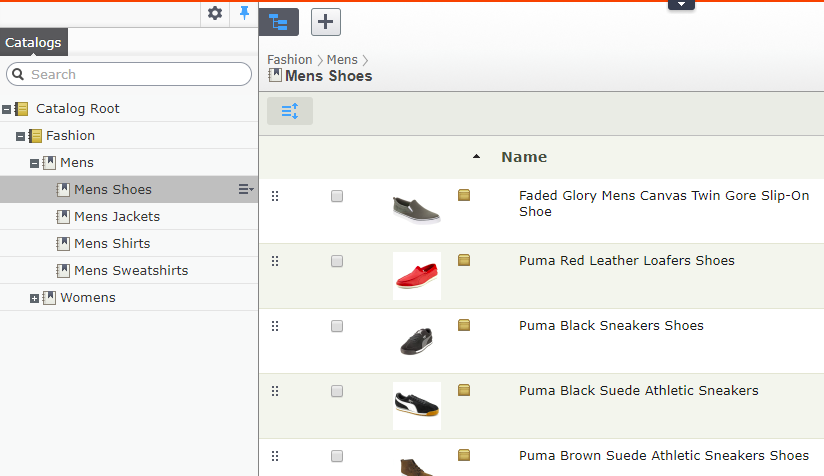
Worry no more, in Commerce 11, the problem has been corrected. SortOrder is now just … sort order. Node-entry relation has now a new property named IsPrimary - and for all the node relations of an entry, only one can has that as true - and that will be the primary node - and all other ones are linked. When you upgrade to Commerce 11, the relation with lowest SortOrder will be selected to be primary (because it was supposed that way). After that, SortOrder will be truly what it is meant to be: You can drag and drop the entries in a node. Let’s say you have a category of iPhone - and there are plenty of model being sold. At this time of writing, iPhone X is the hot shot, and you would naturally want it to be on top of your category. How would you do it - drag and drop it to the top, baby
Assets
Products always need some assets. Images, videos, documentations such as specifications and manuals,…As a developer/an editor, you’ll need a way to work with assets.
There are two ways to work with assets [^foo134]. The old one sticks with ICatalogSystem - you’ll have to access CatalogItemAsset DataTable directly. The new one works via the IAssetContainer interface (which is implemented by EntryContentBase and NodeContent), and is accessible as CommerceMediaCollection. To understand about those APIs, we should take a look at the asset systems. In older versions of Commerce, there is a builtin asset system, which allows you to manage files/folder. This system can be accessed in Commerce Manager. It worked, but with some very important limitations: you can’t manage the assets in Catalog UI, and you can’t use CDN for those files. It’s almost impossible to put those files in some external storage, such as Amazon S3.
Then comes Episerver Commerce 7.5. As it’s fully integrated to Episerver CMS, it’s now possible to use the asset system in CMS - which has no limitations as above.
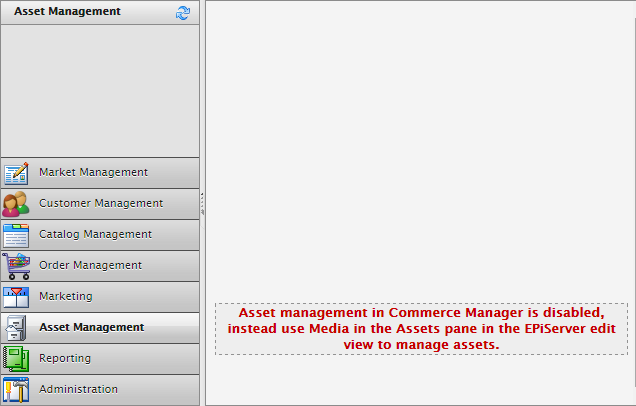
There is a hidden flag - UseLegacyAssetSystem to let the system know which way you want to work with assets. If it’s set to true, the Media tab in Catalog UI will be disabled. By default, the Assets tab in Commerce Manager is disabled.
If you start a new site, there is no reason to work with old asset system. If you upgraded from R3 or earlier to 7.5 and later, you should migrate your site to use new asset system. There is a tool to do that. There are two things the new one is definitely better:
- It’s unified API:s, you can work with catalog content all the ways.
- The new asset system integrates with CMS asset system, which allows some nice features such as CDN.
OK it’s enough of theory, let’s have some code.
As mentioned above, we’ll work with CommerceMediaCollection, which itself is a collection of CommerceMedia, as following:
 1 public class CommerceMedia : ICloneable
 2 {
 3     public ContentReference AssetLink { get; set; }
 4
 5     public string AssetType { get; set; }
 6
 7     public string GroupName { get; set; }
 8
 9     public int SortOrder { get; set; }
10
11     //Other methods and properties omitted for brevity.
12 }
Those properties should explain themselves. AssetLink is the ContentReference to the asset (which is supposed to be another CMS content), AssetType is the type of class you defined to map with the asset (we’ll talk about it later). GroupName is the group you want the asset to be, for easier management (such as “videos”, or “images”, or “manual”). SortOrder is the order they appear in the Asset tab in Catalog UI, with one convention: the first in the list will be the default one.
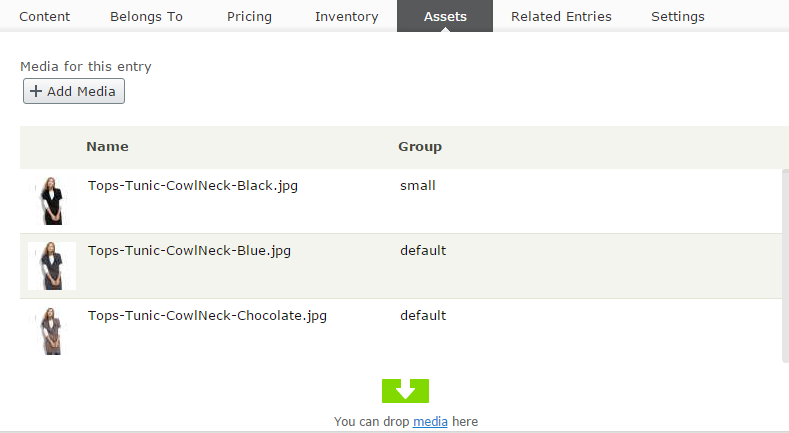
You can add assets from any type implements IContentMedia, but it is more convenient to define your class like this:
 1 using System;
 2 using EPiServer.Commerce.SpecializedProperties;
 3 using EPiServer.DataAnnotations;
 4 using EPiServer.Framework.DataAnnotations;
 5
 6 namespace EPiServer.Commerce.Sample.Models.Files
 7 {
 8     [ContentType(GUID = "872AA39E-5B79-43BF-B7D5-F34D415553BD")]
 9     [MediaDescriptor(ExtensionString = "jpg,jpeg,jpe,ico,gif,bmp,png")]
10     public class ImageFile : CommerceImage
11     {
12         /// <summary>
13         /// Gets or sets the description.
14         /// </summary>
15         public virtual String Description { get; set; }
16     }
17 }
This is CMS-related stuff. The most important thing in this example class is the MediaDescriptor attribute, which allows you to specific which extensions you want to handle by this class. So in this example, any jpg, jpeg, jpe and so on files uploaded to Media gadget will be handled by ImageFile, and if you drag and drop that file into the Asset list of a catalog content, its AssetType will be EPiServer.Commerce.Sample.Models.Files.ImageFile.
CommerceImage extends ImageData by adding LargeThumbnail property. Together with Thumbnail inherited from ImageData, there are two Blob properties you can use:
1 [ImageDescriptor(Width = 256, Height = 256)]
2 public virtual Blob LargeThumbnail { get; set; }
3
4 //Inherited
5 [ImageDescriptor(Width = 48, Height = 48)]
6 public override Blob Thumbnail { get; set; }
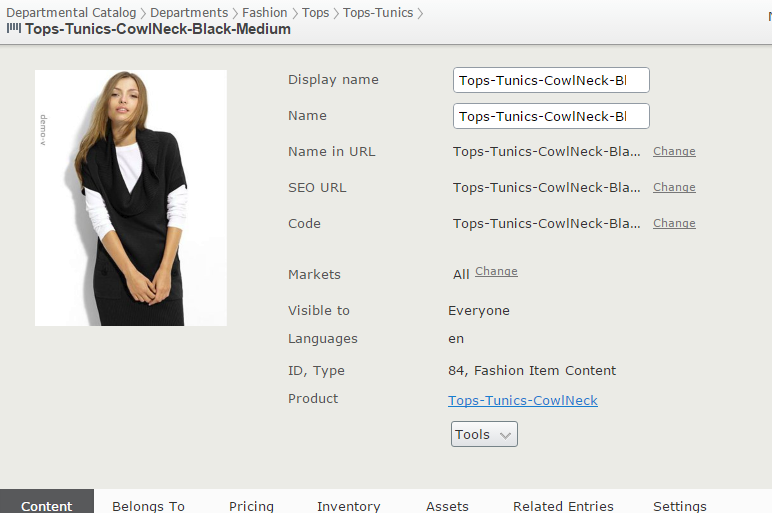
The first one belongs to the CommerceImage itself, it defines a Blob named LargeThumbnail with the size of 256x256. Well, as you might guess, it’s the big header image whenever you edit an entry or node in Catalog UI:
The second one is inherited from MediaData, it defines a Blob named Thumbnail with the size of 48x48. Can you guess? It’s the thumbnail in the entries list of Catalogs gadget:
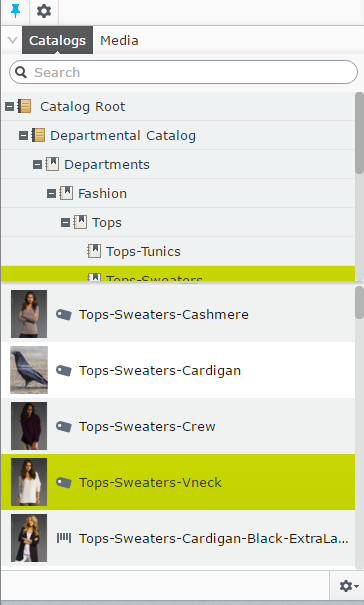
The first asset of type CommerceImage in your asset list (which has smallest SortOrder value) will be taken to generate those thumbnails. They are background transparent, and if you don’t like the size, just override it in your class:
 1 [ContentType(GUID = "872AA39E-5B79-43BF-B7D5-F34D415553BD")]
 2 [MediaDescriptor(ExtensionString = "jpg,jpeg,jpe,ico,gif,bmp,png")]
 3 public class ImageFile : CommerceImage
 4 {
 5     /// <summary>
 6     /// Gets or sets the description.
 7     /// </summary>
 8     public virtual String Description { get; set; }
 9
10     [Editable(false)]
11     [ImageDescriptor(Width = 128, Height = 128)]
12     public override Blob LargeThumbnail { get; set; }
13
14     [Editable(false)]
15     [ImageDescriptor(Width = 64, Height = 64)]
16     public override Blob Thumbnail { get; set; }
17 }
Now the thumbnail header should be only 128x128. The thumbnail list of Catalogs gadget, however, is styled by an CSS class, so it’s not resized automatically on the UI. If you want to, you’ll have to override this class yourself:
1 .Sleek .epi-thumbnailContentList.dgrid .dgrid-row .epi-thumbnail {
2     width: 48px;
3     height: 48px;
4 }
There are two important limitations regarding the AssetType:
- The full name of the type must not exceed 190 characters in length. It’s the maximum length of the column for
AssetTypeinCatalogItemAssettable.CatalogContentScannerExtensionwill validate this during the site start up, and throw an exception if it finds any media class which does violate that rule. This allows the data to be properly indexed. - Asset type must be resolve-able when you import or export the catalog. If you import or export your catalogs in the context of Commerce Manager (which is supposed to have no custom content types), the asset mappings with entries and nodes will be skipped.
Catalog content versions
One of the most important features in CatalogContentProvider is it bring versioning to catalog content. It was somewhat limited with Commerce 7.5 (the languages handling was a bit sloppy), but it has been much more mature since Commerce 9. The versioning system in Commerce 9 is now more or less on par with versioning in CMS, and it’s a good thing.
If you’re new to Episerver CMS/Commerce, then it might be useful to know how version and save action work in content system. Of course, you can skip this section if you already know about it. The version status is defined in EPiServer.Core.VersionStatus. When you save a content, you have to pass a EPiServer.DataAccess.SaveAction to IContentRepository.Save method.
The documentation for those enum:s are pretty good, and the combinations of SaveActions can be quite complicated, but we can consider a basic case so you’ll get the idea:
 1 var parentLink = ContentReference.Parse("1073741845__CatalogContent");
 2 var contentRepo = ServiceLocation.ServiceLocator.Current.GetInstance<IContentReposit\
 3 ory>();
 4
 5 //Unsaved content, should have status of NotCreated.
 6 var variationContent = contentRepo.GetDefault<VariationContent>(parentLink);
 7 variationContent.Name = "New variation";
 8
 9 //Save the content, now it is CheckoutOut
10 var variationLink = contentRepo.Save(variationContent, SaveAction.Save, AccessLevel.\
11 NoAccess);
12
13 //A saved content is readonly. To edit it, we must create a "writable" clone
14 variationContent = contentRepo.Get<VariationContent>(variationLink)
15     .CreateWritableClone<VariationContent>();
16 variationContent.Code = "New-varation";
17
18 //Check in, in the UI, it's Ready to Publish, which mean the edit was complete.
19 //The content status is now CheckedIn.
20 variationLink = contentRepo.Save(variationContent, SaveAction.CheckIn, AccessLevel.N\
21 oAccess);
22 variationContent = contentRepo.Get<VariationContent>(variationLink);
23
24 //Oops, made a typo. reject it.
25 variationContent = contentRepo.Get<VariationContent>(variationLink)
26     .CreateWritableClone<VariationContent>();
27 //Now it's Rejected.
28 variationLink = contentRepo.Save(variationContent, SaveAction.Reject, AccessLevel.No\
29 Access);
30
31 //Correct the mistake.
32 variationContent = contentRepo.Get<VariationContent>(variationLink).CreateWritableCl\
33 one<VariationContent>();
34 variationContent.Code = "New-variation";
35
36 //Publish it directly. Use ForceCurrentVersion flag so no new version will be create\
37 d
38 //it will overwrite the "rejected" version.
39 variationLink = contentRepo.Save(variationContent,
40     SaveAction.Publish | SaveAction.ForceCurrentVersion, AccessLevel.NoAccess);
One thing to remember about the code above is that we used the versioned ContentReference:s (WorkId > 0). By default, if you pass a ContentReference without version to IContentRepository.Get<T>, you will get back the published version (of the master language), or the CommonDraft version if there is no published version available. With WorkId, a specific version is returned (given that version exists).
One fundamental change in Commerce 9 versioning is the uniqueness of WorkId, as we mentioned earlier. Prior to Commerce 9, WorkId is only unique for a specific content, but now it’s unique across system. It does mean from the WorkId, you can know anything, from the content itself to the version you’re pointing to. This also means WorkId triumphs everything else. So for some reasons, you get your ContentReference wrong, such as the ID points to a content, but the WorkId points to a version belongs to another content, then the WorkId wins, and the content returned is the content WorkId points to (In Commerce 8, the content ID wins). That’s why you should always make sure you get the correct version of ContentReference. If you want to load a version with a specific status without knowing its WorkId, make sure can use IContentVersionRepository. For example, to get the latest “Previously Published” version in English:
1 var contentVersionRepository = ServiceLocator.Current.GetInstance<IContentVersionRep\
2 ository>();
3 var contentLink = ContentReference.Parse("83__CatalogContent");
4 var versions = contentVersionRepository.List(contentLink);
5 var previouslyPublished = versions.OrderByDescending(c => c.Saved)
6         .FirstOrDefault(v => v.Status == VersionStatus.PreviouslyPublished && v.Lang\
7 uageBranch == "en");
The unique WorkId across system is, again, consistent with CMS. The other changes, comes at a much lower level - database.
Versioning was reason catalog system in Commerce 7.5 was significant slower than Commerce R3. The non-version parts (ICatalogSystem and MetaDataPlus) are still fast, but the implementation of versioning in Dynamic Data Store10 was the bottleneck. Firstly, DDS was was not designed to handle a “store” with multiple millions of rows. Secondly, the queries are generated automatically and they are less than optimal to access data.
The idea for storage was pretty simple and perhaps was chosen because it looked quite straightforward. Each version (which was call CatalogContentDraft) is stored in one row, and except the “static” data which is supposed to be on all version (such as content link, code, etc), all properties (aka IContent.Property) are serialized and stored in a big column of NVARCHAR(MAX). Compared to the way it’s stored in metadata classes, this was, of course, slower and contribute to the slowness of system as well. Having data in two places means you have to sync it every time you save, which adds even more overheads to the system.
To improve the performance, those issues must be addressed: DDS must be ditched, serialization should be minimized and synchronization should be reduced. All were done in Commerce 9, by rewriting the versioning storage entirely. The draft versions of catalog contents are now stored in more or less the same way with “published” versions (from the previous section, you might already know about CatalogContentProperty), and inline with what CMS does. Version information are stored in ecfVersion table, while version properties are stored in ecfVersionProperty table. ecfVersionProperty has same “schema” as CatalogContentProperty.
Language versions.
If you have been working with CMS content - then language is an area that Catalog has significant difference compared with CMS content.
It’s quite far to say that Episerver CMS is more “advance” when it comes to language settings. CMS allows you to set a content exists in a certain language or not. However, Catalog content does not have such flexibility. There are some characteristics to keep in mind:
- All catalog content language versions are defined by the language setting in the catalog. A content (node or entry) will exist in all languages enabled in its parent catalog. However, it does not mean that when you enable a language, versions in that language will be created automatically. The missing language versions will be created on-the-fly on demand the next time you request it.
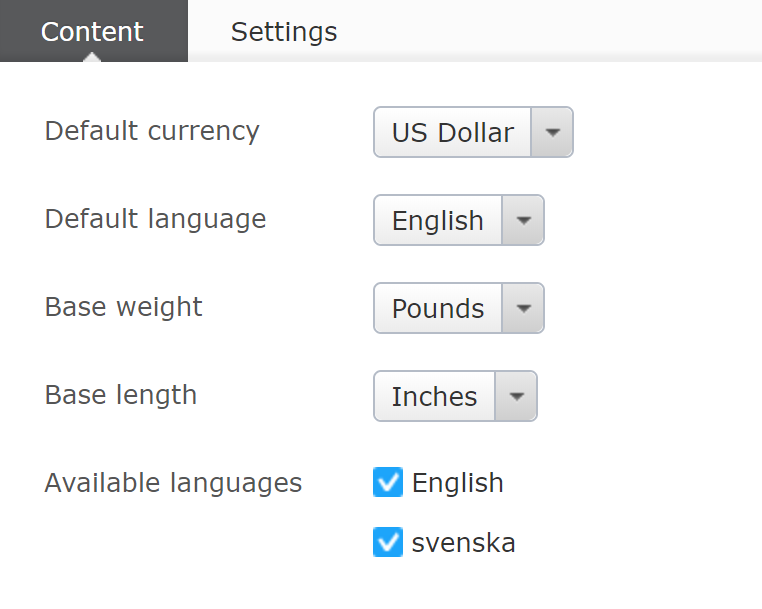
Let’s take an example, your catalog was English only, then because you start selling in Sweden market, you want to add Swedish version - that can be done by enable Swedish language in CMS, and then add it to your catalog. At this point your nodes and entries still only have versions in English. When you request the Swedish language version (explicitly or implicitly), it is created on the fly, saved to database and returned to you.
- CMS content in general, has the concept of master language. For catalog content, the master language of products is defined by the default language of their catalog. When a property is NOT decorated with
CultureSpecificattribute (aka its corresponding metafield hasMultiLanguageValue= false), it is supposed to save in master language, and is shared between other languages. Those properties are not editable when you edit non-master language version:
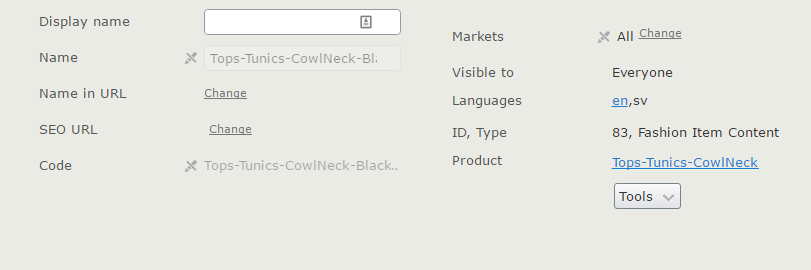
By default, these properties are non-CultureSpecific:
- Code
- Name
- Markets
- Assets
- Prices, Inventories are also un-editable in non-master languages
That goes the same when you update the content with API:s. This code will not throw any error, but it does not really save anything to database:
1 var contentRepository = ServiceLocator.Current.GetInstance<IContentRepository>();
2 var contentLink = ContentReference.Parse("83__CatalogContent");
3 var content = contentRepository.Get<FashionItemContent>(contentLink, CultureInfo.Get\
4 CultureInfo("sv"))
5     .CreateWritableClone<FashionItemContent>();
6 //Assuming Facet_Size is non CultureSpecific.
7 content.Facet_Size = content.Facet_Size + " edited";
8 contentRepository.Save(content, DataAccess.SaveAction.Publish, EPiServer.Security.Ac\
9 cessLevel.Publish);
When a content is loaded, how are its properties treated? If the being requested language version is master language, all property will be loaded from master language. What if the language is different from master language? CultureSpecific properties are loaded from that language, but non-CultureSpecific properties are loaded from master language.
The same rule of “WorkId triumphs everything else” also applies in this case. That means if you want to load a content with a WorkId points to a language which is different to the language you want to load, then the language pointed by WorkId will be loaded. IContentRepository and IContentVersionRepository both provide methods for you to get a specific version of a content.
Version settings
There are two important settings for version in Commerce:
The first one is DisableVersionSync. This can be set by a key in appSettingssection. If this setting is true, when you update catalog content from lower level than CatalogContentProvider, such as using ICatalogSystem directly, the update will also delete all other versions (only latest, published version is kept). This setting comes in handy when you don’t not want to keep the old versions in the system, only latest, published one is needed. This is pretty much the same behavior with R3 where no versions existed. When you don’t need versioning, this might be one way to improve performance.
The second one is UIMaxVersions. However, this setting affects both catalog content and CMS content, so think carefully before using it. This setting allows you to set the maximum number of versions per content you want to keep, if the number is reached, the oldest version would be trimmed when you save a content. You can either set this by code:
1 EPiServer.Configuration.Settings.Instance.UIMaxVersions = 1;
Or by adding uiMaxVersions (note it’s not UIMaxVersions, the attributes in siteSettings are case-sensitive) attribute to siteSettings in episerver.config.
If you don’t set the value, by default both CMS and Commerce will keep 20 most recent versions of each catalog content. It’s a best practice to set this to a specific value of your choice to keep your version history manageable (and in long term, maintain performance, too many versions might be bad for performance).
Another option to clear old versions is to use the extended flag for SaveAction - ClearVersions. Instead of just using Save.Publish when you publish content, make sure to add the extended flag:
1 var extendedAction = SaveAction.Publish.SetExtendedActionFlag(ExtendedSaveAction.Cle\
2 arVersions);
Note that compared to two previous options, this option is more flexible. You can apply it on certain catalog content which match specific criteria.
Import and export catalogs
It’s fairly common that sites use an external system to manage catalog information. One of the examples is to use Product Information Management - PIM - system, then export the changes and import to Episerver Commerce site. You might have heard about PIM, like inRiver, and their connectors to export the catalog to a format that Episerver Commerce understands.
CatalogImportExport
This is the most common way to import/export catalog.
The export is always full export - so everything in the catalog will be exported. However, import can be partly, you might have catalog which only contains part of the catalog. That make senses because you don’t always update all catalog information, and importing only the changes will help you save both time and resource.
Import and export, out of the box, can only be done in Commerce Manager.
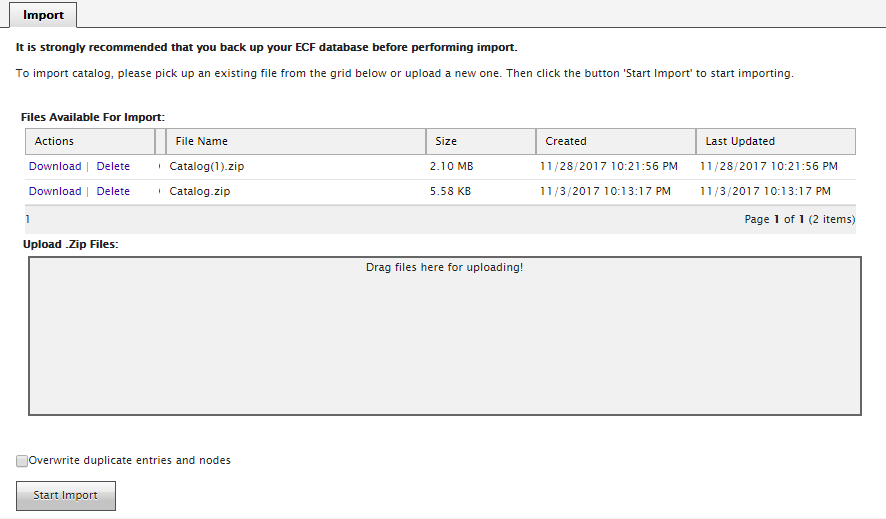
The heart of import/export catalog is CatalogImportExport, but you will mostly work with its wrapper, ImportJob. The reason we need ImportJob was because importing can be a long task and ImportJob has an async implementation with feedback - i.e. the caller can know what is the current progress - how many entries were imported etc. Unlike many other classes where you create a new instance by the inversion of control framework, like structuremap, you create a new instance of ImportJob by the constructors, either
1 var importJob = new ImportJob(sourceZipFile, overwriteDuplicates);
or
1 var importJob = new ImportJob(sourceZipFile, sourceXmlInZip, overwriteDuplicates);
or
1 var importJob = new ImportJob(sourceZipFile, sourceXmlInZip, overwriteDuplicates, is\
2 ModelsAvailable);
Here you are passing the path to the catalog zip file, the name of the catalog file inside that zip (default is “catalog.xml”), and if you want to overwrite catalog items if existing ones found, and if the strongly typed content models are available (which will affect if the asset links will be imported or not). The next step is just to run it:
1 importJob.Execute(addMessageAction, cancellationToken);
addMessageAction is an Action<IBackgroundTaskMessage> so you can have a callback to your method to decide what to do with the messages the importer sends to you (either display them to the UI, log them, or just ignore), and cancellationToken is a CancellationToken so you can cancel the job (only has effect if the import job is extracting the zip file).
To export catalog, it’s even simpler:
1 var importExport = new CatalogImportExport();
2 using(FileStream fs = new FileStream(filePath, FileMode.Create, FileAccess.ReadWrite\
3 ))
4 {
5     importExport.Export(CatalogName, fs, folderPath);
6 }
This will export your selected catalog (via CatalogName) to the filePath in folderPath. Normally, you would want filePath to have file name of Catalog.xml. You can then zip this file to make it easier to store, or to transfer.
CSV Import
CatalogImportExport is not the only way to import the changes from an external source - you can also use CSV for such task. However while a Catalog.xml is very self-contained and has everything you need for a catalog, CSV files are very simple. So you would need an extra part - a mapping file to let Commerce knows which column in CSV maps to which field in catalog.
For example here’s a mapping rule:
1 <RuleItem><SourColumnName>Code</SourColumnName><SourColumnType>System.String</SourCo\
2 lumnType>
3 <DestColumnName>Code</DestColumnName><DestColumnType>NVarChar</DestColumnType>
4 <FillType>CopyValue</FillType><CustomValue />
5 <DestColumnSystem>True</DestColumnSystem></RuleItem>
You can define and change these rules by Commerce Manager:
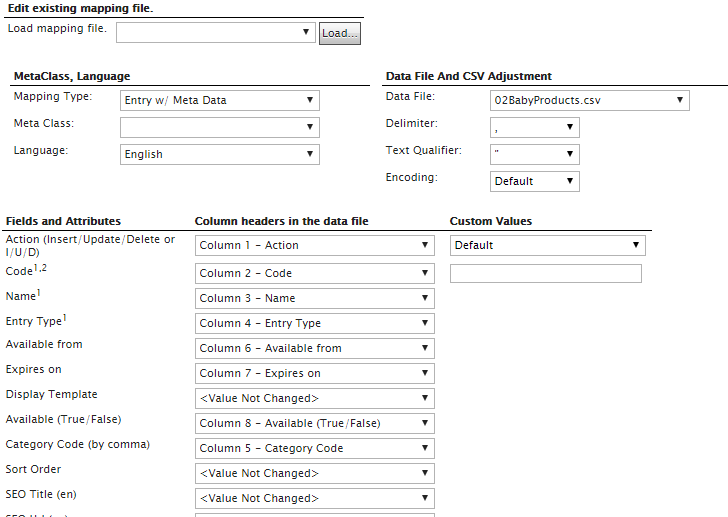
Creating mapping rules might not be the most interesting part of your job, but fortunately you only have to do it once - as long as your CSV format does not change.
 1 var enDataContext = CatalogContext.MetaDataContext.Clone();
 2 enDataContext.UseCurrentThreadCulture = false;
 3 enDataContext.Language = "en";
 4 var mappingMetaClass = new EntryMappingMetaClass(enDataContext, metaClassName, 1);
 5 Rule mappingRule = Rule.XmlDeserialize(dataContext, mappingFilePath);
 6 char chTextQualifier = '\0';
 7 if (mappingRule.Attribute["TextQualifier"].ToString() != "")
 8 {
 9     chTextQualifier = char.Parse(mappingRule.Attribute["TextQualifier"]);
10 }
11 IIncomingDataParser parser = null;
12 System.Data.DataSet rawData = null;
13 parser = new CsvIncomingDataParser(sourceFolder, true, char.Parse(mappingRule.Attrib\
14 ute["Delimiter"].ToString()), chTextQualifier, true, Encoding.Default);
15 rawData = parser.Parse(Path.GetFileName(csvFilePath), null);
16 System.Data.DataTable dtSource = rawData.Tables[0];
17 string userName = Thread.CurrentPrincipal.Identity != null ? Thread.CurrentPrincipal\
18 .Identity.Name : String.Empty;
19 return mappingMetaClass.FillData(FillDataMode.All, dtSource, mappingRule, userName, \
20 DateTime.UtcNow);
CSV can only be used for import, there is no built in way to export data to a CSV. But that would be easy to do so, as CSV is an universal, well known format.
Optimizing your catalog structure
As the most frequently hit entities your system, Catalogs have a big impact of performance for your website - so put some thoughts into organizing it properly will definitely help.
There are a couple of things to consider:
- Do not put too many entries in one node. This has been greatly improved in Commerce 9, but still, Catalog UI will still struggle to manage that many items.
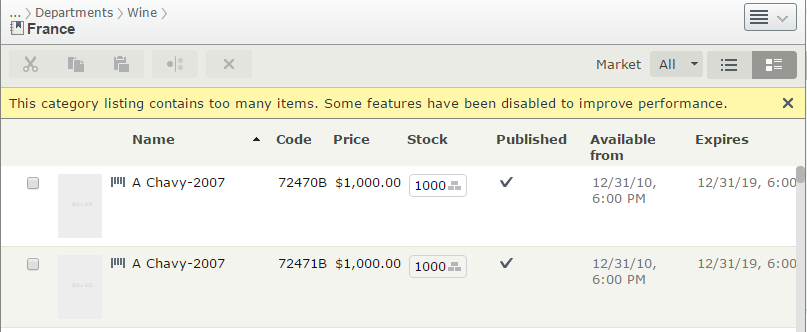
By default, Catalog UI will display a node in a product - variations structure, variations will appear as children of products. However if the number of entries in a node reaches 2000, then it will only display flat structure. The threshold can be changed by SimplifiedCatalogListingThreshold value in AppSettings.
There is no definitive value for the optimal number of entries per node, it totally depends on your catalog, but speaking from experience, you might want to try to limit it to less than 2000. Anything bigger than that and you should be thinking about having sub-category.
And it’s not just Catalog UI. As we will learn later, the hierarchical routing system will need to find all of children of a node to find the next matching RouteSegment. Having too many children, of course, can’t be a good thing. Or there are scenario when you call IContentLoader.GetChildren on that big category, without paging (in case you are indexing your content via Find, for example). Pretty sure SQL Server will choke on such requests.
Depending on your catalog, the maximum number of entries per category might vary from less than 500 to less than 2000. Anything more than that and you should think about introducing sub-categories.
- Think about what metafields to put in a product, and what to put in its variations. It might be crystal clear to do so, but it’s not always the case. Having multiple variations to share same metafields will reduce the number of rows we have to load from CatalogContentProperty. Less rows mean better performance. That might not sound a lot, but imagine you have 100.000 variations, in 10 languages. Each metafield less means 1.000.000 less rows in the table. It can be some thing.
- Same goes to
CultureSpecificand nonCultureSpecificproperties. NonCultureSpecificfields will be shared across all languages, so unless necessary, don’t make your propertyCultureSpecific. (Of course, if your site is going to have many languages. If it has only 2-3 languages then the difference is very small, though.)
Optimizing your catalog operations
In previous section we talked about how to structure your catalog for the best performance. But that’s only the half of the picture - what even more important is how you work with your catalog.
As we learned before, by default, the catalog content is cached - which is a good thing, because the next time you need it, Episerver Framework will happily load it from memory, save you both precious time and disk I/O. However, if your catalog content is only loaded for one use, cache is not helping here. And remember your server’s memory is limited - and one instance of catalog content is not that small, depends on your modeling, it can be easily 10MB or 20MB. No cache can live forever. It will, sooner or later, be removed for new catalog content. The more that happens, the worse it is for performance - even worse if Garbage Collector needs to kick in often. If you are continuously loading and discarding catalog contents from cache, then you are probably doing something wrong.
As a rule of thumb, only load the content when you absolutely need it. I’ve seen more than often when the developers feel generous to load more than they need - and in the end, the site struggles when it has to serve multiple concurrent users.
Here’s something to keep in mind. If you can - do a review of your projects and fix the following problems. The performance gain might surprise you:
- You don’t have to load an entire content just to get its code. That’s what
ReferenceConverteris for - a new methodGetCode(ContentReference)was added recently and was even improved in Commerce 10+. It’s much more faster and memory-efficient than a content. This is also true when you want to get, for example,ContentReferenceof all variations of a product. You don’t have to get all theVariationContent-ILinksRepository(orIAssociationRepository) can provide the lightweight solution for you. The general rule is - if you are not using the entire content, but just a small part of it, then look around. The framework might already provide something for you, with (much) better performance. - Keep in mind that
UrlResolver.GetUrlalso load contents, and not just one - it loads content recursively until it finds the configured root (which we will discuss more in part 3 - Advanced Stuffs). Sometimes, call toUrlResolver.GetUrlis inevitable, but in many cases, you can cache it …somewhere. If you are using Episerver Find (or even better, Find.Commerce), then the content url can be included in the index and reused for later calls. - If you are using
IContentLoader.GetChildrenfor the product listing page, you are probably doing it wrong. Thing is, when a customer visits a product listing page, they unlikely click on every product - just one or two out of ten. Loading all of the children, even with paging, is not a good idea. A common best practice is to avoid loading the content until you needs to - and avoid loading multiple content in product listing page. That’s what the search provider (or Find/Find.Commerce) is for. We will talk more about this is part 5 - Searching.