Chapter 2: Catalog content modeling
The MetaData system
It’s hard to fully understand the Catalog system without knowing about the MetaData system, with its MetaClass(es) and MetaField(s). The Catalog is just the skeleton, it’s the MetaData system which brings it to life.
The idea of metaclasses and metafields is simple. To make it effective to editing your catalog, you’ll need pre-defined templates. So a shirt needs a style (tailor fit, slim fit,…), a material (silk, cotton, polyester,…), a color (red, white, blue), a texture,…, while a TV needs a size (40”, 50”, 55”,…), a resolution (HD ready, FullHD or 4k), Smart features (Netflix, Youtube, Browser), 3D or not, etc. As a framework, Episerver cannot pre-define all of those things out of the box - it’s up to you to define your “templates” for your needs. So each template is a metaclass, and each attribute of the template, is a metafield.
And each instance of the template, is a MetaObject. MetaObject is nothing more than a HashSet of values.
At API:s level, there’s nothing really interesting about MetaClass(es) or MetaField(s) in particular. Today, you will be hardly working with them - you should be working with the strongly typed models instead, which will come up in next part. However, they are still the internals of the catalog system, so it’ll make sense for us to explore how they works.
Let’s take a closer looks at MetaClass. At its core, it’s a simple class with some attributes (Id, Name, TableName, Namespace, etc) and a list of MetaFields attach to it. If you take a look at the MetaClass management in Commerce Manager (Commerce Manager/Administration/Catalog System/MetaClass), it’s as close as bare metal you can get (without looking at database, of course)
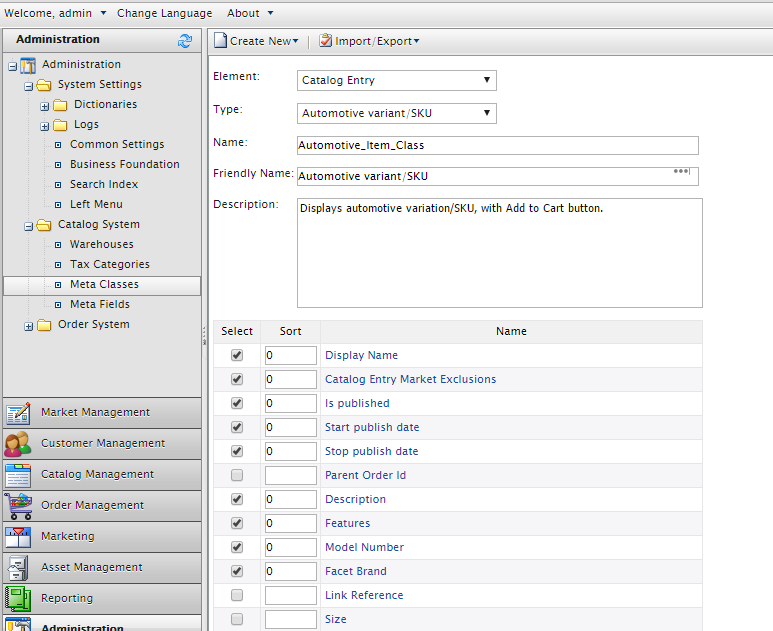
The key feature of MetaData system is the extensibility. You can attach or remove a metafield from a metaclass on-the-fly. (if you come from Commerce R3 and earlier, it was not on-the-fly, you’ll have to restart the site for it to take effect. But hey, why would you still use that version?). You can share metafields between metaclasses (yes, pretty cool, I know). There is no hard limit of how many metafields can be in a metaclass, but my opinion is you should not exceed 50. (30 is even better, but there are products with complex specifications).
It’s the metafield which is more interesting
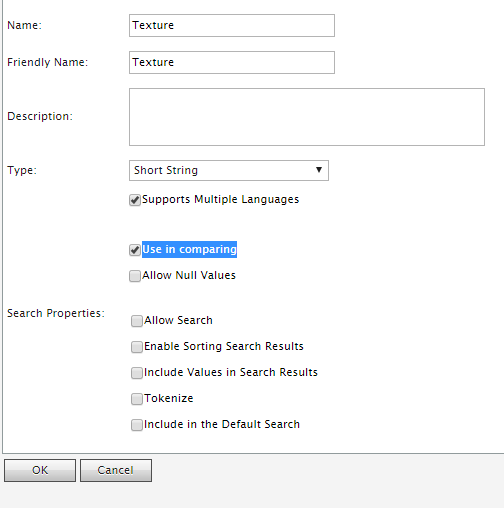
What do these settings mean?
- Support multiple languages: That mean the metafield will be per-language, each language version of the
MetaObjectwill have an unique value for this metafield. For example, theDisplayNamefor this book can be “Pro Episerver Commerce” in “English”, but can be “Professionell Episerver Commerce” in “svenska”. - Use in comparing: This is a legacy setting which no longer has any meaning. (It should have been removed)
- Allow Null Values: This metafield is not required. If this is set to false, the editor must set a value for it before saving.
- Encrypted: The metafield will be encrypted by the master key in database and be decrypted in the fly. This option, however, does not show up if your database is set to be Azure-compatible. (As Sql Azure Database does not support encryption at the time of this writing).
- Precision/Scale: This only set-able if your metafield is a decimal. This was important in the past because it will affect how the decimal is stored in the database, but with Commerce 9, the decimal will always be stored in the (38,9) form.
Search attributes: These attributes will affect how will this metafield be indexed in a Lucene-based search provider:
- Allow Search: This metafield will be indexed by the search providers.
- Enable Sorting Search results: The value of this metafield can be used for sort by the search providers.
- Include Value in search results:
- Tokenize: The value of this metafield will be tokenized. So if its value is “Hello World”, you can either search with “Hello” or “World”
- Include in Default Search: This metafield will be include in the default Lucene query.
If you can only choose between either CatalogEntry or CatalogNode for MetaClass, then it’s whole lot more thing to choose for metafield. The full list of MetaType which you can choose from:
 1 public enum MetaDataType
 2 {
 3 	Integer			= 26,
 4 	Boolean			= 27,
 5 	Date			= 28,
 6 	Email			= 29,
 7 	URL				= 30,
 8 	ShortString		= 31,
 9 	LongString		= 32,
10 	LongHtmlString	= 33,
11
12 	DictionarySingleValue = 34,
13 	DictionaryMultiValue = 35,
14 	EnumSingleValue		= 36,
15 	EnumMultiValue		= 37,
16 	StringDictionary	= 38,
17 	File				=	39,
18 	ImageFile			=	40,
19
20 	MetaObject			=	41
21 }
Remember, you can’t change the type of a metafield after you saved it. If you make a wrong move, it might be easiest to just delete the metafield and create again.
The strongly typed models
Now you can have the basic ideas of how the catalog is structured - it’s time to start working with some real code. As I mentioned above, you’ll be working with IContentRepository (in some cases, with its base interface - IContentLoader - when you only need to load the contents, not to save them), around IContent. Any content must implement IContent to be handled by the content providers - so the first thing to get the Catalog integrated into the content system (aka to get CatalogContentProvider to work) is modelling the catalog, node, and entry with that interface.
Let’s see how the catalog contents are modeled
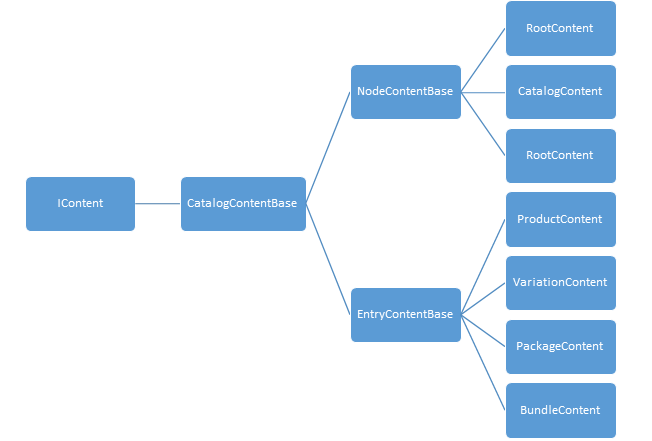
All catalog content types inherit from CatalogContentBase, which itself implements IContent and then add some properties, such as ApplicationId.
RootContent is a “virtual” content - it has no Mediachase eCF Catalog counterpart. You can only have one RootContent in the system, its ContentLink is fixed and it is always read-only. You can try to save it but nothing will be persisted. You will hardly work with RootContent directly, but with its ContentReference, via ReferenceConverter.GetRootLink(). (The only places where we need to use GetRootLink are when we need to work with CatalogContent, for example, to load all catalogs in the system.)
Let’s us see a simple code of creating a Catalog, then editing its language, then deleting it. (We are just showing how the API:s work, right, you’ll usually do not write code like this in your daily work)
 1     //Get the dependencies
 2     var contentRepository = ServiceLocation.ServiceLocator.Current.GetInstance<ICont\
 3 entRepository>();
 4     var referenceConverter = ServiceLocation.ServiceLocator.Current.GetInstance<Refe\
 5 renceConverter>();
 6
 7     //Create a CatalogContent
 8     var catalogContent = contentRepository.GetDefault<CatalogContent>(referenceConve\
 9 rter.GetRootLink());
10     catalogContent.Name = "Pro Episerver Commerce";
11     catalogContent.DefaultCurrency = Currency.USD;
12     catalogContent.DefaultLanguage = "en";
13     catalogContent.WeightBase = "kgs";
14     var catalogContentLink = contentRepository.Save(catalogContent, DataAccess.SaveA\
15 ction.Publish, EPiServer.Security.AccessLevel.NoAccess);
16
17     //Edit it to add Swedish
18     catalogContent = contentRepository.Get<CatalogContent>(catalogContentLink).Creat\
19 eWritableClone<CatalogContent>();
20     catalogContent.CatalogLanguages.Add("sv");
21     contentRepository.Save(catalogContent, DataAccess.SaveAction.Publish, EPiServer.\
22 Security.AccessLevel.NoAccess);
23
24     //Delete it
25     contentRepository.Delete(catalogContentLink, false, EPiServer.Security.AccessLev\
26 el.NoAccess);
Well, it’s easy, isn’t it? If you worked with CMS before, then even without explaining, you should be able to understand the code. I told you, you’ll like the new content way.
One thing to remember about CatalogContent is it’s different from NodeContent or EntryContentBase - it cannot be extended. While CatalogNode or CatalogEntry can be enriched by MetaClasses (as they implement IMetaClass interface), CatalogContent has no such abilities, you’ll always work with CatalogContent directly, never with its deratives.
This will simply does not work:
 1 using EPiServer.Commerce.Catalog.ContentTypes;
 2 using EPiServer.Commerce.Catalog.DataAnnotations;
 3
 4 namespace EPiServer.Commerce.Sample
 5 {
 6     [CatalogContentType(GUID = "1FD3E34D-6476-40E2-8CB5-8EFB0DB79E3E")]
 7     public class MyCatalogContent : CatalogContent
 8     {
 9         public virtual string MyExtendedProperty { get; set; }
10     }
11 }
CatalogContentScannerExtension will throw an EPiServerException exception during the initialization if it detects any content types inherit from CatalogContent 8, something like this:
The content type ‘EPiServer.Commerce.Sample.MyCatalogContent’ extends ‘EPiServer.Commerce.Catalog.ContentTypes.CatalogContent’, which is not supported.
Working with Nodes and Entries is more or less the same. Well, not entirely true. You’ll have to model your metaclasses first.
Modeling catalog content types
It’s not required to model your metaclasses. You can use the defined classes such as NodeContent or ProductContent, and throw everything into Property properties, instead of content.VeryLongPropertyName, you can use content.Property["VeryLongPropretyName"]. (Remember? Any instance of IContent has Property property as a “property bag” to store its properties). It’s why Catalog UI (which relies on content types) will still work when you import a Catalog with metaclasses you didn’t model after. But that defeats one of the most important benefits of having content types: strongly typed types mean Intellisense and compile-time checking. Noticed the typo I intentionally made above? You might not notice it and your code will throw exception at runtime. But with the strongly typed content types, Visual Studio will just catch that for you! And as they always say, compile time checks are always better!
 1 /// <summary>
 2 /// FashionProductContent class, map to Fashion_Product_Class metadata class
 3 /// </summary>
 4 [CatalogContentType(GUID = "18EA436F-3B3B-464E-A526-564E9AC454C7", MetaClassName = "\
 5 Fashion_Product_Class", GroupName = "Fashion",
 6     DisplayName = "Fashion product", Description = "Display fashion product with Add\
 7  to Cart button.")]
 8 [ImageUrl("~/Templates/UX/gfx/page-type-thumbnail-fashion.png")]
 9 public class FashionProductContent : ProductContent
10 {
11     [Display(Name = "Description", Order = -15)]
12     public virtual XhtmlString Info_Description { get; set; }
13
14     [Display(Name = "Features", Order = -11)]
15     public virtual XhtmlString Info_Features { get; set; }
16
17     [Display(Name = "Model Number", Order = -3)]
18     public virtual string Info_ModelNumber { get; set; }
19
20     [Display(Name = "Facet Brand", Order = -1)]
21     [Searchable]
22     public virtual string Facet_Brand { get; set; }
23 }
Catalog Content modeling uses attributes intensively. As you might see, there are plenty to explain:
-
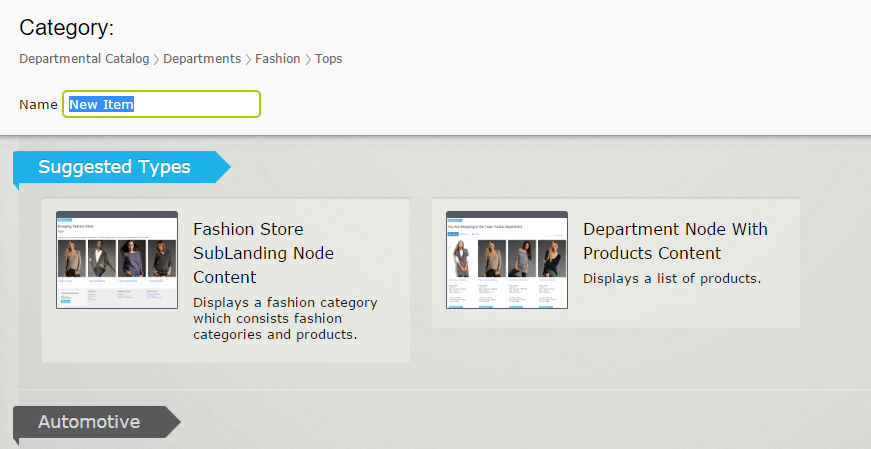
CatalogContentType: this is the most important attribute. It inherits from CMSContentTypeattribute, which makes this content type an option to select when you create new content in Catalog UI. GUID is something required by CMS to identify the content type, even its name and its namespace is changed. It hasMetaClassNameproperty indicate that your class is mapped to the corresponding metaclass. In case the metaclass does not exist,GroupNamegroups your content type with other content types, so when you create a new content in CMS, they will in same group and be easier to select. - Other properties is to make the display of your content type in Catalog UI looks nicer and more recognizable.
-
ImageUrlthumbnail allow you to set a thumbnail to your content type.
When you define your strongly typed content, there are some rules to keep in mind:
- The property must match the name and the type of the the metafield. Casing is not important. So if you have a string metafield named
facet_color, your property must be stringFacet_Color.
Here’s the map between PropertyData types and MetaField types:
| MetaDataType | PropertyData type |
|---|---|
| MetaDataType.Decimal | PropertyDecimal |
| MetaDataType.BigInt | |
| MetaDataType.Money | |
| MetaDataType.SmallMoney | |
| MetaDataType.DateTime | PropertyDate |
| MetaDataType.SmallDateTime | |
| MetaDataType.Date | |
| MetaDataType.Float | PropertyFloatNumber |
| MetaDataType.Real | |
| MetaDataType.Bit | PropertyNumber |
| MetaDataType.Char | |
| MetaDataType.Int | |
| MetaDataType.Integer | |
| MetaDataType.SmallInt | |
| MetaDataType.TinyInt | PropertyNumber |
| MetaDataType.NChar | PropertyLongString |
| MetaDataType.VarChar | |
| MetaDataType.NText | |
| MetaDataType.Text | |
| MetaDataType.NVarChar | |
| MetaDataType.LongString | |
| MetaDataType.Boolean | PropertyBoolean |
| MetaDataType.Email | PropertyEmailAddress |
| MetaDataType.URL | PropertyUrl |
| MetaDataType.ShortString | PropertyString |
| MetaDataType.UniqueIdentifier | |
| MetaDataType.LongHtmlString | PropertyXhtmlString |
| MetaDataType.EnumMultiValue | PropertyDictionaryMultiple |
| MetaDataType.DictionaryMultiValue | |
| MetaDataType.EnumSingleValue | PropertyDictionarySingle |
| MetaDataType.DictionarySingleValue | |
| MetaDataType.Timestamp | Unsupported |
| MetaDataType.Variant | |
| MetaDataType.Numeric | |
| MetaDataType.Sysname | |
| MetaDataType.Binary | |
| MetaDataType.VarBinary | |
| MetaDataType.StringDictionary | |
| MetaDataType.Image | |
| MetaDataType.File | |
| MetaDataType.ImageFile | |
| MetaDataType.MetaObject |
- The property must be declared as
virtual. Which means the catalog content type can’t never besealed. (If you wonder, that because Episerver CMS Core, or more precisely, Castle.Core needs to be able to inherit the content type and create an instance of that proxy class on-the-fly. It’s a framework thing, so there is no way around it. That’s also the reason whyCatalogContentis not-extendable, but is not marked assealed.) - As a metafield can be used across multiple metaclass, the property which maps to it also has to be identical across content types. It does mean you can NOT have a property named
Facet_Coloras string in one class and another namedFacet_Coloras double in another class. It also has to have the same attributes decorated. If one of the properties has mismatched attributes between content types, an exception will be thrown during site initialization. - In most of the case, the underlying
MetaDataTypeis automatically detected, based on your property type, so you don’t have to do anything else. This is, however, not true with dictionary types. Both of them need aBackingType. In case ofMetaDataType.EnumSingleValueandMetaDataType.DictionarySingleValue, if you fail to do so, it’ll be created as a normal string, whileMetaDataType.EnumMultiValueandMetaDataType.DictionaryMultiValuewill throw exception during site startup. Here’s how you create them:
1 [BackingType(typeof(PropertyDictionaryMultiple))]
2 public virtual IEnumerable<string> MultipleValue { get; set; }
3
4 [BackingType(typeof(PropertyDictionarySingle))]
5 public virtual string SingleValue { get; set; }
These are attributes you can use to decorate the property, which also map to attributes of a metafield we discussed in previous section:
-
Required: the property cannot be null -
Searchable: the property will be indexed by the search provider -
Tokenize: the value of the property will be tokenized while indexing. So if the value is “Hello world”, whenTokenizeis set to true, then you can find this content with either “Hello” or “world”. Otherwise it only matches when you search for “Hello world” -
IncludeValuesInSearchResults: Same as “Include value in search results” setting for metafield. -
IncludeInDefaultSearch: same as “Include in default search” setting for metafield. -
Encrypted: Indicates that the property will be saved to database (as a metafield) encrypted. This attribute, however, does not take effect, if your database is set to be Azure-compatible. -
DecimalSettings: Allow you to set the precision and scale of a decimal type. Note that the highest precision ofdecimaltype stored in SQL Server is (38,9), so anything bigger than that will not be allowed. If you don’t explicitly setDecimalSettingsvalues for precision and scale, yourdecimalmetafield will have the the default precision of (18,0).
When your site starts, CatalogContentScannerExtension will do all the leg works to scan the content types and synchronize them to the metadata system - content types to metaclasses and and properties to metafields. In case of any conflicts between those pairs, catalog content types win. For example, you have a metafield with decimal precision of (18,0), but the mapping property has DecimalSettings to be (33,9), CatalogContentScannerExtension will update the metafield to be (33,9), not the way around.
IDimensionalStockPlacement
Most of properties of the base content types provided by Episerver Commerce (CatalogContent, NodeContent, ProductContent, etc) are flat, which means you can access directly, for example:
1 nodeContent.Code = "This-is-a-code";
But the contents implement IDimensionalStockPlacement (by default VariationContent and PackageContent), are exceptions. They are accessible via a block - ShippingDimensions. So to set the length of a variation, you’ll have to do like this:
1 variationContent.ShippingDimensions.Height = 10m;
That’s why the shipping dimensions are displayed a bit differently in Catalog UI:
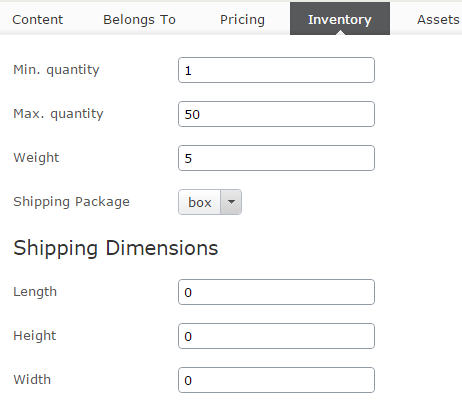
If you have worked with CMS, you might already know that you don’t have to initialize a block before using it - it’ll never be null for a content. So you don’t have to write code such as:
1 variationContent.ShippingDimensions = new ShippingDimensions();
Just use the block directly, as we showed above.
How properties are stored
It might not be particularly useful to look into how properties are stored in database, but it can be interesting to know the detail (You might someday look into your databases to investigate, when a problem arises.)
Prior to Commerce 9 (8+ and earlier), each metaclass has two tables to represent it. Usually it’s a table with the metaclass name, and another table with that name and _Localization suffix. But it does not always work that way, it’s possible to create a metaclass with a custom table name using MetaClass API:s, the only way to know for sure is to look at column TableName in MetaClass table.
As you might guess, the normal table is used to store non-localization metafields, while the _Localization stores the other ones (the ones with CultureSpecific attribute decorated, or “Support multiple languages” option enabled). Each metafield will be on one table or the other, and they are added/removed dynamically.
Yes, every time you add a metafield to a metaclass, a new column will be added to your table. And when you remove it, it will be dropped.
It sounds to be alarming if you have a big catalog with one million entries or so, but mostly the operations of adding and removing metafields will be done along deployments, so it might not as bad as it sounds. But you were right, it’s not the best way to handle the changes of catalog content types.
In Commerce 9, the way properties are stored is fundamentally changed.
If you have worked with CMS content properties before, you might know about tblContentProperty. Commerce 9 adapts the same idea.
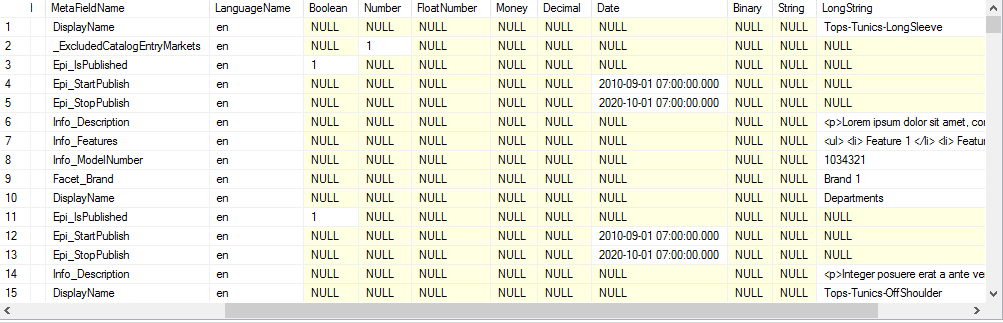
Commerce 9 has a new table - CatalogContentProperty to store properties. Besides the identity columns, there are 10 columns for the data types MetaDataPlus supports: Boolean, Number (Integer), FloatNumber, Money, Decimal 9, Date, Binary, String (for strings shorter than 256 characters length), LongString (any strings long than that) and Guid. A metafield, for each content and for each language (in case it’s culture specific) will be stored in one row matches with it value. So a string property value will be in String column, while an Integer property value will be in Number column, and so on and so forth, while the other columns remain null for that row.
It’s hard to say if the old or new approach is definitely better than the other. The new one might be more flexible, but it means more rows and is not as “natural” as the old one (and then can possibly yield better performance). However, the new one has simply access approach - you only read or update or delete from one table, while the old one has to rely on the automatically generated stored procedures (which are updated every time you add or remove metafields to metaclasses). In long run, the new approach might be simpler to maintain. Let’s hope for that.
When you upgrade your site to Commerce 9, all old metaclass tables are dropped. Of course, it does not really make sense to keep the tables you no longer update. However, you might still have custom queries to work on that tables (such as to report something on your catalog). To replace those tables, new views are created. They are created by querying the data from CatalogContentProperty table, and are updated every time you update your metaclasses (just like the way old metaclass tables did).
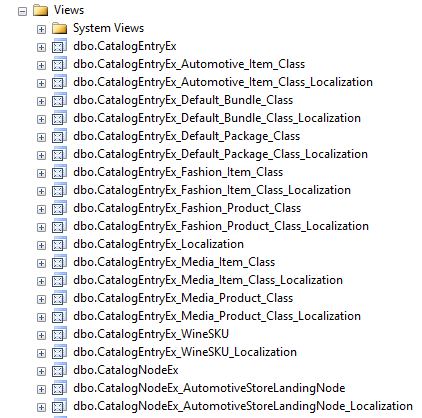
Those views are, of course, slower than the original tables, some tests shows that they can be 30% slower than the original ones. However, you’ll not use them frequently enough for the difference to really make senses.
Dictionary types.
Previously we discussed on how properties work with catalog content. However - if you have dictionary types in your MetaClasses, they will work differently. In this section we will examine these special data types - this applies to Order system metaclasses as well.
As we all know - there are three types of dictionary in Episerver Commerce:
- Single value dictionary: editor can select a value from defined ones.
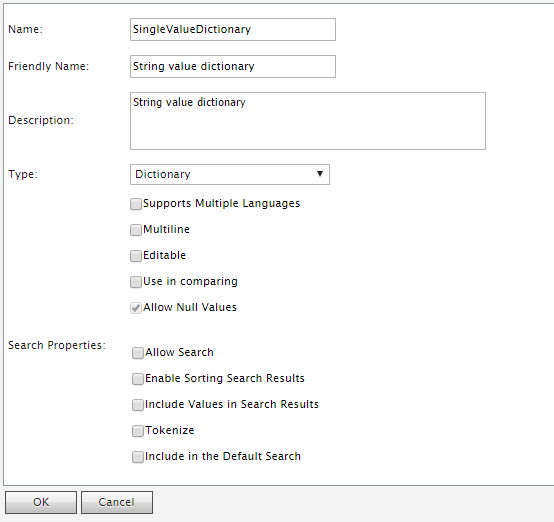
Single value dictionary type is supported in the strongly typed content types - you need to define a property of type string, with backing type of typeof(PropertyDictionarySingle)
1     [BackingType(typeof(PropertyDictionarySingle))]
2     public virtual string Color { get; set; }
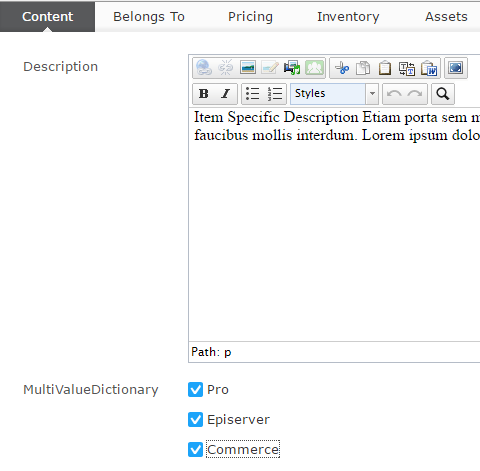
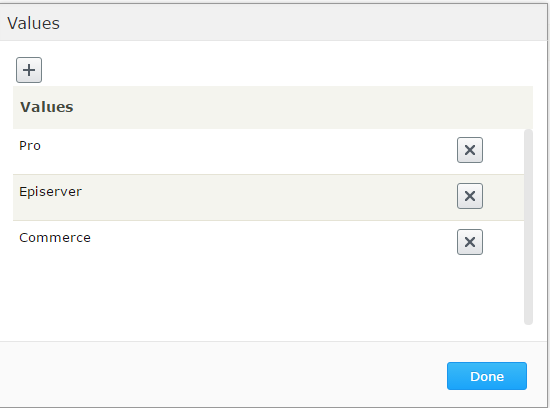
- Multi-value Dictionary: editor can select multiple values from defined ones. The only different from Single value dictionary is it has the “Multiline” option enabled.
You can define a property for Multi value dictionary in content type by IEnumerable<string> and typeof(PropertyDictionaryMultiple) backing type
1     [BackingType(typeof(PropertyDictionaryMultiple))]
2     public virtual IEnumerable<string> Colors { get; set; }
Both single and multi value dictionary types are fully supported in Catalog UI, including editing:
 and administration:
- String dictionary: this is the true “dictionary type”: you can define pairs of key and value (the previous types are actually “list”).
String dictionary is not supported by the strongly typed content types, nor Catalog UI. To manage this metafield, we’ll have to use Commerce Manager, or use MetaDataPlus API:s
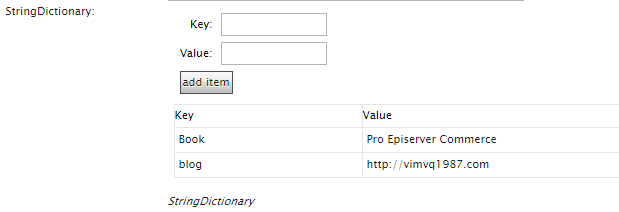
There are ways to support String dictionary, at least in strongly typed APIs. However, that is out of scope for this book.
How dictionary works
We’ve learned in previous chapters how properties are stored and loaded. Technically, dictionaries are “just another properties”. However they are stored differently. If you look at CatalogContentProperty table (or ecfVersionProperty, for draft versions), you’ll see the dictionary properties are stored as numbers. What do those numbers mean?
- For single value dictionary type, that number is the MetaDictionaryId of the selected value in
MetaDictionarytable. - For multi value dictionary type, things are a bit more complicated. That number is the
MetaKeyvalue inMetaKeytable. ThisMetaKey, is, however, connected toMetaMultiValueDictionary, which itself points back toMetaDictionary. An “usual” design for 1-n relation in database, right? - For string dictionary type, it’s more or less the same as multi value dictionary. However, the
MetaKeywill point to pairs of key and value inMetaStringDictionaryValuetable.
Those information might not be really interesting to you - but they can be useful in some specific scenario. Let’s consider some of those cases:
- You want to know which entries use a specific dictionary value. In previous example, we have a property named Color, we want to find all entries with Color is ‘Blue’. For front-end site, it would be easy to find such entries by search feature (will be discussed later), but what if you want to create a report for that? Episerver Commerce does not provide such functionality out of the box, so we’ll have to craft it ourselves. Time for some SQL then!
 1 DECLARE @MetaFieldId INT
 2 DECLARE @MetaDictionaryId INT
 3
 4 SET @MetaFieldId = (SELECT MetaFieldId FROM MetaField WHERE Name = 'Color' AND Names\
 5 pace = 'Mediachase.Commerce.Catalog')
 6 SET @MetaDictionaryId = (SELECT MetaDictionaryId FROM MetaDictionary WHERE Value = '\
 7 Blue' AND MetaFieldId = @MetaFieldId)
 8
 9 SELECT ObjectId FROM CatalogContentProperty WHERE MetaFieldId = @MetaFieldId AND Num\
10 ber = @MetaDictionaryId AND ObjectTypeId = 0
This script is quite simple - we need to get the Id of Color MetaField first, then the MetaDictionaryId of the ‘Blue’ color. When we have two values, we can simple query from table CatalogContentProperty to find which entries have that value. You can go even further to join with CatalogEntry table to get more information such as name or code - I’ll leave that to you.
- Let’s consider another case - we need to report which entries belong to a specific Market. To determine which entries belong to which markets, Episerver Commerce uses a special metafield, named
_ExcludedCatalogEntryMarketswhich is a multi-value dictionary. As its name might suggest, it contains list of the MarketId which the entry does not belong to, for example, if_ExcludedCatalogEntryMarketscontains ‘US’ then the entry is not available in ‘US’ market. So if we are to find entries which belong to ‘US’ market, we have to find entries which do not have ‘US’ value for_ExcludedCatalogEntryMarkets.
 1 DECLARE @MetaFieldId INT
 2 DECLARE @MetaDictionaryId INT
 3
 4 SET @MetaFieldId = (SELECT MetaFieldId FROM MetaField
 5 WHERE Name = '_ExcludedCatalogEntryMarkets' AND Namespace = 'Mediachase.Commerce.Cat\
 6 alog')
 7 SET @MetaDictionaryId = (SELECT MetaDictionaryId FROM MetaDictionary WHERE Value = '\
 8 US' AND MetaFieldId = @MetaFieldId)
 9
10 SELECT ObjectId FROM CatalogContentProperty
11 WHERE
12 MetaFieldId = @MetaFieldId AND
13 Number NOT IN
14 (
15 SELECT mk.MetaKey from MetaMultiValueDictionary mmv
16 INNER JOIN MetaKey mk on mmv.MetaKey = mk.MetaKey
17 WHERE mk.MetaFieldId = @MetaFieldId
18 AND MetaDictionaryId = @MetaDictionaryId
19 )
Same as previous script, we need to find the Id of _ExcludedCatalogEntryMarkets MetaField, then the MetaDictionaryId of ‘US’ market. The next statement is tricky - we need to find MetaKey which value matching value for ‘US’, then except them. Again, you can join with other tables for more data.