Chapter 1: How the catalog is structured
##Overview
Catalog Management is the old catalog-editing UI in Commerce Manager, which has been there since the first version of Episerver Commerce. Catalog UI is the rewrite interface which integrates into CMS UI since Episerver Commerce 7.5. Catalog UI is vastly superior to Catalog Management in almost all aspects, and it’s recommended to use by Episerver. However we’ll show screenshots in both interfaces to see how they’re connected.
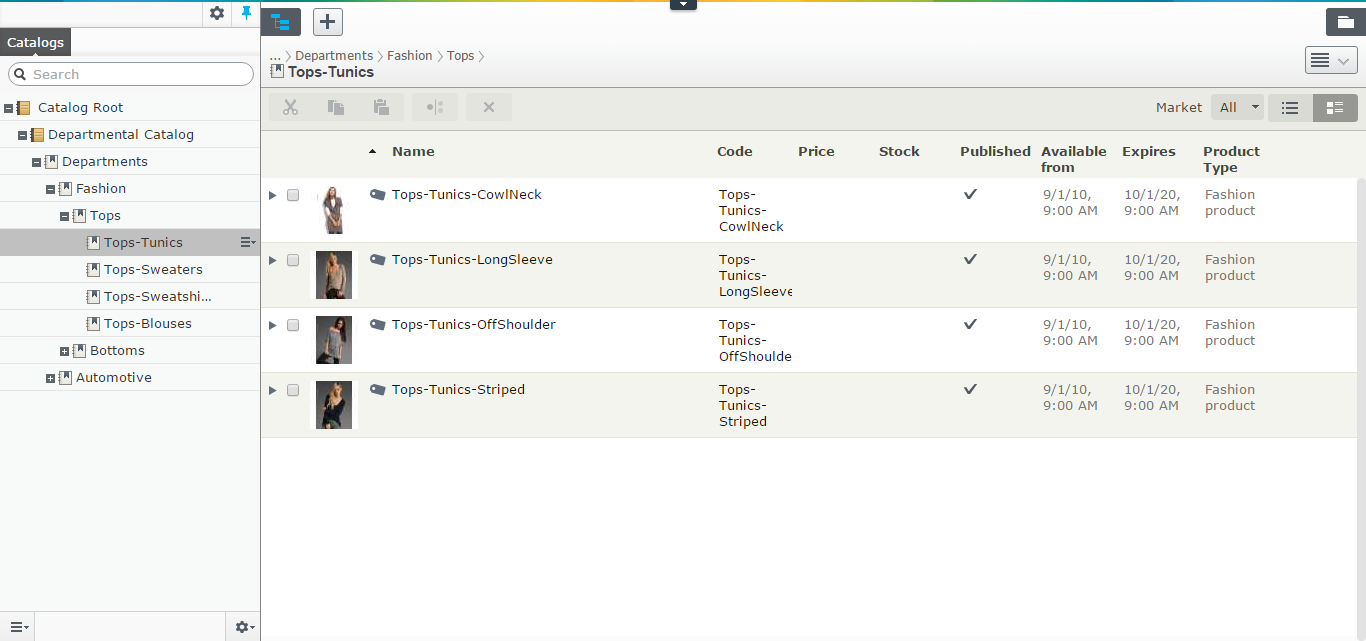
The catalog system - as the heart of Episerver Commerce - has been there for long, long before the merge and long before CatalogContentProvider. In the most basic concept, a catalog can be viewed as a tree - a catalog is the root, the nodes are the branches, and the entries are the leaves. It helps to grasp some ideas about the catalog system, but it’s not enough. Mind you, the catalog is much more complicated than that, which all kinds of relations and associations we’ll discuss shortly.
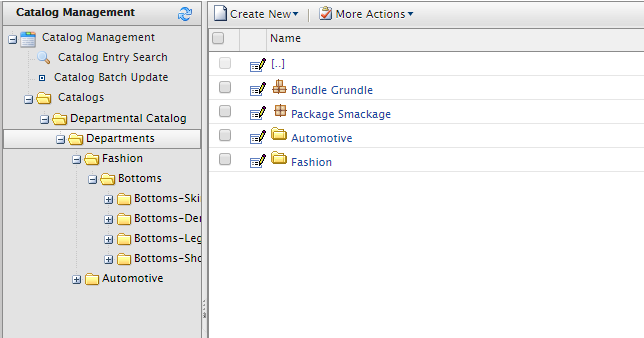
The catalog itself, can be seen as the container in the system. You can import and export it at will. Whenever you export a catalog, all other information come along (the nodes, the entries, the warehouses, the inventories information, the prices, and the metadata classes). And you can import it to another system. You can use many ways to transfer catalog information between system, such as writing the code to update the entries directly from CSV files, use ServiceAPI to update from a PIM like InRiver, … but the most common way to date, is to export and import the catalog.12
The data of Catalogs are stored in Catalog and CatalogLanguage tables. If there is anything interesting to look at, it’s CatalogLanguage. The languages available here will define which languages you content will have in. Prior to Commerce 9, adding a new language to a catalog will also update all the drafts of all contents, hence it’s very expensive operation. It’s been much improved in Commerce 9, but it’s still quite slow and you won’t want to do it on a live site during high load time.
Under catalog, you usually have nodes. You can, of course, create an entry to be a direct children of a catalog. However, in that case, it actually means that entry does not belong to any nodes.
And under the node, you can have another nodes, or entries. The naming can be a little confusing here: It’s sometimes called node, or CatalogNode, but in the new Catalog UI, it’s called Category to match with “Category concept” of CMS content.
There are two kinds of relations between nodes:
- Each node would have one parent node. Nodes which have no parent node will be direct children of the catalog. This relation is defined by the ParentNodeId in CatalogNode table.
- A node can be linked to one or multiple nodes. When a node is linked, it will appear in as a normal child node in the parent node. This relation is defined by the
CatalogNodeRelationtable.
A node might contain, of course, many entries. And vice versa, an entry can belong to multiple nodes. This kind of relation is defined is NodeEntryRelation table.
And then we have relations and associations between entries.
Node-entry relation
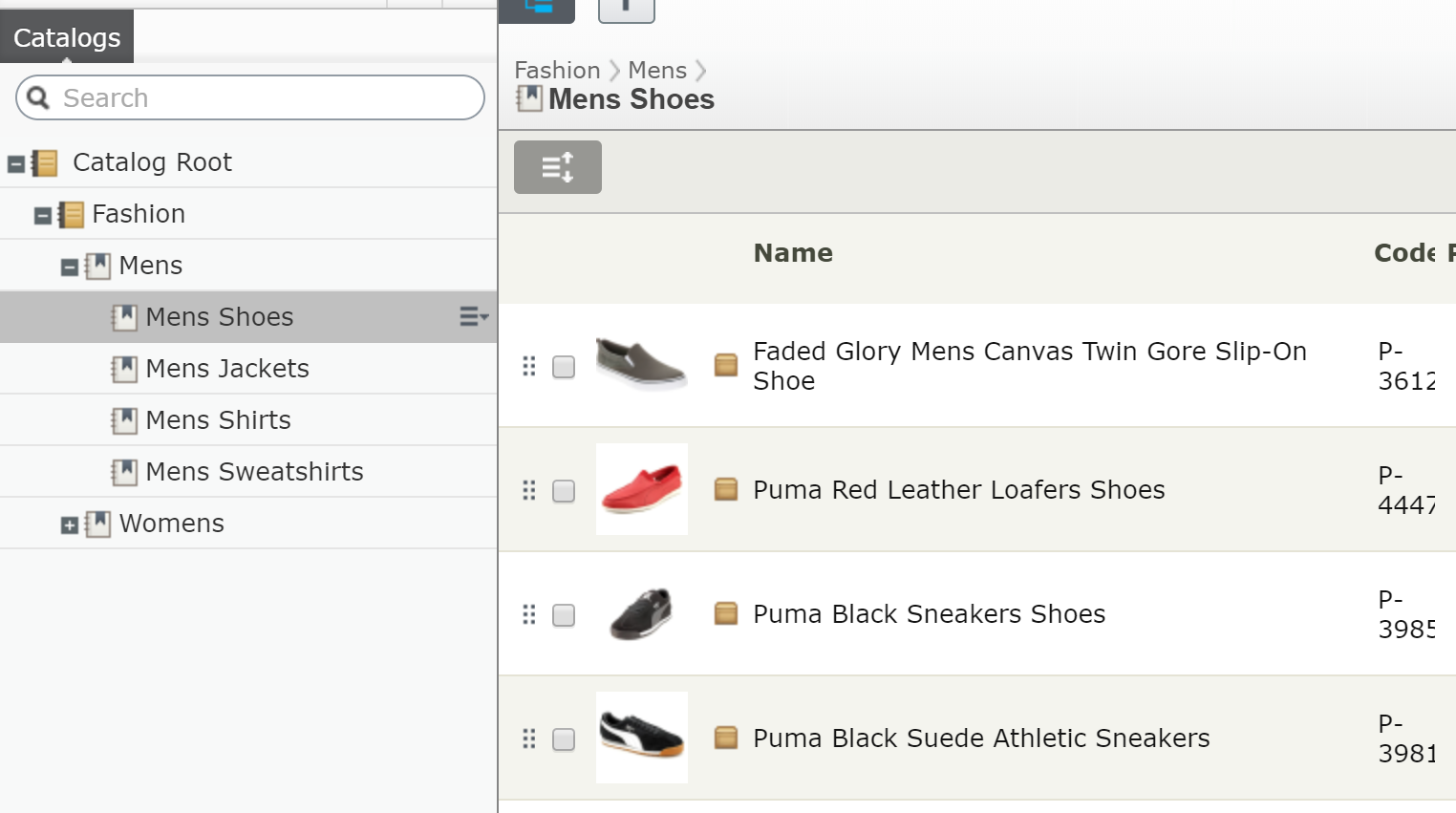
Before Commerce 11, there is no way to know which is the “true” parent node of an entry. Currently, the first relation with lowest SortOrder is assumed to be the parent node. This is not entirely correct, and it comes with a limitation: you can really drag and drop an entry within a node. If you have a category of “smart phone”, you would want to make the most popular phone, like iPhone X or Galaxy S9+ to the top of the category, because those are more likely to be bought buy a customers. Prior Commerce 11, you just … can’t. It is not supported in Catalog UI, and if you want a workaround, it can be completed (for example adding a metafield to the entry type and use that as sort order).
Commerce 11 addresses this issue by adding a property IsPrimary to the node-entry relation. That means the SortOrder is now free to do what it is supposed to do.
The entries
If the catalog system is the heart of entire Episerver Commerce, the entries can be called the heart of the catalog system. In the end it’s the only thing your customers care about, right? And it might no be simple as you might think.
There are 4 types of entries in the system:
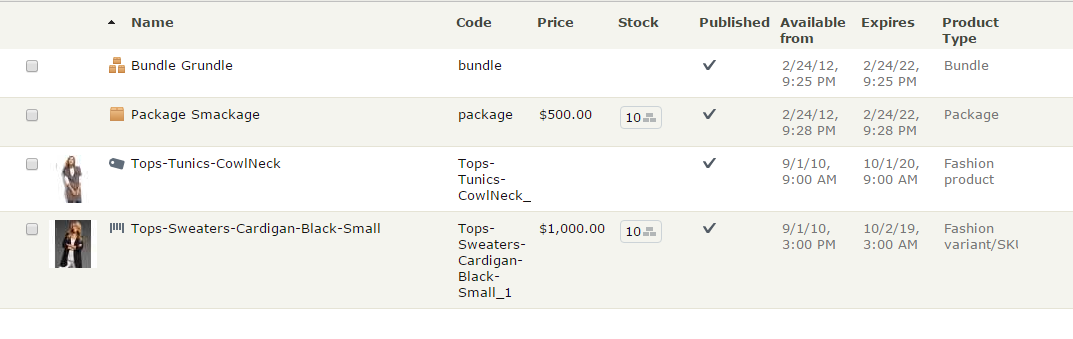
- Product: Well it’s a product. Normally, a Product is a place holder of information, it does not have inventories or prices for itself, so it’s not sell-able. (I’ve seen some customers sell products directly, it’s possible but it will be a lot more of works. I would suggest you to stick with the “standard” implementation instead). A product might have one or more variations.
- Variation/SKU: It’s easiest to explain Product-Variation in term of a TV series. Let’s pick the Panasonic CX680 4K TV for example (I have one of these, it’s a pretty awesome TV by the way). We can have it as a product with all specifications (resolution, OS, features and App). There are 3 variations of its by size. Here’s a screenshot from Panasonic website:
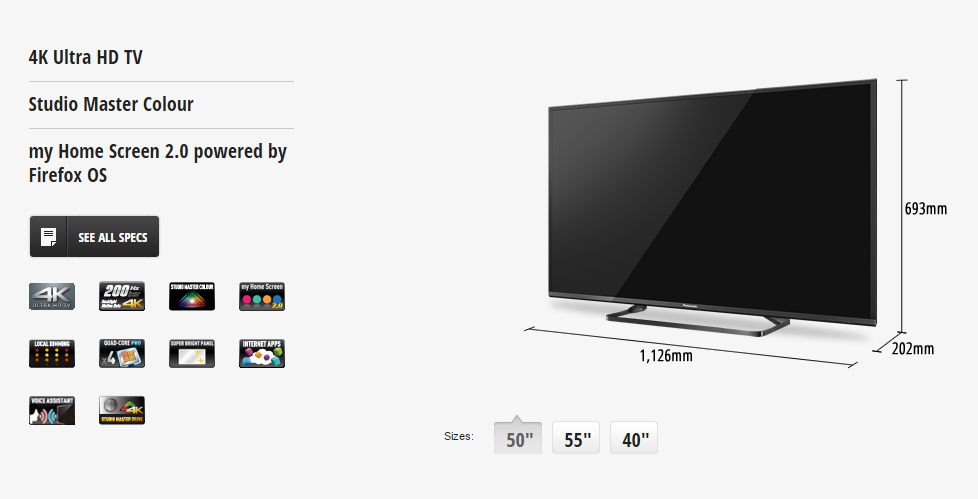
A variation might have its own inventories and prices. In the end, it’s the thing your customers actually buy. However, it’s possible your variations have no products on their own (when each and every variation is unique and don’t share anything with other variation, it does not really make sense to have “products” here).
- Package: A package consists of two or more variations, which itself act as a variation. Think of a package as a collection of items. You might have Harry Potter books as seven variations, and then you have a collection of them as a package. Package has its own prices and inventories. Therefore, when you buy, you all of items as one. Customers should not have the ability to change the quantity or remove items from a package. 3
- Bundle: A bundle is just a collection of things you can add to the cart at once, but then they acts as individual items. They are something customers buy together, but are not forced to do so. You can change quantity of or remove items from the cart if you’d like to. Bundles have no prices or inventories of its own.
And then comes the tangible relations and associations between them.
There are three type of relations between entries:
-
ProductVariationbetween a product and its variations. -
BundleEntrybetween a bundle and its entries. -
PackageEntrybetween a package and its entries.
Those relations are stored in CatalogEntryRelation table, and are managed by the the Variants tab (for Products) or Package Entries (for Packages) or Bundle Entries (for Bundle)
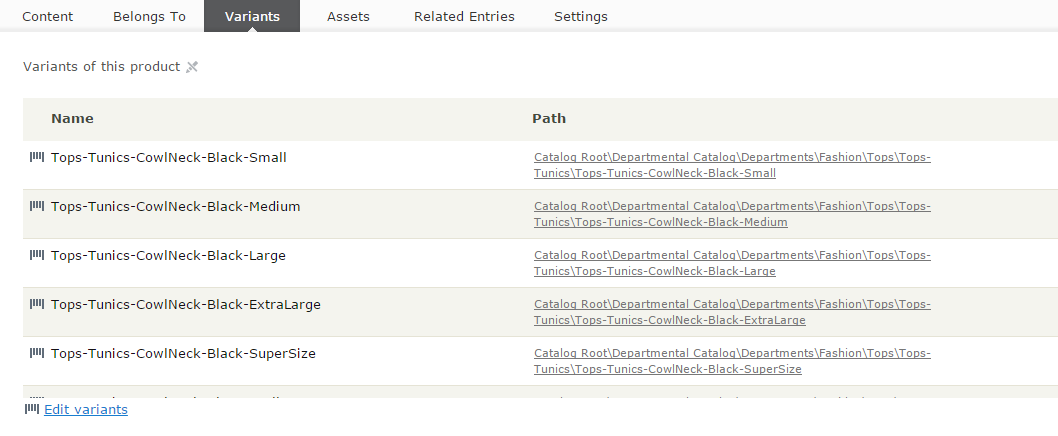 .
.
If you look at the tab Variations/SKUs when editing a Product in Commerce Manager, you’ll see “Quantity” column. This is not entirely correct as the Quantity is never used in a ProductVariation relation. Catalog UI reflects this better. It only matters in BundleEntry and PackageEntry relations.
And then between entries, you can set the associations. It can be the “CrossSell” or “UpSell” items that you might want to show in “You might also want” section when a customer browses a product detail page. The associations are stored in CatalogEntryAssociation and CatalogAssociation table.
Variations
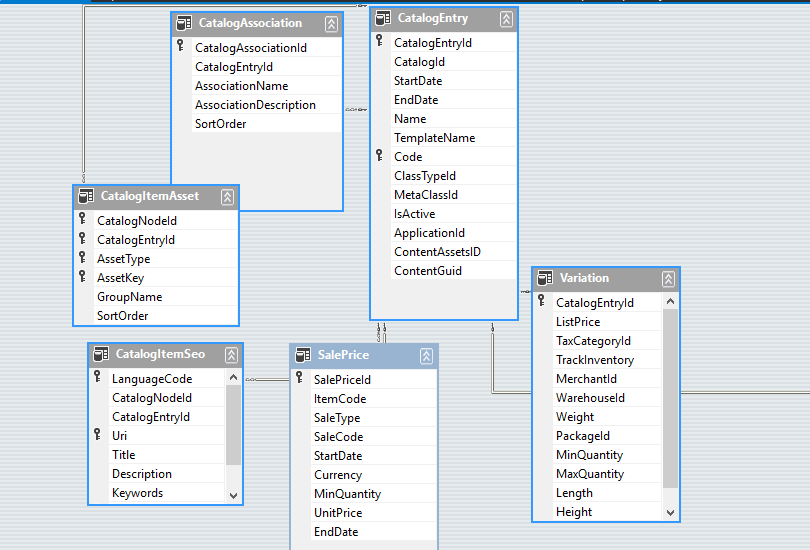
As the most important entry types in the system, variation and package receive a bit of special treatment. While they share some tables with other entry types, they have one specific table, Variation, which contains some of very important information about your SKU. You can view or edit those values in the Pricing tab in both Commerce Manager and Catalog UI:
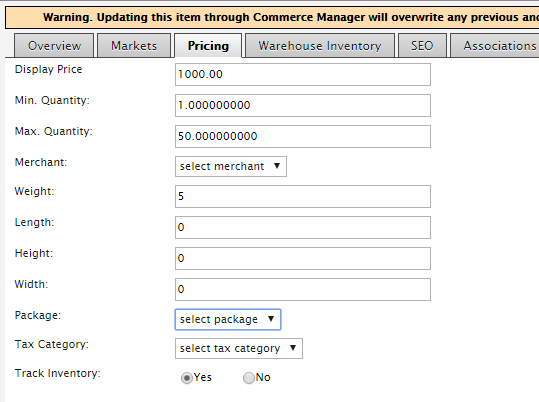
- Display Price (or List Price) is an interesting field - it’s long obsolete since R3 with the birth of pricing system, however, if you have a catalog exported from old version, it might still be there. If you delete the value (aka set the value to be null), the field will be hidden. This field is not mapped to any property in strongly typed content, nor displayed in Catalog UI.
- Min Quantity and Max Quantity are the lower and upper limit a customer can add this SKU to cart. Those values will be used in several workflows during checkout, so they are particularly useful if you want to configure something like “Only buy by batch of at least 4”, “Only 10 per cart”, etc. Note that almost every value of quantity in Episerver Commerce is stored in decimal. While this might not really be useful in normal shop (it does not really make sense to have 1.5 TV or 2.3 Bluray discs, right?), it’s a must for B2B scenarios or liquor stores.
- Merchant is a field supposed to identify the merchant provides this SKU, but I hardly see any real world uses of it. This is not reflected in strongly typed content.
- Weight: It should describe itself, but note: this is only the value without unit. It’s supposed that the unit is the base weight setting of the Catalog. (which, by default, can be either kilograms or pounds). Episerver Commerce does not really use the unit in any calculations, the setting is more of a convention. You can assume that the unit of the weight, for example, as gram instead. But in most of the cases, sticking with the setting would help you avoid later confusions.
- Height, Width and Length: Those are values of the dimensions. Like weight, they are not tied to an unit. You can set the unit in the base length setting of the Catalog (which is by default, is null, but you can choose between inches and centimeters).
- Package: Choose the shipping package the SKU might come with. You can define the packages in Administration/Order System/Shipping/Shipping Packages section of Commerce Manager. Prior to 8.7, it comes with dimension (Height, Width and Length) settings and is the only way to define the shipping dimensions, but you now can use much more convenient way with the
Height,WidthandLengthattributes. However, this is still useful when you have non-box SKUs, such as flower vases. - Tax category: The tax category this SKU belong to. You usually don’t update this manually, but you can still go to Administration/Order System/Tax Configuration to add a tax category and try. We will discuss more about this in Chapter 8
- Track Inventory: This is one important flag. If it’s set to false it does mean you don’t want to track the inventory of this SKU, so any check for inventory such as available quantity etc will be skipped during checkout. That can be useful in cases such as your SKU is a software and is distributed via download.
The standard configuration
The most common configuration of catalog is product-variation. One product has multiple variants in size, color, material. It is, however, not the only configuration.
Another fairly common case is to have standalone SKUs. So a variant is an entry of its own and does not belong to a product. Because variant already has prices and inventory information of its own, it’s not a problem. The only thing that needs to be kept in mind - a content is only route-able if it has a “template”. If you are using MVC for example, to route to your MyVariantContent, you would need to define a controller take inherit from ContentController<MyVariantContent> - and that’s all it takes.
Another, less common scenario is the product-product-variant. The first level product defines general information, like T-shirt. The second level product defines size, while the variants defines other information like color. This is used in a few websites - and to be honest I’m not sure why it’s needed. It requires customizations on framework level and the benefits aren’t that clear. In my opinion, yes, you can, but that doesn’t mean you should.
The two systems.
As mentioned in the brief history, Episerver Commerce was based on Mediachase eCF. Mediachase eCF built its catalog API:s around one interface - ICatalogSystem (If you worked with Commerce R3 and earlier, you might use the instance of it instead - CatalogContext.Current). ICatalogSystem methods use mostly DTO objects as inputs and outputs. The DTO:s are actually typed DataSets, and in most case, maps to several tables in database.
ICatalogSystem had its days. By today standards, it might not be the best API design, but it worked quite well until Commerce R3, which is the compatibility release for Episerver CMS 7. The biggest new feature in CMS 7 was the content concept (Before that, we had pages, and pages), so it became a big demand to have a content API:s to work with catalog/node/entry, and Episerver Commerce can be considered as a first-class product in Episerver framework. It was made real in Commerce 7.5, and has been improved and refined ever since.
The content API:s to work with catalog content use ICatalogSystem internally. To be fair, ICatalogSystem is a fast, proved, reliable API:s, so why not use it directly?
Firstly, using the new API:s means you use the same API:s as the Episerver CMS. Working on a unified API:s allow you to increase the code-recognition. Once you’re familiar with the API:s, it’ll be much quicker for you to know what the intention the code are doing to do (code-read), and much unlikely for you to use wrong method (code-write). In the end, it’s your productivity which improves.
Secondly, the new API:s use a much more efficient caching mechanism, or it’s the old system which does not cache thing very effectively. For the content way, if you load an object, you can cache it by its ContentReference and that’s it. Every call to that ContentReference will hit the cache easily. Caching the DTO:s is a much harder problem. A CatalogEntryDto, for example, can have multiple rows, and depends on the ResponseGroup you specified, the data in some table might not be present. You get the cache, but hey, do you know if the next time can you re-use it when your parameters change?
Thirdly, with the content way, you can read or update both of the “static” properties and the metafields in the same API:s. They are, after all, just properties. With the old way of ICatalogSystem, you can only update static properties and will need the help from MetaObject when you want to read or update the metafields.
Finally, the POCO (Plain Old C# Object) approach in the content way is arguably move intuitive than the DTO:s (DataSet:s) approach of ICatalogSystem. Let’s see how to change a name of an EntryContentBase vs a CatalogEntryDto:
1 entryContent.Name = "This is new name";
vs
1 entryDto.CatalogEntry[0].Name = "This is new name";
Tell me, which one will catch your eyes?
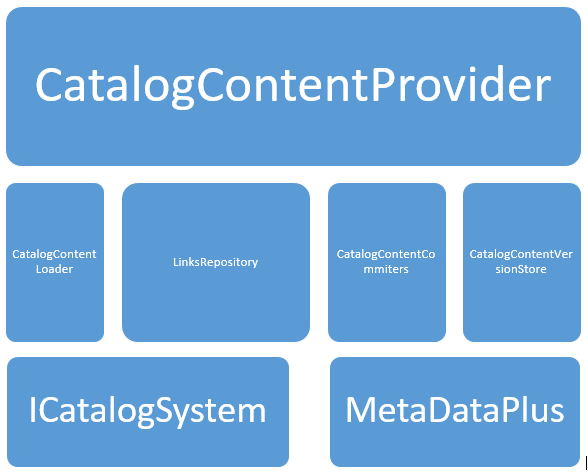
And one other approach - when you work with versions, ICatalogSystem simply provide nothing to work with versions. New content API:s are simply superior because they are designed to work with versioning.
In short, if you start your Episerver Commerce project today, you should be using the latest and greatest version (Episerver releases new packages of Commerce every one or two weeks, to it’s always a best practice to keep to up-to-date as much as possible), and you should be using the IContentRepository. There are very little reasons to use ICatalogSystem (well, there always is a reason for something), but you should always think about the content way first. It’s the way forward.
ReferenceConverter - the bridge.
One of the biggest features in Episerver CMS is its content provider system, which allow you to plug your own content provider to the system. So anything can be considered content, and can be manipulated with one unified API:s. However, to do that, you have to solve the first issue - the identity.
There are two problems Commerce team had to solve when they tried to plug the catalog structure into the content provider system. Firstly, the data are stored in three separated tables (and you might already know, Catalog, CatalogNode and CatalogEntry), with the auto incremented identity. So a content with ID = 1 can be a Catalog, a Node or an Entry. Secondly, there can be multiple catalogs, while you need a “root” content to attach your content provider system.
The second one can be easily resolved by introducing a virtual root. It’s just another content, but virtual, meaning you can never edit or delete it. It’s there, created on the fly whenever you need it. But the first one is a bit tricky. That was when ReferenceConverter came to life.
The content provider system requires every content to be identified by a specific ContentReference, which is supposed to be unique in the system. A ContentReference consists of three parts:
A sample catalog content reference: 123_1_CatalogContent
- The first one is the content id, which is mandatory. The ID is supposed to be unique within the system.
- The
WorkId, which identifies the version of the content. - The content provider name. This allows the content system to know which provider should be handling the content - in this case - the content repository knows it should let
CatalogContentProviderhandle this content. For catalog content, it’s alwaysCatalogContentProviderwho does the leg works. 45
ReferenceConverter was a small class resides in Mediachase.Commerce namespace, it’s not very “small” now, but in this section we only discuss its three “base” methods:
 1 public class ReferenceConverter
 2     {
 3         /// <summary>
 4         /// Gets a <see cref="ContentReference"/> instance with the specified commer\
 5 ce object ID and type
 6         /// encoded in the content ID.
 7         /// </summary>
 8         public virtual ContentReference GetContentLink(int objectId, CatalogContentT\
 9 ype contentType, int versionId)
10
11         /// <summary>
12         /// Gets the actual id of commerce object.
13         /// </summary>
14         public virtual int GetObjectId(ContentReference contentLink)
15
16         /// <summary>
17         /// Gets the type of the commerce object. Parse the content ID to take two m\
18 ost significant bits to
19         /// determine CatalogContentType.
20         /// </summary>
21         public virtual CatalogContentType GetContentType(ContentReference contentLin\
22 k)
23
24         ...
25     }
These are two most interesting parts of the class. As I said above, the content id is supposed to be unique, while the catalog id, catalog node id and catalog entry id are not. The solution? Bitwise comes to rescue.[^foo33]
Episerver Commerce use the first two bits of the id to store the content type. So basically:
- 00: CatalogEntry
- 01: CatalogNode
- 10: Catalog
- 11: Do you want to guess? Well, it’s the Catalog root. You can always get the root’s content link by
GetRootLink()method ofReferenceConverter. It’s always the boring same content reference every time.
So these methods work in an extremely efficient way to convert the id to ContentReference back and forth: From an id, add the two first bit (MSB - most significant bit), based on the content type, then add the fixed content provider name (CatalogContent) to get the ContentReference. From a ContentReference, clear the two first bits to get back the id. Easy, huh? 6