Using LLMs To Organize Information in Our Google Drives
My digital life consists of writing, working as an AI practitioner, and learning activities that I justify with my self-image of a “gentleman scientist.” Cloud storage like GitHub, Google Drive, Microsoft OneDrive, and iCloud are central to my activities.
About ten years ago I spent two months of my time writing a system in Clojure that was planned to be my own custom and personal DropBox, augmented with various NLP tools and a FireFox plugin to send web clippings directly to my personal system. To be honest, I stopped using my own project after a few months because the time it took to organize my information was a greater opportunity cost than the value I received.
In this chapter I am going to walk you through parts of a new system that I am developing for my own personal use to help me organize my material on Google Drive (and eventually other cloud services). Don’t be surprised if the completed project is an additional example in a future edition of this book!
With the Google setup directions listed below, you will get a pop-up web browsing window with a warning like (this shows my Gmail address, you should see your own Gmail address here assuming that you have recently logged into Gmail using your default web browser):
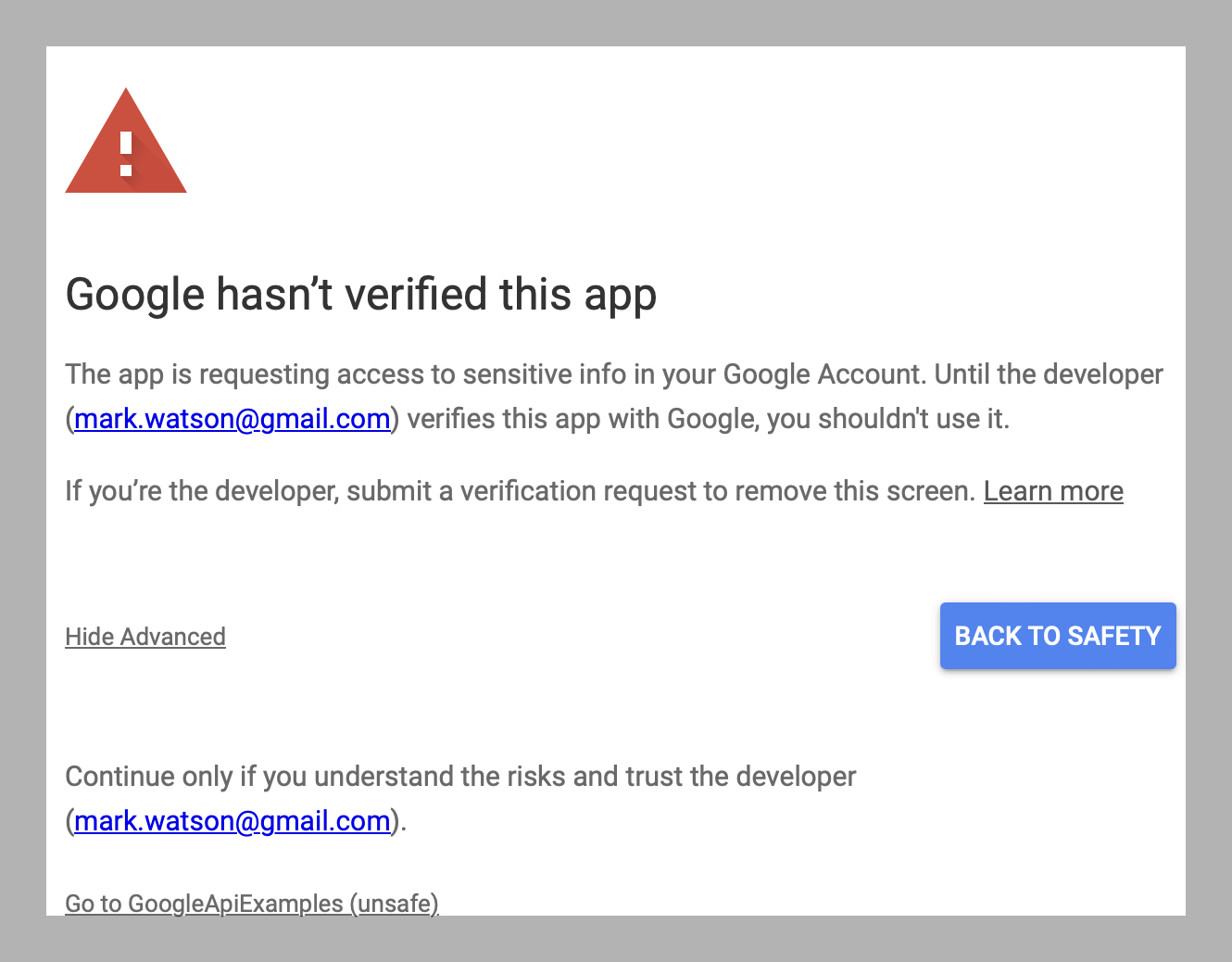
You will need to first click Advanced and then click link Go to GoogleAPIExamples (unsafe) link in the lower left corner and then temporarily authorize this example on your Gmail account.
Setting Up Requirements.
You need to create a credential at https://console.cloud.google.com/cloud-resource-manager (copied from the PyDrive documentation, changing application type to “Desktop”):
- Search for ‘Google Drive API’, select the entry, and click ‘Enable’.
- Select ‘Credentials’ from the left menu, click ‘Create Credentials’, select ‘OAuth client ID’.
- Now, the product name and consent screen need to be set -> click ‘Configure consent screen’ and follow the instructions. Once finished:
- Select ‘Application type’ to be Desktop application.
- Enter an appropriate name.
- Input http://localhost:8080 for ‘Authorized JavaScript origins’.
- Input http://localhost:8080/ for ‘Authorized redirect URIs’.
- Click ‘Save’.
- Click ‘Download JSON’ on the right side of Client ID to download client_secret_.json. Copy the downloaded JSON credential file to the example directory google_drive_llm for this chapter.
Write Utility To Fetch All Text Files From Top Level Google Drive Folder
For this example we will just authenticate our test script with Google, and copy all top level text files with names ending with “.txt” to the local file system in subdirectory data. The code is in the directory google_drive_llm in file fetch_txt_files.py (edited to fit page width):
 1 from pydrive.auth import GoogleAuth
 2 from pydrive.drive import GoogleDrive
 3 from pathlib import Path
 4
 5 # good GD search docs:
 6 # https://developers.google.com/drive/api/guides/search-files
 7
 8 # Authenticate with Google
 9 gauth = GoogleAuth()
10 gauth.LocalWebserverAuth()
11 drive = GoogleDrive(gauth)
12
13 def get_txt_files(dir_id='root'):
14     " get all plain text files with .txt extension in top level Google Drive directo\
15 ry "
16
17     file_list = drive.ListFile({'q': f"'{dir_id}' in parents and trashed=false"}).Ge\
18 tList()
19     for file1 in file_list:
20         print('title: %s, id: %s' % (file1['title'], file1['id']))
21     return [[file1['title'], file1['id'], file1.GetContentString()]
22             for file1 in file_list
23               if file1['title'].endswith(".txt")]
24
25 def create_test_file():
26     " not currently used, but useful for testing. "
27
28     # Create GoogleDriveFile instance with title 'Hello.txt':
29     file1 = drive.CreateFile({'title': 'Hello.txt'})
30     file1.SetContentString('Hello World!')
31     file1.Upload()
32
33 def test():
34     fl = get_txt_files()
35     for f in fl:
36         print(f)
37         file1 = open("data/" + f[0],"w")
38         file1.write(f[2])
39         file1.close()
40
41 if __name__ == '__main__':
42     test()
For testing I just have one text file with the file extension “.txt” on my Google Drive so my output from running this script looks like the following listing. I edited the output to change my file IDs and to only print a few lines of the debug printout of file titles.
 1 $ python fetch_txt_files.py
 2 Your browser has been opened to visit:
 3
 4     https://accounts.google.com/o/oauth2/auth?client_id=529311921932-xsmj3hhiplr0dhq\
 5 jln13fo4rrtvoslo8.apps.googleusercontent.com&redirect_uri=http%3A%2F%2Flocalhost%3B6
 6 180%2F&scope=https%3A%2F%2Fwww.googleapis.com%2Fauth%2Fdrive&access_type=offline&res
 7 ponse_type=code
 8
 9 Authentication successful.
10
11 title: testdata, id: 1TZ9bnL5XYQvKACJw8VoKWdVJ8jeCszJ
12 title: sports.txt, id: 18RN4ojvURWt5yoKNtDdAJbh4fvmRpzwb
13 title: Anaconda blog article, id: 1kpLaYQA4Ao8ZbdFaXU209hg-z0tv1xA7YOQ4L8y8NbU
14 title: backups_2023, id: 1-k_r1HTfuZRWN7vwWWsYqfssl0C96J2x
15 title: Work notes, id: 1fDyHyZtKI-0oRNabA_P41LltYjGoek21
16 title: Sedona Writing Group Contact List, id: 1zK-5v9OQUfy8Sw33nTCl9vnL822hL1w
17  ...
18 ['sports.txt', '18RN4ojvURWt5yoKNtDdAJbh4fvmRpzwb', 'Sport is generally recognised a\
19 s activities based in physical athleticism or physical dexterity.[3] Sports are usua
20 lly governed by rules to ensure fair competition and consistent adjudication of the
21 winner.\n\n"Sport" comes from the Old French desport meaning "leisure", with the old
22 est definition in English from around 1300 being "anything humans find amusing or en
23 tertaining".[4]\n\nOther bodies advocate widening the definition of sport to include
24  all physical activity and exercise. For instance, the Council of Europe include all
25  forms of physical exercise, including those completed just for fun.\n\n']
Generate Vector Indices for Files in Specific Google Drive Directories
The example script in the last section should have created copies of the text files in you home Google Documents directory that end with “.txt”. Here, we use the same LlamaIndex test code that we used in a previous chapter. The test script index_and_QA.py is listed here:
 1 # make sure you set the following environment variable is set:
 2 #   OPENAI_API_KEY
 3
 4 from llama_index import GPTSimpleVectorIndex, SimpleDirectoryReader
 5 documents = SimpleDirectoryReader('data').load_data()
 6 index = GPTSimpleVectorIndex(documents)
 7
 8 # save to disk
 9 index.save_to_disk('index.json')
10 # load from disk
11 index = GPTSimpleVectorIndex.load_from_disk('index.json')
12
13 # search for a document
14 print(index.query("What is the definition of sport?"))
For my test file, the output looks like:
 1 $ python index_and_QA.py
 2 INFO:llama_index.token_counter.token_counter:> [build_index_from_documents] Total LL\
 3 M token usage: 0 tokens
 4 INFO:llama_index.token_counter.token_counter:> [build_index_from_documents] Total em\
 5 bedding token usage: 111 tokens
 6 INFO:llama_index.token_counter.token_counter:> [query] Total LLM token usage: 202 to\
 7 kens
 8 INFO:llama_index.token_counter.token_counter:> [query] Total embedding token usage: \
 9 7 tokens
10
11 Sport is generally recognised as activities based in physical athleticism or physica\
12 l dexterity that are governed by rules to ensure fair competition and consistent adj
13 udication of the winner. It is anything humans find amusing or entertaining, and can
14  include all forms of physical exercise, even those completed just for fun.
It is interesting to see how the query result is rewritten in a nice form, compared to the raw text in the file sports.txt on my Google Drive:
 1 $ cat data/sports.txt
 2 Sport is generally recognised as activities based in physical athleticism or physica\
 3 l dexterity.[3] Sports are usually governed by rules to ensure fair competition and
 4 consistent adjudication of the winner.
 5
 6 "Sport" comes from the Old French desport meaning "leisure", with the oldest definit\
 7 ion in English from around 1300 being "anything humans find amusing or entertaining"
 8 .[4]
 9
10 Other bodies advocate widening the definition of sport to include all physical activ\
11 ity and exercise. For instance, the Council of Europe include all forms of physical
12 exercise, including those completed just for fun.
Google Drive Example Wrap Up
If you already use Google Drive to store your working notes and other documents, then you might want to expand the simple example in this chapter to build your own query system for your documents. In addition to Google Drive, I also use Microsoft Office 365 and OneDrive in my work and personal projects.
I haven’t written my own connectors yet for OneDrive but this is on my personal to-do list using the Microsoft library https://github.com/OneDrive/onedrive-sdk-python.