Retrieval Augmented Generation (RAG) Applications
Note: August 27, 2024: pinned library versions.
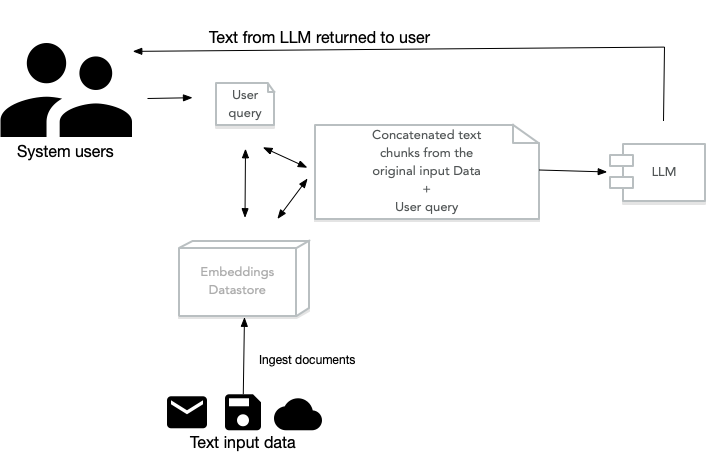
Retrieval Augmented Generation (RAG) Applications work by pre-processing a user’s query to search for indexed document fragments that are semantically similar to the user’s query. These fragments are concatenated together as context text that is attached to the user’s query and then passed of to a LLM model. The LLM can preferentially use information in this context text as well as innate knowledge stored in the LLM to process user queries.
Simple RAG Example Using LlamaIndex
We will start with an example that only uses a vector store to find documents similar to the text in a query. Here is a listing of rag/simple_llama_index_retrieve_docs.py.
The code imports VectorStoreIndex and Document from the llama_index.core module. It then defines a list of strings, each describing aspects of LlamaIndex, and converts these strings into Document objects. These documents are then used to create an index using VectorStoreIndex.from_documents(documents), which builds an index from the provided documents. This index is capable of understanding and storing the text data in a structured form that can be efficiently queried.
Following the index creation, the code initializes a query engine with index.as_query_engine(), which allows for querying the indexed data. The query “What is LlamaIndex?” is passed to the retrieve method of the query engine. This method processes the query against the indexed documents to find relevant information. The results are then printed. This demonstrates a basic use case of LlamaIndex for text retrieval where the system identifies and retrieves information directly related to the user’s query from the indexed data. In practice we usually combine the use of vector stores with LLM chat models, as we do in later examples.
 1 from llama_index.core import VectorStoreIndex
 2 from llama_index.core import Document
 3
 4 text_list = ["LlamaIndex is a powerful tool for LLM applications.",
 5              "It helps in structuring and retrieving data efficiently."]
 6 documents = [Document(text=t) for t in text_list]
 7
 8 index = VectorStoreIndex.from_documents(documents)
 9 query_engine = index.as_query_engine()
10
11 retrieved_docs = query_engine.retrieve("What is LlamaIndex?")
12 print(retrieved_docs)
The output looks like:
 1  $ python simple_llama_index_retrieve_docs.py
 2 [NodeWithScore(node=TextNode(id_='504482a2-e633-4d08-9bbe-363b42e67cde', embedding=N\
 3 one, metadata={}, excluded_embed_metadata_keys=[], excluded_llm_metadata_keys=[], re
 4 lationships={<NodeRelationship.SOURCE: '1'>: RelatedNodeInfo(node_id='876b1b31-116e-
 5 4c31-a65d-1d9ae3bbe6a4', node_type=<ObjectType.DOCUMENT: '4'>, metadata={}, hash='7d
 6 d73651a571de869137f2fc94f74d158ecbd7901ed81576ad7172de96394464')}, text='LlamaIndex
 7 is a powerful tool for LLM applications.', start_char_idx=0, end_char_idx=51, text_t
 8 emplate='{metadata_str}\n\n{content}', metadata_template='{key}: {value}', metadata_
 9 seperator='\n'), score=0.9153632840140399), NodeWithScore(node=TextNode(id_='694d071
10 9-b6cc-4053-9c29-2cba0fc1f564', embedding=None, metadata={}, excluded_embed_metadata
11 _keys=[], excluded_llm_metadata_keys=[], relationships={<NodeRelationship.SOURCE: '1
12 '>: RelatedNodeInfo(node_id='b9411d72-f945-4553-8cb4-5b55754e9b56', node_type=<Objec
13 tType.DOCUMENT: '4'>, metadata={}, hash='2813e9c7d682d7dec242363505166e9696fbf7a4958
14 ec6e1c2ed8e47389f70c6')}, text='It helps in structuring and retrieving data efficien
15 tly.', start_char_idx=0, end_char_idx=56, text_template='{metadata_str}\n\n{content}
16 ', metadata_template='{key}: {value}', metadata_seperator='\n'), score=0.74424191545
17 64265)]
I almost never use just a vector index by itself. The next example is in the file simple_rag_llama_index.py.
This code demonstrates the use of the LlamaIndex library to process, index, and query text data, specifically focusing on extracting information about sports from a dataset. The code imports necessary classes from the llama_index library. VectorStoreIndex is used for creating a searchable index of documents.
SimpleDirectoryReader reads documents from a specified directory. OpenAIEmbedding is used to convert text into numerical embeddings using OpenAI’s models. SentenceSplitter and TitleExtractor are used for preprocessing the text by splitting it into sentences and extracting titles, respectively. The ingestion pipeline configuration object IngestionPipeline is configured with three transformations:
- SentenceSplitter breaks the text into smaller chunks or sentences with specified chunk_size and chunk_overlap. This helps in managing the granularity of text processing.
- TitleExtractor pulls out titles from the text, which can be useful for summarizing or categorizing documents.
- OpenAIEmbedding converts the processed text into vector embeddings. These embeddings represent the text in a high-dimensional space, capturing semantic meanings which are crucial for effective searching and querying.
We use SimpleDirectoryReader to convert the text files in a directory to a list or document objects:
1 documents = SimpleDirectoryReader("../data_small").load_data()
As in the last example, we create a vector store object fro the list of document objects:
1 index = VectorStoreIndex.from_documents(documents)
The index is built using the vector embeddings generated by OpenAIEmbedding, allowing for semantic search capabilities.
The statement
1 query_engine = index.as_query_engine()
sets up a query engine from the index. This engine can process queries to find relevant documents based on their semantic content.
Finally we are ready to make a test query:
1 response = query_engine.query("List a few sports")
The engine searches through the indexed documents and retrieves information that semantically matches the query about sports.
Here is a complete code listing for this example:
 1 from llama_index.core import VectorStoreIndex, SimpleDirectoryReader
 2 from llama_index.embeddings.openai import OpenAIEmbedding
 3 from llama_index.core.node_parser import SentenceSplitter
 4 from llama_index.core.extractors import TitleExtractor
 5 from llama_index.core.ingestion import IngestionPipeline
 6
 7 pipeline = IngestionPipeline(
 8     transformations=[
 9         SentenceSplitter(chunk_size=25, chunk_overlap=0),
10         TitleExtractor(),
11         OpenAIEmbedding(),
12     ]
13 )
14
15 documents = SimpleDirectoryReader("../data_small").load_data()
16 index = VectorStoreIndex.from_documents(documents)
17
18 query_engine = index.as_query_engine()
19 response = query_engine.query("List a few sports")
20
21 print(response)
The output looks like:
1 $ python simple_rag_llama_index.py
2 Football, basketball, tennis, swimming, and cycling.
RAG With Reranking Example
Reranking in the context of Retrieval-Augmented Generation (RAG) for LLMs refers to a process of adjusting the order of documents retrieved by an initial search query to improve the relevance and quality of the results before they are used for generating responses. This step is crucial because the initial retrieval might fetch a broad set of documents, not all of which are equally relevant to the user’s query.
The primary function of reranking is to refine the selection of documents based on their actual relevance to the expanded query. This is typically achieved by employing more sophisticated models that can better understand the context and nuances of the query and the documents. For instance, cross-encoder models are commonly used in reranking due to their ability to process the query and document simultaneously, providing a more accurate evaluation of relevance.
Just as LLMs have the flexibility to handle a broad range of text topics, different programming languages, etc., reranking mechanisms have the flexibility to handle a wide range of source information as well as a wide range of query types.
For your RAG applications, you should notice a reduction of noise text and irrelevance in RAG system responses to user queries.
The code example is very similar to the last example but we now add a reranker as a query engine postprocessor:
 1 from llama_index.core import VectorStoreIndex, SimpleDirectoryReader
 2 from llama_index.embeddings.openai import OpenAIEmbedding
 3 from llama_index.core.node_parser import SentenceSplitter
 4 from llama_index.core.extractors import TitleExtractor
 5 from llama_index.core.ingestion import IngestionPipeline
 6 from llama_index.core.postprocessor import SentenceTransformerRerank
 7
 8 # Set up the ingestion pipeline with transformations
 9 pipeline = IngestionPipeline(
10     transformations=[
11         SentenceSplitter(chunk_size=25, chunk_overlap=0),
12         TitleExtractor(),
13         OpenAIEmbedding(),
14     ]
15 )
16
17 # Load documents using a directory reader
18 documents = SimpleDirectoryReader("../data_small").load_data()
19
20 # Create an index from the documents
21 index = VectorStoreIndex.from_documents(documents)
22
23 # Initialize the reranker with a specific model
24 reranker = SentenceTransformerRerank(
25     model="cross-encoder/ms-marco-MiniLM-L-12-v2",  # Example model, adjust as needed
26     top_n=3  # Adjust the number of top documents to rerank
27 )
28
29 # Set up the query engine with the reranker as a postprocessor
30 query_engine = index.as_query_engine(
31     similarity_top_k=10,  # Set for how many results to retrieve before reranking
32     node_postprocessors=[reranker]  # Add the reranker to the postprocessing steps
33 )
34
35 # Perform a query
36 response = query_engine.query("List a few sports")
37
38 # Print the response
39 print(response)
The output is similar to before:
1 List a few sports: basketball, soccer, tennis, swimming, and cycling.
Let’s try a more complex query and instead of just using the document directory ../data_small that only contains information about sports, we will now use the text documents in ../data that cover more general topics. We make two code changes. First we use a different document directory:
1 documents = SimpleDirectoryReader("../data").load_data()
We also change the query:
1 response = query_engine.query("Compare sports with the study of health issues")
The output looks like:
1 Sports are activities based on physical athleticism or dexterity, often governed by \
2 rules to ensure fair competition. On the other hand, the study of health issues invo
3 lves analyzing the production, distribution, and consumption of goods and services r
4 elated to health and well-being. While sports focus on physical activities and exerc
5 ise for leisure or competition, the study of health issues delves into understanding
6  and addressing various aspects of physical and mental well-being, including disease
7 s, treatments, and preventive measures.
RAG on CSV Spreadsheet Files
TBD