Using DBPedia and WikiData as Knowledge Sources
Both DBPedia and Wikidata are public Knowledge Graphs (KGs) that store data as Resource Description Framework (RDF) and are accessed through the SPARQL Query Language for RDF. The examples for this project are in the GitHub repository for this book in the directory kg_search.
I am not going to spend much time here discussing RDF and SPARQL. Instead I ask you to read online the introductory chapter Linked Data, the Semantic Web, and Knowledge Graphs in my book A Lisp Programmer Living in Python-Land: The Hy Programming Language.
As we saw in the last chapter, a Knowledge Graph (that I often abbreviate as KG) is a graph database using a schema to define types (both objects and relationships between objects) and properties that link property values to objects. The term “Knowledge Graph” is both a general term and also sometimes refers to the specific Knowledge Graph used at Google which I worked with while working there in 2013. Here, we use KG to reference the general technology of storing knowledge in graph databases.
DBPedia and Wikidata are similar, with some important differences. Here is a summary of some similarities and differences between DBPedia and Wikidata:
- Both projects aim to provide structured data from Wikipedia in various formats and languages. Wikidata also has data from other sources so it contains more data and more languages.
- Both projects use RDF as a common data model and SPARQL as a query language.
- DBPedia extracts data from the infoboxes in Wikipedia articles, while Wikidata collects data entered through its interfaces by both users and automated bots.
- Wikidata requires sources for its data, while DBPedia does not.
- DBpedia is more popular in the Semantic Web and Linked Open Data communities, while Wikidata is more integrated with Wikimedia projects.
To the last point: I personally prefer DBPedia when experimenting with the semantic web and linked data, mostly because DBPedia URIs are human readable while Wikidata URIs are abstract. The following URIs represent the town I live in, Sedona Arizona:
- DBPedia: https://dbpedia.org/page/Sedona,_Arizona
- Wikidata: https://www.wikidata.org/wiki/Q80041
In RDF we enclose URIs in angle brackets like <https://www.wikidata.org/wiki/Q80041>.
If you read the chapter on RDF and SPARQL in my book link that I mentioned previously, then you know that RDF data is represented by triples where each part is named:
- subject
- property
- object
We will look at two similar examples in this chapter, one using DBPedia and one using Wikidata. Both services have SPARQL endpoint web applications that you will want to use for exploring both KGs. We will look at the DBPedia web interface later. Here is the Wikidata web interface:
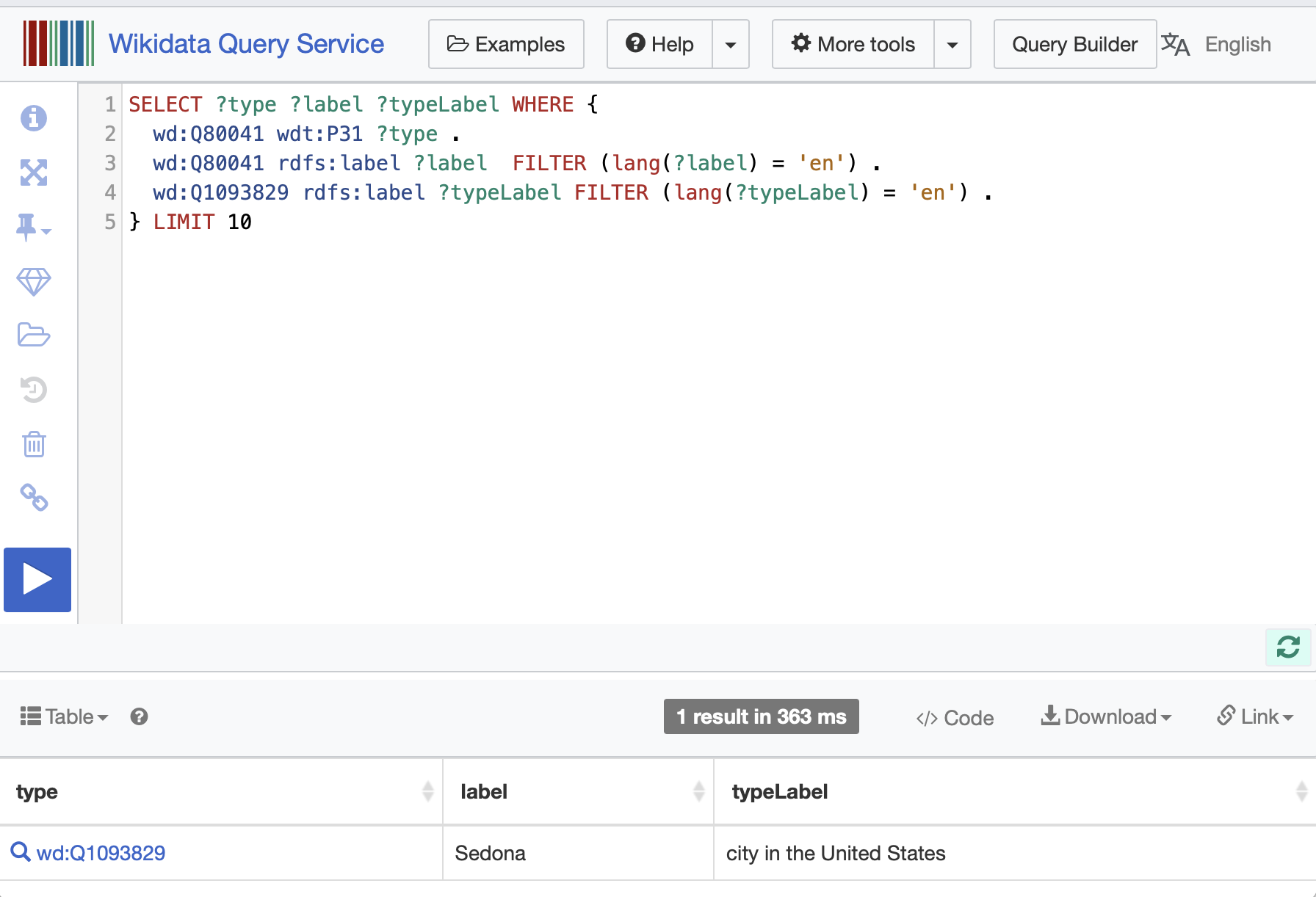
In this SPARQL query the prefix wd: stands for Wikidata data while the prefix wdt: stands for Wikidata type (or property). The prefix rdfs: stands for RDF Schema.
Using DBPedia as a Data Source
DBpedia is a community-driven project that extracts structured content from Wikipedia and makes it available on the web as a Knowledge Graph (KG). The KG is a valuable resource for researchers and developers who need to access structured data from Wikipedia. With the use of SPARQL queries to DBpedia as a data source we can write a variety applications, including natural language processing, machine learning, and data analytics. We demonstrate the effectiveness of DBpedia as a data source by presenting several examples that illustrate its use in real-world applications. In my experience, DBpedia is a valuable resource for researchers and developers who need to access structured data from Wikipedia.
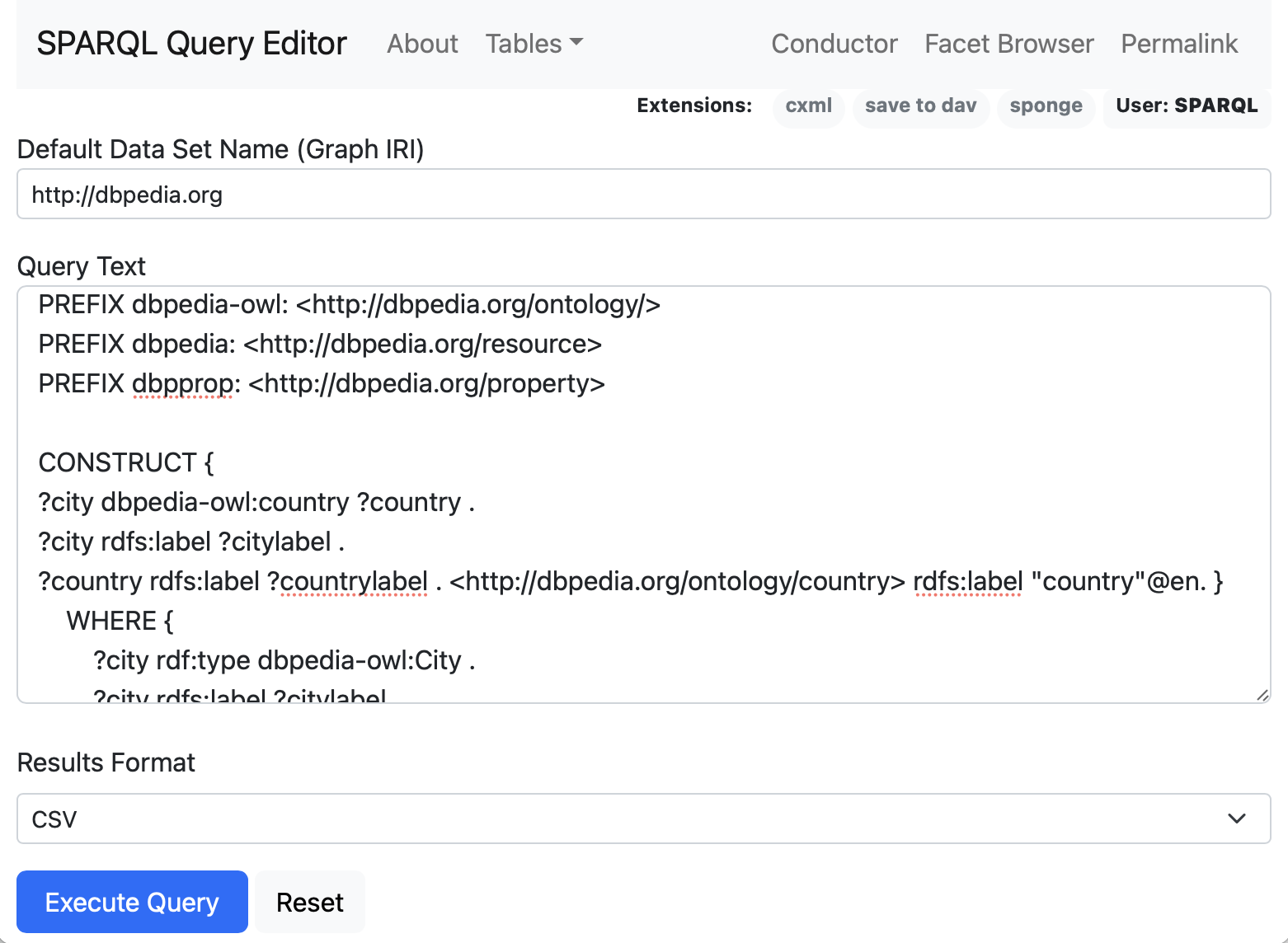
In general you will start projects using DBPedia by exploring available data using the web app https://dbpedia.org/sparql that can be seen in this screen shot:
The following listing of file dbpedia_generate_rdf_as_nt.py shows Python code for making a SPARQL query to DBPedia and saving the results as RDF triples in NT format in a local text file:
 1 from SPARQLWrapper import SPARQLWrapper
 2 from rdflib import Graph
 3
 4 sparql = SPARQLWrapper("http://dbpedia.org/sparql")
 5 sparql.setQuery("""
 6     PREFIX dbpedia-owl: <http://dbpedia.org/ontology/>
 7     PREFIX dbpedia: <http://dbpedia.org/resource>
 8     PREFIX dbpprop: <http://dbpedia.org/property>
 9
10     CONSTRUCT {
11         ?city dbpedia-owl:country ?country .
12         ?city rdfs:label ?citylabel .
13         ?country rdfs:label ?countrylabel .
14         <http://dbpedia.org/ontology/country> rdfs:label "country"@en .
15     }
16     WHERE {
17         ?city rdf:type dbpedia-owl:City .
18         ?city rdfs:label ?citylabel .
19         ?city dbpedia-owl:country ?country .
20         ?country rdfs:label ?countrylabel .
21         FILTER (lang(?citylabel) = 'en')
22         FILTER (lang(?countrylabel) = 'en')
23     }
24     LIMIT 50
25 """)
26 sparql.setReturnFormat("rdf")
27 results = sparql.query().convert()
28
29 g = Graph()
30 g.parse(data=results.serialize(format="xml"), format="xml")
31
32 print("\nresults:\n")
33 results = g.serialize(format="nt").encode("utf-8").decode('utf-8')
34 print(results)
35
36 text_file = open("sample.nt", "w")
37 text_file.write(results)
38 text_file.close()
Here is the printed output from running this script (most output not shown, and manually edited to fit page width):
 1  $ python generate_rdf_as_nt.py
 2 results:
 3
 4 <http://dbpedia.org/resource/Ethiopia>
 5     <http://www.w3.org/2000/01/rdf-schema#label>
 6     "Ethiopia"@en .
 7 <http://dbpedia.org/resource/Valentin_Alsina,_Buenos_Aires>
 8     <http://www.w3.org/2000/01/rdf-schema#label>
 9     "Valentin Alsina, Buenos Aires"@en .
10 <http://dbpedia.org/resource/Davyd-Haradok>
11     <http://dbpedia.org/ontology/country>
12     <http://dbpedia.org/resource/Belarus> .
13 <http://dbpedia.org/resource/Davyd-Haradok>
14     <http://www.w3.org/2000/01/rdf-schema#label>
15     "Davyd-Haradok"@en .
16 <http://dbpedia.org/resource/Belarus>
17     <http://www.w3.org/2000/01/rdf-schema#label>
18     "Belarus"@en .
19  ...
This output was written to a local file sample.nt. I divided this example into two separate Python scripts because I thought it would be easier for you, dear reader, to experiment with fetching RDF data separately from using a LLM to process the RDF data. In production you may want to combine KG queries with semantic analysis.
This code example demonstrates the use of the GPTSimpleVectorIndex for querying RDF data and retrieving information about countries. The function download_loader loads data importers by string name. While it is not a type safe to load a Python class by name using a string, if you misspell the name of the class to load the call to download_loader then a Python ValueError(“Loader class name not found in library”) error is thrown. The GPTSimpleVectorIndex class represents an index data structure that can be used to efficiently search and retrieve information from the RDF data. This is similar to other types of LlamaIndex vector index types for different types of data sources.
Here is the script dbpedia_rdf_query.py:
 1 "Example from documentation"
 2
 3 from llama_index import GPTSimpleVectorIndex, Document
 4 from llama_index import download_loader
 5
 6 RDFReader = download_loader("RDFReader")
 7 doc = RDFReader().load_data("sample.nt")
 8 index = GPTSimpleVectorIndex(doc)
 9
10 result = index.query("list all countries in a quoted Python array, then explain why")
11
12 print(result.response)
Here is the output:
 1 $ python rdf_query.py
 2 INFO:root:> [build_index_from_documents] Total LLM token usage: 0 tokens
 3 INFO:root:> [build_index_from_documents] Total embedding token usage: 761 tokens
 4 INFO:root:> [query] Total LLM token usage: 921 tokens
 5 INFO:root:> [query] Total embedding token usage: 12 tokens
 6
 7 ['Argentina', 'French Polynesia', 'Democratic Republic of the Congo', 'Benin', 'Ethi\
 8 opia', 'Australia', 'Uzbekistan', 'Tanzania', 'Albania', 'Belarus', 'Vanuatu', 'Arme
 9 nia', 'Syria', 'Andorra', 'Venezuela', 'France', 'Vietnam', 'Azerbaijan']
10
11 This is a list of all the countries mentioned in the context information. All of the\
12  countries are listed in the context information, so this list is complete.
Why are there only 18 countries listed? In the script used to perform a SPARQL query on DBPedia, we had a statement LIMIT 50 at the end of the query so only 50 RDF triples were written to the file sample.nt that only contains data for 18 countries.
Using Wikidata as a Data Source
It is slightly more difficult exploring Wikidata compared to DBPedia. Let’s revisit getting information about my home town of Sedona Arizona.
In writing this example, I experimented with SPARQL queries using the Wikidata SPARQL web app.
We can start by finding RDF statements with the object value being “Sedona” using the Wikidata web app:
1 select * where {
2   ?s ?p "Sedona"@en
3 } LIMIT 30
First we write a helper utility to gather prompt text for an entity name (e.g., name of a person, place, etc.) in the file wikidata_generate_prompt_text.py:
 1 from SPARQLWrapper import SPARQLWrapper, JSON
 2 from rdflib import Graph
 3 import pandas as pd
 4
 5 def get_possible_entity_uris_from_wikidata(entity_name):
 6    sparql = SPARQLWrapper("https://query.wikidata.org/sparql")
 7    sparql.setQuery("""
 8       SELECT ?entity ?entityLabel WHERE {
 9          ?entity rdfs:label "%s"@en .
10       } limit 5
11    """ % entity_name)
12
13    sparql.setReturnFormat(JSON)
14    results = sparql.query().convert()
15
16    results = pd.json_normalize(results['results']['bindings']).values.tolist()
17    results = ["<" + x[1] + ">" for x in results]
18    return [*set(results)] # remove duplicates
19
20 def wikidata_query_to_df(entity_uri):
21    sparql = SPARQLWrapper("https://query.wikidata.org/sparql")
22    sparql.setQuery("""
23       SELECT ?description ?is_a_type_of WHERE {
24         %s schema:description ?description FILTER (lang(?description) = 'en') .
25         %s wdt:P31 ?instanceOf .
26         ?instanceOf rdfs:label ?is_a_type_of FILTER (lang(?is_a_type_of) = 'en') .
27       } limit 10
28    """ % (entity_uri, entity_uri))
29
30    sparql.setReturnFormat(JSON)
31    results = sparql.query().convert()
32    results2 = pd.json_normalize(results['results']['bindings'])
33    prompt_text = ""
34    for index, row in results2.iterrows():
35         prompt_text += row['description.value'] + " is a type of " + row['is_a_type_\
36 of.value'] + "\n"
37    return prompt_text
38
39 def generate_prompt_text(entity_name):
40    entity_uris = get_possible_entity_uris_from_wikidata(entity_name)
41    prompt_text = ""
42    for entity_uri in entity_uris:
43        p = wikidata_query_to_df(entity_uri)
44        if "disambiguation page" not in p:
45            prompt_text += entity_name + " is " + wikidata_query_to_df(entity_uri)
46    return prompt_text
47
48 if __name__ == "__main__":
49    print("Sedona:", generate_prompt_text("Sedona"))
50    print("California:",
51          generate_prompt_text("California"))
52    print("Bill Clinton:",
53          generate_prompt_text("Bill Clinton"))
54    print("Donald Trump:",
55           generate_prompt_text("Donald Trump"))
This utility does most of the work in getting prompt text for an entity.
The GPTTreeIndex class is similar to other LlamaIndex index classes. This class builds a tree-based index of the prompt texts, which can be used to retrieve information based on the input question. In LlamaIndex, a GPTTreeIndex is used to select the child node(s) to send the query down to. A GPTKeywordTableIndex uses keyword matching, and a GPTVectorStoreIndex uses embedding cosine similarity. The choice of which index class to use depends on how much text is being indexed, what the granularity of subject matter in the text is, and if you want summarization.
GPTTreeIndex is also more efficient than GPTSimpleVectorIndex because it uses a tree structure to store the data. This allows for faster searching and retrieval of data compared to a linear list index class like GPTSimpleVectorIndex.
The LlamaIndex code is relatively easy to implement in the script wikidata_query.py (edited to fit page width):
 1 from llama_index import StringIterableReader, GPTTreeIndex
 2 from wikidata_generate_prompt_text import generate_prompt_text
 3
 4 def wd_query(question, *entity_names):
 5     prompt_texts = []
 6     for entity_name in entity_names:
 7         prompt_texts +=
 8           [generate_prompt_text(entity_name)]
 9     documents =
10       StringIterableReader().load_data(texts=prompt_texts)
11     index = GPTTreeIndex(documents)
12     index = index.as_query_engine(child_branching_factor=2)
13     return index.query(question)
14
15 if __name__ == "__main__":
16   print("Sedona:", wd_query("What is Sedona?", "Sedona"))
17   print("California:",
18         wd_query("What is California?", "California"))
19   print("Bill Clinton:",
20     wd_query("When was Bill Clinton president?",
21              "Bill Clinton"))
22   print("Donald Trump:",
23     wd_query("Who is Donald Trump?",
24              "Donald Trump"))
Here is the test output (with some lines removed):
 1 $ python wikidata_query.py
 2 Total LLM token usage: 162 tokens
 3 INFO:llama_index.token_counter.token_counter:> [build_index_from_documents] INFO:lla\
 4 ma_index.indices.query.tree.leaf_query:> Starting query: What is Sedona?
 5 INFO:llama_index.token_counter.token_counter:> [query] Total LLM token usage: 154 to\
 6 kens
 7 Sedona: Sedona is a city in the United States located in the counties of Yavapai and\
 8  Coconino, Arizona. It is also the title of a 2012 film, a company, and a 2015 singl
 9 e by Houndmouth.
10
11 Total LLM token usage: 191 tokens
12 INFO:llama_index.indices.query.tree.leaf_query:> Starting query: What is California?
13 California: California is a U.S. state in the United States of America.
14
15 Total LLM token usage: 138 tokens
16 INFO:llama_index.indices.query.tree.leaf_query:> Starting query: When was Bill Clint\
17 on president?
18 Bill Clinton: Bill Clinton was the 42nd President of the United States from 1993 to \
19 2001.
20
21 Total LLM token usage: 159 tokens
22 INFO:llama_index.indices.query.tree.leaf_query:> Starting query: Who is Donald Trump?
23 Donald Trump: Donald Trump is the 45th President of the United States, serving from \
24 2017 to 2021.