1. TinyCalculator
TinyCalculator is the first and simplest application discussed in this book. It’s nothing more than a simple calculator for basic arithmetics. But, is is useful to show some fundamental concepts of web applications with Java and JSF.
As a kind of appetizer, and unlike the following applications, I first show you the whole application, with a little explanation only afterwards. Then, as a kind of re-start, I talk about the foundations of web applications and explaining TinyCalculator and different approaches.
In this chapter, we’ll discuss
- Create a web application from scratch
- A brief introduction into the used protocols and languages
- A brief introduction into the underlying Servlet technology
- Mapping between UI components and their server representation
- Component tree
- Bean scopes & JSF Lifecycles
- Simple UI test with selenium
1.1 Creating the application
[This section isn’t available in the book sample]
1.2 TinyCalculator briefly explained
This chapter briefly explains some aspects of the TinyCalculator application.
1.2.1 Managed Bean
I assume, for you as a Java developer, the code of the managed bean had been the most familiar part of the application. In JSF, developers often talk about Managed Beans, and that is how NetBeans called this in its New File dialog. However, this term is not really accurate.
JavaServer Faces is designed to run both in EJB (Enterprise Java Beans) containers as well as in servlet containers. Both are called Application Servers. Whilst the first one contains a full or partial1 stack of Java EE technologies (including servlet), the later one “only” serves servlets. Thus, other Jave EE technologies like Context and Dependency Injection (CDI) are not available in servlet containers.
Some widely known examples of EJB containers are GlassFish or WildFly. Examples of servlet containers are Tomcat or Jetty.
If JSF runs on a pure servlet container, so called Backing Beans are managed by JSF. Such a bean will be annotated as @ManagedBean and that’s what the term Managed Bean originates. Starting with Java EE 6 / JSF 2.0, developers could use CDI Named Beans too, which is today’s recommended technology. In TinyCalculator, we use a CDI Named Bean.
A named or managed bean might be accessed by its name.
The second annotation @RequestScoped declares the bean’s lifetime: With every request (from your browser), an instance of this class is created. A longer lifetime might be declared by @SessionScoped (one instance per user session), @ApplicationScoped (one instance during the application’s lifetime), and more. This will be discussed further on.
In the example, we used a CDI named bean.
1 import javax.inject.Named;
2 import javax.enterprise.context.RequestScoped;
3
4 @Named
5 @RequestScoped
6 public class TinyCalculator {...}
A JSF managed bean, on the other hand, would be declared like this:
1 import javax.faces.bean.ManagedBean;
2 import javax.faces.bean.RequestScoped;
3
4 @ManagedBean
5 @RequestScoped
6 public class TinyCalculator {...}
Although you can’t mix theses annotations within a single bean, it is possible to use both types (named and managed) beans within one application. This might be useful to migrate elder applications, which used JSF managed beans: It is possible to add new features by implementing them as CDI named beans whilst keeping the existing beans. Then, time by time, the existing beans might be changed to named beans too.
But why should you prefer CDI named beans over JSF managed beans? As the name suggests, JSF managed beans are developed especially for and dedicated only to JSF.
CDI (Context and Dependency Injection) is relatively new to Java EE and has made into EE 6. It allows the container to “inject” appropriate objects into your object. These objects might not be known at compile time and the dependencies will be resolved at runtime. This allows loosely coupling of objects. One essential part of this solution is a general naming concept.
Since CDI named beans might be used in different Java EE technologies, JSF itself slowly migrates to CDI, which sometimes replaces the proprietary solution.
But, is CDI available in pure Servlet containers like Apache Tomcat? The bad news is simply no. But JSF isn’t available too, until deploy the JSF library to enable it. And, the same way, you can use CDI together with a servlet container. Just provide a CDI implementation, for example Weld. I case of Tomcat, ther is a simpler solution: Use TomEE, which is Tomcat bundled with Java EE technologies, implementing the Java EE Web Profile.
The calculation methods might look quite strange. These are not functions, returning the calculated value, but methods returning a String and perform the calculation by changing the status of the result variable. The simple reason, the calculation is called within the action of the appropriate button. Such an action performs a page navigation. Return an empty String or null keeps the browser “staying” on the current page. In fact, this page will be reloaded. We cover page navigation in detail later on.
1.2.2 The page
I don’t want to anticipate the detailed explanation during the next chapters. Just to point out, the page will be rendered as HTML and sent to the browser. If you’re familiar with HTML, you would have recognized only some HTML elements. JSF’s former intention was to provide the programmer a kind of known interface, hiding away that HTML stuff. Because of that, JSF offers a set of its own tags, which are included into the page and will be replaced before sending the page to the browser. This tags are regular XML tags, assigned to appropriate namespaces.
1 <h:outputLabel value="Param1: "/>
2 <h:inputText value="#{tinyCalculator.param1}"/>
This is a label with a value (text) of Param1: followed by a text element. The value of the text element is retrieved from and sent to our bean.
#{…} denotes the Expression Language (EL), which is used to glue parts of the user interface to the managed bean. tinyCalculator refers to our bean. By default, the EL uses the bean name with a lower-case first letter. And then, with dot-notation, referring methods. In case of properties, this establishes a two way communication with the getter/setter pair. name refers to getName and setName. Thus, the text element reads and writes the property.
1 <h:commandButton value="Add" action="#{tinyCalculator.add}"/>
In case of the buttons, each action defines one of the calculating methods.
1.2.3 Relationship
The rough relationship between browser view, page definition and managed bean should be understandable from the explanation. But, a picture is worth a thousand words.
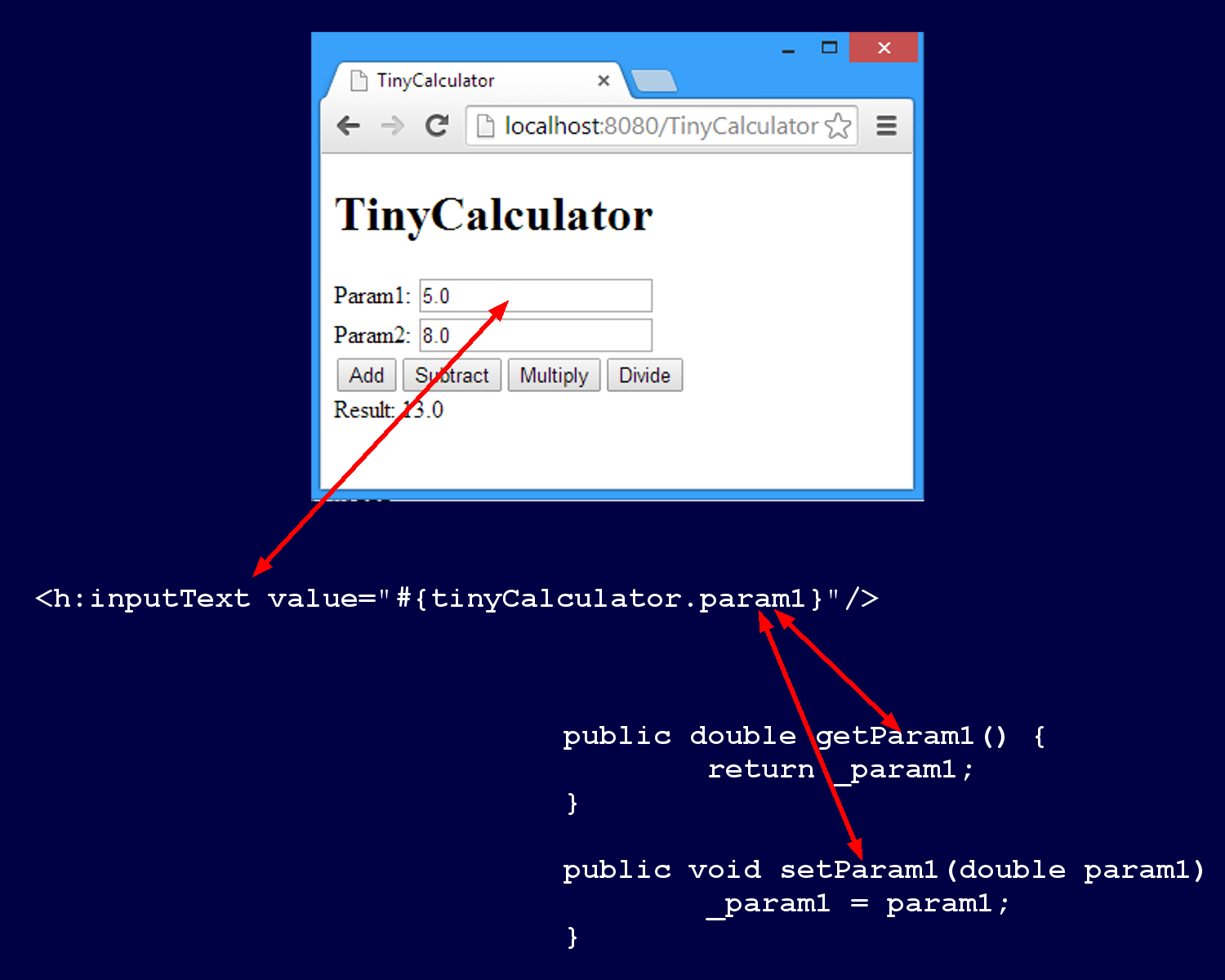
The tag <inputText ...> represents a text field in the browser. Its values are bound to a getter/setter pair of the bean.
There is much more to explain, like the configuration NetBeans build for us under the hood and which we modified by simply changing the project’s properties. But this chapter is just an appetizer, a quick start. Beginning with the next chapter, we’ll discuss the foundation.