2. Foundations
For web development, a couple of different technologies are used. This chapter discusses the basics of some, and mentions other important technologies.
- Definition of web application
- Hypertext Transfer Protocol (HTTP)
- Hypertext Markup Language (HTML)
- Cascading Style Sheets (CSS)
- JavaScript
- Java
- Maven
- Selenium & Arquillian
- Servlet
2.1 Web Application
First of all, the term web application, as it is used throughout this book has to be defined.
A web application is a client-server application interacting dynamically with the user via web browser.
Thus, we are talking about distinct part, the client, presenting the user interface, and the server, executing the main part of the application. The application logic might be organized in layers and split between client and server. Especially to get a responsive user experience, some bits are executed on client side. Unlike an application using a specially programmed client, a common web browser is used to display the presentation layer. Thus, we cannot manage every detail. Instead, we have to rely on the browser functionality, which mainly is to retrieve and display content like HTML pages and related stuff and executing script code. A simple web server, only delivering static pages, is not an web application in the sense of this book.
By using a standard web browser, a web application might be used on every platform, such a browser is available for. A web browser is connected to a web server via HTTP. Because of that, a web application has to deal with some restrictions by this protocol.
The client is linked to the server via the internet.
2.2 HTTP
The Hypertext Transfer Protocol is a logical transport layer (application protocol), acting on a stack of other layers, down to the physical transport layer. Usually it is used atop TCP/IP. As the name suggests, it was primary designed, to distribute hypertext information. As such, it is the foundation of the world wide web.
HTTP is a stateless request-response protocol. A server is listening for a request and sends back a response. Then the communication terminates.
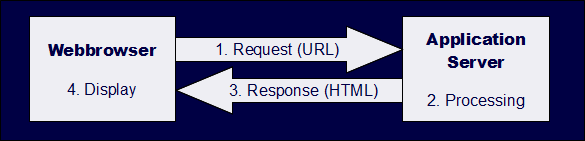
The simplified picture shows a typical request-response-cycle as triggered by the user when she wants to retrieve a page. In fact, the response is a HTTP response, composed of a message header and body, which might carry other information then HTML, e.g. JSON, XML or other.
Any following request acts independent from the former ones. This kind of protocol affects the way, a web application works with its clients. To proceed with a user session of the application, a session management has to be implemented on top of HTTP. The server might save the application’s state and provide some information to the client. The client sends back this information during the next request. According to this, the server is able to restore the current state. This piece of information might be anything useful.
One extreme is to send all attributes (state) of the application to the client. In this case, there is nothing to remember on server side. Any status might be restored by the information the client provides. Such an approach keeps memory consumption on the server lean. Sending lots of information over the web has some important drawbacks. Latency will slow down the application. Another aspect is security. If the network transport isn’t secured by a protocol like TLS, then this information might be read by unauthorized persons.
The other extreme is to keep any information on the server and send an identifier only to the client. Such an identifier is called session id. Common possible ways to convey a session id are the usage of a hidden field or sending a HTTP cookie.
Luckily session management is implemented by the Java environment. Within Servlet/JSF configuration, it is possible to choose between client or server state.
During a request, HTTP addresses an uniform resource identifier URI. Beside that, it tells the server, which method to use. This is often called a verb. Most interesting methods for use with JSF are GET and POST.
GET queries information from the server by use of an URI. Additional parameters might be appended to the URI.
Example: http://it-rezension.de/Books/books.xhtml?catId=2
This addresses the server found for it-rezension.de, and within that, the application and page Books/books.xhtml. A parameter catId=2 is appended.
With a POST request, information is send to the server within the body of the request.
Example: A web form (HTML) contains some input fields and a submit button. Hitting this button initiates a POST request.
By the means of Representational State Transfer (REST) the methods (verbs) PUT and DELETE are important too. The idea behind REST is to assign defined actions to the verbs.
2.3 HTML
The Hypertext Markup Language is used to describe the content of a web page. Like XML, HTML is derived from the Standard Generalized Markup Language SGML.
As a Java developer, I assume, you would be familiar with XML. Like XML, HTML uses tags to structure the content of a page. Unlike XML, these tags are predefined, HTML is not extensible in the sense of XML.
A HTML document starts with a document type, followed by on HTML tag. Within that, each one tag for header and body might be included. In case of XHTML, the doctype is preceded by the XML version.
 1 <?xml version='1.0' encoding='UTF-8' ?>
 2 <!DOCTYPE html>
 3 <html>
 4     <head>
 5         <title>TinyCalculator</title>
 6     </head>
 7     <body>
 8         <h1>TinyCalculator</h1>
 9         <form>
10             <div>
11                 <label>Param1: </label>
12                 <input type="text" value="0.0" />
13             </div>
14         </form>
15     </body>
16 </html>
Further information about HTML, including a commented list of important tags is provided in the appendix.
2.4 CSS
HTML provides some little tags for styling the page, like emphasized, italics and more. The Cascading Style Sheets have been developed as a much more powerful designing tool. As a rule of thumb, you should separate layout from content. Thus, don’t use the styling tags of HTML, completely rely on CSS for the layout of a page.
By using CSS, it is possible to address an element and to assign layout information within curly braces.
1 h1 {
2     font-size: 2em;
3 }
4
5 h2 {
6     font-size: 1.5em;
7     font-style: italic;
8 }
The small code above addresses header 1 (h1), which is set to a font size of 2em, and header 2, which is set to a smaller font and italics. Within the curly braces, a couple of layout statements might be placed.
To address an element, its tag name is used. To style different elements with the same tag name in a different style, a couple of tag names might be used, building a path. Or a class or an id is assigned to the element and might be used for addressing. These addressing elements might be combined to define complex paths. Certain rules exists to avoid ambiguity. The layout information might differ depending on the output device or screen size. Using these features, it is for example possible, to define a responsive webdesign: The layout is changed and adjusted by the size of the browser window.
In Part II, Books application, we’ll discuss CSS in a web application. You may open [Books]}(it-rezension.de/Books/) with different devices or simulate this by changing the size of your browser window.
As with HTML, I don’t want to bore those readers, who are familiar with CSS. The other find an introduction into CSS within the appendix.
2.5 JavaScript
JavaScript is the programming language of the client side. Almost every modern browser has implemented a JavaScript interpreter or just in time compiler. Even if Microsoft tried to introduce VB Script some years ago, JavaScript is the language of choice, and it is well understood by the Microsoft browser too.
It is used to enhance client behavior or to initiate partial requests (AJAX). JSF hides JavaScript behind its AJAX tag. Sometimes it is useful to develop a bit of JavaScript code. As a Java developer, it should be no problem for you to follow the simple examples described in this book.
1 alert("The information has been saved");
Unlike Java, JavaScript is not a typed language. Thus you may assign an integer to a variable and later on replace its value by a string.
2.6 Java
Java is the main technical foundation for programming the web applications. I assume my readers to be familiar with Java SE.
All web applications discussed in this book are build up using Java EE. The Java EE platform is build as a JSR (Java EE 7: JSR 342). It is an umbrella specification describing a complete architecture build up by a mass of technologies, each defined by its own JSR. Throughout this book, a couple of such technologies are introduced.
2.7 Maven
For professional Java development, a build tool is needed. There are lots of developers, who never care about their build tool, because it is configured by their favourite IDE. Other developers perfectly know their build tool and like to tune every detail.
Beside others, there are two popular tools in the Java world: Apache ANT which acts more imperative and Apache Maven which follows a more declarative approach. On their web site, they call Maven a “software project management and comprehension tool”. Popular IDEs, like NetBeans, have build in support for both tools. Nevertheless, whichever tool you prefer, ANT based projects often use an IDE specific configuration, whilst Maven projects follow a more strictly convention. Thus, they become mostly independent of the IDE.
To ensure most compatibility with your favourite IDE, all applications discussed in this book are build with Maven.
2.8 Selenium & Arquillian
Selenium automates browsers. Beside macro-recording and replay, such an automation may be fully controlled by a Java, for example by a test. Doing such, enables GUI-testing of web applications.
Testing beans or other components, which are managed by a container can be a hassle. Arquillian allows testing the interesting parts of a web application within a container. It fully integrates with test frameworks like JUnit.
Although this book does not focus on unit testing or test driven development, we’ll discuss some simple test scenarios with both tools.
2.9 Servlet
A Servlet is a Java class hosted in a servlet container that dynamically processes requests and constructs reponses. This class must conform to the Java Servlet API. Like other Java EE components, it is specified by the Java Communication Process. By the time of this writing, this current version is JSR 340: Java Servlet 3.1 Specification. JSR is short for Java Specification Request.
Although a servlet may respond to any request, we’re talking about responding to a HTTP request. Thus, we use servlet as synonym to HTTP servlet.
The servlet’s life-cycle is maintained by the container. The web client, e. g. browser, interacts with the servlet by request/response as described in the section HTTP.
A servlet is a class extending javax.servlet.http.HttpServlet. In most common scenarios, at least two methods doGet and doPost will be overwritten to implement specific behaviour and send back the response.
A servlet is invoked by a client’s request to a specific path (of the URI).
By using the simple annotation @WebServlet("/path") this might be defined.
Whilst discussing JSF configuration, we’ll talk about configuring servlets by a configuration file.
JSF itself is implemented as servlet (FacesServlet).
If you enhance the TinyCalculator by NetBeans’ 8 Add Servlet wizard, and provide Hello as name, NetBeans generates the following code example.
 1 [imports omitted]
 2
 3 @WebServlet(name = "Hello", urlPatterns = {"/Hello"})
 4 public class Hello extends HttpServlet {
 5
 6     /**
 7      * Processes requests for both HTTP <code>GET</code>
 8      * and <code>POST</code> methods.
 9      *
10      * @param request servlet request
11      * @param response servlet response
12      * @throws ServletException if a servlet-specific error occurs
13      * @throws IOException if an I/O error occurs
14      */
15     protected void processRequest(HttpServletRequest request,
16             HttpServletResponse response)
17             throws ServletException, IOException {
18         response.setContentType("text/html;charset=UTF-8");
19         try (PrintWriter out = response.getWriter()) {
20             /* TODO output your page here.
21                You may use following sample code. */
22             out.println("<!DOCTYPE html>");
23             out.println("<html>");
24             out.println("<head>");
25             out.println("<title>Servlet Hello</title>");
26             out.println("</head>");
27             out.println("<body>");
28             out.println("<h1>Servlet Hello at "
29                 + request.getContextPath() + "</h1>");
30             out.println("</body>");
31             out.println("</html>");
32         }
33     }
34
35     /**
36      * Handles the HTTP <code>GET</code> method.
37      *
38      * @param request servlet request
39      * @param response servlet response
40      * @throws ServletException if a servlet-specific error occurs
41      * @throws IOException if an I/O error occurs
42      */
43     @Override
44     protected void doGet(HttpServletRequest request,
45             HttpServletResponse response)
46             throws ServletException, IOException {
47         processRequest(request, response);
48     }
49
50     /**
51      * Handles the HTTP <code>POST</code> method.
52      *
53      * @param request servlet request
54      * @param response servlet response
55      * @throws ServletException if a servlet-specific error occurs
56      * @throws IOException if an I/O error occurs
57      */
58     @Override
59     protected void doPost(HttpServletRequest request,
60             HttpServletResponse response)
61             throws ServletException, IOException {
62         processRequest(request, response);
63     }
64
65     [...code omitted ...]
66 }
If you start this application and complete the URI by /Hello, you can verify the servlet responding to your request.
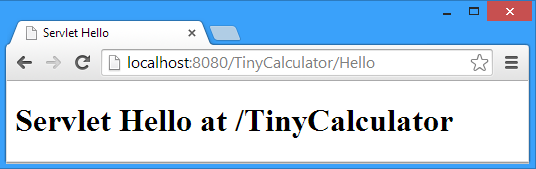
Within the methods doGet and doPost, we implement our code, or as in this generated skeleton, we simply call a common method if Get and Post can be handled in the same fashion.
The HTML code is generated within the processRequest method.
Writing HTML code directly inside Java code is not a good approach for anything beyond a trivial example. One approach is to separate the HTML page from the Java code using Java Server Pages (JSP). The page is stored on its own with embedded JSP tags and is compiled into a servlet at a later time.
2.10 Deployment
All servlets, and this includes JSF, run within a servlet container. When we launched TinyCalculator, NetBeans automatically started GlassFish (if not running) and deployed the application to the application server.
If we want to install an application into a production server, we may add this server to the NetBeans environment (or to your favourite IDE) and let the IDE perform the deployment to the production system. If, for some reasons, it is not possible to use the IDE for deployment, you might deploy the application by yourself. This process depends on the application server you use.
In case of GlassFish, you can either deploy at command line, using the asadmin command, or you use your browser to log into the administrator console. GlassFish offers an application menu. This is intended to deploy, un-deploy, start an application and more. And last but not least, you may use maven to deploy the application.