Introduction
You want to understand how filesystems really work: not how to call open(), but what the bytes on disk actually mean. FAT12 is the one to do it with - simple enough to hold entirely in your head, real enough to run on bare metal. Over twelve chapters we will implement every operation ourselves in C (read, delete, move, create directories, write, and format), then boot the exact same code inside our own kernel:
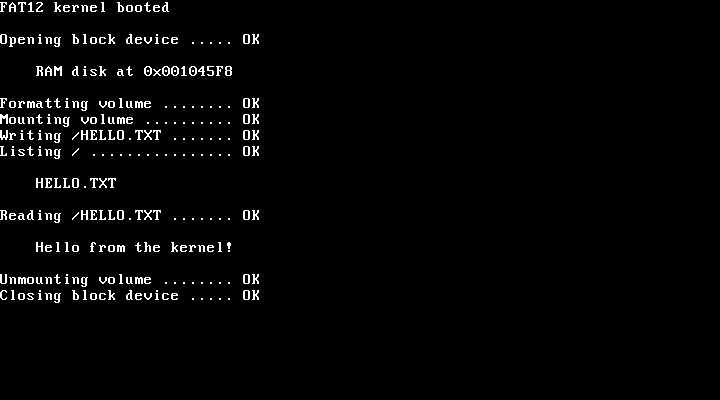
No operating system underneath, no filesystem code we did not write. Just an emulated PC, 4 MiB of RAM standing in for a disk, and code we typed ourselves. (Appendix A swaps that RAM disk for an ATA driver.)
Why FAT12?
Almost every PC sold in the last decade boots by reading a FAT volume: UEFI firmware loads its bootloader from the EFI System Partition, and the UEFI specification requires that partition to be FAT. USB sticks, SD cards up to 32 GB, the floppy images so many OSDev tutorials boot from: FAT again.
This book focuses on FAT12, the variant DOS started with. Understand it and you already understand most of FAT16 and FAT32 too - the core concepts transfer directly. And FAT12 strips everything to the essentials: a single table links every file’s clusters together (no extents, no block groups, no B-trees, just a linked list), and the root directory sits at a fixed position with a fixed size, so finding / takes no chain-walking at all. The volumes we work with are just a few MiB, small enough to hexdump every structure on them end to end.
Why Not Just Generate It?
An AI assistant will write you a FAT12 implementation in minutes. It will compile. It might even list a directory. Whether it packs the 12-bit FAT entries correctly is another matter, and a bug there does not crash. It quietly overwrites four bits of the neighboring entry, breaking some other file’s cluster chain, and you find out much later when that file comes back as garbage. And no amount of reading the code will catch it unless you know exactly where those twelve bits belong.
This book gives you that understanding, and the tools to prove it. We decode every structure from a real volume created by mkfs.fat, and verify our work at every stage: hexdump the disk image, trace what the code did, and compare the two. And when we start writing, we hand the result to Linux’s own FAT driver, which never saw our code. Once you know what the bytes should be, generated code stops being something you have to trust and becomes something you can review.
Who This Book Is For
You have a kernel that boots and prints to the screen, and now you want it to load files. Every program you want to run is sitting in a filesystem your code cannot parse yet, and FAT12 is the shortest path from here to there.
You do not need to have gotten that far, either. Everything up to the final chapter runs as a command-line tool on your own machine, so the kernel is where we end up rather than where you have to start. The only thing assumed is C: pointers, structs, and bitwise operations. The main chapters need no assembly beyond a 37-line Multiboot stub in Chapter 12.
If you have tried this before, you know the existing material: wiki articles and tutorials that stop once a file can be read, or switch to assembly halfway through, and a spec that gives you the formulas but not how they fit together into working code. This book goes the whole way, from the first sector read to formatting a fresh volume, all in C.
It is not a C tutorial, and it implements FAT12 only. FAT16 and FAT32 are close cousins (Appendix D lines up what changes for each), and long filenames get an appendix of their own rather than full support.
What We Will Build
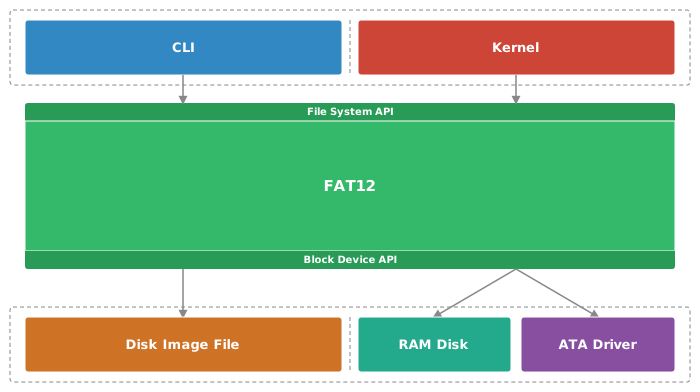
The same FAT12 code runs both as a CLI tool and inside our kernel because it never touches storage directly. Every sector it reads or writes goes through a small BlockDevice interface, and each platform plugs in its own backend: a disk image file for the CLI tool we test with as we go, a RAM disk for the kernel, and in Appendix A a real ATA disk driver. Three very different backends, one FAT12 implementation that never knows the difference.
How This Book Is Structured
The book is split into three parts, plus a set of appendixes:
Part I: Reading - From raw bytes to file contents. We set up the toolchain, build a portable BlockDevice abstraction, and decode the boot sector into the geometry that powers the entire filesystem. Then we walk the root directory and read our first file straight off the volume. To read files of any size, we take apart the File Allocation Table and its famously awkward 12-bit entries in Chapter 5 (the part most tutorials wave at instead of explaining), and finally we follow any path down into nested subdirectories.
Part II: Writing - Delete, move, create directories, and write files, each chapter building on the one before. Every change touches more than one place on the volume, so the order of our writes decides what a crash can break. Delete a file in the wrong order and a badly timed crash leaves its entry pointing at clusters the FAT already calls free; the next file to claim them is cross-linked with it, and the two silently corrupt each other. Delete it in the right order and the worst a crash can do is leak a little free space.
Part III: Advanced - Everything so far assumed someone else formatted the volume for us. Now we write our own formatter and create a FAT12 volume from nothing. Then comes the payoff: we compile our FAT12 code into a kernel, boot it in QEMU, and watch it format, write, and read its own RAM disk.
Appendixes - Topics I pulled out of the chapters’ straight line but did not want to cut. One swaps the kernel’s RAM disk for an ATA driver so what the kernel writes lands on a disk image we can inspect afterward, another introduces long filenames (LFN/VFAT), a third catalogs the boot sector fields we never touched, and a fourth lines FAT12 up against its FAT16 and FAT32 cousins.
How to Read This Book
Read the chapters front to back - each one builds on the last - then browse the appendixes in whatever order interests you. If you want one chapter to judge the book by, make it Chapter 5. Code appears with the explanation: type it, run it, hexdump it, break it. Every chapter ends with code that compiles with zero warnings under -Wall -Wextra on a current GCC, and a command we run to watch it work. If a build fails or a hexdump does not match, the finished code for every chapter is on GitHub as a safety net (the Prerequisites show how to get it).
A few conventions keep the listings easy to follow:
- Every listing is headed by its file path, relative to the project root, so you always know which file to create or edit.
/* --- NEW --- */marks lines added to a function or struct we already wrote, whether in an earlier chapter or earlier in the same one. A single new line has just that marker above it; a block of new lines ends with/* --- END NEW --- */. Lines that are gone from the listing are gone from the code, too. Update the existing definition rather than typing a second copy.- Functions appear in the order that explains them best, not in the order the C compiler needs them. Whenever you add a function, put a one-line declaration at the top of the file (its signature,
staticincluded, ending in;), and you can place the definition anywhere below it. This matters mostly insrc/fat12.c, the file we extend the most. - All of our FAT12 logic lives in one file,
src/fat12.c, and it grows long over the course of the book. Production code would split it into multiple files, but then every new function would mean hopping between files and updating headers, and the chapters would spend their time on where code goes instead of on FAT12. One long file is the price for chapters you can follow in a straight line. Once you have finished the book, split it up however you like. <snake_case>in a command is a value you supply, and the sentence right before the listing tells you what to put there.- Production Note callouts mark where we took a shortcut that a production implementation would not.
Not Production Code
We skip some checks on purpose, but only ones that have nothing to do with FAT12 itself, such as memory allocation failures and general I/O errors from the block device. Everything that belongs to FAT12 stays in: path validation, attribute checks, bounds on cluster chains, cycle detection, and write ordering that keeps a crash from corrupting more than it has to. Wherever a simplification would matter in production, a Production Note says so.
About the Author
I am Björn Götz, a software developer from a small village in Hesse, Germany. I taught myself to program at twelve, started a three-year software developer apprenticeship at sixteen, and have been building software professionally ever since, mostly backends, plus full-stack web and mobile apps, including the cloud infrastructure they run on. After hours, I go the other direction: operating systems, assembly, and emulators (I wrote my own CHIP-8 emulator just to see how the magic works).
This book started out far bigger. First it was going to cover the most common filesystems, then just the whole FAT family, and each time the scope buried the part worth learning. So I kept cutting until one filesystem was left, small enough to build from scratch and understand properly. I could not find a book that builds FAT12 step by step in C. The spec tells you what every field means, in roughly the tone of a tax form; building the thing yourself is where it actually sticks, and where it gets fun. So I wrote that book.
Feedback
Found an error? Have a question? Email me at hello@bjoern-goetz.com or open an issue on the book’s GitHub repository at github.com/BjoernGoetz/FAT12-Book-Code. If you enjoyed the book, I would appreciate a review wherever you bought it. And if you know someone chasing the same rabbit hole, point them to the book’s home page at bjoern-goetz.com/fat12-book.