Chapter 3: Listing the Root Directory
Chapter 2 built the base every filesystem operation stands on. But before we can read a single file, we first need to know which files and directories are actually there. By the end of this chapter, we will have extended our filesystem API with a directory iteration API that lists the contents of the root directory (/), used by our own ls command.
Locating the Root Directory
Before we can read what’s inside the root directory, we first need to know where it lives. For that, let’s look at how a FAT12 volume is laid out:
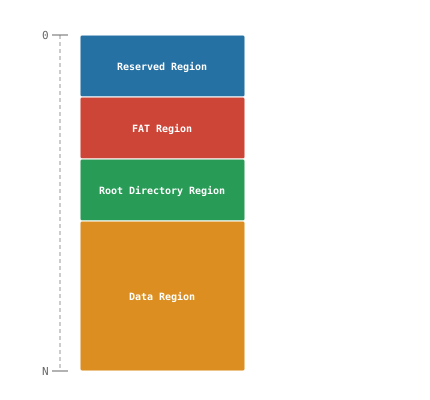
Every volume splits into four regions, one after another. At the very start sits the reserved region, at LBA 0 - wait, didn’t we just say the boot sector lives at LBA 0, and now the reserved region starts at LBA 0 too? Both are true: the boot sector is the first sector of the reserved region, it just does not have to be the last one (though it usually is). Next comes the FAT region, which we will fully introduce in Chapter 5. After that is what we are actually looking for: the root directory has its own fixed region on the volume. The last region spans everything left over - the data region, introduced in Chapter 4.
Now that we know where the root directory sits, let’s actually find it - at which LBA does its region start? At first glance it looks like every region should have a fixed LBA, but only the reserved region does: every other region’s start depends on the size of everything before it, and FAT itself does not fix those sizes anywhere. Luckily, the boot sector holds everything we need to work them out, starting with the one fixed point we already know: the reserved region begins at LBA 0. It usually holds nothing but the boot sector, but we cannot assume it is always exactly one sector - its exact size comes from the BPB field Reserved Sector Count, which can never be less than 1, since the boot sector alone already accounts for that one. FAT12 itself does not care what, if anything, fills the rest of that space - it only needs to know how many sectors to skip before the FAT region begins.
That puts us at the start of the FAT region. Now the only thing we need to know is how big it is - for that we need two more BPB fields we have not introduced yet: Number of FATs, which tells us how many copies of the FAT exist (more on that in Chapter 5), and FAT Size (sectors), which tells us how big each copy is. So calculating the size of the FAT region is simply Number of FATs * FAT Size (sectors). By adding that size to the start LBA, we get the start of the root directory - the formulas below put it all together:
Reserved region start LBA = 0
FAT region start LBA      = Reserved region start LBA + Reserved Sector Count
FAT region size (sectors) = Number of FATs * FAT Size (sectors)
Root dir start LBA        = FAT region start LBA + FAT region size (sectors)
Now that we know where it starts, we also need to know how big it is so we can load it into memory. The root directory itself is nothing more than a sequence of directory entries, each always 32 bytes in size. The BPB’s Root Entry Count field tells us how many entries it has space for, so we get the total byte size by multiplying it by the size of each entry. Every region on the volume must be allocated in whole sectors, so we round up to the next whole sector. The BPB field Bytes Per Sector gives us exactly what we need for that: the volume’s sector size, the same value our block device already reports, now read straight from the BPB’s own copy of it - the formula below puts it all together:
Directory Entry Size          = 32
Root directory size (sectors) = (Root Entry Count * Directory Entry Size + Bytes Per Sector - 1) / Bytes Per Sector
The + Bytes Per Sector - 1 is the standard trick for rounding up with integer math: it pushes any leftover bytes into one more whole sector before the division truncates.
That’s a lot of math to take in at once. Take a moment, reread the formulas above until they click, and trace them back against the volume layout diagram - watching how each region’s start and size feeds into the next one is what makes the whole chain make sense. We compute these values once and cache the ones we will keep needing throughout the book inside our mount struct, alongside everything Chapter 2 already stored there. Let’s translate it into code:
src/fat12.c
/* --- NEW --- */
#define DIRECTORY_ENTRY_SIZE 32

// ...

struct FAT12FS {
    BlockDevice *device;
    BootSector bs;

    /* --- NEW --- */
    uint32_t fat_lba;
    uint32_t root_dir_lba;
    uint32_t root_dir_sectors;
    /* --- END NEW --- */
};

// ...

FAT12FS *fat12_mount(BlockDevice *device)
{
    DBG_PRINT("[ fat12        ] --- fat12_mount() ---\n");
    FAT12FS *fs = malloc(sizeof(FAT12FS));
    fs->device = device;
    fs->bs = read_boot_sector(device);

    /* jump, boot_code: machine code, not data; reserved_nt: Windows
       NT's own flags byte. We skip all three */
    DBG_PRINT("[ fat12        ] OEM Name: \"%.8s\"\n", fs->bs.oem_name);
    DBG_PRINT("[ fat12        ] Bytes Per Sector: %u\n",
              fs->bs.bpb.bytes_per_sector);
    DBG_PRINT("[ fat12        ] Sectors Per Cluster: %u\n",
              fs->bs.bpb.sectors_per_cluster);
    DBG_PRINT("[ fat12        ] Reserved Sector Count: %u\n",
              fs->bs.bpb.reserved_sector_count);
    DBG_PRINT("[ fat12        ] Number of FATs: %u\n",
              fs->bs.bpb.num_fats);
    DBG_PRINT("[ fat12        ] Root Entry Count: %u\n",
              fs->bs.bpb.root_entry_count);
    DBG_PRINT("[ fat12        ] Total Sectors (16): %u\n",
              fs->bs.bpb.total_sectors_16);
    DBG_PRINT("[ fat12        ] Media Descriptor: 0x%02x\n",
              fs->bs.bpb.media);
    DBG_PRINT("[ fat12        ] FAT Size (sectors): %u\n",
              fs->bs.bpb.fat_size_16);
    DBG_PRINT("[ fat12        ] Sectors Per Track: %u\n",
              fs->bs.bpb.sectors_per_track);
    DBG_PRINT("[ fat12        ] Number of Heads: %u\n",
              fs->bs.bpb.number_of_heads);
    DBG_PRINT("[ fat12        ] Hidden Sectors: %u\n",
              fs->bs.bpb.hidden_sectors);
    DBG_PRINT("[ fat12        ] Total Sectors (32): %u\n",
              fs->bs.bpb.total_sectors_32);
    DBG_PRINT("[ fat12        ] Drive Number: 0x%02x\n",
              fs->bs.extended_bpb.drive_number);
    DBG_PRINT("[ fat12        ] Boot Signature: 0x%02x\n",
              fs->bs.extended_bpb.boot_signature);
    DBG_PRINT("[ fat12        ] Volume ID: 0x%08x\n",
              fs->bs.extended_bpb.volume_id);
    DBG_PRINT("[ fat12        ] Volume Label: \"%.11s\"\n",
              fs->bs.extended_bpb.volume_label);
    DBG_PRINT("[ fat12        ] File System Type: \"%.8s\"\n",
              fs->bs.extended_bpb.file_system_type);
    DBG_PRINT("[ fat12        ] Signature: 0x%04x\n", fs->bs.signature);

    /* --- NEW --- */
    fs->fat_lba = fs->bs.bpb.reserved_sector_count;
    uint32_t fat_sectors = fs->bs.bpb.num_fats * fs->bs.bpb.fat_size_16;
    fs->root_dir_lba = fs->fat_lba + fat_sectors;
    fs->root_dir_sectors = ((fs->bs.bpb.root_entry_count *
                             DIRECTORY_ENTRY_SIZE) +
                            (fs->bs.bpb.bytes_per_sector - 1)) /
                           fs->bs.bpb.bytes_per_sector;

    DBG_PRINT("[ fat12        ] FAT start LBA: %u\n", fs->fat_lba);
    DBG_PRINT("[ fat12        ] FAT region size (sectors): %u\n",
              fat_sectors);
    DBG_PRINT("[ fat12        ] Root dir start LBA: %u\n",
              fs->root_dir_lba);
    DBG_PRINT("[ fat12        ] Root dir size (sectors): %u\n",
              fs->root_dir_sectors);
    /* --- END NEW --- */

    return fs;
}
The formulas match the ones above - computed once, cached forever. We also add them to our debug output, so we can inspect them and use them as the starting point for manual hexdumps. fat_lba comes back in Chapter 5 when we load the FAT itself. The FAT region size is only a stepping stone to root_dir_lba, so it stays a local variable instead of taking up a field in the struct.
Peeking Inside the Root Directory
Now that we know where the root directory lives and that it holds a sequence of 32-byte directory entries, let’s take a look inside.
But first, let’s create some actual files and directories inside the root directory so we have something to look at. For that we use a loopback mount - it treats our disk image as if it were a real block device, letting Linux’s own FAT driver take over and giving us ordinary tools to create files and directories on it, exactly as it would on a physical disk. We will be able to write files with our own code soon enough; for now, this is the only way we have to put files on our disk image, and it doubles as a check that our implementation reads them back correctly.
# Mount disk.img as a loopback device at /mnt/fat12
sudo mkdir -p /mnt/fat12
sudo mount -o loop disk.img /mnt/fat12

# Create a couple of files and a directory on it
echo "Hello from FAT12!" | sudo tee /mnt/fat12/HELLO.TXT
echo "Some text file" | sudo tee /mnt/fat12/README.TXT
sudo mkdir /mnt/fat12/MYDIR

# Unmount so the writes are flushed back to disk.img
sudo umount /mnt/fat12
Now that there are files and directories inside the root directory, let’s take a look at its raw contents with xxd. For that we need the byte offset where the root directory starts inside disk.img. Everything we need to calculate it is already sitting in our debug output - let’s build and run once to see it:
DEBUG=1 ./build.sh
./fat12-cli
We should see something like:
[ fat12        ] --- fat12_mount() ---
[ block_device ] read 1 sector(s) at LBA 0 (512 bytes at 0x0)
[ fat12        ] OEM Name: "mkfs.fat"
[ fat12        ] Bytes Per Sector: 512
[ fat12        ] Sectors Per Cluster: 2
[ fat12        ] Reserved Sector Count: 1
[ fat12        ] Number of FATs: 2
[ fat12        ] Root Entry Count: 512
[ fat12        ] Total Sectors (16): 8192
[ fat12        ] Media Descriptor: 0xf8
[ fat12        ] FAT Size (sectors): 12
[ fat12        ] Sectors Per Track: 32
[ fat12        ] Number of Heads: 2
[ fat12        ] Hidden Sectors: 0
[ fat12        ] Total Sectors (32): 0
[ fat12        ] Drive Number: 0x80
[ fat12        ] Boot Signature: 0x29
[ fat12        ] Volume ID: 0x72bae6ba
[ fat12        ] Volume Label: "MYDISK     "
[ fat12        ] File System Type: "FAT12   "
[ fat12        ] Signature: 0xaa55
[ fat12        ] FAT start LBA: 1
[ fat12        ] FAT region size (sectors): 24
[ fat12        ] Root dir start LBA: 25
[ fat12        ] Root dir size (sectors): 32
[ fat12        ] --- fat12_umount() ---
The four lines right before fat12_umount are new - everything above them is the same boot sector output from Chapter 2. Plug the Root dir start LBA and Bytes Per Sector values from that output into the formula below to get the byte offset:
Byte offset = Root dir start LBA * Bytes Per Sector
Replace <offset> with your calculated value to dump 128 bytes (four entries) from the start of the root directory:
xxd -g 1 -s <offset> -l 128 disk.img
00003200: 4d 59 44 49 53 4b 20 20 20 20 20 08 00 00 51 7b  MYDISK     ...Q{
00003210: 3c 5d 3c 5d 00 00 51 7b 3c 5d 00 00 00 00 00 00  <]<]..Q{<]......
00003220: 48 45 4c 4c 4f 20 20 20 54 58 54 20 00 98 61 7d  HELLO   TXT ..a}
00003230: 3d 5d 3d 5d 00 00 61 7d 3d 5d 03 00 12 00 00 00  =]=]..a}=]......
00003240: 52 45 41 44 4d 45 20 20 54 58 54 20 00 67 64 7d  README  TXT .gd}
00003250: 3d 5d 3d 5d 00 00 64 7d 3d 5d 04 00 0f 00 00 00  =]=]..d}=]......
00003260: 4d 59 44 49 52 20 20 20 20 20 20 10 00 91 66 7d  MYDIR      ...f}
00003270: 3d 5d 3d 5d 00 00 66 7d 3d 5d 05 00 00 00 00 00  =]=]..f}=]......
Every line of xxd output is exactly 16 bytes, and each directory entry is 32 bytes - so two lines together make up exactly one entry. We can already recognize the names of the files and directories we created. But to really understand what we are looking at, we first need to know how a directory entry is structured.
Anatomy of a Directory Entry
Each of those 32-byte entries is structured like the diagram below:
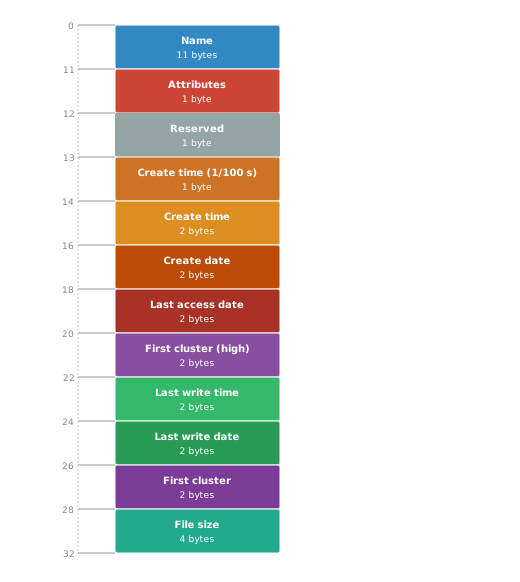
Let’s first mirror this layout into a C struct, before we go into detail on each field. Like every on-disk struct, its byte layout has to match exactly, so it goes between the #pragma pack(push, 1) and #pragma pack(pop) pair:
src/layout.h
typedef struct {
    char name[11];
    uint8_t attributes;
    uint8_t reserved;
    uint8_t create_time_tenth;
    uint16_t create_time;
    uint16_t create_date;
    uint16_t last_access_date;
    uint16_t first_cluster_high;
    uint16_t last_write_time;
    uint16_t last_write_date;
    uint16_t first_cluster;
    uint32_t file_size;
} DirectoryEntry;
Let’s take a look at every field. name, attributes, and the timestamp fields each get their own section later in this chapter, so we skip them here. reserved is set aside for Windows NT and never touched by us. file_size is exactly what it sounds like: the file’s size in bytes, straight from the entry. first_cluster is the one field we are not covering yet - it gets its own explanation in Chapter 4. first_cluster_high is only used on FAT32, so we can ignore it entirely.
The 8.3 Name Format
The name is stored in one 11-byte wide field. But it isn’t a plain name: it uses a special encoding called 8.3, where the first 8 bytes hold the actual name and the last 3 bytes hold an optional extension. Unused space in either part is padded with spaces (0x20), and the dot between name and extension is never stored on disk - it’s only implied, and only inserted back on read if the extension isn’t empty. For the plain ASCII names we deal with, each byte holds exactly one character - which is where the “8.3” name comes from: 8 characters for the name, 3 for the extension.
Here are just the 11 name bytes from each of the three entries from the hexdump above:
48 45 4c 4c 4f 20 20 20 54 58 54  HELLO   TXT
52 45 41 44 4d 45 20 20 54 58 54  README  TXT
4d 59 44 49 52 20 20 20 20 20 20  MYDIR
No dot in sight - 54 58 54 (TXT) sits straight after the padding, and MYDIR trails off into six 0x20 bytes with no extension at all.
Only uppercase letters, digits, and a handful of punctuation marks are legal, and no lowercase. Spaces are legal too, anywhere except the very first byte, which is why only trailing spaces count as padding. The full extended byte range 0x80-0xFF, is legal too, using whatever OEM code page was active when the entry was created (a code page is a table that decides which characters these bytes stand for: accented letters on one machine, Cyrillic on another).
The first byte of the name also has a special meaning of its own, which we will see later in this chapter. For now, it’s enough to know that the value 0xE5 is one such special byte - because it causes a gotcha for the name itself: 0xE5 is also a valid lead byte for Kanji characters in the Shift-JIS code page used in Japan, so a perfectly good filename could start with that exact byte. FAT reroutes it: a real first byte of 0xE5 gets stored as 0x05 instead, the ASCII ENQ control character, never valid in a filename, so there’s no ambiguity.
Now that we understand how a name is encoded, we can build a function that decodes it - turning the padded 8.3 format back into the plain name.ext string.
src/fat12.c
static void decode_8_3_name(const DirectoryEntry *entry, char *out)
{
    /* Only trailing spaces are padding: scan each part from the right
       to find where it really ends */
    int base_len = 8;
    while (base_len > 0 && entry->name[base_len - 1] == ' ')
        base_len--;

    int ext_len = 3;
    while (ext_len > 0 && entry->name[8 + ext_len - 1] == ' ')
        ext_len--;

    /* Copy the base name, embedded spaces included */
    int i;
    for (i = 0; i < base_len; i++)
        out[i] = entry->name[i];

    /* 0x05 escape: real first byte is 0xE5 */
    if (entry->name[0] == 0x05)
        out[0] = (char)0xE5;

    /* If extension exists, insert dot and copy it */
    if (ext_len > 0) {
        out[i] = '.';
        i++;
        for (int k = 0; k < ext_len; k++) {
            out[i] = entry->name[8 + k];
            i++;
        }
    }

    out[i] = '\0';
}
Since only trailing spaces are padding, the function first scans each part from the right to find where it really ends. Then it copies the base name, un-escapes a leading 0x05 back into 0xE5, and, only if the extension isn’t blank, appends a dot and the extension. A final \0 terminates the string.
The Attribute Byte
The attribute byte is a bitfield describing properties of the entry. Each bit and what it means when set (1) is listed in the table below:
| Bit | Flag | Meaning |
|---|---|---|
| 0 | Read-only | Protects against writes and modification. DOS and Windows also block deletion, even though that isn’t officially specified (Linux’s FAT driver deletes the file anyway). |
| 1 | Hidden | Hides the entry from normal directory listings. |
| 2 | System | An indicator that this is an OS-critical file - FAT defines no enforcement at all. Any protection is a convention individual tools layer on top, not something FAT12 requires. |
| 3 | Volume Label | Marks the entry as the volume label (more on this later). |
| 4 | Directory | Marks the entry as a directory. |
| 5 | Archive | Marks the file as changed since the last backup. Set whenever a file is created, renamed, or written to; cleared by backup software once it has backed the file up - a cheap alternative to comparing timestamps or checksums to find what changed. |
Bits 6 and 7 are reserved - their value should be ignored.
Notice that no flag marks a file: an entry with both Directory and Volume Label clear (0) is one.
Let’s define constants for each flag:
src/fat12.c
#define FAT12_ATTR_READ_ONLY 0x01
#define FAT12_ATTR_HIDDEN    0x02
#define FAT12_ATTR_SYSTEM    0x04
#define FAT12_ATTR_VOLUME_ID 0x08
#define FAT12_ATTR_DIRECTORY 0x10
#define FAT12_ATTR_ARCHIVE   0x20
The Timestamp Fields
Each directory entry carries six time-related fields in total. Two of them we leave alone, even though Linux filled in both on our volume: create_time_tenth, a byte of sub-second creation precision (0-199, in 10 ms steps despite its name), and last_access_date, which records the date a file was last read or written. Sub-second creation precision is rarely useful to any application, and updating last_access_date on every read costs an extra disk write for a value few tools ever check.
The other four make up two timestamp pairs we actually need: creation time (create_time / create_date) and last modification time (last_write_time / last_write_date). Each pair shares the same two bit-packed 2-byte fields.
The time field packs hours, minutes, and seconds into 16 bits:

Seconds only get 5 bits - not enough to count 0-59 - so FAT stores them in 2-second increments instead; multiply the stored value by 2 to recover real seconds. A FAT time field on its own can never land on an odd second.
The date field packs year, month, and day the same way:

Instead of a full year, it counts years since the MS-DOS epoch of January 1, 1980; add that back to get the real year.
A time field and a date field together give us a full timestamp, which we want to hand callers as a single struct.
include/fat12.h
typedef struct {
    unsigned year;
    unsigned month;
    unsigned day;
    unsigned hours;
    unsigned minutes;
    unsigned seconds;
} Timestamp;
Now we can write the function that decodes both into a Timestamp struct:
src/fat12.c
static Timestamp decode_timestamp(uint16_t time, uint16_t date)
{
    Timestamp ts;

    ts.hours = (time >> 11) & 0x1F;
    ts.minutes = (time >> 5) & 0x3F;
    ts.seconds = (time & 0x1F) * 2;

    ts.day = date & 0x1F;
    ts.month = (date >> 5) & 0x0F;
    ts.year = ((date >> 9) & 0x7F) + 1980;

    return ts;
}
The shifts and masks simply pull out each component we saw in the field maps above; the only extra work is the * 2 and + 1980 correcting seconds and year back to their real values.
Reading the Root Directory
We know where the root directory lives, how big it is, and what its bytes mean. None of that helps until it is actually sitting in memory - let’s read it:
src/fat12.c
static DirectoryEntry *read_root_directory(FAT12FS *fs)
{
    DBG_PRINT("[ fat12        ] read root directory\n");
    uint32_t bytes = fs->root_dir_sectors * fs->bs.bpb.bytes_per_sector;
    DirectoryEntry *entries = (DirectoryEntry *)malloc(bytes);
    block_device_read(fs->device, fs->root_dir_lba,
                      fs->root_dir_sectors, entries);

    return entries;
}
read_root_directory allocates a buffer sized to the root directory region and reads it in one call using the block device. Because DirectoryEntry is packed to match the on-disk layout, the bytes read can be used directly as an array of entries.
Filtering the Entries
We now have the contents of the root directory as an array of directory entries, but that array still contains entries that should never be visible to a caller - free slots and the volume label.
Two special values in an entry’s first name byte drive most of this filtering. 0x00 marks the end of the directory: nothing beyond it is ever allocated, so a scan can stop right there. 0xE5 also marks an entry as free, but only that one entry - real entries can still follow it, so a scan has to skip it and keep going. It’s the same byte that forced the 0x05 escape we saw earlier.
The first entry in our hexdump, MYDISK, is the odd one out: it’s the volume label. A real, in-use entry, but one that names the volume itself rather than a file or a directory. Nobody listing a directory or looking up a path has any use for it, so we skip every entry with the Volume Label bit set.
To filter those entries out, let’s introduce a few small helper functions, plus the function that ties them together and returns the next valid entry from an array of directory entries:
src/fat12.c
#include <stdbool.h>

#define NAME_FREE 0xE5
#define NAME_END  0x00

static bool is_free_entry(const DirectoryEntry *entry)
{
    // Cast to unsigned char: 0xE5 doesn't fit a signed char (-128 to
    // 127), so without the cast, sign-extension turns it into
    // 0xFFFFFFE5 and the comparison fails.
    return (unsigned char)entry->name[0] == NAME_FREE;
}

static bool is_end_of_directory(const DirectoryEntry *entry)
{
    return entry->name[0] == NAME_END;
}

static bool is_volume_label(const DirectoryEntry *entry)
{
    /* The volume label names the volume itself: it is
       neither a file nor a directory, so we never hand out
       an entry carrying this bit. */
    return (entry->attributes & FAT12_ATTR_VOLUME_ID) != 0;
}

static DirectoryEntry *next_valid_entry(DirectoryEntry *entries,
                                        uint32_t count,
                                        uint32_t *offset)
{
    while (*offset < count) {
        DirectoryEntry *entry = &entries[*offset];
        if (is_end_of_directory(entry))
            return NULL;

        (*offset)++;

        if (is_free_entry(entry))
            continue;
        if (is_volume_label(entry))
            continue;

        return entry;
    }

    return NULL;
}
next_valid_entry walks the entries array starting at *offset, skipping free slots and anything carrying the Volume Label bit along the way, and stops the moment it hits the end-of-directory marker. The first real entry it finds is returned directly, with *offset left pointing just past it - so calling it again picks up right where the last call left off. It returns NULL when there is nothing left to give.
Putting It All Together
We have every building block. Now it is time to put it all together: a directory iteration API - open a directory by path (root only for now, Chapter 6 extends this to walk into subdirectories), read the next entry if one is present, and close it when done. Let’s start by extending the File System API:
include/fat12.h
typedef enum {
    ENTRY_FILE,
    ENTRY_DIRECTORY
} EntryKind;

typedef struct {
    char name[13];
    uint32_t size;
    EntryKind kind;
    Timestamp create_time;
    Timestamp modify_time;
} DirEntry;

typedef struct Directory Directory;

Directory *fat12_opendir(FAT12FS *fs, const char *path);
int fat12_readdir(Directory *dir, DirEntry *out);
void fat12_closedir(Directory *dir);
DirEntry is the directory entry we actually expose to callers - a smaller, already-decoded view of what a raw directory entry holds, with only the fields anyone outside the FAT12 implementation should ever need. Directory is the opaque handle fat12_opendir hands back: only declared to exist, with everything it actually contains left to the implementation, the same idea as C’s own FILE*, which callers also only ever hold a pointer to. Callers hand that handle to fat12_readdir, which writes the next entry into out, and to fat12_closedir, which closes it and frees whatever resources it was holding - without either of them ever needing to know what is inside. The point is to hide details the caller has no business knowing - how we track iteration state is our concern, not theirs.
Now that the public API is declared, let’s define how we actually track that state inside Directory, and implement fat12_opendir:
src/fat12.c
struct Directory {
    DirectoryEntry *entries;
    uint32_t count;
    uint32_t offset;
};

Directory *fat12_opendir(FAT12FS *fs, const char *path)
{
    DBG_PRINT("[ fat12        ] --- fat12_opendir(\"%s\") ---\n", path);

    /* Guards against anything but the root directory for now */
    if (strcmp(path, "/") != 0)
        return NULL;

    Directory *dir = (Directory *)malloc(sizeof(Directory));
    dir->entries = read_root_directory(fs);
    dir->count = fs->bs.bpb.root_entry_count;
    dir->offset = 0;

    return dir;
}
fat12_opendir reads the full root directory into memory, allocates the Directory handle, and initializes it with that array of entries, the total count and an offset starting at 0 for the scan. It currently guards against every path except the root directory - every other path is rejected with NULL, since we have no way yet to resolve anything deeper. Chapter 6 replaces this check with a real path resolver that walks into subdirectories.
Let’s continue with fat12_readdir:
src/fat12.c
int fat12_readdir(Directory *dir, DirEntry *out)
{
    DBG_PRINT("[ fat12        ] --- fat12_readdir() ---\n");
    DirectoryEntry *entry = next_valid_entry(dir->entries, dir->count,
                                             &dir->offset);
    if (entry == NULL)
        return -1;

    decode_8_3_name(entry, out->name);
    out->size = entry->file_size;
    out->create_time = decode_timestamp(entry->create_time,
                                        entry->create_date);
    out->modify_time = decode_timestamp(entry->last_write_time,
                                        entry->last_write_date);
    out->kind = (entry->attributes & FAT12_ATTR_DIRECTORY)
                        ? ENTRY_DIRECTORY
                        : ENTRY_FILE;

    return 0;
}
fat12_readdir looks at where it currently is in the scan and checks whether another entry follows. If not, it returns -1 - end of directory. Otherwise, it decodes the raw entry it found into the caller-facing struct, setting every other field we expose - including kind, translated once here from the raw attribute byte.
The last thing missing is fat12_closedir:
src/fat12.c
void fat12_closedir(Directory *dir)
{
    DBG_PRINT("[ fat12        ] --- fat12_closedir() ---\n");
    free(dir->entries);
    free(dir);
}
fat12_closedir simply frees the memory occupied by the directory entries and the directory handle itself.
The ls Command
Now that we have the directory iteration API, let’s replace main from Chapter 2 with a command-line interface - the boilerplate future chapters will extend, rather than replace, to add more CLI commands:
platform/cli/main.c
#include <stdio.h>
#include <stdint.h>
#include <string.h>
#include <stdlib.h>
#include "block_device.h"
#include "fat12.h"
#include "file_block_device.h"

static int cmd_ls(FAT12FS *fs, int argc, char *argv[])
{
    if (argc != 3) {
        fprintf(stderr, "usage: ls <path>\n");
        return 1;
    }

    const char *path = argv[2];
    Directory *dir = fat12_opendir(fs, path);
    if (dir == NULL) {
        fprintf(stderr, "error: directory not found\n");
        return 1;
    }

    printf("%-12s  %-9s  %-19s  %-19s\n", "NAME", "TYPE/SIZE",
           "CREATED", "MODIFIED");

    DirEntry entry;
    while (fat12_readdir(dir, &entry) == 0) {
        char type_str[16];

        if (entry.kind == ENTRY_DIRECTORY)
            snprintf(type_str, sizeof(type_str), "<DIR>");
        else
            snprintf(type_str, sizeof(type_str), "%u B", entry.size);

        printf("%-12s  %-9s  %04u-%02u-%02u %02u:%02u:%02u  "
               "%04u-%02u-%02u %02u:%02u:%02u\n",
               entry.name, type_str, entry.create_time.year,
               entry.create_time.month, entry.create_time.day,
               entry.create_time.hours, entry.create_time.minutes,
               entry.create_time.seconds, entry.modify_time.year,
               entry.modify_time.month, entry.modify_time.day,
               entry.modify_time.hours, entry.modify_time.minutes,
               entry.modify_time.seconds);
    }

    fat12_closedir(dir);
    return 0;
}

int main(int argc, char *argv[])
{
    if (argc < 2) {
        fprintf(stderr, "usage: <command>\n");
        return 1;
    }

    /* Hardcoded so every command stays short */
    BlockDevice *device = file_block_device_open("disk.img");
    if (device == NULL) {
        fprintf(stderr, "error: could not open disk image\n");
        return 1;
    }

    FAT12FS *fs = fat12_mount(device);

    char *command = argv[1];
    int ret = 0;

    if (strcmp(command, "ls") == 0) {
        ret = cmd_ls(fs, argc, argv);
    } else {
        fprintf(stderr, "unknown command: %s\n", command);
        ret = 1;
    }

    fat12_umount(fs);
    block_device_close(device);

    return ret;
}
main opens the disk image and mounts the filesystem before dispatching to a command, then unmounts and closes it again once that command returns. The interesting part is cmd_ls: typing ls followed by a path opens that directory - only / works for now, since path walking arrives in Chapter 6 - then walks every entry with fat12_readdir, printing one line per entry - its name, type or size, and both timestamps.
Our disk image still contains the entries we created manually earlier in this chapter. Let’s build and run our brand new ls command using / to list the root directory:
./build.sh
./fat12-cli ls /
NAME          TYPE/SIZE  CREATED              MODIFIED
HELLO.TXT     18 B       2026-09-29 15:43:02  2026-09-29 15:43:02
README.TXT    15 B       2026-09-29 15:43:08  2026-09-29 15:43:08
MYDIR         <DIR>      2026-09-29 15:43:12  2026-09-29 15:43:12
It worked! Both HELLO.TXT and README.TXT show up with the correct file size, and their creation and modification times (yours will differ).
Our directory, MYDIR, shows up too - correctly marked <DIR> instead of a size.
And MYDISK, the first entry in our hexdump, is missing, exactly as planned: it’s the volume label, and next_valid_entry skips it on purpose.
What’s Next
We can now list the root directory’s contents. But it only tells us what files are there, not what they actually contain. That’s where first_cluster comes in - a field we have read into every DirectoryEntry this whole chapter but never followed. It is the connection between a directory entry and its actual data. Chapter 4 shows how we follow it to read a file’s contents.