Chapter 2: Mounting the Filesystem
Chapter 1 laid the foundation: a block device that can read and write raw sectors. But raw sectors alone don’t know anything about the filesystem sitting on top of them - before any operation can work, we first need to mount it. Mounting reads the volume’s metadata once, sets up the internal state every later operation relies on, and hands back a handle we pass to everything from here on. By the end of this chapter, we will have a mounted filesystem with every one of its parameters printed out in front of us, ready to build later operations on.
Meet the Boot Sector
The boot sector is always the first sector of every FAT volume (LBA 0) and exactly one sector long. It holds every parameter the FAT format doesn’t fix on its own - without it, we don’t know anything about the filesystem. Each of those parameters is a field at a fixed position within the sector. Here is what it looks like:
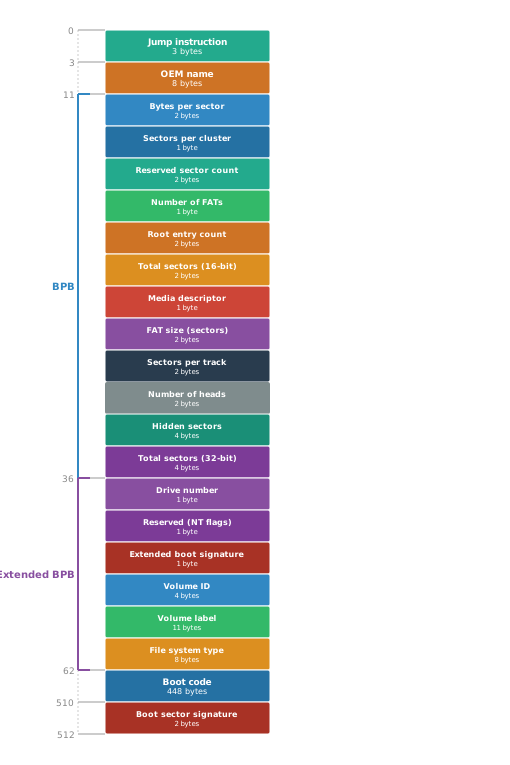
Each field’s meaning gets explained the moment we actually need it - spread out across the chapters ahead, not dumped here all at once. A handful of unused, legacy fields skip that treatment entirely and live in Appendix C instead, so this chapter doesn’t turn into a long reference that breaks the narrative.
Two regions of it are further grouped into named blocks. The BIOS Parameter Block (BPB) is the centerpiece - it holds everything we need to locate the rest of the volume. The Extended BIOS Parameter Block (EBPB), added in later FAT revisions, carries additional identification.
We need an easy, structured way to access each field. For that, we define structs that directly mirror the boot sector’s on-disk layout in C.
src/layout.h
#ifndef LAYOUT_H
#define LAYOUT_H

#include <stdint.h>

#pragma pack(push, 1)

typedef struct {
    uint16_t bytes_per_sector;
    uint8_t sectors_per_cluster;
    uint16_t reserved_sector_count;
    uint8_t num_fats;
    uint16_t root_entry_count;
    uint16_t total_sectors_16;
    uint8_t media;
    uint16_t fat_size_16;
    uint16_t sectors_per_track;
    uint16_t number_of_heads;
    uint32_t hidden_sectors;
    uint32_t total_sectors_32;
} BPB;

typedef struct {
    uint8_t drive_number;
    uint8_t reserved_nt;
    uint8_t boot_signature;
    uint32_t volume_id;
    char volume_label[11];
    char file_system_type[8];
} ExtendedBPB;

typedef struct {
    uint8_t jump[3];
    char oem_name[8];
    BPB bpb;
    ExtendedBPB extended_bpb;
    uint8_t boot_code[448];
    uint16_t signature;
} BootSector;

#pragma pack(pop)

#endif
Reading the Boot Sector
Now that we have the boot sector struct in place, we can actually load it using our block device.
src/fat12.c
#include <stdlib.h>
#include <string.h>
#include "block_device.h"
#include "debug.h"
#include "layout.h"
#include "fat12.h"

static BootSector read_boot_sector(BlockDevice *device)
{
    uint32_t sector_size = block_device_sector_size(device);
    void *buffer = malloc(sector_size);
    block_device_read(device, 0, 1, buffer);

    BootSector result;
    memcpy(&result, buffer, sizeof(BootSector));
    free(buffer);

    return result;
}
read_boot_sector allocates a buffer the size of one sector, reads the first sector (LBA 0) into it, then copies it byte for byte directly into our BootSector struct - which works because the struct is already packed to match the boot sector’s exact on-disk layout.
Putting It All Together
Everything we need is in place - the boot sector struct and the code to read it. Now we can implement mounting (and unmounting).
First, let’s define the two operations our public file system API exposes - fat12_mount and fat12_umount - along with the opaque FAT12FS handle they hand back and forth.
include/fat12.h
#ifndef FAT12_H
#define FAT12_H
#include <stdint.h>
#include "block_device.h"

typedef struct FAT12FS FAT12FS;

FAT12FS *fat12_mount(BlockDevice *device);
void fat12_umount(FAT12FS *fs);

#endif
Now let’s define what FAT12FS actually holds, and implement both functions.
src/fat12.c
struct FAT12FS {
    BlockDevice *device;
    BootSector bs;
};

FAT12FS *fat12_mount(BlockDevice *device)
{
    DBG_PRINT("[ fat12        ] --- fat12_mount() ---\n");
    FAT12FS *fs = malloc(sizeof(FAT12FS));
    fs->device = device;
    fs->bs = read_boot_sector(device);

    /* jump, boot_code: machine code, not data; reserved_nt: Windows
       NT's own flags byte. We skip all three */
    DBG_PRINT("[ fat12        ] OEM Name: \"%.8s\"\n", fs->bs.oem_name);
    DBG_PRINT("[ fat12        ] Bytes Per Sector: %u\n",
              fs->bs.bpb.bytes_per_sector);
    DBG_PRINT("[ fat12        ] Sectors Per Cluster: %u\n",
              fs->bs.bpb.sectors_per_cluster);
    DBG_PRINT("[ fat12        ] Reserved Sector Count: %u\n",
              fs->bs.bpb.reserved_sector_count);
    DBG_PRINT("[ fat12        ] Number of FATs: %u\n",
              fs->bs.bpb.num_fats);
    DBG_PRINT("[ fat12        ] Root Entry Count: %u\n",
              fs->bs.bpb.root_entry_count);
    DBG_PRINT("[ fat12        ] Total Sectors (16): %u\n",
              fs->bs.bpb.total_sectors_16);
    DBG_PRINT("[ fat12        ] Media Descriptor: 0x%02x\n",
              fs->bs.bpb.media);
    DBG_PRINT("[ fat12        ] FAT Size (sectors): %u\n",
              fs->bs.bpb.fat_size_16);
    DBG_PRINT("[ fat12        ] Sectors Per Track: %u\n",
              fs->bs.bpb.sectors_per_track);
    DBG_PRINT("[ fat12        ] Number of Heads: %u\n",
              fs->bs.bpb.number_of_heads);
    DBG_PRINT("[ fat12        ] Hidden Sectors: %u\n",
              fs->bs.bpb.hidden_sectors);
    DBG_PRINT("[ fat12        ] Total Sectors (32): %u\n",
              fs->bs.bpb.total_sectors_32);
    DBG_PRINT("[ fat12        ] Drive Number: 0x%02x\n",
              fs->bs.extended_bpb.drive_number);
    DBG_PRINT("[ fat12        ] Boot Signature: 0x%02x\n",
              fs->bs.extended_bpb.boot_signature);
    DBG_PRINT("[ fat12        ] Volume ID: 0x%08x\n",
              fs->bs.extended_bpb.volume_id);
    DBG_PRINT("[ fat12        ] Volume Label: \"%.11s\"\n",
              fs->bs.extended_bpb.volume_label);
    DBG_PRINT("[ fat12        ] File System Type: \"%.8s\"\n",
              fs->bs.extended_bpb.file_system_type);
    DBG_PRINT("[ fat12        ] Signature: 0x%04x\n", fs->bs.signature);

    return fs;
}

void fat12_umount(FAT12FS *fs)
{
    DBG_PRINT("[ fat12        ] --- fat12_umount() ---\n");
    free(fs);
}
fat12_mount allocates a new FAT12FS handle, storing the block device and caching the boot sector inside it so every later operation can reach it without reading it again. fat12_mount reads the boot sector once via read_boot_sector, debug-prints every field except the jump instruction, the boot code, and the NT reserved byte, then returns the handle. fat12_umount simply frees the space the handle occupies.
Mounting in Action
Let’s put it to use by replacing our main from Chapter 1 with the following code - it keeps opening and closing the block device, and mounts and unmounts the filesystem in between:
platform/cli/main.c
#include <stdio.h>
#include <stdlib.h>
#include "block_device.h"
#include "file_block_device.h"
#include "fat12.h"

int main(void)
{
    /* Hardcoded so every command stays short */
    BlockDevice *device = file_block_device_open("disk.img");
    if (device == NULL) {
        fprintf(stderr, "error: could not open disk.img\n");
        return 1;
    }

    FAT12FS *fs = fat12_mount(device);
    fat12_umount(fs);

    block_device_close(device);

    return 0;
}
Create a fresh disk image, then build and run with debug output enabled:
./create_disk.sh
DEBUG=1 ./build.sh
./fat12-cli
We should see something like:
[ fat12        ] --- fat12_mount() ---
[ block_device ] read 1 sector(s) at LBA 0 (512 bytes at 0x0)
[ fat12        ] OEM Name: "mkfs.fat"
[ fat12        ] Bytes Per Sector: 512
[ fat12        ] Sectors Per Cluster: 2
[ fat12        ] Reserved Sector Count: 1
[ fat12        ] Number of FATs: 2
[ fat12        ] Root Entry Count: 512
[ fat12        ] Total Sectors (16): 8192
[ fat12        ] Media Descriptor: 0xf8
[ fat12        ] FAT Size (sectors): 12
[ fat12        ] Sectors Per Track: 32
[ fat12        ] Number of Heads: 2
[ fat12        ] Hidden Sectors: 0
[ fat12        ] Total Sectors (32): 0
[ fat12        ] Drive Number: 0x80
[ fat12        ] Boot Signature: 0x29
[ fat12        ] Volume ID: 0x72bae6ba
[ fat12        ] Volume Label: "MYDISK     "
[ fat12        ] File System Type: "FAT12   "
[ fat12        ] Signature: 0xaa55
[ fat12        ] --- fat12_umount() ---
Every field should match the output above, except Volume ID - it’s meant to be unique per volume.
We also see the volume label we read in Chapter 1 in the output above. Back then we referenced it by an absolute offset, not knowing why it lived there. Now we know: volume_label is a real field in our struct, defining exactly where it fits inside the boot sector and how big it is. The quotes around it come from our DBG_PRINT, not from the volume: they show the trailing spaces that pad MYDISK out to the field’s full 11 bytes.
What’s Next
We can now mount the filesystem: mounting hands back a handle holding the block device and the boot sector - everything every later operation will need. Next, in Chapter 3, we put that handle to its first real use: listing what’s actually in the root directory.