Chapter 4: Reading Files
Chapter 3 showed us which files are on the volume. But a listing only gives us names and sizes, not a single byte of what those files actually hold. The link to their contents is a field we have read into every directory entry but never followed: first_cluster. By the end of this chapter, we will have followed it all the way to a file’s contents, with our own cat command reading a file straight off the volume and printing it, byte-for-byte.
The Data Region
first_cluster points into the data region, which we already saw in Chapter 3’s volume layout diagram:
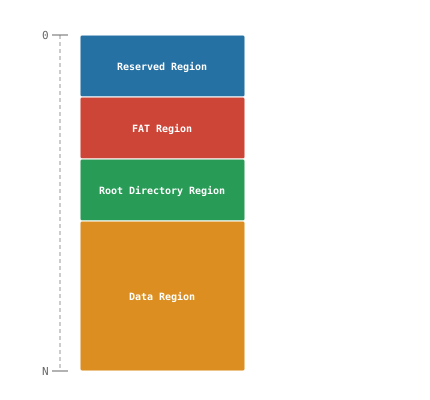
The data region is the last region of the volume, running all the way to its final sector. To follow first_cluster, we need to know where the region starts. As the diagram shows, the region right before it is the root directory region, and we already calculated both its start and its size in Chapter 3. Adding the two gives us the data region’s start:
Data region start LBA = Root dir start LBA + Root directory size (sectors)
We cache it in FAT12FS and compute it once on mount, right after the root directory values it builds on:
src/fat12.c
struct FAT12FS {
    BlockDevice *device;
    BootSector bs;
    uint32_t fat_lba;
    uint32_t root_dir_lba;
    uint32_t root_dir_sectors;

    /* --- NEW --- */
    uint32_t data_lba;
};

// ...

FAT12FS *fat12_mount(BlockDevice *device)
{
    DBG_PRINT("[ fat12        ] --- fat12_mount() ---\n");
    FAT12FS *fs = malloc(sizeof(FAT12FS));
    fs->device = device;
    fs->bs = read_boot_sector(device);

    /* jump, boot_code: machine code, not data; reserved_nt: Windows
       NT's own flags byte. We skip all three */
    DBG_PRINT("[ fat12        ] OEM Name: \"%.8s\"\n", fs->bs.oem_name);
    DBG_PRINT("[ fat12        ] Bytes Per Sector: %u\n",
              fs->bs.bpb.bytes_per_sector);
    DBG_PRINT("[ fat12        ] Sectors Per Cluster: %u\n",
              fs->bs.bpb.sectors_per_cluster);
    DBG_PRINT("[ fat12        ] Reserved Sector Count: %u\n",
              fs->bs.bpb.reserved_sector_count);
    DBG_PRINT("[ fat12        ] Number of FATs: %u\n",
              fs->bs.bpb.num_fats);
    DBG_PRINT("[ fat12        ] Root Entry Count: %u\n",
              fs->bs.bpb.root_entry_count);
    DBG_PRINT("[ fat12        ] Total Sectors (16): %u\n",
              fs->bs.bpb.total_sectors_16);
    DBG_PRINT("[ fat12        ] Media Descriptor: 0x%02x\n",
              fs->bs.bpb.media);
    DBG_PRINT("[ fat12        ] FAT Size (sectors): %u\n",
              fs->bs.bpb.fat_size_16);
    DBG_PRINT("[ fat12        ] Sectors Per Track: %u\n",
              fs->bs.bpb.sectors_per_track);
    DBG_PRINT("[ fat12        ] Number of Heads: %u\n",
              fs->bs.bpb.number_of_heads);
    DBG_PRINT("[ fat12        ] Hidden Sectors: %u\n",
              fs->bs.bpb.hidden_sectors);
    DBG_PRINT("[ fat12        ] Total Sectors (32): %u\n",
              fs->bs.bpb.total_sectors_32);
    DBG_PRINT("[ fat12        ] Drive Number: 0x%02x\n",
              fs->bs.extended_bpb.drive_number);
    DBG_PRINT("[ fat12        ] Boot Signature: 0x%02x\n",
              fs->bs.extended_bpb.boot_signature);
    DBG_PRINT("[ fat12        ] Volume ID: 0x%08x\n",
              fs->bs.extended_bpb.volume_id);
    DBG_PRINT("[ fat12        ] Volume Label: \"%.11s\"\n",
              fs->bs.extended_bpb.volume_label);
    DBG_PRINT("[ fat12        ] File System Type: \"%.8s\"\n",
              fs->bs.extended_bpb.file_system_type);
    DBG_PRINT("[ fat12        ] Signature: 0x%04x\n", fs->bs.signature);

    fs->fat_lba = fs->bs.bpb.reserved_sector_count;
    uint32_t fat_sectors = fs->bs.bpb.num_fats * fs->bs.bpb.fat_size_16;
    fs->root_dir_lba = fs->fat_lba + fat_sectors;
    fs->root_dir_sectors = ((fs->bs.bpb.root_entry_count *
                             DIRECTORY_ENTRY_SIZE) +
                            (fs->bs.bpb.bytes_per_sector - 1)) /
                           fs->bs.bpb.bytes_per_sector;

    /* --- NEW --- */
    fs->data_lba = fs->root_dir_lba + fs->root_dir_sectors;

    DBG_PRINT("[ fat12        ] FAT start LBA: %u\n", fs->fat_lba);
    DBG_PRINT("[ fat12        ] FAT region size (sectors): %u\n",
              fat_sectors);
    DBG_PRINT("[ fat12        ] Root dir start LBA: %u\n",
              fs->root_dir_lba);
    DBG_PRINT("[ fat12        ] Root dir size (sectors): %u\n",
              fs->root_dir_sectors);

    /* --- NEW --- */
    DBG_PRINT("[ fat12        ] Data region start LBA: %u\n",
              fs->data_lba);
    /* --- END NEW --- */

    return fs;
}
Build and run with debug output enabled:
DEBUG=1 ./build.sh
./fat12-cli ls /
Among the output is the new line we just added, telling us at which LBA the data region starts on our disk image:
[ fat12 ] Data region start LBA: 57
Carving Up the Data Region
The data region is where the contents of every file on the volume actually live. It is nothing more than one long array of numbered, equally-sized chunks called clusters. Each cluster is a contiguous span of one or more sectors, the smallest amount of space a file can occupy. Our disk image uses 2 sectors per cluster (set by the -s 2 flag in create_disk.sh’s mkfs.fat command back in Chapter 1). Laid out end to end, our data region looks like this:

Each box is one cluster, labeled with its number, and the scale underneath counts sectors from the start of the data region. The clusters are numbered sequentially, each spanning exactly 2 sectors: cluster 2 covers sectors 0–1, cluster 3 covers sectors 2–3, and so on. Notice that the numbering starts at 2, not 0. That is no typo. Cluster numbers 0 and 1 are reserved and have no space of their own in the data region (we will see why in Chapter 5), so the first real cluster, cluster 2, sits right at the data region’s very first sector.
A file’s contents are cut into cluster-sized pieces, one piece per cluster, and each cluster holds nothing but its raw piece of data. A small file fits in a single cluster, a bigger one takes as many as it needs (finding the rest of them is Chapter 5’s job). So every file on the volume consumes a whole number of clusters, even a tiny one. Whenever a file’s size is not an exact multiple of the cluster size, the leftover bytes are still allocated to the file, even though they hold none of its data. That unused remainder is called slack space.
first_cluster holds exactly such a cluster number: the number of the first cluster containing the file’s data.
Finding a File’s First Cluster
Now that we know what first_cluster holds, let’s follow it by hand. First, we need its value from a file’s directory entry, so let’s look at the start of the root directory again, the same way we did in Chapter 3. As a reminder, its byte offset comes from the Root dir start LBA and Bytes Per Sector values in our debug output:
Byte offset = Root dir start LBA * Bytes Per Sector
Replace <offset> with your calculated byte offset:
xxd -g 1 -s <offset> -l 128 disk.img
00003200: 4d 59 44 49 53 4b 20 20 20 20 20 08 00 00 51 7b  MYDISK     ...Q{
00003210: 3c 5d 3c 5d 00 00 51 7b 3c 5d 00 00 00 00 00 00  <]<]..Q{<]......
00003220: 48 45 4c 4c 4f 20 20 20 54 58 54 20 00 98 61 7d  HELLO   TXT ..a}
00003230: 3d 5d 3d 5d 00 00 61 7d 3d 5d 03 00 12 00 00 00  =]=]..a}=]......
00003240: 52 45 41 44 4d 45 20 20 54 58 54 20 00 67 64 7d  README  TXT .gd}
00003250: 3d 5d 3d 5d 00 00 64 7d 3d 5d 04 00 0f 00 00 00  =]=]..d}=]......
00003260: 4d 59 44 49 52 20 20 20 20 20 20 10 00 91 66 7d  MYDIR      ...f}
00003270: 3d 5d 3d 5d 00 00 66 7d 3d 5d 05 00 00 00 00 00  =]=]..f}=]......
Focus on the third and fourth rows, HELLO.TXT’s entry. As Chapter 3’s directory entry layout showed, first_cluster sits at offset 26 of the 32-byte entry and file_size at offset 28, together filling the entry’s last six bytes. So both sit at the end of its second row: 03 00 is first_cluster, and 12 00 00 00 is file_size. (Your dump may show different values; if so, use yours from here on.) Like every multi-byte value in FAT12, both are stored little-endian, so we read their bytes back to front:
first_cluster:  03 00        ->  0x0003      =  3
file_size:      12 00 00 00  ->  0x00000012  =  18
So HELLO.TXT starts at cluster 3 and is 18 bytes long.
Now let’s find where that cluster lives on our volume. We need two numbers for that: the data region’s start LBA, which our debug output already printed earlier in this chapter, and the cluster number itself, which is simply first_cluster (3 in our example). Cluster 2 sits right at the data region’s start, and every cluster after it follows directly behind the one before:
Cluster LBA = Data region start LBA + (Cluster - 2) * Sectors Per Cluster
We already know each cluster on our disk image is 2 sectors wide, because we chose that ourselves when we created it. But our code must not assume it, since another volume may use a different cluster size. The value has to come from the volume itself, and it does: the BPB field Sectors Per Cluster holds exactly this number, and it has been sitting in our debug output since Chapter 2, waiting for us to need it:
[ fat12 ] Sectors Per Cluster: 2
Now we have every value the formula above needs to calculate the start LBA of any cluster, including HELLO.TXT’s first cluster. To dump that cluster with xxd, we need two more values, both in bytes: its offset (the same way we just did for the root directory) and its size. Bytes Per Sector from our debug output converts both:
Byte offset          = Cluster LBA * Bytes Per Sector
Cluster size (bytes) = Sectors Per Cluster * Bytes Per Sector
Now let’s dump the whole cluster. Replace <offset> with your byte offset and <cluster_size> with your cluster size in bytes:
xxd -g 1 -s <offset> -l <cluster_size> disk.img
00007600: 48 65 6c 6c 6f 20 66 72 6f 6d 20 46 41 54 31 32  Hello from FAT12
00007610: 21 0a 00 00 00 00 00 00 00 00 00 00 00 00 00 00  !...............
00007620: 00 00 00 00 00 00 00 00 00 00 00 00 00 00 00 00  ................
00007630: 00 00 00 00 00 00 00 00 00 00 00 00 00 00 00 00  ................
00007640: 00 00 00 00 00 00 00 00 00 00 00 00 00 00 00 00  ................
00007650: 00 00 00 00 00 00 00 00 00 00 00 00 00 00 00 00  ................
00007660: 00 00 00 00 00 00 00 00 00 00 00 00 00 00 00 00  ................
00007670: 00 00 00 00 00 00 00 00 00 00 00 00 00 00 00 00  ................
00007680: 00 00 00 00 00 00 00 00 00 00 00 00 00 00 00 00  ................
00007690: 00 00 00 00 00 00 00 00 00 00 00 00 00 00 00 00  ................
000076a0: 00 00 00 00 00 00 00 00 00 00 00 00 00 00 00 00  ................
000076b0: 00 00 00 00 00 00 00 00 00 00 00 00 00 00 00 00  ................
000076c0: 00 00 00 00 00 00 00 00 00 00 00 00 00 00 00 00  ................
000076d0: 00 00 00 00 00 00 00 00 00 00 00 00 00 00 00 00  ................
000076e0: 00 00 00 00 00 00 00 00 00 00 00 00 00 00 00 00  ................
000076f0: 00 00 00 00 00 00 00 00 00 00 00 00 00 00 00 00  ................
00007700: 00 00 00 00 00 00 00 00 00 00 00 00 00 00 00 00  ................
00007710: 00 00 00 00 00 00 00 00 00 00 00 00 00 00 00 00  ................
00007720: 00 00 00 00 00 00 00 00 00 00 00 00 00 00 00 00  ................
00007730: 00 00 00 00 00 00 00 00 00 00 00 00 00 00 00 00  ................
00007740: 00 00 00 00 00 00 00 00 00 00 00 00 00 00 00 00  ................
00007750: 00 00 00 00 00 00 00 00 00 00 00 00 00 00 00 00  ................
00007760: 00 00 00 00 00 00 00 00 00 00 00 00 00 00 00 00  ................
00007770: 00 00 00 00 00 00 00 00 00 00 00 00 00 00 00 00  ................
00007780: 00 00 00 00 00 00 00 00 00 00 00 00 00 00 00 00  ................
00007790: 00 00 00 00 00 00 00 00 00 00 00 00 00 00 00 00  ................
000077a0: 00 00 00 00 00 00 00 00 00 00 00 00 00 00 00 00  ................
000077b0: 00 00 00 00 00 00 00 00 00 00 00 00 00 00 00 00  ................
000077c0: 00 00 00 00 00 00 00 00 00 00 00 00 00 00 00 00  ................
000077d0: 00 00 00 00 00 00 00 00 00 00 00 00 00 00 00 00  ................
000077e0: 00 00 00 00 00 00 00 00 00 00 00 00 00 00 00 00  ................
000077f0: 00 00 00 00 00 00 00 00 00 00 00 00 00 00 00 00  ................
00007800: 00 00 00 00 00 00 00 00 00 00 00 00 00 00 00 00  ................
00007810: 00 00 00 00 00 00 00 00 00 00 00 00 00 00 00 00  ................
00007820: 00 00 00 00 00 00 00 00 00 00 00 00 00 00 00 00  ................
00007830: 00 00 00 00 00 00 00 00 00 00 00 00 00 00 00 00  ................
00007840: 00 00 00 00 00 00 00 00 00 00 00 00 00 00 00 00  ................
00007850: 00 00 00 00 00 00 00 00 00 00 00 00 00 00 00 00  ................
00007860: 00 00 00 00 00 00 00 00 00 00 00 00 00 00 00 00  ................
00007870: 00 00 00 00 00 00 00 00 00 00 00 00 00 00 00 00  ................
00007880: 00 00 00 00 00 00 00 00 00 00 00 00 00 00 00 00  ................
00007890: 00 00 00 00 00 00 00 00 00 00 00 00 00 00 00 00  ................
000078a0: 00 00 00 00 00 00 00 00 00 00 00 00 00 00 00 00  ................
000078b0: 00 00 00 00 00 00 00 00 00 00 00 00 00 00 00 00  ................
000078c0: 00 00 00 00 00 00 00 00 00 00 00 00 00 00 00 00  ................
000078d0: 00 00 00 00 00 00 00 00 00 00 00 00 00 00 00 00  ................
000078e0: 00 00 00 00 00 00 00 00 00 00 00 00 00 00 00 00  ................
000078f0: 00 00 00 00 00 00 00 00 00 00 00 00 00 00 00 00  ................
00007900: 00 00 00 00 00 00 00 00 00 00 00 00 00 00 00 00  ................
00007910: 00 00 00 00 00 00 00 00 00 00 00 00 00 00 00 00  ................
00007920: 00 00 00 00 00 00 00 00 00 00 00 00 00 00 00 00  ................
00007930: 00 00 00 00 00 00 00 00 00 00 00 00 00 00 00 00  ................
00007940: 00 00 00 00 00 00 00 00 00 00 00 00 00 00 00 00  ................
00007950: 00 00 00 00 00 00 00 00 00 00 00 00 00 00 00 00  ................
00007960: 00 00 00 00 00 00 00 00 00 00 00 00 00 00 00 00  ................
00007970: 00 00 00 00 00 00 00 00 00 00 00 00 00 00 00 00  ................
00007980: 00 00 00 00 00 00 00 00 00 00 00 00 00 00 00 00  ................
00007990: 00 00 00 00 00 00 00 00 00 00 00 00 00 00 00 00  ................
000079a0: 00 00 00 00 00 00 00 00 00 00 00 00 00 00 00 00  ................
000079b0: 00 00 00 00 00 00 00 00 00 00 00 00 00 00 00 00  ................
000079c0: 00 00 00 00 00 00 00 00 00 00 00 00 00 00 00 00  ................
000079d0: 00 00 00 00 00 00 00 00 00 00 00 00 00 00 00 00  ................
000079e0: 00 00 00 00 00 00 00 00 00 00 00 00 00 00 00 00  ................
000079f0: 00 00 00 00 00 00 00 00 00 00 00 00 00 00 00 00  ................
As the dump shows, the cluster holds far more bytes than our file needs. Everything after the file’s last byte is slack space. Here it happens to be all zeros, but nothing guarantees that: slack can just as well hold garbage, or leftovers from a file that used this cluster before. That is why we always stop reading at file_size, never at the end of the cluster. Let’s dump the cluster once more, this time asking for only file_size bytes. <offset> is still the cluster’s byte offset; replace <file_size> with your file’s size from the directory entry:
xxd -g 1 -s <offset> -l <file_size> disk.img
00007600: 48 65 6c 6c 6f 20 66 72 6f 6d 20 46 41 54 31 32  Hello from FAT12
00007610: 21 0a                                            !.
file_size tells us exactly how many of the cluster’s bytes the file really uses, so we can trim the dump to the file’s logical end. What is left is the content of HELLO.TXT, read straight off our disk image by hand, without a single line of file-reading code.
Let’s capture what we just worked out by hand in code, so it is ready when we put everything together later in this chapter. First up, data_cluster_to_lba wraps the Cluster LBA formula in a function that returns the start LBA of any cluster number:
src/fat12.c
#define FIRST_DATA_CLUSTER 2

static uint32_t data_cluster_to_lba(FAT12FS *fs, uint16_t cluster)
{
    return fs->data_lba + ((cluster - FIRST_DATA_CLUSTER) *
                           fs->bs.bpb.sectors_per_cluster);
}
We also cache the size of a single cluster in bytes on mount. Every cluster we read or write needs a buffer that big, so we will reach for this value again and again throughout the rest of the book. It is simply Sectors Per Cluster * Bytes Per Sector, the same Cluster size formula we used earlier to tell xxd how much to dump:
src/fat12.c
struct FAT12FS {
    BlockDevice *device;
    BootSector bs;
    uint32_t fat_lba;
    uint32_t root_dir_lba;
    uint32_t root_dir_sectors;
    uint32_t data_lba;

    /* --- NEW --- */
    uint32_t cluster_bytes;
};

// ...

FAT12FS *fat12_mount(BlockDevice *device)
{
    DBG_PRINT("[ fat12        ] --- fat12_mount() ---\n");
    FAT12FS *fs = malloc(sizeof(FAT12FS));
    fs->device = device;
    fs->bs = read_boot_sector(device);

    /* jump, boot_code: machine code, not data; reserved_nt: Windows
       NT's own flags byte. We skip all three */
    DBG_PRINT("[ fat12        ] OEM Name: \"%.8s\"\n", fs->bs.oem_name);
    DBG_PRINT("[ fat12        ] Bytes Per Sector: %u\n",
              fs->bs.bpb.bytes_per_sector);
    DBG_PRINT("[ fat12        ] Sectors Per Cluster: %u\n",
              fs->bs.bpb.sectors_per_cluster);
    DBG_PRINT("[ fat12        ] Reserved Sector Count: %u\n",
              fs->bs.bpb.reserved_sector_count);
    DBG_PRINT("[ fat12        ] Number of FATs: %u\n",
              fs->bs.bpb.num_fats);
    DBG_PRINT("[ fat12        ] Root Entry Count: %u\n",
              fs->bs.bpb.root_entry_count);
    DBG_PRINT("[ fat12        ] Total Sectors (16): %u\n",
              fs->bs.bpb.total_sectors_16);
    DBG_PRINT("[ fat12        ] Media Descriptor: 0x%02x\n",
              fs->bs.bpb.media);
    DBG_PRINT("[ fat12        ] FAT Size (sectors): %u\n",
              fs->bs.bpb.fat_size_16);
    DBG_PRINT("[ fat12        ] Sectors Per Track: %u\n",
              fs->bs.bpb.sectors_per_track);
    DBG_PRINT("[ fat12        ] Number of Heads: %u\n",
              fs->bs.bpb.number_of_heads);
    DBG_PRINT("[ fat12        ] Hidden Sectors: %u\n",
              fs->bs.bpb.hidden_sectors);
    DBG_PRINT("[ fat12        ] Total Sectors (32): %u\n",
              fs->bs.bpb.total_sectors_32);
    DBG_PRINT("[ fat12        ] Drive Number: 0x%02x\n",
              fs->bs.extended_bpb.drive_number);
    DBG_PRINT("[ fat12        ] Boot Signature: 0x%02x\n",
              fs->bs.extended_bpb.boot_signature);
    DBG_PRINT("[ fat12        ] Volume ID: 0x%08x\n",
              fs->bs.extended_bpb.volume_id);
    DBG_PRINT("[ fat12        ] Volume Label: \"%.11s\"\n",
              fs->bs.extended_bpb.volume_label);
    DBG_PRINT("[ fat12        ] File System Type: \"%.8s\"\n",
              fs->bs.extended_bpb.file_system_type);
    DBG_PRINT("[ fat12        ] Signature: 0x%04x\n", fs->bs.signature);

    fs->fat_lba = fs->bs.bpb.reserved_sector_count;
    uint32_t fat_sectors = fs->bs.bpb.num_fats * fs->bs.bpb.fat_size_16;
    fs->root_dir_lba = fs->fat_lba + fat_sectors;
    fs->root_dir_sectors = ((fs->bs.bpb.root_entry_count *
                             DIRECTORY_ENTRY_SIZE) +
                            (fs->bs.bpb.bytes_per_sector - 1)) /
                           fs->bs.bpb.bytes_per_sector;
    fs->data_lba = fs->root_dir_lba + fs->root_dir_sectors;

    /* --- NEW --- */
    fs->cluster_bytes = fs->bs.bpb.sectors_per_cluster *
                        fs->bs.bpb.bytes_per_sector;
    /* --- END NEW --- */

    DBG_PRINT("[ fat12        ] FAT start LBA: %u\n", fs->fat_lba);
    DBG_PRINT("[ fat12        ] FAT region size (sectors): %u\n",
              fat_sectors);
    DBG_PRINT("[ fat12        ] Root dir start LBA: %u\n",
              fs->root_dir_lba);
    DBG_PRINT("[ fat12        ] Root dir size (sectors): %u\n",
              fs->root_dir_sectors);
    DBG_PRINT("[ fat12        ] Data region start LBA: %u\n",
              fs->data_lba);

    /* --- NEW --- */
    DBG_PRINT("[ fat12        ] Cluster size (bytes): %u\n",
              fs->cluster_bytes);
    /* --- END NEW --- */

    return fs;
}
Resolving a Path
We now know how to turn a first_cluster into an LBA and how many bytes a cluster holds, which is everything we need to locate a file’s first cluster and read its data. On top of that, we want the interface every C programmer already knows from POSIX: open a file by its path, read from it, close it. But at this point, all a caller has is a path, not a directory entry. We could make callers search the directory for the entry themselves, but that would turn path walking into their job, when it belongs to the filesystem’s internals. So before we can open anything, we need one more piece: resolve_path, which turns a path like /HELLO.TXT into its directory entry, the one carrying the first_cluster we now know how to follow.
We already have read_root_directory from Chapter 3, which loads every entry of the root directory. For now, that is all the searching we need: resolve_path only looks inside the root directory, so a subdirectory path like /MYDIR/FILE.TXT cannot be resolved yet (Chapter 6 retrofits full path walking through nested directories).
One piece is still missing: finding an entry inside a directory by its name. We walk every entry, decode its 8.3 name, and compare it against the name from our path. And there is a gotcha hiding in that comparison: FAT12 names are case-insensitive, so /hello.txt has to find HELLO.TXT. Names on disk are always uppercase, so we uppercase the name from our path before comparing:
src/fat12.c
#include <ctype.h>

static void str_upper(char *s)
{
    // char may be signed, so bytes >= 0x80 could arrive as negative
    // values, which toupper does not accept; the cast keeps them in
    // 0-255
    for (int i = 0; s[i] != '\0'; i++) {
        s[i] = (char)toupper((unsigned char)s[i]);
    }
}

static DirectoryEntry *find_entry_by_name(DirectoryEntry *entries,
                                          uint32_t count,
                                          const char *name)
{
    /* No 8.3 name is longer than 12 characters, so a
       longer one can't match */
    if (strlen(name) > 12)
        return NULL;

    /* Uppercase the name for comparison: names on disk
       are always uppercase */
    char target[13];
    strcpy(target, name);
    str_upper(target);

    uint32_t offset = 0;
    DirectoryEntry *entry;

    while ((entry = next_valid_entry(entries, count, &offset)) !=
           NULL) {
        char entry_name[13];
        decode_8_3_name(entry, entry_name);

        if (strcmp(entry_name, target) == 0)
            return entry;
    }

    return NULL;
}
find_entry_by_name simply walks every directory entry with next_valid_entry, which we already built in Chapter 3. Every entry it hands us gets its 8.3 name decoded and compared against target, the name we are searching for, uppercased so it always matches the case on disk. That is what makes the search case-insensitive. If an entry matches, we return it; if none does, we return NULL.
Finally, resolve_path ties it together. It rejects anything that is not an absolute path, then treats everything after the leading slash as a single name directly inside the root directory.
src/fat12.c
static int resolve_path(FAT12FS *fs, const char *path,
                        DirectoryEntry *out)
{
    /* Only absolute paths are supported: every
       path must start at "/" */
    if (path[0] != '/')
        return -1;

    DirectoryEntry *entries = read_root_directory(fs);

    DirectoryEntry *entry = find_entry_by_name(
            entries, fs->bs.bpb.root_entry_count,
            path + 1 // skip the leading "/"
    );

    if (entry != NULL) {
        memcpy(out, entry, DIRECTORY_ENTRY_SIZE);
    }

    free(entries);

    return entry != NULL ? 0 : -1;
}
Putting It All Together
We have all the building blocks, so let’s declare the public API our filesystem exposes: the open-read-close interface we promised, with every bit of the internal navigation hidden behind it:
include/fat12.h
typedef struct File File;

File *fat12_open(FAT12FS *fs, const char *path, char mode);
uint32_t fat12_read(File *file, void *buffer, uint32_t size);
int fat12_close(File *file);
fat12_open takes a mode. For now we only support 'r' for reading, but Chapter 10 adds 'w' for writing, and taking the mode now means the signature will not have to change when it does.
Just like Directory in Chapter 3, File is an opaque handle: the header only declares that it exists, and what it holds is an implementation detail. Since fat12_open is what creates and fills in a File, we define the struct and fat12_open together:
src/fat12.c
struct File {
    uint8_t *data;
    uint32_t size;
    uint32_t position;
    char mode;
};

File *fat12_open(FAT12FS *fs, const char *path, char mode)
{
    DBG_PRINT(
            "[ fat12        ] --- fat12_open(\"%s\", mode='%c') ---\n",
            path, mode);

    if (mode == 'r') {
        DirectoryEntry resolved;
        /* Fail if the path does not resolve to an entry */
        if (resolve_path(fs, path, &resolved) != 0)
            return NULL;
        /* Only files can be opened, not directories */
        if (resolved.attributes & FAT12_ATTR_DIRECTORY)
            return NULL;

        uint8_t *data = NULL;
        uint32_t size = resolved.file_size;

        /* Empty files own no cluster (first_cluster is 0), so
           there is nothing to read */
        if (size > 0) {
            /* One cluster only: anything past it is cut off for now */
            if (size > fs->cluster_bytes)
                size = fs->cluster_bytes;

            DBG_PRINT("[ fat12        ] read cluster %u\n",
                      resolved.first_cluster);
            data = (uint8_t *)malloc(fs->cluster_bytes);
            block_device_read(
                    fs->device,
                    data_cluster_to_lba(fs, resolved.first_cluster),
                    fs->bs.bpb.sectors_per_cluster, data);
        }

        File *file = (File *)malloc(sizeof(File));
        file->data = data;
        file->size = size;
        file->position = 0;
        file->mode = 'r';
        return file;
    }

    return NULL;
}
For now, fat12_open only accepts 'r'; any other mode returns NULL. We resolve the path and make sure the entry is a file, not a directory, failing otherwise. If the file is not empty, we read its contents into memory, but only the first cluster for now: we do not know yet where the others live, so a file bigger than one cluster gets cut off there, with size capped to match (Chapter 5 follows the rest of the cluster chain). Empty files are skipped: they own no cluster (their first_cluster is 0), so there is nothing to read. Finally, we store the data, its size, the mode, and a starting position of 0 in a new File and return it.
With the heavy lifting done in fat12_open, reading is easy: fat12_read just copies bytes out of the buffer we already loaded:
src/fat12.c
uint32_t fat12_read(File *file, void *buffer, uint32_t size)
{
    DBG_PRINT("[ fat12        ] --- fat12_read(%u bytes) ---\n", size);

    if (file->mode != 'r')
        return 0;
    /* Empty files have no data to copy from */
    if (file->data == NULL)
        return 0;

    uint32_t remaining = file->size - file->position;
    if (size < remaining)
        remaining = size;

    memcpy(buffer, file->data + file->position, remaining);
    file->position += remaining;

    return remaining;
}
fat12_read starts with two guards: it only reads files opened in 'r' mode, and it returns 0 right away for an empty file, which has no data to copy from. Then it copies the caller’s size or the bytes left in the file, whichever is smaller (0 once we reach the end), from the current position into buffer, advances position past them, and returns how many bytes it copied. A return value smaller than size means we hit the end of the file.
All that is left is closing the file:
src/fat12.c
int fat12_close(File *file)
{
    DBG_PRINT("[ fat12        ] --- fat12_close() ---\n");

    /* free(NULL) is a no-op, so empty files are fine */
    free(file->data);
    free(file);

    return 0;
}
fat12_close frees the data buffer, then the File itself.
The cat Command
With fat12_open, fat12_read, and fat12_close in place, cat almost writes itself. We open the file at the given path, read and print it chunk by chunk until fat12_read returns 0, then close it:
platform/cli/main.c
static int cmd_cat(FAT12FS *fs, int argc, char *argv[])
{
    if (argc != 3) {
        fprintf(stderr, "usage: cat <path>\n");
        return 1;
    }

    const char *path = argv[2];
    File *file = fat12_open(fs, path, 'r');
    if (file == NULL) {
        fprintf(stderr, "error: file not found\n");
        return 1;
    }

    uint8_t buf[512];
    uint32_t bytes;
    while ((bytes = fat12_read(file, buf, sizeof(buf))) > 0) {
        fwrite(buf, 1, bytes, stdout);
    }

    fat12_close(file);
    return 0;
}
The 512-byte buffer is an arbitrary choice: fat12_read copies up to as many bytes as we ask for, so the caller never needs to know how big a sector or cluster is.
main does not know about cmd_cat yet, so we give it one more branch in the dispatch chain, right after ls:
platform/cli/main.c
    // ...
    if (strcmp(command, "ls") == 0) {
        ret = cmd_ls(fs, argc, argv);
    /* --- NEW --- */
    } else if (strcmp(command, "cat") == 0) {
        ret = cmd_cat(fs, argc, argv);
    /* --- END NEW --- */
    } else {
        fprintf(stderr, "unknown command: %s\n", command);
        ret = 1;
    }
    // ...
Time to see it in action. We build with debug output enabled, then cat HELLO.TXT, the file we followed by hand earlier in this chapter:
DEBUG=1 ./build.sh
./fat12-cli cat /HELLO.TXT
After the familiar mount output, the trace shows our code retracing the steps we took by hand: fat12_open reads the root directory to find the entry, turns its first_cluster into an LBA, and reads that one cluster. Then fat12_read hands over the file’s contents straight from memory, with no disk read under it. A second call returns 0, the end of the file, and cat closes the file and unmounts:
[ fat12        ] --- fat12_open("/HELLO.TXT", mode='r') ---
[ fat12        ] read root directory
[ block_device ] read 32 sector(s) at LBA 25 (16384 bytes at 0x3200)
[ fat12        ] read cluster 3
[ block_device ] read 2 sector(s) at LBA 59 (1024 bytes at 0x7600)
[ fat12        ] --- fat12_read(512 bytes) ---
Hello from FAT12!
[ fat12        ] --- fat12_read(512 bytes) ---
[ fat12        ] --- fat12_close() ---
[ fat12        ] --- fat12_umount() ---
There it is, sandwiched between the debug lines: Hello from FAT12!, the very text we wrote into HELLO.TXT back in Chapter 3. Our own code just read a file off the volume. Now compare the trace with the values you worked out by hand earlier: the cluster number, its start LBA and sector count, the byte offset, and the number of bytes read should all match exactly.
What’s Next
first_cluster is not a mystery anymore: we followed it from a directory entry to a file’s bytes, first by hand, then in code. But HELLO.TXT is only 18 bytes. Hand our cat a file just one byte bigger than a cluster, and everything after byte 1024 vanishes without a trace: a directory entry tells us where a file starts, never where it goes next. Chapter 5 finds that missing link in the structure the whole filesystem is named after: the File Allocation Table. Each of its entries is only 12 bits wide (the 12 in FAT12), so two of them fit into three bytes, splitting the middle byte between them.