IV Tutorials and Examples
1 Instagram Gallery

|
ExampleThe full source code of this example is available at https://github.com/azat-co/sfy-gallery. |
Storify runs on Node.js and Express.js; therefore, why not use these technologies to write an application that demonstrates how to build apps that rely on third-party APIs and HTTP requests?
The Instagram Gallery app will fetch a story object and display its title, description, and a gallery of the elements/images like this:

Instagram Gallery: Storify API + Node.js = <3
1.1 A File Structure
1 - index.js
2 - package.json
3 - views/index.html
4 - css/bootstrap-responsive.min.css
5 - css/flatly-bootstrap.min.css
Where index.js is our main Node.js file and index.html is the Handlebars template.
1.2 Dependencies
Our dependencies include:
- express: 3.2.5 for Express.js framework
- superagent: 0.14.6 for making HTTP requests
- consolidate: 0.9.1 for using Handlebars with Express.js
- handlebars: 1.0.12 for using Handlebars template engine
The package.json file:
 1 {
 2   "name": "sfy-demo",
 3   "version": "0.0.0",
 4   "description": "Simple Node.js demo app on top of Storify API",
 5   "main": "index.js",
 6   "scripts": {
 7     "test": "echo \"Error: no test specified\" && exit 1"
 8   },
 9   "dependencies": {
10     "express": "3.2.5",
11     "superagent": "0.14.6",
12     "consolidate": "0.9.1",
13     "handlebars": "1.0.12"
14   },
15   "repository": "",
16   "author": "Azat Mardanov",
17   "license": "BSD"
18 }
1.3 Node.js Server
At the beginning of the file, we require dependencies:
1 var express = require('express');
2 var superagent = require('superagent');
3 var consolidate = require('consolidate');
4
5 var app = express();
Then, configure template engine:
1 app.engine('html', consolidate.handlebars);
2 app.set('view engine', 'html');
3 app.set('views', __dirname + '/views');
Set up a static folder with middleware:
1 app.use(express.static(__dirname + '/public'));
If you want to serve any other story, feel free to do so. All you need is the username of the author and the story slug for my gallery of the capitol of Tatarstan, Kazan. Leave the following:
1 var user = 'azat_co';
2 var story_slug = 'kazan';
Paste your values, i.e., Storify API key, username and _token if you have one. As of this writing, Storify API is public, meaning there is no need for authentication. In case this changes in the future, please obtain your signup for an API key at http://dev.storify.com/request or follow the official documentation at dev.storify.com:
1 var api_key = "";
2 var username = "";
3 var _token = "";
Let’s define the home route:
1 app.get('/',function(req, res){
Now we’ll fetch elements from Storify API for the route’s callback:
1   superagent.get("http://api.storify.com/v1/stories/"
2     + user + "/" + story_slug)
3     .query({api_key: api_key,
4       username: username,
5       _token: _token})
6     .set({  Accept: 'application/json' })
7     .end(function(e, storifyResponse){
8       if (e) next(e);
To render the template with the story object which is in the HTTP response body’s content property:
1       return res.render('index', storifyResponse.body.content);
2     })
3
4 })
5
6 app.listen(3001);
1.4 Handlebars Template
The views/index.html file:
 1 <!DOCTYPE html lang="en">
 2 <html>
 3   <head>
 4     <link type="text/css"
 5       href="css/flatly-bootstrap.min.css"
 6       rel="stylesheet" />
 7     <link type="text/css"
 8       href="css/bootstrap-responsive.min.css"
 9       rel="stylesheet"/>
10   </head>
11
12   <body class="container">
13     <div class="row">
14       <h1>{{title}}<small> by {{author.name}}</small></h1>
15       <p>{{description}}</p>
16     </div>
17     <div class="row">
18       <ul class="thumbnails">
19       {{#each elements}}
20         <li class="span3">
21           <a class="thumbnail" href="{{permalink}}"
22           target="_blank">
23             <img src="{{data.image.src}}"
24               title="{{data.image.caption}}" />
25           </a>
26         </li>
27       {{/each}}
28       </ul>
29     </div>
30   </body>
31
32 </html>
1.5 Conclusion
Express.js and SuperAgent allow developers to retrieve and manipulate data provided by third-party services such as Storify, Twitter and Facebook in just a few lines of code.

|
NoteIn most cases, service providers (such as Google, Facebook and Twitter) require authentication (which is not the case with Storify API as of this writing). To make OAuth 1.0, OAuth 2.0 and OAuth Echo requests, consider oauth (GitHub), everyauth (GitHub) and/or Passport(website and GitHub). |
2 Todo App
In our Todo app, we’ll intentionally not use Backbone.js or Angular to demonstrate how to build traditional websites with the use of forms and redirects. We’ll also explain how to plug in CSRF and LESS.
|
|
ExampleAll the source code is in github.com/azat-co/todo-express for your convenience. |
Here are some screenshots of the Todo app in which we start from a home page:
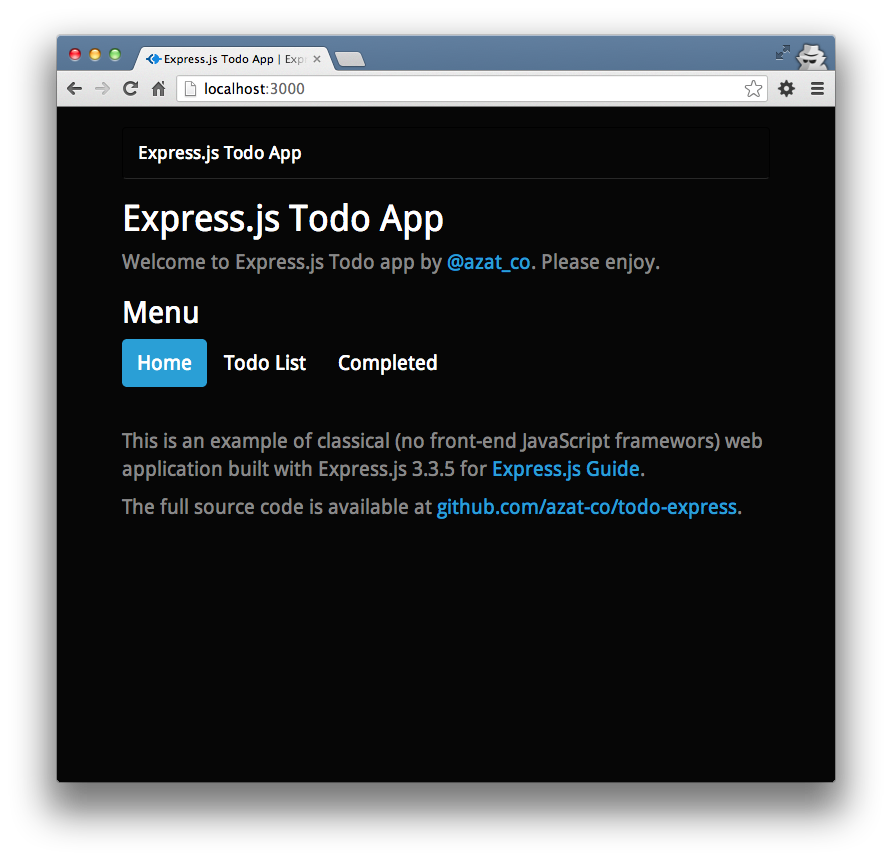
The Todo app home page.
There’s an empty list (unless you played with this app before):
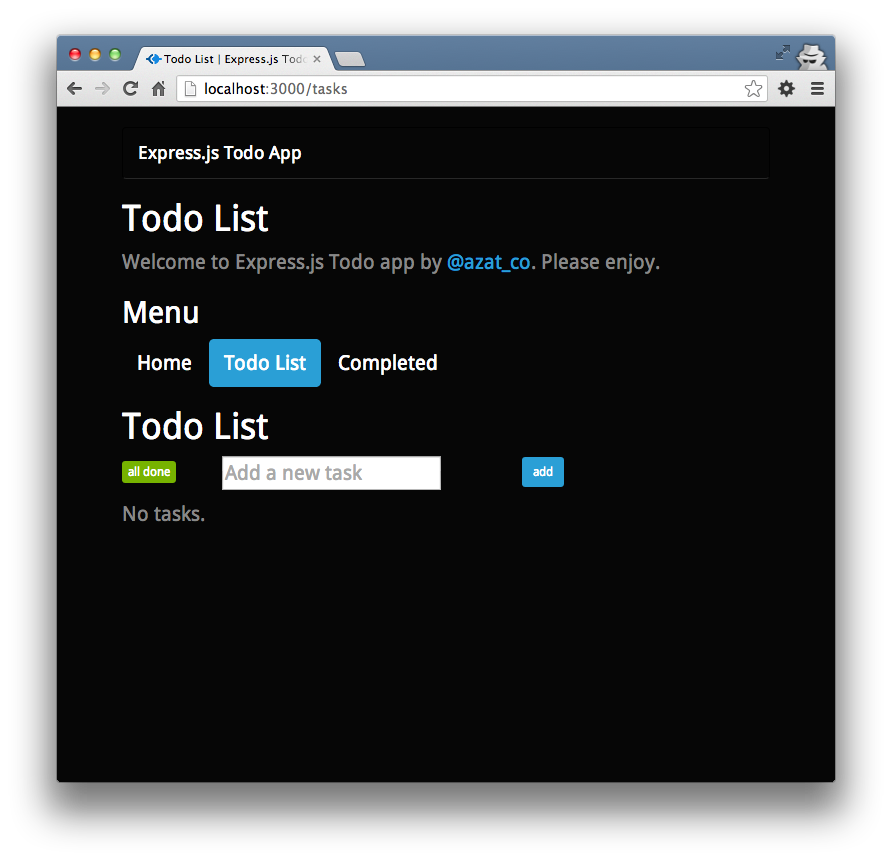
The empty Todo List page.
Now we can add four items to the Todo List:
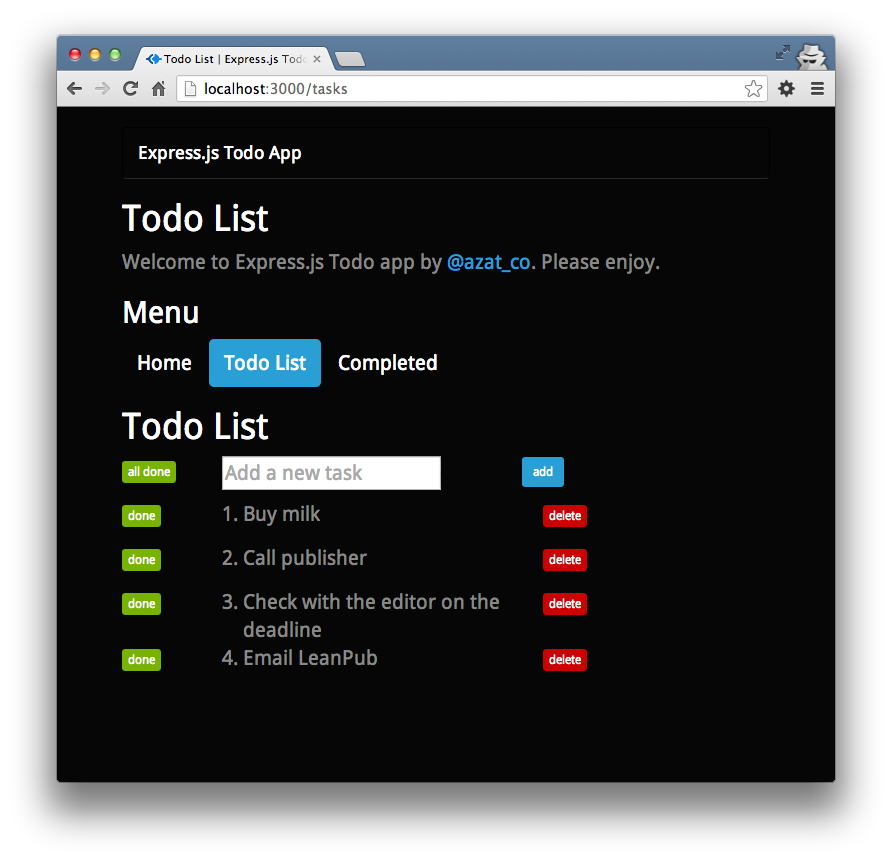
The Todo List page with added items.
Mark one of the tasks as “done”, e.g.. “Buy milk”:
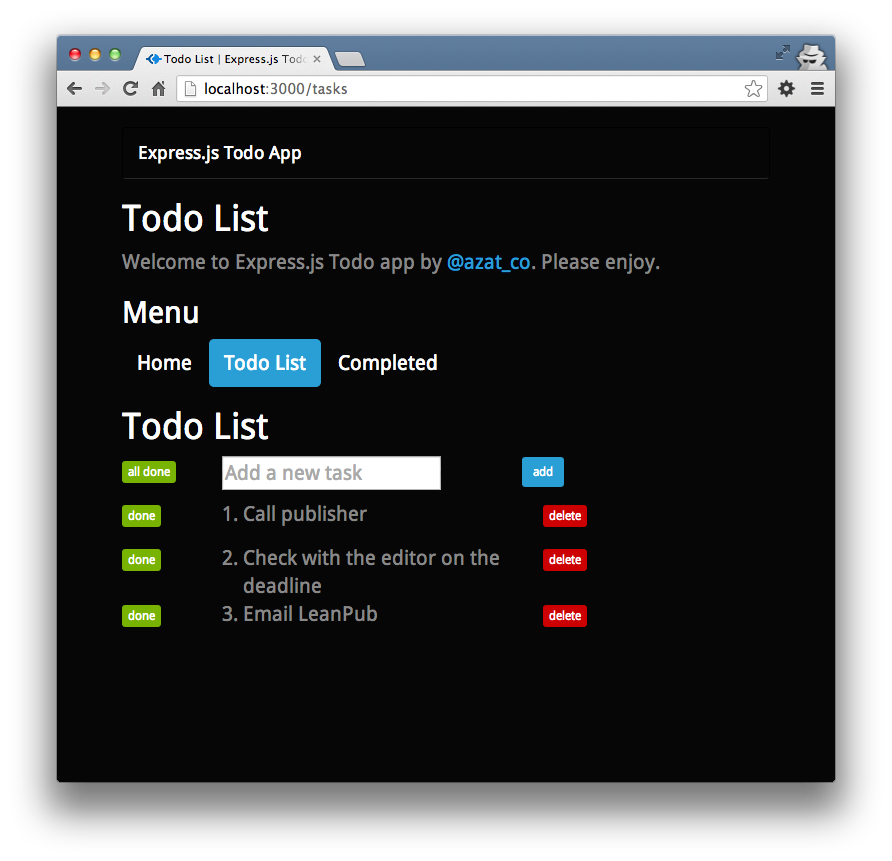
The Todo List page with one item marked done.
Going to the Complete page reveals this done item:
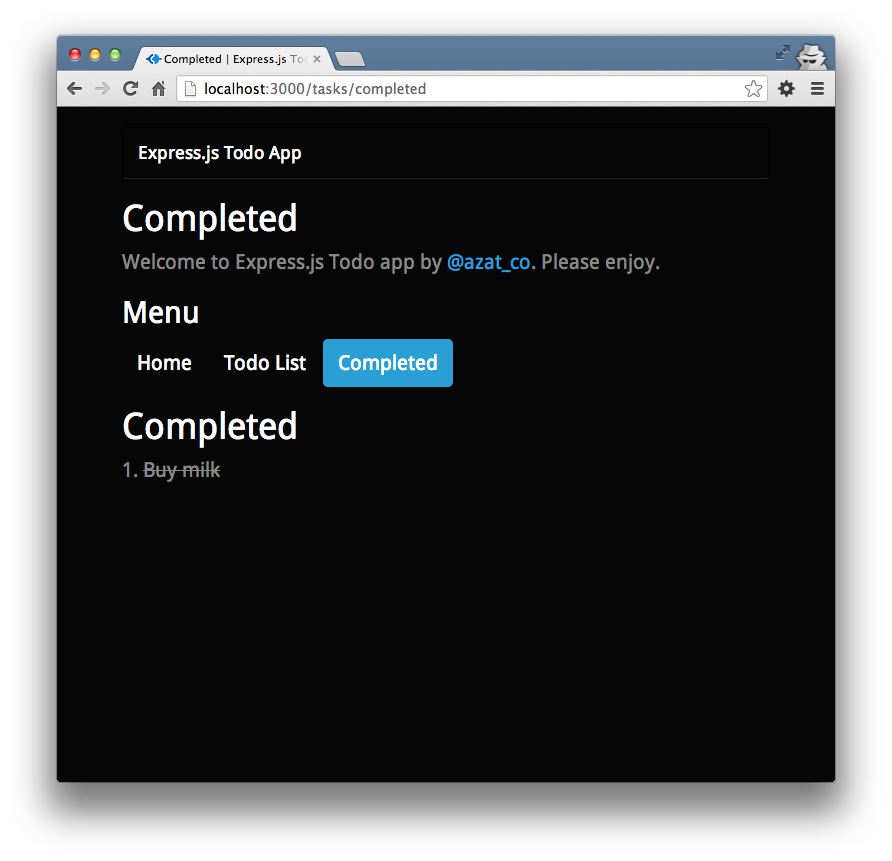
The Todo app Completed page.
Deletion of an item from the Todo list is the only action performed via AJAX/XHR request. The rest of the logic is done via GETs and POSTs (by forms).
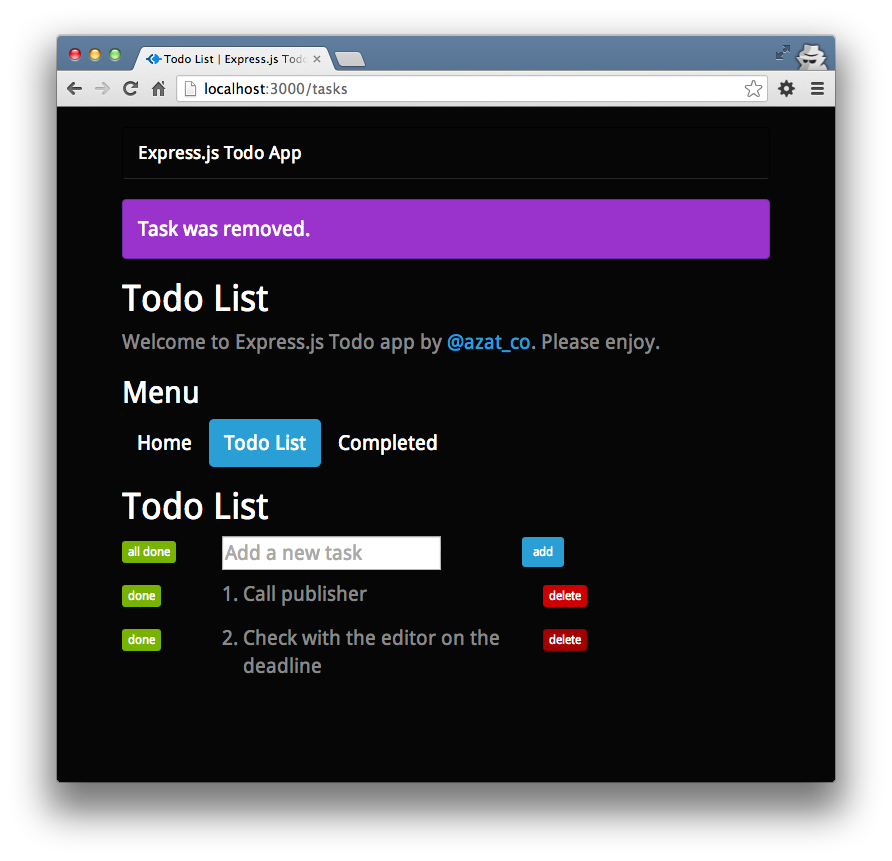
The Todo List page with removed tasks.
2.1 Scaffolding
As usual, we start by running
1 $ express todo-express
2 $ cd todo-express
3 $ npm install
This will give us the basic Express.js application.
We’ll need to add two extra dependencies to package.json, the less-middleware and Mongoskin libraries:
1 $ npm install less-middleware --save
2 $ npm install mongoskin --save
Changing the name to todo-express is optional:
 1 {
 2   "name": "todo-express",
 3   "version": "0.0.1",
 4   "private": true,
 5   "scripts": {
 6     "start": "node app.js"
 7   },
 8   "dependencies": {
 9     "express": "3.3.5",
10     "jade": "*",
11     "mongoskin": "~0.6.0",
12     "less-middleware": "~0.1.12"
13   }
14 }
2.2 MongoDB
Install MongoDB if you don’t have it already.
1 $ brew update
2 $ brew install mongodb
3 $ mongo --version
For more flavors of MongoDB installation, check out the official docs.
2.3 Structure
The final version of the app has the following folder/file structure (GitHub):
 1 /todo-express
 2   /public
 3     /bootstrap
 4       *.less
 5     /images
 6     /javascripts
 7       main.js
 8       jquery.js
 9     /stylesheets
10       style.css
11       main.less
12   /routes
13     tasks.js
14     index.js
15   /views
16     tasks_completed.jade
17     layout.jade
18     index.jade
19     tasks.jade
20   app.js
21   readme.md
22   package.json
The *.less in the bootstrap folder means there are a bunch of Twitter Bootstrap (the CSS framework) source files. They’re available at GitHub.
2.4 app.js
This is a breakdown of the Express.js-generated app.js file with the addition of routes, database, session, LESS and param middlewares.
Firstly, we import dependencies with the Node.js global require() function:
1 var express = require('express');
Similarly, we get access to our own modules, which are the app’s routes:
1 var routes = require('./routes');
2 var tasks = require('./routes/tasks');
The core http and path modules will be needed as well:
1 var http = require('http');
2 var path = require('path');
Mongoskin is a better alternative to the native MongoDB driver:
1 var mongoskin = require('mongoskin');
One line is all we need to get the database connection object. The first param follows the standard URI convention of protocol://username:password@host:port/database:
1 var db = mongoskin.db('mongodb://localhost:27017/todo?auto_reconnect', {safe:true\
2 });
The app itself:
1 var app = express();
In this middleware, we export the database object to all middlewares. By doing so, we’ll be able to perform database operations in the routes modules:
1 app.use(function(req, res, next) {
2   req.db = {};
We simply store the tasks collection in every request:
1   req.db.tasks = db.collection('tasks');
2   next();
3 })
This line allows us to access appname from within every Jade template:
1 app.locals.appname = 'Express.js Todo App'
We set the server port to either the environment variable, or if that’s undefined, to 3000:
1 app.set('port', process.env.PORT || 3000);
These statements tell Express.js where templates live and what file extension to prepend in case the extension is omitted during the render calls:
1 app.set('views', __dirname + '/views');
2 app.set('view engine', 'jade');
Display the Express.js favicon (the graphic in the URL address bar of browsers):
1 app.use(express.favicon());
The out-of-the-box logger will print requests in the terminal window:
1 app.use(express.logger('dev'));
The bodyParser() middleware is needed to painlessly access incoming data:
1 app.use(express.bodyParser());
The methodOverride() middleware is a workaround for HTTP methods that involve headers. It’s not essential for this example, but we’ll leave it here:
1 app.use(express.methodOverride());
To use CSRF, we need cookieParser() and session():
1 app.use(express.cookieParser());
2 app.use(express.session({
3   secret: '59B93087-78BC-4EB9-993A-A61FC844F6C9'
4 }));
The csrf() middleware itself. The order is important; in other words, csrf() must be preceded by cookieParser() and session():
1 app.use(express.csrf());
To process LESS stylesheets into CSS ones, we utilize less-middleware in this manner:
1 app.use(require('less-middleware')({
2   src: __dirname + '/public',
3   compress: true
4 }));
The other static files are also in the public folder:
1 app.use(express.static(path.join(__dirname, 'public')));
Remember CSRF? This is how we expose it to templates:
1 app.use(function(req, res, next) {
2   res.locals._csrf = req.session._csrf;
3   return next();
4 })
The router plug-in is enabled by this statement. It’s important to have this line after the less-middleware and csrf() lines above:
1 app.use(app.router);
It’s possible to configure different behavior based on environments:
1 if ('development' == app.get('env')) {
2   app.use(express.errorHandler());
3 }
When there’s a request that matches route/RegExp with :task_id in it, this block is executed:
1 app.param('task_id', function(req, res, next, taskId) {
The value of task ID is in taskId and we query the database to find that object:
1 req.db.tasks.findById(taskId, function(error, task){
It’s tremendously important to check for errors and empty results:
1     if (error) return next(error);
2     if (!task) return next(new Error('Task is not found.'));
If there’s data, store it in the request and proceed to the next middleware:
1     req.task = task;
2     return next();
3   });
4 });
Now it’s time to define our routes. We start with the home page:
1 app.get('/', routes.index);
The Todo List page:
1 app.get('/tasks', tasks.list);
This route will mark all tasks in the Todo List as completed if the user presses the all done button. In a RESP API, the HTTP method would be PUT but because we’re building classical web apps with forms, we have to use POST:
1 app.post('/tasks', tasks.markAllCompleted)
The same URL for adding new tasks is used for marking all tasks completed, but in the previous methods itself (markAllCompleted) you’ll see how we handle flow control:
1 app.post('/tasks', tasks.add);
To mark a single task completed, we use the aforementioned :task_id string in our URL pattern. (In REST API, this should have been a PUT request):
1 app.post('/tasks/:task_id', tasks.markCompleted);
Unlike with the POST route above, we utilize Express.js param middleware with a :task_id token:
1 app.del('/tasks/:task_id', tasks.del);
For our Completed page, we define this route:
1 app.get('/tasks/completed', tasks.completed);
In case of malicious attacks or mistyped URLs, it’s a user-friendly thing to catch all requests with *. Keep in mind that if we had a match previously, the Node.js won’t come to execute this block:
1 app.all('*', function(req, res){
2   res.send(404);
3 })
Finally, we spin up our application with the good ‘ol http method:
1 http.createServer(app).listen(app.get('port'),
2   function(){
3     console.log('Express server listening on port '
4       + app.get('port'));
5   }
6 );
The full content of the app.js file:
 1 /**
 2  * Module dependencies.
 3  */
 4
 5 var express = require('express');
 6 var routes = require('./routes');
 7 var tasks = require('./routes/tasks');
 8 var http = require('http');
 9 var path = require('path');
10 var mongoskin = require('mongoskin');
11 var db = mongoskin.db('mongodb://localhost:27017/todo?auto_reconnect', {safe:true\
12 });
13 var app = express();
14 app.use(function(req, res, next) {
15   req.db = {};
16   req.db.tasks = db.collection('tasks');
17   next();
18 })
19 app.locals.appname = 'Express.js Todo App'
20 // all environments
21
22
23 app.set('port', process.env.PORT || 3000);
24 app.set('views', __dirname + '/views');
25 app.set('view engine', 'jade');
26 app.use(express.favicon());
27 app.use(express.logger('dev'));
28 app.use(express.bodyParser());
29 app.use(express.methodOverride());
30 app.use(express.cookieParser());
31 app.use(express.session({secret: '59B93087-78BC-4EB9-993A-A61FC844F6C9'}));
32 app.use(express.csrf());
33
34 app.use(require('less-middleware')({ src: __dirname + '/public', compress: true }\
35 ));
36 app.use(express.static(path.join(__dirname, 'public')));
37 app.use(function(req, res, next) {
38   res.locals._csrf = req.session._csrf;
39   return next();
40 })
41 app.use(app.router);
42
43 // development only
44 if ('development' == app.get('env')) {
45   app.use(express.errorHandler());
46 }
47 app.param('task_id', function(req, res, next, taskId) {
48   req.db.tasks.findById(taskId, function(error, task){
49     if (error) return next(error);
50     if (!task) return next(new Error('Task is not found.'));
51     req.task = task;
52     return next();
53   });
54 });
55
56 app.get('/', routes.index);
57 app.get('/tasks', tasks.list);
58 app.post('/tasks', tasks.markAllCompleted)
59 app.post('/tasks', tasks.add);
60 app.post('/tasks/:task_id', tasks.markCompleted);
61 app.del('/tasks/:task_id', tasks.del);
62 app.get('/tasks/completed', tasks.completed);
63
64 app.all('*', function(req, res){
65   res.send(404);
66 })
67 http.createServer(app).listen(app.get('port'), function(){
68   console.log('Express server listening on port ' + app.get('port'));
69 });
2.5 Routes
There are only two files in the routes folder. One of them serves the home page (e.g., http://localhost:3000/) and is straightforward:
1 /*
2  * GET home page.
3  */
4
5 exports.index = function(req, res){
6   res.render('index', { title: 'Express.js Todo App' });
7 };
The remaining logic that deals with tasks itself has been placed in todo-express/routes/tasks.js. Let’s break it down a bit.
We start by exporting a list() request handler that gives us a list of incomplete tasks:
1 exports.list = function(req, res, next){
To do so, we perform a database search with completed=false query:
1   req.db.tasks.find({
2     completed: false
3   }).toArray(function(error, tasks){
In the callback, we need to check for any errors:
javascript
    if (error) return next(error);
Since we use toArray(), we can send the date directly to the template:
1     res.render('tasks', {
2       title: 'Todo List',
3       tasks: tasks || []
4     });
5   });
6 };
Adding a new task requires us to check for the name parameter:
1 exports.add = function(req, res, next){
2   if (!req.body || !req.body.name)
3     return next(new Error('No data provided.'));
Thanks to our middleware, we already have a database collection in the req object, and the default value for the task is incomplete (completed: false):
1   req.db.tasks.save({
2     name: req.body.name,
3     completed: false
4   }, function(error, task){
Again, it’s important to check for errors and propagate them with the Express.js next() function:
1     if (error) return next(error);
2     if (!task) return next(new Error('Failed to save.'));
Logging is optional; however, it’s useful for learning and debugging:
1 console.info('Added %s with id=%s', task.name, task._id);
Lastly, we redirect back to the Todo List page when the saving operation has finished successfully:
1     res.redirect('/tasks');
2   })
3 };
This method marks all incomplete tasks as complete:
1 exports.markAllCompleted = function(req, res, next) {
Because we had to reuse the POST route and since it’s a good illustration of flow control, we check for the all_done parameter to decide if this request comes from the all done button or the add button:
1   if (!req.body.all_done
2     || req.body.all_done !== 'true')
3     return next();
If the execution has come this far, we perform a db query with multi: true:
javascript
  req.db.tasks.update({
    completed: false
  }, {$set: {
    completed: true
  }}, {multi: true}, function(error, count){
Significant error handling, logging and redirection back to Todo List page:
1     if (error) return next(error);
2     console.info('Marked %s task(s) completed.', count);
3     res.redirect('/tasks');
4   })
5 };
The Completed route is similar to the Todo List, except for the completed flag value (true in this case):
 1 exports.completed = function(req, res, next) {
 2   req.db.tasks.find({
 3     completed: true
 4   }).toArray(function(error, tasks) {
 5     res.render('tasks_completed', {
 6       title: 'Completed',
 7       tasks: tasks || []
 8     });
 9   });
10 };
This is the route that takes care of marking a single task as done. We use updateById but the same thing can be accomplished with a plain update method from Mongoskin/MongoDB API. The trick with completed: req.body.completed === 'true is needed because the incoming value is a string and not a boolean.
1 exports.markCompleted = function(req, res, next) {
2   if (!req.body.completed)
3     return next(new Error('Param is missing'));
4   req.db.tasks.updateById(req.task._id, {
5     $set: {completed: req.body.completed === 'true'}},
6     function(error, count) {
Once more, we perform error and results checks; (update() and updateById() don’t return object, but the count of the affected documents instead):
 1       if (error) return next(error);
 2       if (count !==1)
 3         return next(new Error('Something went wrong.'));
 4       console.info('Marked task %s with id=%s completed.',
 5         req.task.name,
 6         req.task._id);
 7       res.redirect('/tasks');
 8     }
 9   )
10 }
Delete is the single route called by an AJAX request. However, there’s nothing special about its implementation. The only difference is that we don’t redirect, but send status 200 back.
Just for your information, the remove() method can be used instead of removeById().
 1 exports.del = function(req, res, next) {
 2   req.db.tasks.removeById(req.task._id, function(error, count) {
 3     if (error) return next(error);
 4     if (count !==1) return next(new Error('Something went wrong.'));
 5     console.info('Deleted task %s with id=%s completed.',
 6       req.task.name,
 7       req.task._id);
 8     res.send(200);
 9   });
10 }
For your convenience, here’s the full content of the todo-express/routes/tasks.js file:
 1 /*
 2  * GET users listing.
 3  */
 4
 5 exports.list = function(req, res, next){
 6   req.db.tasks.find({completed: false}).toArray(function(error, tasks){
 7     if (error) return next(error);
 8     res.render('tasks', {
 9       title: 'Todo List',
10       tasks: tasks || []
11     });
12   });
13 };
14
15 exports.add = function(req, res, next){
16   if (!req.body || !req.body.name) return next(new Error('No data provided.'));
17   req.db.tasks.save({
18     name: req.body.name,
19     completed: false
20   }, function(error, task){
21     if (error) return next(error);
22     if (!task) return next(new Error('Failed to save.'));
23     console.info('Added %s with id=%s', task.name, task._id);
24     res.redirect('/tasks');
25   })
26 };
27
28 exports.markAllCompleted = function(req, res, next) {
29   if (!req.body.all_done || req.body.all_done !== 'true') return next();
30   req.db.tasks.update({
31     completed: false
32   }, {$set: {
33     completed: true
34   }}, {multi: true}, function(error, count){
35     if (error) return next(error);
36     console.info('Marked %s task(s) completed.', count);
37     res.redirect('/tasks');
38   })
39 };
40
41 exports.completed = function(req, res, next) {
42   req.db.tasks.find({completed: true}).toArray(function(error, tasks) {
43     res.render('tasks_completed', {
44       title: 'Completed',
45       tasks: tasks || []
46     });
47   });
48 };
49
50 exports.markCompleted = function(req, res, next) {
51   if (!req.body.completed) return next(new Error('Param is missing'));
52   req.db.tasks.updateById(req.task._id, {$set: {completed: req.body.completed ===\
53  'true'}}, function(error, count) {
54     if (error) return next(error);
55     if (count !==1) return next(new Error('Something went wrong.'));
56     console.info('Marked task %s with id=%s completed.', req.task.name, req.task.\
57 _id);
58     res.redirect('/tasks');
59   })
60 };
61
62 exports.del = function(req, res, next) {
63   req.db.tasks.removeById(req.task._id, function(error, count) {
64     if (error) return next(error);
65     if (count !==1) return next(new Error('Something went wrong.'));
66     console.info('Deleted task %s with id=%s completed.', req.task.name, req.task\
67 ._id);
68     res.send(200);
69   });
70 };
2.6 Jades
In the Todo app, we use four templates:
-
layout.jade: the skeleton of HTML pages that is used on all pages -
index.jade: home page -
tasks.jade: Todo List page -
tasks_completed.jade: Completed page
Let’s go through each file starting with layout.jade. It starts with doctype, html and head types:
1 doctype 5
2 html
3   head
We should have the appname variable set:
1 title= title + ' | ' + appname
Next, we include *.css files but underneath, and Express.js will serve its contents from LESS files:
1     link(rel="stylesheet", href="/stylesheets/style.css")
2     link(rel="stylesheet", href="/bootstrap/bootstrap.css")
3     link(rel="stylesheet", href="/stylesheets/main.css")
The body with Twitter Bootstrap structure consist of .container and .navbar. To read more about those and other classes, go to getbootstrap.com/css/:
 1   body
 2     .container
 3       .navbar.navbar-default
 4         .container
 5           .navbar-header
 6             a.navbar-brand(href='/')= appname
 7       .alert.alert-dismissable
 8       h1= title
 9       p Welcome to Express.js Todo app by
10         a(href='http://twitter.com/azat_co') @azat_co
11         |. Please enjoy.
This is the place where other jades (like tasks.jade) will be imported:
1 block content
The last lines include front-end JavaScript files:
1   script(src='/javascripts/jquery.js', type="text/javascript")
2   script(src='/javascripts/main.js', type="text/javascript")
The full layout.jade file:
 1 doctype html
 2 html
 3   head
 4     title= title + ' | ' + appname
 5     link(rel="stylesheet", href="/stylesheets/style.css")
 6     link(rel="stylesheet", href="/bootstrap/bootstrap.css")
 7     link(rel="stylesheet", href="/stylesheets/main.css")
 8
 9   body
10     .container
11       .navbar.navbar-default
12         .container
13           .navbar-header
14             a.navbar-brand(href='/')= appname
15       .alert.alert-dismissable
16       h1= title
17       p Welcome to Express.js Todo app by
18         a(href='http://twitter.com/azat_co') @azat_co
19         |. Please enjoy.
20       block content
21   script(src='/javascripts/jquery.js', type="text/javascript")
22   script(src='/javascripts/main.js', type="text/javascript")
The index.jade file is our home page and it’s quite vanilla. The most interesting thing it has is the nav-pills menu:
 1 extends layout
 2
 3 block content
 4   .menu
 5     h2 Menu
 6     ul.nav.nav-pills
 7       li.active
 8         a(href="/tasks") Home
 9       li
10         a(href="/tasks") Todo List
11       li
12         a(href="/tasks") Completed
13   .home
14     p This is an example of classical (no front-end JavaScript frameworks) web ap\
15 plication built with Express.js 3.3.5 for
16       a(href="http://expressjsguide.com") Express.js Guide
17       |.
18     p The full source code is available at
19       a(href='http://github.com/azat-co/todo-express') github.com/azat-co/todo-ex\
20 press
21       |.
The tasks.jade uses extends layout:
1 extends layout
2
3 block content
Then goes our main page of specific content:
 1   .menu
 2     h2 Menu
 3     ul.nav.nav-pills
 4       li
 5         a(href='/') Home
 6       li.active
 7         a(href='/tasks') Todo List
 8       li
 9         a(href="/tasks/completed") Completed
10   h1= title
The div with list class will hold the Todo List:
1   .list
2     .item.add-task
The form to mark all items as done has a CSRF token in a hidden field and uses the POST method pointed to /tasks:
1       div.action
2         form(action='/tasks', method='post')
3           input(type='hidden', value='true', name='all_done')
4           input(type='hidden', value=locals._csrf, name='_csrf')
5           input(type='submit', class='btn btn-success btn-xs', value='all done')
A similar CSRF-enabled form is used for new task creation:
1       form(action="/tasks", method='post')
2         input(type='hidden', value=locals._csrf, name='_csrf')
3         div.name
4           input(type="text", name="name", placeholder='Add a new task')
5         div.delete
6           input.btn.btn-primary.btn-sm(type="submit", value='add')
When we start the app for the first time (or clean the database), there are no tasks:
1     if (tasks.length === 0)
2       | No tasks.
Jade supports iterations with the each command:
1     each task, index in tasks
2       .item
3         div.action
This form submits data to its individual task route:
1           form(action='/tasks/#{task._id}', method='post')
2             input(type='hidden', value=task._id.toString(), name='id')
3             input(type='hidden', value='true', name='completed')
4             input(type='hidden', value=locals._csrf, name='_csrf')
5             input(type='submit', class='btn btn-success btn-xs task-done', value=\
6 'done')
The index variable is used to display order in the list of tasks:
1         div.num
2           span=index+1
3             |.
4         div.name
5           span.name=task.name
6           //- no support for DELETE method in forms
7           //- http://amundsen.com/examples/put-delete-forms/
8           //- so do XHR request instead from public/javascripts/main.js
The delete button doesn’t have anything fancy attached to it, because events are attached to these buttons from the main.js front-end JavaScript file:
1         div.delete
2           a(class='btn btn-danger btn-xs task-delete', data-task-id=task._id.toSt\
3 ring(), data-csrf=locals._csrf) delete
The full source code of tasks.jade:
 1 extends layout
 2
 3 block content
 4
 5   .menu
 6     h2 Menu
 7     ul.nav.nav-pills
 8       li
 9         a(href='/') Home
10       li.active
11         a(href='/tasks') Todo List
12       li
13         a(href="/tasks/completed") Completed
14   h1= title
15
16   .list
17     .item.add-task
18       div.action
19         form(action='/tasks', method='post')
20           input(type='hidden', value='true', name='all_done')
21           input(type='hidden', value=locals._csrf, name='_csrf')
22           input(type='submit', class='btn btn-success btn-xs', value='all done')
23       form(action="/tasks", method='post')
24         input(type='hidden', value=locals._csrf, name='_csrf')
25         div.name
26           input(type="text", name="name", placeholder='Add a new task')
27         div.delete
28           input.btn.btn-primary.btn-sm(type="submit", value='add')
29     if (tasks.length === 0)
30       | No tasks.
31     each task, index in tasks
32       .item
33         div.action
34           form(action='/tasks/#{task._id}', method='post')
35             input(type='hidden', value=task._id.toString(), name='id')
36             input(type='hidden', value='true', name='completed')
37             input(type='hidden', value=locals._csrf, name='_csrf')
38             input(type='submit', class='btn btn-success btn-xs task-done', value=\
39 'done')
40         div.num
41           span=index+1
42             |.
43         div.name
44           span.name=task.name
45           //- no support for DELETE method in forms
46           //- http://amundsen.com/examples/put-delete-forms/
47           //- so do XHR request instead from public/javascripts/main.js
48         div.delete
49           a(class='btn btn-danger btn-xs task-delete', data-task-id=task._id.toSt\
50 ring(), data-csrf=locals._csrf) delete
Last but not least comes tasks_completed.jade, which is just a stripped down version of the tasks.jade file:
 1 extends layout
 2
 3 block content
 4
 5   .menu
 6     h2 Menu
 7     ul.nav.nav-pills
 8       li
 9         a(href='/') Home
10       li
11         a(href='/tasks') Todo List
12       li.active
13         a(href="/tasks/completed") Completed
14
15   h1= title
16
17   .list
18     if (tasks.length === 0)
19       | No tasks.
20     each task, index in tasks
21       .item
22         div.num
23           span=index+1
24             |.
25         div.name.completed-task
26           span.name=task.name
2.7 LESS
As we’ve mentioned before, after applying proper middleware in app.js files, we can put *.less files anywhere under the public folder. Express.js works by accepting a request for some .css file and tries to match the corresponding file by name. Therefore, we include *.css files in our jades.
Here is the content of the todo-express/public/stylesheets/main.less file:
 1 * {
 2   font-size:20px;
 3 }
 4 .btn {
 5   // margin-left: 20px;
 6   // margin-right: 20px;
 7 }
 8 .num {
 9   // margin-right: 3px;
10 }
11 .item {
12   height: 44px;
13   width: 100%;
14   clear: both;
15   .name {
16     width: 300px;
17   }
18   .action {
19     width: 100px;
20   }
21   .delete {
22     width: 100px
23   }
24   div {
25     float:left;
26   }
27 }
28 .home {
29   margin-top: 40px;
30 }
31 .name.completed-task {
32   text-decoration: line-through;
33 }
2.8 Conclusion
The Todo app is considered classic because it doesn’t rely on any front-end framework. This was done intentionally to show how easy it is to use Express.js for such tasks. In modern-day development, people often leverage some sort of REST API server architecture with a front-end client built with Backbone.js, Angular, Ember or something else. Our next examples dive into the details about how to write such servers.
3 REST API
This tutorial will walk you through the writing test using the Mocha and Super Agent libraries, and then use them in a test-driven development manner to build a Node.js free JSON REST API server, utilizing the Express.js framework and Mongoskin library for MongoDB.
|
|
ExampleAll the source code is in github.com/azat-co/rest-api-express for your convenience. |
In this REST API server, we’ll perform create, update, remove and delete (CRUD) operations and harness the Express.js middleware concept with app.param() and app.use() methods.
3.1 Test Coverage
Before anything else, let’s write functional tests that make HTTP requests to our soon-to-be-created REST API server. If you know how to use Mocha or just want to jump straight to the Express.js app implementation, feel free to do so. You can use CURL terminal commands for testing too.
Assuming we already have Node.js, NPM and MongoDB installed, let’s create a new folder (or if you wrote the tests, use that folder):
1 mkdir rest-api
2 cd rest-api
We’ll use the Mocha, Expect.js and Super Agent libraries. To install them, run these commands from the project folder:
1 $ npm install -g mocha
2 $ npm install expect.js
3 $ npm install superagent

|
TipInstalling Mocha locally will give us the ability to use different versions at the same time. To run tests, simply point to |
Now let’s create an express.test.js file in the same folder, which will have six suites:
- creating a new object
- retrieving an object by its ID
- retrieving the whole collection
- updating an object by its ID
- checking an updated object by its ID
- removing an object by its ID
HTTP requests are a breeze with SuperAgent’s chained functions, which we’ll put inside of each test suite.
Here is the full source code for the rest-api-express/express.test.js file:
 1 var superagent = require('superagent')
 2 var expect = require('expect.js')
 3
 4 describe('express rest api server', function(){
 5   var id
 6
 7   it('post object', function(done){
 8     superagent.post('http://localhost:3000/collections/test')
 9       .send({ name: 'John'
10         , email: 'john@rpjs.co'
11       })
12       .end(function(e,res){
13         // console.log(res.body)
14         expect(e).to.eql(null)
15         expect(res.body.length).to.eql(1)
16         expect(res.body[0]._id.length).to.eql(24)
17         id = res.body[0]._id
18         done()
19       })
20   })
21
22   it('retrieves an object', function(done){
23     superagent.get('http://localhost:3000/collections/test/'+id)
24       .end(function(e, res){
25         // console.log(res.body)
26         expect(e).to.eql(null)
27         expect(typeof res.body).to.eql('object')
28         expect(res.body._id.length).to.eql(24)
29         expect(res.body._id).to.eql(id)
30         done()
31       })
32   })
33
34   it('retrieves a collection', function(done){
35     superagent.get('http://localhost:3000/collections/test')
36       .end(function(e, res){
37         // console.log(res.body)
38         expect(e).to.eql(null)
39         expect(res.body.length).to.be.above(0)
40         expect(res.body.map(function (item){return item._id})).to.contain(id)
41         done()
42       })
43   })
44
45   it('updates an object', function(done){
46     superagent.put('http://localhost:3000/collections/test/'+id)
47       .send({name: 'Peter'
48         , email: 'peter@yahoo.com'})
49       .end(function(e, res){
50         // console.log(res.body)
51         expect(e).to.eql(null)
52         expect(typeof res.body).to.eql('object')
53         expect(res.body.msg).to.eql('success')
54         done()
55       })
56   })
57
58   it('checks an updated object', function(done){
59     superagent.get('http://localhost:3000/collections/test/'+id)
60       .end(function(e, res){
61         // console.log(res.body)
62         expect(e).to.eql(null)
63         expect(typeof res.body).to.eql('object')
64         expect(res.body._id.length).to.eql(24)
65         expect(res.body._id).to.eql(id)
66         expect(res.body.name).to.eql('Peter')
67         done()
68       })
69   })
70   it('removes an object', function(done){
71     superagent.del('http://localhost:3000/collections/test/'+id)
72       .end(function(e, res){
73         // console.log(res.body)
74         expect(e).to.eql(null)
75         expect(typeof res.body).to.eql('object')
76         expect(res.body.msg).to.eql('success')
77         done()
78       })
79   })
80 })
To run the tests, we can use the $ mocha express.test.js command.
3.2 Dependencies
In this tutorial, we’ll utilize Mongoskin, a MongoDB library, which is a better alternative to the plain good old native MongoDB driver for Node.js. In addition, Mongoskin is more lightweight than Mongoose and schema-less. For more insight, please check out this Mongoskin comparison blurb.
Express.js is a wrapper for core Node.js HTTP module objects. The Express.js framework is built on top of Connect middleware and provides tons of convenience. Some people compare the framework to Ruby’s Sinatra because it’s non-opinionated and configurable.
If you’ve created a rest-api folder in the previous section Test Coverage, simply run these commands to install modules for the application:
1 npm install express
2 npm install mongoskin
3.3 Implementation
First things first. Let’s define our dependencies:
1 var express = require('express')
2   , mongoskin = require('mongoskin')
After version 3.x, Express streamlines the instantiation of its app instance, so that this line will give us a server object:
1 var app = express()
To extract params from the body of the requests, we’ll use bodyParser() middleware which looks more like a configuration statement:
1 app.use(express.bodyParser())
Middleware (in this and other forms) is a powerful and convenient pattern in Express.js and Connect to organize and reuse code.
As with the bodyParser() method that saves us from the hurdles of parsing a body object of an HTTP request, Mongoskin makes it possible to connect to the MongoDB database in one effortless line of code:
1 var db = mongoskin.db('localhost:27017/test', {safe:true});
|
|
NoteIf you wish to connect to a remote database, e.g., MongoHQ for instance, substitute the string with your username, password, host and port values. Here is the format of the URI string: |
The app.param() method is another Express.js middleware. It basically says “do something every time there is this value in the URL pattern of the request handler.” In our case, we select a particular collection when a request pattern contains a string collectionName prefixed with a colon (you’ll see it later in the routes):
1 app.param('collectionName', function(req, res, next, collectionName){
2   req.collection = db.collection(collectionName)
3   return next()
4 })
Merely to be user-friendly, let’s put a root route with a message:
1 app.get('/', function(req, res, next) {
2   res.send('please select a collection, e.g., /collections/messages')
3 })
Now the real work begins. Here is how we retrieve a list of items sorted by _id and that has a limit of 10:
1 app.get('/collections/:collectionName', function(req, res, next) {
2   req.collection.find({},{
3     limit:10, sort: [['_id',-1]]
4   }).toArray(function(e, results){
5     if (e) return next(e)
6     res.send(results)
7   })
8 })
Have you noticed a :collectionName string in the URL pattern parameter? This and the previous app.param() middleware is what gives us the req.collection object which points to a specified collection in our database.
The object-creating endpoint is slightly easier to grasp since we just pass the whole payload to the MongoDB (method a.k.a. free JSON REST API):
1 app.post('/collections/:collectionName', function(req, res, next) {
2   req.collection.insert(req.body, {}, function(e, results){
3     if (e) return next(e)
4     res.send(results)
5   })
6 })
Single-object-retrieval functions are faster than find(), but they use different interface (they return an object directly instead of a cursor — please be aware). We’re also extracting the ID from :id part of the path with req.params.id Express.js magic:
1 app.get('/collections/:collectionName/:id', function(req, res, next) {
2   req.collection.findOne({
3     _id: req.collection.id(req.params.id)
4   }, function(e, result){
5     if (e) return next(e)
6     res.send(result)
7   })
8 })
The PUT request handler gets more interesting because update() doesn’t return the augmented object; instead, it returns a count of affected objects.
Also {$set:req.body} is a special MongoDB operator (operators tend to start with a dollar sign) that sets values.
The second ` {safe:true, multi:false}` parameter is an object with options that tell MongoDB to wait for the execution before running the callback function and to process only one (the first) item.
 1 app.put('/collections/:collectionName/:id', function(req, res, next) {
 2   req.collection.update({
 3       _id: req.collection.id(req.params.id)
 4     }, {$set:req.body}, {safe:true, multi:false},
 5     function(e, result){
 6       if (e) return next(e)
 7       res.send((result===1)?{msg:'success'}:{msg:'error'})
 8     }
 9   );
10 })
Finally, the DELETE method, which also outputs a custom JSON message:
 1 app.del('/collections/:collectionName/:id', function(req, res, next) {
 2   req.collection.remove({
 3       _id: req.collection.id(req.params.id)
 4     },
 5     function(e, result){
 6       if (e) return next(e)
 7       res.send((result===1)?{msg:'success'}:{msg:'error'})
 8     }
 9   );
10 })
Note: The delete is an operator in JavaScript, so Express.js uses app.del instead.
The last line that actually starts the server on port 3000 in this case is:
1 app.listen(3000)
Just in case something is not working well, here is the full code of the rest-api-express/express.js file :
 1 var express = require('express')
 2   , mongoskin = require('mongoskin')
 3
 4 var app = express()
 5 app.use(express.bodyParser())
 6
 7 var db = mongoskin.db('localhost:27017/test', {safe:true});
 8
 9 app.param('collectionName', function(req, res, next, collectionName){
10   req.collection = db.collection(collectionName)
11   return next()
12 })
13
14 app.get('/', function(req, res, next) {
15   res.send('please select a collection, e.g., /collections/messages')
16 })
17
18 app.get('/collections/:collectionName', function(req, res, next) {
19   req.collection.find({},{limit:10, sort: [['_id',-1]]}).toArray(function(e, resu\
20 lts){
21     if (e) return next(e)
22     res.send(results)
23   })
24 })
25
26 app.post('/collections/:collectionName', function(req, res, next) {
27   req.collection.insert(req.body, {}, function(e, results){
28     if (e) return next(e)
29     res.send(results)
30   })
31 })
32
33
34 app.get('/collections/:collectionName/:id', function(req, res, next) {
35   req.collection.findOne({_id: req.collection.id(req.params.id)}, function(e, res\
36 ult){
37     if (e) return next(e)
38     res.send(result)
39   })
40 })
41 app.put('/collections/:collectionName/:id', function(req, res, next) {
42   req.collection.update({_id: req.collection.id(req.params.id)}, {$set:req.body},\
43  {safe:true, multi:false}, function(e, result){
44     if (e) return next(e)
45     res.send((result===1)?{msg:'success'}:{msg:'error'})
46   })
47 })
48 app.del('/collections/:collectionName/:id', function(req, res, next) {
49   req.collection.remove({_id: req.collection.id(req.params.id)}, function(e, resu\
50 lt){
51     if (e) return next(e)
52     res.send((result===1)?{msg:'success'}:{msg:'error'})
53   })
54 })
55
56
57
58 app.listen(3000)
Exit your editor and run this command in your terminal:
1 $ node express.js
And in a different window (without closing the first one):
1 $ mocha express.test.js
If you really don’t like Mocha and/or BDD, CURL is always there for you. :-)
For example, CURL data to make a POST request:
1 $ curl -d "" http://localhost:3000
GET requests also work in the browser. For example http://localhost:3000/test.
In this tutorial, our tests are longer than the app code itself, so abandoning test-driven development might be tempting, but believe me, the good habits of TDD will save you hours and hours during any serious development when the complexity of the application you are working on is high.
3.4 Conclusion
The Express.js and Mongoskin libraries are great when you need to build a simple REST API server in a few lines of code. Later, if you need to expand the libraries, they also provide a way to configure and organize your code.
NoSQL databases like MongoDB are good at handling free-REST APIs. We don’t have to define schemas and can throw any data at it and it’ll be saved.
The full code for both test and app files: https://gist.github.com/azat-co/6075685.
If you would like to learn more about Express.js and other JavaScript libraries, take a look at the series Intro to Express.js tutorials.
|
|
NoteIn this example, I’m using a semicolon-less style. Semicolons in JavaScript are absolutely optional except in two cases: in the for loop and before expressions/statements that start with parenthesis (e.g., Immediately-Invoked Function Expression). |
4 HackHall
|
|
ExampleThe HackHall source code is in the public GitHub repository. |
The live demo is accessible at hackhall.com, either with AngelList or pre-filled email (1@1.com) and password (1).
4.1 What is HackHall
HackHall (ex-Accelerator.IO) is an open-source invite-only social network and collaboration tool for hackers, hipsters, entrepreneurs and pirates (just kidding). HackHall is akin to Reddit, plus Hacker News, plus Facebook Groups with curation.
The HackHall project is in its early stage and roughly a beta. We plan to extend the code base in the future and bring in more people to share skills, wisdom and passion for programming.
In this chapter, we’ll cover the 1.0 release which has:
- OAuth 1.0 with oauth modules and AngelList API
- Email and password authentication
- Mongoose models and schemas
- Express.js structure with routes in modules
- JSON REST API
- Express.js error handling
- Front-end client Backbone.js app (for more info on Backbone.js, download/read online our Rapid Prototyping with JS tutorials)
- Environmental variables with Foreman’s
.env - TDD with Mocha
- Basic Makefile setup
4.2 Running HackHall
To get the source code, you can navigate to the hackhall folder or clone it from GitHub:
1 $ git clone git@github.com:azat-co/hackhall
2 $ git checkout 1.0
3 $ npm install
If you plan to test an AngelList (optional), HackHall is using a Heroku and Foreman setup for AngelList API keys, storing them in environmental variables, so we need to add an .evn file like this (below are fake values):
1 ANGELLIST_CLIENT_ID=254C0335-5F9A-4607-87C0
2 ANGELLIST_CLIENT_SECRET=99F5C1AC-C5F7-44E6-81A1-8DF4FC42B8D9
The keys can be found at angel.co/api after someone creates and registers his/her AngelList app.
Download and install MongoDB if you don’t have it already. The databases and third-party libraries are outside of the scope of this book. However, you can find enough materials online and in Rapid Prototyping with JS.
To start the MongoDB server, open a new terminal window and run:
1 $ mongod
Go back to the project folder and run:
1 $ foreman start
After MongoDB is running on localhost with default port 27017, it’s possible to seed the database hackhall with a default admin user by running seed.js MongoDB script:
1 $ mongo localhost:27017/hackhall seed.js
Feel free to modify seed.js to your liking (beware that it erases all previous data!):
 1 db.dropDatabase();
 2 var seedUser ={
 3   firstName:'Azat',
 4   lastName:"Mardanov",
 5   displayName:"Azat Mardanov",
 6   password:'1',
 7   email:'1@1.com',
 8   role:'admin',
 9   approved: true,
10   admin: true
11 };
12 db.users.save(seedUser);
If you open your browser at http://localhost:5000, you should see the login screen.
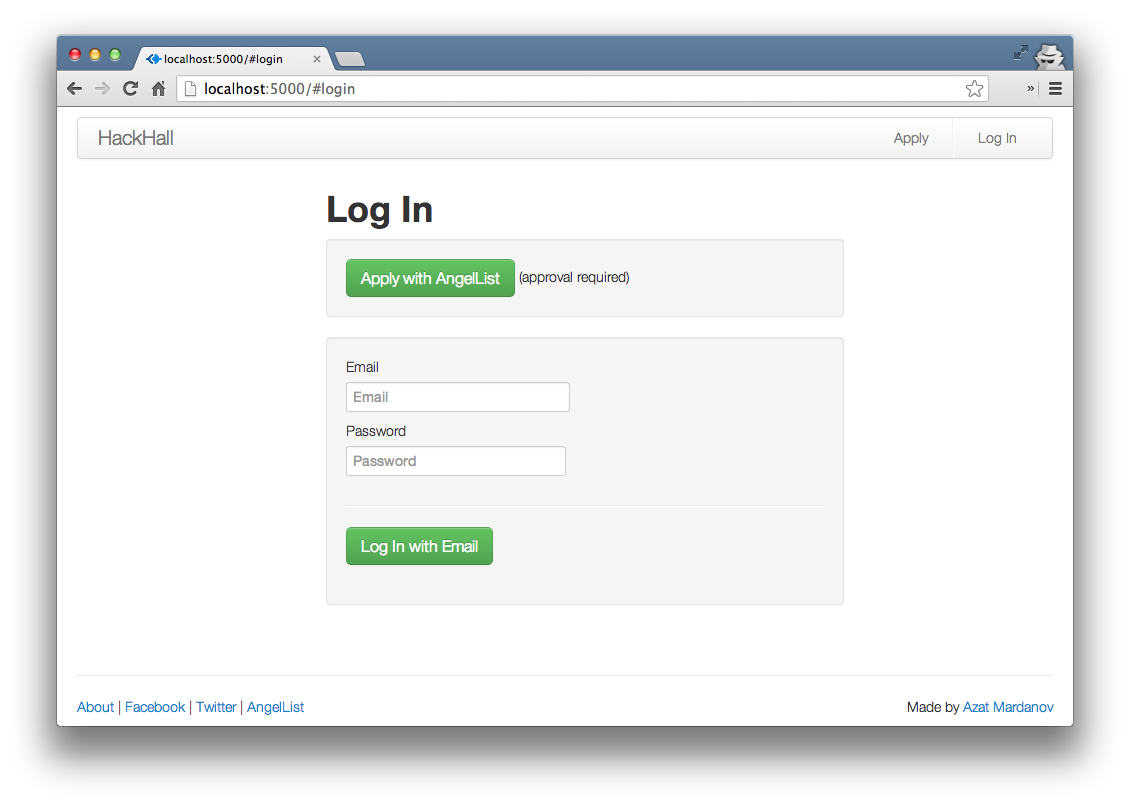
The HackHall login page running locally.
Enter username and password to get in (the ones from the seed.js file).
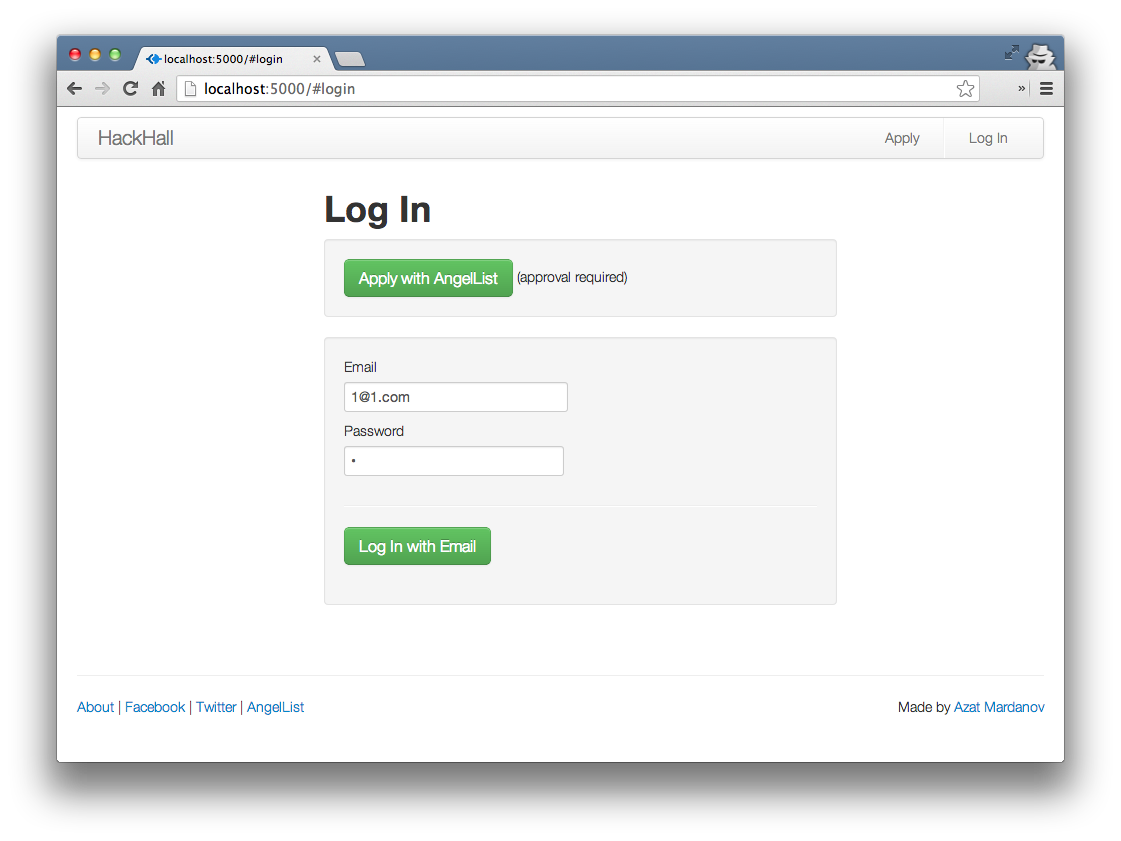
The HackHall login page with seed data.
After successful authentication, users are redirected to the Posts page:
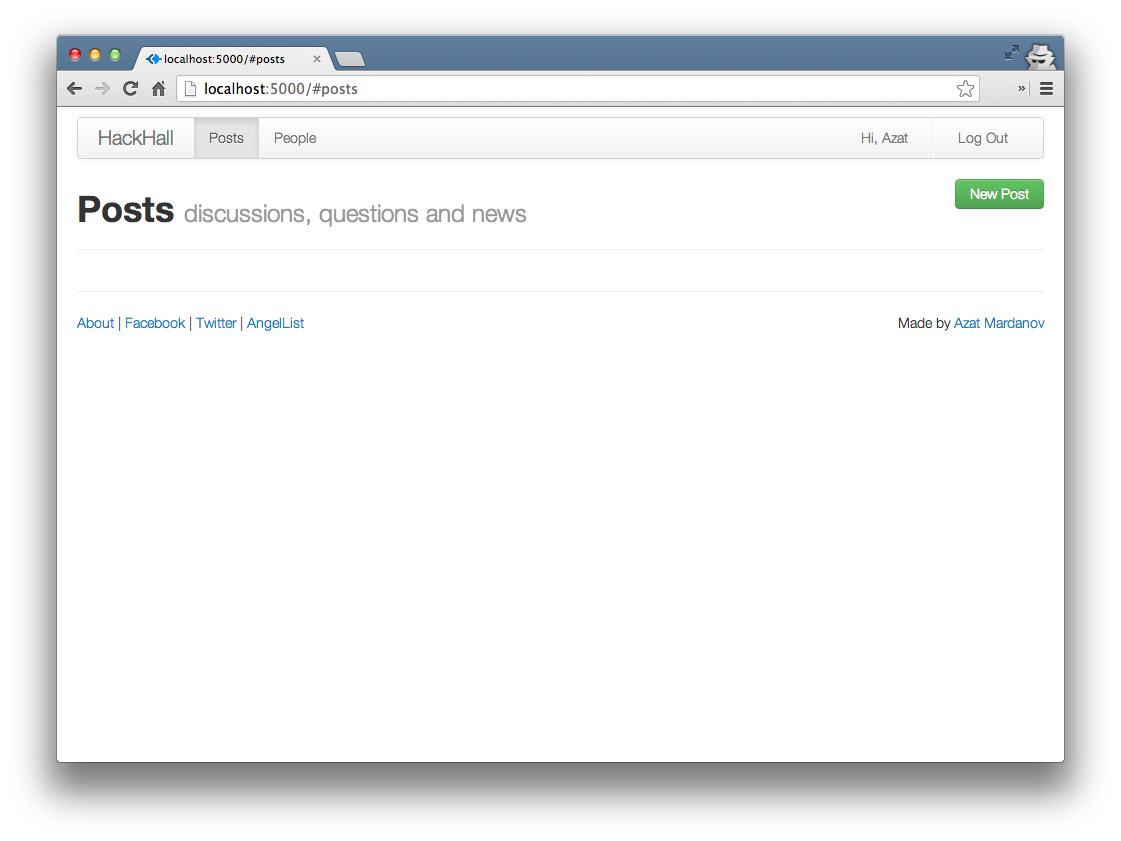
The HackHall Posts page.
where they can create a post (e.g., a question):
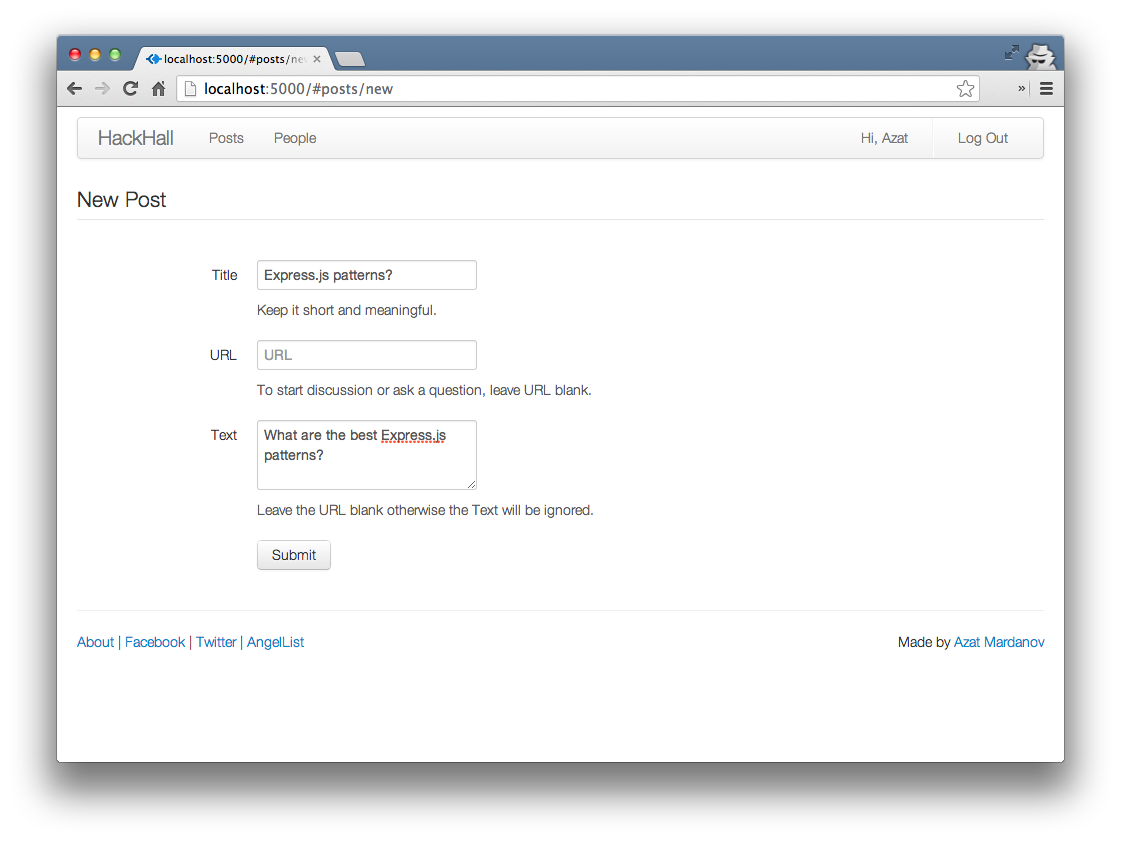
The HackHall Posts page.
Save the post:
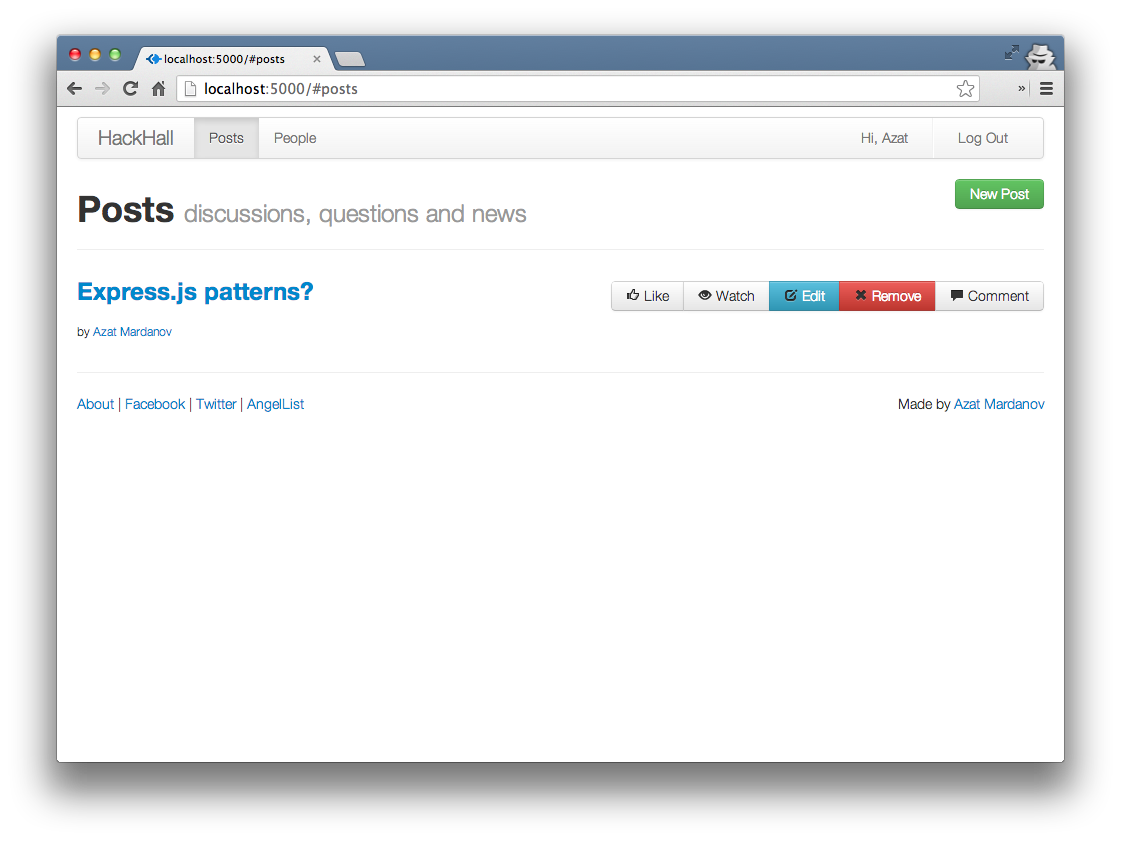
The HackHall Posts page with a saved post.
Like posts:
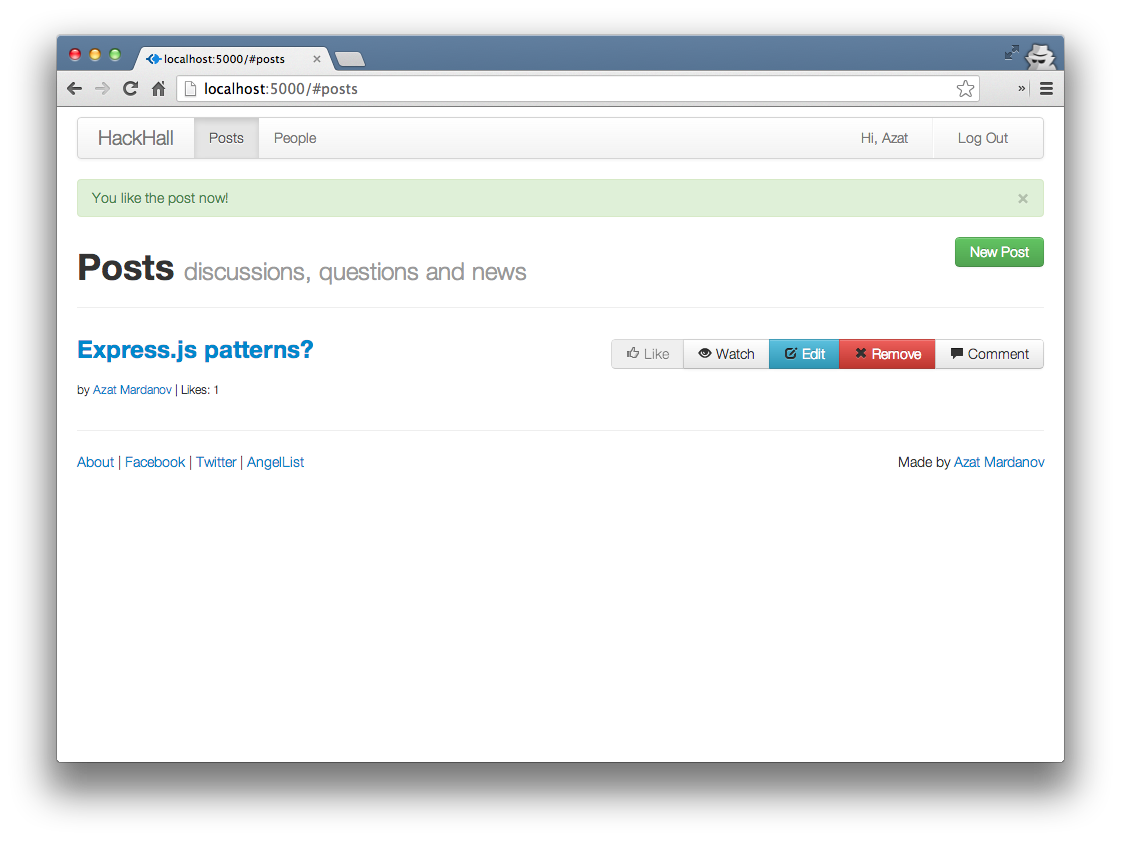
The HackHall Posts page with a liked post.
Visit other users’ profiles:
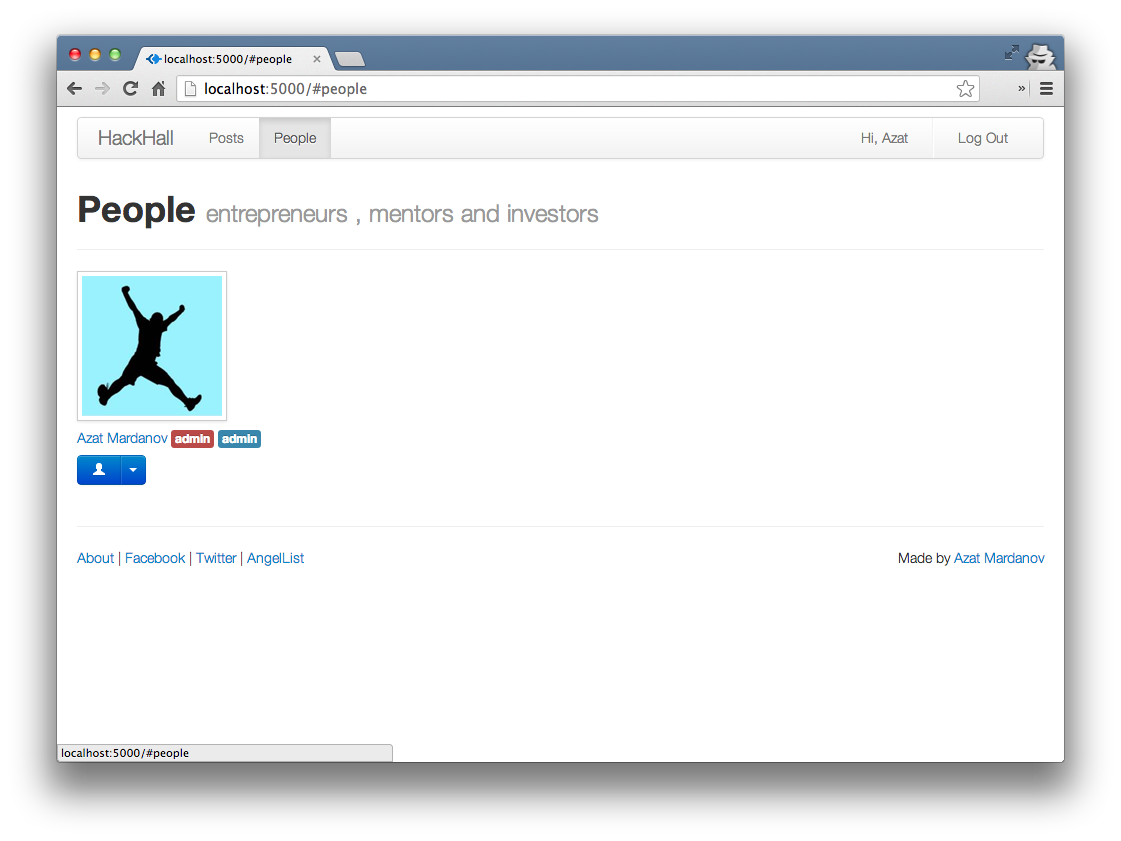
The HackHall People page.
If they have admin rights, users can approve applicants:
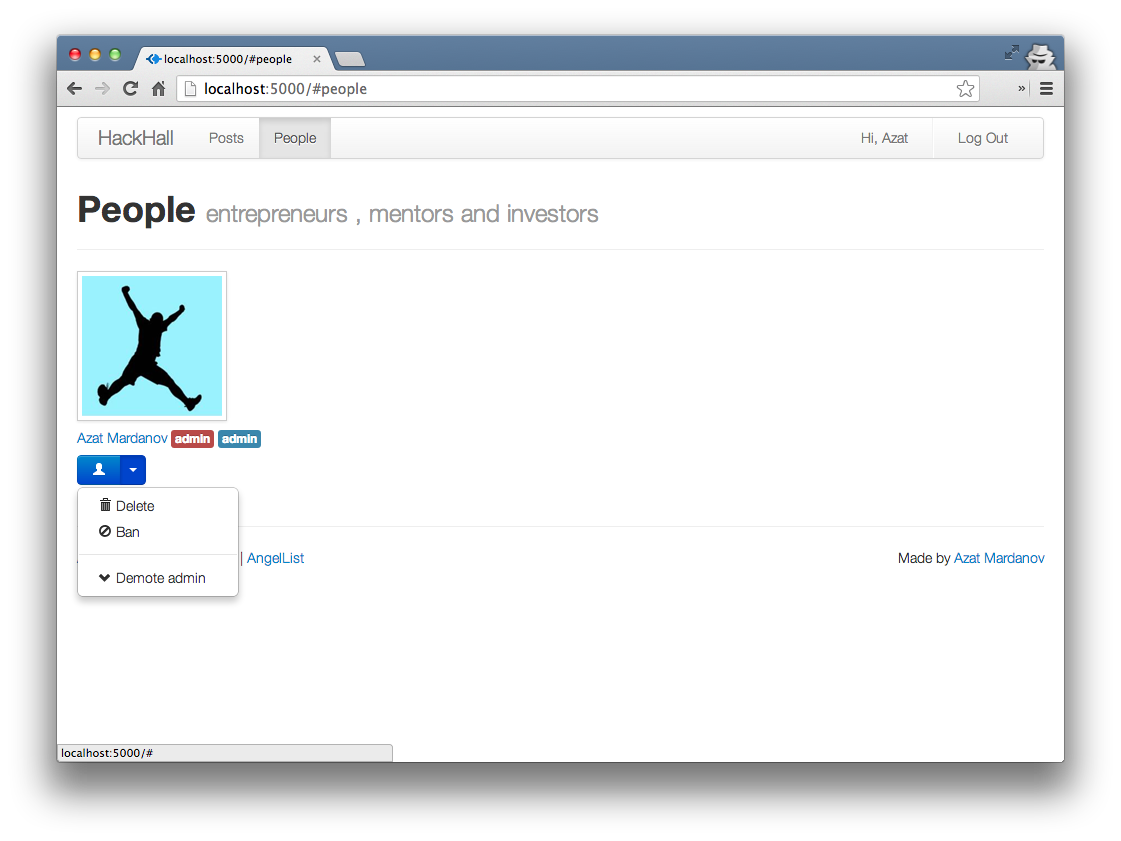
The HackHall People page with admin rights.
and manage their account on the Profile page:
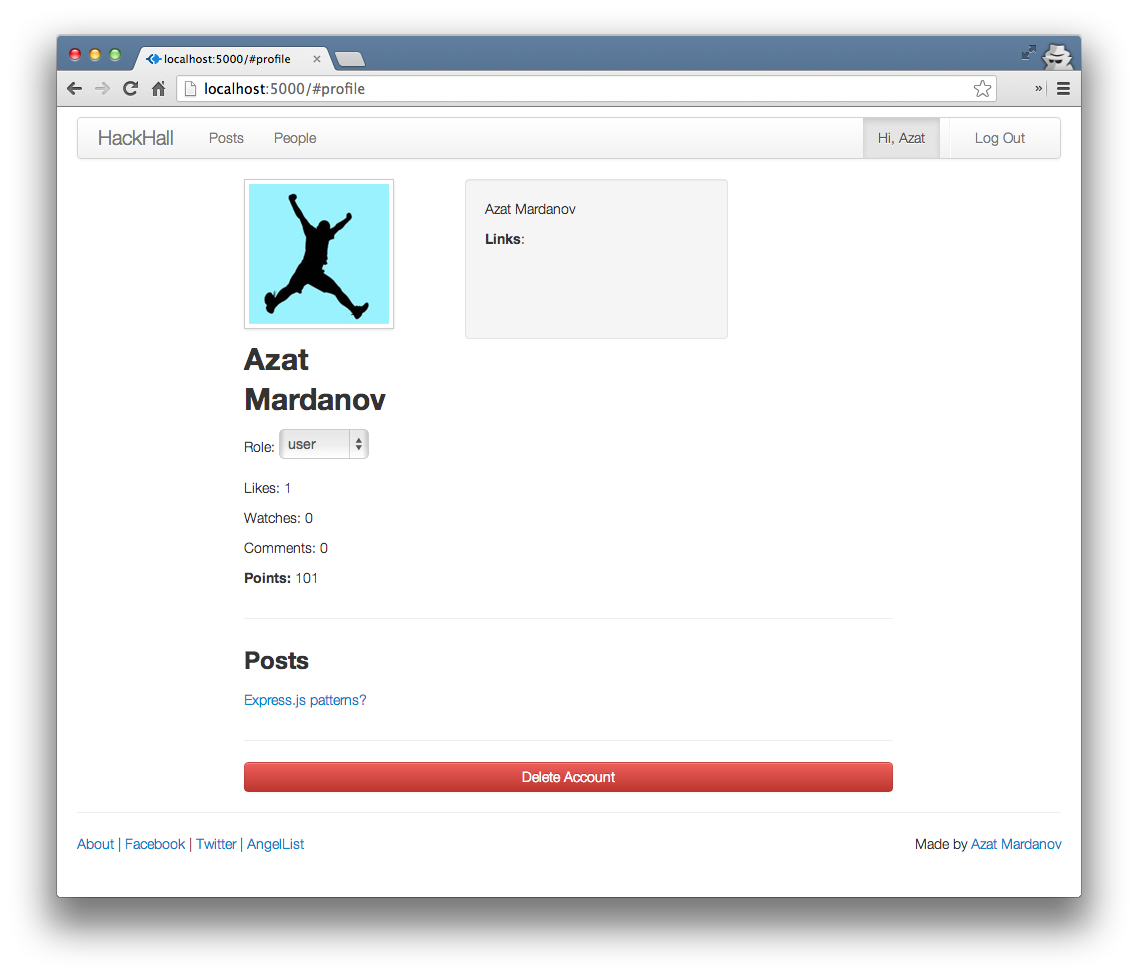
The HackHall Profile page.
4.3 Structure
Here are what each of the folders and files contain:
-
/api: app-shared routes -
/models: Mongoose models -
/public: Backbone app, static files like front-end JavaScript, CSS, HTML -
/routes: REST API routes -
/tests: Mocha tests -
.gitignore: list of files that git should ignore -
Makefile: make file to run tests -
Procfile: Cedar stack file needed for Heroku deployment -
package.json: NPM dependencies and HackHall metadata -
readme.md: description -
server.js: main HackHall server file
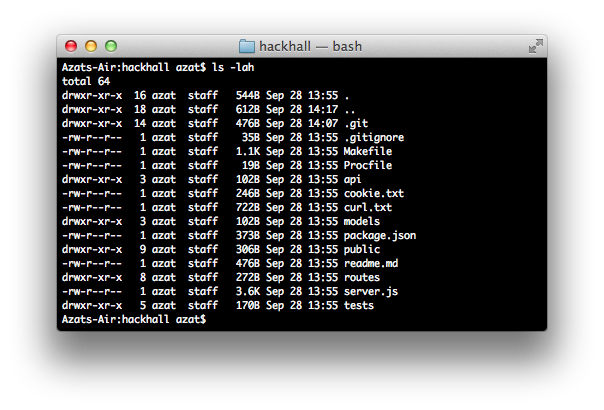
Content of the HackHall base folder.
4.4 Express.js App
Let’s jump straight to the server.js file and learn how it’s implemented. Firstly, we declare dependencies:
1 var express = require('express'),
2   routes = require('./routes'),
3   http = require('http'),
4   util = require('util'),
5   oauth = require('oauth'),
6   querystring = require('querystring');
Then, we initialize the app and configure middlewares. The process.env.PORT is populated by Heroku, and in the case of a local setup, falls back on 3000.
1 var app = express();
2 app.configure(function(){
3   app.set('port', process.env.PORT || 3000  );
4   app.use(express.favicon());
5   app.use(express.logger('dev'));
6   app.use(express.bodyParser());
7   app.use(express.methodOverride());
The values passed to cookieParser and session middlewares are needed for authentication. Obviously, session secrets are supposed to be private:
1   app.use(express.cookieParser('asd;lfkajs;ldfkj'));
2   app.use(express.session({
3     secret: '<h1>WHEEYEEE</h1>',
4     key: 'sid',
5     cookie: {
6       secret: true,
7       expires: false
8     }
9   }));
This is how we serve our front-end client Backbone.js app and other static files like CSS:
1   app.use(express.static(__dirname + '/public'));
2   app.use(app.router);
3 });
Error handling is broken down into three functions with clientErrorHandler dedicated to AJAX/XHR requests from the Backbone.js app (responds with JSON):
 1 app.configure(function() {
 2   app.use(logErrors);
 3   app.use(clientErrorHandler);
 4   app.use(errorHandler);
 5 });
 6
 7 function logErrors(err, req, res, next) {
 8   console.error('logErrors', err.toString());
 9   next(err);
10 }
11
12 function clientErrorHandler(err, req, res, next) {
13   console.error('clientErrors ', err.toString());
14   res.send(500, { error: err.toString()});
15   if (req.xhr) {
16     console.error(err);
17     res.send(500, { error: err.toString()});
18   } else {
19     next(err);
20   }
21 }
22
23 function errorHandler(err, req, res, next) {
24   console.error('lastErrors ', err.toString());
25   res.send(500, {error: err.toString()});
26 }
In the same way that we determine process.env.PORT and fallback on local setup value 3000, we do a similar thing with a MongoDB connection string:
1 var dbUrl = process.env.MONGOHQ_URL
2   || 'mongodb://@127.0.0.1:27017/hackhall';
3 var mongoose = require('mongoose');
4 var connection = mongoose.createConnection(dbUrl);
5 connection.on('error', console.error.bind(console,
6   'connection error:'));
Sometimes it’s a good idea to log the connection open event:
1 connection.once('open', function () {
2   console.info('connected to database')
3 });
The Mongoose models live in the models folder:
1 var models = require('./models');
This middleware will provide access to two collections within our routes methods:
1 function db (req, res, next) {
2   req.db = {
3     User: connection.model('User', models.User, 'users'),
4     Post: connection.model('Post', models.Post, 'posts')
5   };
6   return next();
7 }
Just a new name for imported auth functions:
1 checkUser = routes.main.checkUser;
2 checkAdmin = routes.main.checkAdmin;
3 checkApplicant = routes.main.checkApplicant;
AngelList OAuth routes:
1 app.get('/auth/angellist', routes.auth.angelList);
2 app.get('/auth/angellist/callback',
3   routes.auth.angelListCallback,
4   routes.auth.angelListLogin,
5   db,
6   routes.users.findOrAddUser);
Main application routes including the api/profile return user session if user is logged in:
1 //MAIN
2 app.get('/api/profile', checkUser, db, routes.main.profile);
3 app.del('/api/profile', checkUser, db, routes.main.delProfile);
4 app.post('/api/login', db, routes.main.login);
5 app.post('/api/logout', routes.main.logout);
The POST requests for creating users and posts:
 1 //POSTS
 2 app.get('/api/posts', checkUser, db, routes.posts.getPosts);
 3 app.post('/api/posts', checkUser, db, routes.posts.add);
 4 app.get('/api/posts/:id', checkUser, db, routes.posts.getPost);
 5 app.put('/api/posts/:id', checkUser, db, routes.posts.updatePost);
 6 app.del('/api/posts/:id', checkUser, db, routes.posts.del);
 7
 8 //USERS
 9 app.get('/api/users', checkUser, db, routes.users.getUsers);
10 app.get('/api/users/:id', checkUser, db,routes.users.getUser);
11 app.post('/api/users', checkAdmin, db, routes.users.add);
12 app.put('/api/users/:id', checkAdmin, db, routes.users.update);
13 app.del('/api/users/:id', checkAdmin, db, routes.users.del);
These routes are for new members that haven’t been approved yet:
 1 //APPLICATION
 2 app.post('/api/application',
 3   checkAdmin,
 4   db,
 5   routes.application.add);
 6 app.put('/api/application',
 7   checkApplicant,
 8   db,
 9   routes.application.update);
10 app.get('/api/application',
11   checkApplicant,
12   db,
13   routes.application.get);
The catch-all-else route:
1 app.get('*', function(req, res){
2   res.send(404);
3 });
The require.main === module is a clever trick to determine if this file is being executed as a standalone or as an imported module:
 1 http.createServer(app);
 2 if (require.main === module) {
 3   app.listen(app.get('port'), function(){
 4     console.info('Express server listening on port '
 5       + app.get('port'));
 6   });
 7 }
 8 else {
 9   console.info('Running app as a module')
10   exports.app = app;
11 }
The full source code for hackhall/server.js:
  1 var express = require('express'),
  2   routes = require('./routes'),
  3   http = require('http'),
  4   util = require('util'),
  5   oauth = require('oauth'),
  6   querystring = require('querystring');
  7
  8 var app = express();
  9 app.configure(function(){
 10   app.set('port', process.env.PORT || 3000  );
 11   app.use(express.favicon());
 12   app.use(express.logger('dev'));
 13   app.use(express.bodyParser());
 14   app.use(express.methodOverride());
 15   app.use(express.cookieParser('asd;lfkajs;ldfkj'));
 16   app.use(express.session({
 17     secret: '<h1>WHEEYEEE</h1>',
 18     key: 'sid',
 19     cookie: {
 20       secret: true,
 21       expires: false
 22     }
 23   }));
 24   // app.use(express.csrf());
 25   // app.use(function(req, res, next) {
 26     // res.locals.csrf = req.session._cstf;
 27     // return next();
 28   // });
 29   app.use(express.static(__dirname + '/public'));
 30   app.use(app.router);
 31 });
 32
 33 app.configure(function() {
 34   app.use(logErrors);
 35   app.use(clientErrorHandler);
 36   app.use(errorHandler);
 37 });
 38
 39 function logErrors(err, req, res, next) {
 40   console.error('logErrors', err.toString());
 41   next(err);
 42 }
 43
 44 function clientErrorHandler(err, req, res, next) {
 45   console.error('clientErrors ', err.toString());
 46   res.send(500, { error: err.toString()});
 47   if (req.xhr) {
 48     console.error(err);
 49     res.send(500, { error: err.toString()});
 50   } else {
 51     next(err);
 52   }
 53 }
 54
 55 function errorHandler(err, req, res, next) {
 56   console.error('lastErrors ', err.toString());
 57   res.send(500, {error: err.toString()});
 58 }
 59
 60 var dbUrl = process.env.MONGOHQ_URL || 'mongodb://@127.0.0.1:27017/hackhall';
 61 var mongoose = require('mongoose');
 62 var connection = mongoose.createConnection(dbUrl);
 63 connection.on('error', console.error.bind(console, 'connection error:'));
 64 connection.once('open', function () {
 65   console.info('connected to database')
 66 });
 67
 68 var models = require('./models');
 69 function db (req, res, next) {
 70   req.db = {
 71     User: connection.model('User', models.User, 'users'),
 72     Post: connection.model('Post', models.Post, 'posts')
 73   };
 74   return next();
 75 }
 76 checkUser = routes.main.checkUser;
 77 checkAdmin = routes.main.checkAdmin;
 78 checkApplicant = routes.main.checkApplicant;
 79
 80 app.get('/auth/angellist', routes.auth.angelList);
 81 app.get('/auth/angellist/callback',
 82   routes.auth.angelListCallback,
 83   routes.auth.angelListLogin,
 84   db,
 85   routes.users.findOrAddUser);
 86
 87 //MAIN
 88 app.get('/api/profile', checkUser, db, routes.main.profile);
 89 app.del('/api/profile', checkUser, db, routes.main.delProfile);
 90 app.post('/api/login', db, routes.main.login);
 91 app.post('/api/logout', routes.main.logout);
 92
 93 //POSTS
 94 app.get('/api/posts', checkUser, db, routes.posts.getPosts);
 95 app.post('/api/posts', checkUser, db, routes.posts.add);
 96 app.get('/api/posts/:id', checkUser, db, routes.posts.getPost);
 97 app.put('/api/posts/:id', checkUser, db, routes.posts.updatePost);
 98 app.del('/api/posts/:id', checkUser, db, routes.posts.del);
 99
100 //USERS
101 app.get('/api/users', checkUser, db, routes.users.getUsers);
102 app.get('/api/users/:id', checkUser, db,routes.users.getUser);
103 app.post('/api/users', checkAdmin, db, routes.users.add);
104 app.put('/api/users/:id', checkAdmin, db, routes.users.update);
105 app.del('/api/users/:id', checkAdmin, db, routes.users.del);
106
107 //APPLICATION
108 app.post('/api/application', checkAdmin, db, routes.application.add);
109 app.put('/api/application', checkApplicant, db, routes.application.update);
110 app.get('/api/application', checkApplicant, db, routes.application.get);
111
112 app.get('*', function(req, res){
113   res.send(404);
114 });
115
116 http.createServer(app);
117 if (require.main === module) {
118   app.listen(app.get('port'), function(){
119     console.info('Express server listening on port ' + app.get('port'));
120   });
121 }
122 else {
123   console.info('Running app as a module')
124   exports.app = app;
125 }
4.5 Routes
The HackHall routes reside in the hackhall/routes folder and are grouped into several modules:
-
hackhall/routes/index.js: bridge betweenserver.jsand other routes in the folder -
hackhall/routes/auth.js: routes that handle OAuth dance with AngelList API -
hackhall/routes/main.js: login, logout and other routes -
hackhall/routes/users.js: routes related to users’ REST API -
hackhall/routes/application.js: submission of application to become a user -
hackhall/routes/posts.js: routes related to posts’ REST API
4.5.1 index.js
Let’s peek into hackhall/routes/index.js where we’ve included other modules:
1 exports.posts = require('./posts');
2 exports.main = require('./main');
3 exports.users = require('./users');
4 exports.application = require('./application');
5 exports.auth = require('./auth');
4.5.2 auth.js
In this module, we’ll handle OAuth dance with AngelList API. To do so, we’ll have to rely on the https library:
1 var https = require('https');
The AngelList API client ID and client secret are obtained at theangel.co/api website and stored in environment variables:
1 var angelListClientId = process.env.ANGELLIST_CLIENT_ID;
2 var angelListClientSecret = process.env.ANGELLIST_CLIENT_SECRET;
The method will redirect users to the angel.co website for authentication:
1 exports.angelList = function(req, res) {
2   res.redirect('https://angel.co/api/oauth/authorize?client_id=' + angelListClien\
3 tId + '&scope=email&response_type=code');
4 }
After users allow our app to access their information, AngelList sends them back to this route to allow us to make a new (HTTPS) request to retrieve the token:
 1 exports.angelListCallback = function(req, res, next) {
 2   var token;
 3   var buf = '';
 4   var data;
 5   // console.log('/api/oauth/token?client_id='
 6   //+ angelListClientId
 7   //+ '&client_secret='
 8   //+ angelListClientSecret
 9   //+ '&code='
10   //+ req.query.code
11   //+ '&grant_type=authorization_code');
12   var angelReq = https.request({
13       host: 'angel.co',
14       path: '/api/oauth/token?client_id='
15         + angelListClientId
16         + '&client_secret='
17         + angelListClientSecret
18         + '&code='
19         + req.query.code
20         + '&grant_type=authorization_code',
21       port: 443,
22       method: 'POST',
23       headers: {
24         'content-length': 0
25       }
26     },
27     function(angelRes) {
28       angelRes.on('data', function(buffer) {
29         buf += buffer;
30       });
31       angelRes.on('end', function() {
32         try {
33           data = JSON.parse(buf.toString('utf-8'));
34         } catch (e) {
35           if (e) return res.send(e);
36         }
37         if (!data || !data.access_token) return res.send(500);
38         token = data.access_token;
39         req.session.angelListAccessToken = token;
40         if (token) next();
41         else res.send(500);
42       });
43     });
44   angelReq.end();
45   angelReq.on('error', function(e) {
46     console.error(e);
47     next(e);
48   });
49 }
Directly call AngleList API with the token from the previous middleware to get user information:
 1 exports.angelListLogin = function(req, res, next) {
 2   token = req.session.angelListAccessToken;
 3   httpsRequest = https.request({
 4       host: 'api.angel.co',
 5       path: '/1/me?access_token=' + token,
 6       port: 443,
 7       method: 'GET'
 8     },
 9     function(httpsResponse) {
10       httpsResponse.on('data', function(buffer) {
11         data = JSON.parse(buffer.toString('utf-8'));
12         if (data) {
13           req.angelProfile = data;
14           next();
15         }
16       });
17     }
18   );
19   httpsRequest.end();
20   httpsRequest.on('error', function(e) {
21     console.error(e);
22   });
23 };
The full source code for hackhall/routes/auth.js files:
 1 var https = require('https');
 2
 3 var angelListClientId = process.env.ANGELLIST_CLIENT_ID;
 4 var angelListClientSecret = process.env.ANGELLIST_CLIENT_SECRET;
 5
 6 exports.angelList = function(req, res) {
 7   res.redirect('https://angel.co/api/oauth/authorize?client_id=' + angelListClien\
 8 tId + '&scope=email&response_type=code');
 9 }
10 exports.angelListCallback = function(req, res, next) {
11   var token;
12   var buf = '';
13   var data;
14   // console.log('/api/oauth/token?client_id=' + angelListClientId + '&client_sec\
15 ret=' + angelListClientSecret + '&code=' + req.query.code + '&grant_type=authoriz\
16 ation_code');
17   var angelReq = https.request({
18       host: 'angel.co',
19       path: '/api/oauth/token?client_id=' + angelListClientId + '&client_secret='\
20  + angelListClientSecret + '&code=' + req.query.code + '&grant_type=authorization\
21 _code',
22       port: 443,
23       method: 'POST',
24       headers: {
25         'content-length': 0
26       }
27     },
28     function(angelRes) {
29
30       angelRes.on('data', function(buffer) {
31         buf += buffer;
32       });
33       angelRes.on('end', function() {
34         try {
35           data = JSON.parse(buf.toString('utf-8'));
36         } catch (e) {
37           if (e) return res.send(e);
38         }
39         if (!data || !data.access_token) return res.send(500);
40         token = data.access_token;
41         req.session.angelListAccessToken = token;
42         if (token) next();
43         else res.send(500);
44       });
45     });
46   angelReq.end();
47   angelReq.on('error', function(e) {
48     console.error(e);
49     next(e);
50   });
51 }
52 exports.angelListLogin = function(req, res, next) {
53   token = req.session.angelListAccessToken;
54   httpsRequest = https.request({
55       host: 'api.angel.co',
56       path: '/1/me?access_token=' + token,
57       port: 443,
58       method: 'GET'
59     },
60     function(httpsResponse) {
61       httpsResponse.on('data', function(buffer) {
62         data = JSON.parse(buffer.toString('utf-8'));
63         if (data) {
64           req.angelProfile = data;
65           next();
66         }
67       });
68     }
69   );
70   httpsRequest.end();
71   httpsRequest.on('error', function(e) {
72     console.error(e);
73   });
74 };
4.5.3 main.js
The hackhall/routes/main.js file is also interesting.
The checkAdmin() function performs authentication for admin privileges. If the session object doesn’t carry the proper flag, we call Express.js next() function with an error object:
 1 exports.checkAdmin = function(request, response, next) {
 2   if (request.session
 3     && request.session.auth
 4     && request.session.userId
 5     && request.session.admin) {
 6     console.info('Access ADMIN: ' + request.session.userId);
 7     return next();
 8   } else {
 9     next('User is not an administrator.');
10   }
11 };
Similarly, we can check only for the user without checking for admin rights:
1 exports.checkUser = function(req, res, next) {
2   if (req.session && req.session.auth && req.session.userId
3     && (req.session.user.approved || req.session.admin)) {
4     console.info('Access USER: ' + req.session.userId);
5     return next();
6   } else {
7     next('User is not logged in.');
8   }
9 };
If an application is just an unapproved user object, we can also check for that:
1 exports.checkApplicant = function(req, res, next) {
2   if (req.session && req.session.auth && req.session.userId
3     && (!req.session.user.approved || req.session.admin)) {
4     console.info('Access USER: ' + req.session.userId);
5     return next();
6   } else {
7     next('User is not logged in.');
8   }
9 };
In the login function, we search for email and password matches in the database. Upon success, we store the user object in the session and proceed; otherwise the request fails:
 1 exports.login = function(req, res, next) {
 2   req.db.User.findOne({
 3       email: req.body.email,
 4       password: req.body.password
 5     },
 6     null, {
 7       safe: true
 8     },
 9     function(err, user) {
10       if (err) return next(err);
11       if (user) {
12         req.session.auth = true;
13         req.session.userId = user._id.toHexString();
14         req.session.user = user;
15         if (user.admin) {
16           req.session.admin = true;
17         }
18         console.info('Login USER: ' + req.session.userId);
19         res.json(200, {
20           msg: 'Authorized'
21         });
22       } else {
23         next(new Error('User is not found.'));
24       }
25     });
26 };
The logging out process removes any session information:
 1 exports.logout = function(req, res) {
 2   console.info('Logout USER: ' + req.session.userId);
 3   req.session.destroy(function(error) {
 4     if (!error) {
 5       res.send({
 6         msg: 'Logged out'
 7       });
 8     }
 9   });
10 };
This route is used for the Profile page as well as by Backbone.js for user authentication:
 1 exports.profile = function(req, res, next) {
 2   req.db.User.findById(req.session.userId, 'firstName lastName'
 3       + 'displayName headline photoUrl admin'
 4       + 'approved banned role angelUrl twitterUrl'
 5       + 'facebookUrl linkedinUrl githubUrl', function(err, obj) {
 6     if (err) next(err);
 7     if (!obj) next(new Error('User is not found'));
 8     req.db.Post.find({
 9       author: {
10         id: obj._id,
11         name: obj.displayName
12       }
13     }, null, {
14       sort: {
15         'created': -1
16       }
17     }, function(err, list) {
18       if (err) next(err);
19       obj.posts.own = list || [];
20       req.db.Post.find({
21         likes: obj._id
22       }, null, {
23         sort: {
24           'created': -1
25         }
This logic finds posts and comments made by the user:
 1       }, function(err, list) {
 2         if (err) next(err);
 3         obj.posts.likes = list || [];
 4         req.db.Post.find({
 5           watches: obj._id
 6         }, null, {
 7           sort: {
 8             'created': -1
 9           }
10         }, function(err, list) {
11           if (err) next(err);
12           obj.posts.watches = list || [];
13           req.db.Post.find({
14             'comments.author.id': obj._id
15           }, null, {
16             sort: {
17               'created': -1
18             }
19           }, function(err, list) {
20             if (err) next(err);
21             obj.posts.comments = [];
22             list.forEach(function(value, key, list) {
23               obj.posts.comments.push(
24                 value.comments.filter(
25                   function(el, i, arr) {
26                     return (el.author.id.toString() == obj._id.toString());
27                   }
28                 )
29               );
30             });
31             res.json(200, obj);
32           });
33         });
34       });
35     });
36   });
37 };
It’s important to allow users to delete their profiles:
 1 exports.delProfile = function(req, res, next) {
 2   console.log('del profile');
 3   console.log(req.session.userId);
 4   req.db.User.findByIdAndRemove(req.session.user._id, {},
 5     function(err, obj) {
 6       if (err) next(err);
 7       req.session.destroy(function(error) {
 8         if (err) {
 9           next(err)
10         }
11       });
12       res.json(200, obj);
13     }
14   );
15 };
The full source code of hackhall/routes/main.js files:
  1 exports.checkAdmin = function(request, response, next) {
  2   if (request.session && request.session.auth && request.session.userId && reques\
  3 t.session.admin) {
  4     console.info('Access ADMIN: ' + request.session.userId);
  5     return next();
  6   } else {
  7     next('User is not an administrator.');
  8   }
  9 };
 10
 11 exports.checkUser = function(req, res, next) {
 12   if (req.session && req.session.auth && req.session.userId && (req.session.user.\
 13 approved || req.session.admin)) {
 14     console.info('Access USER: ' + req.session.userId);
 15     return next();
 16   } else {
 17     next('User is not logged in.');
 18   }
 19 };
 20
 21 exports.checkApplicant = function(req, res, next) {
 22   if (req.session && req.session.auth && req.session.userId && (!req.session.user\
 23 .approved || req.session.admin)) {
 24     console.info('Access USER: ' + req.session.userId);
 25     return next();
 26   } else {
 27     next('User is not logged in.');
 28   }
 29 };
 30
 31 exports.login = function(req, res, next) {
 32   req.db.User.findOne({
 33       email: req.body.email,
 34       password: req.body.password
 35     },
 36     null, {
 37       safe: true
 38     },
 39     function(err, user) {
 40       if (err) return next(err);
 41       if (user) {
 42         req.session.auth = true;
 43         req.session.userId = user._id.toHexString();
 44         req.session.user = user;
 45         if (user.admin) {
 46           req.session.admin = true;
 47         }
 48         console.info('Login USER: ' + req.session.userId);
 49         res.json(200, {
 50           msg: 'Authorized'
 51         });
 52       } else {
 53         next(new Error('User is not found.'));
 54       }
 55     });
 56 };
 57
 58 exports.logout = function(req, res) {
 59   console.info('Logout USER: ' + req.session.userId);
 60   req.session.destroy(function(error) {
 61     if (!error) {
 62       res.send({
 63         msg: 'Logged out'
 64       });
 65     }
 66   });
 67 };
 68
 69 exports.profile = function(req, res, next) {
 70   req.db.User.findById(req.session.userId, 'firstName lastName displayName headli\
 71 ne photoUrl admin approved banned role angelUrl twitterUrl facebookUrl linkedinUr\
 72 l githubUrl', function(err, obj) {
 73     if (err) next(err);
 74     if (!obj) next(new Error('User is not found'));
 75     req.db.Post.find({
 76       author: {
 77         id: obj._id,
 78         name: obj.displayName
 79       }
 80     }, null, {
 81       sort: {
 82         'created': -1
 83       }
 84     }, function(err, list) {
 85       if (err) next(err);
 86       obj.posts.own = list || [];
 87       req.db.Post.find({
 88         likes: obj._id
 89       }, null, {
 90         sort: {
 91           'created': -1
 92         }
 93       }, function(err, list) {
 94         if (err) next(err);
 95         obj.posts.likes = list || [];
 96         req.db.Post.find({
 97           watches: obj._id
 98         }, null, {
 99           sort: {
100             'created': -1
101           }
102         }, function(err, list) {
103           if (err) next(err);
104           obj.posts.watches = list || [];
105           req.db.Post.find({
106             'comments.author.id': obj._id
107           }, null, {
108             sort: {
109               'created': -1
110             }
111           }, function(err, list) {
112             if (err) next(err);
113             obj.posts.comments = [];
114             list.forEach(function(value, key, list) {
115               obj.posts.comments.push(value.comments.filter(function(el, i, arr) {
116                 return (el.author.id.toString() == obj._id.toString());
117               }));
118             });
119             res.json(200, obj);
120           });
121         });
122       });
123     });
124   });
125 };
126
127 exports.delProfile = function(req, res, next) {
128   console.log('del profile');
129   console.log(req.session.userId);
130   req.db.User.findByIdAndRemove(req.session.user._id, {}, function(err, obj) {
131     if (err) next(err);
132     req.session.destroy(function(error) {
133       if (err) {
134         next(err)
135       }
136     });
137     res.json(200, obj);
138   });
139 };
4.5.4 users.js
The full source code for hackhall/routes/users.js files:
  1 objectId = require('mongodb').ObjectID;
  2
  3 exports.getUsers = function(req, res, next) {
  4   if (req.session.auth && req.session.userId) {
  5     req.db.User.find({}, 'firstName lastName displayName headline photoUrl admin \
  6 approved banned role angelUrl twitterUrl facebookUrl linkedinUrl githubUrl', func\
  7 tion(err, list) {
  8       if (err) next(err);
  9       res.json(200, list);
 10     });
 11   } else {
 12     next('User is not recognized.')
 13   }
 14 }
 15
 16 exports.getUser = function(req, res, next) {
 17   req.db.User.findById(req.params.id, 'firstName lastName displayName headline ph\
 18 otoUrl admin approved banned role angelUrl twitterUrl facebookUrl linkedinUrl git\
 19 hubUrl', function(err, obj) {
 20     if (err) next(err);
 21     if (!obj) next(new Error('User is not found'));
 22     req.db.Post.find({
 23       author: {
 24         id: obj._id,
 25         name: obj.displayName
 26       }
 27     }, null, {
 28       sort: {
 29         'created': -1
 30       }
 31     }, function(err, list) {
 32       if (err) next(err);
 33       obj.posts.own = list || [];
 34       req.db.Post.find({
 35         likes: obj._id
 36       }, null, {
 37         sort: {
 38           'created': -1
 39         }
 40       }, function(err, list) {
 41         if (err) next(err);
 42         obj.posts.likes = list || [];
 43         req.db.Post.find({
 44           watches: obj._id
 45         }, null, {
 46           sort: {
 47             'created': -1
 48           }
 49         }, function(err, list) {
 50           if (err) next(err);
 51           obj.posts.watches = list || [];
 52           req.db.Post.find({
 53             'comments.author.id': obj._id
 54           }, null, {
 55             sort: {
 56               'created': -1
 57             }
 58           }, function(err, list) {
 59             if (err) next(err);
 60             obj.posts.comments = [];
 61             list.forEach(function(value, key, list) {
 62               obj.posts.comments.push(value.comments.filter(function(el, i, arr) {
 63                 return (el.author.id.toString() == obj._id.toString());
 64               }));
 65             });
 66             res.json(200, obj);
 67           });
 68         });
 69       });
 70     });
 71   });
 72 };
 73
 74 exports.add = function(req, res, next) {
 75   var user = new req.db.User(req.body);
 76   user.save(function(err) {
 77     if (err) next(err);
 78     res.json(user);
 79   });
 80 };
 81
 82 exports.update = function(req, res, next) {
 83   var obj = req.body;
 84   obj.updated = new Date();
 85   delete obj._id;
 86   req.db.User.findByIdAndUpdate(req.params.id, {
 87     $set: obj
 88   }, {
 89     new: true
 90   }, function(err, obj) {
 91     if (err) next(err);
 92     res.json(200, obj);
 93   });
 94 };
 95
 96 exports.del = function(req, res, next) {
 97   req.db.User.findByIdAndRemove(req.params.id, function(err, obj) {
 98     if (err) next(err);
 99     res.json(200, obj);
100   });
101 };
102
103 exports.findOrAddUser = function(req, res, next) {
104   data = req.angelProfile;
105   req.db.User.findOne({
106     angelListId: data.id
107   }, function(err, obj) {
108     console.log('angelListLogin4');
109     if (err) next(err);
110     console.warn(obj);
111     if (!obj) {
112       req.db.User.create({
113         angelListId: data.id,
114         angelToken: token,
115         angelListProfile: data,
116         email: data.email,
117         firstName: data.name.split(' ')[0],
118         lastName: data.name.split(' ')[1],
119         displayName: data.name,
120         headline: data.bio,
121         photoUrl: data.image,
122         angelUrl: data.angellist_url,
123         twitterUrl: data.twitter_url,
124         facebookUrl: data.facebook_url,
125         linkedinUrl: data.linkedin_url,
126         githubUrl: data.github_url
127       }, function(err, obj) { //remember the scope of variables!
128         if (err) next(err);
129         console.log(obj);
130         req.session.auth = true;
131         req.session.userId = obj._id;
132         req.session.user = obj;
133         req.session.admin = false; //assing regular user role by default         \
134
135         res.redirect('/#application');
136         // }
137       });
138     } else { //user is in the database
139       req.session.auth = true;
140       req.session.userId = obj._id;
141       req.session.user = obj;
142       req.session.admin = obj.admin; //false; //assing regular user role by defau\
143 lt
144       if (obj.approved) {
145         res.redirect('/#posts');
146       } else {
147         res.redirect('/#application');
148       }
149     }
150   })
151 }
4.5.5 applications.js
In the current version, submitting and approving an application won’t trigger an email notification. Therefore, users have to come back to the website to check their status.
Merely add a user object (with approved=false by default) to the database:
 1 exports.add = function(req, res, next) {
 2   req.db.User.create({
 3     firstName: req.body.firstName,
 4     lastName: req.body.lastName,
 5     displayName: req.body.displayName,
 6     headline: req.body.headline,
 7     photoUrl: req.body.photoUrl,
 8     password: req.body.password,
 9     email: req.body.email,
10     angelList: {
11       blah: 'blah'
12     },
13     angelUrl: req.body.angelUrl,
14     twitterUrl: req.body.twitterUrl,
15     facebookUrl: req.body.facebookUrl,
16     linkedinUrl: req.body.linkedinUrl,
17     githubUrl: req.body.githubUrl
18   }, function(err, obj) {
19     if (err) next(err);
20     if (!obj) next('Cannot create.')
21     res.json(200, obj);
22   })
23 };
Let the users update information in their applications:
 1 exports.update = function(req, res, next) {
 2   var data = {};
 3   Object.keys(req.body).forEach(function(k) {
 4     if (req.body[k]) {
 5       data[k] = req.body[k];
 6     }
 7   });
 8   delete data._id;
 9   req.db.User.findByIdAndUpdate(req.session.user._id, {
10     $set: data
11   }, function(err, obj) {
12     if (err) next(err);
13     if (!obj) next('Cannot save.')
14     res.json(200, obj);
15   });
16 };
Select a particular object with the get() function:
 1 exports.get = function(req, res, next) {
 2   req.db.User.findById(req.session.user._id,
 3     'firstName lastName photoUrl headline displayName'
 4       + 'angelUrl facebookUrl twitterUrl linkedinUrl'
 5       + 'githubUrl', {}, function(err, obj) {
 6       if (err) next(err);
 7       if (!obj) next('cannot find');
 8       res.json(200, obj);
 9     })
10 };
The full source code of hackhall/routes/applications.js files:
<<(hackhall/routes/applications.js)
4.5.6 posts.js
The last routes module that we bisect is hackhall/routes/posts.js. It takes care of adding, editing and removing posts, as well as commenting, watching and liking.
We use object ID for conversion from HEX strings to proper objects:
1 objectId = require('mongodb').ObjectID;
The coloring is nice for logging, but it’s of course optional. We accomplish it with escape sequences:
1 var red, blue, reset;
2 red   = '\u001b[31m';
3 blue  = '\u001b[34m';
4 reset = '\u001b[0m';
5 console.log(red + 'This is red' + reset + ' while ' + blue + ' this is blue' + re\
6 set);
The default values for the pagination of posts:
1 var LIMIT = 10;
2 var SKIP = 0;
The add() function handles creation of new posts:
 1 exports.add = function(req, res, next) {
 2   if (req.body) {
 3     req.db.Post.create({
 4       title: req.body.title,
 5       text: req.body.text || null,
 6       url: req.body.url || null,
 7       author: {
 8         id: req.session.user._id,
 9         name: req.session.user.displayName
10       }
11     }, function(err, docs) {
12       if (err) {
13         console.error(err);
14         next(err);
15       } else {
16         res.json(200, docs);
17       }
18
19     });
20   } else {
21     next(new Error('No data'));
22   }
23 };
To retrieve the list of posts:
 1 exports.getPosts = function(req, res, next) {
 2   var limit = req.query.limit || LIMIT;
 3   var skip = req.query.skip || SKIP;
 4   req.db.Post.find({}, null, {
 5     limit: limit,
 6     skip: skip,
 7     sort: {
 8       '_id': -1
 9     }
10   }, function(err, obj) {
11     if (!obj) next('There are not posts.');
12     obj.forEach(function(item, i, list) {
13       if (req.session.user.admin) {
14         item.admin = true;
15       } else {
16         item.admin = false;
17       }
18       if (item.author.id == req.session.userId) {
19         item.own = true;
20       } else {
21         item.own = false;
22       }
23       if (item.likes
24         && item.likes.indexOf(req.session.userId) > -1) {
25         item.like = true;
26       } else {
27         item.like = false;
28       }
29       if (item.watches
30         && item.watches.indexOf(req.session.userId) > -1) {
31         item.watch = true;
32       } else {
33         item.watch = false;
34       }
35     });
36     var body = {};
37     body.limit = limit;
38     body.skip = skip;
39     body.posts = obj;
40     req.db.Post.count({}, function(err, total) {
41       if (err) next(err);
42       body.total = total;
43       res.json(200, body);
44     });
45   });
46 };
For the individual post page, we need the getPost() method:
 1 exports.getPost = function(req, res, next) {
 2   if (req.params.id) {
 3     req.db.Post.findById(req.params.id, {
 4       title: true,
 5       text: true,
 6       url: true,
 7       author: true,
 8       comments: true,
 9       watches: true,
10       likes: true
11     }, function(err, obj) {
12       if (err) next(err);
13       if (!obj) {
14         next('Nothing is found.');
15       } else {
16         res.json(200, obj);
17       }
18     });
19   } else {
20     next('No post id');
21   }
22 };
The del() function removes specific posts from the database. The findById() and remove() methods from Mongoose are used in this snippet. However, the same thing can be accomplished with just remove().
 1 exports.del = function(req, res, next) {
 2   req.db.Post.findById(req.params.id, function(err, obj) {
 3     if (err) next(err);
 4     if (req.session.admin || req.session.userId === obj.author.id) {
 5       obj.remove();
 6       res.json(200, obj);
 7     } else {
 8       next('User is not authorized to delete post.');
 9     }
10   })
11 };
To like the post, we update the post item by prepending the post.likes array with the ID of the user:
 1 function likePost(req, res, next) {
 2   req.db.Post.findByIdAndUpdate(req.body._id, {
 3     $push: {
 4       likes: req.session.userId
 5     }
 6   }, {}, function(err, obj) {
 7     if (err) {
 8       next(err);
 9     } else {
10       res.json(200, obj);
11     }
12   });
13 };
Likewise, when a user performs the watch action, the system adds a new ID to the post.watches array:
 1 function watchPost(req, res, next) {
 2   req.db.Post.findByIdAndUpdate(req.body._id, {
 3     $push: {
 4       watches: req.session.userId
 5     }
 6   }, {}, function(err, obj) {
 7     if (err) next(err);
 8     else {
 9       res.json(200, obj);
10     }
11   });
12 };
The updatePost() is what calls like or watch functions based on the action flag sent with the request. In addition, the updatePost() processes the changes to the post and comments:
 1 exports.updatePost = function(req, res, next) {
 2   var anyAction = false;
 3   if (req.body._id && req.params.id) {
 4     if (req.body && req.body.action == 'like') {
 5       anyAction = true;
 6       likePost(req, res);
 7     }
 8     if (req.body && req.body.action == 'watch') {
 9       anyAction = true;
10       watchPost(req, res);
11     }
12     if (req.body && req.body.action == 'comment'
13       && req.body.comment && req.params.id) {
14       anyAction = true;
15       req.db.Post.findByIdAndUpdate(req.params.id, {
16         $push: {
17           comments: {
18             author: {
19               id: req.session.userId,
20               name: req.session.user.displayName
21             },
22             text: req.body.comment
23           }
24         }
25       }, {
26         safe: true,
27         new: true
28       }, function(err, obj) {
29         if (err) throw err;
30         res.json(200, obj);
31       });
32     }
33     if (req.session.auth && req.session.userId && req.body
34       && req.body.action != 'comment' &&
35       req.body.action != 'watch' && req.body != 'like' &&
36       req.params.id && (req.body.author.id == req.session.user._id
37       || req.session.user.admin)) {
38       req.db.Post.findById(req.params.id, function(err, doc) {
39         if (err) next(err);
40         doc.title = req.body.title;
41         doc.text = req.body.text || null;
42         doc.url = req.body.url || null;
43         doc.save(function(e, d) {
44           if (e) next(e);
45           res.json(200, d);
46         });
47       })
48     } else {
49       if (!anyAction) next('Something went wrong.');
50     }
51
52   } else {
53     next('No post ID.');
54   }
55 };
The full source code for the hackhall/routes/posts.js file:
  1 objectId = require('mongodb').ObjectID;
  2 var red, blue, reset;
  3 red = '\u001b[31m';
  4 blue = '\u001b[34m';
  5 reset = '\u001b[0m';
  6 console.log(red + 'This is red' + reset + ' while ' + blue + ' this is blue' + re\
  7 set);
  8
  9 var LIMIT = 10;
 10 var SKIP = 0;
 11
 12 exports.add = function(req, res, next) {
 13   if (req.body) {
 14     req.db.Post.create({
 15       title: req.body.title,
 16       text: req.body.text || null,
 17       url: req.body.url || null,
 18       author: {
 19         id: req.session.user._id,
 20         name: req.session.user.displayName
 21       }
 22     }, function(err, docs) {
 23       if (err) {
 24         console.error(err);
 25         next(err);
 26       } else {
 27         res.json(200, docs);
 28       }
 29
 30     });
 31   } else {
 32     next(new Error('No data'));
 33   }
 34 };
 35
 36 exports.getPosts = function(req, res, next) {
 37   var limit = req.query.limit || LIMIT;
 38   var skip = req.query.skip || SKIP;
 39   req.db.Post.find({}, null, {
 40     limit: limit,
 41     skip: skip,
 42     sort: {
 43       '_id': -1
 44     }
 45   }, function(err, obj) {
 46     if (!obj) next('There are not posts.');
 47     obj.forEach(function(item, i, list) {
 48       if (req.session.user.admin) {
 49         item.admin = true;
 50       } else {
 51         item.admin = false;
 52       }
 53       if (item.author.id == req.session.userId) {
 54         item.own = true;
 55       } else {
 56         item.own = false;
 57       }
 58       if (item.likes && item.likes.indexOf(req.session.userId) > -1) {
 59         item.like = true;
 60       } else {
 61         item.like = false;
 62       }
 63       if (item.watches && item.watches.indexOf(req.session.userId) > -1) {
 64         item.watch = true;
 65       } else {
 66         item.watch = false;
 67       }
 68     });
 69     var body = {};
 70     body.limit = limit;
 71     body.skip = skip;
 72     body.posts = obj;
 73     req.db.Post.count({}, function(err, total) {
 74       if (err) next(err);
 75       body.total = total;
 76       res.json(200, body);
 77     });
 78   });
 79 };
 80
 81
 82 exports.getPost = function(req, res, next) {
 83   if (req.params.id) {
 84     req.db.Post.findById(req.params.id, {
 85       title: true,
 86       text: true,
 87       url: true,
 88       author: true,
 89       comments: true,
 90       watches: true,
 91       likes: true
 92     }, function(err, obj) {
 93       if (err) next(err);
 94       if (!obj) {
 95         next('Nothing is found.');
 96       } else {
 97         res.json(200, obj);
 98       }
 99     });
100   } else {
101     next('No post id');
102   }
103 };
104
105 exports.del = function(req, res, next) {
106   req.db.Post.findById(req.params.id, function(err, obj) {
107     if (err) next(err);
108     if (req.session.admin || req.session.userId === obj.author.id) {
109       obj.remove();
110       res.json(200, obj);
111     } else {
112       next('User is not authorized to delete post.');
113     }
114   })
115 };
116
117 function likePost(req, res, next) {
118   req.db.Post.findByIdAndUpdate(req.body._id, {
119     $push: {
120       likes: req.session.userId
121     }
122   }, {}, function(err, obj) {
123     if (err) {
124       next(err);
125     } else {
126       res.json(200, obj);
127     }
128   });
129 };
130
131 function watchPost(req, res, next) {
132   req.db.Post.findByIdAndUpdate(req.body._id, {
133     $push: {
134       watches: req.session.userId
135     }
136   }, {}, function(err, obj) {
137     if (err) next(err);
138     else {
139       res.json(200, obj);
140     }
141   });
142 };
143
144 exports.updatePost = function(req, res, next) {
145   var anyAction = false;
146   if (req.body._id && req.params.id) {
147     if (req.body && req.body.action == 'like') {
148       anyAction = true;
149       likePost(req, res);
150     }
151     if (req.body && req.body.action == 'watch') {
152       anyAction = true;
153       watchPost(req, res);
154     }
155     if (req.body && req.body.action == 'comment' && req.body.comment && req.param\
156 s.id) {
157       anyAction = true;
158       req.db.Post.findByIdAndUpdate(req.params.id, {
159         $push: {
160           comments: {
161             author: {
162               id: req.session.userId,
163               name: req.session.user.displayName
164             },
165             text: req.body.comment
166           }
167         }
168       }, {
169         safe: true,
170         new: true
171       }, function(err, obj) {
172         if (err) throw err;
173         res.json(200, obj);
174       });
175     }
176     if (req.session.auth && req.session.userId && req.body && req.body.action != \
177 'comment' &&
178       req.body.action != 'watch' && req.body != 'like' &&
179       req.params.id && (req.body.author.id == req.session.user._id || req.session\
180 .user.admin)) {
181       req.db.Post.findById(req.params.id, function(err, doc) {
182         if (err) next(err);
183         doc.title = req.body.title;
184         doc.text = req.body.text || null;
185         doc.url = req.body.url || null;
186         doc.save(function(e, d) {
187           if (e) next(e);
188           res.json(200, d);
189         });
190       })
191     } else {
192       if (!anyAction) next('Something went wrong.');
193     }
194
195   } else {
196     next('No post ID.');
197   }
198 };
4.6 Mogoose Models
Ideally, in a big application, we would break down each model into a separate file. Right now in the HackHall app, we have them all in hackhall/models/index.js.
As always, our dependencies look better at the top:
1 var mongoose = require('mongoose');
2 var Schema = mongoose.Schema;
3 var roles = 'user staff mentor investor founder'.split(' ');
The Post model represents post with its likes, comments and watches.
 1 exports.Post = new Schema ({
 2   title: {
 3     required: true,
 4     type: String,
 5     trim: true,
 6     // match: /^([[:alpha:][:space:][:punct:]]{1,100})$/
 7     match: /^([\w ,.!?]{1,100})$/
 8   },
 9   url: {
10     type: String,
11     trim: true,
12     max: 1000
13   },
14   text: {
15     type: String,
16     trim: true,
17     max: 2000
18   },
19   comments: [{
20     text: {
21       type: String,
22       trim: true,
23       max:2000
24     },
25     author: {
26       id: {
27         type: Schema.Types.ObjectId,
28         ref: 'User'
29       },
30       name: String
31     }
32   }],
33   watches: [{
34     type: Schema.Types.ObjectId,
35     ref: 'User'
36   }],
37   likes: [{
38     type: Schema.Types.ObjectId,
39     ref: 'User'
40   }],
41   author: {
42     id: {
43       type: Schema.Types.ObjectId,
44       ref: 'User',
45       required: true
46     },
47     name: {
48       type: String,
49       required: true
50     }
51   },
52   created: {
53     type: Date,
54     default: Date.now,
55     required: true
56   },
57   updated:  {
58     type: Date,
59     default: Date.now,
60     required: true
61   },
62   own: Boolean,
63   like: Boolean,
64   watch: Boolean,
65   admin: Boolean,
66   action: String
67 });
The User model can also serve as an application object (when approved=false):
 1 exports.User = new Schema({
 2   angelListId: String,
 3   angelListProfile: Schema.Types.Mixed,
 4   angelToken: String,
 5     firstName: {
 6     type: String,
 7     required: true,
 8     trim: true
 9   },
10   lastName: {
11     type: String,
12     required: true,
13     trim: true
14   },
15   displayName: {
16     type: String,
17     required: true,
18     trim: true
19   },
20     password: String,
21     email: {
22     type: String,
23     required: true,
24     trim: true
25   },
26   role: {
27     type:String,
28     enum: roles,
29     required: true,
30     default: roles[0]
31   },
32   approved: {
33     type: Boolean,
34     default: false
35   },
36   banned: {
37     type: Boolean,
38     default: false
39   },
40   admin: {
41     type: Boolean,
42     default: false
43   },
44   headline: String,
45   photoUrl: String,
46   angelList: Schema.Types.Mixed,
47   created: {
48     type: Date,
49     default: Date.now
50   },
51   updated:  {
52     type: Date, default: Date.now
53   },
54   angelUrl: String,
55   twitterUrl: String,
56   facebookUrl: String,
57   linkedinUrl: String,
58   githubUrl: String,
59   own: Boolean,
60   posts: {
61     own: [Schema.Types.Mixed],
62     likes: [Schema.Types.Mixed],
63     watches: [Schema.Types.Mixed],
64     comments: [Schema.Types.Mixed]
65   }
66 });
The full source code for hackhall/models/index.js:
  1 var mongoose = require('mongoose');
  2 var Schema = mongoose.Schema;
  3 var roles = 'user staff mentor investor founder'.split(' ');
  4
  5 exports.Post = new Schema ({
  6   title: {
  7     required: true,
  8     type: String,
  9     trim: true,
 10     // match: /^([[:alpha:][:space:][:punct:]]{1,100})$/
 11     match: /^([\w ,.!?]{1,100})$/
 12   },
 13   url: {
 14     type: String,
 15     trim: true,
 16     max: 1000
 17   },
 18   text: {
 19     type: String,
 20     trim: true,
 21     max: 2000
 22   },
 23   comments: [{
 24     text: {
 25       type: String,
 26       trim: true,
 27       max:2000
 28     },
 29     author: {
 30       id: {
 31         type: Schema.Types.ObjectId,
 32         ref: 'User'
 33       },
 34       name: String
 35     }
 36   }],
 37   watches: [{
 38     type: Schema.Types.ObjectId,
 39     ref: 'User'
 40   }],
 41   likes: [{
 42     type: Schema.Types.ObjectId,
 43     ref: 'User'
 44   }],
 45   author: {
 46     id: {
 47       type: Schema.Types.ObjectId,
 48       ref: 'User',
 49       required: true
 50     },
 51     name: {
 52       type: String,
 53       required: true
 54     }
 55   },
 56   created: {
 57     type: Date,
 58     default: Date.now,
 59     required: true
 60   },
 61   updated:  {
 62     type: Date,
 63     default: Date.now,
 64     required: true
 65   },
 66   own: Boolean,
 67   like: Boolean,
 68   watch: Boolean,
 69   admin: Boolean,
 70   action: String
 71 });
 72
 73 exports.User = new Schema({
 74   angelListId: String,
 75   angelListProfile: Schema.Types.Mixed,
 76   angelToken: String,
 77     firstName: {
 78     type: String,
 79     required: true,
 80     trim: true
 81   },
 82   lastName: {
 83     type: String,
 84     required: true,
 85     trim: true
 86   },
 87   displayName: {
 88     type: String,
 89     required: true,
 90     trim: true
 91   },
 92     password: String,
 93     email: {
 94     type: String,
 95     required: true,
 96     trim: true
 97   },
 98   role: {
 99     type:String,
100     enum: roles,
101     required: true,
102     default: roles[0]
103   },
104   approved: {
105     type: Boolean,
106     default: false
107   },
108   banned: {
109     type: Boolean,
110     default: false
111   },
112   admin: {
113     type: Boolean,
114     default: false
115   },
116   headline: String,
117   photoUrl: String,
118   angelList: Schema.Types.Mixed,
119   created: {
120     type: Date,
121     default: Date.now
122   },
123   updated:  {
124     type: Date, default: Date.now
125   },
126   angelUrl: String,
127   twitterUrl: String,
128   facebookUrl: String,
129   linkedinUrl: String,
130   githubUrl: String,
131   own: Boolean,
132   posts: {
133     own: [Schema.Types.Mixed],
134     likes: [Schema.Types.Mixed],
135     watches: [Schema.Types.Mixed],
136     comments: [Schema.Types.Mixed]
137   }
138 });
4.7 Mocha Tests
One of the benefits of using REST API server architecture is that each route and the application as a whole become very testable. The assurance of the passed tests is a wonderful supplement during development — the so-called test-driven development approach.
To run tests, we utilize Makefile:
 1 REPORTER = list
 2 MOCHA_OPTS = --ui tdd --ignore-leaks
 3
 4 test:
 5 	clear
 6 	echo Starting test *********************************************************
 7 	./node_modules/mocha/bin/mocha \
 8 	--reporter $(REPORTER) \
 9 	$(MOCHA_OPTS) \
10 	tests/*.js
11 	echo Ending test
12
13 test-w:
14 	./node_modules/mocha/bin/mocha \
15 	--reporter $(REPORTER) \
16 	--growl \
17 	--watch \
18 	$(MOCHA_OPTS) \
19 	tests/*.js
20
21 users:
22 	mocha tests/users.js --ui tdd --reporter list --ignore-leaks
23
24 posts:
25 	clear
26 	echo Starting test *********************************************************
27 	./node_modules/mocha/bin/mocha \
28 	--reporter $(REPORTER) \
29 	$(MOCHA_OPTS) \
30 	tests/posts.js
31 	echo Ending test
32
33 application:
34 	mocha tests/application.js --ui tdd --reporter list --ignore-leaks
35
36 .PHONY: test test-w posts application
Therefore, we can start tests with the $ make command.
All 20 tests should pass:
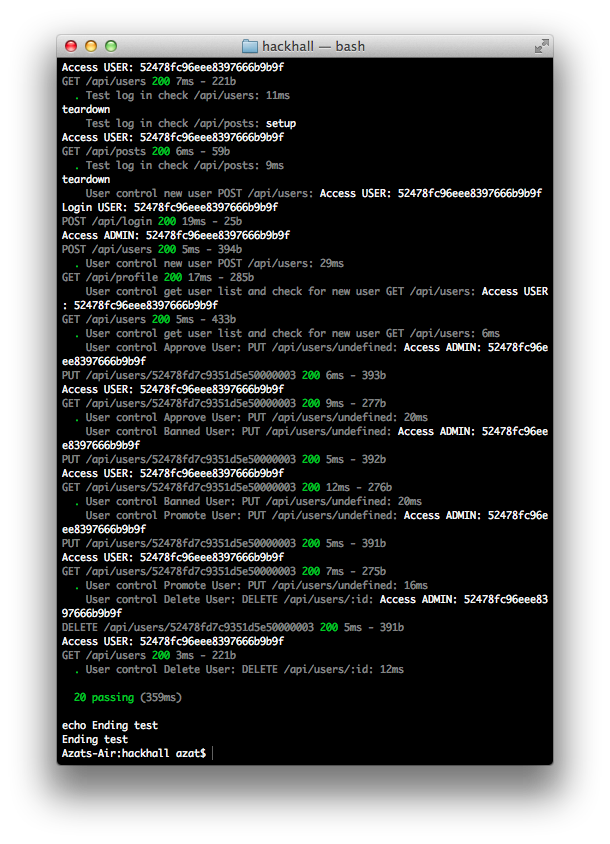
The results of running Mocha tests.
The HackHall tests live in the tests folder and consist of:
-
hackhall/tests/application.js: functional tests for unapproved users’ information -
hackhall/tests/posts.js: functional tests for posts -
hackhall/tests/users.js: functional tests for users
Tests use a library called superagent(GitHub).
The full content for hackhall/tests/application.js:
  1 var app = require ('../server').app,
  2   assert = require('assert'),
  3   request = require('superagent');
  4
  5 app.listen(app.get('port'), function(){
  6   console.log('Express server listening on port ' + app.get('port'));
  7 });
  8
  9 var user1 = request.agent();
 10 var port = 'http://localhost:'+app.get('port');
 11 var userId;
 12
 13 suite('APPLICATION API', function (){
 14   suiteSetup(function(done){
 15     done();
 16   });
 17   test('log in as admin', function(done){
 18     user1.post(port+'/api/login').send({email:'1@1.com',password:'1'}).end(functi\
 19 on(res){
 20         assert.equal(res.status,200);
 21       done();
 22     });
 23   });
 24   test('get profile for admin',function(done){
 25     user1.get(port+'/api/profile').end(function(res){
 26         assert.equal(res.status,200);
 27       done();
 28     });
 29   });
 30   test('submit applicaton for user 3@3.com', function(done){
 31     user1.post(port+'/api/application').send({
 32         firstName: 'Dummy',
 33       lastName: 'Application',
 34       displayName: 'Dummy Application',
 35         password: '3',
 36         email: '3@3.com',
 37       headline: 'Dummy Appliation',
 38       photoUrl: '/img/user.png',
 39       angelList: {blah:'blah'},
 40       angelUrl: 'http://angel.co.com/someuser',
 41       twitterUrl: 'http://twitter.com/someuser',
 42       facebookUrl: 'http://facebook.com/someuser',
 43       linkedinUrl: 'http://linkedin.com/someuser',
 44       githubUrl: 'http://github.com/someuser'
 45     }).end(function(res){
 46       assert.equal(res.status,200);
 47       userId = res.body._id;
 48       done();
 49     });
 50
 51   });
 52   test('logout admin',function(done){
 53     user1.post(port+'/api/logout').end(function(res){
 54         assert.equal(res.status,200);
 55       done();
 56     });
 57   });
 58   test('get profile again after logging out',function(done){
 59     user1.get(port+'/api/profile').end(function(res){
 60         assert.equal(res.status,500);
 61       done();
 62     });
 63   });
 64   test('log in as user3 - unapproved', function(done){
 65     user1.post(port+'/api/login').send({email:'3@3.com',password:'3'}).end(functi\
 66 on(res){
 67         assert.equal(res.status,200);
 68       done();
 69     });
 70   });
 71   test('get user application', function(done){
 72     user1.get(port+'/api/application/').end(function(res){
 73       // console.log(res.body)
 74       assert.equal(res.status, 200);
 75       done();
 76     });
 77   });
 78   test('update user application', function(done){
 79     user1.put(port+'/api/application/').send({
 80       firstName: 'boo'}).end(function(res){
 81       // console.log(res.body)
 82       assert.equal(res.status, 200);
 83       done();
 84     });
 85   });
 86   test('get user application', function(done){
 87     user1.get(port+'/api/application/').end(function(res){
 88       // console.log(res.body)
 89       assert.equal(res.status, 200);
 90       done();
 91     });
 92   });
 93   test('check for posts - fail (unapproved?)', function(done){
 94     user1.get(port+'/api/posts/').end(function(res){
 95       // console.log(res.body)
 96       assert.equal(res.status, 500);
 97
 98       done();
 99     });
100   });
101   test('logout user',function(done){
102     user1.post(port+'/api/logout').end(function(res){
103         assert.equal(res.status,200);
104       done();
105     });
106   });
107   test('log in as admin', function(done){
108     user1.post(port+'/api/login').send({email:'1@1.com',password:'1'}).end(functi\
109 on(res){
110         assert.equal(res.status,200);
111       done();
112     });
113   });
114   test('delete user3', function(done){
115     user1.del(port+'/api/users/'+userId).end(function(res){
116       assert.equal(res.status, 200);
117       done();
118     });
119   });
120   test('logout admin',function(done){
121     user1.post(port+'/api/logout').end(function(res){
122         assert.equal(res.status,200);
123       done();
124     });
125   });
126   test('log in as user - should fail', function(done){
127     user1.post(port+'/api/login').send({email:'3@3.com',password:'3'}).end(functi\
128 on(res){
129       // console.log(res.body)
130         assert.equal(res.status,500);
131
132       done();
133     });
134   });
135   test('check for posts - must fail', function(done){
136     user1.get(port+'/api/posts/').end(function(res){
137       // console.log(res.body)
138       assert.equal(res.status, 500);
139
140       done();
141     });
142   });
143   suiteTeardown(function(done){
144     done();
145   });
146
147 });
The full content for hackhall/tests/posts.js:
 1 var app = require('../server').app,
 2   assert = require('assert'),
 3   request = require('superagent');
 4
 5 app.listen(app.get('port'), function() {
 6   console.log('Express server listening on port ' + app.get('port'));
 7 });
 8
 9 var user1 = request.agent();
10 var port = 'http://localhost:' + app.get('port');
11 var postId;
12
13 suite('POSTS API', function() {
14   suiteSetup(function(done) {
15     done();
16   });
17   test('log in', function(done) {
18     user1.post(port + '/api/login').send({
19       email: '1@1.com',
20       password: '1'
21     }).end(function(res) {
22       assert.equal(res.status, 200);
23       done();
24     });
25   });
26   test('add post', function(done) {
27     user1.post(port + '/api/posts').send({
28       title: 'Yo Test Title',
29       text: 'Yo Test text',
30       url: ''
31     }).end(function(res) {
32       assert.equal(res.status, 200);
33       postId = res.body._id;
34       done();
35     });
36
37   });
38   test('get profile', function(done) {
39     user1.get(port + '/api/profile').end(function(res) {
40       assert.equal(res.status, 200);
41       done();
42     });
43   });
44   test('post get', function(done) {
45     // console.log('000'+postId);
46     user1.get(port + '/api/posts/' + postId).end(function(res) {
47       assert.equal(res.status, 200);
48       assert.equal(res.body._id, postId);
49       done();
50     });
51   });
52   test('delete post', function(done) {
53     user1.del(port + '/api/posts/' + postId).end(function(res) {
54       assert.equal(res.status, 200);
55       done();
56     });
57   });
58   test('check for deleted post', function(done) {
59     user1.get(port + '/api/posts/' + postId).end(function(res) {
60       // console.log(res.body)
61       assert.equal(res.status, 500);
62
63       done();
64     });
65   });
66   suiteTeardown(function(done) {
67     done();
68   });
69
70 });
The full content for hackhall/tests/users.js:
  1 var app = require('../server').app,
  2   assert = require('assert'),
  3   request = require('superagent');
  4 // http = require('support/http');
  5
  6 var user1 = request.agent();
  7 var port = 'http://localhost:' + app.get('port');
  8
  9
 10 app.listen(app.get('port'), function() {
 11   console.log('Express server listening on port ' + app.get('port'));
 12 });
 13
 14 suite('Test root', function() {
 15   setup(function(done) {
 16     console.log('setup');
 17
 18     done();
 19   });
 20
 21   test('check /', function(done) {
 22     request.get('http://localhost:3000').end(function(res) {
 23       assert.equal(res.status, 200);
 24       done();
 25     });
 26   });
 27   test('check /api/profile', function(done) {
 28     request.get('http://localhost:' + app.get('port') + '/api/profile').end(funct\
 29 ion(res) {
 30       assert.equal(res.status, 500);
 31       done();
 32     });
 33   });
 34   test('check /api/users', function(done) {
 35     user1.get('http://localhost:' + app.get('port') + '/api/users').end(function(\
 36 res) {
 37       assert.equal(res.status, 500);
 38       // console.log(res.text.length);
 39       done();
 40     });
 41     // done();
 42   });
 43   test('check /api/posts', function(done) {
 44     user1.get('http://localhost:' + app.get('port') + '/api/posts').end(function(\
 45 res) {
 46       assert.equal(res.status, 500);
 47       // console.log(res.text.length);
 48       done();
 49     });
 50     // done();
 51   });
 52   teardown(function(done) {
 53     console.log('teardown');
 54     done();
 55   });
 56
 57 });
 58
 59 suite('Test log in', function() {
 60   setup(function(done) {
 61     console.log('setup');
 62
 63     done();
 64   });
 65   test('login', function(done) {
 66     user1.post('http://localhost:3000/api/login').send({
 67       email: '1@1.com',
 68       password: '1'
 69     }).end(function(res) {
 70       assert.equal(res.status, 200);
 71       done();
 72     });
 73
 74   });
 75   test('check /api/profile', function(done) {
 76     user1.get('http://localhost:' + app.get('port') + '/api/profile').end(functio\
 77 n(res) {
 78       assert.equal(res.status, 200);
 79       // console.log(res.text.length);
 80       done();
 81     });
 82     // done();
 83   });
 84   test('check /api/users', function(done) {
 85     user1.get('http://localhost:' + app.get('port') + '/api/users').end(function(\
 86 res) {
 87       assert.equal(res.status, 200);
 88       // console.log(res.text);
 89       done();
 90     });
 91     // done();
 92   });
 93   test('check /api/posts', function(done) {
 94     user1.get('http://localhost:' + app.get('port') + '/api/posts').end(function(\
 95 res) {
 96       assert.equal(res.status, 200);
 97       // console.log(res.text.length);
 98       done();
 99     });
100     // done();
101   });
102
103   teardown(function(done) {
104     console.log('teardown');
105     done();
106   });
107
108 });
109 suite('User control', function() {
110   var user2 = {
111     firstName: 'Bob',
112     lastName: 'Dilan',
113     displayName: 'Bob Dilan',
114     email: '2@2.com'
115   };
116   suiteSetup(function(done) {
117     user1.post('http://localhost:3000/api/login').send({
118       email: '1@1.com',
119       password: '1'
120     }).end(function(res) {
121       assert.equal(res.status, 200);
122       // done();
123     });
124     user1.get('http://localhost:' + app.get('port') + '/api/profile').end(functio\
125 n(res) {
126       assert.equal(res.status, 200);
127       // console.log(res.text.length);
128       // done();
129     });
130
131     done();
132   })
133
134   test('new user POST /api/users', function(done) {
135     user1.post(port + '/api/users')
136       .send(user2)
137       .end(function(res) {
138         assert.equal(res.status, 200);
139         // console.log(res.text.length);
140         user2 = res.body;
141         // console.log(user2)
142         done();
143       })
144   });
145   test('get user list and check for new user GET /api/users', function(done) {
146     user1.get('http://localhost:' + app.get('port') + '/api/users').end(function(\
147 res) {
148       assert.equal(res.status, 200);
149       // console.log(res.body)
150       var user3 = res.body.filter(function(el, i, list) {
151         return (el._id == user2._id);
152       });
153       assert(user3.length === 1);
154       // assert(res.body.indexOf(user2)>-1);
155       // console.log(res.body.length)
156       done();
157     })
158   });
159   test('Approve User: PUT /api/users/' + user2._id, function(done) {
160     assert(user2._id != '');
161     user1.put(port + '/api/users/' + user2._id)
162       .send({
163         approved: true
164       })
165       .end(function(res) {
166         assert.equal(res.status, 200);
167         // console.log(res.text.length);
168         assert(res.body.approved);
169         user1.get(port + '/api/users/' + user2._id).end(function(res) {
170           assert(res.status, 200);
171           assert(res.body.approved);
172           done();
173         })
174
175       })
176   });
177   test('Banned User: PUT /api/users/' + user2._id, function(done) {
178     assert(user2._id != '');
179     user1.put(port + '/api/users/' + user2._id)
180       .send({
181         banned: true
182       })
183       .end(function(res) {
184         assert.equal(res.status, 200);
185         // console.log(res.text.length);
186         assert(res.body.banned);
187         user1.get(port + '/api/users/' + user2._id).end(function(res) {
188           assert(res.status, 200);
189           assert(res.body.banned);
190           done();
191         })
192
193       })
194   });
195   test('Promote User: PUT /api/users/' + user2._id, function(done) {
196     assert(user2._id != '');
197     user1.put(port + '/api/users/' + user2._id)
198       .send({
199         admin: true
200       })
201       .end(function(res) {
202         assert.equal(res.status, 200);
203         // console.log(res.text.length);
204         assert(res.body.admin);
205         user1.get(port + '/api/users/' + user2._id).end(function(res) {
206           assert(res.status, 200);
207           assert(res.body.admin);
208           done();
209         })
210
211       })
212   });
213   test('Delete User: DELETE /api/users/:id', function(done) {
214     assert(user2._id != '');
215     user1.del(port + '/api/users/' + user2._id)
216       .end(function(res) {
217         assert.equal(res.status, 200);
218         // console.log('id:' + user2._id)
219         user1.get(port + '/api/users').end(function(res) {
220           assert.equal(res.status, 200);
221           var user3 = res.body.filter(function(el, i, list) {
222             return (el._id === user2._id);
223           });
224           // console.log('***');
225           // console.warn(user3);
226           assert(user3.length === 0);
227           done();
228         });
229       });
230
231
232   });
233 });
234 // app.close();
235 // console.log(app)

|
WarningPlease don’t store plain passwords/keys in the database. Any serious production app should at least salt the passwords before storing them. |
4.8 Conclusion
HackHall is still in development, but there are important real production application components, such as REST API architecture, OAuth, Mongoose and its models, MVC structure of Express.js apps, access to environment variables, etc.
ExpressWorks
What is ExpressWorks Based On?
ExpressWorks is the Express.js workshop based on workshopper and inspired by stream-adventure by @substack and @maxogden.
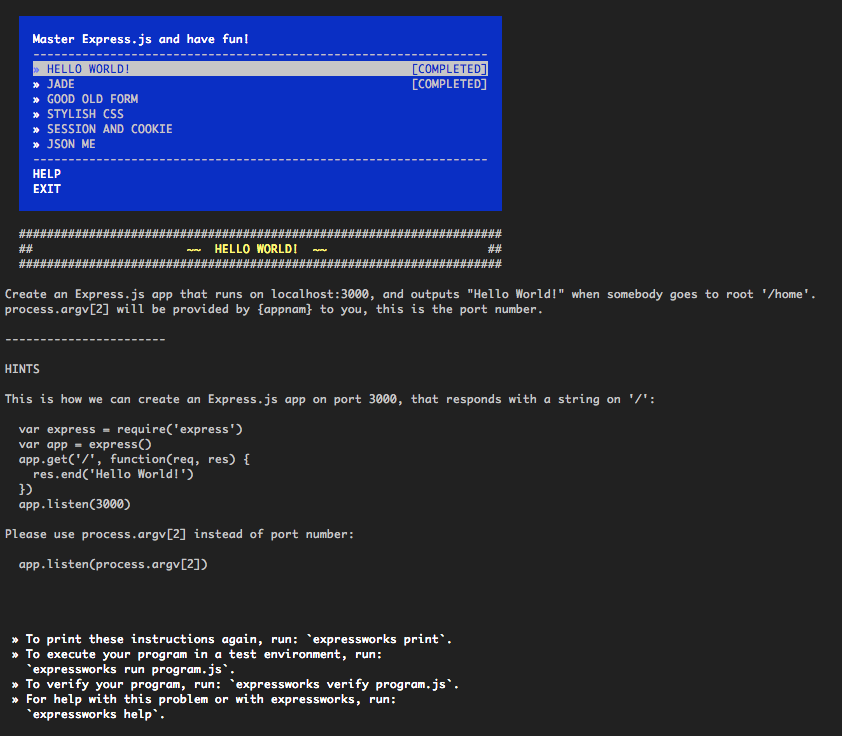
Hello World Express.js app
Installation (recommended)
Recommended global installation:
1 $ npm install -g expressworks
2 $ expressworks
If you see errors, try:
1 $ sudo npm install -g expressworks
Local Installation (advanced)
Run and install locally:
1 $ npm install expressworks
2 $ cd expressworks
3 $ npm install
4 $ node expressworks
Usage
ExpressWorks understands these commands:
 1 Usage
 2
 3   expressworks
 4     Show a menu to interactively select a workshop.
 5   expressworks list
 6     Show a newline-separated list of all the workshops.
 7   expressworks select NAME
 8     Select a workshop.
 9   expressworks current
10     Show the currently selected workshop.
11   expressworks run program.js
12     Run your program against the selected input.
13   expressworks verify program.js
14     Verify your program against the expected output.
Reset
If you want to reset the list of completed tasks, clean the ~/.config/expressworks/completed.json file.
Hello World Express.js app
Steps
Hello World
Create an Express.js app that runs on localhost:3000, and outputs “Hello World!” when somebody goes to root ‘/home’.
process.argv[2] will be provided by expressworks to you. This is the port number.
Jade
Create an Express.js app with a home page (/home) rendered by a Jade template engine that shows the current date (toDateString).
Good Old Form
Write a route (‘/form’) that processes an HTML form input (<form><input name="str"/></form>) and prints the str value backwards.
Static
Apply static middleware to the server index.html file without any routes. The index.html file is provided and usable via the process.argv[3] value of the path to it. However, you can use your own file with this content:
1   <html>
2     <head>
3       <link rel="stylesheet" type="text/css" href="/main.css"/>
4     </head>
5     <body>
6       <p>I am red!</p>
7     </body>
8   </html>
Stylish CSS
Style your HTML from the previous example with some Stylus middleware. The path to the main.styl file is provided in process.argv[3], or you can create your own file/folder from these:
1   p
2     color red
The index.html file:
1   <html>
2     <head>
3       <title>expressworks</title>
4       <link rel="stylesheet" type="text/css" href="/main.css"/>
5     </head>
6     <body>
7       <p>I am red!</p>
8     </body>
9   </html>
Param Pam Pam
Create an Express.js server that processes PUT /message/:id requests, e.g., PUT /message/526aa677a8ceb64569c9d4fb.
The response of this request returns id SHA1 hashed with a date:
1   require('crypto')
2     .createHash('sha1')
3     .update(new Date().toDateString().toString() + id)
4     .digest('hex')
What’s in a Query
Write a route that extracts data from a query string in the GET /search URL route, e.g., ?results=recent&include_tabs=true, and then transforms and outputs it back to the user in JSON format.
JSON Me
Write a server that reads a file (file name is passed in process.argv[3]), then parses it to JSON, and outputs the content to the user with res.json(object).
Related Reading and Resources
Other Node.js Frameworks
The Express.js framework is no doubt the most mature, popular, robust, tested and used project for Node.js web services. As of this writing, Express.js is also the most starred NPM repository with 2x more stars that request and async libraries. There are plenty of real production apps that rely on Express 2.x and 3.x including Storify (acquired by LiveFyre), DocuSign, new MySpace, LearnBoost, Geekli.st, Klout, Prismatic, Segment.io and more.
Express.js is also the most starred NPM repository.
Nevertheless, there are plenty of alternatives for which we created our analog of todomvc.com collection: nodeframework.com. By the way, some of the more comprehensive frameworks depend on Express.js (i.e., SailsJS). So it’s great that our readers know Express.js by now!
Node.js Books
For more core Node.js overview and/or other components of the Node.js stack, such as databases and websockets, please consider these resources:
- Rapid Prototyping with JS: Agile JavaScript Development (Azat Mardanov) — beginner-to-intermediate book on Node.js, MongoDB and Backbone.js
- JavaScript and Node FUNdamentals: A Collection of Essential Basics (Azat Mardanov) — short read on simple but important concepts of browser JS and Node
- Pro Node.js (Colin J. Ihrig) — ISBN: 978-1-4302-5860-5, comprehensive low-level book on Node.js sans any non-core modules
- Node.js in Action (TJ Holowaychuk et al) — ISBN: 9781617290572 not yet published (est. end of 2013). Book about Express.js from the creators of the framework
- Learning Node (Shelley Powers) — ISBN: 978-1-4493-2307-3 book covers Express, MongoDB, Mongoose and Socket.IO
- Node Cookbook (David Mark Clements) — ISBN: 978-1-84951-718-8 book covers databases and websockets
- Node: Up and Running (Tom Hughes-Croucher et al) brief overview of Node.js
- Smashing Node.js (Guillermo Rauch) covers Express.js, Jade, and Stylus from the creator of Mongoose ORM for MongoDB
JavaScript Classics
For deeper understanding of the most misunderstood and most popular programming language, please make sure to read these proven classics:
- Eloquent JavaScript: programming fundamentals in the JavaScript coating
- JavaScript: The Good Parts: tricky part of the language
Contact Us
Let’s be friends on the Internet!
- Tweet Node.js question on Twitter: @azat_co
- Follow on Facebook: facebook.com/azat.mardanov
- Website: expressjsguide.com
- GitHub: github.com/azat-co/rpjs
Other Ways to Reach Us
- Email Azat directly: hi@azat.co
- Google Group: rpjs@googlegroups.com and https://groups.google.com/forum/#!forum/rpjs
- Blog: webapplog.com
- HackHall: community for hackers, hipsters and pirates
Share on Twitter with ClickToTweet link: http://ctt.ec/dd0Nc, or just click: