PUBLIC KEY INFRASTRUCTURES
A public key infrastructure (PKI) binds public keys to entities, enables other entities to verify public key bindings, and provides the services needed for ongoing management of keys in a distributed system
PKI COMPONENTS
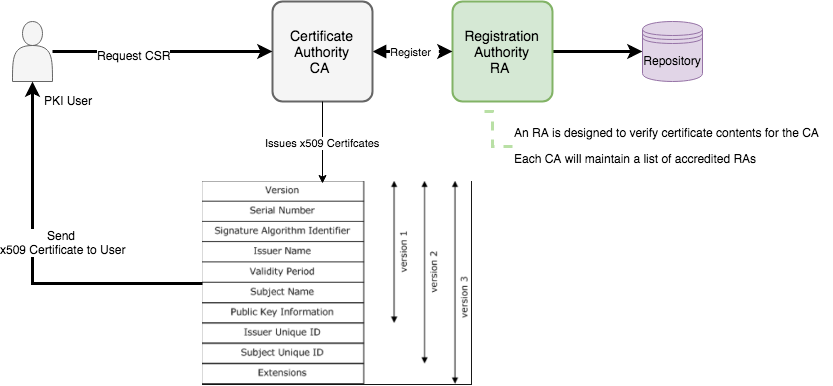
Certification Authority (CA)
The CA issues a public key certificate for each identity, confirming that the identity has the appropriate credentials.
Main Functions of CA
- Verify the CSR request
- Issue the Certificate (Create and SIgn them)
- Attach CRL for Certificate revocation
- Publish it’s current (Expired Certificate ) and CRL’s
Registration Authority (RA)
An RA is designed to verify certificate contents for the CA. Each CA will maintain a list of accredited RAs; that is a list of RAs determined to be trustworthy
PKI Users
PKI Users are organizations or individuals that use the PKI, but do not issue certificates.
Main Functions of PKI user - Generate the Certificate Signing Request. - Maintain the Certificate obtain by the CA.
PKI Architecture
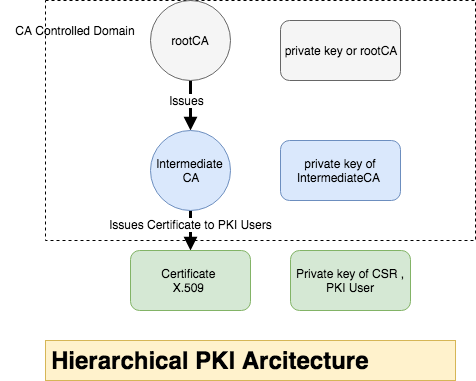
CAs may be linked in a number of ways. Most enterprises that deploy a PKI will choose either a mesh or a hierarchical architecture, This is an example of hierarchical Structure
Generating hierarchical CA structure
-
rootCA will generate self signed certificate and key with longer validity
openssl genrsa -des3 -out rootCA.key 4096 openssl req -new -x509 -days 3650 -key rootCA.key -out rootCA.crt -
intCA will generate CSR and get it signed with rootCA and set Validity for Longer Year.
 openssl genrsa -des3 -out intCA.key 4096
 openssl req -new -key intCA.key -out intCA.csr
intCA Submitted the CSR information to rootCA to get it signed
- Sign intermediateCA with rootCA private key, control the serial Number to specific pattern (Usability)
openssl x509 -req -days 365 -in intCA.csr -CA rootCA.crt -CAkey rootCA.key -set_se\ rial 1111111 -out intCA.crt Signature ok subject=/C=AU/ST=KA/L=IN/O=IntermediateCA Issuers/OU=intermediateCA Issue of myOrg\ /CN=intCA Getting CA Private Key Enter pass phrase for rootCA.key: -
PKI (End)Users will create the CSR and send to CA to get it signed
  openssl genrsa -des3 -out client.key 2048
  openssl req -new  -key client.key -out client.csr
End user submit the CSR information to get it signed by the CA, the CA used intermediate CA to sign the CSR
- Sign with Intermediate CA,set the exipry date to 1 or 2 year Max, and generate a serial number for this
  openssl x509 -req -in client.csr -days 530 -CA intCA.crt -CAkey intCA.key -CAcreat\
eserial -out client.crt
The CSR getting signed
- View the Client Certificate Information , The issuer is IntermediateCA
openssl x509 -text -in client.crt ....... ...... Signature Algorithm: sha1WithRSAEncryption Issuer: C=AU, ST=KA, L=IN, O=IntermediateCA Issuers, OU=intermediateCA Issue o\ f myOrg, CN=intCA - Verify Certificate
Verify Client certificate with Full CA chain
Verify intermediateCA belongs to rootCA chain
PKI Data Structure
Two Basic data structures used in PKI - X.509 Public Key Certificates - CRL Certificate Revocation List - Attribute Certificates
X.509
There are ten common fields, six mandatory and four optional.
The mandatory fields are: serial number, signature algorithm identifier, certificate issuer name, certificate validity period, public key Info , and the subject name
| X.509 Attributes | Description |
|---|---|
| Version | v2 or v3 |
| Serial Number | CA Assigned Serial Number to the Certificate |
| Signature | Indicate which digital Signature Algorithms ex: SHA-256 with RSA Encryption |
| Issuer | Contains x.500 DN |
| Validity | Certificate Expiry Dates |
| Subject | Contains the DN of the Holder of private Key Corresponding to the public key in the certificate |
| Subject public key Information | Optional Parameter, Algorithm Identifiers |
| Issuer UniqueID and Subject UniqueID | ID of the Issues only in v2 and v3 |
| Extensions | Optional only in v3 Certificate version |
| subjectType | Indicate whether a subject is CA or ENtity |
| Names and identity information | c=US; o=8gwifi; ou=Crypto; cn=8gwifi.org |
| Key Attributes | Specifies relevant attributes whether it used for key transport, or be used to verify a digital signature |
| Policy Information | Policies related to Certificate |
| Certificate Extensions | extension identifier, a criticality flag, and extension value |
Reader Note what is self Signed Certificate
In self signed certificate the issuer and subject are same :)
Issuer:  C=AU, ST=KA, L=IN, O=rootCA Issuers, OU=rootCA, CN=rootCA
Subject: C=AU, ST=KA, L=IN, O=rootCA Issuers, OU=rootCA, CN=rootCA
CRL
The CRL contains the following fields:
| CRL Fields | Description |
|---|---|
| Version | Optional Version, Default 2 |
| Signature | algorithm identifier for the digital signature algorithm used by the CRL issuer to sign the CRL |
| Issuer | X.500 DN of the CRL issuer |
| This update | Issue date of the CRL |
| Next update | Next CRL Issue date |
| Revoked Certificates | Structured List of Revoked Certificates |
| CRL Extensions | Additional Information About the CRL |
Pem format of CRL
Implement CERTIFICATION REVOCATION LIST
-
Make a directory for a CRL:
mkdir -p /etc/pki/crl - Create an index file, the CRL Database with the following command:
touch /etc/pki/crl/index.txt -
Create a file for the CRL number. This file should contain the text 00 only.
echo 00 > /etc/pki/crl/crl_number -
crl_openssl.conf: create and write the following contents into a crl_openssl.conf file.
cat <<EOF > crl_openssl.conf # OpenSSL configuration for CRL generation # #################################################################### [ ca ] default_ca = CA_default # The default ca section #################################################################### [ CA_default ] database = /etc/pki/crl/index.txt crlnumber = /etc/pki/crl_number default_days = 365 # how long to certify for default_crl_days= 30 # how long before next CRL default_md = default # use public key default MD preserve = no # keep passed DN ordering #################################################################### [ crl_ext ] # CRL extensions. # Only issuerAltName and authorityKeyIdentifier make any sense in a CRL. # issuerAltName=issuer:copy authorityKeyIdentifier=keyid:always,issuer:always EOF -
Generate CRL file
openssl ca -gencrl -keyfile intCA.key -cert intCA.crt -out intCA.crl -config crl_\ openssl.conf - View CRL file
Added with required CRL field, at this time no certificate is Invoked
if the CRL is DER Encoded then issue the below command
-
Revoke the Certificate
openssl ca -revoke client.crt -keyfile intCA.key -cert intCA.crt -config crl_opens\ sl.conf Using configuration from crl_openssl.conf Enter pass phrase for intCA.key: Adding Entry with serial number AC12C39820C69327 to DB for /C=AU/ST=Some-State/O=I\ nternet Widgits Pty Ltd/CN=8gwifi.org Revoking Certificate AC12C39820C69327. Data Base Updated - Again revoking the same client certificate will through an error Already Revoked
openssl ca -revoke client.crt -keyfile intCA.key -cert intCA.crt -config crl_opens\ sl.conf Using configuration from crl_openssl.conf Enter pass phrase for intCA.key: ERROR:Already revoked, serial number AC12C39820C69327 -
Regenerate the CRL list
openssl ca -gencrl -keyfile intCA.key -cert intCA.crt -out intCA.crl -config crl_o\ penssl.conf Using configuration from crl_openssl.conf Enter pass phrase for intCA.key: - View CRL file
One revoked certificate is Added in the CRL entry
Adding CRL distribution point
- Edit the file crl_openssl.conf and point out the PEM and DER
crlDistributionPoints=@crl_section [crl_section] URI.1 = https://8gwifi.org/intCA.crl URI.2 = https://8gwifi.org/intCA.der - CA role , once CA sign the file it will use
-extfile crl_openssl.confto locate the crlDistributionPointsopenssl x509 -req -in client.csr -days 530 -CA intCA.crt -CAkey intCA.key -CAcreat\ eserial -out client.crt -extfile crl_openssl.conf - Once certificate is Signed, the x.509 certificate will have X509v3 extensions that contains CRL Distribution Points
  openssl x509 -text -in client.crt
 ......
 X509v3 extensions:
      X509v3 CRL Distribution Points:
          Full Name:
            URI:https://8gwifi.org/intCA.crl
          Full Name:
            URI:https://8gwifi.org/intCA.der
OCSP
OCSP stands for the Online Certificate Status Protocol and is one way to validate a certificate status. It is an alternative to the CRL, certificate revocation list.
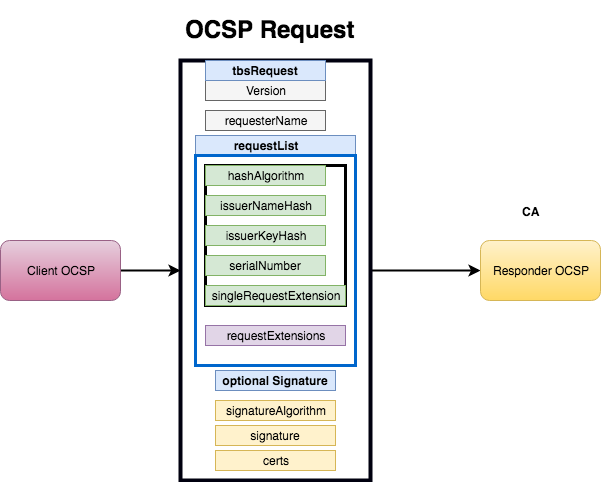
The OCSP process is very simple:
- Client receives the certificate
- Client sends OCSP request to the OCSP server and it query by the serial number of the certificate
- OCSP response with a certificate status Good, Revoked or Unknown
Working Demo
- Get the certificate you want to verify 8gwifi.org
openssl s_client -servername 8gwifi.org -connect 8gwifi.org:443 2>&1 < /dev/null |\ sed -n '/-----BEGIN/,/-----END/p' > 8gwifi.pem - Build the certificate chain
  openssl s_client -servername 8gwifi.org  -connect 8gwifi.com:443 -showcerts 2>&1 <\
 /dev/null > cacert.pem
edit the file cacert.pem and add necessary chain certificate
- Determine the ocsp URI
openssl x509 -noout -ocsp_uri -in 8gwifi.pem http://ocsp.int-x3.letsencrypt.org - Invoke the openssl ocsp client
  openssl ocsp -no_nonce -issuer cacert.pem -cert 8gwifi.pem  -VAfile cacert.pem -te\
xt -url http://ocsp.int-x3.letsencrypt.org/ -header Host ocsp.int-x3.letsencrypt.org\
 -respout ocsptest
The OCSP Response