Chapter 1 - Introduction
Welcome to Guide to Tracktion T6. The goal of this book is to help you learn T6. If you are coming to T6 from another DAW or learning computer recording from the ground up, you will find this guide useful. This book will be particularly interesting to those who already have experience with the Tracktion DAW. Tracktion T6 has dozens of new and innovative features. This latest version streamlines the workflow while making the software more powerful than ever.
T6 runs on both Mac and PC including 64-bit versions of OS X and Windows. T6 is also one of the top mainstream DAWs that runs on Linux. All versions are maintained in parallel so the latest revision across platforms are almost identical.
T6 like it’s predecessors is unique in that it has a one screen user interface with a mixer channel integrated to the right of each track. There is no separate console view so you never need to flip back and forth between a track view and mixer view. This concept was pioneered with T1 more than a decade ago and seems modern even today.
T6 has a very flexible plugin architecture that includes native plugins, plugin racks, and third party plugins supporting VST, VST3 and AU.
What’s in the Book?
In this book you will learn:
- How to install and set up T6
- How to recording audio to tracks
- How to record MIDI and use virtual instruments
- How to recording with guitar amp simulators
- How to editing audio
- How to editing MIDI
- How to mix with the inline mixer section
- How to insert and use plugin effects
- How to mixing down to Wave or MP3 files
Also, check out the Book Extras. You will find a keyboard shortcut cheat-sheet that you can print and reference. And don’t miss my custom color scheme file for Tracktion T6 - GreyscalePro. Apart from the default colors, I used Greyscale pro for many of the illustrations in this book.
What’s Not Covered in this Book?
Tracktion T6 is often promoted as an easy to use DAW. That tends to be true once you get the hang of it. But the more you learn, the more you realize how deep the feature set really is. I never really intended to write a manual for Tracktion. However, for lack of a manual, this book serves that function for many Trackteers. To be honest up front, I have this list of things not covered in the book. This list might not be comprehensive, but these are the big ones:
- Plugin Racks
- Using multi-output Synths
- Control Surface Mapping
- Edit Clips
- Tracktion Sampler
- Video integration
- Melodyne ARA
- Project Templates
- Tracktion Archive format
- CPU Usage Meter
Many of the above topics are addressed in the videos at Groove3.com, on the Tracktion website, or my YouTube channel. If this book is successful, some of these topics might make it to a future edition or a follow-up book on advanced topics. Remember to subscribe to my YouTube channel so you know when new Tracktion content is added.
I don’t attempt to cover fundamentals of recording like mic selection, recording technique, or the broad topics of mixing and mastering. There are plenty of other resources for that. This book is focused on how to operate Tracktion T6.
Tracktion Videos
In conjunction with this book, I produced a series of free videos that detail most of the new features in Tracktion T6. You can find those on my website BillEdstrom.com.
I also produced a full Tracktion video tutorial video series - Tracktion 5 Explained. Many of these videos are available for free on the Tracktion videos page.
The full series is available for purchase and download at Groove 3, Inc.
For in-depth coverage of the plugin racks feature, check out Tracktion Plugin Racks Explained also from Groove 3.
While the videos were produced for Tracktion T5, you will find the core workflows are still relevant. This book along with the videos mentioned above are your best companion as you learn Tracktion T6.
Setting Tracktion Keyboard Shortcuts
This book uses an alternative keyboard shortcut layout that you will need to turn on to follow the examples. To do that follow these steps:
- Navigate to the Settings tab, Keyboard Shortcuts page
- Click Reset to Defaults at the bottom of the page
- Select Use alternative Tracktion key-mappings
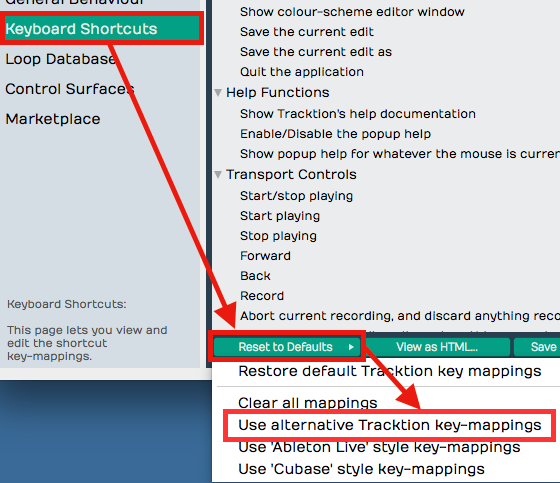
This set of keyboard shortcuts was carefully designed for efficient workflow and keeps the commands consistent between Mac and Windows. You may download the keyboard template and cheatsheet PDFs for the alternative key-mapping from the Leanpub store where you purchased this book.
Is Tracktion the Software or the Company?
Tracktion Software Corporation (TSC) is “Tracktion.” The DAW Software that Tracktion produces is T6. So, the proper way to refer to the DAW software is either “T6” or “Tracktion T6.”
While I am aware of that, I still tend to call the software “Tracktion.” As I revise the sections of the book, I am revising the the terminology to be consistent with TSC’s branding.
Modifier Keys Conventions
The book uses the following abbreviations for modifier keys:
- Command - Cmd
- Control - Ctrl
- Option - Opt
- Alt - Alt
In most cases Cmd on Mac will translate to Ctrl on Windows. For the book, I present both using the convention Mac / PC like this: Cmd + C / Ctrl + C.
- Here is another example:
- Click to select the clip then copy it using Cmd + C / Ctrl + C. Next, position the cursor in the Arrangement where you want to place the copy and paste it using Cmd + V / Ctrl + V.
Assigning the Duplicate Command to the Keyboard
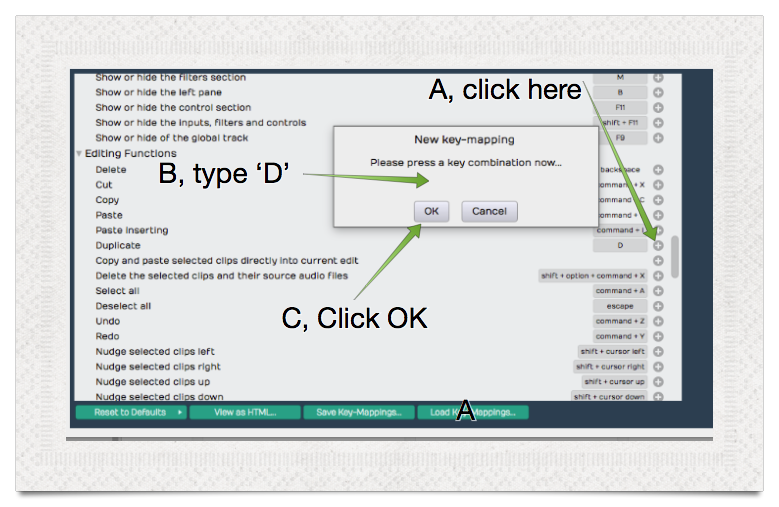
The Duplicate action is not mapped to the keyboard by default. To match the book examples, assign the ‘D’ key to duplicate. Here is how to do that:
- Navigate to Settings tab, Keyboard shortcuts page
- Locate the Duplicate command. It’s in the Editing Functions section
- To the right of Duplicate, press the plus (+) icon
- The New key-mapping dialog box appears
- Press D key, then click OK
Moving On
With those things set, your T6 installation will match the examples in this book. Get ready to learn more about Tracktion T6!