V. arc42 in Everyday Work
The main goal of arc42 is collecting useful and valuable documentation about an IT system, relevant for development and architecture. arc42 helps to achieve these goals, independent of your development process and the kind of your systems.
However, it’s not the goal to fill out arc42 completely. Remember the fundamental tips of chapter III: Document economically, oriented at concrete stakeholder requirements.
Secondly, work and document in the order appropriate for your specific system, usually not in the sequence of the arc42. In other words: Don’t let the arc42 template dictate a task order.
V.1 Good Start
Remember tip III-1, that proposes one responsible person (documentation gardener). This person can add documentation tasks to the backlog or delegate them to the team. The gardener shall not create all content by herself! In tip III-7 we formulated:
The responsible person (the documentation gardener from tip III-1) shall create … arc42 content together with the team.
Tip V-1: Explicitely clarify the target audience of your documentation
Develop an overview of all relevant stakeholders5 - at best in cooperation with your management. Put the result in arc42 section 1.2 (Stakeholder).
With this target audience clarify their concrete information requirements with respect to architecture and its documentation. See tip III-3 (Fast feedback).
Tip V-2: Use existing examples as jumpstart
You can find numerous public examples for arc42 documentation of different systems. Use an example to help your team get up to speed…
- Biking: Manage your favorite biking tracks, plus photos. Author: Michael Simons.
- Chess engine: Author: Stefan Zoerner.
- eCommerce (VENOM): Large scale eCommerce system for configuring and selling of complex systems. Author: Gernot Starke
- Customer-Relationship-Management (CRM): Managing customer relationsships in mass-market situations, like insurance cards or mobile phone tariffs. Mostly batch, complex interactions with external partners.
Tip V-3: Remove unneeded arc42-sections
Tailor the template to your specific needs: Adjust your documentation to stakeholder needs or requirements by removing parts or sections that nobody needs.
Tailoring absolutely requires a thorough understanding of documentation requirements - which you gain by applying tip V-1.
Please note: By tailoring you might alter the overall structure and/or section numbering of your arc42 documentation. This can make recognition of the structure a little more difficult for certain stakeholders, therefore apply tailoring with care.
Tip V-4: Augment arc42 by required sections or topics
In contrast to the preceeding tip V-3 you might need to augment the arc42 documentation of your system by some topics.
We have seen the following examples of adaptions in practice:
- Business or technical data models. In case you work primarily data oriented, or your domain contains complex data structures, a top-level section on those structures can signilize their importance.
- Screen or user interface layout: Create a top-level UI section if you base important architectural or technical decisions on your UI topics (like layout, typography or other visual topics). Might also be helpful if you need to intensively discuss layout or other UI topics with stakeholders.
- Required information for developers (developer guide): In case you have no separate documentation that describes important developer stuff (like environment, conventions, programming style and the like), an additional section in your arc42 documentation might help. We recommend to keep this info separate from the architecture documentation, though.
Tip V-5: Indicate currently unneeded arc42 sections
For systems demanding more formal documentation you should indicate those arc42 sections you don’t currently need or which are currently not required (as opposed to tip v-3). Add statements of the following kind to the corresponding arc42 sections:
- currently not needed
- will be documented for version/release x.y
- deliberately left out / omitted
Tip V-6: Prepare an arc42 repository for the team
Your development team shall focus on creating software, not on setting up documentation tools. You should prepare the required tools in advance: Prepare everything the team needs for lean, efficient and pragmatic documentation.
The concrete embodiment of this tip depends on your toolchain, see chapter VI.
The term repository means all media or tools your team needs to create or maintain documentation, the more centralized and homogeneous, the better.
For example, attend to the following:
- Create a wiki space for the project related (short-term) information. Part of this shall be structured analog to arc42. XXXX (link missing)
- Create a (prestructured) arc42 model within your favorite UML or modeling tool (in case your team sports such legendaries).
- Create a document for arc42, hopefully with something textbased like AsciiDoc or Markdown, or in the text processor of your choice.
Prefill such a repository with existing content, or content that stakeholders need to know.
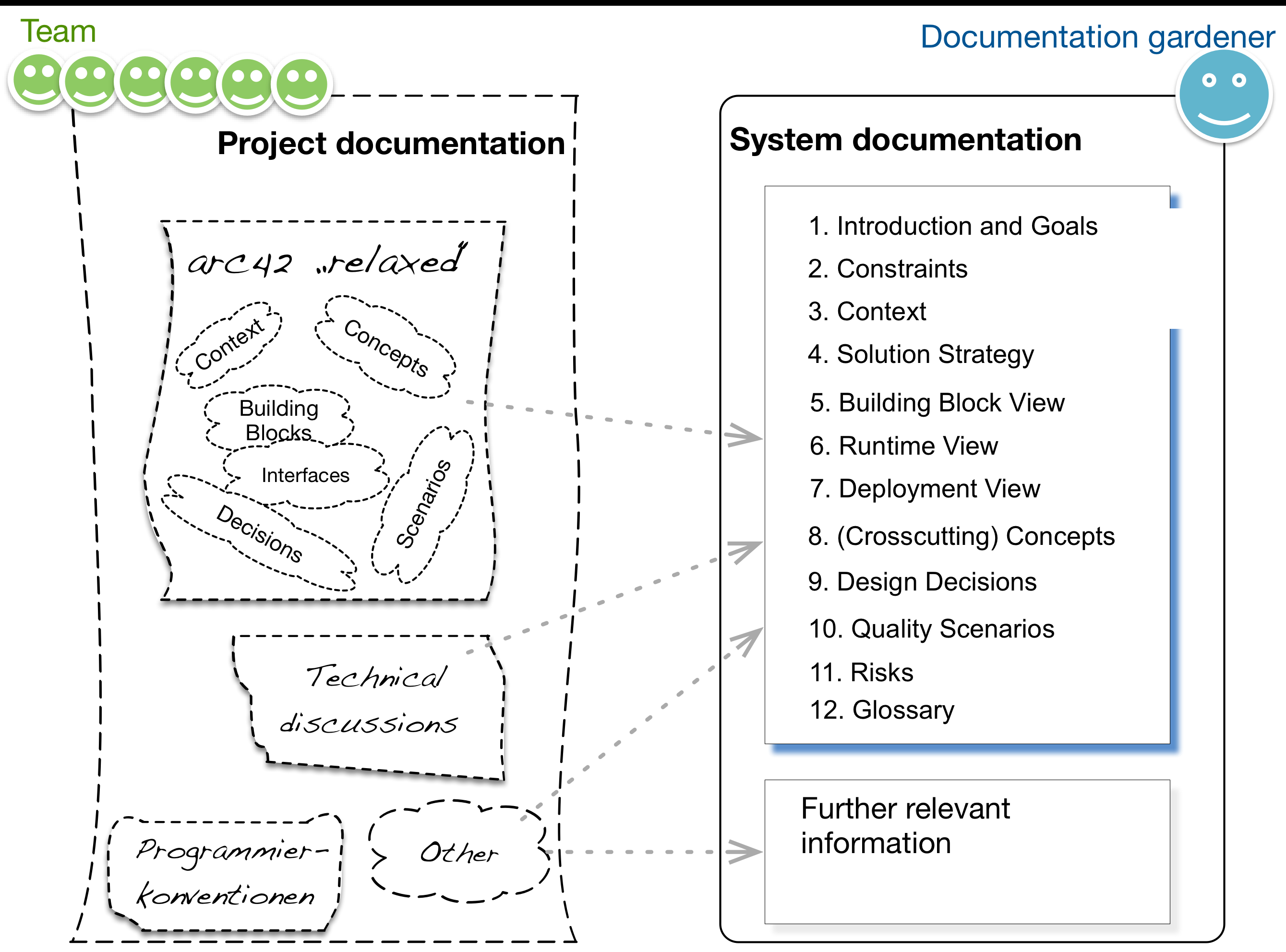
In tip-iii-7 we proposed to separate system- and project documentation, like shown in the following diagram:
Tip V-7: Prepare a sandbox for documentation
Prepare a demo system, which the team can use to try out all documentation tools without risk.
Such a sandbox is especially important for (feature-rich) modeling tools: Their usage is often non-intuitive and non-trivial. Typical developers seldomly use such tools, therefore it is important to have small systems at hand to experiment with the tools.
Tip V-8: Document (and work) from different perspectives
Deliberately change perspectives from time to time to improve your understanding of relationships between different aspects. Reflect (some of) these perspectives in your documentation.
These perspectives can complement, augment and support each other, for example can a runtime scenario support understanding of a complex building block (or code) structure.
arc42 proposes a number of useful perspectives:
- Structural views (building blocks, runtime scenarios, infrastructure and deployment), arc42 sections 5, 6 and 7.
- Crosscutting or technical concepts, arc42 section 8.
- Black- and whitebox perspectives within the building block view, both part of arc42 section 5.
- Domain and technical perspective. The former helps to build the right system (do the right things), the latter to build it right (do things right).
Tip V-9: Documents belong into version control
When setting up tools for documentation, always keep version control in mind (exception: Wikis, which usually have their own version and/or change control). Documentation without both change history and reliable backup is not acceptable. We don’t care wether you use git, subversion, mercurial, TFS or other such tools - main point is you actively use one of those.
This tip might sound trivial - but we still (in the year 2016, deep in the 21st century!) find organizations that maintain Word(tm) documents on shared network drives and do versioning by appending consecutive numbers to filenames.
You should, of course, version binary documents (diagrams, images, office documents) too.
Please note: Maintaining models from UML tools within your VCS XXXX
Tip V-10: Conduct brief and thematically focussed documentation reviews
To ensure your documentation is adequate for your stakeholders you should ask for feedback as early as possible. Prerequisite is an overview of these stakeholders (see tip v-1).
Give selected, small parts of the documentation to selected persons for review. Ask specific questions instead of broad ones, similar to the following examples:
- Which additional information do you require in the description of interface X?
- Which parts of diagram Y are ok/correct/good, and which aren’t?
- Which changes/additions to the documentation do you propose?
Incorporate their feedback in a timely manner and repeat the review.
Tip V-11: Treat documentation tasks equal to developent tasks
Manage missing, insufficient or inappropriate parts of your documentation with the same processes and tools like any other development tasks, like features, tests or bugs.
For example, include reviewer feedback (see tip V-10) in your backlog or issue tracker. Even if the team cannot currently complete such tasks you keep an overview of open documentation issues.
Tip V-12: Document continously - parallel to development
In case you ever tried to move documentation to the end of a project, you know what happens in such cases: Documentation will never be created.
Therefore you should document continously - a little bit every day. In our experience even 15-20 minutes per day can lead to good results.
Both the fixed structure and the proactively prepared repository (see tip V-6) facilitate effective documentation even in small timeboxes.
Tip V-13: Always document in timeboxes
Timeboxes are a gread methodical tool to really focus on (and reach!) a specific goal. They help you concentrate on what’s currently important.
For every documentation task allocate a fixed time period (timebox) to that specific task: The more value that task, the more important the topic, the longer the timebox.
Such timeboxes should be at least 15 minutes long, but rarely longer than 4 hours. Only for huge documentation tasks your timeboxes should be even longer (see also tip v-15 on follow-up documentation).
At the beginning of every timebox (be it long or short!), invest a little time for planning and priorization. Answer the following questions for yourself:
- In the current situation, what’s the most important topic I need to document?
- Which approaches (textual description, bullet-list, table, diagrams etc) seem fit for this topic? What does arc42 propose? Do I see lean alternatives?
- For which stakeholders do I document? Who needs/requires/wants this documentation? (If the answer to this question is nobody, you better use this timebox to improve your source code or write some awesome integration tests.)
Tip V-14: Formulate like “The system {has|does|is|…}”
Sometimes you will write specifications or even requirements for a system or component to be built in the future.
An obvious option to formulate such topics is “the system { shall | should | will|…} “, to verbally indicate the futuristic character of your statements.
But: When the system will be build according to your specs or reqs, you will need to change such sentences, or rewrite them for your documentation. You can easily save this additional effort:
Therefore: Principally stick to indicative formulations (like has, does or is) instead of using conditional or future forms (like shall, should or will).
V.2 arc42 for Existing Systems
Software teams spend most of their time maintaining (modifying, correcting, improving, enhancing, tuning, patching, fixing…) existing systems - and not performing greenfield development (see section V-3) from scratch.
arc42 is well suited to support these maintenance tasks. You can use arc42 to effectively document your existing system a posteriori or in hindsight.
Your approach will depend on your current situation, wether you have:
- no documentation,
- too much documentation,
- outdated documentation,
- inhomogeneous documentation of varying quality,
- demand for specific topics/aspects
or any mix of these.
Tip V-15: Create hindsight documentation iteratively in short timeboxes
In case you currently have not usable documentation at all, you can create an acceptable overview with 3-5 persons within 2-4 hours (obviously depending on the size of your system and its criticality…)
Yes - you read correctly: We’re talking about a very small timebox here: Invest just a few hours instead of weeks:
Prepare a flip chart with the arc42 structure and provide sticky notes and pens. Choose a few (3-5) knowledgeable persons and proceed as follows:
- within 3-5 minutes (!) brainstorm answers to the following questions:
- Which stakeholders are interested in documentation?
- What is the minimal information those stakeholders need/require?
- Which of these information do we already have?
- within 10-15 minutes work along the arc42 sections:
- What are the most important information that we (developers, architects) need to keep?
- Which of these information do we already have?
- Consolidate the results of these short brainstorming sessions: For every
arc42 section, note:
- the stakeholders interested in this section
- where this specific information is already existing or
- which stakeholders might contribute/create this information.
In the diagram below you find an example: Concerning the context, information already exists in the wiki, whereas building-block and deployment views are completely missing. Some concepts are documented in wiki and subversion…
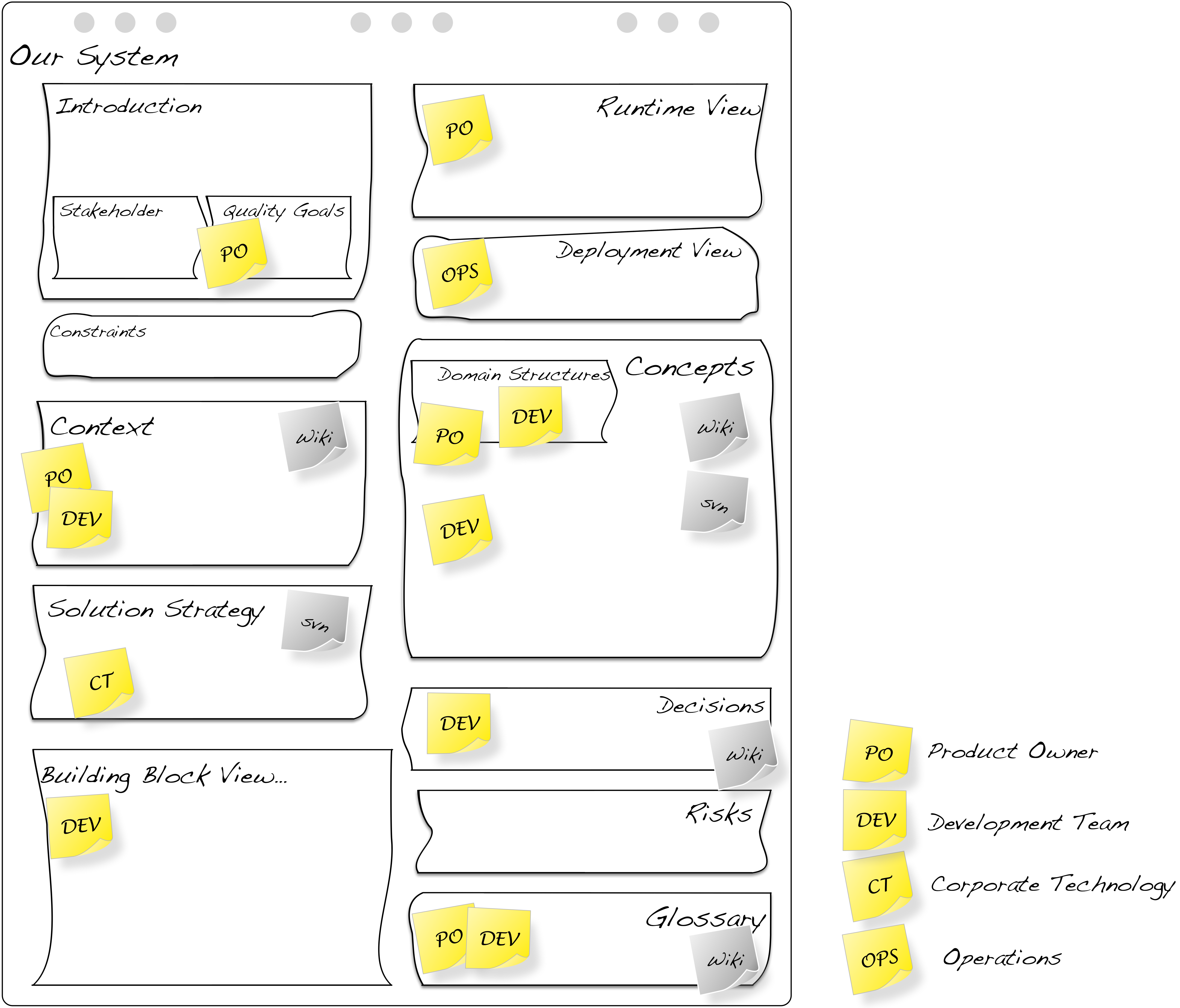
From this comparison (“what you need” versus “what you have”) you can infer concrete documentation tasks, that participants can resolve in the remaining time of your documentation timebox. Focus on content, not on form. Refrain from using high-end tools but write on paper and draw sketches on paper.
The documentation gardener (see tip III-1) can selectively improve certain parts of this documentation: create beautiful UML diagrams, move content to your wiki or other documentation tool.
In the documentation timebox you should focus on the deltas between “need” and “have” and start addressing those!
Tip V-16: Create documentation before you continue development
As an alternative to the iterative documentation of tip V-15, you might work a priori instead: Document the following topics for your existing system before you continue development:
- Building block view level 1, source code structure on highest abstraction level (arc42 section 5.1)
- Solution strategy, essential technical, conceptual or structural decisions (arc42 section 4)
- Concept, crosscutting concerns, fundamental principles or implementation rules (arc42 section 8)
- Quality requirements (arc42 section 1.2) and decisions/solutions derived from those (solution strategy, concepts)
- Context with external interfaces (arc42 section 3)
Again - refine and detail iteratively, based upon stakeholder feedback.
Tip V-17: Document those parts you’re anyhow working on
To change small parts of a system in the course of bug fixing or enhancing, you often need to understand additional parts around the actual culprit. Developing this understanding usually requires more effort than performing the actual change.
Use this opportunity to enhance the documentation of the affected parts.
For example, if you modify a level-2 building block, document responsibility and interface of this component. Explain the context of this building block by means of embedding it into a level-1 whitebox - without striving for completeness. You might go even further, and show the external interfaces (or interface changes) required for this modification within the system context (arc42 section 3).
Dare to leave gaps in your documentation: Leave other parts on level-1 or even the context undocumented. You’ll be positively surprised how good your documentation will become ofter a few of such iterations.
Tip V-18: Make other documents unnecessary as quickly as possible
A real danger when creating hindsight (a posteriori) documentation is the (potentially incorrect) existing documentation.
Ensure existing documentation becomes completely superfluous:
- move valid information from existing documents into your arc42 repository
- tag this existing information with “needs care” or “to be overhauled” if this old information needs to be reworked
- if you cannot delete old documents, at least tag/mark them as “invalid” or “outdated”
Tip V-19: Remove superfluous or outdated documents
In some organizations we experienced documentation overflow: An abundance of documents and information, spread over dozens or hundrets of files on different network shares, content-management-systems or even modeling tools.
In such organizations it’s common that stakeholders create their own documentation and ignore other peoples’ documentation.
If you apply tip V-18 in the large, you should move the content of many of these existing documents or sources into your arc42 repository.
Initially, retrievability or findability is more important than consistency: Remove as many of the existing documents as possible and move documentation into the central arc42 repository.
You can improve the consistency of documentation iteratively over time.
Tip V-20: Explicitly reveal problems and risks
Collect technical and structural problems and risks in arc42 section 11 (risks and technical debt). Use those as basis for future improvements within the system and its documentation.
See the aim42 open source projects, which describes a systematic approach to software improvement, evolution and modernization.
V.3 arc42 for New Systems
When developing new systems from scratch you should create documentation to support the ongoing development.
Documentation shall enable and support communication between stakeholders, especially to avoid implicit assumptions. It shall facilitate stakeholders’ tasks.
Within the following tips we propose a number of alternative perspectives to successfully start software architecture documentation.
Depending on your situation you should invest in each of these perspectives. We don’t propose any specific order - use feedback and iteration to adjust form, detail and depth.
Tip V-21: Start with the (business) domain
Follow the domain driven design (DDD) and model domain entities and services. That’s an elegant bottom-up approach to create building blocks. In many domains, these entities and services are long-lasting and fundamental parts of any architecture. Therefore a model (for example as UML or entity-relationship model) of the domain should be part of your architecture documentation.
- Usually the domain models are part of the crosscutting concepts, located in arc42-section 8.1 (business models). That’s a good home for business service models too.
- Alternatively you include the (entity or data-oriented) part of your domain into a detailed layer of the building block view (e.g. arc42-section 5.2 or 5.3)
Tip V-22: Start with quality requirements
From the beginning of development you should care for the required quality of your system. This especially holds if these kinds of requirements are missing from your requirements documentation.
As soon as you have worked out some quality scenarios based upon major quality goals (see arc42 section 1.2 and section 10), you should collect appropriate solution approaches together with your team. Like explained in tip iv-51, arc42 section 4 (solution strategy) is an ideal place for quality goals plus corresponding architectural decisions or approaches.
XXX: example table of scenarios plus approaches
Tip V-23: Start with the context and external interfaces
We cannot repeat it often enough:
It’s always the goddamned interfaces.
Start early in development by demarcating your system against its neighbours (the context, in arc42-section 3). Iteratively improve this early version of the context over time.
See also tips iv-29 up to tip iv-49.
Tip V-24: Start with the solution strategy
A brief brainstorming with essential stakeholders (especially the development team) will usually result in ideas and proposals how to tackle the problem at hand: What technologies or patterns to use and how to apply them.
Briefly sketch these ideas in arc42 section 4 (solution strategy). Keep this section short and compact. In case you need more extensive documentation, include it in the appropriate part of arc42 section 8 (crosscutting concepts).
You can document the solution strategy within hours (for small to medium systems) or a couple of days (for larger systems) - but you definitely need to have the appropriate stakeholders on board - who can really explain the nitty-gritty details of the solution approaches.
V.4 arc42 for Agile Projects
We already argumented in favor of lean, pragmatic, agile and economical (that is, appropriate) documentation.
If it is possible within your organization, try to strive for economicalness, frugality, brevity and a clear stakeholder focus for your documentation.
Refrain from producing waste that nobody will use in the future.
Tip V-25: Take documentation serious even in agile projects
Even in agile projects a certain amount of documentation will be useful or required. Even well functioning agile teams will encounter some change, even agile team players sometimes forget some details.
Good agile teams that are successful on the long run work very disciplined and properly. They value inner quality of their systems, both code and documentation are maintained appropriately.
You read about appropriateness in several occasions within this book, especially tip III-3 (appropriateness) and tip III-6 (requirements over principles).
Tip V-26: Make documentation part of the Definition-of-Done
The Definition-of-Done (DoD) is a team specific understanding of all expectations that software and accompanying artefacts must live up to in order to be done (meaning: releasable into production). DoD is a well established practice from agile methods, especially Scrum:
DoD consists of a list of tasks and artifacts that deliver value to the system, create appreciation from corresponding stakeholders.
You should convince your team to add appropriate parts of technical documentation to your DoD. Important stakeholders might support your argumentation by stating the value they gain from proper documentation.
Tip V-27: Apply an iterative and incremental approach to documentation
Document iteratively and incrementally: Start with very little content, focus on important topics, concepts, decisions, interfaces or building blocks. Add content (== increment) based upon feedback from stakeholders.
Rinse and repeat.
Such iterations assure that you document lean and economically, according to tip III-2 and tip III-3.
See also tip V-10 (review documentation), tip V-12 (document continously) and tip V-13 (document in timeboxes).
Tip V-28: Use walls instead of electronic tools
During the time a team works cooperatively on a system, it’s highly useful to continously keep imporant information (diagrams, structures, models, concepts or similar) in sight, so everybody can see and comment it.
Print out (or sketch by hand) the context diagram plus the topmost level(s) of the building block view. Pin them to a wall in your project room. If that’s forbidden, grab a cork- or notice board for these diagrams.
Group discussions are way easier with pens in front of a wall as within a complex UML tool. Periodically include changes from the wall into your (electronic) repository. Replace overly scribbled paper by new and adapted printouts. That requires only minimal effort from your side.
For parts or aspects that are currently under heavy diskussion, boards with moveable notes are ideally suited. We love stattys6 to symbolize building blocks and (erasable) pens for dependencies.
Tip V-29: Enable cooperative work, even for distributed teams
Paper and whiteboards are the simplest tools for cooperative creation of ideas - not that much for documentation.
These low ceremony tools help you with planning tasks and projects, but you should provide additional tools for your documentation.
Tools like Google-docs, Dropbox-paper or similar web based apps allow concurrent access and coordination of distributed work.
V.5 arc42 for Large Scale Systems
Very large systems are often maintained by many persons in parallel. Consistent and appropriately-economical documentation of such systems poses a number of organizational and technical challenges.
We summarized our most important suggestion (modularization) in the following tip V-30. Nevertheless there are additional tool requirements for large systems (see chapter VI)
Tip V-30: Modularize extensive documentation
Factor out (extract) documentation commonalities of the system and create separate documentation for relevant subsystems.
Link up these different parts of the documentation by hyperlinks, so that consumers can navigate freely between special and common parts.
A toolchain supporting modularization is an important prerequisite: it’s a nuisance with typical office products, but works quite smoothly with wikis (see section VI-4) or markup-languages (see section VI-3).
For a schematic example of modularized documentation see figure arc42-modularized: The overall systems is made up from three subsystems. The common architecture documentation contains the introduction and goals, strategic decisions, building blocks level 1 plus crosscutting concepts. All these informations are valid and useful for the other three (smaller) documents.
Each subsystems’ documentation contains only parts of the arc42 template, and each subsystem focusses on different aspects.
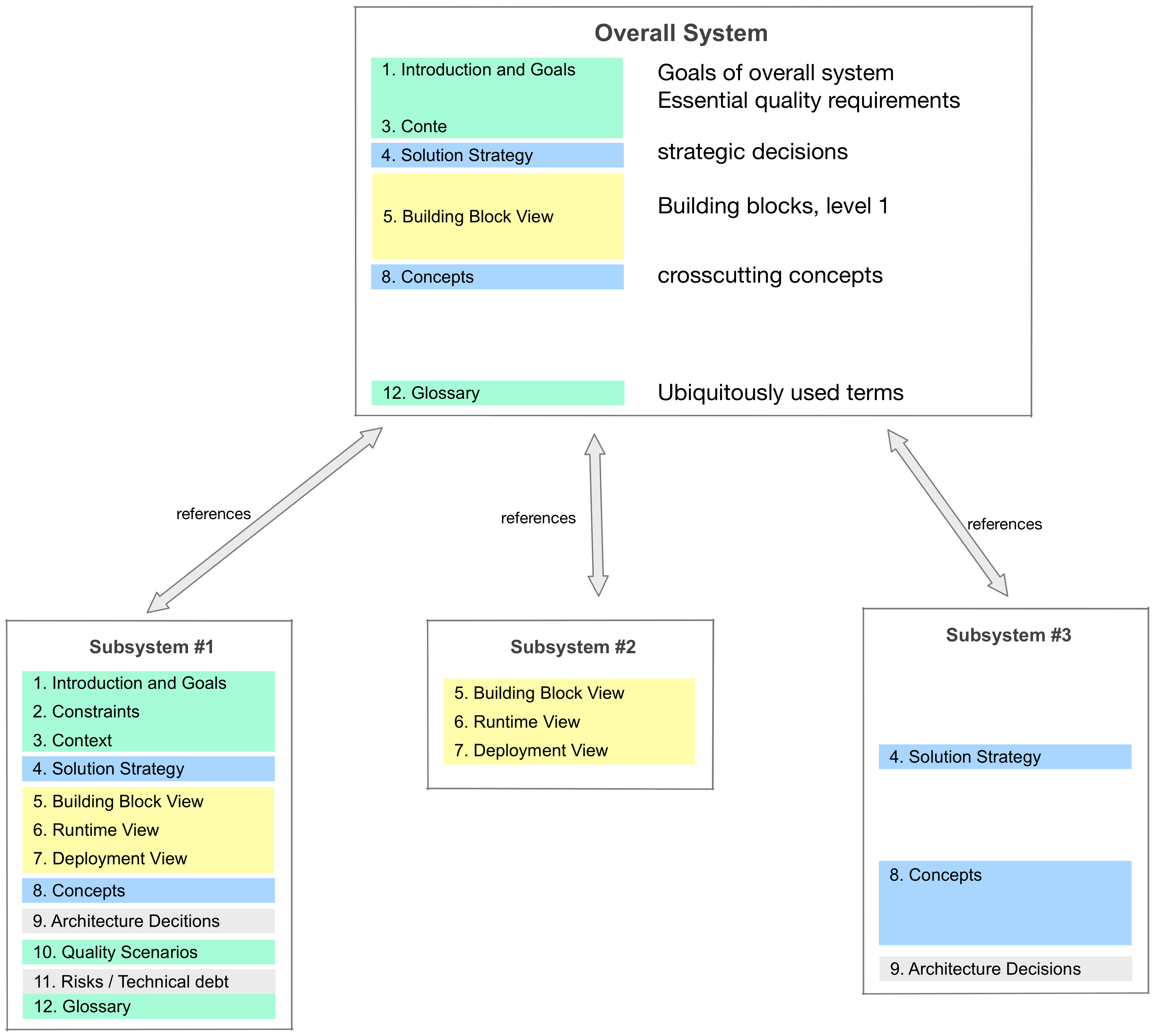
The common part of your architecture documentation will most often contain the global system goals and the overall business context. Eventually it will also contain the solution strategy plus some crosscutting concepts.
Tip V-31: Extract goals, context and concepts
As proposed in the preceeding tip V-30 you should factor out documentation commonalities of the system and create separate documentation for relevant subsystems.
A central document appoint (or documentation hub) for the overall system should at least contain the systems’ goals, its context with the external neighbours and some crosscutting concepts.
Extracting these commonalities saves effort for the subsystems’ documentation.
Tip V-32: Appoint a responsible person responsible for the overall documentation
In case you follow our advice to modularize documentation, you should appoint a responsible person for the extracted (factored-out) part of the documentation - similar to the documentation gardener we proposed in tip III-1.
Tip V-33: Unify the documentation toolchain
<t.b.d.>
Tip V-34: Leave documentation of IT-landscape to enterprise architects
<t.b.d.>
Tip V-35: Structure your overall documentation along organizational boundaries
<t.b.d.>