II. arc42 by Example
Chapter IV contains practical tips for each part of arc42.
The system documented here is a small open source system hosted on Github.
Tip II-1: Improve your arc42 skills by reading additional examples
Luckily there are additional examples for arc42 architecture documentation available from several different authors.
- There’s a Leanpub book, arc42 by Example, that contains several examples.
- Managing bike tours, by Michael Simons: Java based app, productive since several years.
- Chess engine, by Stefan Zörner (in German).
- Customer relationship management (CRM).
- VENOM, a large scale (artificial) e-commerce system. Contains fragments from various real systems, combined into a single legacy tragedy.
If you like YOUR example to be listed here, just drop us an email.
‘nough preamble. Let’s get started…
II.1. Introduction and Goals
HtmlSC supports authors creating digital formats by checking hyperlinks, images and similar resources.
1.1 Requirements Overview
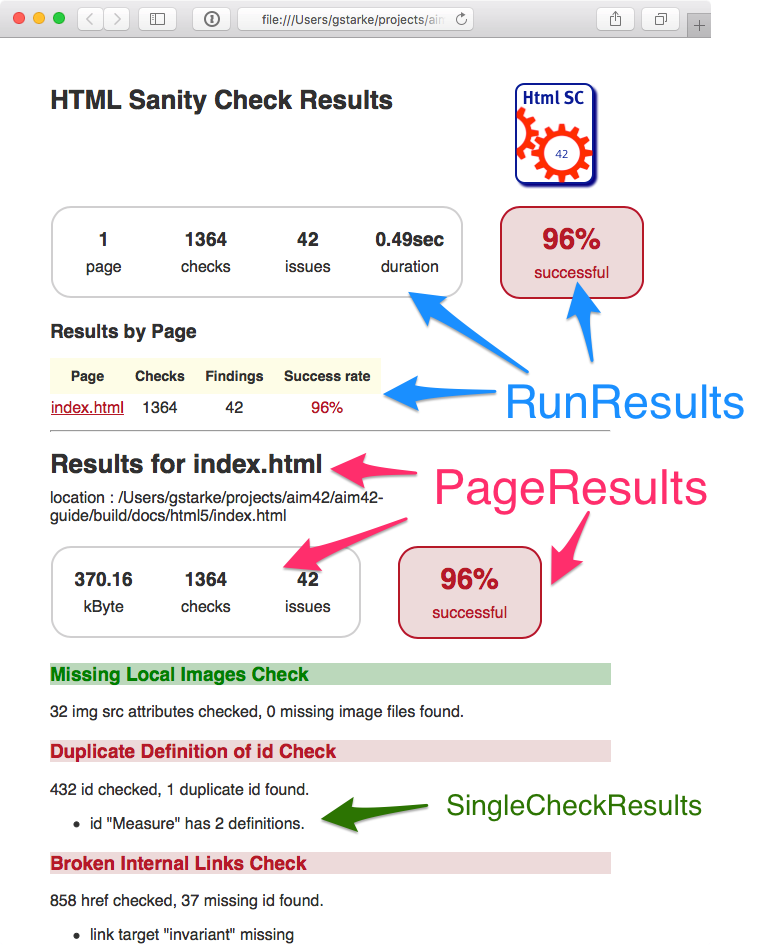
The overall goal of HtmlSC is to create neat and clear reports, showing errors within HTML files. Below you find a sample report.
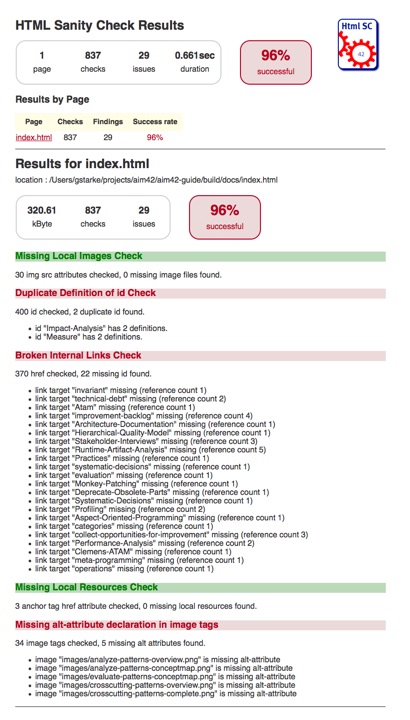
HtmlSanityCheck (HtmlSC) checks HTML for semantic errors, like broken links and missing images.
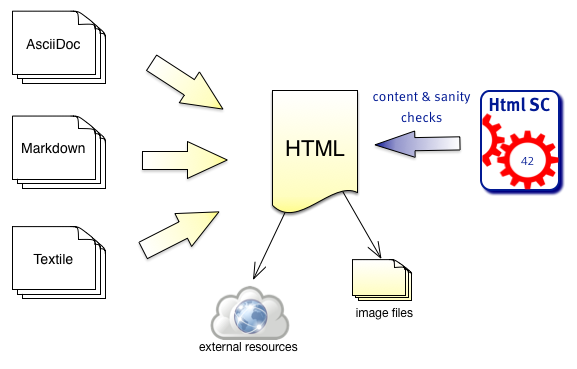
It has been created to support authors who create HTML as output format.
- Authors write in formats like AsciiDoc, Markdown or other formats, which are transformed to HTML by the corresponding generators.
- HtmlSC checks the generated HTML for broken links, missing images and other semantic issues.
- HtmlSC creates a test report, similar to the well-known unit test report.
Basic Usage
- A user configures the location (directory and filename) of an HTML file, and the corresponding images directory.
- HtmlSC performs various checks on the HTML and
- reports its results either on the console or as HTML report.
HtmlSC can run from the command line or as Gradle plugin.
Basic Requirements
| ID | Requirement | Explanation |
|---|---|---|
| G-1 | Read HTML files | HtmlSC shall read one or several (configurable) HTML files as input. |
| G-2 | Gradle Plugin usage | HtmlSC can be run/used as Gradle plugin |
| G-3 | Command line usage | HtmlSC can be run from the command line (shell) |
| G-4 | Open source license | All required dependencies/libraries shall be compatible with a CreativeCommons license. |
| G-5 | Public repositories | HtmlSC shall be available via public repos, like the Gradle plugin portal. |
| G-6 | Multiple input files | Configurable for a set of files, processed in a single run, HtmlSC produces a joint report. |
| G-7 | Suggestions | When HtmlSC detects errors, it shall identify suggestions or alternatives that would repair the error |
Required Functions
HtmlSC shall provide the following checks in HTML files:
| ID | Requirement | Explanation |
|---|---|---|
| C-1 | Missing images | Check all image tags if the referenced image files exist. |
| C-2 | Broken internal links | Check all internal links from anchor-tags (`href=”#XYZ”) if the link targets “XYZ” are defined. |
| C-3 | Missing local resources | Check if referenced files (e.g. css, js, pdf) are missing. |
| C-4 | Duplicate link targets | Check all link targets (… id=”XYZ”) if the id’s (“XYZ”)are unique. |
| C-5 | Malformed links | Check all links for syntactical correctness. |
| C-6 | Unused images | Check for files in image-directories that are not referenced in any HTML files in this run. |
| C-7 | Illegal link targets | Check for malformed or illegal anchors (link targets). |
| C-8 | Broken external links | Check external links for both syntax and availability. |
| C-9 | Broken ImageMaps | Though ImageMaps are a rarely used HTML construct, HtmlSC shall shall identify the most common errors in their usage. |
Reporting and Output Requirements
| ID | Requirement | Explanation |
|---|---|---|
| R-1 | Various output formats | Checking output in plain text and HTML |
| R-2 | Output to stdout | HtmlSC can output results on stdout (the console) |
| R-3 | Configurable output directories | HtmlSC can store results in file in configurable output directories. |
1.2 Quality Goals
| Priority | Quality-Goal | Scenario |
|---|---|---|
| 1 | Correctness | Every broken internal link (cross reference) is found. |
| 1 | Correctness | Every missing local image is found. |
| 2 | Flexibility | Multiple checking algorithms, report formats and clients. At least Gradle, command-line and a graphical client have to be supported. |
| 2 | Safety | Content of the files to be checked is never altered. |
| 2 | Correctness | Correctness of every checker is automatically tested for positive AND negative cases. |
| 2 | Correctness | Every reporting format is tested: Reports must exactly reflect checking results. |
| 3 | Performance | Check of 100kB html file performed under 10 secs (excluding Gradle startup) |
1.3 Stakeholders
Remark: For our simple HtmlSC example we have an extremely limited number of stakeholders, in real-life you will most likely have many more stakeholders!
| Role | Description | Goal, Intention |
|---|---|---|
| Documentation author | writes documentation with HTML output | wants to check that the resulting document contains good links, image references. |
| arc42 user | uses the arc42 template for architecture documentation | wants a small but practical example of how to apply arc42. |
| software developer | wants an example of pragmatic architecture documentation |
Additional information
- Section IV-1 contains additional tips regarding requirements in general.
- In reality, the quality requirements or pretty often neglected and/or remain implicit.
- A more complete overview of quality goals can be given in section-iv-10 on quality scenarios
II.2 Constraints
HtmlSC shall be:
- platform-independent and should run on the major operating systems (Windows(TM), Linux, and Mac-OS(TM))
- implemented in Java or Groovy
- integrated with the Gradle build tool
- runnable from the command line
- developed under a liberal open-source license
Additional information
- Section IV-2 contains additional tips regarding constraints.
II.3 Context
3.1 Business Context
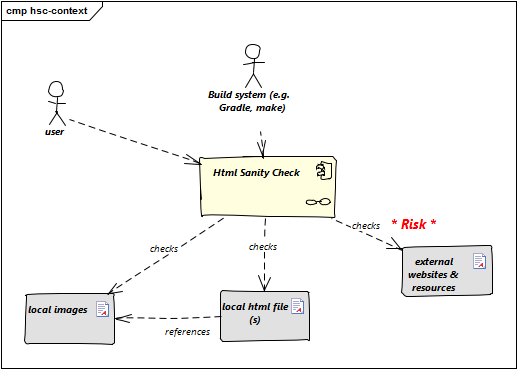
| Neighbor | Description |
|---|---|
| user | documents software with toolchain that generates html. Wants to ensure that links within this HTML are valid. |
| build system | mostly Gradle |
| local HTML files | HtmlSC reads and parses local HTML files and performs sanity checks within those. |
| local image files | HtmlSC checks if linked images exist as (local) files. |
| external web resources | HtmlSC can be configured to optionally check for the existence of external web resources. Due to the nature of web systems, this check might need significant time and might yield invalid results due to network and latency issues. |
3.2 Deployment Context
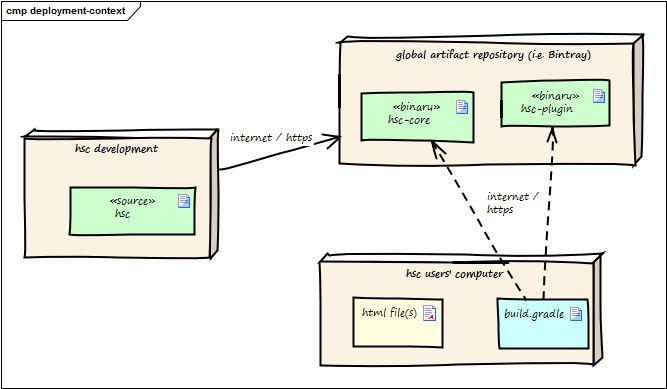
The following diagram shows the participating computers (nodes) with their technical connections plus the major artifacts of HtmlSC, the hsc-plugin-binary.
| Node / Artifact | Description |
|---|---|
| hsc-development | where development of HtmlSC takes place |
| hsc-plugin-binary | compiled and packaged version of HtmlSC including required dependencies. |
| artifact repository | global public cloud repository for binary artifacts, similar to MavenCentral. HtmlSC binaries are uploaded to this server. |
| hsc user computer | where arbitrary documentation takes place with html as output formats. |
| build.gradle | Gradle build script configuring (among other things) the HtmlSC plugin to perform the HTML checking. |
For details see the deployment-view.
Additional information
- Section IV-3 contains additional tips regarding the business and/or technical context.
- Details of the external interfaces shown in the context might be elaborated in the building block view. See section IV-5
II.4 Solution Strategy
- Implement HtmlSC mostly in the Groovy programming language and partially in Java with minimal external dependencies.
- We wrap this implementation into a Gradle plugin, so it can be used within automated builds. Details are given in the Gradle userguide.
- Apply the template-method-pattern
to enable:
- multiple checking algorithms. See the concept for checking algorithms,
- both HTML (file) and text (console) output. See the reporting-concept.
Additional information
- Section IV-4 contains additional tips regarding the solution strategy.
- Keep this part of your documentation very short, move extensive explanations, examples etc. to arc42-section 8 (concepts).
II.5 Building Block View
5.1 Whitebox HtmlSanityChecker
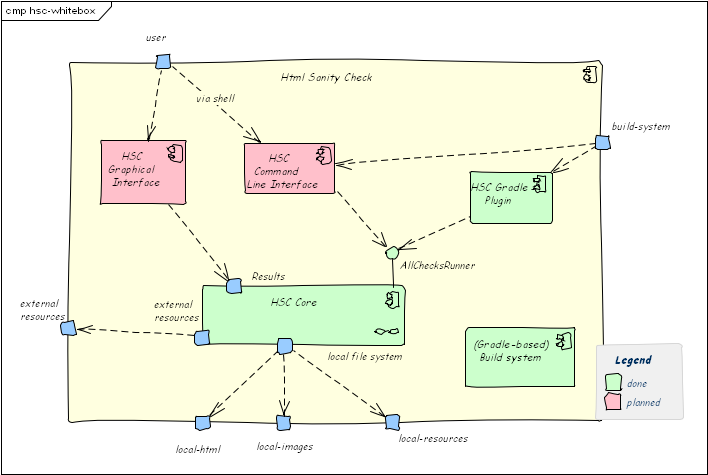
Rationale: We used functional decomposition to separate responsibilities:
-
HSC Coreshall encapsulate checking logic and HTML parsing/processing. -
HSC Gradle Pluginencapsulates all Gradle specific stuff - Various kinds of UI (console, graphical) are handled by separate components.
Contained Blackboxes:
| Building block | Description |
|---|---|
| HSC_Core | HTML parsing and sanity checking, file handling |
| HSC Gradle Plugin | integrates the Gradle build tool with HtmlSC, enabling arbitrary gradle builds to use HtmlSC. |
| HSC Command Line Interface | (not documented) |
| HSC Graphical Interface | (planned, not implemented) |
| (Gradle based) Build System | builds the output artifacts (plugin, jar) |
5.1.1 HSC Core (Blackbox)
Intent/Responsibility: HSC_Core contains the core functions
to perform the various sanity checks. It parses the html file
into a DOM-like in-memory representation, which is then
used to perform the actual checks.
Interfaces:
| Interface (From-To) | Description |
|---|---|
Command Line Interface -> Checker
|
Uses the AllChecksRunner class. |
Gradle Plugin -> Checker
|
Exposes HtmlSC via a standard Gradle plugin, as described in the Gradle user guide. |
Details are described in the HSC-Core Whitebox.
5.2 Building Blocks - Level 2
5.2.1 HSC-Core (Whitebox)
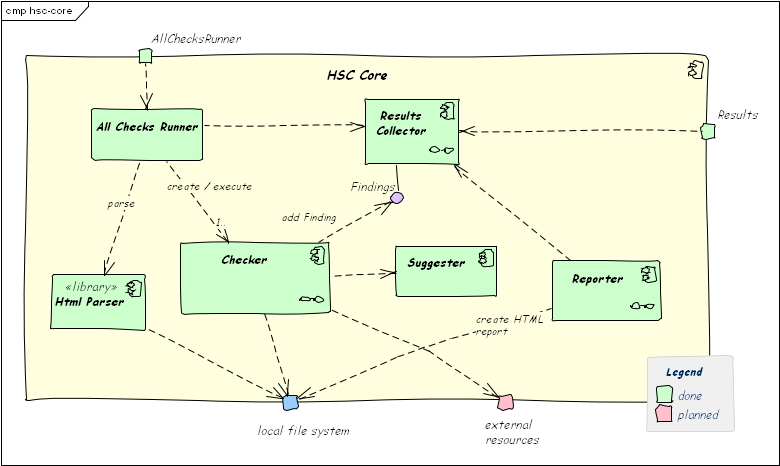
Rationale: This structures follows a strictly functional decomposition:
- parsing and handling HTML input,
- checking,
- creating suggestions and
- collecting checking results
Contained Blackboxes:
| Building block | Description |
|---|---|
Checker |
Abstract class, used in form of the template-pattern. Shall be subclassed for all checking algorithms. |
AllChecksRunner |
Facade to the different Checker instances. Provides a (parameter-driven) command-line interface. |
ResultsCollector |
Collects all checking results. |
Reporter |
Reports checking results to either console or file. |
HtmlParser |
Encapsulates HTML parsing, provides methods to search within the (parsed) DOM tree. We use the open source JSoup, see the corresponding design decision. |
Suggester |
In case of checking issues, suggests alternatives (did you mean xyz?). Suggestions are included in results. |
Source Files:
org.aim42.htmlsanitycheck.AllChecksRunnerorg.aim42.htmlsanitycheck.HtmlSanityCheckGradlePlugin
5.2.1.1 Checker and <xyz>Checker Subclasses
The abstract Checker provides a uniform interface (public void check())
to different checking algorithms. It is based upon the
concept of extensible checking algorithms.
5.3 Building Blocks - Level 3
5.3.1 ResultsCollector (Whitebox)
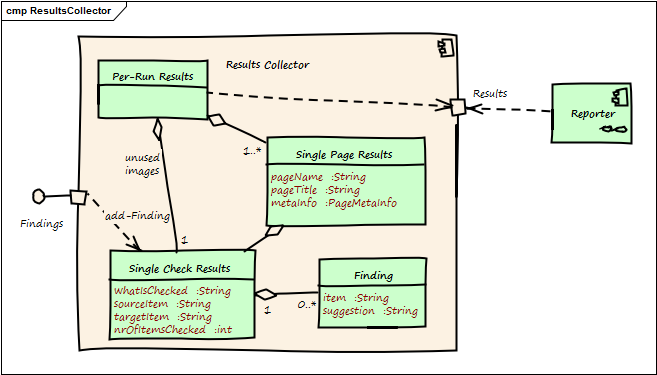
Rationale: This structures follows the hierarchy of checks, managing results for:
- a number of pages/documents
- a single page, each containing many
- single checks within a page
Contained Blackboxes:
| Building block | Description |
|---|---|
Per-Run Results |
Results for potentially many HTML pages/documents. |
SinglePageResults |
Results for a single HTML page |
SingleCheckResults |
Results for a single type of check (e.g. missing-images check or broken-internal-link check) |
Finding |
A single finding, (e.g. “image ‘logo.png’ missing”). Can contain suggestions. |
5.3.2 Interface Results
The Result interface is used by all clients
(especially Reporter subclasses, graphical and command-line
clients) to access checking results. It consists of three distinct
methods for:
- overall
RunResults, - single-page results (
PageResults) and - single-check results (
SingleCheckResults).
See the interface definitions below - taken from the Groovy source code:
package org.aim42.htmlsanitycheck.collect

public interface RunResults {
    // returns results for all pages which have been checked
    public ArrayList<SinglePageResults> getResultsForAllPages()

    // how many pages were checked in this run?
    public int nrOfPagesChecked()

    // how many checks were performed in all?
    public int nrOfChecksPerformedOnAllPages()

    // how many findings (errors and issues) were found in all?
    public int nrOfFindingsOnAllPages()

    // how long took checking (in milliseconds)?
    public Long checkingTookHowManyMillis()
}
package org.aim42.htmlsanitycheck.collect

interface CheckResults {
    // description of what is checked
    // (e.g. "Missing Images Checker" or "Broken Cross-References Checker"
    public String description()

    // all findings (aka problems) found during this check
    public  ArrayList<Finding> getFindings()
}
5.3.3 Suggester (Whitebox)
For a give input (target), Suggester searches within a set of possible values (options)
to find the n most similar values. For example:
- Target = “McDown”
- Options = {“McUp”, “McDon”, “Mickey”}
- The resulting suggestion would be “McDon”, because it has the greatest similarity to the target “McDown”.
Suggester is used in the following cases:
- Broken image links: Compares the name of the missing image with all available image file names to find the closest match.
- Missing cross references (broken internal links): Compares the broken link with all available link targets (anchors).
Additional information
- Section IV-4 contains additional tips regarding the building block view.
II.6 Runtime View
II.6.1 Execute all checks
A typical scenario within HtmlSC is the execution of all available checking algorithms on a set of HTML pages.
Precondition: HtmlSC has been called from a Gradle build and is properly configured.
Scenario:
- User or build-server calls
gradle htmlSanityCheck - Gradle executes build-target htmlSanityCheck via the HtmlSC plugin
- The plugin executes method
AllChecksRunner.performAllCheckswith parameterCollection<File> filesToCheckandFile resultsDir -
performAllChecks:- creates
PerRunResultsinstance - creates a list of
Checkerinstances, one for every available checking algorithm
- creates
- iterate over all these
Checkerinstances. Every instance:- executes its own checks
- adds one instance of
SingleCheckResultcontaining its own results.
-
reportCheckingResultsAsHTMLcreates the final report.
II.6.2 Report checking results
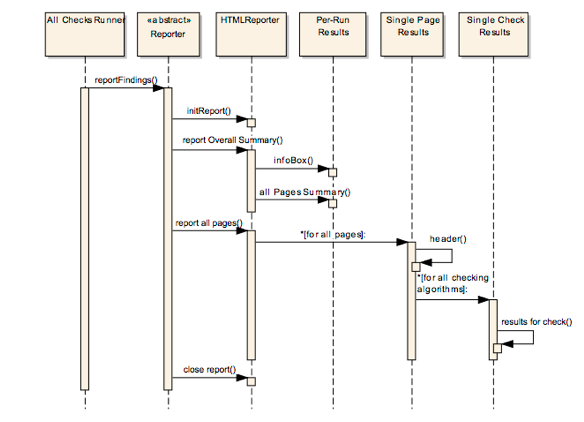
Reporting is done in the natural hierarchy of results (see the corresponding concept in section 8.2.1 for an example report).
- per “run” (
PerRunResults): date/time of this run, files checked, some configuration info, summary of results - per “page” (
SinglePageResults): - create page result header with summary of page name and results
- for each check performed on this page create a section with
SingleCheckResults - per “single check on this page” report the results for this particular check
Additional information
- Section IV-6 contains additional tips regarding the runtime view.
- You often use runtime scenarios only to find or verify building blocks, not that much for documentation.
II.7 Deployment view
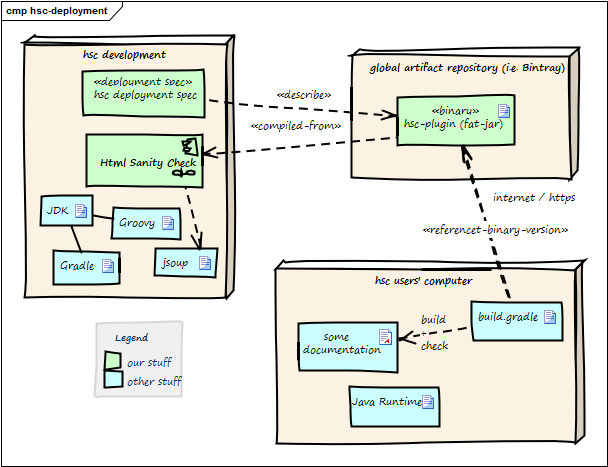
| Node / Artifact | Description |
|---|---|
| hsc plugin binary | Compiled version of HtmlSC, including required dependencies. |
| hsc-development | Development environment |
| artifact repository | Global public cloud repository for binary artifacts, similar to mavenCentral HtmlSC binaries are uploaded to this server. |
| hsc user computer | Where documentation is created and compiled to HTML. |
| build.gradle | Gradle build script configuring (among other things) the HtmlSC plugin. |
The three nodes (computers) shown in the diagram above are connected via Internet.
Prerequisites:
- HtmlSC developers need a Java development kit, Groovy, Gradle plus the JSoup HTML parser.
- HtmlSC users need a Java runtime (> 1.6) plus a build file named
build.gradle. See below for a complete example.
build.gradlebuildscript {
repositories {
maven {
url "https://plugins.gradle.org/m2/"
}
jcenter()
}
dependencies {
classpath (group: 'gradle.plugin.org.aim42',
name: 'htmlSanityCheck', version: '0.9.3')
classpath (group: 'org.asciidoctor',
name: 'asciidoctor-gradle-plugin', version: '1.5.2')
}
}
// location of AsciiDoc files
def asciidocSrcPath = "$projectDir/src/asciidoc"
// location of images used in AsciiDoc documentation
def srcImagesPath = "$asciidocSrcPath/images"
// path for asciidoc-gradle-convert
def htmlOutputPath = "$buildDir/asciidoc/html5"
// images used by generated html
def targetImagesPath = htmlOutputPath + "/images"
// where HTMLSanityCheck checking results ares stored
def checkingResultsPath = "$buildDir/report/htmlchecks"
apply plugin: 'org.asciidoctor.convert'
asciidoctor {
sourceDir = new File( asciidocSrcPath )
options backends: ['html5'],
doctype: 'book', icons: 'font',
sectlink: true, sectanchors: true
resources {
from( srcImagesPath )
into targetImagesPath
}
}
apply plugin: 'org.aim42.htmlSanityCheck'
htmlSanityCheck {
dependsOn asciidoctor // ensure asciidoctor->html runs first
sourceDir = new File( htmlOutputPath )
// files to check, in Set-notation
sourceDocuments = [ "many-errors.html", "no-errors.html"]
// where to put results of sanityChecks...
checkingResultsDir = new File( checkingResultsPath )
}
Additional information
- Section IV-7 contains additional tips regarding the deployment view.
- Sometimes it’s useful to describe high-level deployment or infrastructure in the technical context in arc42 section 3.2, corresponding tips are given in this book
II.8 Technical and Crosscutting Concepts
8.1 Domain Model
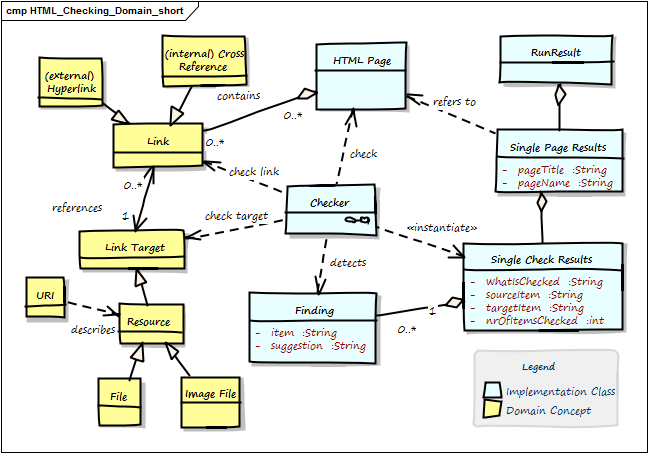
| Term | Description |
|---|---|
| Anchor | Html element to create ->Links. Contains link-target in the form <a href="link-target">
|
| Cross Reference | Link from one part of the document to another part within the same document. Special form of ->Internal Link, with a ->Link Target in the same document. |
| External Link | Link to another page or resource at another domain. |
| Finding | Description of a problem found by one ->Checker within the ->Html Page. |
| Html Element | HTML pages (documents) are made up by HTML elements .e.g., <a href=”link target”>, <img src=”image.png”>` and others. See the definition from the W3-Consortium
|
| Html Page | A single chunk of HTML, mostly regarded as a single file. Shall comply to standard HTML syntax. Minimal requirement: Our HTML parser can successfully parse this page. Contains ->Html Elements. Synonym: Html Document. |
| id | Identifier for a specific part of a document, e.g. <h2 id="#someHeader">.Often used to describe ->Link Targets. |
| Internal Link | Link to another section of the same page or to another page of the same domain. Also called ->Cross Reference or Local Link. |
| Link | Any a reference in the ->Html Page that lets you display or activate another part of this document (->Internal Link) or another document, image or resource (can be either ->Internal (local) or ->External Link). Every link leads from the Link Source to the Link Target. |
| Link Target | Target of any ->Link, e.g. heading or any other a part of ->Html Documents, any internal or external resource (identified by URI). Expressed by ->id. |
| Local Resource | local file, either other Html files or other types (e.g. pdf, docx) |
| Run Result | The overall results of checking a number of pages (at least one page). |
| Single Page Result | A collection of all checks of a single ->Html Page. |
| URI | Universal Resource Identifier. Defined in RFC-2396, the ultimate source of truth concerning link syntax and semantic. |
8.2 Structure of HTML Links
Remark: For many web developers or HTML experts the following information on URI syntax might be completely evident. As we wrote this book also for different kind of people, we included this information anyhow.
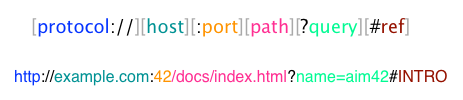
HtmlSC performs various checks on HTML links (hyperlinks), which usually follow the URI syntax specified by RFC-2396. URIs are generally used to link to arbitrary resources (documents, files or parts within documents).
Their general structure is depicted in the following figure - you also find a unit test below.
@Test
public void testGenericURISyntax() {
    // based upon an example from the Oracle(tm) Java tutorial:
    // http://docs.oracle.com/javase/tutorial/networking/urls/urlInfo.html
    def aURL = new URL(
        "http://example.com:42/docs/tutorial/index.html?name=aim42#INTRO");
    aURL.with {
        assert getProtocol() == "http"
        assert getAuthority() == "example.com:42"
        assert getHost() == "example.com"
        assert getPort() == 42
        assert getPath() == "/docs/tutorial/index.html"
        assert getQuery() == "name=aim42"
        assert getRef() == "INTRO"
    }
}
8.3 Multiple Checking algorithms
HtmlSC uses the template-method-pattern to enable flexible checking algorithms:
“The Template Method defines a skeleton of an algorithm in an operation, and defers some steps to subclasses”.
We achieve that by defining the skeleton of the checking algorithm in one operation (performCheck), deferring the specific checking algorithm steps to subclasses. The invariant steps are implemented in the abstract base class, while the variant checking algorithms have to be provided by the subclasses.
/**
  * Prerequisite: pageToCheck has been successfully parsed,
  * prior to constructing this Checker instance.
**/
public CheckingResultsCollector performCheck() {
    // assert prerequisite
    assert pageToCheck != null
    initResults()
    return check() // subclass executes the actual checking algorithm
}
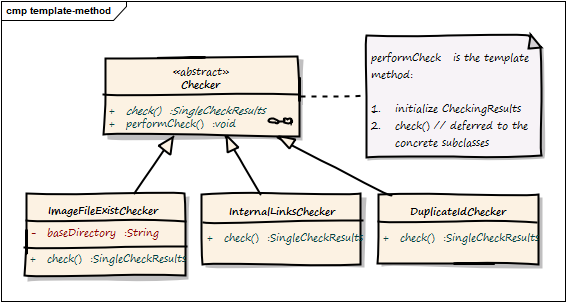
| Component | Description |
|---|---|
| Checker |
abstract base class, containing the template method check() plus the public method performCheck()
|
Image File ExistC Checker |
checks if referenced local image files exist |
Internal Links Checker |
checks if cross references (links referenced within the page) exist |
DuplicateIdChecker |
checks if any id has multiple definitions |
8.4 Reporting
HtmlSC supports the following output (== reporting) formats and destinations:
- formats (HTML and text) and
- destinations (file and console)
The reporting subsystem uses the template method pattern to allow different output formats (e.g. Console and HTML). The overall structure of reports is always the same.
The (generic and abstract) reporting is implemented in the abstract Reporter class as follows:
/**
 * main entry point for reporting - to be called when a report is requested
 * Uses template-method to delegate concrete implementations to subclasses
*/
    public void reportFindings() {
        initReport()            // (1)
        reportOverallSummary()  // (2)
        reportAllPages()        // (3)
        closeReport()           // (4)
    }

    private void reportAllPages() {
        pageResults.each { pageResult ->
            reportPageSummary( pageResult )                    // (5)
            pageResult.singleCheckResults.each { resultForOneCheck ->
               reportSingleCheckSummary( resultForOneCheck )  // (6)
               reportSingleCheckDetails( resultForOneCheck )  // (7)
               reportPageFooter()
        }
    }
- initialize the report, e.g. create and open the file, copy css-, javascript and image files.
- create the overall summary, with the overall success percentage and a list of all checked pages with their success rate.
- iterate over all pages
- write report footer - in HTML report also create back-to-top-link
- for a single page, report the number of checks and problems plus the success rate
- for every singleCheck on that page, report a summary and
- all detailed findings for a singleCheck.
- for every checked page, create a footer, page break or similar to graphically distinguish pages between each other.
The sample report below illustrates this.
Additional information
- Section IV-8 contains additional tips regarding crosscutting concepts.
II.9 Design Decisions
9.1 Checking of external links postponed
In the current version of HtmlSC we won’t check external links. These checks have been postponed to later versions.
9.2 HTML Parsing with jsoup
To check HTML we parse it into an internal (DOM-like) representation. For this task we use Jsoup, an open-source parser without external dependencies.
To quote from the their website:
[quote] jsoup is a Java library for working with real-world HTML. It provides a very convenient API for extracting and manipulating data, using the best of DOM, CSS, and jQuery-like methods.
Goals of this decision: Check HTML programmatically by using an existing API that provides access and finder methods to the DOM-tree of the file(s) to be checked.
Decision Criteria:
- few dependencies, so the HtmlSC binary stays as small as possible.
- accessor and finder methods to find images, links and link-targets within the DOM tree.
Alternatives:
- HTTPUnit: a testing framework for web applications and -sites. Its main focus is web testing and it suffers from a large number of dependencies.
- jsoup: a plain HTML parser without any dependencies (!) and a rich API to access all HTML elements in DOM-like syntax.
Find details about usage of this parser in the HTML encapsulation.
9.3 String Similarity Checking using Jaro-Winkler-Distance
The small java string similarity library
(by Ralph Allen Rice) contains implementations of several similarity-calculation algorithms.
As it is not available as public binary, we use the sources instead, primarily:
net.ricecode.similarity.JaroWinklerStrategy.
Additional information
- Section IV-9 contains additional tips regarding decisions.
II.10 Quality Scenarios
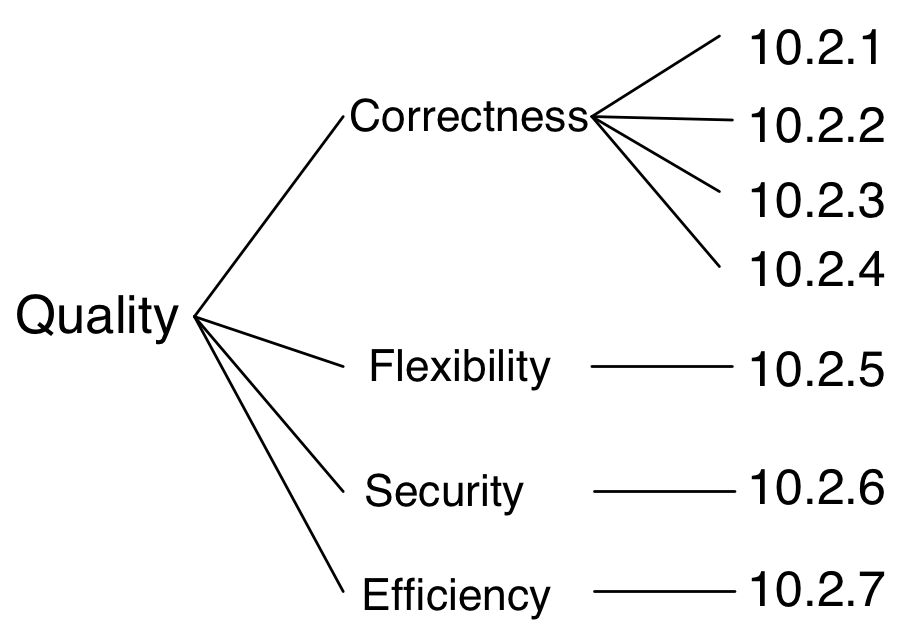
Remark: For our small example, such a quality tree is overly extensive… whereas in real-live systems we’ve seen quality trees with more than 100 scenarios.
10.1 Quality tree
10.2 Quality Scenarios
| ID | Description |
|---|---|
| 10.2.1 | Every broken internal link will be found. |
| 10.2.2 | Every missing (local) image will be found. |
| 10.2.3 | Correctness of all checks is ensured by automated positive and negative tests. |
| 10.2.4 | The results-report must contain all results (aka findings) |
| 10.2.5 | HtmlSC shall be extensible with new checking algorithms and new usage scenarios (i.e. from different build systems) |
| 10.2.6 | HtmlSC leaves its source files completely intact: Content of files to be checked will never be modified. |
| 10.2.7 | HtmlSC performs all checks on a 100kByte HTML file in less than 10 seconds. |
Additional information
- The most important quality goals (expressed as scenarios) have been summarized in the introductory section IV-1.2.
- Section IV-10 contains additional tips regarding quality scenarios.
II.11 Risks and technical debt
Remark: In our small example we don’t see any real risks for architecture and implementation. Therefore the risks shown below are a bit artificial…
11.1 Technical risks
| Risk | Description |
|---|---|
| Bottleneck with access rights on public repositories | Currently only one single developer has access rights to deploy new versions of HtmlSC on public servers like Bintray or Gradle plugin portal. |
| High effort required for new versions of AsciiDoc | Upgrading AsciiDoc from v-0.x to v-1.x required significant effort for HtmlSC due to several breaking changes in Asciidoc. Such high effort might be needed again for future upgrades of the AsciiDoc API |
11.2 Business or domain risks
| Risk | Description |
|---|---|
| System might become obsolete | In case AsciiDoc or Markdown processors implement HTML checking natively, HtmlSC might become obsolete. |
Additional information
- Section IV-11 contains additional tips regarding risks.
- Help your management by informing them about technical risks - and options for their mitigation.
II.12 Glossary
In the case of our small example, the terms given here should be good friends to most developers. You find a more interesting version of the glossary in section II-8.1.
| Term | Definition |
| Link | A reference within an →HTMLPage. Points to →LinkTarget |
| Cross Reference | Link from one part of a document to another part within the same document. |
| External Hyperlink | Link to another HTML-page or to a resource within another domain or site. |
| Run Result | Combined checking results for multiple pages (→HTMLPages) |
| SinglePageResults | Combined results of all Checker instances for a single HTML page. |
Additional information
- Section IV-12 contains additional tips regarding the glossary.
- Many terms in the glossary correspond to parts of the “Ubiquitous Language” from Eric Evans’ Domain Driven Design