Pivotal Tracker
Pivotal Tracker (Tracker) is an agile work tracking tool. Tracker takes the science of Scrum, the flexibility of Kanban and formalises many of the vague and open-ended agile principles into a concrete and straightforward system. Put simply, Tracker gives teams a digital wall for storing work, tracking the rate of delivery and using said rate to forward project new work.
Compared to other tools
Tracker, the tool, has about an 85-95% intersection with the #agileforteams point of view. This means that there is little waste and distraction when using a tool such as this to support our process. Here are a few reasons why other tools don’t carry as great a net gain on comparison:
- Physical card walls are great and many would argue it’s all a team needs. I also agree they have their advantages over software/digital walls especially from a human-centric point of view. The problem is that teams are almost always distributed. Even a team who has the luxury of sitting together on the same office floor in the same bullpen will have members working from home sometimes and others who should be included in the “team” participating from elsewhere. It’s simply just not practical to enforce the limitations a physical wall holds over your team on them any more. You get ones best work by allowing them to work how they want to work. If that’s at home on the couch or down in the cafe then (provided your boss allows it) let them be. Physical walls don’t cater for this well and the workarounds often hinder effective parallelisation of work.
- Trello is more lightweight than Tracker and has some handy features that Tracker does not. Trello however does not give first-class support to tracking delivery capacity and forward predicting dates with it. I understand there is a Chrome extension but the UX isn’t great.
- VSTS (sometimes called TFS) is a tool from Microsoft which includes build/CI and deployment features in the same place. This is great if you use the MS stack and therefore have free licences and cheap tooling is more important than the right tooling. But as a work tracking tool, it’s basic design hasn’t changed in a decade and many of it’s interfaces still reflect the MS Excel/Access interfaces it was originally born with. Yes it has some first class support for tracking delivery capacity but the rest of the experience is mediocre largely I’d say because it’s a heavily integrated tool trying to do way too many things.
- JIRA is similar to VSTS in many regards - it’s trying to be all things to all people. This is a curse: as energy is split across many outcomes, the time and love for each is diminished. JIRA was birthed as a issue tracking tool and even today, many of the first-class agile features are still backed by “issues” which seem to surface every now and then creating (yeah, you guessed it) more issues for your team who are just trying to track their work. Much of the capacity tracking and estimate projection is available in JIRA through reports but it’s a little indirect. Because JIRA doesn’t want to take on one particular point of view, it has a complex workflow engine which is almost infinitely customisable. Now if you know anything about enterprise systems, then you will know that as you approach the far end of the flexibility continuum, you tend to find said flexibility injecting unnecessary complexity throughout the rest of the application. This is certainly the case with JIRA. While JIRA appears to be very flexible in many ways, in others it’s not. For example, last time I checked, you still had to “plan sprints”. This is a clunky process and one I highly discourage as it inflicts substantial damage on team morale.
Thanks to it’s customisation, JIRA is probably the tool which you could bend to the #agileforteams point of view most closely. The problem is in the bending, and the UX - it would take a lot of work and there would still be many parts of the tool you don’t want, that you can’t turn off, that would get in your way. Tracker was designed to do one thing really well - track work, and surface the rate of delivery using an experience optimised for just getting on with delivering. None of the above tools can boast this.
Finally, do not underestimate the power of small little things in your tooling that frustrate your team mates. Those poor UX elements, or the “extra hoops” or clicks a user needs to make just to create a Feature are going to result in disengagement with the tool. I’ve seen it over and over. What good is a tool if your team doesn’t participate? If the tool supports the process then the delta between your process’ point of view and your tool’s point of view represents how likely your process is to fail. I’ve found Tracker to be simple enough that team members are happy to engage with it and often remark what a joy it is to use. When was the last time you heard a project management tool spoken about like that?
The Killer Feature
Tracker knows how much you can deliver in a given Iteration and so rather than telling you that number, it tries to answer you’re next question: So when can I have Feature D or Feature K?
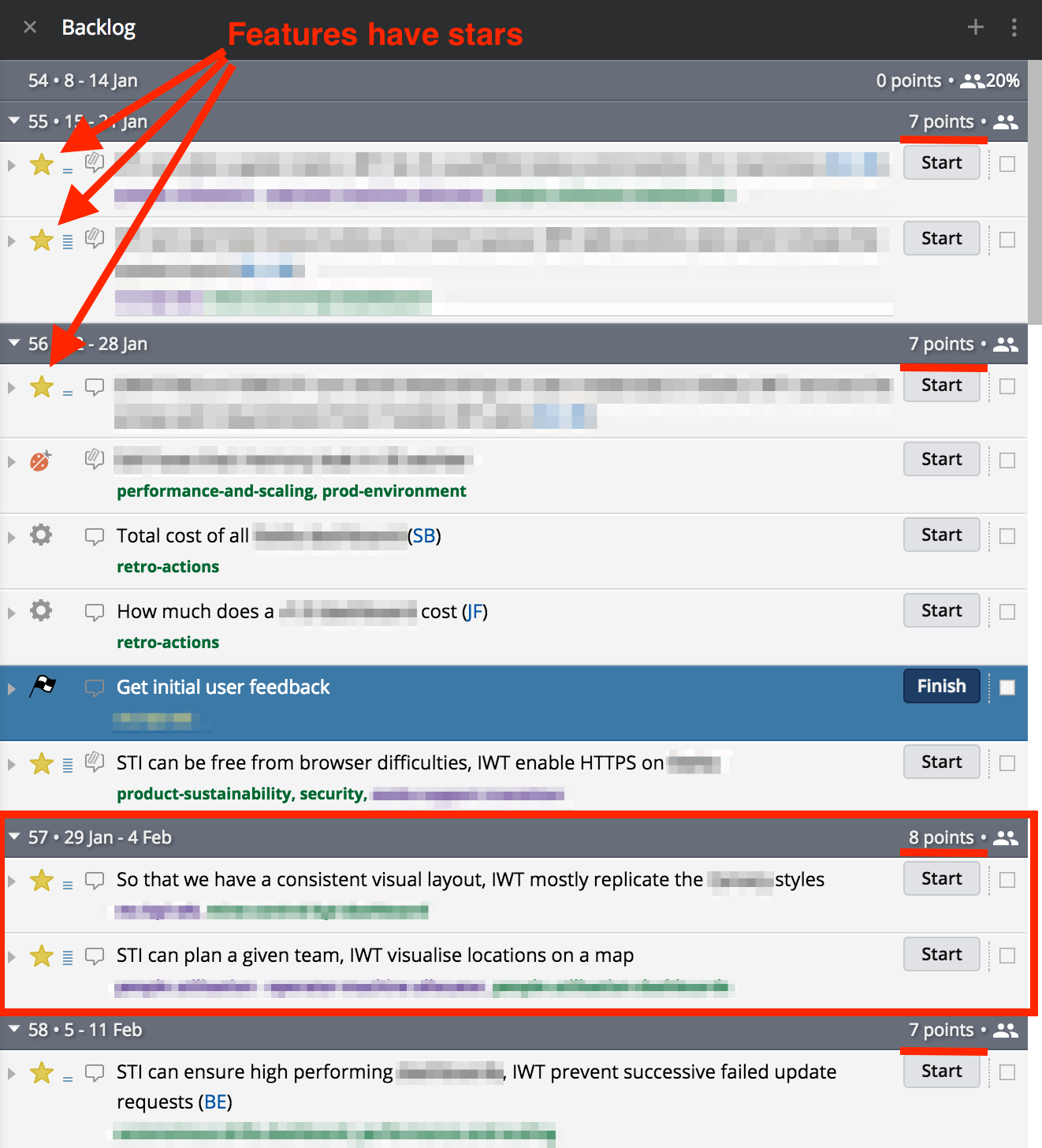
Those Features (yellow star) have a cost to them and that cost is expressed in the same terms as the computed capacity of your team. I’ll explain later how Tracker calculates this, but for now assume Tracker knows it. It’s 7 points in this example.
Now that tracker knows that in each iteration, your team can deliver 7 points worth of work, answering the question “When can I have x?” becomes trivial. Tracker simply breaks up the backlog into iterations and their associated weeks and groups the Features into the iteration they’re likely to be delivered by based on that capacity.
This is not a special view for managers or team leads - everyone sees the backlog like this every day and so everyone knows what’s happening next and when it’s likely to get delivered.
Questions and Actions
- When was the last time you used an enterprise tool that was fun or a “delight to use” every day? Write the number of elapsed months and the names down or reply to this tweet and tell me about them.
- Watch this short Intro to Tracker video and take a glance over the basic features.