Using Ollama to Run Local LLMs
Ollama is a program and framework written in Go that allows you to download, run models on the command line, and call using a REST style interface. You need to download the Ollama executable for your operating system at https://ollama.com.
Similarly to our use of a third party for accessing the Anthropic Claude models, here we will not write a wrapper library. The example code for this chapter is in the directory source-code/Ollama_swift_examples.
We use the library in the GitHub repository https://github.com/mattt/ollama-swift.
Running the Ollama Service
Assuming you have Ollama installed, download the following model:
1 ollama pull qwen3:1.7b
When the model is downloaded it is also cached for future use on your laptop.
The OllamaService Actor Library
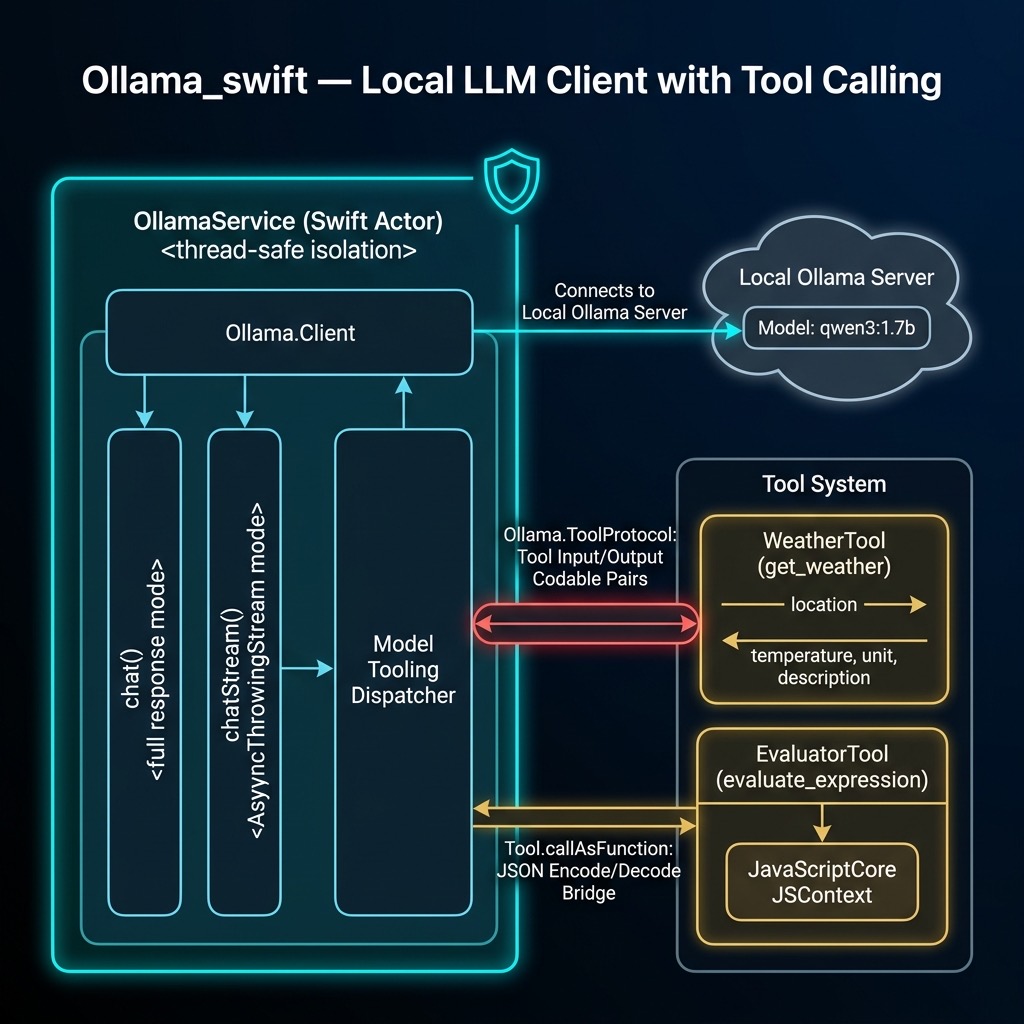
The library wraps the raw Ollama.Client in a Swift actor to provide safe concurrent access. It supports basic chat, streaming chat, and optional tool calling:
 1 import Ollama
 2 import Foundation
 3 import JavaScriptCore
 4
 5 /// A service to interact with Ollama models using modern Swift concurrency.
 6 public actor OllamaService {
 7     private let client: Ollama.Client
 8     private let model: Model.ID
 9
10     @MainActor
11     public init(model: Model.ID = "qwen3:1.7b",
12                 client: Ollama.Client? = nil) {
13         self.model = model
14         self.client = client ?? .default
15     }
16
17     /// Performs a chat request with optional tools.
18     public func chat(
19         messages: [Ollama.Chat.Message],
20         tools: [any Ollama.ToolProtocol] = []
21     ) async throws -> Ollama.Client.ChatResponse {
22         return try await client.chat(
23             model: model, messages: messages, tools: tools
24         )
25     }
26
27     /// Performs a streaming chat request with optional tools.
28     public func chatStream(
29         messages: [Ollama.Chat.Message],
30         tools: [any Ollama.ToolProtocol] = []
31     ) -> AsyncThrowingStream<Ollama.Client.ChatResponse,
32                              any Error> {
33         AsyncThrowingStream { continuation in
34             Task {
35                 do {
36                     for try await chunk in try await
37                       client.chatStream(
38                         model: model,
39                         messages: messages,
40                         tools: tools) {
41                         continuation.yield(chunk)
42                     }
43                     continuation.finish()
44                 } catch {
45                     continuation.finish(throwing: error)
46                 }
47             }
48         }
49     }
50 }
Tool Definitions
One of the most powerful features of modern LLMs is tool calling — the model can decide to invoke external functions to answer a question. The ollama-swift library provides a Tool type that defines the function schema and implementation. Here we define two tools: a weather lookup stub and a math expression evaluator.
The weather tool uses Codable structs for its input and output, and returns a hardcoded stub response. In a real application you would call a weather API:
 1 public struct WeatherInput: Codable {
 2     public let location: String
 3 }
 4
 5 public struct WeatherOutput: Codable {
 6     public let temperature: Double
 7     public let unit: String
 8     public let description: String
 9 }
10
11 public let weatherTool =
12     Ollama.Tool<WeatherInput, WeatherOutput>(
13     name: "get_weather",
14     description: "Get the current weather for a location",
15     parameters: [
16         "location": [
17             "type": "string",
18             "description":
19                 "The city and state, e.g. San Francisco, CA"
20         ]
21     ],
22     required: ["location"]
23 ) { input in
24     // Stub implementation
25     return WeatherOutput(
26         temperature: 72,
27         unit: "Fahrenheit",
28         description: "Sunny")
29 }
The evaluator tool uses JavaScriptCore to safely evaluate math expressions. We use JSContext rather than NSExpression because NSExpression has known security risks when used with untrusted input:
 1 public struct EvaluatorInput: Codable {
 2     public let expression: String
 3 }
 4
 5 public struct EvaluatorOutput: Codable {
 6     public let result: String
 7 }
 8
 9 public let evaluatorTool =
10     Ollama.Tool<EvaluatorInput, EvaluatorOutput>(
11     name: "evaluate_expression",
12     description: "Evaluate a mathematical expression " +
13                  "(arithmetic and basic algebra)",
14     parameters: [
15         "expression": [
16             "type": "string",
17             "description":
18                 "The expression to evaluate, e.g. '2 + 2'"
19         ]
20     ],
21     required: ["expression"]
22 ) { input in
23     let context = JSContext()!
24     if let value = context.evaluateScript(input.expression),
25        !value.isUndefined, !value.isNull {
26         return EvaluatorOutput(result: value.toString())
27     } else {
28         return EvaluatorOutput(
29             result: "Error: Could not evaluate expression")
30     }
31 }
We also add an extension on Ollama.Tool that allows calling a tool directly with the arguments dictionary returned by the model:
 1 extension Ollama.Tool {
 2     public func callAsFunction(
 3         _ arguments: [String: Ollama.Value]
 4     ) async throws -> Output {
 5         let data = try JSONEncoder().encode(
 6             Ollama.Value.object(arguments))
 7         let input = try JSONDecoder().decode(
 8             Input.self, from: data)
 9         return try await self(input)
10     }
11 }
Example Tests
The tests use Swift’s modern Testing framework rather than XCTest. Here is the test/example code we will run:
  1 import Testing
  2 import Ollama
  3 import Foundation
  4 @testable import Ollama_swift_examples
  5
  6 @Suite("Ollama Service Tests")
  7 @MainActor
  8 struct OllamaServiceTests {
  9     let service = OllamaService(model: "qwen3:1.7b")
 10
 11     @Test("Basic Chat Functionality")
 12     func testBasicChat() async throws {
 13         let messages: [Ollama.Chat.Message] = [
 14             .system("You are a helpful assistant."),
 15             .user("What is the capital of Germany?")
 16         ]
 17
 18         let response = try await service.chat(
 19             messages: messages)
 20         #expect(!response.message.content.isEmpty)
 21         print("Response: \(response.message.content)")
 22     }
 23
 24     @Test("Weather Tool Functionality")
 25     func testWeatherTool() async throws {
 26         var messages: [Ollama.Chat.Message] = [
 27             .system("You are a helpful assistant that " +
 28                     "can check the weather."),
 29             .user("What is the weather in San Francisco?")
 30         ]
 31
 32         let response = try await service.chat(
 33             messages: messages, tools: [weatherTool])
 34
 35         if let toolCalls = response.message.toolCalls {
 36             for toolCall in toolCalls {
 37                 #expect(
 38                     toolCall.function.name == "get_weather")
 39                 let result = try await weatherTool(
 40                     toolCall.function.arguments)
 41                 let resultString = String(
 42                     data: try JSONEncoder().encode(result),
 43                     encoding: .utf8)!
 44                 messages.append(response.message)
 45                 messages.append(.tool(resultString))
 46
 47                 let finalResponse = try await service.chat(
 48                     messages: messages)
 49                 #expect(
 50                     !finalResponse.message.content.isEmpty)
 51                 print("Weather Final Response: " +
 52                       "\(finalResponse.message.content)")
 53             }
 54         } else {
 55             print("Model did not call the weather tool.")
 56         }
 57     }
 58
 59     @Test("Evaluator Tool Functionality")
 60     func testEvaluatorTool() async throws {
 61         var messages: [Ollama.Chat.Message] = [
 62             .system("You are a helpful assistant that " +
 63                     "can evaluate math expressions."),
 64             .user("What is (15 * 3) + 7?")
 65         ]
 66
 67         let response = try await service.chat(
 68             messages: messages, tools: [evaluatorTool])
 69
 70         if let toolCalls = response.message.toolCalls {
 71             for toolCall in toolCalls {
 72                 #expect(toolCall.function.name ==
 73                         "evaluate_expression")
 74                 let result = try await evaluatorTool(
 75                     toolCall.function.arguments)
 76                 let resultString = String(
 77                     data: try JSONEncoder().encode(result),
 78                     encoding: .utf8)!
 79                 messages.append(response.message)
 80                 messages.append(.tool(resultString))
 81
 82                 let finalResponse = try await service.chat(
 83                     messages: messages)
 84                 #expect(
 85                     finalResponse.message.content
 86                         .contains("52"))
 87                 print("Evaluator Final Response: " +
 88                       "\(finalResponse.message.content)")
 89             }
 90         } else {
 91             print("Model did not call the evaluator tool.")
 92         }
 93     }
 94
 95     @Test("Streaming Chat Functionality")
 96     func testStreamingChat() async throws {
 97         let messages: [Ollama.Chat.Message] = [
 98             .user("Tell me a very short joke.")
 99         ]
100
101         var fullResponse = ""
102         for try await chunk in await service.chatStream(
103             messages: messages) {
104             fullResponse += chunk.message.content
105         }
106
107         #expect(!fullResponse.isEmpty)
108         print("Streaming Response: \(fullResponse)")
109     }
110 }
The output for the basic chat test looks like:
1 Response: The capital of Germany is Berlin.
Ollama Wrap Up
I do over half my work with LLMs running locally on my laptop using Ollama, with the rest of my work using OpenAI, Anthropic, and Google commercial APIs. Running models locally is appealing for privacy, offline use, and avoiding per-token costs. The ollama-swift library also supports structured outputs (since version 1.2.0) which lets you constrain the model’s response to a specific JSON schema — a very useful feature for building reliable tool-calling pipelines.