Using Apple Intelligence’s Default System Model To Build a Chat Command Line Tool
Here we create a simple command line chat tool. The LLM specific code can also be used in iOS, iPadOS, and macOS applications. This chat tool will use the local system LLM for simple queries and will transparently call a more capable model on Apple’s servers in a secure and privacy preserving sandbox.
The following Swift package manifest defines an executable command-line program named chattool designed to run on macOS. The tool relies on Apple’s swift-argument-parser package to process command-line arguments.
Package.swift:
 1 // swift-tools-version: 6.2
 2 import PackageDescription
 3
 4 let package = Package(
 5     name: "ChatTool",
 6     platforms: [.macOS(.v26)],   // macOS 15/16 is fine too
 7     products: [
 8         .executable(name: "chattool", targets: ["ChatTool"])
 9     ],
10     dependencies: [
11         // ⬇︎ Apple’s official argument-parsing package
12         .package(url: "https://github.com/apple/swift-argument-parser.git",
13                  from: "1.3.0")
14     ],
15     targets: [
16         .executableTarget(
17             name: "ChatTool",
18             // expose the ArgumentParser product to the target
19             dependencies: [
20                 .product(name: "ArgumentParser", package: "swift-argument-parser")
21                 // FoundationModels is an Apple framework, no SPM entry needed
22             ],
23             path: "Sources/ChatTool"          // adjust if your path differs
24         )
25     ]
26 )
ChatTool.swift:
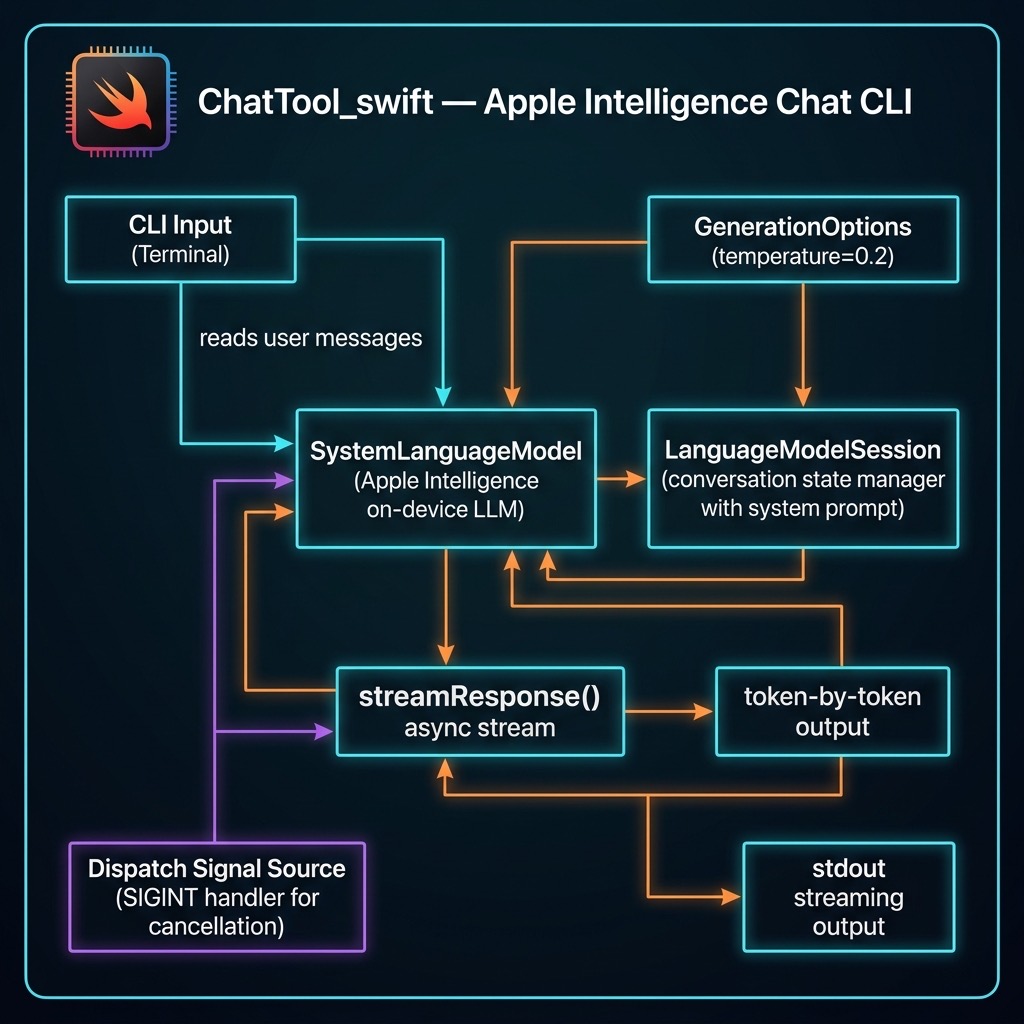
This Swift code implements a command-line chat interface that interacts directly with Apple’s native FoundationModels framework. Upon launch, it verifies the system’s default language model is available, initializes a LanguageModelSession with a hard-coded system prompt and temperature, and then enters a read-evaluate-print loop. The program continuously accepts user input from the console and sends it to the language model for processing until the user quits.
The core of the implementation leverages modern Swift concurrency (async/await) to handle the model’s output as an asynchronous stream. For each user prompt, it iterates through the text fragments as they are generated by session.streamResponse, writing only the new characters to standard output to create a real-time, typewriter-like effect. To enhance usability, it uses a DispatchSource to set up a signal handler for SIGINT (Ctrl+C), allowing a user to cancel the current in-progress stream from the model without terminating the entire chat application.
 1 import Foundation
 2 import FoundationModels
 3 import Dispatch
 4
 5 @main
 6 struct ChatCLI {
 7     static func main() async throws {
 8         // Hard-coded defaults
 9         let temperature  = 0.2
10         let sysPrompt    = "You are a helpful assistant."
11
12         // Verify model
13         let model = SystemLanguageModel.default
14         guard model.isAvailable else {
15             throw RuntimeError(
16                 "Model unavailable: \(model.availability)")
17         }
18
19         let session = LanguageModelSession(
20             instructions: sysPrompt)
21         print("Temperature: \(temperature)")
22         print("System Prompt: \(sysPrompt)")
23         let options = GenerationOptions(temperature: temperature)
24
25         print("Apple-Intelligence chat (T=0.2). /quit to exit.\n")
26
27         while true {
28             print("Enter your message: ", terminator: "")
29             guard let prompt =
30                 readLine(strippingNewline: true) else { break }
31             if prompt.isEmpty || prompt == "/quit" { break }
32
33             var previous = ""   // text already printed
34
35             let task = Task {
36                 for try await part in session.streamResponse(
37                     to: prompt, options: options) {
38                     let current: String = String(describing: part)
39                     // emit only new characters
40                     let delta = current.dropFirst(previous.count)
41                     if !delta.isEmpty {
42                         FileHandle.standardOutput.write(
43                             Data(delta.utf8))
44                         fflush(stdout)
45                         previous = current
46                     }
47                 }
48                 print() // newline when complete
49             }
50
51             // ^C cancels the streaming task
52             signal(SIGINT, SIG_IGN)
53             let sigSrc = DispatchSource.makeSignalSource(
54                 signal: SIGINT, queue: .main)
55             sigSrc.setEventHandler { task.cancel() }
56             sigSrc.resume()
57             defer { sigSrc.cancel() }
58
59             _ = try await task.value
60         }
61     }
62 }
63
64 /// Simple error wrapper
65 struct RuntimeError: Error, CustomStringConvertible {
66     let description: String
67     init(_ msg: String) { description = msg }
68 }
Here is sample output from two prompts:
 1 $ swift run
 2 [1/1] Planning build
 3 Building for debugging...
 4 [1/1] Write swift-version--58304C5D6DBC2206.txt
 5 Build of product 'chattool' complete! (0.12s)
 6 Temperature: 0.2
 7 System Prompt: You are a helpful assistant.
 8 Apple-Intelligence chat (T=0.2). /quit to exit.
 9
10 Enter your message: why is the sky blue?
11 The sky appears blue due to a phenomenon called Rayleigh scattering.
12 This occurs because the Earth's atmosphere is composed of gases and
13 small particles, such as nitrogen and oxygen. When sunlight enters
14 the atmosphere, it collides with these particles.
15
16 Sunlight is made up of different colors, each with a different
17 wavelength. Blue light has a shorter wavelength than other colors,
18 such as red or yellow. Because of this shorter wavelength, blue light
19 is scattered in all directions by the gases and particles in the
20 atmosphere.
21
22 As a result, when we look up at the sky, we see the scattered blue
23 light more prominently than the other colors. This is why the sky
24 appears blue during the day.
25
26 Enter your message: write a Swift function to print the first 11 prime numbers
27 Here is a Swift function that prints the first 11 prime numbers:
28
29 ```swift
30 func printFirst11PrimeNumbers() {
31     var primes: [Int] = []
32     var num = 2
33
34     while primes.count < 11 {
35         var isPrime = true
36
37         for prime in primes {
38             if prime * prime > num { break }
39             if num % prime == 0 {
40                 isPrime = false
41                 break
42             }
43         }
44
45         if isPrime { primes.append(num) }
46         num += 1
47     }
48
49     print("The first 11 prime numbers are: \(primes)")
50 }
51
52 printFirst11PrimeNumbers()
This function starts with the smallest prime number, 2, and checks
each subsequent number to see if it is prime. If it is, it adds it
to the primes array. The loop continues until there are 11 prime
numbers in the array, at which point it prints them.
Enter your message: /quit
 1 # AI Harness/Coding Agent
 2
 3 In this chapter we build **CodingCLI**, an AI pair programmer that runs in your terminal. You type a request such as "fix the bug in calc.py" and the agent reads your files, searches the code, runs a few safe shell commands, and proposes edits. Every edit appears as a colored diff that you approve or reject before the agent touches a file. After each accepted edit the agent runs `make check` and reports any failure back to the model.
 4
 5 The agent can talk to three kinds of LLM backend:
 6
 7 - **Apple Intelligence**, the on-device model in the `FoundationModels` framework. It needs no API key and makes no network calls. This provider is built in, so CodingCLI works with no config file at all.
 8 - Any **OpenAI-compatible** cloud endpoint, such as Fireworks.ai or DeepSeek, using streaming chat completions.
 9 - A **local MLX or Ollama** server that speaks the OpenAI `/v1/chat/completions` protocol.
10
11 This program ports the feature set of my Python and Racket coding agents to Swift. It is larger than most examples in this book (about 2,600 lines in 13 files), so this chapter shows the key parts of the code and explains how they fit together. The full source is in the directory `source-code/CodingCLI_swift`.
12
13 ## Requirements
14
15 - **macOS 26 (Tahoe) or later.** `FoundationModels` ships as a system framework starting with macOS 26.
16 - **Xcode 17 or later** to build against `FoundationModels`.
17 - **Apple Intelligence enabled** in System Settings, but only for the built-in `apple` provider.
18
19 There are no third-party Swift packages. Cloud providers need an API key in an environment variable (`FIREWORKS_API_KEY`, `DEEPSEEK_API_KEY`, or whatever the provider profile names). Web search needs `BRAVE_SEARCH_API_KEY` or `EXA_SEARCH_API_KEY`.
20
21 ## Features
22
23 - An **agentic loop** with six tools: `read_file`, `list_dir`, `grep`, `run_shell`, `propose_edit`, and `fetch_url`.
24 - **Colored unified diffs** with a `y/n/s` (yes, no, skip and tell the model why) prompt before any file changes. `--dry-run` never writes and `-y` approves without asking but still shows the diff.
25 - A **`make check` gate** after every accepted edit.
26 - **Safety guards:** a whitelist for shell commands, refusal to read hidden files such as `.env`, stale-base checks on edits, and a stop when the model repeats the same tool call.
27 - An **intent classifier** that sends general questions to web search and coding tasks to the tools.
28 - **Skills:** `/<name>` loads `~/.agents/skills/<name>/SKILL.md` into the conversation.
29 - **Context tools:** `/context`, `/compact`, and `/summary`.
30 - **Token counts and cost estimates** with `/tokens`.
31 - A **one-shot mode** with exit codes for scripts.
32 - **Line editing** with history, `Ctrl-R`, and Tab completion through libedit.
33
34 ## Project Layout
35
36 ```text
37 CodingCLI_swift/
38 ├── Package.swift
39 ├── Makefile                   # build / check / install (make check gates every accepted edit)
40 ├── coding_harness.example.json
41 └── Sources/CodingCLI/
42     ├── CodingCLI.swift        # @main entry point, CLI flag parsing
43     ├── Agent.swift            # REPL, slash commands, skills, context, intent routing, one-shot mode
44     ├── ChatLoop.swift         # provider-agnostic agentic tool-calling loop
45     ├── OpenAIClient.swift     # OpenAI-compatible SSE + MLX clients, token/cost stats
46     ├── AppleProvider.swift    # Apple Intelligence provider, FoundationModels tools, /summary
47     ├── Tools.swift            # tool registry and the six agent tools
48     ├── Approval.swift         # settings, subprocess helper, colored diffs, y/n/s prompts
49     ├── HarnessConfig.swift    # hierarchical JSON config, provider profiles, legacy config
50     ├── Search.swift           # Brave and Exa web search
51     ├── WebFetch.swift         # fetch_url: download a page, HTML -> plain text
52     ├── LineInput.swift        # libedit line editing, history, Tab completion
53     └── JSON.swift             # JSON value type
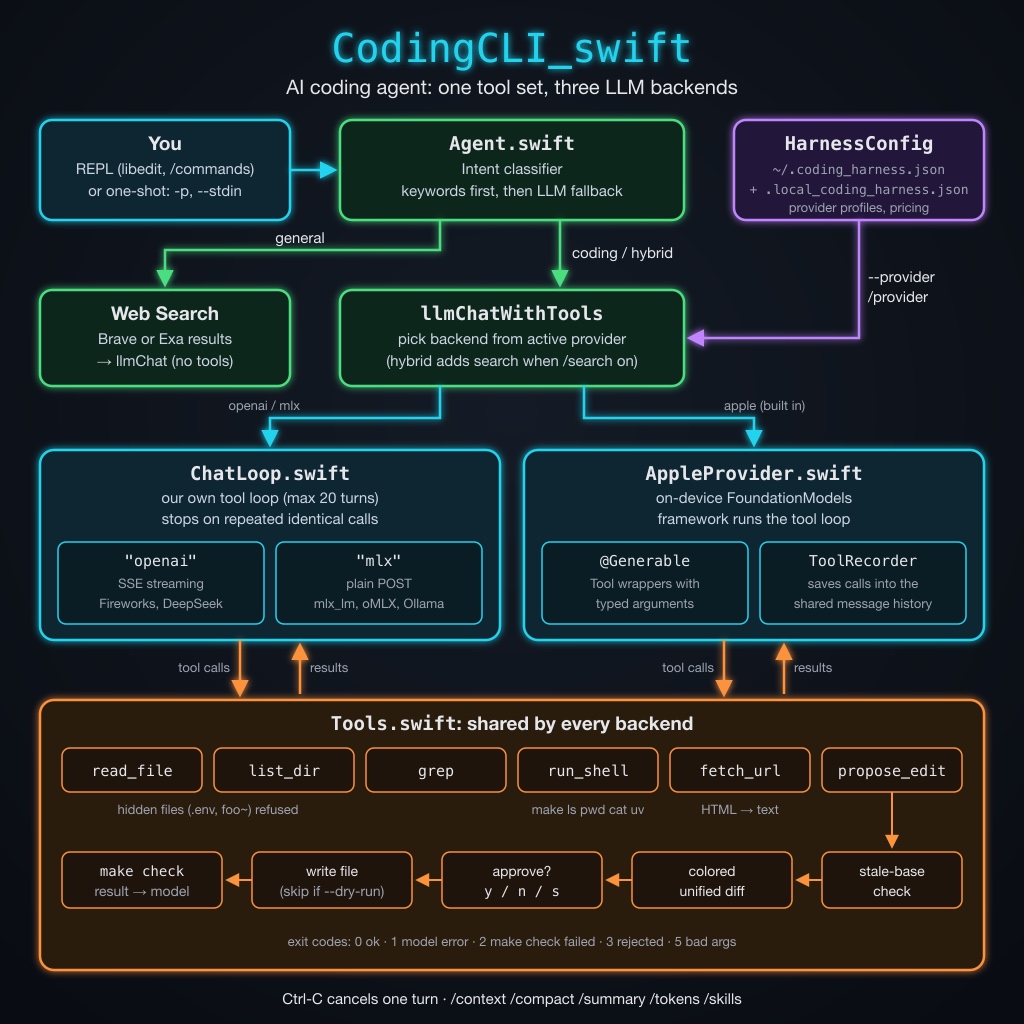
The flow of one request is:
Agentreads a line in the REPL (or takes the one-shot prompt) and classifies its intent.- A coding request goes to
llmChatWithTools, which picks a backend from the active provider profile. - For
openaiandmlxproviders,ChatLoopruns the tool-calling loop itself. For theappleprovider,FoundationModelsruns its own loop andAppleProviderrecords each tool call. - Both paths call the same tool code in
Tools.swift, so the diffs, approvals, and safety checks behave the same for every backend.
Package.swift
 1 // swift-tools-version: 6.2
 2 // The swift-tools-version declares the minimum version of Swift required to build this package.
 3
 4 import PackageDescription
 5
 6 let package = Package(
 7     name: "CodingCLI",
 8
 9     // macOS 26 is required for FoundationModels (the built-in "apple"
10     // provider). Remote/local OpenAI-compatible providers need nothing extra.
11     platforms: [
12         .macOS(.v26)
13     ],
14
15     products: [
16         .executable(name: "CodingCLI", targets: ["CodingCLI"])
17     ],
18
19     targets: [
20         .executableTarget(
21             name: "CodingCLI",
22
23             // Link the system framework that ships with Xcode 17+
24             // (no external dependency required). libedit, for line editing,
25             // is loaded at run time with dlopen.
26             linkerSettings: [
27                 .linkedFramework("FoundationModels")
28             ]
29         )
30     ],
31
32     // Swift 5 language mode: the CLI is effectively single-threaded and keeps
33     // its session state in plain statics.
34     swiftLanguageModes: [.v5]
35 )
The .linkedFramework("FoundationModels") setting links the system framework without a package dependency. The package uses Swift 5 language mode because the tool keeps session state in static variables and runs one request at a time; Swift 6 strict concurrency checks would add work with no benefit here.
The Makefile and the make check Gate
The agent runs make check after every edit you accept. In this project check just builds the code:
1 check: build
2
3 lint: check
In your own projects, point check at whatever proves the code still works: a compiler, a test suite, or a linter. If make check fails, the tool result tells the model, and it can try to fix the problem. The Makefile also has build, release, run, install, uninstall, and clean targets. make install copies the release binary to ~/bin by default; set PREFIX to change that.
The Tools
Tools.swift defines a small registry. Each tool has a name, a description, a list of string parameters, and a handler:
 1 struct ToolParam {
 2     let name: String
 3     let type: String
 4     let description: String
 5 }
 6
 7 struct ToolSpec {
 8     let name: String
 9     let description: String
10     let params: [ToolParam]
11     // Positional string arguments, in `params` order.
12     let handler: ([String]) -> String
13 }
Tools.render turns registered tools into the OpenAI "tools" JSON array that cloud and MLX models expect. registerAll defines the six tools. Here are two of them:
 1         define("propose_edit",
 2                [ToolParam(name: "path", type: "string", description: "Path to the file to edit or create."),
 3                 ToolParam(name: "old", type: "string", description: "For an existing file: the exact current contents. For a new file: pass empty string."),
 4                 ToolParam(name: "new", type: "string", description: "The proposed new contents of the file, in full.")],
 5                "Propose an edit or new-file creation. The user is shown a unified diff and asked to approve. On approval the file is written and `make check` is run.",
 6                { proposeEdit($0[0], $0[1], $0[2]) })
 7         define("fetch_url",
 8                [ToolParam(name: "url", type: "string", description: "Web page URL (http or https).")],
 9                "Fetch a web page and return its readable text content (HTML tags, scripts, and styles removed; long pages truncated). Use this whenever the user asks about the contents of a web site or URL.",
10                { WebFetch.fetch($0[0]) })
Handling Bad Tool Calls
Small models often send malformed tool calls. runOne turns each kind of error into a message for the model rather than throwing an error that would end the loop:
 1     static func runOne(name: String, argsJSON: String) -> String {
 2         let short = argsJSON.count <= 120 ? argsJSON : String(argsJSON.prefix(117)) + "..."
 3         if !Settings.quiet { print("* \(name) \(short)") }
 4         if name.trimmingCharacters(in: .whitespaces).isEmpty {
 5             // The model stopped mid-generation, so no function name survived.
 6             return "Error: the model's tool call was truncated mid-generation (no function name provided). Received arguments: \(short)"
 7         }
 8         guard let parsed = try? JSON.parse(argsJSON) else {
 9             return "Error: invalid JSON in arguments for tool '\(name)'. Received: \(short)"
10         }
11         guard let obj = parsed.object else {
12             return "Error: arguments for tool '\(name)' must be a JSON object. Received: \(short)"
13         }
14         return callTool(name, obj)
15     }
callTool also checks for missing arguments and lists the expected ones, which gives a confused model a clear way to retry.
Shell Commands
run_shell only runs commands on a whitelist: make, ls, pwd, cat, and uv. It refuses any argument that names a hidden file, and it disables uv under --dry-run since uv run can execute code that writes files:
 1     static func runShell(_ command: String) -> String {
 2         let tokens = command.split(whereSeparator: { $0 == " " || $0 == "\t" || $0 == "\n" }).map(String.init)
 3         guard let cmd = tokens.first else { return "empty command" }
 4         if !shellWhitelist.contains(cmd) {
 5             return "Command '\(cmd)' not whitelisted. Allowed: \(shellWhitelist.sorted().joined(separator: ", "))"
 6         }
 7         // `uv run` executes arbitrary code, which could write files behind a
 8         // --dry-run preview, so it is unavailable in that mode.
 9         if Settings.dryRun && cmd == "uv" {
10             return "refused: 'uv' is disabled in --dry-run mode, where no files may be written. The user only wants to preview the proposed diffs."
11         }
12         if cmd != "ls", let bad = tokens.dropFirst().first(where: isHiddenArg) {
13             return "refusing to run command referencing hidden/internal file: \(bad)"
14         }
15         do {
16             let (out, code) = try Subprocess.run(cmd, Array(tokens.dropFirst()))
17             return (cmd == "ls" ? filterLsOutput(out) : out) + "(exit \(code))"
18         } catch {
19             return "Error running command: \(error)"
20         }
21     }
The command runs through Process with an argument array, not through a shell, so pipes, redirects, and ; have no special meaning.
Proposing Edits
propose_edit takes the whole old file and the whole new file. Asking for full contents is simpler and more reliable with small models than asking for patches. The function makes several checks before it shows a diff:
 1     static func proposeEdit(_ path: String, _ old: String, _ proposed: String) -> String {
 2         let exists = FileManager.default.fileExists(atPath: path)
 3         var new = proposed
 4         var current = ""
 5         if exists {
 6             do {
 7                 current = try String(contentsOfFile: path, encoding: .utf8)
 8             } catch {
 9                 return "Error reading \(path): \(error.localizedDescription)"
10             }
11         }
12         if exists && trimTrailingWhitespace(current) != trimTrailingWhitespace(old) {
13             return "stale base: on-disk contents of \(path) do not match the 'old' you provided. Read the file again and retry."
14         }
15         // Keep the conventional final newline the model left off.
16         if (current.hasSuffix("\n") || !exists), !new.isEmpty, !new.hasSuffix("\n") {
17             new += "\n"
18         }
19         if exists && current == new {
20             return "no changes (proposed content matches current file)"
21         }
22         if !exists && new.isEmpty {
23             return "refused: cannot create an empty file"
24         }
25         let diff = Approval.unifiedDiff(old: current, new: new, oldLabel: "a/\(path)", newLabel: "b/\(path)")
26         print("")
27         if !exists { print("(new file: \(path))") }
28         Approval.printColoredDiff(diff)
29         if Settings.dryRun {
30             return "dry-run: the user asked only to preview changes (--dry-run). The diff was shown and the file was intentionally not written. This edit is complete: do not retry it or try to write the file any other way. Finish with a summary of the proposed change."
31         }
32         if Settings.autoApprove {
33             // Safety: the diff is still shown above, then applied without a prompt.
34             if !Settings.quiet { print("[auto-approve: applying change without prompt]") }
35             return applyAndCheck(path, new, label: "applied (auto-approved)")
36         }
37         switch Approval.promptYesNoSkip() {
38         case .no: return "user rejected the change"
39         case .skip: return "user skipped: \(Approval.promptReason())"
40         case .yes: return applyAndCheck(path, new, label: "applied")
41         }
42     }
The stale-base check catches a model that edits from memory instead of from the file on disk. The comparison ignores trailing whitespace because models often drop or add the final newline. Approval.unifiedDiff writes both versions to temporary files and runs diff -u, and printColoredDiff colors added lines green, removed lines red, and headers cyan. applyAndCheck writes the file, runs make check, and returns the result (cut to 2,000 characters on failure) to the model.
Reading Web Pages
WebFetch.swift implements fetch_url. Tool handlers are synchronous, so the code bridges URLSession with a semaphore. It then strips the HTML down to text with regular expressions:
 1     static func htmlToText(_ html: String) -> String {
 2         var s = html
 3         func replace(_ pattern: String, _ with: String) {
 4             s = s.replacingOccurrences(of: pattern, with: with,
 5                                        options: [.regularExpression, .caseInsensitive])
 6         }
 7         replace("<!--[\\s\\S]*?-->", " ")
 8         for tag in ["script", "style", "noscript", "svg", "head", "template", "iframe"] {
 9             replace("<\(tag)\\b[^>]*>[\\s\\S]*?</\(tag)\\s*>", " ")
10         }
11         replace("<(br|hr)\\b[^>]*>", "\n")
12         replace("</?(p|div|section|article|header|footer|nav|main|aside|li|ul|ol|tr|table|h[1-6]|blockquote|pre|dd|dt)\\b[^>]*>", "\n")
13         replace("<[^>]+>", " ")
14         s = decodeEntities(s)
15         replace("[ \\t\\u00a0]+", " ")
16         replace(" *\\n *", "\n")
17         replace("\\n{3,}", "\n\n")
18         return s.trimmingCharacters(in: .whitespacesAndNewlines)
19     }
This is not a full HTML parser, but it reads most pages well enough for a model. The tool caps output at 20,000 characters so one large page cannot fill the context window.
The Agentic Loop for OpenAI-Style Providers
ChatLoop.swift holds the loop for the openai and mlx backends. It takes a post function that sends an OpenAI-style request and returns a response in a standard shape, so the loop does not care which backend it talks to:
1 typealias PostFunction = (JSON) async throws -> JSON
The core of chatWithTools sends the conversation and tools to the model, runs any tool calls, appends the results as "tool" messages, and repeats until the model replies with plain text:
 1         for _ in 0..<maxIterations {
 2             try Task.checkCancellation()
 3             var payload = requestPayload(model: model, maxTokens: maxTokens,
 4                                          temperature: temperature, messages: messages)
 5             if !rendered.isEmpty {
 6                 payload["tools"] = .array(rendered)
 7                 payload["tool_choice"] = "auto"
 8             }
 9             let data = try await post(payload)
10             guard let msg = responseMessage(data) else {
11                 throw AgentError("response has no 'message'. Raw: \(data.serialized())")
12             }
13             let toolCalls = msg["tool_calls"]?.array ?? []
14             let text = content(msg)
15             messages.append(msg)
16
17             if toolCalls.isEmpty {
18                 return (text.isEmpty ? "(empty response from model)" : text, messages)
19             }
20             let sig = signature(toolCalls)
21             if recentSignatures.first == sig
22                 || recentSignatures.filter({ $0 == sig }).count >= repeatLimit - 1 {
23                 return ("(stopped: the model repeated the identical tool call(s) without making progress; it may be too weak for this task or its arguments are malformed)", messages)
24             }
25             let trimmed = text.trimmingCharacters(in: .whitespacesAndNewlines)
26             if !trimmed.isEmpty {
27                 print("")
28                 print(trimmed)
29             }
30             runTools(toolCalls)
31         }
The loop stops a stuck model. It builds a signature for each batch of tool calls (the sorted list of names and arguments) and keeps the last five. The loop stops if the same batch comes back twice in a row, or three times within that window. It allows a single repeat after other calls because re-reading a file after a “stale base” error is real progress. After 20 iterations the loop makes one last call without tools to get a summary.
Streaming Clients
OpenAIClient.swift holds the two post functions. The openai type sends "stream": true and reads server-sent events (SSE). parseSSE rebuilds a normal, non-streaming response from the chunks. Tool calls arrive in pieces keyed by an index, so the parser joins each call’s argument fragments:
1                 for t in delta["tool_calls"]?.array ?? [] {
2                     let idx = t["index"]?.int ?? 0
3                     var e = calls[idx] ?? ("", "function", "", "")
4                     if let s = t["id"]?.string, !s.isEmpty { e.id = s }
5                     if let s = t["type"]?.string { e.type = s }
6                     if let s = t["function"]?["name"]?.string, !s.isEmpty { e.name = s }
7                     if let s = t["function"]?["arguments"]?.string { e.args += s }
8                     calls[idx] = e
9                 }
Streaming lets the client use an idle timeout (600 seconds without data) instead of a cap on total time, so long generations from slow reasoning models still finish. The mlx type sends a plain request with a 900-second limit. Both clients add the usage block of each response to a SessionStats object that /tokens prints, with a cost estimate when the provider profile has a pricing block.
The Apple Intelligence Provider
FoundationModels runs its own tool-calling loop, so the apple provider cannot use ChatLoop. Instead, AppleProvider.swift wraps each tool as a native Tool. The arguments are a @Generable struct, which lets the framework constrain the model’s output to valid arguments:
 1 @Generable struct ProposeEditArgs {
 2     @Guide(description: "Path to the file to edit or create.")
 3     var path: String
 4     @Guide(description: "For an existing file: the exact current contents. For a new file: pass empty string.")
 5     var old: String
 6     @Guide(description: "The proposed new contents of the file, in full.")
 7     var new: String
 8 }
 9
10 struct ProposeEditTool: Tool {
11     let recorder: AppleToolRecorder
12     let name = "propose_edit"
13     var description: String { toolDescription(name) }
14     func call(arguments: ProposeEditArgs) async throws -> String {
15         recorder.run(name, ["path": .string(arguments.path), "old": .string(arguments.old),
16                             "new": .string(arguments.new)])
17     }
18 }
Each tool forwards to AppleToolRecorder.run, which calls the same Tools.runOne used by the other backends and saves each call and result. When the response is done, chatWithTools writes the saved calls into the shared message history as assistant tool_calls messages and tool messages:
 1         let (instructions, prompt) = split(messages)
 2         let session = LanguageModelSession(tools: names.compactMap { all[$0] },
 3                                            instructions: instructions.isEmpty ? nil : instructions)
 4         var out = messages
 5         func record() {
 6             for c in recorder.drain() {
 7                 out.append(["role": "assistant", "content": "",
 8                             "tool_calls": [["id": .string(c.id), "type": "function",
 9                                             "function": ["name": .string(c.name),
10                                                          "arguments": .string(c.args)]]]])
11                 out.append(["role": "tool", "tool_call_id": .string(c.id),
12                             "name": .string(c.name), "content": .string(c.result)])
13             }
14         }
This keeps one message format for every provider, so /context, /compact, and the one-shot exit codes work the same way with the on-device model.
The on-device model has a small context window. split turns the message list into session instructions (the system messages) and one prompt. The prompt holds the last 6,000 characters of earlier conversation, with each tool result cut to 1,500 characters, followed by the current request.
Routing Requests by Intent
Not every question needs coding tools. Agent.classifyIntent first tries a keyword check, then falls back to asking the model:
1     static func heuristicClassify(_ lower: String) -> String? {
2         // A URL needs the fetch_url tool, which only the tool-calling route has.
3         if lower.contains("http://") || lower.contains("https://") || lower.contains("www.") {
4             return "coding"
5         }
6         if generalKeywords.contains(where: lower.contains) { return "general" }
7         if codingKeywords.contains(where: lower.contains) { return "coding" }
8         return nil
9     }
There are three routes:
- general questions (“weather in Paris”, “who is …”) go to web search, and the model answers from the results with no tools.
- coding requests go to the tool loop.
- hybrid requests go to the tool loop, with web search results added when
/searchis on.
Configuration and Providers
HarnessConfig.swift merges two JSON files: the global ~/.coding_harness.json and the per-project .local_coding_harness.json. Local values win, and nested objects merge key by key. Here is part of coding_harness.example.json:
 1 {
 2   "default_provider": "fireworks",
 3   "providers": {
 4     "fireworks": {
 5       "type": "openai",
 6       "endpoint": "https://api.fireworks.ai/inference/v1/chat/completions",
 7       "api_key_env": "FIREWORKS_API_KEY",
 8       "model": "accounts/fireworks/models/deepseek-v4p1-flash",
 9       "generation": { "temperature": 0.6, "max_tokens": 32768 },
10       "pricing": { "input": 0.14, "cached_input": 0.028, "output": 0.28 }
11     },
12     "mlx": {
13       "type": "mlx",
14       "endpoint": "http://localhost:11434/v1/chat/completions",
15       "model": "qwen3.8:27b-mlx",
16       "generation": { "temperature": 0.6, "max_tokens": 32768 }
17     }
18   },
19   "search": { "engine": "brave", "enabled": false },
20   "quiet": false, "plain": false, "debug": false
21 }
The code adds a built-in apple profile unless the config defines its own. The default profile is default_provider if set, else fireworks if present, else the first profile in alphabetical order, else apple. With no config files, the agent uses the on-device model.
Settings come from four places. From lowest to highest priority: the harness config, a legacy flat config file at ~/.config/coding-agent/config.json, environment variables such as CODING_AGENT_PROVIDER, and command-line flags.
The REPL and One-Shot Mode
With no prompt, CodingCLI starts a REPL that supports these commands:
| Command | Description |
|---|---|
/reset |
Clear conversation history |
/history |
Dump the full message log |
/context |
Show each message’s role, size, and a preview |
/compact |
Replace history with a model-written summary |
/summary |
Summarize the .swift, .py, and .lisp files here |
/model <id> |
Switch model for the current provider |
/provider [name] |
Show or switch provider profiles |
/debug |
Toggle raw request and response logging |
/search [engine] |
Toggle web search, or pick brave or exa
|
/tokens |
Show token usage and estimated cost |
/skills |
List skills in ~/.agents/skills
|
/<skill-name> |
Load that skill into the conversation |
/quit |
Exit |
/summary keeps the behavior of the first version of this program: it gathers source files under 8 KB, sends up to 24 KB of them to the model at temperature 0, and prints one bullet per file plus a short overview. It now works with any provider.
Pressing Control-C during a model turn cancels that turn without leaving the REPL. runInterruptibleTurn runs the turn in a Task and installs a DispatchSource signal handler that cancels it:
 1     func runInterruptibleTurn(_ line: String) async {
 2         let task = Task { try await self.sendToModel(line) }
 3         signal(SIGINT, SIG_IGN)
 4         let sig = DispatchSource.makeSignalSource(signal: SIGINT, queue: .global())
 5         sig.setEventHandler { task.cancel() }
 6         sig.resume()
 7         defer {
 8             sig.cancel()
 9             signal(SIGINT, SIG_DFL)
10         }
11         do {
12             try await task.value
13         } catch is CancellationError {
14             print("\n[interrupted]")
15         } catch let e as URLError where e.code == .cancelled {
16             print("\n[interrupted]")
17         } catch {
18             print("\nError talking to model: \(error)")
19         }
20         fflush(stdout)
21     }
LineInput.swift loads libedit at run time with dlopen instead of linking it. If the library is missing, or stdin is not a terminal, input falls back to plain readLine(). History persists in ~/.coding_agent_history.
With a prompt, given as an argument, with -p, or with --stdin, the agent runs one task and exits. inferExitCode scans the tool results to choose an exit code: 0 for success, 1 for a model or network error, 2 when make check failed, 3 when you rejected or skipped a change, and 5 for bad arguments. Shell scripts and CI jobs can act on these codes.
Running the Tool
Build and show the options:
 1 $ swift build
 2 $ .build/debug/CodingCLI --help
 3 usage: CodingCLI [ <option> ... ] [<prompt>] ...
 4
 5 With a prompt, runs one task and exits; otherwise starts the REPL.
 6
 7  -p <text>, --prompt <text>   Prompt text (repeatable, joined with newlines)
 8  --stdin                      Read prompt from stdin (pipe/heredoc)
 9  -y, --yes                    Auto-approve all propose_edit diffs (still shows diff)
10  --dry-run                    Show diffs but do not write files
11  --provider <name>            LLM provider profile (from harness config, or apple)
12  --model <id>                 Model id for current provider
13  --cwd <dir>                  Working directory before running
14  --debug                      Enable debug logging (same as /debug)
15  -q, --quiet                  Quiet: no banner, no [intent] line, less tool chatter
16  --plain, --no-color          Plain output: no ANSI colors in diffs
17  -v, --version                Show version and exit
18  -h, --help                   Show this help and exit
19
20 Exit codes: 0 ok, 1 model/network error, 2 make check failed,
21             3 change rejected/skipped, 5 bad arguments.
Here is a one-shot run with the on-device model on a directory that holds a buggy calc.py (add returns a - b) and a Makefile:
1 $ CodingCLI --cwd demo --provider apple --dry-run --plain "fix the bug in calc.py"
2 [intent: coding → coding + web fetch tools, no search]
3 * read_file {"path":"calc.py"}
4
5 The function `add` currently returns `a - b` instead of `a + b`. Could you clarify what the expected behavior is for the `add` function?
The keyword .py routed the request to the coding tools, and the model read the file and found the bug. It then asked a question instead of calling propose_edit. In my tests the small on-device model often stops at this point, even when the prompt tells it to use propose_edit. A larger model from a cloud or local MLX provider follows the full read, edit, approve, and check cycle more reliably. Switch with --provider or /provider.
Other ways to run the tool:
1 CodingCLI                                  # interactive REPL in the current directory
2 CodingCLI -p "refactor foo" -p "add tests" # repeatable prompt parts
3 echo "explain Tools.swift" | CodingCLI --stdin
4 CodingCLI --provider mlx --model llama3.2:3b "hi"
5 CodingCLI -y "apply the fix"               # auto-approve diffs (still shows them)
6 CodingCLI --quiet --plain -p "hello" > out.txt
Ideas for Extension
- Add a tool. Call
defineinTools.registerAll, add its name toenabledTools, and add a matching@Generableargument struct andToolinAppleProvider.swift. - Use patch-style edits. Full-file replacement wastes tokens on large files. A
replace_texttool that swaps one exact snippet would scale better. - Grow the shell whitelist with care. Each command you add (
swift test,git diff) widens what the model can do without asking. - Tune the keyword lists in
Agent.swiftfor the kinds of requests you make most.
Wrap Up
In this chapter we built a coding agent that works with Apple’s on-device model, cloud models, and local models. The key design choice is that all three backends share one set of tools and one message format. The tool code holds the safety logic (whitelists, hidden-file checks, stale-base checks, diffs, and approval prompts), so every backend gets the same guards. The OpenAI-style backends run the tool loop in ChatLoop, while the Apple backend lets FoundationModels run the loop and records each call.
Start with the built-in apple provider for private, offline work on small tasks, and switch to a larger model when a task needs more steps than the on-device model handles well.