Tool Use / Function Calling
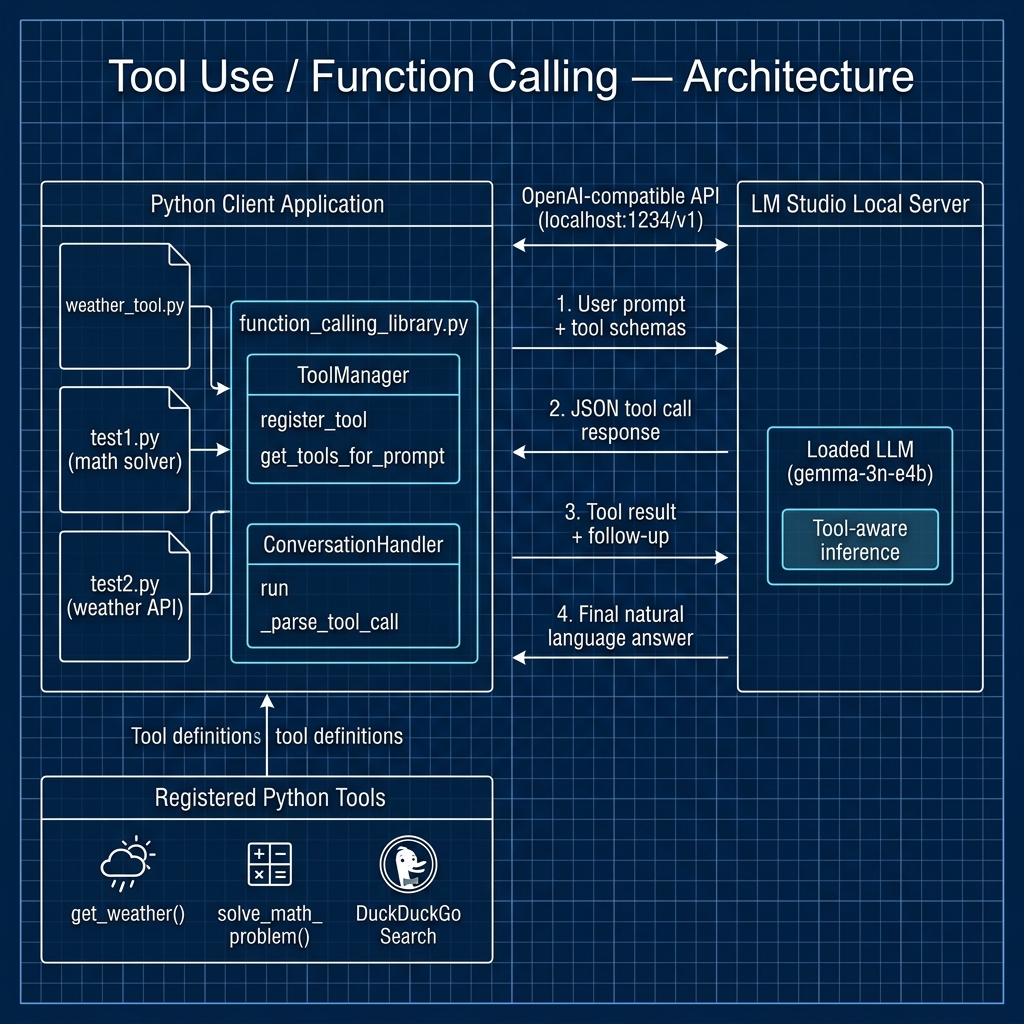
Tool use, also called function calling, lets a model ask your program to run a function and then use the result. You write plain Python functions, tell the model their names and arguments, and the model decides when to call them. This turns a chat model into an agent that can fetch live data, do exact math, read files, and act on the world.
LM Studio now supports tool use natively, so you no longer have to hand-build prompt templates for most models. This chapter covers three approaches, from the one I recommend to the one that teaches you the most:
- Native tool use via the OpenAI-compatible API. You pass a
toolslist in your request and LM Studio returns structured tool calls. This is the primary approach for most work. - The Python SDK
.act()API. You pass plain Python functions to.act()and the SDK runs the whole multi-round tool loop for you. This is the simplest way to build an agent. - Manual tool use with prompt templates. You build the whole loop yourself. Newer models make this unnecessary for production, but it shows you how tool use works internally, and it still helps with models that lack native tool support.
Native Tool Use via the OpenAI-Compatible API
LM Studio supports the tools parameter in /v1/chat/completions requests, following the OpenAI function calling format. You describe each tool as a JSON schema. The model returns its tool calls in the tool_calls field of the response, and LM Studio parses them for you. There is no prompt template to write and no JSON to scrape from the reply.
There are two levels of support:
- Native support: models with tool-use-trained chat templates, such as Qwen3, Llama 3.1/3.2, and Mistral. These earn a hammer badge in the app and perform best.
- Default support: every other model gets a system prompt and default tool call format that LM Studio injects. Results vary by model.
The example below uses the OpenAI Python client with a single get_weather tool. The full source is in src/tool_use/native_tool_use.py:
 1 from openai import OpenAI
 2 import json
 3
 4 client = OpenAI(base_url="http://localhost:1234/v1", api_key="lm-studio")
 5
 6 def get_weather(city: str) -> str:
 7     if "tokyo" in city.lower():
 8         return json.dumps({"city": "Tokyo", "temperature": "25", "unit": "celsius"})
 9     return json.dumps({"error": "City not found"})
10
11 tools = [
12     {
13         "type": "function",
14         "function": {
15             "name": "get_weather",
16             "description": "Get the current weather for a given city.",
17             "parameters": {
18                 "type": "object",
19                 "properties": {
20                     "city": {"type": "string", "description": "The city name."}
21                 },
22                 "required": ["city"],
23             },
24         },
25     }
26 ]
27
28 messages = [{"role": "user", "content": "What's the weather in Tokyo?"}]
29
30 response = client.chat.completions.create(
31     model="openai/gpt-oss-20b",
32     messages=messages,
33     tools=tools,
34 )
35
36 tool_calls = response.choices[0].message.tool_calls
37 if tool_calls:
38     messages.append(response.choices[0].message)
39     for tc in tool_calls:
40         args = json.loads(tc.function.arguments)
41         result = get_weather(**args)
42         messages.append({"role": "tool", "content": result, "tool_call_id": tc.id})
43
44     final = client.chat.completions.create(model="openai/gpt-oss-20b", messages=messages)
45     print(final.choices[0].message.content)
46 else:
47     print(response.choices[0].message.content)
The flow has two rounds. In the first round you send the user question and the tool list, and the model replies with one or more tool calls. You run each tool, append its result as a message with the role tool, and send everything back. In the second round the model reads the tool results and writes the final answer. This replaces the custom prompt templates, the regex JSON parsing, and the ToolManager and ConversationHandler classes that you will meet later in this chapter.
The Python SDK .act() API
The OpenAI-compatible flow above still asks you to run the tool loop by hand, one round at a time. The lmstudio Python SDK removes even that work with its .act() method. You pass plain Python functions, and .act() runs the whole loop: it builds the tool schema from your function signatures and docstrings, sends the tools to the model, parses the tool calls, runs your functions, feeds the results back, and repeats until the model produces a final answer.
Here is a small agent that does arithmetic. The full source is in src/tool_use/act_example.py:
 1 import lmstudio as lms
 2
 3 def multiply(a: float, b: float) -> float:
 4     """Given two numbers a and b, returns the product of them."""
 5     return a * b
 6
 7 def add(a: float, b: float) -> float:
 8     """Given two numbers a and b, returns the sum of them."""
 9     return a + b
10
11 model = lms.llm("qwen/qwen3-4b-2507")
12 model.act(
13     "What is the result of 12345 multiplied by 54321?",
14     [multiply, add],
15     on_message=print,
16 )
You can also drive an interactive chat with tools. The .act() method takes a lms.Chat object, and on_message appends each new message to the chat history:
 1 import lmstudio as lms
 2 from pathlib import Path
 3
 4 def create_file(name: str, content: str):
 5     """Create a file with the given name and content."""
 6     Path(name).write_text(content)
 7     return "File created."
 8
 9 model = lms.llm()
10 chat = lms.Chat("You are a task focused AI assistant")
11
12 while True:
13     user_input = input("You: ")
14     if not user_input:
15         break
16     chat.add_user_message(user_input)
17     model.act(chat, [create_file], on_message=chat.append)
A few useful options:
max_parallel_tool_callsruns tools in parallel. The default is 1. Set it toNoneto let the SDK scale automatically.handle_invalid_tool_requestlets you catch and handle a bad tool call yourself.- Progress callbacks
on_round_start,on_prediction_completed,on_round_end, andon_prediction_fragmentlet you watch each round as it runs. on_messageappends new messages to your chat history, as shown above.
A Worked Example: DuckDuckGo Web Search
Let us apply the native tools approach to something more useful than mock data: a web search tool. The example in src/ddg_search_tool/ddg_search.py gives the model a single ddg-search tool backed by DuckDuckGo, then asks a question that needs a live lookup. It uses the requests library and the raw REST endpoint rather than the OpenAI client, so you can see the exact JSON sent to and from the server.
The tool schema and the search function look like this:
 1 tools = [
 2     {
 3         "type": "function",
 4         "function": {
 5             "name": "ddg-search",
 6             "description": "Performs a general web search using DuckDuckGo.",
 7             "parameters": {
 8                 "type": "object",
 9                 "properties": {
10                     "query": {
11                         "type": "string",
12                         "description": "The search query to forward to DuckDuckGo."
13                     }
14                 },
15                 "required": ["query"]
16             }
17         }
18     }
19 ]
20
21 def perform_ddg_search(query: str) -> str:
22     search_url = f"https://api.duckduckgo.com/?q={query}&format=json"
23     response = requests.get(search_url, timeout=10)
24     response.raise_for_status()
25     return json.dumps(response.json())
The main loop sends the user question with the tool list, detects the tool_calls field in the reply, runs perform_ddg_search, appends the result as a tool message, and sends it back for the final answer. This is the same two-round pattern as the weather example, applied to a real API.
One caveat: the DuckDuckGo Instant Answer API returns a small set of results and often comes back nearly empty for specific questions. It is fine for a demo, but for real work you will want a fuller search API such as Brave Search or Tavily. The tool-calling code stays the same; only the body of perform_ddg_search changes.
Manual Tool Use: Understanding the Basics
The rest of this chapter builds tool use from scratch to show you how it works internally. For production code, use the native tools parameter or the .act() API from the sections above. The manual approach below is still useful in two cases: when you need to support a model that lacks native tool support, and when you want to understand what LM Studio does for you automatically.
The key idea is to guide the model with a structured prompt that lists the available functions and their arguments. We work around the lack of built-in tool support by writing a template that names each tool and its arguments, then we parse the model’s reply for a tool call.
Before we look at more complex tools we will first look at a simple common example: a tool to use a stubbed out weather API.
An Initial Example: a Tool That is a Simple Python Function
The first example in this chapter can be found in the file LM_Studio_BOOK/src/tool_use/weather_tool.py and uses these steps:
- Define the tools: First, I need to define the functions that the AI can “call.” These are standard Python functions. For this example, I’ll create a simple get_weather function.
- Create the prompt template: This is the most critical step for local models that may not directly support tool use. We need to design a prompt that clearly lists the available tools with their descriptions and parameters, and provides a format for the model to use when it wants to call a tool. The prompt should instruct the model to output a specific, parseable format, like JSON.
- Set up a client for using the LM Studio service APIs: In this example we use the OpenAI Python library, configured to point to the local LM Studio server. This allows for a familiar and standardized way to interact with the local model.
- Process user input: The user’s query is inserted into the prompt template.
- Send a prompt to a model and get a response: In this example a complete prompt is sent to the Gemma model running in LM Studio.
- Parse the JSON response and execute a local Pyhton function in the client script: Check the model’s response. If it contains the special JSON format for a tool call, then we parse it, execute the corresponding Python function with the provided arguments, and then feed the result back to the model for a final, natural language response. If the initial response from the model doesn’t contain a tool call, then we just use the response.
  1 from openai import OpenAI
  2 import json
  3 import re
  4
  5 def get_weather(city: str, unit: str = "celsius"):
  6     """
  7     Get the current weather for a given city.
  8
  9     Args:
 10         city (str): The name of the city.
 11         unit (str): The temperature unit, 'celsius' or 'fahrenheit'.
 12     """
 13     # In a real application, you would call a weather API here.
 14     # For this example, we'll just return some mock data.
 15     if "chicago" in city.lower():
 16         return json.dumps({"city": "Chicago", "temperature": "12", "unit": unit})
 17     elif "tokyo" in city.lower():
 18         return json.dumps({"city": "Tokyo", "temperature": "25", "unit": unit})
 19     else:
 20         return json.dumps({"error": "City not found"})
 21
 22
 23 # Point to the local server
 24 client = OpenAI(base_url="http://localhost:1234/v1", api_key="lm-studio")
 25
 26 # A dictionary to map tool names to actual functions
 27 available_tools = {
 28     "get_weather": get_weather,
 29 }
 30
 31 def run_conversation(user_prompt: str):
 32     # System prompt that defines the rules and tools for the model
 33     system_prompt = """
 34     You are a helpful assistant with access to the following tools.
 35     To use a tool, you must respond with a JSON object with two keys: "tool_name" and "parameters".
 36
 37     Here are the available tools:
 38     {
 39         "tool_name": "get_weather",
 40         "description": "Get the current weather for a given city.",
 41         "parameters": [
 42             {"name": "city", "type": "string", "description": "The city name."},
 43             {"name": "unit", "type": "string", "description": "The unit for temperature, either 'celsius' or 'fahrenheit'."}
 44         ]
 45     }
 46
 47     If you decide to use a tool, your response MUST be only the JSON object.
 48     If you don't need a tool, answer the user's question directly.
 49     """
 50
 51     messages = [
 52         {"role": "system", "content": system_prompt},
 53         {"role": "user", "content": user_prompt}
 54     ]
 55
 56     print("--- User Question ---")
 57     print(user_prompt)
 58
 59     completion = client.chat.completions.create(
 60         model="local-model", # This will be ignored by LM Studio
 61         messages=messages,
 62         temperature=0.1, # Lower temperature for more predictable, structured output
 63     )
 64
 65     response_message = completion.choices[0].message.content
 66
 67     # More robustly find and extract the JSON from the model's response
 68     json_str = None
 69     tool_call = {}
 70
 71     # Use regex to find JSON within ```json ... ``` or ``` ... ```
 72     match = re.search(r'```(?:json)?\s*(\{.*?\})\s*```', response_message, re.DOTALL)
 73     if match:
 74         json_str = match.group(1)
 75     else:
 76         # If no markdown block, maybe the whole message is the JSON
 77         if response_message.startswith('{'):
 78             json_str = response_message
 79
 80     if json_str:
 81         try:
 82             tool_call = json.loads(json_str)
 83         except json.JSONDecodeError as e:
 84             print(e)
 85
 86     # Check if the model wants to call a tool
 87     try:
 88         tool_name = tool_call.get("tool_name")
 89
 90         if tool_name in available_tools:
 91             print("\n--- Tool Call Detected ---")
 92             print(f"Tool: {tool_name}")
 93             print(f"Parameters: {tool_call.get('parameters')}")
 94
 95             # Execute the function
 96             function_to_call = available_tools[tool_name]
 97             tool_params = tool_call.get("parameters", {})
 98             function_response = function_to_call(**tool_params)
 99
100             print("\n--- Tool Response ---")
101             print(function_response)
102
103             # (Optional) Send the result back to the model for a final summary
104             messages.append({"role": "assistant", "content": response_message})
105             messages.append({"role": "tool", "content": function_response})
106
107             print("\n--- Final Response from Model ---")
108             final_completion = client.chat.completions.create(
109                 model="local-model",
110                 messages=messages,
111                 temperature=0.7,
112             )
113             print(final_completion.choices[0].message.content)
114
115         else:
116             # The JSON doesn't match our tool schema
117             print("\n--- Assistant Response (No Tool) ---")
118             print(response_message)
119
120     except json.JSONDecodeError:
121         # The response was not JSON, so it's a direct answer
122         print("\n--- Assistant Response (No Tool) ---")
123         print(response_message)
124
125
126 # --- Run Examples ---
127 run_conversation("What's the weather like in Tokyo in celsius?")
128 print("\n" + "="*50 + "\n")
129 run_conversation("What is the capital of France?")
The output using LM Studio with the model google/gemma-4-12b-qat looks like:
 1 $ uv run weather_tool.py
 2 --- User Question ---
 3 What's the weather like in Tokyo in celsius?
 4
 5 --- Tool Call Detected ---
 6 Tool: get_weather
 7 Parameters: {'city': 'Tokyo', 'unit': 'celsius'}
 8
 9 --- Tool Response ---
10 {"city": "Tokyo", "temperature": "25", "unit": "celsius"}
11
12 --- Final Response from Model ---
13 The weather in Tokyo is 25 degrees Celsius.
14
15 ==================================================
16
17 --- User Question ---
18 What is the capital of France?
19
20 --- Assistant Response (No Tool) ---
21 Paris is the capital of France.
Here we tested two prompts: the first uses a tool and the second prompt does not use a tool. We started with a simple example so you understand the low-level process of supporting tool use/function calling. In the next section we will generalize this example into two parts: a separate library and examples that uses this separate library.
Creating a General Purpose Tools/Function Calling Library
This Python code in the file tool_use/function_calling_library.py provides a lightweight and flexible framework for integrating external functions as “tools” with a large language model (LLM). (Note: we will use tools hosted in the LM Studio application in the next chapter.) Our library defines two primary classes: ToolManager, which handles the registration and schema generation for available tools, and ConversationHandler, which orchestrates the multi-step interaction between the user, the LLM, and the tools. This approach allows the LLM to decide when to call a function, execute it within the Python environment, and then use the result to formulate a more informed and human readable response.
  1 import json
  2 import re
  3 import inspect
  4 from openai import OpenAI
  5
  6 class ToolManager:
  7     """
  8     Manages the registration and formatting of tools for the LLM.
  9     """
 10     def __init__(self):
 11         """Initializes the ToolManager with empty dictionaries for tools."""
 12         self.tools_schema = {}
 13         self.available_tools = {}
 14
 15     def register_tool(self, func):
 16         """
 17         Registers a function as a tool, extracting its schema from the
 18         docstring and signature.
 19
 20         Args:
 21             func (function): The function to be registered as a tool.
 22         """
 23         tool_name = func.__name__
 24         self.available_tools[tool_name] = func
 25
 26         # Extract description from docstring
 27         description = "No description found."
 28         docstring = inspect.getdoc(func)
 29         if docstring:
 30             description = docstring.strip().split('\n\n')[0]
 31
 32         # Extract parameters from function signature
 33         sig = inspect.signature(func)
 34         parameters = []
 35         for name, param in sig.parameters.items():
 36             param_type = "string" # Default type
 37             if param.annotation is not inspect.Parameter.empty:
 38                 # A simple way to map Python types to JSON schema types
 39                 if param.annotation == int:
 40                     param_type = "integer"
 41                 elif param.annotation == float:
 42                     param_type = "number"
 43                 elif param.annotation == bool:
 44                     param_type = "boolean"
 45
 46             # Simple docstring parsing for parameter descriptions (assumes "Args:" section)
 47             param_description = ""
 48             if docstring:
 49                 arg_section = re.search(r'Args:(.*)', docstring, re.DOTALL)
 50                 if arg_section:
 51                     param_line = re.search(rf'^\s*{name}\s*\(.*?\):\s*(.*)',
 52                                            arg_section.group(1), re.MULTILINE)
 53                     if param_line:
 54                         param_description = param_line.group(1).strip()
 55
 56             parameters.append({
 57                 "name": name,
 58                 "type": param_type,
 59                 "description": param_description
 60             })
 61
 62         self.tools_schema[tool_name] = {
 63             "tool_name": tool_name,
 64             "description": description,
 65             "parameters": parameters
 66         }
 67
 68     def get_tools_for_prompt(self):
 69         """
 70         Formats the registered tools' schemas into a JSON string for the system prompt.
 71
 72         Returns:
 73             str: A JSON string representing the list of available tools.
 74         """
 75         if not self.tools_schema:
 76             return "No tools available."
 77         return json.dumps(list(self.tools_schema.values()), indent=4)
 78
 79 class ConversationHandler:
 80     """
 81     Handles the conversation flow, including making API calls and executing tools.
 82     """
 83     def __init__(self, client: OpenAI, tool_manager: ToolManager,
 84                  model: str = "local-model", temperature: float = 0.1):
 85         """
 86         Initializes the ConversationHandler.
 87
 88         Args:
 89             client (OpenAI): The OpenAI client instance.
 90             tool_manager (ToolManager): The ToolManager instance with registered tools.
 91             model (str): The model name to use (ignored by LM Studio).
 92             temperature (float): The sampling temperature for the model.
 93         """
 94         self.client = client
 95         self.tool_manager = tool_manager
 96         self.model = model
 97         self.temperature = temperature
 98
 99     def _create_system_prompt(self):
100         """Creates the system prompt with tool definitions."""
101         return f"""
102 You are a helpful assistant with access to the following tools.
103 To use a tool, you must respond with a JSON object with two keys: "tool_name" and "parameters".
104
105 Here are the available tools:
106 {self.tool_manager.get_tools_for_prompt()}
107
108 If you decide to use a tool, your response MUST be only the JSON object.
109 If you don't need a tool, answer the user's question directly.
110 """
111
112     def run(self, user_prompt: str, verbose: bool = True):
113         """
114         Runs the full conversation loop for a single user prompt.
115
116         Args:
117             user_prompt (str): The user's question or command.
118             verbose (bool): If True, prints detailed steps of the conversation.
119         """
120         system_prompt = self._create_system_prompt()
121         messages = [
122             {"role": "system", "content": system_prompt},
123             {"role": "user", "content": user_prompt}
124         ]
125
126         if verbose:
127             print("--- User Question ---")
128             print(user_prompt)
129
130         # --- First API Call: Check for tool use ---
131         completion = self.client.chat.completions.create(
132             model=self.model,
133             messages=messages,
134             temperature=self.temperature,
135         )
136         response_message = completion.choices[0].message.content
137
138         # --- Parse for Tool Call ---
139         tool_call = self._parse_tool_call(response_message)
140
141         if tool_call and tool_call.get("tool_name") in self.tool_manager.available_tools:
142             tool_name = tool_call["tool_name"]
143             tool_params = tool_call.get("parameters", {})
144
145             if verbose:
146                 print("\n--- Tool Call Detected ---")
147                 print(f"Tool: {tool_name}")
148                 print(f"Parameters: {tool_params}")
149
150             # --- Execute the Tool ---
151             function_to_call = self.tool_manager.available_tools[tool_name]
152             try:
153                 function_response = function_to_call(**tool_params)
154             except Exception as e:
155                 function_response = f"Error executing tool: {e}"
156
157             if verbose:
158                 print("\n--- Tool Response ---")
159                 print(function_response)
160
161             # --- Second API Call: Summarize the result ---
162             messages.append({"role": "assistant", "content": json.dumps(tool_call, indent=4)})
163             messages.append({"role": "tool", "content": str(function_response)})
164
165             messages.append({
166                 "role": "user",
167                 "content": "Based on the result from the tool, please formulate a final answer to the original user question."
168             })
169
170             if verbose:
171                 print("\n--- Final Response from Model ---")
172
173             final_completion = self.client.chat.completions.create(
174                 model=self.model,
175                 messages=messages,
176                 temperature=0.7, # Higher temp for more natural language
177             )
178             final_response = final_completion.choices[0].message.content
179             print(final_response)
180         else:
181             # --- No Tool Call Detected ---
182             if verbose:
183                 print("\n--- Assistant Response (No Tool) ---")
184             print(response_message)
185
186     def _parse_tool_call(self, response_message: str) -> dict | None:
187         """
188         Parses the model's response to find and decode a JSON tool call.
189
190         Args:
191             response_message (str): The raw response content from the model.
192
193         Returns:
194             dict or None: A dictionary representing the tool call, or None if not found.
195         """
196         json_str = None
197         # Use regex to find JSON within ```json ... ``` or ``` ... ```
198         match = re.search(r'```(?:json)?\s*(\{.*?\})\s*```', response_message, re.DOTALL)
199         if match:
200             json_str = match.group(1)
201         # If no markdown block, check if the whole message is a JSON object
202         elif response_message.strip().startswith('{'):
203             json_str = response_message
204
205         if json_str:
206             try:
207                 # Clean up the JSON string before parsing
208                 cleaned_json_str = json_str.strip()
209                 return json.loads(cleaned_json_str)
210             except json.JSONDecodeError as e:
211                 print(f"JSON Decode Error: {e} in string '{cleaned_json_str}'")
212                 return None
213         return None
The first class, ToolManager, serves as a registry for the functions you want to expose to the LLM. Its core method, register_tool, uses Python’s inspect module to dynamically analyze a function’s signature and docstring. It extracts the function’s name, its parameters (including their type hints), and their descriptions from the “Args” section of the docstring. This information is then compiled into a JSON schema that describes the tool in a machine-readable format. This automated process is powerful because it allows a developer to make a standard Python function available to the LLM simply by adding it to the manager, without manually writing complex JSON schemas.
The second class, ConversationHandler, is the engine that drives the interaction. When its run method is called, it first constructs a detailed system prompt. This special prompt instructs the LLM on how to behave and includes the JSON schemas for all registered tools, informing the model of its capabilities. The user’s question is then sent to the LLM. The model’s first task is to decide whether to answer directly or to use one of the provided tools. If it determines a tool is necessary, it is instructed to respond only with a JSON object specifying the tool_name and the parameters needed to run it.
The process concludes with a crucial two-step execution logic. If the ConversationHandler receives a valid JSON tool call from the LLM, it executes the corresponding Python function with the provided parameters. The return value from that function is then packaged into a new message with the role “tool” and sent back to the LLM in a second API call. This second call prompts the model to synthesize the tool’s output into a final, natural-language answer for the user. If the model’s initial response was not a tool call, the system assumes no tool was needed and simply presents that response directly to the user. This conditional, multi-step approach enables the LLM to leverage external code to answer questions it otherwise couldn’t.
First example Using Function Calling Library: Generate Python and Execute to Answer User Questions
This Python script in the file tool_use/test1.py demonstrates a practical implementation of the function_calling_library by creating a specific tool designed to solve mathematical problems. It defines a function, solve_math_problem, that can execute arbitrary Python code in an insecure (you must trust the Python tool functions that the model writes for you to help solve a user prompt or query), isolated process. The main part of the script then initializes the ToolManager and ConversationHandler from the library developed in the previous section, registers the new math tool, and runs two example conversations: one that requires complex calculation, thereby triggering the tool, and another that is a general knowledge question, which the LLM answers directly.
 1 import os
 2 import subprocess
 3 import json
 4 from openai import OpenAI
 5 from function_calling_library import ToolManager, ConversationHandler
 6
 7 # --- Define the Custom Tool ---
 8
 9 def solve_math_problem(python_code: str):
10     """
11     Executes a given string of Python code to solve a math problem and returns the output.
12     The code should be a complete, runnable script that prints the final result to standard output.
13
14     Args:
15         python_code (str): A string containing the Python code to execute.
16     """
17     temp_filename = "temp.py"
18
19     # Ensure any previous file is removed
20     if os.path.exists(temp_filename):
21         os.remove(temp_filename)
22
23     try:
24         # Write the code to a temporary file
25         with open(temp_filename, "w") as f:
26             f.write(python_code)
27
28         # Execute the python script as a separate process
29         result = subprocess.run(
30             ['python', temp_filename],
31             capture_output=True,
32             text=True,
33             check=True, # This will raise CalledProcessError if the script fails
34             timeout=10 # Add a timeout for safety
35         )
36
37         # The output from the script's print() statements
38         return result.stdout.strip()
39
40     except subprocess.CalledProcessError as e:
41         # If the script has a runtime error, return the error message
42         error_message = f"Error executing the Python code:\nSTDOUT:\n{e.stdout}\nSTDERR:\n{e.stderr}"
43         return error_message
44     except Exception as e:
45         return f"An unexpected error occurred: {e}"
46     finally:
47         # Clean up the temporary file
48         if os.path.exists(temp_filename):
49             os.remove(temp_filename)
50
51
52 # --- Main Execution Logic ---
53
54 if __name__ == "__main__":
55     # Point to the local LM Studio server
56     client = OpenAI(base_url="http://localhost:1234/v1", api_key="lm-studio")
57
58     # 1. Initialize the ToolManager
59     tool_manager = ToolManager()
60
61     # 2. Register the custom tool
62     tool_manager.register_tool(solve_math_problem)
63
64     # 3. Initialize the ConversationHandler with the client and tools
65     handler = ConversationHandler(client, tool_manager)
66
67     # 4. Define a user prompt that requires the tool
68     user_prompt = "Can you please calculate the area of a circle with a radius of 7.5 and also find the 20th number in the Fibonacci sequence? Please provide the Python code to do this."
69
70     # 5. Run the conversation
71     handler.run(user_prompt)
72
73     print("\n" + "="*50 + "\n")
74
75     # Example of a question that should NOT use the tool
76     non_tool_prompt = "What is the most popular programming language?"
77     handler.run(non_tool_prompt)
The core of this script is the solve_math_problem function, which serves as the custom tool. It’s designed to somewhat safely execute a string of Python code passed to it by the LLM. To avoid security risks associated with eval() or exec(), it writes the code to a temporary file (temp.py). It then uses Python’s subprocess module to run this file as an entirely separate process. This sandboxes the execution, and the capture_output=True argument ensures that any output printed by the script (e.g., the result of a calculation) is captured. The function includes robust error handling, returning any standard error from the script if it fails, and a finally block to guarantee the temporary file is deleted, maintaining a clean state.
Please note that code generated my the LLM is not fully sandboxed and this approach is tailored to personal development environments. For production consider running the generated code in a container that limits network and file access activity, as appropriate.
The main execution block, guarded by if __name__ == "__main__", orchestrates the entire demonstration. It begins by configuring the OpenAI client to connect to a local server, such as LM Studio. It then instantiates the ToolManager and registers the solve_math_problem function as an available tool. With the tool ready, it creates a ConversationHandler to manage the flow. The script then showcases the system’s decision-making ability by running two different prompts. The first asks for two distinct mathematical calculations, a task that perfectly matches the solve_math_problem tool’s purpose. The second prompt is a general knowledge question that requires no calculation, demonstrating the LLM’s ability to differentiate between tasks and answer directly when a tool is not needed.
Sample output:
 1 $ uv run test1.py
 2 --- User Question ---
 3 Can you please calculate the area of a circle with a radius of 7.5 and also find the 20th number in the Fibonacci sequence? Please provide the Python code to do this.
 4
 5 --- Tool Call Detected ---
 6 Tool: solve_math_problem
 7 Parameters: {'python_code': 'import math\nradius = 7.5\narea = math.pi * radius**2\nprint(area)\n\ndef fibonacci(n):\n  if n <= 0:\n    return 0\n  elif n == 1:\n    return 1\n  else:\n    a, b = 0, 1\n    for _ in range(2, n + 1):\n      a, b = b, a + b\n    return b\n\nprint(fibonacci(20))'}
 8
 9 --- Tool Response ---
10 176.71458676442586
11 6765
12
13 --- Final Response from Model ---
14 The area of a circle with a radius of 7.5 is approximately 176.7146, and the 20th number in the Fibonacci sequence is 6765.
15
16
17 ==================================================
18
19 --- User Question ---
20 What is the most popular programming language?
21
22 --- Assistant Response (No Tool) ---
23 Python is generally considered the most popular programming language.
Having a model generate Python code to solve problems is a powerful technique so please, dear reader, take some time experimenting with this last example and adapting it to your own use cases.
Second example Using Function Calling Library: Stub of Weather API
This is our original example, modified to use the library developed earlier in this chapter.
This script in the file tool_use/test2.py provides another clear example of how the function_calling_library can be used to extend an LLM’s capabilities, this time by simulating an external data fetch from a weather API. It defines a simple get_weather function that returns mock data for specific cities. The main execution logic then sets up the ConversationHandler, registers this new tool, and processes two distinct user prompts to demonstrate the LLM’s ability to intelligently decide when to call the function and when to rely on its own knowledge base.
 1 import json
 2 from openai import OpenAI
 3 from function_calling_library import ToolManager, ConversationHandler
 4
 5 # --- Define the Custom Tool ---
 6
 7 def get_weather(city: str, unit: str = "celsius"):
 8     """
 9     Get the current weather for a given city.
10
11     Args:
12         city (str): The name of the city.
13         unit (str): The temperature unit, 'celsius' or 'fahrenheit'.
14     """
15     # In a real application, you would call a weather API here.
16     # For this example, we'll just return some mock data.
17     if "chicago" in city.lower():
18         return json.dumps({"city": "Chicago", "temperature": "12", "unit": unit})
19     elif "tokyo" in city.lower():
20         return json.dumps({"city": "Tokyo", "temperature": "25", "unit": unit})
21     else:
22         return json.dumps({"error": "City not found"})
23
24 # --- Main Execution Logic ---
25
26 if __name__ == "__main__":
27     # Point to the local LM Studio server
28     client = OpenAI(base_url="http://localhost:1234/v1", api_key="lm-studio")
29
30     # 1. Initialize the ToolManager
31     tool_manager = ToolManager()
32
33     # 2. Register the custom tool
34     tool_manager.register_tool(get_weather)
35
36     # 3. Initialize the ConversationHandler with the client and tools
37     handler = ConversationHandler(client, tool_manager)
38
39     # 4. Define a user prompt that requires the tool
40     user_prompt = "What's the weather like in Tokyo in celsius?"
41
42     # 5. Run the conversation
43     handler.run(user_prompt)
44
45     print("\n" + "="*50 + "\n")
46
47     # Example of a question not using tool calling:
48     another_prompt = "What do Chicago and Tokyo have in common? Provide a fun answer."
49     handler.run(another_prompt)
The custom tool in this example is the get_weather function. It is defined with clear parameters, city and temperature unit, and includes type hints and a docstring that the ToolManager will use to automatically generate its schema. Instead of making a live call to a weather service, this function contains simple conditional logic to return hardcoded JSON strings for “Chicago” and “Tokyo,” or an error if another city is requested. This mock implementation is a common and effective development practice, as it allows you to build and test the entire function-calling logic without depending on external network requests or API keys. The function’s return value is a JSON string, which is a standard data interchange format easily understood by both the Python environment and the LLM.
The main execution block follows the same clear, step-by-step pattern as the previous example. It configures the client, initializes the ToolManager, and registers the get_weather function. After setting up the ConversationHandler, it runs two test cases that highlight the system’s contextual awareness. The first prompt, “What’s the weather like in Tokyo in celsius?”, directly maps to the functionality of the get_weather tool, and the LLM correctly identifies this and generates the appropriate JSON tool call. The second prompt, which asks for commonalities between the two cities, is a conceptual question outside the tool’s scope. In this case, the LLM correctly bypasses the tool-calling mechanism and provides a direct, creative answer from its own training data, demonstrating the robustness of the overall approach.
Here is sample output from the test2.py script:
 1 $ uv run test2.py
 2 --- User Question ---
 3 What's the weather like in Tokyo in celsius?
 4
 5 --- Tool Call Detected ---
 6 Tool: get_weather
 7 Parameters: {'city': 'Tokyo', 'unit': 'celsius'}
 8
 9 --- Tool Response ---
10 {"city": "Tokyo", "temperature": "25", "unit": "celsius"}
11
12 --- Final Response from Model ---
13 The weather in Tokyo is 25 degrees Celsius.
14
15
16 ==================================================
17
18 --- User Question ---
19 What do Chicago and Tokyo have in common? Provide a fun answer.
20
21 --- Assistant Response (No Tool) ---
22 Chicago and Tokyo both have amazing food scenes! Chicago is famous for deep-dish pizza, while Tokyo is known for its incredible sushi and ramen. Both cities are culinary adventures! 🍕🍜
Dear reader, you probably use many APIs in developing applications. Choose one or two of these APIs that you are familiar with and modify this last example to call real APIs, making sure that you use type metadata and a descriptive comment in each Python tool function you write. Then you can experiment with “chatting” with live application data from APIs that you use in your own work or research.
Optional Practice Problems
To help solidify your understanding of manual function calling and building your own function-calling libraries, try the following exercises:
- Sequential Tool Execution: Extend the
ConversationHandlerclass infunction_calling_library.pyto support executing multiple tool calls sequentially. For example, if the user asks a question that requires first fetching coordinates of a city and then fetching the weather for those coordinates, ensure the handler can orchestrate these steps in a loop until the final response is generated. - Error Recovery and Feedback Loop: Modify
ConversationHandlerso that if a tool execution throws an exception, the error message is captured, formatted as a tool response, and sent back to the LLM. This provides a feedback loop that allows the model to realize its input arguments were invalid and try calling the tool again with corrected parameters. - Registering a Calculator Tool: Write a new tool
calculate(expression: str) -> floatthat evaluates simple mathematical expressions. Register it alongsideget_weatherintest2.py. Verify that the model can dynamically choose between the math tool and the weather tool depending on whether the user prompt is “Calculate 5 * 9 - 3” or “What is the weather in Chicago?”. - Handling Default Values: Update
ToolManager.register_toolto check if any arguments in the function’s signature have default values (usinginspect.Parameter.default). Update the generated JSON schema to mark these parameters as optional, informing the LLM that it does not have to generate values for them.