12. User Settings
There are a couple of locations where EA stores information locally per user. These can be found in
- Registry
- %APPDATA%Sparx SystemsEA
- %PROGRAMFILES%Sparx SystemsEA
These locations are mainly used to hold user options (those from Tools/Options), Layout information, MDG data and more.
12.1 Registry
In former EA versions the registry keys were just a handfull, but now there are tons. The EA relevant keys are found at
HKEY_CURRENT_USER\Software\Sparx Systems\EA400HKEY_CURRENT_USER\Software\Sparx Systems\EAAddinsHKEY_LOCAL_MACHINE\SOFTWARE\Sparx Systems\EAAddins
Obviously the EAAddins keys are used for addins and the usualy suspects will know how to deal with them.
The first key contains all the marvelous settings which EA needs to show up. Quite some of the Tools/Options are hidden here besides all the layout stuff. So when you need to find certain settings and don’t find any of the files being changed you should export the EA registry part, change the settings and export the registry again. Now you can compare the exports (e.g. with WinMerge).
If you need to change any of Tools/Options you likely have to go through the registry. And in order to take the changes effect you have to restart EA. I can’t go into details for each single option but instead give you a simple receipt how to find the right one in case you need it.
As an example we want to change the General/General/Author and General/General/Double Click. Per default they are set to Administrator and Shows Properties on my machine. So the first thing to do is to locate them. You can simply open the registry by entering regedit in the command line of the Windows Start menu. Next navigate to HKEY_CURRENT_USER\Software\Sparx Systems\EA400\EA which should look like this:
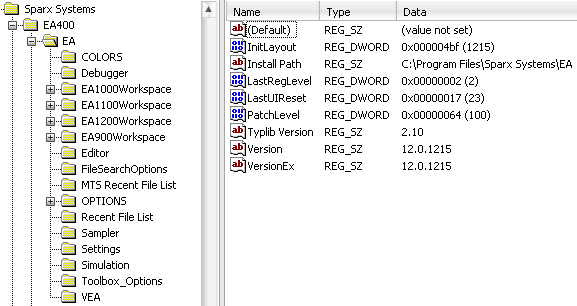
Now you need to export the current contents of the EA branch:
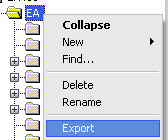
In order to spot the difference the options must be changed. Setting the author to Someone and checking Opens Branch will modify the registry. The EA branch must be saved once more to another file. When comparing the two exports with WinMerge you can easily spot the differences.

Obviously the key Author holds the Author option as plain string and TDCLICK is an enumeration11. Since both values were added as new they will have defaults when not in the registry. So to get the default back you would need to remove the keys. In case of the TDCLICK you could also set it to 0.
Using the above schema you should be able to figure out any option/key pair.
12.2 APPDATA
… omitted …